I've been demoted "need administrator privileges"

Spiral72

New member
Local time
4:14 PM
Messages
20
First, I am quite new (1 week) to Win7. I come from XP which I loved and hated to leave. However:

I'm running a Dell Precision M4500, 4Gb ram, I5 quad core, and Windows 7 64-bit

I took my computer out of the box, booted it, created an administrative account with user name and password. I setup the network, installed a ton of software I use daily and a purchased copy of AVG with firewall (groan!). Firefox, Thunderbird, Office, Solidworks, AutoCAD, blah, blah, blah...... Everything was great.

So I come in several days after the initial install to find my one and only account has been "demoted". I no longer have privileges to install software, or change some of my own friggin icons. I am the only admin account, I have always been, I am the big cheese on this computer.

I research, Google, read, tried stuff, checked stuff..... I activated the built in admin account.... now I can change stuff.... but "MY" account is still demoted.... I have no idea why or what happened. It my account SAYS admin, but it doesn't have admin privileges that I am accustomed too.

Is this a built in security "annoyance" of Windows 7 or did I do something wrong?
I've been treating this like any XP system, which is not right I know, but I'm still learning this Win 7 OS....... No good feelings so far. I mean it's pretty... it's stable, but what a headache!


Any ideas??

I'm thinking I did something wrong bc everyone LOVES Win7..... But I can't image what/when/how I changed anything.
 

My Computer My Computer

At a glance

Windows 7I54GbNVidea 1800M
Computer Manufacturer/Model Number
Dell Precision M4500
OS
Windows 7
CPU
I5
Memory
4Gb
Graphics Card(s)
NVidea 1800M
Monitor(s) Displays
Dual
Hard Drives
250Gb
I think that the best solution is to try to set up a new adm account using the built in Adm. Then make an extra just in case (that is what I do). You can then change the status of the account that was Adm, at one time. The only thing that you could have done is to change the status, but you would know if you had done that.

No this is not normal for Seven.
 

My Computer My Computer

At a glance

Windows 10, Home Clean InstallIntel Core2 processsor Q8200(2.33Ghz 1333FSB)...6 gbATI Radeon 256MB HD3650
Computer type
PC/Desktop
Computer Manufacturer/Model Number
Dell XPS 420
OS
Windows 10, Home Clean Install
CPU
Intel Core2 processsor Q8200(2.33Ghz 1333FSB) Quad Core Tech
Motherboard
Dell
Memory
6 gb
Graphics Card(s)
ATI Radeon 256MB HD3650
Sound Card
Intergrated 7.1 Channel Audio
Monitor(s) Displays
Dell SP2009W 20"
Hard Drives
640 GB Serial ATA Hard drive
Cooling
Fan
Keyboard
Dell USB Keyboard
Mouse
Dell Premium Optical USB
Internet Speed
DSL 2.85
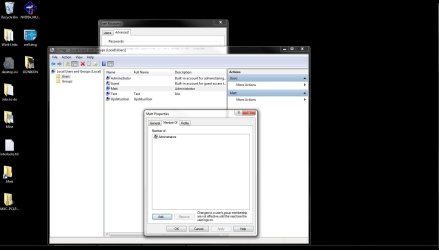
Click Start > Right click Computer > Click Manage > Expand System Tools > Expand Local Users and Groups > Click Users > Right click your UserName > Click Properties > Click the Members Of tab

Make sure you are in Administrators. If not, add it.
 

My Computer My Computer

At a glance

Windows 7 UltimateAMD Athlon II X2 245 2.90Ghz3.00 GB8800GTS 512MB
Computer Manufacturer/Model Number
Custom Built
OS
Windows 7 Ultimate
CPU
AMD Athlon II X2 245 2.90Ghz
Motherboard
Some Gigabyte one, dont remember model
Memory
3.00 GB
Graphics Card(s)
8800GTS 512MB
Sound Card
Sound Blaster X-Fi Titanium Fatal1ty
Monitor(s) Displays
Dual 22" widescreen
Hard Drives
250GB internal, 500GB internal
PSU
CORSAIR CMPSU-850TX 850W Power Supply
Case
Thermalkake Tsunami Dream
Cooling
Thermaltake Golden Orb II
Keyboard
Saitek Eclipse 2
Mouse
Logitech MX518
Thank you. I'll look into and try that (again) :)

The more I read about this, there are two schools of thought. There are people that say "Yea, that's normal with Windows 7 and it's there to protect you, get used to it" and then others that say "What the!??? I use Win7 everyday and I've never had ANYTHING like that happen..... I LOVE Win7"

So I can't figure it.... btw... the people I know personally that run and love Win7 say "Ummmm, I dunno dude, never happened to me"

Oh, I also disabled the User account control crap after 30 seconds of my new machine. I planned to turn it back on.... honestly..... after the machine was setup.... but now I don't have privileges to turn ON the UAC. ARG!!!
 

My Computer My Computer

At a glance

Windows 7I54GbNVidea 1800M
Computer Manufacturer/Model Number
Dell Precision M4500
OS
Windows 7
CPU
I5
Memory
4Gb
Graphics Card(s)
NVidea 1800M
Monitor(s) Displays
Dual
Hard Drives
250Gb
Had the system from day one and it did not happen to me. It is not normal. If it were would not be a very popular system.
 

My Computer My Computer

At a glance

Windows 10, Home Clean InstallIntel Core2 processsor Q8200(2.33Ghz 1333FSB)...6 gbATI Radeon 256MB HD3650
Computer type
PC/Desktop
Computer Manufacturer/Model Number
Dell XPS 420
OS
Windows 10, Home Clean Install
CPU
Intel Core2 processsor Q8200(2.33Ghz 1333FSB) Quad Core Tech
Motherboard
Dell
Memory
6 gb
Graphics Card(s)
ATI Radeon 256MB HD3650
Sound Card
Intergrated 7.1 Channel Audio
Monitor(s) Displays
Dell SP2009W 20"
Hard Drives
640 GB Serial ATA Hard drive
Cooling
Fan
Keyboard
Dell USB Keyboard
Mouse
Dell Premium Optical USB
Internet Speed
DSL 2.85
Click Start > Right click Computer > Click Manage > Expand System Tools > Expand Local Users and Groups > Click Users > Right click your UserName > Click Properties > Click the Members Of tab

Make sure you are in Administrators. If not, add it.


Thank you sir, but it's Admin...... :mad:

I just checked it by following your instructions exactly in case this was some hidden setting I didn't know about.
 

My Computer My Computer

At a glance

Windows 7I54GbNVidea 1800M
Computer Manufacturer/Model Number
Dell Precision M4500
OS
Windows 7
CPU
I5
Memory
4Gb
Graphics Card(s)
NVidea 1800M
Monitor(s) Displays
Dual
Hard Drives
250Gb
Can you screenshot the members of tab for me? And, please, a screenshot of the error you get stating you need elevated privileges.
 

My Computer My Computer

At a glance

Windows 7 UltimateAMD Athlon II X2 245 2.90Ghz3.00 GB8800GTS 512MB
Computer Manufacturer/Model Number
Custom Built
OS
Windows 7 Ultimate
CPU
AMD Athlon II X2 245 2.90Ghz
Motherboard
Some Gigabyte one, dont remember model
Memory
3.00 GB
Graphics Card(s)
8800GTS 512MB
Sound Card
Sound Blaster X-Fi Titanium Fatal1ty
Monitor(s) Displays
Dual 22" widescreen
Hard Drives
250GB internal, 500GB internal
PSU
CORSAIR CMPSU-850TX 850W Power Supply
Case
Thermalkake Tsunami Dream
Cooling
Thermaltake Golden Orb II
Keyboard
Saitek Eclipse 2
Mouse
Logitech MX518
I'm here.... trying to figure out how to attach images.... if it's possible.
 

My Computer My Computer

At a glance

Windows 7I54GbNVidea 1800M
Computer Manufacturer/Model Number
Dell Precision M4500
OS
Windows 7
CPU
I5
Memory
4Gb
Graphics Card(s)
NVidea 1800M
Monitor(s) Displays
Dual
Hard Drives
250Gb
Click on the paper clip on top of the box.
 

My Computer My Computer

At a glance

Windows 10, Home Clean InstallIntel Core2 processsor Q8200(2.33Ghz 1333FSB)...6 gbATI Radeon 256MB HD3650
Computer type
PC/Desktop
Computer Manufacturer/Model Number
Dell XPS 420
OS
Windows 10, Home Clean Install
CPU
Intel Core2 processsor Q8200(2.33Ghz 1333FSB) Quad Core Tech
Motherboard
Dell
Memory
6 gb
Graphics Card(s)
ATI Radeon 256MB HD3650
Sound Card
Intergrated 7.1 Channel Audio
Monitor(s) Displays
Dell SP2009W 20"
Hard Drives
640 GB Serial ATA Hard drive
Cooling
Fan
Keyboard
Dell USB Keyboard
Mouse
Dell Premium Optical USB
Internet Speed
DSL 2.85
Oh, yea... the paperclip... DUH

Anyways,
"Members.JPG" is the members tab you requested
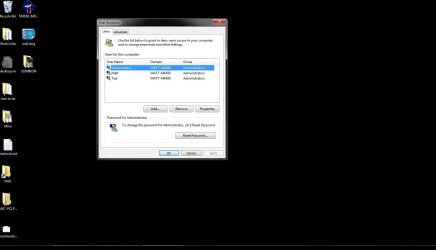
"UserAccounts.JPG" is all active users......
Administrator is the built in system admin account I enabled after all the trouble.

Matt is the first and only account I created to setup the computer
Test is another admin account I created 30 minutes ago to try what richc46 suggested (I haven't logged in with it yet)

AccessDenied.JPG...... I tried to move a shortcut I created out of a subfolder in the start menu

InstallSW.JPG..... I run setup as admin to install softaware I've been using on my old machine for five years. It's an AutoCAD overlay..... it's really a set of Macros that make my work a little easier.

InsuffPrivileges.JPG The program won't install.... I can't install it as the system admin account bc the settings are all wrong (wrong user) and the settings are too numerous to manually correct..... I tried, believe me.
 

Attachments

  • memberstab.jpg
    memberstab.jpg
    77.3 KB · Views: 100
  • UserAccounts.jpg
    UserAccounts.jpg
    49.5 KB · Views: 68
  • AccessDenied.jpg
    AccessDenied.jpg
    15.3 KB · Views: 56
  • InstallSW.jpg
    InstallSW.jpg
    85.3 KB · Views: 65
  • InsuffPrivileges.jpg
    InsuffPrivileges.jpg
    95.5 KB · Views: 77

My Computer My Computer

At a glance

Windows 7I54GbNVidea 1800M
Computer Manufacturer/Model Number
Dell Precision M4500
OS
Windows 7
CPU
I5
Memory
4Gb
Graphics Card(s)
NVidea 1800M
Monitor(s) Displays
Dual
Hard Drives
250Gb
I don't know what the "UPDATUS\User" account is..... I haven't noticed that before today. I think it's new.... seems like I would have noticed it.

Guest is a built in and never enabled guest account.
 

My Computer My Computer

At a glance

Windows 7I54GbNVidea 1800M
Computer Manufacturer/Model Number
Dell Precision M4500
OS
Windows 7
CPU
I5
Memory
4Gb
Graphics Card(s)
NVidea 1800M
Monitor(s) Displays
Dual
Hard Drives
250Gb
For the SYSTEM one, sounds like SYSTEM is the owner

You can change the permissions for folders (and subdirectories) by right clicking on the parent folder, choose Properties, go to the Security tab, click Advanced, go to the Owner tab, click Edit, select the new owner and check the Replace owner on subcontainers and objects and press Apply.

Try moving the shortcut then. I'll keep looking at the other problem.
 

My Computer My Computer

At a glance

Windows 7 UltimateAMD Athlon II X2 245 2.90Ghz3.00 GB8800GTS 512MB
Computer Manufacturer/Model Number
Custom Built
OS
Windows 7 Ultimate
CPU
AMD Athlon II X2 245 2.90Ghz
Motherboard
Some Gigabyte one, dont remember model
Memory
3.00 GB
Graphics Card(s)
8800GTS 512MB
Sound Card
Sound Blaster X-Fi Titanium Fatal1ty
Monitor(s) Displays
Dual 22" widescreen
Hard Drives
250GB internal, 500GB internal
PSU
CORSAIR CMPSU-850TX 850W Power Supply
Case
Thermalkake Tsunami Dream
Cooling
Thermaltake Golden Orb II
Keyboard
Saitek Eclipse 2
Mouse
Logitech MX518
Looks like error 1303 has to do with SYSTEM also!! Look at this page and see if it helps at all, I think we may have found the answer dude (or dudette :zip:)!!
 

My Computer My Computer

At a glance

Windows 7 UltimateAMD Athlon II X2 245 2.90Ghz3.00 GB8800GTS 512MB
Computer Manufacturer/Model Number
Custom Built
OS
Windows 7 Ultimate
CPU
AMD Athlon II X2 245 2.90Ghz
Motherboard
Some Gigabyte one, dont remember model
Memory
3.00 GB
Graphics Card(s)
8800GTS 512MB
Sound Card
Sound Blaster X-Fi Titanium Fatal1ty
Monitor(s) Displays
Dual 22" widescreen
Hard Drives
250GB internal, 500GB internal
PSU
CORSAIR CMPSU-850TX 850W Power Supply
Case
Thermalkake Tsunami Dream
Cooling
Thermaltake Golden Orb II
Keyboard
Saitek Eclipse 2
Mouse
Logitech MX518
Kirsch, ok. Thanks, I'll try it right now... and look at the page.

Richc46, I created the other user named "Test" with admin privileges...... I logged in under test and seem to have full control. I seem to be able to move or change whatever I want and was able to install my program no problem.... I didn't even have to run setup.exe as an admin.

With that said, I can't use my installed program under MY account, but at least this tells me there's something wrong with MY account.

Crap, I surely hope I don't have to delete my account and start over. That's gonna suck.
 

My Computer My Computer

At a glance

Windows 7I54GbNVidea 1800M
Computer Manufacturer/Model Number
Dell Precision M4500
OS
Windows 7
CPU
I5
Memory
4Gb
Graphics Card(s)
NVidea 1800M
Monitor(s) Displays
Dual
Hard Drives
250Gb
No, you can use easy trasfer to move everything but the programs. Interested?
 

My Computer My Computer

At a glance

Windows 10, Home Clean InstallIntel Core2 processsor Q8200(2.33Ghz 1333FSB)...6 gbATI Radeon 256MB HD3650
Computer type
PC/Desktop
Computer Manufacturer/Model Number
Dell XPS 420
OS
Windows 10, Home Clean Install
CPU
Intel Core2 processsor Q8200(2.33Ghz 1333FSB) Quad Core Tech
Motherboard
Dell
Memory
6 gb
Graphics Card(s)
ATI Radeon 256MB HD3650
Sound Card
Intergrated 7.1 Channel Audio
Monitor(s) Displays
Dell SP2009W 20"
Hard Drives
640 GB Serial ATA Hard drive
Cooling
Fan
Keyboard
Dell USB Keyboard
Mouse
Dell Premium Optical USB
Internet Speed
DSL 2.85
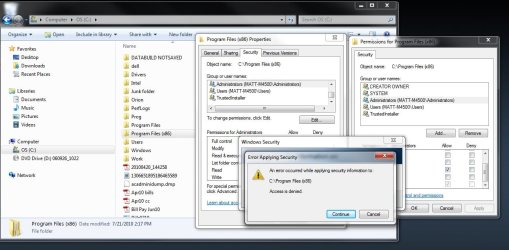
I'm not allowed to change permissions under the built in admin account...... ON any account, whether it be full control, read, list contents.... or anything. I'll try the ownership next.
 

Attachments

  • changepermissions.jpg
    changepermissions.jpg
    98.4 KB · Views: 109

My Computer My Computer

At a glance

Windows 7I54GbNVidea 1800M
Computer Manufacturer/Model Number
Dell Precision M4500
OS
Windows 7
CPU
I5
Memory
4Gb
Graphics Card(s)
NVidea 1800M
Monitor(s) Displays
Dual
Hard Drives
250Gb
No, on the window on the right, click Add, and add your username. Can you do that?
 

My Computer My Computer

At a glance

Windows 7 UltimateAMD Athlon II X2 245 2.90Ghz3.00 GB8800GTS 512MB
Computer Manufacturer/Model Number
Custom Built
OS
Windows 7 Ultimate
CPU
AMD Athlon II X2 245 2.90Ghz
Motherboard
Some Gigabyte one, dont remember model
Memory
3.00 GB
Graphics Card(s)
8800GTS 512MB
Sound Card
Sound Blaster X-Fi Titanium Fatal1ty
Monitor(s) Displays
Dual 22" widescreen
Hard Drives
250GB internal, 500GB internal
PSU
CORSAIR CMPSU-850TX 850W Power Supply
Case
Thermalkake Tsunami Dream
Cooling
Thermaltake Golden Orb II
Keyboard
Saitek Eclipse 2
Mouse
Logitech MX518
No, you can use easy trasfer to move everything but the programs. Interested?

Yes, most definitely. I'll create a third account, verify it works, then transfer all my setting to it...

Then all I have to do is beg IT to change the network to accept the new account. <sigh>

I'm gonna try the ownership thing first though.....
 

My Computer My Computer

At a glance

Windows 7I54GbNVidea 1800M
Computer Manufacturer/Model Number
Dell Precision M4500
OS
Windows 7
CPU
I5
Memory
4Gb
Graphics Card(s)
NVidea 1800M
Monitor(s) Displays
Dual
Hard Drives
250Gb
You do whatever is best for you. That is how the forum works. You get all the ideas and you make the choice.
 

My Computer My Computer

At a glance

Windows 10, Home Clean InstallIntel Core2 processsor Q8200(2.33Ghz 1333FSB)...6 gbATI Radeon 256MB HD3650
Computer type
PC/Desktop
Computer Manufacturer/Model Number
Dell XPS 420
OS
Windows 10, Home Clean Install
CPU
Intel Core2 processsor Q8200(2.33Ghz 1333FSB) Quad Core Tech
Motherboard
Dell
Memory
6 gb
Graphics Card(s)
ATI Radeon 256MB HD3650
Sound Card
Intergrated 7.1 Channel Audio
Monitor(s) Displays
Dell SP2009W 20"
Hard Drives
640 GB Serial ATA Hard drive
Cooling
Fan
Keyboard
Dell USB Keyboard
Mouse
Dell Premium Optical USB
Internet Speed
DSL 2.85
No, on the window on the right, click Add, and add your username. Can you do that?

No, the same error.... let me try it again in another account.
 

My Computer My Computer

At a glance

Windows 7I54GbNVidea 1800M
Computer Manufacturer/Model Number
Dell Precision M4500
OS
Windows 7
CPU
I5
Memory
4Gb
Graphics Card(s)
NVidea 1800M
Monitor(s) Displays
Dual
Hard Drives
250Gb
Back
Top