Logitech G9 mouse works intermitenttly with Win 7 Ultimate x64 bit

AstaLaVista

Lost in Cyberspace
Guru
Local time
10:28 AM
Messages
1,962
Location
Miami, Florida
Hi folks, I have been having some issues with my G9 mouse that I tried to solved on my own but it is getting a bit annoying so I guess is time to ask the Gurus.

I dual boot with Vista Ultimate 64 bit & Windows 7 Ultimate 64 bit but I have the Logitech setpoint installed only on my Win 7 OS so in Vista it just works as a regular mouse... can't get the wife to come to Win 7 (nags that she has to learn to use everything all over again LOL).

But I digress, the main problem is that, sometimes, the G9 set profiles work but most times it doesn't, I literally have to go to Device Settings, click on the G9 button, then on the Apply button, finally on the OK button and now all my mouse buttons do what they are supposed to do. (**)

I have tried to back trace the issue but to no avail, sometimes it will quit working even when I start the PC (do a cold boot), most of the time it won't work and I have to do the above (**), other times it will work beautifully from a cold boot, sometimes it quits working when I go from Vista and restart into Win 7, other times it works when I do this. And sometimes it happens even when I reboot from Win 7.

Things I have done...

  1. Uninstall the old copy of Set-point, clean registry, restart and install a fresh copy of the latest setpoint (I have not tried their latest 6.15 yet but I doubt it will fix the issue or make a difference... I will try to install it tonight nonetheless).
  2. I have also Scheduled a Task for it to start at login every time but to no avail... I have various schedule tasks so I know, for the most part, I did it right.

I don't mind the fact that it doesn't automatically change the profiles from General to Gaming, etc, etc and I have to manually change it but this is to annoying to pass up, more so when I don't know why :p.

Thanks for the help or tips.
 

My Computer My Computer

At a glance

Windows 7 x64 (Ultimate)Intel i5-4670K8GBs Ripjaws 2133MhzAsus GTX660 (2GBs)
Computer type
PC/Desktop
Computer Manufacturer/Model Number
Custom Built... Intel/Nvidia/ASRock
OS
Windows 7 x64 (Ultimate)
CPU
Intel i5-4670K
Motherboard
ASRock Z87 Extreme 6
Memory
8GBs Ripjaws 2133Mhz
Graphics Card(s)
Asus GTX660 (2GBs)
Sound Card
Onboard Realtek HD
Monitor(s) Displays
Acer AL2216W
Screen Resolution
1680 x 1050
Hard Drives
Samsung 840 SSD 120GBs
Samsung 750GB 32MB cache
1.5 TB
PSU
PC Cooling 750w Silencer
Case
Thermaltake Spedo Advance
Cooling
Std Cooler
Keyboard
Logitech G15
Mouse
Logitech G9
Internet Speed
Comcast 20Mbit
Antivirus
Avast
Browser
Firefox
Not sure if it will help or not, but I remember having a problem with a program not running at start-up when it was scheduled to and someone said to let the computer sit at the login screen until the hard drive activity light calms down a bit or is no longer solid (ie lit but not blinking). It seemed to solve the issue.
 

My Computer My Computer

At a glance

Windows 7 Professional SP1 64-bitIntel Core i5-2450M @2.5 GHz6 GB DDR3 1333MHzIntel HD 3000
Computer type
Laptop
Computer Manufacturer/Model Number
Toshiba P775-S7100
OS
Windows 7 Professional SP1 64-bit
CPU
Intel Core i5-2450M @2.5 GHz
Memory
6 GB DDR3 1333MHz
Graphics Card(s)
Intel HD 3000
Monitor(s) Displays
Built-in 17.3" LED; 22" Insignia NS-L22Q-10A
Screen Resolution
1600x900; 1360x768
Hard Drives
750 GB Hitachi
1TB Seagate FreeAgent External
Internet Speed
Verizon DSL Speed(Down/Up): 3360 Kbps / 800 Kbps
Antivirus
MSE and MBAM Pro
Browser
IE10
Not sure if it will help or not, but I remember having a problem with a program not running at start-up when it was scheduled to and someone said to let the computer sit at the login screen until the hard drive activity light calms down a bit or is no longer solid (ie lit but not blinking). It seemed to solve the issue.
And here I was hopeful... :p

I have done that, not because I read it somewhere but because, there are times where I start my pc and go do something that will take about 5 minutes or less so the pc will sit right at the login screen for a long time and the answer is...

Sometimes the mouse will work, some other times it won't.

For a moment I thought that the fact that I had Vista had something to do with it, meaning, I was on vista and I switched to Win 7 but, since there are times when I wake up in the morning (computer has been off all night) and go straight to my win 7 login and I still have the issue, I have a feeling it must be something else.
 

My Computer My Computer

At a glance

Windows 7 x64 (Ultimate)Intel i5-4670K8GBs Ripjaws 2133MhzAsus GTX660 (2GBs)
Computer type
PC/Desktop
Computer Manufacturer/Model Number
Custom Built... Intel/Nvidia/ASRock
OS
Windows 7 x64 (Ultimate)
CPU
Intel i5-4670K
Motherboard
ASRock Z87 Extreme 6
Memory
8GBs Ripjaws 2133Mhz
Graphics Card(s)
Asus GTX660 (2GBs)
Sound Card
Onboard Realtek HD
Monitor(s) Displays
Acer AL2216W
Screen Resolution
1680 x 1050
Hard Drives
Samsung 840 SSD 120GBs
Samsung 750GB 32MB cache
1.5 TB
PSU
PC Cooling 750w Silencer
Case
Thermaltake Spedo Advance
Cooling
Std Cooler
Keyboard
Logitech G15
Mouse
Logitech G9
Internet Speed
Comcast 20Mbit
Antivirus
Avast
Browser
Firefox
Try the new version of the driver you mentioned tonight. Report back afterwards. In the mean time, I will try to come up with something.
 

My Computer My Computer

At a glance

Windows 7 Professional SP1 64-bitIntel Core i5-2450M @2.5 GHz6 GB DDR3 1333MHzIntel HD 3000
Computer type
Laptop
Computer Manufacturer/Model Number
Toshiba P775-S7100
OS
Windows 7 Professional SP1 64-bit
CPU
Intel Core i5-2450M @2.5 GHz
Memory
6 GB DDR3 1333MHz
Graphics Card(s)
Intel HD 3000
Monitor(s) Displays
Built-in 17.3" LED; 22" Insignia NS-L22Q-10A
Screen Resolution
1600x900; 1360x768
Hard Drives
750 GB Hitachi
1TB Seagate FreeAgent External
Internet Speed
Verizon DSL Speed(Down/Up): 3360 Kbps / 800 Kbps
Antivirus
MSE and MBAM Pro
Browser
IE10
Which versions of Setpoint have you tried? For me (G5 v2 and Wave keyboard) and from what I can see on the Logitech forums, the last version of Setpoint to work properly (or as close as possible) was 4.8.
 

My Computer My Computer

At a glance

Win 7 Ultimate x64FX-8350 @ 4.6 GHz so farADATA XPG V1 Series Black 8GB DDR3 1600Sapphire R9 270x Dual-X
Computer type
PC/Desktop
Computer Manufacturer/Model Number
Me
OS
Win 7 Ultimate x64
CPU
FX-8350 @ 4.6 GHz so far
Motherboard
Asus M5A97 EVO
Memory
ADATA XPG V1 Series Black 8GB DDR3 1600
Graphics Card(s)
Sapphire R9 270x Dual-X
Sound Card
Xonar DGX w/ Corsair Vengence 1300
Monitor(s) Displays
Acer S232HL Abid
Screen Resolution
1920x1080
Hard Drives
120 GB OCZ Vertex 3
500 GB Seagate 7200.12
PSU
Antec Earthwatts 650W Green
Case
Antec Three Hundred
Cooling
Cooler Master 212 EVO
Keyboard
Logitech G510
Mouse
Logitech G500s
Internet Speed
35000/3000
Thats an interesting idea. Try the 4.8 version and make sure Windows Update does not update it.
 

My Computer My Computer

At a glance

Windows 7 Professional SP1 64-bitIntel Core i5-2450M @2.5 GHz6 GB DDR3 1333MHzIntel HD 3000
Computer type
Laptop
Computer Manufacturer/Model Number
Toshiba P775-S7100
OS
Windows 7 Professional SP1 64-bit
CPU
Intel Core i5-2450M @2.5 GHz
Memory
6 GB DDR3 1333MHz
Graphics Card(s)
Intel HD 3000
Monitor(s) Displays
Built-in 17.3" LED; 22" Insignia NS-L22Q-10A
Screen Resolution
1600x900; 1360x768
Hard Drives
750 GB Hitachi
1TB Seagate FreeAgent External
Internet Speed
Verizon DSL Speed(Down/Up): 3360 Kbps / 800 Kbps
Antivirus
MSE and MBAM Pro
Browser
IE10
Well, I tried the new Setpoint 6.15 to no avail... I'll see if I can find the 4.8 version but, IIRC, this version was not compatible with Win 7 64bit, meaning it was only a 32bit version and not a 64 but, if it does what I want, I could care less if its only a 16bit version ;) :D
 

My Computer My Computer

At a glance

Windows 7 x64 (Ultimate)Intel i5-4670K8GBs Ripjaws 2133MhzAsus GTX660 (2GBs)
Computer type
PC/Desktop
Computer Manufacturer/Model Number
Custom Built... Intel/Nvidia/ASRock
OS
Windows 7 x64 (Ultimate)
CPU
Intel i5-4670K
Motherboard
ASRock Z87 Extreme 6
Memory
8GBs Ripjaws 2133Mhz
Graphics Card(s)
Asus GTX660 (2GBs)
Sound Card
Onboard Realtek HD
Monitor(s) Displays
Acer AL2216W
Screen Resolution
1680 x 1050
Hard Drives
Samsung 840 SSD 120GBs
Samsung 750GB 32MB cache
1.5 TB
PSU
PC Cooling 750w Silencer
Case
Thermaltake Spedo Advance
Cooling
Std Cooler
Keyboard
Logitech G15
Mouse
Logitech G9
Internet Speed
Comcast 20Mbit
Antivirus
Avast
Browser
Firefox
If you manage to install a 32bit driver (rare but possible) you will likely run into even more trouble with it. I find it hard to believe there wouldn't be a Vista 64bit version somewhere.
 

My Computer My Computer

At a glance

Windows 7 Professional SP1 64-bitIntel Core i5-2450M @2.5 GHz6 GB DDR3 1333MHzIntel HD 3000
Computer type
Laptop
Computer Manufacturer/Model Number
Toshiba P775-S7100
OS
Windows 7 Professional SP1 64-bit
CPU
Intel Core i5-2450M @2.5 GHz
Memory
6 GB DDR3 1333MHz
Graphics Card(s)
Intel HD 3000
Monitor(s) Displays
Built-in 17.3" LED; 22" Insignia NS-L22Q-10A
Screen Resolution
1600x900; 1360x768
Hard Drives
750 GB Hitachi
1TB Seagate FreeAgent External
Internet Speed
Verizon DSL Speed(Down/Up): 3360 Kbps / 800 Kbps
Antivirus
MSE and MBAM Pro
Browser
IE10
Are you sure windows 7 isn't running your mouse on its own driver? If that's the case you can probably try to uninstall the driver update that came native from windows 7 and just fresh install SetPoint before you hook the mouse up to the computer. In the mean time between installation of your G9 and possibly non functioning mouse, use a backup and/or just fiddle with the keyboard to finish the SetPoint installer.
 

My Computer My Computer

At a glance

Windows 7 Ultimate x64 / Windows 7 Ultimate x32AMD Phenom(tm) 9500 Quad-Core Processor 2.2Ghz8192MB RAMATI Raedeon 3200 integrated HD
Computer Manufacturer/Model Number
Gateway LX 6200-01
OS
Windows 7 Ultimate x64 / Windows 7 Ultimate x32
CPU
AMD Phenom(tm) 9500 Quad-Core Processor 2.2Ghz
Memory
8192MB RAM
Graphics Card(s)
ATI Raedeon 3200 integrated HD
Monitor(s) Displays
SyncMaster 2220WM Samsung
Hard Drives
650gb single partioned drive
Last edited:

My Computer My Computer

At a glance

Win 7 Ultimate x64FX-8350 @ 4.6 GHz so farADATA XPG V1 Series Black 8GB DDR3 1600Sapphire R9 270x Dual-X
Computer type
PC/Desktop
Computer Manufacturer/Model Number
Me
OS
Win 7 Ultimate x64
CPU
FX-8350 @ 4.6 GHz so far
Motherboard
Asus M5A97 EVO
Memory
ADATA XPG V1 Series Black 8GB DDR3 1600
Graphics Card(s)
Sapphire R9 270x Dual-X
Sound Card
Xonar DGX w/ Corsair Vengence 1300
Monitor(s) Displays
Acer S232HL Abid
Screen Resolution
1920x1080
Hard Drives
120 GB OCZ Vertex 3
500 GB Seagate 7200.12
PSU
Antec Earthwatts 650W Green
Case
Antec Three Hundred
Cooling
Cooler Master 212 EVO
Keyboard
Logitech G510
Mouse
Logitech G500s
Internet Speed
35000/3000
Are you sure windows 7 isn't running your mouse on its own driver? If that's the case you can probably try to uninstall the driver update that came native from windows 7 and just fresh install SetPoint before you hook the mouse up to the computer. In the mean time between installation of your G9 and possibly non functioning mouse, use a backup and/or just fiddle with the keyboard to finish the SetPoint installer.
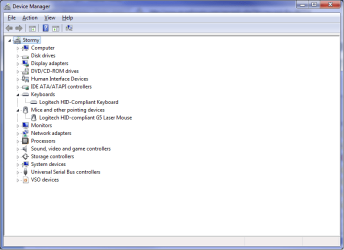
I hadn't thought of that so I went to "Device Manager" to check and found two instances of drivers there that I don't really know what to make of it.

1.- I have an HID-complient mouse with a Microsoft ver. 6.1.7600.16385 dated 06/21/2006

2.- I also have a Logitech HID-compliant G9 Laser Mouse with a Logitech ver. 5.0.15.0 dated 03/18/2010

Does this seem right to any of you? I am a little reluctant to just Off the Microsoft driver for fear of buggering something but I also find it disturbing that I would have 2 drivers running at the same time.


64 bit version of 4.8 here,

Old Version of SetPoint Download - OldApps.com

which I have been using without any problems since it came out.
Thanks stormy, I also found another 4.8 64bit but I am going to use yours instead... I feel a little better using a driver suggested by one of you guys ;)


P.S.:

I know this may be Off-topic but I think I will ask nonetheless, looking at my Device Manager since I also have a Logitech G15 Keyboard, I was baffled (to say the least) to find 4 HID Keyboard Device Microsoft Drivers using the same 6.1.7600.16385 dated 06/21/2006 running at the same time. that's right... 4 KB devices!!! :eek: :eek: :eek:

I should also add that I am using Logitech's latest lgpz304b_x64.exe software and I have tried installing/uninstalling twice just to have the same fate... Now I think I am in trouble. :mad:
 

My Computer My Computer

At a glance

Windows 7 x64 (Ultimate)Intel i5-4670K8GBs Ripjaws 2133MhzAsus GTX660 (2GBs)
Computer type
PC/Desktop
Computer Manufacturer/Model Number
Custom Built... Intel/Nvidia/ASRock
OS
Windows 7 x64 (Ultimate)
CPU
Intel i5-4670K
Motherboard
ASRock Z87 Extreme 6
Memory
8GBs Ripjaws 2133Mhz
Graphics Card(s)
Asus GTX660 (2GBs)
Sound Card
Onboard Realtek HD
Monitor(s) Displays
Acer AL2216W
Screen Resolution
1680 x 1050
Hard Drives
Samsung 840 SSD 120GBs
Samsung 750GB 32MB cache
1.5 TB
PSU
PC Cooling 750w Silencer
Case
Thermaltake Spedo Advance
Cooling
Std Cooler
Keyboard
Logitech G15
Mouse
Logitech G9
Internet Speed
Comcast 20Mbit
Antivirus
Avast
Browser
Firefox
Check event viewer to make sure nothing serious is happening. If them being there isn't causing trouble, I see no reason to start trying to change anything besides that driver.
 

My Computer My Computer

At a glance

Windows 7 Professional SP1 64-bitIntel Core i5-2450M @2.5 GHz6 GB DDR3 1333MHzIntel HD 3000
Computer type
Laptop
Computer Manufacturer/Model Number
Toshiba P775-S7100
OS
Windows 7 Professional SP1 64-bit
CPU
Intel Core i5-2450M @2.5 GHz
Memory
6 GB DDR3 1333MHz
Graphics Card(s)
Intel HD 3000
Monitor(s) Displays
Built-in 17.3" LED; 22" Insignia NS-L22Q-10A
Screen Resolution
1600x900; 1360x768
Hard Drives
750 GB Hitachi
1TB Seagate FreeAgent External
Internet Speed
Verizon DSL Speed(Down/Up): 3360 Kbps / 800 Kbps
Antivirus
MSE and MBAM Pro
Browser
IE10
No, No Warnings or even Error from Logitech in the Event Viewer and it doesn't seem to cause any Ill effects... I just find it extremely odd that I have not one or two instances but 4 and none of them from the logitech software or drivers.

I am wondering if there is a way to prevent the Microsoft drivers from installing to see if the logitech driver would install instead?

If I can do this, perhaps I can also prevent the mouse microsoft driver from installing itself :shock:

And of course, going to the Logitech forum is a waste of time, those guys only answer question that are easy and let the "Questionables" die of long age... or perhaps they just don't like negative posts? :p
 

My Computer My Computer

At a glance

Windows 7 x64 (Ultimate)Intel i5-4670K8GBs Ripjaws 2133MhzAsus GTX660 (2GBs)
Computer type
PC/Desktop
Computer Manufacturer/Model Number
Custom Built... Intel/Nvidia/ASRock
OS
Windows 7 x64 (Ultimate)
CPU
Intel i5-4670K
Motherboard
ASRock Z87 Extreme 6
Memory
8GBs Ripjaws 2133Mhz
Graphics Card(s)
Asus GTX660 (2GBs)
Sound Card
Onboard Realtek HD
Monitor(s) Displays
Acer AL2216W
Screen Resolution
1680 x 1050
Hard Drives
Samsung 840 SSD 120GBs
Samsung 750GB 32MB cache
1.5 TB
PSU
PC Cooling 750w Silencer
Case
Thermaltake Spedo Advance
Cooling
Std Cooler
Keyboard
Logitech G15
Mouse
Logitech G9
Internet Speed
Comcast 20Mbit
Antivirus
Avast
Browser
Firefox
You can try disabling the extra drivers. They will still be there in device manager, but then you can make sure they aren't interfering with the Logitech drivers you want to use. This may make the mouse work a little better too.
 

My Computer My Computer

At a glance

Windows 7 Professional SP1 64-bitIntel Core i5-2450M @2.5 GHz6 GB DDR3 1333MHzIntel HD 3000
Computer type
Laptop
Computer Manufacturer/Model Number
Toshiba P775-S7100
OS
Windows 7 Professional SP1 64-bit
CPU
Intel Core i5-2450M @2.5 GHz
Memory
6 GB DDR3 1333MHz
Graphics Card(s)
Intel HD 3000
Monitor(s) Displays
Built-in 17.3" LED; 22" Insignia NS-L22Q-10A
Screen Resolution
1600x900; 1360x768
Hard Drives
750 GB Hitachi
1TB Seagate FreeAgent External
Internet Speed
Verizon DSL Speed(Down/Up): 3360 Kbps / 800 Kbps
Antivirus
MSE and MBAM Pro
Browser
IE10
You can try disabling the extra drivers. They will still be there in device manager, but then you can make sure they aren't interfering with the Logitech drivers you want to use. This may make the mouse work a little better too.

How exactly can I do this? I mean, if I go to device manager and disable/uninstall them there, they will go away but only for that session, as soon as I restart, they will be back again.

If there is a way to disable them always... I will be more than glad to hear how. :cool:
 

My Computer My Computer

At a glance

Windows 7 x64 (Ultimate)Intel i5-4670K8GBs Ripjaws 2133MhzAsus GTX660 (2GBs)
Computer type
PC/Desktop
Computer Manufacturer/Model Number
Custom Built... Intel/Nvidia/ASRock
OS
Windows 7 x64 (Ultimate)
CPU
Intel i5-4670K
Motherboard
ASRock Z87 Extreme 6
Memory
8GBs Ripjaws 2133Mhz
Graphics Card(s)
Asus GTX660 (2GBs)
Sound Card
Onboard Realtek HD
Monitor(s) Displays
Acer AL2216W
Screen Resolution
1680 x 1050
Hard Drives
Samsung 840 SSD 120GBs
Samsung 750GB 32MB cache
1.5 TB
PSU
PC Cooling 750w Silencer
Case
Thermaltake Spedo Advance
Cooling
Std Cooler
Keyboard
Logitech G15
Mouse
Logitech G9
Internet Speed
Comcast 20Mbit
Antivirus
Avast
Browser
Firefox
I never knew that that would happen. Have you tried running Device Manager as administrator?
 

My Computer My Computer

At a glance

Windows 7 Professional SP1 64-bitIntel Core i5-2450M @2.5 GHz6 GB DDR3 1333MHzIntel HD 3000
Computer type
Laptop
Computer Manufacturer/Model Number
Toshiba P775-S7100
OS
Windows 7 Professional SP1 64-bit
CPU
Intel Core i5-2450M @2.5 GHz
Memory
6 GB DDR3 1333MHz
Graphics Card(s)
Intel HD 3000
Monitor(s) Displays
Built-in 17.3" LED; 22" Insignia NS-L22Q-10A
Screen Resolution
1600x900; 1360x768
Hard Drives
750 GB Hitachi
1TB Seagate FreeAgent External
Internet Speed
Verizon DSL Speed(Down/Up): 3360 Kbps / 800 Kbps
Antivirus
MSE and MBAM Pro
Browser
IE10
I never knew that that would happen. Have you tried running Device Manager as administrator?

Sure, that'show I do it... the problem is that windows 7 scans for hardware everytime the system boots and installs the std drivers and it does not allow me to choose so to speak.

I need to find a way to disable win 7 from doing this so I can install the drivers of my choosing.

OH and By the Way... May the force be with you! ;) :D
 

My Computer My Computer

At a glance

Windows 7 x64 (Ultimate)Intel i5-4670K8GBs Ripjaws 2133MhzAsus GTX660 (2GBs)
Computer type
PC/Desktop
Computer Manufacturer/Model Number
Custom Built... Intel/Nvidia/ASRock
OS
Windows 7 x64 (Ultimate)
CPU
Intel i5-4670K
Motherboard
ASRock Z87 Extreme 6
Memory
8GBs Ripjaws 2133Mhz
Graphics Card(s)
Asus GTX660 (2GBs)
Sound Card
Onboard Realtek HD
Monitor(s) Displays
Acer AL2216W
Screen Resolution
1680 x 1050
Hard Drives
Samsung 840 SSD 120GBs
Samsung 750GB 32MB cache
1.5 TB
PSU
PC Cooling 750w Silencer
Case
Thermaltake Spedo Advance
Cooling
Std Cooler
Keyboard
Logitech G15
Mouse
Logitech G9
Internet Speed
Comcast 20Mbit
Antivirus
Avast
Browser
Firefox
How exactly can I do this? I mean, if I go to device manager and disable/uninstall them there, they will go away but only for that session, as soon as I restart, they will be back again.

If there is a way to disable them always... I will be more than glad to hear how. :cool:

This maybe,

http://www.sevenforums.com/tutorials/82137-drivers-turn-off-automatic-driver-installation.html

Not that it helps in your case but I just did a fresh install of Windows today, and after installing Setpoint all I have in Device Manager is the 2 entries you would expect for a Logitech mouse and keyboard,

logidm.png

Also went straight to 6.15 and it has been working properly since installed. On the previous Windows install any of the 6.x version were buggy with something not working properly with either the keyboard or the mouse (and something with both in the first 6.0).
 

My Computer My Computer

At a glance

Win 7 Ultimate x64FX-8350 @ 4.6 GHz so farADATA XPG V1 Series Black 8GB DDR3 1600Sapphire R9 270x Dual-X
Computer type
PC/Desktop
Computer Manufacturer/Model Number
Me
OS
Win 7 Ultimate x64
CPU
FX-8350 @ 4.6 GHz so far
Motherboard
Asus M5A97 EVO
Memory
ADATA XPG V1 Series Black 8GB DDR3 1600
Graphics Card(s)
Sapphire R9 270x Dual-X
Sound Card
Xonar DGX w/ Corsair Vengence 1300
Monitor(s) Displays
Acer S232HL Abid
Screen Resolution
1920x1080
Hard Drives
120 GB OCZ Vertex 3
500 GB Seagate 7200.12
PSU
Antec Earthwatts 650W Green
Case
Antec Three Hundred
Cooling
Cooler Master 212 EVO
Keyboard
Logitech G510
Mouse
Logitech G500s
Internet Speed
35000/3000
Stormy13, I tried to do that and I also tried re-installing the Logitech Keyboard software but no driver was loaded for the keyboard, at least nothing showed in Device Manager so I reset it back to default.

Things like this really upset me because I can't find answers and it seems I am the only one with the problem. Sad since the G15 is a very common KB... unless of course, people just don't worry about having 4 instances of KB drivers on their device manager ;) :p

Oh dang, it just dawned on me, I am still using the RTM Win 7 OS, you don't think I am having the issue because of this? Nah, it can't be this (RTM) is almost the retail version, correct?

Thanks again fellas.
 

My Computer My Computer

At a glance

Windows 7 x64 (Ultimate)Intel i5-4670K8GBs Ripjaws 2133MhzAsus GTX660 (2GBs)
Computer type
PC/Desktop
Computer Manufacturer/Model Number
Custom Built... Intel/Nvidia/ASRock
OS
Windows 7 x64 (Ultimate)
CPU
Intel i5-4670K
Motherboard
ASRock Z87 Extreme 6
Memory
8GBs Ripjaws 2133Mhz
Graphics Card(s)
Asus GTX660 (2GBs)
Sound Card
Onboard Realtek HD
Monitor(s) Displays
Acer AL2216W
Screen Resolution
1680 x 1050
Hard Drives
Samsung 840 SSD 120GBs
Samsung 750GB 32MB cache
1.5 TB
PSU
PC Cooling 750w Silencer
Case
Thermaltake Spedo Advance
Cooling
Std Cooler
Keyboard
Logitech G15
Mouse
Logitech G9
Internet Speed
Comcast 20Mbit
Antivirus
Avast
Browser
Firefox
I'm using both the G15 keyboard and the G9 mouse but have none of the problems described here. There must be another program causing this problem, maybe an A/V software problem can't say for sure.

There is one thing I noticed right after I installed the G9 driver when I first open up the G9 control panel, it asked me if I wanted this device to be the default pointer device which I answered yes too. Other than that it always starts with the settings I choose. Just be sure that you hit the apply-ok button after you edit the settings and they should stick.
 

My Computer My Computer

At a glance

Windows 7 Ult, Windows 8.1 Pro,Q9650-4.275GHz, E8600 4.5GHz, E6750-3.8GHzG.Skill PC2 9600 1200Mhz 5 5 5 15 2TGTX480
Computer type
PC/Desktop
Computer Manufacturer/Model Number
Home built
OS
Windows 7 Ult, Windows 8.1 Pro,
CPU
Q9650-4.275GHz, E8600 4.5GHz, E6750-3.8GHz
Motherboard
Evga 780i FTW
Memory
G.Skill PC2 9600 1200Mhz 5 5 5 15 2T
Graphics Card(s)
GTX480
Sound Card
Asus Xonar D2
Monitor(s) Displays
HannsG
Screen Resolution
1680X1050
Hard Drives
GSkill Phoenix Pro 120GB SSD
PSU
ThermalTake Toughpower 1000Watt modular
Case
ThermalTake XaserV
Cooling
Xigmatek S1283
Keyboard
Logitech G15
Mouse
Logitech G9
Internet Speed
T1
Back
Top