What power option plan is best to minimize fan noise?

jwblue

New member
Local time
4:51 PM
Messages
16
Hello:
Sony Vaio Desktop VGC-JS320J

E5400 dual core processor

The fans on my desktop are loud and running at a high RPM for seemingly no reason.

Here is the history of the problem.

Initially, when I booted the computer, the fan RPMs were at about 2200 RPM. After about 3 hours the RPM were at 3,800 but the temperature of the cores remain at 36 and 38.

I don't do anything that taxes the processor. I just surf the internet, use Microsoft Word. When I run adobe flash player to listen to a radio station, that does seem to cause the fan to run faster. CPU usage is at 10%.

I sent my computer back to Sony. They replaced the fan. The problem has become worse.

Now within an hour the RPMs are up to about 3,800.


I am using HWMonitor to obtain the fan readings.

I have been advised to set the Windows 7 power option to each of the plans (balanced, high performance, and power saver) to alleviate the problem. Obviously, only one person is correct.


When I set the plan to "High Performance", the fan does not seem to run as high, but I am still not sure this is the optimal setting. It is counterintuitive. I would think that by having the setting at "Power Saver", the fan would be quieter. The core temperature seems to rise to the mid 40's at the "High Performance" setting which I don't mind because it is still not too high.

What about the advanced settings for the power plans? What are the optimal settings? Especially the Multimedia Settings/"When playing video". Would the fan run slower with "Optimize Power savings" or "Optimize Video quality".

I know this is a Windows forum, but someone suggested changing the settings of Smart Fan in the BIOS. Does anyone know how to do this? When i go into the BIOS there are no options to change any fan settings. It just has a setting for the two fans. They are both at around 2,200.

Are there any settings in Windows that would allow the temperature of the cores to rise a small amount without having the RPM of the fans increase?
 

My Computer My Computer

At a glance

Window 7
OS
Window 7
Hello:
Sony Vaio Desktop VGC-JS320J

E5400 dual core processor

The fans on my desktop are loud and running at a high RPM for seemingly no reason.

Here is the history of the problem.

Initially, when I booted the computer, the fan RPMs were at about 2200 RPM. After about 3 hours the RPM were at 3,800 but the temperature of the cores remain at 36 and 38.

I don't do anything that taxes the processor. I just surf the internet, use Microsoft Word. When I run adobe flash player to listen to a radio station, that does seem to cause the fan to run faster. CPU usage is at 10%.

I sent my computer back to Sony. They replaced the fan. The problem has become worse.

Now within an hour the RPMs are up to about 3,800.


I am using HWMonitor to obtain the fan readings.

I have been advised to set the Windows 7 power option to each of the plans (balanced, high performance, and power saver) to alleviate the problem. Obviously, only one person is correct.


When I set the plan to "High Performance", the fan does not seem to run as high, but I am still not sure this is the optimal setting. It is counterintuitive. I would think that by having the setting at "Power Saver", the fan would be quieter. The core temperature seems to rise to the mid 40's at the "High Performance" setting which I don't mind because it is still not too high.

What about the advanced settings for the power plans? What are the optimal settings? Especially the Multimedia Settings/"When playing video". Would the fan run slower with "Optimize Power savings" or "Optimize Video quality".

I know this is a Windows forum, but someone suggested changing the settings of Smart Fan in the BIOS. Does anyone know how to do this? When i go into the BIOS there are no options to change any fan settings. It just has a setting for the two fans. They are both at around 2,200.

Are there any settings in Windows that would allow the temperature of the cores to rise a small amount without having the RPM of the fans increase?


Well lets see if we can fix the problem instead of a work around. How old is the computer? Has its fan and heat sinks ever been cleaned? If the computer is over 6 months old has the heat sink thermal paste been reapplied?

Power saver will use the least power and hence generate the least heat.

Ken
 

My Computer My Computer

At a glance

Win 8 Release candidate 8400[email protected]4 gigsNvidia 9600M
Computer Manufacturer/Model Number
HP Pavillion dv-7 1005 Tx
OS
Win 8 Release candidate 8400
CPU
[email protected]
Memory
4 gigs
Graphics Card(s)
Nvidia 9600M
Sound Card
HD built-in
Monitor(s) Displays
17" Wxga
Screen Resolution
1440x900
Cooling
none
Internet Speed
45Mb down 5Mb up
I dont think changing Power Plan will make such difference. As already said by my colleague, clean the fan and the dust inside the computer. Also, check for programs which uses a lot of resources (CPU, RAM, etc.). When I play some full screen multi player online games, thats when the fan spins at full speed to keep the CPU cool.
 

My Computer My Computer

At a glance

Windows® 8 Pro (64-bit)Intel® Core™ i5 Processor 2467M (1.60GHz, 3MB...6GB DDR3 System Memory at 1,333MHz (on BD 4GB...AMD Radeon™ HD7550M 1GB DDR3 (Ext. Graphic)
Computer Manufacturer/Model Number
Samsung NP530U4B-S02IN
OS
Windows® 8 Pro (64-bit)
CPU
Intel® Core™ i5 Processor 2467M (1.60GHz, 3MB L3 Cache)
Motherboard
Samsung Electronics
Memory
6GB DDR3 System Memory at 1,333MHz (on BD 4GB + 2GB x 1)
Graphics Card(s)
AMD Radeon™ HD7550M 1GB DDR3 (Ext. Graphic)
Sound Card
Realtek High Definition Audio
Monitor(s) Displays
35.56cm (14.0) SuperBright 300nit HD LED Display
Screen Resolution
1366x768
Hard Drives
1TB S-ATA II Hard Drive (5400RPM) with ExpressCache 16GB SSD
Internet Speed
sucks
Antivirus
Microsoft Security Essentials
Browser
Google Chrome (Sync enabled)
The computer is one year old. When I took the computer to Sony, everything inside the computer has been cleaned.

Nothing we do on the computer stresses the processor.

I just surf the internet, use Microsoft Word, and play Ma Jong.


The temperature of the cores remains at 36 and 38 degrees. Why do the fans have to increase speed?

Does internet explorer put strain on the processor? What about Microsoft Word?
 

My Computer My Computer

At a glance

Window 7
OS
Window 7
The computer is one year old. When I took the computer to Sony, everything inside the computer has been cleaned.

Nothing we do on the computer stresses the processor.

I just surf the internet, use Microsoft Word, and play Ma Jong.


The temperature of the cores remains at 36 and 38 degrees. Why do the fans have to increase speed?

Does internet explorer put strain on the processor? What about Microsoft Word?
All these tasks are very basic. Its definitely the dust which is causing the loud noise. The temperature also seems fine. Clean it and see the difference.

BTW, are you sure that the sound comes from the fan only? It could also be the hard drive or the power supply making such sound.
 

My Computer My Computer

At a glance

Windows® 8 Pro (64-bit)Intel® Core™ i5 Processor 2467M (1.60GHz, 3MB...6GB DDR3 System Memory at 1,333MHz (on BD 4GB...AMD Radeon™ HD7550M 1GB DDR3 (Ext. Graphic)
Computer Manufacturer/Model Number
Samsung NP530U4B-S02IN
OS
Windows® 8 Pro (64-bit)
CPU
Intel® Core™ i5 Processor 2467M (1.60GHz, 3MB L3 Cache)
Motherboard
Samsung Electronics
Memory
6GB DDR3 System Memory at 1,333MHz (on BD 4GB + 2GB x 1)
Graphics Card(s)
AMD Radeon™ HD7550M 1GB DDR3 (Ext. Graphic)
Sound Card
Realtek High Definition Audio
Monitor(s) Displays
35.56cm (14.0) SuperBright 300nit HD LED Display
Screen Resolution
1366x768
Hard Drives
1TB S-ATA II Hard Drive (5400RPM) with ExpressCache 16GB SSD
Internet Speed
sucks
Antivirus
Microsoft Security Essentials
Browser
Google Chrome (Sync enabled)
Do all the fans increase the same? Or is it just the CPU fan? You could use Speed Fan to control your fans if indeed they aren't being sped up due to a failure or overheating issue. A Guy
 

My Computer My Computer

At a glance

Windows 10 Home x64INTEL Core i5-750 Quad-Core 3.37GHzHyperX Fury Black Series 8GB (2 x 4GB) 1866MhzEVGA GeForce GTX 750 Superclocked 1GB 128-Bit...
Computer type
PC/Desktop
OS
Windows 10 Home x64
CPU
INTEL Core i5-750 Quad-Core 3.37GHz
Motherboard
ASUS P7P55D
Memory
HyperX Fury Black Series 8GB (2 x 4GB) 1866Mhz
Graphics Card(s)
EVGA GeForce GTX 750 Superclocked 1GB 128-Bit GDDR5
Monitor(s) Displays
LG 32MA68HY 32" IPS
Screen Resolution
1920 x 1080
Hard Drives
Samsung 840 Evo 120GB, SEAGATE 500GB Barracuda® 7200.12, SATA 3 Gb/s, 7200 RPM, 16MB cache
PSU
ANTEC TruePower New TP-550, 80 PLUS, 550W
Case
ANTEC Three Hundred Illusion
Cooling
COOLER MASTER Hyper 212 Plus, 4 x 120mm 1 x 140mm Noctua's
Internet Speed
85 + Mbps
Antivirus
Avast
Browser
Vivaldi
Or is it just the CPU fan? You could use Speed Fan to control your fans if indeed they aren't being sped up due to a failure or overheating issue. A Guy

There is a front fan and a cpu fan.

The front fan is always 300 RPM higher.

I tried to use Speed Fan, but the fans don't show up on the program. The fan tab is blank. My computer might not be compatable with it. Are there any other fan control programs?

My fans usually are at around 3500 and 3800 RPM. Should they be noisy at that rpm?
 

My Computer My Computer

At a glance

Window 7
OS
Window 7
Hello:
Sony Vaio Desktop VGC-JS320J

E5400 dual core processor

The fans on my desktop are loud and running at a high RPM for seemingly no reason.

Here is the history of the problem.

Initially, when I booted the computer, the fan RPMs were at about 2200 RPM. After about 3 hours the RPM were at 3,800 but the temperature of the cores remain at 36 and 38.

I don't do anything that taxes the processor. I just surf the internet, use Microsoft Word. When I run adobe flash player to listen to a radio station, that does seem to cause the fan to run faster. CPU usage is at 10%.

I sent my computer back to Sony. They replaced the fan. The problem has become worse.

Now within an hour the RPMs are up to about 3,800.


I am using HWMonitor to obtain the fan readings.

I have been advised to set the Windows 7 power option to each of the plans (balanced, high performance, and power saver) to alleviate the problem. Obviously, only one person is correct.


When I set the plan to "High Performance", the fan does not seem to run as high, but I am still not sure this is the optimal setting. It is counterintuitive. I would think that by having the setting at "Power Saver", the fan would be quieter. The core temperature seems to rise to the mid 40's at the "High Performance" setting which I don't mind because it is still not too high.

What about the advanced settings for the power plans? What are the optimal settings? Especially the Multimedia Settings/"When playing video". Would the fan run slower with "Optimize Power savings" or "Optimize Video quality".

I know this is a Windows forum, but someone suggested changing the settings of Smart Fan in the BIOS. Does anyone know how to do this? When i go into the BIOS there are no options to change any fan settings. It just has a setting for the two fans. They are both at around 2,200.

Are there any settings in Windows that would allow the temperature of the cores to rise a small amount without having the RPM of the fans increase?


Use Speccy and fully complete your system specs. That info will help us in this and further questions.

The Power Saver setting will result in the coolest operating temperatures.

Take the cover off of the unit.

Listen and observe the various fans after starting up and then later when the fan speed increases significantly.

I'm also suspect dust bunnies of being the biggest part of your problem, although you could simply have a fan that is malfunctioning.

SPECCY- System Information Tool
http://www.piriform.com/speccy

Operating System, CPU and Temp, Ram, Motherboard, Graphics, Hard Drives, Optical Drives, Audio, Peripherals, Network info.
Simply put—this is the best and it’s free!
 

My Computer My Computer

At a glance

MS Windows 7 Ultimate SP1 64-bitAMD A10-4600M6.00 GB Dual-Channel DDR3 @ 798MHz (11-11-12-28)AMD Radeon HD 7660G
Computer Manufacturer/Model Number
Toshiba Satellite S875D-S7239 laptop
OS
MS Windows 7 Ultimate SP1 64-bit
CPU
AMD A10-4600M
Motherboard
AMD Pumori (Socket FT1)
Memory
6.00 GB Dual-Channel DDR3 @ 798MHz (11-11-12-28)
Graphics Card(s)
AMD Radeon HD 7660G
Sound Card
High Definition Audio Device
Monitor(s) Displays
Generic PnP Monitor (1600x900@60Hz)
Screen Resolution
1600x900@60Hz
Hard Drives
SSD 119GB Corsair CSSD-V128GB2 ATA Device
Keyboard
Standard PS/2 Keyboard
Mouse
HP Wireless Optical Mobile Mouse Model FHA-3410
Internet Speed
What the local pub, local coffee shop offers.
Other Info
Optical Drive:MATSHITA BD-CMB UJ160B ATA Device


Also have an Asus ha1002xp netbook with Win 7 Ultimate installed.
Use Speccy and fully complete your system specs. That info will help us in this and further questions.

The Power Saver setting will result in the coolest operating temperatures.

Take the cover off of the unit.

Listen and observe the various fans after starting up and then later when the fan speed increases significantly.

I'm also suspect dust bunnies of being the biggest part of your problem, although you could simply have a fan that is malfunctioning.


SPECCY- System Information Tool
http://www.piriform.com/speccy

Operating System, CPU and Temp, Ram, Motherboard, Graphics, Hard Drives, Optical Drives, Audio, Peripherals, Network info.
Simply put—this is the best and it’s free!

I did send the computer back to Sony and they replaced the fan and cleaned out the inside of the computer.

I have been having this problem since I bought the computer.

Here is my system information.

Summary
Operating System
MS Windows 7 Home Premium 64-bit
CPU
Intel Pentium E5200 @ 2.50GHz 37 °C
Wolfdale 45nm Technology
RAM
3.0GB Dual-Channel DDR2 @ 398MHz (6-6-6-18)
Motherboard
Sony Corporation VAIO (N/A)
Graphics
Generic PnP Monitor @ 1680x1050
Intel(R) G45/G43 Express Chipset
Hard Drives
313GB Seagate ST3320813AS ATA Device (Unknown Interface) 36 °C
Ricoh Memory Stick Disk Device (IDE)
Ricoh SD/MMC Disk Device (IDE)
Optical Drives
Optiarc DVD RW AD-7590S ATA Device
SAC Virtual Cdrom USB Device
Audio
Realtek High Definition Audio
CPU
Intel Pentium E5200
Cores 2
Threads 2
Name Intel Pentium E5200
Code Name Wolfdale
Package Socket 775 LGA
Technology 45nm
Specification Pentium(R) Dual-Core CPU E5200 @ 2.50GHz
Family 6
Extended Family 6
Model 7
Extended Model 17
Stepping A
Revision R0
Instructions MMX, SSE, SSE2, SSE3, SSSE3, EM64T
Bus Speed 199.5 MHz
Rated Bus Speed 798.0 MHz
Stock Core Speed 2500 MHz
Stock Bus Speed 200 MHz
Average Temperature 37 °C
Caches
L1 Data Cache Size 2 x 32 KBytes
L1 Instructions Cache Size 2 x 32 KBytes
L2 Unified Cache Size 2048 KBytes
Core 0
Core Speed 1196.8 MHz
Multiplier x 6.0
Bus Speed 199.5 MHz
Rated Bus Speed 798.0 MHz
Temperature 36 °C
Thread 1
APIC ID 0
Core 1
Core Speed 1196.8 MHz
Multiplier x 6.0
Bus Speed 199.5 MHz
Rated Bus Speed 798.0 MHz
Temperature 38 °C
Thread 1
APIC ID 1
RAM
Memory slots
Total memory slots 2
Used memory slots 2
Free memory slots 0
Memory
Type DDR2
Size 3072 MBytes
Channels # Dual
DRAM Frequency 399.0 MHz
CAS# Latency (CL) 6 clocks
RAS# to CAS# Delay (tRCD) 6 clocks
RAS# Precharge (tRP) 6 clocks
Cycle Time (tRAS) 18 clocks
Command Rate (CR) 2T
SPD
Number Of SPD Modules 2
Slot #1
Type DDR2
Size 2048 MBytes
Manufacturer Hyundai Electronics
Max Bandwidth PC2-6400 (400 MHz)
Part Number HMP125S6EFR8C-S6
Serial Number 00002222
Week/year 09 / 09
SPD Ext. EPP
JEDEC #3
Frequency 400.0 MHz
CAS# Latency 6.0
RAS# To CAS# 6
RAS# Precharge 6
tRAS 18
tRC 24
Voltage 1.800 V
JEDEC #2
Frequency 333.3 MHz
CAS# Latency 5.0
RAS# To CAS# 6
RAS# Precharge 6
tRAS 16
tRC 21
Voltage 1.800 V
JEDEC #1
Frequency 266.7 MHz
CAS# Latency 4.0
RAS# To CAS# 4
RAS# Precharge 4
tRAS 12
tRC 16
Voltage 1.800 V
Slot #2
Type DDR2
Size 1024 MBytes
Manufacturer Hyundai Electronics
Max Bandwidth PC2-6400 (400 MHz)
Part Number HMP112S6EFR6C-S6
Serial Number 00007073
Week/year 12 / 09
SPD Ext. EPP
JEDEC #3
Frequency 400.0 MHz
CAS# Latency 6.0
RAS# To CAS# 6
RAS# Precharge 6
tRAS 18
tRC 24
Voltage 1.800 V
JEDEC #2
Frequency 333.3 MHz
CAS# Latency 5.0
RAS# To CAS# 6
RAS# Precharge 6
tRAS 16
tRC 21
Voltage 1.800 V
JEDEC #1
Frequency 266.7 MHz
CAS# Latency 4.0
RAS# To CAS# 4
RAS# Precharge 4
tRAS 12
tRC 16
Voltage 1.800 V
Motherboard
Manufacturer Sony Corporation
Model VAIO
Version C6U147TD
Chipset Vendor Intel
Chipset Model P45/P43
Chipset Revision A3
Southbridge Vendor Intel
Southbridge Model 82801JR (ICH10R)
Southbridge Revision 00
BIOS
Brand American Megatrends Inc.
Version R0283T4
Date 01/15/2009
Graphics
Monitor
Name Generic PnP Monitor on Intel G45/G43 Express Chipset
Current Resolution 1680x1050 pixels
Work Resolution 1680x1010 pixels
State enabled, primary
Monitor Width 1680
Monitor Height 1050
Monitor BPP 32 bits per pixel
Monitor Frequency 59 Hz
Device \\.\DISPLAY1\Monitor0
Intel(R) G45/G43 Express Chipset
Memory 1334 MB
Memory type 2
Driver version 8.15.10.1872
Intel(R) G45/G43 Express Chipset
Memory type 2
Driver version 8.15.10.1872
Hard Drives
ST3320813AS ATA Device
Manufacturer Seagate
Form Factor 3.5"
Interface Unknown Interface
Capacity 313GB
Real size 320,072,933,376 bytes
S.M.A.R.T
01 Read Error Rate 117 (099 worst) Data 0008080215
03 Spin-Up Time 097 (097) Data 0000000000
04 Start/Stop Count 100 (100) Data 00000003BF
05 Reallocated Sectors Count 100 (100) Data 0000000000
07 Seek Error Rate 075 (060) Data 00026E1850
09 Power-On Hours (POH) 098 (098) Data 00000009B7
0A Spin Retry Count 100 (100) Data 0000000003
0C Device Power Cycle Count 100 (100) Data 0000000334
B8 100 (100) Data 0000000000
BB 100 (100) Data 0000000000
BC 100 (099) Data 0000000003
BD High Fly Writes (WDC) 083 (083) Data 0000000011
BE Temperature Difference from 100 064 (057) Data 00251A0024
C2 Temperature 036 (043) Data 0000000024
C3 Hardware ECC Recovered 046 (036) Data 0008080215
C5 Current Pending Sector Count 100 (100) Data 0000000000
C6 Uncorrectable Sector Count 100 (100) Data 0000000000
C7 UltraDMA CRC Error Count 200 (200) Data 0000000000
Temperature 36 °C
Temperature Range ok (less than 50 °C)
Status Good
Partition 0
Partition ID Disk #0, Partition #0
Size 10.0 GB
Partition 1
Partition ID Disk #0, Partition #1
Disk Letter C:
File System NTFS
Volume Serial Number BE20F864
Size 288GB
Used Space 38.7GB (14%)
Free Space 249GB (86%)
Ricoh Memory Stick Disk Device
Manufacturer Unknown manufacturer
Interface IDE
Capacity
Real size 0 bytes
S.M.A.R.T
S.M.A.R.T not supported
Ricoh SD/MMC Disk Device
Manufacturer Unknown manufacturer
Interface IDE
Capacity
Real size 0 bytes
S.M.A.R.T
S.M.A.R.T not supported
Optical Drives
Optiarc DVD RW AD-7590S ATA Device
Media Type DVD Writer
Name Optiarc DVD RW AD-7590S ATA Device
Availability Running/Full Power
Capabilities Random Access, Supports Writing, Supports Removable Media
Config Manager Error Code Device is working properly
Config Manager User Config FALSE
Drive D:
Media Loaded FALSE
SCSI Bus 0
SCSI Logical Unit 0
SCSI Port 0
SCSI Target Id 1
Status OK
SAC Virtual Cdrom USB Device
Media Type UNKNOWN
Name SAC Virtual Cdrom USB Device
Availability Running/Full Power
Capabilities Random Access, Supports Removable Media
Config Manager Error Code Device is working properly
Config Manager User Config FALSE
Drive E:
DriveIntegrity TRUE
Media Loaded TRUE
Size 46.1 MB
Status OK
Transfer Rate 3385 KB/S
Volume Name Clickfree_System
Volume Serial Number 5143DC59
Audio
Sound Card
Realtek High Definition Audio
Playback Devices
Speaker/HP (Realtek High Definition Audio) (default)
Digital Output(Optical) (Realtek High Definition Audio)
Recording Device
Microphone (Realtek High Definition Audio)
Peripherals
HID Keyboard Device
Device Kind Keyboard
Device Name HID Keyboard Device
Vendor Unknown
Location USB Input Device
Driver
Date 6-21-2006
Version 6.1.7600.16385
File system32\DRIVERS\kbdhid.sys
HID-compliant mouse
Device Kind Mouse
Device Name HID-compliant mouse
Vendor Unknown
Location USB Input Device
Driver
Date 6-21-2006
Version 6.1.7600.16385
File system32\DRIVERS\mouhid.sys
USB Video Device
Device Kind Camera/scanner
Device Name USB Video Device
Vendor Unknown
Comment Sony Visual Communication Camera
Location 0000.001a.0007.003.000.000.000.000.000
Driver
Date 6-21-2006
Version 6.1.7600.16385
File System32\Drivers\usbvideo.sys
Disk drive
Device Kind USB storage
Device Name Disk drive
Vendor SAC
Comment SAC SAC-Click free USB Device
Location USB Mass Storage Device
Driver
Date 6-21-2006
Version 6.1.7600.16385
File \SystemRoot\system32\DRIVERS\disk.sys
Network


Adapter Type Ethernet
WinInet Info
LAN Connection
Local system uses a local area network to connect to the Internet
Local system has RAS to connect to the Internet
Wi-Fi Info
Using native Wi-Fi API version 2
Available access points count 1
Wi-Fi ()
SSID
Name
Signal Strength/Quality 100
Security Enabled
State The interface is not connected to any network
Dot11 Type Infrastructure BSS network
Network Connectible
Network Flags There is a profile for this network
Cipher Algorithm to be used when joining this network AES-CCMP algorithm
Default Auth used to join this network for the first time 802.11i RSNA algorithm that uses PSK
WinHTTPInfo
WinHTTPSessionProxyType No proxy
Session Proxy
Session Proxy Bypass
Connect Retries 5
Connect Timeout 60000
HTTP Version HTTP 1.1
Max Connects Per 1.0 Servers INFINITE
Max Connects Per Servers INFINITE
Max HTTP automatic redirects 10
Max HTTP status continue 10
Send Timeout 30000
IEProxy Auto Detect No
IEProxy Auto Config
IEProxy
IEProxy Bypass
Default Proxy Config Access Type No proxy
Default Config Proxy
Default Config Proxy Bypass

 

My Computer My Computer

At a glance

Window 7
OS
Window 7
Let me ask a few questions that should have been asked first.

What is the temperature of the room the computer is in.
Where is the computer sitting? in a cubby hole in a desk, on the floor, on the desk?
 

My Computer My Computer

At a glance

Windows 7 Ultimate 64bitIntel i7 3770K16GB DDR3 1333 Corsair XMS3XFX HD6950 2GB EyeFinity
Computer Manufacturer/Model Number
HAL-9000
OS
Windows 7 Ultimate 64bit
CPU
Intel i7 3770K
Motherboard
Asus Sabertooth Z77
Memory
16GB DDR3 1333 Corsair XMS3
Graphics Card(s)
XFX HD6950 2GB EyeFinity
Sound Card
Logitech G35 & Sennheiser PC135 & VIA HD
Monitor(s) Displays
23" HP 2310e, 23" Samsung B2230, 21.5" Viewsonic
Screen Resolution
5760x1080
Hard Drives
16TB of Storage
128GB & 256GB Crucial M4 SSD's, 2X 1TB WD Black, 3x 2TB WD, 3x 2TB Samsung F4, 1.5TB Seagate, WD 500GB,
PSU
Antec True Power New 650watt
Case
Cooler Master HAF-932
Cooling
Corsair H60 Hydro Cooler, 3x 230mm Fans, 2x120mm Fan
Keyboard
Logitech G15 and G13
Mouse
Logitech G700 Gaming Mouse
Internet Speed
50/10 Mbit
Other Info
Speakers : Alesis M1 Active Mk2 Studio Monitors , APC RS 1200 UPS, HP 4500DN Color Laser, HP P1006 mono Laser, Kodak 8500 Dye-Sub, Epson 1280 inkjet, Epson Worforce 610 MFC
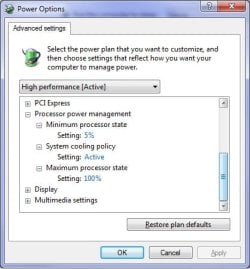
Speedstep would help as long as Sony weren't you-know-whats and hid/removed the option from the bios. Between Speedstep and adjusting the Windows power options like this,

poweroptions1.jpg

will at least lower the CPU fan speed.
 

My Computer My Computer

At a glance

Win 7 Ultimate x64FX-8350 @ 4.6 GHz so farADATA XPG V1 Series Black 8GB DDR3 1600Sapphire R9 270x Dual-X
Computer type
PC/Desktop
Computer Manufacturer/Model Number
Me
OS
Win 7 Ultimate x64
CPU
FX-8350 @ 4.6 GHz so far
Motherboard
Asus M5A97 EVO
Memory
ADATA XPG V1 Series Black 8GB DDR3 1600
Graphics Card(s)
Sapphire R9 270x Dual-X
Sound Card
Xonar DGX w/ Corsair Vengence 1300
Monitor(s) Displays
Acer S232HL Abid
Screen Resolution
1920x1080
Hard Drives
120 GB OCZ Vertex 3
500 GB Seagate 7200.12
PSU
Antec Earthwatts 650W Green
Case
Antec Three Hundred
Cooling
Cooler Master 212 EVO
Keyboard
Logitech G510
Mouse
Logitech G500s
Internet Speed
35000/3000
Speedstep would help as long as Sony weren't you-know-whats and hid/removed the option from the bios. Between Speedstep and adjusting the Windows power options like this,

View attachment 87350

will at least lower the CPU fan speed.
Actually, setting the "System Cooling Policy" under "Processor Power management" to "Passive" (instead of active) will reduce fan noise. The passive setting means that the processor is slowed down before the fan speed is increased.
 

My Computer My Computer

At a glance

Windows 7 x64 pro/ Windows 7 x86 Pro/ XP SP3 x86
Computer Manufacturer/Model Number
Too many to describe...
OS
Windows 7 x64 pro/ Windows 7 x86 Pro/ XP SP3 x86
That is one I didn't have to touch. For mine at least between Cool and Quiet (AMD's version of Speedstep) and the Q-Fan option in the bios (Asus motherboard), the fan does go up and down as needed (~2400 RPM fan currently spinning at ~1100 RPM).
 

My Computer My Computer

At a glance

Win 7 Ultimate x64FX-8350 @ 4.6 GHz so farADATA XPG V1 Series Black 8GB DDR3 1600Sapphire R9 270x Dual-X
Computer type
PC/Desktop
Computer Manufacturer/Model Number
Me
OS
Win 7 Ultimate x64
CPU
FX-8350 @ 4.6 GHz so far
Motherboard
Asus M5A97 EVO
Memory
ADATA XPG V1 Series Black 8GB DDR3 1600
Graphics Card(s)
Sapphire R9 270x Dual-X
Sound Card
Xonar DGX w/ Corsair Vengence 1300
Monitor(s) Displays
Acer S232HL Abid
Screen Resolution
1920x1080
Hard Drives
120 GB OCZ Vertex 3
500 GB Seagate 7200.12
PSU
Antec Earthwatts 650W Green
Case
Antec Three Hundred
Cooling
Cooler Master 212 EVO
Keyboard
Logitech G510
Mouse
Logitech G500s
Internet Speed
35000/3000
Speedstep would help as long as Sony weren't you-know-whats and hid/removed the option from the bios. Between Speedstep and adjusting the Windows power options like this,

View attachment 87350

will at least lower the CPU fan speed.

Would it be possible unhide the BIOS option?

Does the Speedstep only prevent the cores from becoming hot or does it prevent the fans from running faster?
 

My Computer My Computer

At a glance

Window 7
OS
Window 7
When it is enable it lowers the speed of the CPU and the voltage, as well as lowering the fan speed, and will speed each up as usage demands.

Would it be possible unhide the BIOS option?

Not even if you tried real hard.
 

My Computer My Computer

At a glance

Win 7 Ultimate x64FX-8350 @ 4.6 GHz so farADATA XPG V1 Series Black 8GB DDR3 1600Sapphire R9 270x Dual-X
Computer type
PC/Desktop
Computer Manufacturer/Model Number
Me
OS
Win 7 Ultimate x64
CPU
FX-8350 @ 4.6 GHz so far
Motherboard
Asus M5A97 EVO
Memory
ADATA XPG V1 Series Black 8GB DDR3 1600
Graphics Card(s)
Sapphire R9 270x Dual-X
Sound Card
Xonar DGX w/ Corsair Vengence 1300
Monitor(s) Displays
Acer S232HL Abid
Screen Resolution
1920x1080
Hard Drives
120 GB OCZ Vertex 3
500 GB Seagate 7200.12
PSU
Antec Earthwatts 650W Green
Case
Antec Three Hundred
Cooling
Cooler Master 212 EVO
Keyboard
Logitech G510
Mouse
Logitech G500s
Internet Speed
35000/3000
When it is enable it lowers the speed of the CPU and the voltage, as well as lowering the fan speed, and will speed each up as usage demands.

Would it be possible unhide the BIOS option?

Not even if you tried real hard.

Figures. Sony computers suck.

How do most people feel about their VAIO notebooks?

Mine is a desktop.
 

My Computer My Computer

At a glance

Window 7
OS
Window 7
I don't know if this can help solve the problem.

When I put the computer into "Sleep" mode and then one second later, come out of it, the fan goes back down to 2,200 RPM (from 3,800 beofre going into sleep mode).

Could this indicate anything?
 

My Computer My Computer

At a glance

Window 7
OS
Window 7
@stormy13 that cool and quiet feature is really good what i think is very amazing is i hear almost nothing but the fan on the side of my tower pushing air out even my psu is quiet

as for the postmaster of this thread i would consider just changing all the fans and see what happens if changed if not and it continues it has something to do with your board settings

Im pretty sure it is a open shut case if you were to just spend a little change the fans and test i mean what could it hurt you have a reciept they can take the fans back if it isn't satifying the job

just a suggestion not the answer please rep the person that gave you the answer to solve this puzzle
 

My Computer My Computer

At a glance

Windows 10 Home Premium 64bit sp1Intel I7-6700K @ 4.6 Ghz 1.344 volts everyday OC32GB G-Skill TridentZ 3200mhz 16-18-18-38 DDR4Sli Gigabyte Windforce GTX 980 G1
Computer type
PC/Desktop
Computer Manufacturer/Model Number
CoreI7-6700K MrFingerIII Special Builds
OS
Windows 10 Home Premium 64bit sp1
CPU
Intel I7-6700K @ 4.6 Ghz 1.344 volts everyday OC
Motherboard
Asrock Fatality K6 Z170 Socket 1151
Memory
32GB G-Skill TridentZ 3200mhz 16-18-18-38 DDR4
Graphics Card(s)
Sli Gigabyte Windforce GTX 980 G1
Sound Card
AC97 Creative Rage Tactic 3D Headphones Bluetooth
Monitor(s) Displays
27" Asus ROG Swift PG278Q G-Sync 48" Vizio Smart HD TV
Screen Resolution
2560x1440p 27"- 48" Currently Gaming at 2560x1440p Res 2K
Hard Drives
250GB Samsung Evo840SSD Seagate baracuda 500 GB WD Mybook 500Gb 1TB Seagate Barracuda
PSU
HX1050w Corsair Silver 80plus certified crosfire/sli
Case
Enthod Pro Full Tower
Cooling
Corsair H110i GT 280 mm High Performance WaterBlock
Keyboard
Logitech wireless keyboard
Mouse
Logitech wireless mouse
Internet Speed
Cox Cable 100+ mb
Antivirus
WebRoot Spysweeper with Antivirus
Browser
IE-10, Chrome, Opera
Other Info
My Other Rig is a AMD FX8320E @4.6Ghz 16GB Ballistic Sport Ram
Mobo Asrock Fatality 990FX 120GB OCZ SSD 1TB Seagate Barracuda Corsair H75 Cooling PSU Corsair CX750
GPU GTX Gigabyte 970G1
I don't know if this can help solve the problem.

When I put the computer into "Sleep" mode and then one second later, come out of it, the fan goes back down to 2,200 RPM (from 3,800 beofre going into sleep mode).

Could this indicate anything?


but sleep mode is just idling the pc i don't think that would be effective cause take in mind after you do the wake up it will just resume the speed it slowed down from and most of all consider if the cpu's heatsink is in proper place because it sounds like something is heating up and the fans speed increases to make up for it and i would also open up the side panels and see where the fans go from there

your case could be really hot and the fans have to increase to compisate for the heat being shelled out by the unit psu cpu vid card
 

My Computer My Computer

At a glance

Windows 10 Home Premium 64bit sp1Intel I7-6700K @ 4.6 Ghz 1.344 volts everyday OC32GB G-Skill TridentZ 3200mhz 16-18-18-38 DDR4Sli Gigabyte Windforce GTX 980 G1
Computer type
PC/Desktop
Computer Manufacturer/Model Number
CoreI7-6700K MrFingerIII Special Builds
OS
Windows 10 Home Premium 64bit sp1
CPU
Intel I7-6700K @ 4.6 Ghz 1.344 volts everyday OC
Motherboard
Asrock Fatality K6 Z170 Socket 1151
Memory
32GB G-Skill TridentZ 3200mhz 16-18-18-38 DDR4
Graphics Card(s)
Sli Gigabyte Windforce GTX 980 G1
Sound Card
AC97 Creative Rage Tactic 3D Headphones Bluetooth
Monitor(s) Displays
27" Asus ROG Swift PG278Q G-Sync 48" Vizio Smart HD TV
Screen Resolution
2560x1440p 27"- 48" Currently Gaming at 2560x1440p Res 2K
Hard Drives
250GB Samsung Evo840SSD Seagate baracuda 500 GB WD Mybook 500Gb 1TB Seagate Barracuda
PSU
HX1050w Corsair Silver 80plus certified crosfire/sli
Case
Enthod Pro Full Tower
Cooling
Corsair H110i GT 280 mm High Performance WaterBlock
Keyboard
Logitech wireless keyboard
Mouse
Logitech wireless mouse
Internet Speed
Cox Cable 100+ mb
Antivirus
WebRoot Spysweeper with Antivirus
Browser
IE-10, Chrome, Opera
Other Info
My Other Rig is a AMD FX8320E @4.6Ghz 16GB Ballistic Sport Ram
Mobo Asrock Fatality 990FX 120GB OCZ SSD 1TB Seagate Barracuda Corsair H75 Cooling PSU Corsair CX750
GPU GTX Gigabyte 970G1
Would undervolting help?
 

My Computer My Computer

At a glance

Window 7
OS
Window 7
Back
Top