My stupidity with other OS's

Azuremein

New member
Local time
2:32 PM
Messages
8
Location
Florida
Hey guys, kinda new here, I know a little bit about computers but not a lot... I was experimenting with some other OS's (Ubuntu, Fedora, WinXP, etc.) and I decided just to keep 7 for now and delete the rest. Well, all the OS's came off fine, I reinstalled 7 with no problem, I just have one thing that's annoying me... it still doesn't just boot 7 automatically, it asks if I want to boot Win7 or "an older version of Windows". Of course, whenever you click it it just basically says nothing is there, because there is nothing there... I just want to know if anyone knows how to remove this option so Win7 just boots without any other options. I know it's probably impossible to remove it COMPLETELY, so even if there is just a configuration in Win7 that just boots Win7 without asking to boot any other OS's but doesn't delete your old OS's, that'd be fine. Any help would be appreciated, I'd just like to get rid of the "older Windows" option lol.
 

My Computer My Computer

Computer Manufacturer/Model Number
HP Pavilion dv6-1230us
OS
Win7
CPU
Intel core 2 Duo T6500 @ 2.10ghz
Memory
4GB
Graphics Card(s)
Intel Graphics Media Accelerator 4500MHD
Hard Drives
320GB HDD
Type "msconfig.exe" into the start search and run the program presented

One the Boot tab of the application you should see the two start-up choices you are seeing

simply select and delete the entry you do not need
 

My Computers My Computers

System One System Two

  • Computer type
    PC/Desktop
    Computer Manufacturer/Model Number
    ChillBlast - Custom to my design
    OS
    Windows 11 Pro x64 [Latest Release and Release Preview]
    CPU
    Ryzen 9 5950X, 3.8 - 5.2 MHz
    Motherboard
    Asus Prime X570-Pro
    Memory
    64GB [2 x 32GB] DDR4 3200MHz
    Graphics Card(s)
    4GB NVIDIA GEFORCE GTX 1650 Ti
    Sound Card
    On-board SPDIF to 5.1 System + HDMI [5.1 system]
    Monitor(s) Displays
    32" UHD 32 Bit HDR Monitor + 43" UHD 4K 32Bit HDR TV
    Screen Resolution
    2 x 3840 x 2160 @60Hz
    Hard Drives
    1TB M2 SSD OS, 500GB Fast Access SSD, 2 x 8TB Data + Various Externals from 1TB to 4TB, 10TB NAS
    PSU
    NZXT C750 80 PLUS Gold 750W Modular PSU
    Case
    Workstation Case [Matt Black]
    Cooling
    NZXT Kraken X63 280mm CPU Cooler +2x Quiet Case fans
    Keyboard
    Logitech Wireless MX Keys & K400 + others
    Mouse
    Logitech Wireless MX Master 3S
    Internet Speed
    920 MB Down 50 MB Up
    Antivirus
    BitDefender Total Security Pro
    Browser
    Chrome (always run latest Non-Beta)
    Other Info
    Also run ...
    Laptop - Quad 8GB - Windows 10 Pro x64
    Nexus 7 Android tablet x2
    Samsung 10.2" tablet
    Blackview TAB 8 4G Android Tablet c/w Keyboard
    Wacom Intuos Pro Medium Pen Pad
    Wacom Intuos Pro Small Pen Pad
    Wacom Expresskeys Remote
    Loopdeck+ Graphics Controller
    Shuttle Pro v2 Control
  • Computer type
    Laptop
    System Manufacturer/Model Number
    Dell XPS 17 10750H
    OS
    Windows 11 Pro x64 Latest RP
    CPU
    Intel I7 10750H 5.0GHz
    Motherboard
    Dell XPS
    Memory
    32GB [2x16GB] DDR4 2933 MHz
    Graphics Card(s)
    nVidia GTX1650Ti 4 GB GDDR6
    Sound Card
    Stock [Realtek] 4 Speaker
    Monitor(s) Displays
    17" IPS UHD+ Infinity Edge Touchscreen
    Screen Resolution
    3840 x 2400
    Hard Drives
    2TB M2 NVMe, 4TB External + various 500GB & 1TB External NVMe (also have access to spinner HDD from
    PSU
    Stock
    Case
    Stock XPS Aluminium & Carbon Fibre
    Cooling
    Stock - Active Fan Control
    Keyboard
    Backlit + Various Logitech
    Mouse
    Stock Track Pad + Logitech MX Trackball
    Internet Speed
    72 MB Down 18MB Up
    Browser
    Chrome
    Other Info
    Also run ...
    Laptop - Quad 8GB - Windows 10 Pro x64
    Nexus 7 Android tablet x2
    10.2" tablet
    Sony Z3 Android Smartphone
    Wacom Intuos Pro Medium Pen Pad
    Wacom Intuos Pro Small Pen Pad
    Wacom Expresskeys Remote
    Loopdeck+ Graphics Controller
    Shuttle Pro v2 Control Pad
    10TB NAS
Type "msconfig.exe" into the start search and run the program presented

One the Boot tab of the application you should see the two start-up choices you are seeing

simply select and delete the entry you do not need

I've actually used msconfig already, but all that shows up is Win7. I used that to delete a previous 3rd option, a dead link to a second Win7 (I still don't fully understand what happened there). I've done the disc clean up and disk clean up and disk defragment but nothings worked, I'm at a loss :'(
 

My Computer My Computer

Computer Manufacturer/Model Number
HP Pavilion dv6-1230us
OS
Win7
CPU
Intel core 2 Duo T6500 @ 2.10ghz
Memory
4GB
Graphics Card(s)
Intel Graphics Media Accelerator 4500MHD
Hard Drives
320GB HDD
OK check your install for a widows.old folder which may be the remains of an previous win7 install or it may be the remains of an old copy of XP on another partition - I would delete and remake any other unused partitions to be totally sure of cleaning them fully.

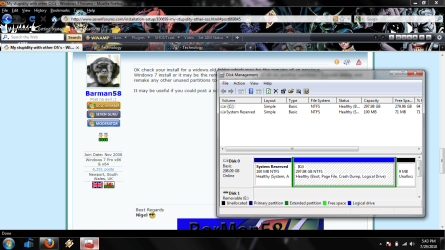
It may be useful if you could post a screenshot of your current partitions
 

My Computers My Computers

System One System Two

  • Computer type
    PC/Desktop
    Computer Manufacturer/Model Number
    ChillBlast - Custom to my design
    OS
    Windows 11 Pro x64 [Latest Release and Release Preview]
    CPU
    Ryzen 9 5950X, 3.8 - 5.2 MHz
    Motherboard
    Asus Prime X570-Pro
    Memory
    64GB [2 x 32GB] DDR4 3200MHz
    Graphics Card(s)
    4GB NVIDIA GEFORCE GTX 1650 Ti
    Sound Card
    On-board SPDIF to 5.1 System + HDMI [5.1 system]
    Monitor(s) Displays
    32" UHD 32 Bit HDR Monitor + 43" UHD 4K 32Bit HDR TV
    Screen Resolution
    2 x 3840 x 2160 @60Hz
    Hard Drives
    1TB M2 SSD OS, 500GB Fast Access SSD, 2 x 8TB Data + Various Externals from 1TB to 4TB, 10TB NAS
    PSU
    NZXT C750 80 PLUS Gold 750W Modular PSU
    Case
    Workstation Case [Matt Black]
    Cooling
    NZXT Kraken X63 280mm CPU Cooler +2x Quiet Case fans
    Keyboard
    Logitech Wireless MX Keys & K400 + others
    Mouse
    Logitech Wireless MX Master 3S
    Internet Speed
    920 MB Down 50 MB Up
    Antivirus
    BitDefender Total Security Pro
    Browser
    Chrome (always run latest Non-Beta)
    Other Info
    Also run ...
    Laptop - Quad 8GB - Windows 10 Pro x64
    Nexus 7 Android tablet x2
    Samsung 10.2" tablet
    Blackview TAB 8 4G Android Tablet c/w Keyboard
    Wacom Intuos Pro Medium Pen Pad
    Wacom Intuos Pro Small Pen Pad
    Wacom Expresskeys Remote
    Loopdeck+ Graphics Controller
    Shuttle Pro v2 Control
  • Computer type
    Laptop
    System Manufacturer/Model Number
    Dell XPS 17 10750H
    OS
    Windows 11 Pro x64 Latest RP
    CPU
    Intel I7 10750H 5.0GHz
    Motherboard
    Dell XPS
    Memory
    32GB [2x16GB] DDR4 2933 MHz
    Graphics Card(s)
    nVidia GTX1650Ti 4 GB GDDR6
    Sound Card
    Stock [Realtek] 4 Speaker
    Monitor(s) Displays
    17" IPS UHD+ Infinity Edge Touchscreen
    Screen Resolution
    3840 x 2400
    Hard Drives
    2TB M2 NVMe, 4TB External + various 500GB & 1TB External NVMe (also have access to spinner HDD from
    PSU
    Stock
    Case
    Stock XPS Aluminium & Carbon Fibre
    Cooling
    Stock - Active Fan Control
    Keyboard
    Backlit + Various Logitech
    Mouse
    Stock Track Pad + Logitech MX Trackball
    Internet Speed
    72 MB Down 18MB Up
    Browser
    Chrome
    Other Info
    Also run ...
    Laptop - Quad 8GB - Windows 10 Pro x64
    Nexus 7 Android tablet x2
    10.2" tablet
    Sony Z3 Android Smartphone
    Wacom Intuos Pro Medium Pen Pad
    Wacom Intuos Pro Small Pen Pad
    Wacom Expresskeys Remote
    Loopdeck+ Graphics Controller
    Shuttle Pro v2 Control Pad
    10TB NAS
Alright, I screenshotted, it's just the reserve and c:/ right now evidently :/
 

Attachments

  • Partitions.png
    Partitions.png
    144.3 KB · Views: 23

My Computer My Computer

Computer Manufacturer/Model Number
HP Pavilion dv6-1230us
OS
Win7
CPU
Intel core 2 Duo T6500 @ 2.10ghz
Memory
4GB
Graphics Card(s)
Intel Graphics Media Accelerator 4500MHD
Hard Drives
320GB HDD
Does anyone else think they could have any idea what this might be? Sorry for self bumping here.
 

My Computer My Computer

Computer Manufacturer/Model Number
HP Pavilion dv6-1230us
OS
Win7
CPU
Intel core 2 Duo T6500 @ 2.10ghz
Memory
4GB
Graphics Card(s)
Intel Graphics Media Accelerator 4500MHD
Hard Drives
320GB HDD
The system is booting from the system reserved partition ( the actual partition that win7 is on is a logical drive ), and the boot sector appears to be corrupted.

Have put a request in to check if anyone else here has seen this before, hopefully there will be someone who can suggest something better than repartitioning.
 

My Computers My Computers

System One System Two

  • Computer type
    PC/Desktop
    Computer Manufacturer/Model Number
    ChillBlast - Custom to my design
    OS
    Windows 11 Pro x64 [Latest Release and Release Preview]
    CPU
    Ryzen 9 5950X, 3.8 - 5.2 MHz
    Motherboard
    Asus Prime X570-Pro
    Memory
    64GB [2 x 32GB] DDR4 3200MHz
    Graphics Card(s)
    4GB NVIDIA GEFORCE GTX 1650 Ti
    Sound Card
    On-board SPDIF to 5.1 System + HDMI [5.1 system]
    Monitor(s) Displays
    32" UHD 32 Bit HDR Monitor + 43" UHD 4K 32Bit HDR TV
    Screen Resolution
    2 x 3840 x 2160 @60Hz
    Hard Drives
    1TB M2 SSD OS, 500GB Fast Access SSD, 2 x 8TB Data + Various Externals from 1TB to 4TB, 10TB NAS
    PSU
    NZXT C750 80 PLUS Gold 750W Modular PSU
    Case
    Workstation Case [Matt Black]
    Cooling
    NZXT Kraken X63 280mm CPU Cooler +2x Quiet Case fans
    Keyboard
    Logitech Wireless MX Keys & K400 + others
    Mouse
    Logitech Wireless MX Master 3S
    Internet Speed
    920 MB Down 50 MB Up
    Antivirus
    BitDefender Total Security Pro
    Browser
    Chrome (always run latest Non-Beta)
    Other Info
    Also run ...
    Laptop - Quad 8GB - Windows 10 Pro x64
    Nexus 7 Android tablet x2
    Samsung 10.2" tablet
    Blackview TAB 8 4G Android Tablet c/w Keyboard
    Wacom Intuos Pro Medium Pen Pad
    Wacom Intuos Pro Small Pen Pad
    Wacom Expresskeys Remote
    Loopdeck+ Graphics Controller
    Shuttle Pro v2 Control
  • Computer type
    Laptop
    System Manufacturer/Model Number
    Dell XPS 17 10750H
    OS
    Windows 11 Pro x64 Latest RP
    CPU
    Intel I7 10750H 5.0GHz
    Motherboard
    Dell XPS
    Memory
    32GB [2x16GB] DDR4 2933 MHz
    Graphics Card(s)
    nVidia GTX1650Ti 4 GB GDDR6
    Sound Card
    Stock [Realtek] 4 Speaker
    Monitor(s) Displays
    17" IPS UHD+ Infinity Edge Touchscreen
    Screen Resolution
    3840 x 2400
    Hard Drives
    2TB M2 NVMe, 4TB External + various 500GB & 1TB External NVMe (also have access to spinner HDD from
    PSU
    Stock
    Case
    Stock XPS Aluminium & Carbon Fibre
    Cooling
    Stock - Active Fan Control
    Keyboard
    Backlit + Various Logitech
    Mouse
    Stock Track Pad + Logitech MX Trackball
    Internet Speed
    72 MB Down 18MB Up
    Browser
    Chrome
    Other Info
    Also run ...
    Laptop - Quad 8GB - Windows 10 Pro x64
    Nexus 7 Android tablet x2
    10.2" tablet
    Sony Z3 Android Smartphone
    Wacom Intuos Pro Medium Pen Pad
    Wacom Intuos Pro Small Pen Pad
    Wacom Expresskeys Remote
    Loopdeck+ Graphics Controller
    Shuttle Pro v2 Control Pad
    10TB NAS
Looks like you still have linux code left over.
All Linux code must be deleted.As you have had linux on the HD you need do a Clean all & full format.
http://www.sevenforums.com/tutorials/52129-disk-clean-clean-all-diskpart-command.html
http://www.sevenforums.com/tutorials/2668-partition-volume-delete.html?ltr=P
http://www.sevenforums.com/tutorials/2674-partition-volume-create-new.html?ltr=P
http://www.sevenforums.com/tutorials/71432-partition-mark-active.html?ltr=P
Try a full clean & full format in command prompt.
1) Boot DVD & Press Shift+F10 (for command prompt)
2) Boot DVD, & http://www.sevenforums.com/tutorials/682-command-prompt-startup.html
(for command prompt)

Type in command line
DISKPART
LIST DISK
SELECT DISK # (win HD)
CLEAN ALL
CREATE PARTITION PRIMARY
SELECT PARTITION 1
ACTIVE
FORMAT fs=NTFS
ASSIGN
EXIT
EXIT

List Disk.PNG
 

My Computer My Computer

OS
ME/XP/Vista/Win7
Looks like you still have linux code left over.
All Linux code must be deleted.As you have had linux on the HD you need do a Clean all & full format.
http://www.sevenforums.com/tutorials/52129-disk-clean-clean-all-diskpart-command.html
http://www.sevenforums.com/tutorials/2668-partition-volume-delete.html?ltr=P
http://www.sevenforums.com/tutorials/2674-partition-volume-create-new.html?ltr=P
http://www.sevenforums.com/tutorials/71432-partition-mark-active.html?ltr=P
Try a full clean & full format in command prompt.
1) Boot DVD & Press Shift+F10 (for command prompt)
2) Boot DVD, & http://www.sevenforums.com/tutorials/682-command-prompt-startup.html
(for command prompt)

Type in command line
DISKPART
LIST DISK
SELECT DISK # (win HD)
CLEAN ALL
CREATE PARTITION PRIMARY
SELECT PARTITION 1
ACTIVE
FORMAT fs=NTFS
ASSIGN
EXIT
EXIT

View attachment 88216

Thank you, I'll get on that right now, I appreciate your help :) Also thank you Barman, you've been very kind, it's nice to be in such a kind and helpful community
 
Last edited:

My Computer My Computer

Computer Manufacturer/Model Number
HP Pavilion dv6-1230us
OS
Win7
CPU
Intel core 2 Duo T6500 @ 2.10ghz
Memory
4GB
Graphics Card(s)
Intel Graphics Media Accelerator 4500MHD
Hard Drives
320GB HDD
have you had a looky here pal
 

Attachments

  • startup and recovery.PNG
    startup and recovery.PNG
    132.8 KB · Views: 29

My Computer My Computer

Computer type
PC/Desktop
Computer Manufacturer/Model Number
Self Built
OS
Windows 7 Ultimate 64bit
CPU
AMD Phenom Quad core 9950 black edition
Motherboard
Gigabyte
Memory
16Gb
Graphics Card(s)
2x XFX Radeon 5850
Sound Card
PCI Express X-Fi Titanium / Logitech G35
Monitor(s) Displays
2x HP 2410i
Screen Resolution
1920x1080
Hard Drives
2x 500Gb Seagate
1x 300Gb Seagate
1x 1Tb Seagate
2x 1Tb Hitatchi
PSU
Jean Tech Storm 700W
Case
Cooler Master COSMOS S
Cooling
Akasa Evo Blue Pro
Keyboard
Logitech G15
Mouse
Mad Catz M.M.O. 7
Internet Speed
12mb

My Computer My Computer

Computer Manufacturer/Model Number
HP Pavilion dv6-1230us
OS
Win7
CPU
Intel core 2 Duo T6500 @ 2.10ghz
Memory
4GB
Graphics Card(s)
Intel Graphics Media Accelerator 4500MHD
Hard Drives
320GB HDD
Install EasyBCD 2.0 to have a look at the listings and remove any old ones from the list.

Removing the timeout for the stray listing doesn't remove the listing just it's appearance. If this is sufficient and performance is otherwise good, you can wait to wipe and reinstall but be aware you may have some GRUB corruption on the HD.
 
Be sure to backup or save any personal data to somewhere other than your C partition before you wipe and install.

The wipe will delete everything from your C partition.
 

My Computer My Computer

Computer type
PC/Desktop
Computer Manufacturer/Model Number
76~2.0
OS
Windows 7 Ult x64 - SP1/ Windows 8 Pro x64
CPU
Intel Core i5-3570K 4.6GHz
Motherboard
Gigabyte GA-Z77X UD3H, f18
Memory
8GB (2X4GB) DDR3 1600 Corsair Vengeance CL8 1.5v
Graphics Card(s)
Sapphire HD 7770 Vapor-X OC 1GB DDR5
Sound Card
Onboard VIA VT2021
Monitor(s) Displays
22" LCD Dell
Screen Resolution
1680x1050
Hard Drives
Samsung 840Pro 128GB SSD,
Seagate Barracuda 500GB SATA2 7200rpm 32MB cache, Seagate Barracuda 1TB SATA2 7200rpm 32MB cache,
PSU
Corsair HX650W
Case
Cooler Master Storm Scout
Cooling
Corsair H80 2x12cm Noctua NF P12 , 2x14cm case fans
Keyboard
Logitech Wave
Mouse
CM Sentinel
Internet Speed
Dismal
Antivirus
Avast
Browser
Opera Next
Other Info
Haswell laptop: HP Envy 17t-j, i7-4700MQ, GeForce 740M 2GB DDR3, 17.3" Full HD 1920x1080, 16GB RAM, Samsung 840 Pro 128GB, 1TB Hitachi 7200 HDD,
Desktop: eSATA ports,
External eSATA Seagate 500GB SATA2 7200rpm,
External WD USB 500GB
Back
Top