Windows Prioritizing a connection over my own

Linkofpower

New member
Local time
5:34 AM
Messages
5
.. I've been at this all day, but windows 7's networking capability is just.. hilariously oversimplified to the point it's mystifying.

I have a connection, using a Linksys 160N router with DD-WRT, I get a solid enough signal.. runs fine.. but it randomly disconnects every couple hours/minutes/seconds.. lol

I tried seeing if it was the router or network card, so I switched to ubuntu, ran for 14 hours under load with no issue, so.. definitely 7.

I came back, tried to identify the problem, and noticed that every time it disconnected, two networks popped up, Bluecat and Bluecat-guest -- my neighbors router, both at 1 bar of signal strength (My network stays at 4)

Further investigation shows that Bluecat is set to connect automatically, and unchecking that box does nothing, it's just checked the moment I click away.

SO I tried telling it to diagnose the adapter, it manually disconnected my internet connection and told me the problem was that Bluecat-Guest was set to manually connect.. yea, right. wut.

So, my problem seems to be that Windows 7 thinks I should be connecting to my neighbors connection and not my own.. is there some way to tell windows to ignore the other connection, or just.. not find it?
 

My Computer My Computer

OS
7
Welcome to Seven Forums Linkofpower

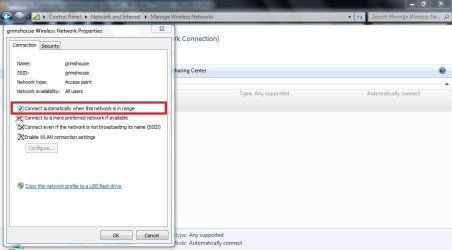
Go to Control Panel>Network and Internet>Manage Wireless Networks

Delete your neighbors connection, and make sure your signal is the only one that shows up.

Let me know how it all goes,ok?

I attached a screen shot may help you further:)
 

Attachments

  • wireless properties.JPG
    wireless properties.JPG
    52.5 KB · Views: 89

My Computer My Computer

Computer Manufacturer/Model Number
custom of course...built by grimreaper
OS
Windows 7 Ultimate X64
CPU
Intel Core 2 Quad Q9650 3.0GHz (3.6GHz 24/7) maxed 4.05GHz
Motherboard
EVGA 790i Ultra SLi Model#132-CK-NF79-A1 BIOS P10
Memory
8GB OCZ DDR3 PC3-14400 @ 1800MHz NVIDIA SLi-Ready
Graphics Card(s)
2XBFG GeForce GTX 280 OC Edition SLi'd
Sound Card
SoundBlaster X-Fi Titanium Fatal1ty Pro Series
Monitor(s) Displays
Samsung 52" 1080P LCD HDTV (LN52B550)
Screen Resolution
1920X1080 @ 60Hz
Hard Drives
3xWestern Digital WD1001FALS Caviar Black 1TB Hard Drive(s) RAID 0 x2 encased in 3xMasscool KuFormula SHF1 HDD Cooler(s)
PSU
ThermalTake ToughPower 1200W P/N:W0133RU Modularized
Case
ThermalTake P/N: VH6000BWS Armor Full-Tower
Cooling
ThermalTake SpinQ P/N: P0466 CPU Cooler
Keyboard
Logitech cordless Y-RAJ56A piece of ****
Mouse
Logitech G7 Laser Cordless mouse black
Internet Speed
10 Mbps DL-1Mbps UL wirelessly DWA-552 extreme N
Other Info
1XSamsung DVD burner SH-S223Q/BEBN SATA
1XSamsung DVD burner SH-S223L/BEBN SATA
1XLG GGW-H20L Blu-Ray burner
4XCooler Master 120mm Blue LED SickleFlow 2000 RPM
1XBelkin UPS F6C1500TWRK) backup power supply
That would be the obvious solution -- and i've done it several times, but alas, to no avail.

The moment it picks up their connection again (Their home is about 1500 ft away, I get a very very weak signal, and it goes in and out, we're out in the country so there is literally no noise -- but sometimes it picks up their connection, others it doesn't) it adds the profile again =/

As for that, I have everything but "Connect to a more preffered network if available" checked -- but ironically it doesn't automatically connect to my network, I have to do it manually =/
 

My Computer My Computer

OS
7
What kind of router do you have?

Also, it would help members of Seven Forums if you could fill out your system profile as much as possible to help us give you a more accurate answer to the problem(s) you currently have.
 

My Computer My Computer

Computer Manufacturer/Model Number
custom of course...built by grimreaper
OS
Windows 7 Ultimate X64
CPU
Intel Core 2 Quad Q9650 3.0GHz (3.6GHz 24/7) maxed 4.05GHz
Motherboard
EVGA 790i Ultra SLi Model#132-CK-NF79-A1 BIOS P10
Memory
8GB OCZ DDR3 PC3-14400 @ 1800MHz NVIDIA SLi-Ready
Graphics Card(s)
2XBFG GeForce GTX 280 OC Edition SLi'd
Sound Card
SoundBlaster X-Fi Titanium Fatal1ty Pro Series
Monitor(s) Displays
Samsung 52" 1080P LCD HDTV (LN52B550)
Screen Resolution
1920X1080 @ 60Hz
Hard Drives
3xWestern Digital WD1001FALS Caviar Black 1TB Hard Drive(s) RAID 0 x2 encased in 3xMasscool KuFormula SHF1 HDD Cooler(s)
PSU
ThermalTake ToughPower 1200W P/N:W0133RU Modularized
Case
ThermalTake P/N: VH6000BWS Armor Full-Tower
Cooling
ThermalTake SpinQ P/N: P0466 CPU Cooler
Keyboard
Logitech cordless Y-RAJ56A piece of ****
Mouse
Logitech G7 Laser Cordless mouse black
Internet Speed
10 Mbps DL-1Mbps UL wirelessly DWA-552 extreme N
Other Info
1XSamsung DVD burner SH-S223Q/BEBN SATA
1XSamsung DVD burner SH-S223L/BEBN SATA
1XLG GGW-H20L Blu-Ray burner
4XCooler Master 120mm Blue LED SickleFlow 2000 RPM
1XBelkin UPS F6C1500TWRK) backup power supply
First, Thanks for all the help, kind of an odd problem I know:

as for the router, I said it in the initial post, but again:
Linksys 160N, running DD-WRT k26 build 14815
Wireless card is a Atheros ar928x
Laptop is a Asus m70Vm
uh.. rest is kind of unimportant to the issue at hand.

As I said, in ubuntu, I stayed connected for 14 hours straight, no disconnects, it picked up their router several times but just ignored it (it was in the "other available connections" box, but it didn't try to connect or anything)

So it's 7, not my router or laptop, heh.
 

My Computer My Computer

OS
7
Yes you did post earlier on...my bad...I'm getting tired lol

Let me do a little searching for an answer I'll be back:)
 

My Computer My Computer

Computer Manufacturer/Model Number
custom of course...built by grimreaper
OS
Windows 7 Ultimate X64
CPU
Intel Core 2 Quad Q9650 3.0GHz (3.6GHz 24/7) maxed 4.05GHz
Motherboard
EVGA 790i Ultra SLi Model#132-CK-NF79-A1 BIOS P10
Memory
8GB OCZ DDR3 PC3-14400 @ 1800MHz NVIDIA SLi-Ready
Graphics Card(s)
2XBFG GeForce GTX 280 OC Edition SLi'd
Sound Card
SoundBlaster X-Fi Titanium Fatal1ty Pro Series
Monitor(s) Displays
Samsung 52" 1080P LCD HDTV (LN52B550)
Screen Resolution
1920X1080 @ 60Hz
Hard Drives
3xWestern Digital WD1001FALS Caviar Black 1TB Hard Drive(s) RAID 0 x2 encased in 3xMasscool KuFormula SHF1 HDD Cooler(s)
PSU
ThermalTake ToughPower 1200W P/N:W0133RU Modularized
Case
ThermalTake P/N: VH6000BWS Armor Full-Tower
Cooling
ThermalTake SpinQ P/N: P0466 CPU Cooler
Keyboard
Logitech cordless Y-RAJ56A piece of ****
Mouse
Logitech G7 Laser Cordless mouse black
Internet Speed
10 Mbps DL-1Mbps UL wirelessly DWA-552 extreme N
Other Info
1XSamsung DVD burner SH-S223Q/BEBN SATA
1XSamsung DVD burner SH-S223L/BEBN SATA
1XLG GGW-H20L Blu-Ray burner
4XCooler Master 120mm Blue LED SickleFlow 2000 RPM
1XBelkin UPS F6C1500TWRK) backup power supply
I would do a hard reset on the Linksys WRT160N router, start from scratch, and set it on the 2.4Ghz band, pick either wireless N only or mixed N,G and B or N and G only , encryption set it for only AES WPA/WPA2.

When you have finally configured the router, save and reboot, then search for your SSID (wireless signal), and configure your Atheros AR9285 properly, and you should have no further problems.

Let me know how it all goes for you my friend;)
 

My Computer My Computer

Computer Manufacturer/Model Number
custom of course...built by grimreaper
OS
Windows 7 Ultimate X64
CPU
Intel Core 2 Quad Q9650 3.0GHz (3.6GHz 24/7) maxed 4.05GHz
Motherboard
EVGA 790i Ultra SLi Model#132-CK-NF79-A1 BIOS P10
Memory
8GB OCZ DDR3 PC3-14400 @ 1800MHz NVIDIA SLi-Ready
Graphics Card(s)
2XBFG GeForce GTX 280 OC Edition SLi'd
Sound Card
SoundBlaster X-Fi Titanium Fatal1ty Pro Series
Monitor(s) Displays
Samsung 52" 1080P LCD HDTV (LN52B550)
Screen Resolution
1920X1080 @ 60Hz
Hard Drives
3xWestern Digital WD1001FALS Caviar Black 1TB Hard Drive(s) RAID 0 x2 encased in 3xMasscool KuFormula SHF1 HDD Cooler(s)
PSU
ThermalTake ToughPower 1200W P/N:W0133RU Modularized
Case
ThermalTake P/N: VH6000BWS Armor Full-Tower
Cooling
ThermalTake SpinQ P/N: P0466 CPU Cooler
Keyboard
Logitech cordless Y-RAJ56A piece of ****
Mouse
Logitech G7 Laser Cordless mouse black
Internet Speed
10 Mbps DL-1Mbps UL wirelessly DWA-552 extreme N
Other Info
1XSamsung DVD burner SH-S223Q/BEBN SATA
1XSamsung DVD burner SH-S223L/BEBN SATA
1XLG GGW-H20L Blu-Ray burner
4XCooler Master 120mm Blue LED SickleFlow 2000 RPM
1XBelkin UPS F6C1500TWRK) backup power supply
I did several 30-30-30 hard resets when installing dd-wrt, and like I said, I confirmed it wasn't the router with the ubuntu check; The problem with with a setting somewhere in 7, that iI don't know how to find.

Thanks, though
 

My Computer My Computer

OS
7
I did several 30-30-30 hard resets when installing dd-wrt, and like I said, I confirmed it wasn't the router with the ubuntu check; The problem with with a setting somewhere in 7, that iI don't know how to find.

Thanks, though

If you go to your Network and Sharing center look upper left then to "manage wireless networks" open that up and you will see both connections there where you can adjust the settings to not connect automatically or you can delate the unwanted connection.

You can also go to the control panel and then to the credential manager where you can also adjust or delate the unwanted connection.

Although this may be a channel crosover problem in which case you should run Xirrus Wi-Fi scanner to determine the best channel to use.
Xirrus: The Leader in High Performance Wi-Fi - Advanced IT Wi-Fi Networking Tools
 

My Computer My Computer

Computer type
PC/Desktop
Computer Manufacturer/Model Number
Home built
OS
Windows 7 Ult, Windows 8.1 Pro,
CPU
Q9650-4.275GHz, E8600 4.5GHz, E6750-3.8GHz
Motherboard
Evga 780i FTW
Memory
G.Skill PC2 9600 1200Mhz 5 5 5 15 2T
Graphics Card(s)
GTX480
Sound Card
Asus Xonar D2
Monitor(s) Displays
HannsG
Screen Resolution
1680X1050
Hard Drives
GSkill Phoenix Pro 120GB SSD
PSU
ThermalTake Toughpower 1000Watt modular
Case
ThermalTake XaserV
Cooling
Xigmatek S1283
Keyboard
Logitech G15
Mouse
Logitech G9
Internet Speed
T1
As I said earlier, I can delete it, but the signal from the neighbors connection is so weak it goes in and out (As in, I can see it at times, others I can't) -- so even if I do delete it, it just comes back next time it picks up their connection. Removing the auto connect there does nothing, still dc's me the moment it finds it

.. and I have no idea how to use credentials

Finally it's not a channel problem, as I said earlier, I ran it in a different operating system for 14 hours, it picked up the other connection there too, but it didn't disconnect me, or try to connect to it or anything

The problem lies in Windows 7 trying to force me to connect to their network when it finds it, for some reason.
 

My Computer My Computer

OS
7
Back
Top