
Icon help

I just realised something when i was going through the tutorial and starting the install...

A "repair install" is just installing brand new windows ontop of the old windows.... so i will have you reinstall all the programs... and things to work with the new windows file...

and going through the tutorial im not sure if it only effects the "windows" folder or if it effects everything [like the program files, My documents, User profiles etc.]... im a tad cautious here.... but i do think that the problem is in my Windows Installer... but how do i fix this so that it doesnt happen again?
 

My Computer

Computer Manufacturer/Model Number
Self Built
OS
Windows 7 Professional 64bit + Ubuntu in Virtual Box
CPU
Intel Quad Core 9550
Motherboard
ASUS P5Q SE2
Memory
2048MB Transend
Graphics Card(s)
Powercolor Radeon HD4870
Sound Card
Onboard
Monitor(s) Displays
Fujitsu Siemens Scaleoview L17-7 TFT
Screen Resolution
1280x1024
Hard Drives
500GB Seagate Barracuda
1TB Segate Barracuda
PSU
Huntkey 600W
Case
Achielles
Cooling
3x Fans
Keyboard
Microsoft Reculsa
Mouse
Microsoft Sidewinder 3X
Internet Speed
4MB
Other Info
TEC 5.1 Surround Sound
Free Mouse Pad :P

I just realised something when i was going through the tutorial and starting the install...

A "repair install" is just installing brand new windows ontop of the old windows.... so i will have you reinstall all the programs... and things to work with the new windows file...

and going through the tutorial im not sure if it only effects the "windows" folder or if it effects everything [like the program files, My documents, User profiles etc.]... im a tad cautious here.... but i do think that the problem is in my Windows Installer... but how do i fix this so that it doesnt happen again?

Repair install will preserve your programs, This is right at the top of that tutorial...
 

Attachments

  • repair.JPG
    repair.JPG
    55 KB · Views: 11

My Computer

Computer type
PC/Desktop
Computer Manufacturer/Model Number
Self Built
OS
Win 10 Pro x64
CPU
Intel I5-2500K @3.3GHz
Motherboard
Asrock P67 Extreme4
Memory
16GB G.Skill Ripjaws X (4x4GB)
Graphics Card(s)
EVGA GeForce 750 Ti SC 2GB
Sound Card
ASUS Xonar DG 5.1 Channels 24-bit 96KHz PCI Interface Sound
Monitor(s) Displays
auria eq2367
Screen Resolution
1920 x 1080
Hard Drives
250GB Samsung 850 EVO SSD
1TB WD Blue
1TB Hitachi
PSU
SeaSonic X 650W 80 Plus Gold
Case
Corsair Obsidian 750D
Cooling
Corsair H60, Three 140mm case fans
Keyboard
Logitech Wireless Keyboard K520
Mouse
Logitech Wireless Mouse M310
Internet Speed
Wave Broadband ~ 100 dn 5 up
Antivirus
Windows Defender, Malwarebytes Premium
Browser
Edge, IE11, Chrome
Other Info
Laptop specs: HP g7-1365dx /
CPU: AMD A6-3420M APU with Radeon(tm) HD Graphics /
RAM: Crucial 8Gb (2x4Gb) /
SSD: Crucial M4-CT128M4SSD2 ATA Device/ FW 000F /
GFX: AMD Radeon HD 6520G /
OS: Windows 10 Pro x64
As repair install is an upgrade install, it will take effect of most of all of your installed programs. Only a few like Safari, iTunes, ets are to be installed later again.

And, user profile, my documents, etc will not be lost.
 

My Computer

Computer type
PC/Desktop
Computer Manufacturer/Model Number
Self Assembled
OS
Microsoft Windows 10 Pro Insider Preview 64-bit
CPU
Intel(R) Core(TM) i3-4130 CPU @ 3.40GHz
Motherboard
Gigabyte Technology Co., Ltd. B85M-D3H
Memory
Corsair Vengence 4GB x2 (8.00GB Dual-Channel DDR3 @ 798MHz)
Graphics Card(s)
2047MB GeForce GTS 450 (ZOTAC International)
Sound Card
Onboard (Realtek High Definition Audio)
Monitor(s) Displays
LG Flatron E2040T
Screen Resolution
1600x900
Hard Drives
Western Digital 1 TB
Seagate 500 GB
PSU
Corsair VS550
Case
Cooler Master K380
Cooling
Cooler Master Seidon 120V Plus
Keyboard
Logitech MK260r
Mouse
Logitech MK260r
Internet Speed
PMPL Broadband
Antivirus
Windows Defender + MBAM
Browser
Firefox
Other Info
Dell Studio 15" Laptop
ok i will let you guys know how it turned out.
 

My Computer

Computer Manufacturer/Model Number
Self Built
OS
Windows 7 Professional 64bit + Ubuntu in Virtual Box
CPU
Intel Quad Core 9550
Motherboard
ASUS P5Q SE2
Memory
2048MB Transend
Graphics Card(s)
Powercolor Radeon HD4870
Sound Card
Onboard
Monitor(s) Displays
Fujitsu Siemens Scaleoview L17-7 TFT
Screen Resolution
1280x1024
Hard Drives
500GB Seagate Barracuda
1TB Segate Barracuda
PSU
Huntkey 600W
Case
Achielles
Cooling
3x Fans
Keyboard
Microsoft Reculsa
Mouse
Microsoft Sidewinder 3X
Internet Speed
4MB
Other Info
TEC 5.1 Surround Sound
Free Mouse Pad :P
ok i will let you guys know how it turned out.

Well it appears that everything is still intact and it didnt change my logon screen or anything like that... i have done the bulk of the updating... but i have noticed a reduce in speed....

ok but now how are we going to fix the icons.... i did get windows office 2010 so should i just install that? and then what about the games.... could i possibly copy the 2007 office folder from an XP installer file to my computer? will that fix the prob...
 

My Computer

Computer Manufacturer/Model Number
Self Built
OS
Windows 7 Professional 64bit + Ubuntu in Virtual Box
CPU
Intel Quad Core 9550
Motherboard
ASUS P5Q SE2
Memory
2048MB Transend
Graphics Card(s)
Powercolor Radeon HD4870
Sound Card
Onboard
Monitor(s) Displays
Fujitsu Siemens Scaleoview L17-7 TFT
Screen Resolution
1280x1024
Hard Drives
500GB Seagate Barracuda
1TB Segate Barracuda
PSU
Huntkey 600W
Case
Achielles
Cooling
3x Fans
Keyboard
Microsoft Reculsa
Mouse
Microsoft Sidewinder 3X
Internet Speed
4MB
Other Info
TEC 5.1 Surround Sound
Free Mouse Pad :P
*BUMP*
 

My Computer

Computer Manufacturer/Model Number
Self Built
OS
Windows 7 Professional 64bit + Ubuntu in Virtual Box
CPU
Intel Quad Core 9550
Motherboard
ASUS P5Q SE2
Memory
2048MB Transend
Graphics Card(s)
Powercolor Radeon HD4870
Sound Card
Onboard
Monitor(s) Displays
Fujitsu Siemens Scaleoview L17-7 TFT
Screen Resolution
1280x1024
Hard Drives
500GB Seagate Barracuda
1TB Segate Barracuda
PSU
Huntkey 600W
Case
Achielles
Cooling
3x Fans
Keyboard
Microsoft Reculsa
Mouse
Microsoft Sidewinder 3X
Internet Speed
4MB
Other Info
TEC 5.1 Surround Sound
Free Mouse Pad :P
Sorry pal ! Forgot the link ... your post made it visible again. After having repair install successfully done, run Disk Cleanup (in accessories > System Tools) once. After that, if your icons are still invisible, Install the programs again, without reinstalling those. When completed, have a prompt backup, so that if such instance occurs again, you can easily restore it.

If still it doesnot work, I will call a person having more expertise.
 

My Computer

Computer type
PC/Desktop
Computer Manufacturer/Model Number
Self Assembled
OS
Microsoft Windows 10 Pro Insider Preview 64-bit
CPU
Intel(R) Core(TM) i3-4130 CPU @ 3.40GHz
Motherboard
Gigabyte Technology Co., Ltd. B85M-D3H
Memory
Corsair Vengence 4GB x2 (8.00GB Dual-Channel DDR3 @ 798MHz)
Graphics Card(s)
2047MB GeForce GTS 450 (ZOTAC International)
Sound Card
Onboard (Realtek High Definition Audio)
Monitor(s) Displays
LG Flatron E2040T
Screen Resolution
1600x900
Hard Drives
Western Digital 1 TB
Seagate 500 GB
PSU
Corsair VS550
Case
Cooler Master K380
Cooling
Cooler Master Seidon 120V Plus
Keyboard
Logitech MK260r
Mouse
Logitech MK260r
Internet Speed
PMPL Broadband
Antivirus
Windows Defender + MBAM
Browser
Firefox
Other Info
Dell Studio 15" Laptop
ok then the next question is... unrelated to the topic is... would you suggest i reinstall Microsoft Office 2007 or move onto 2010?
 

My Computer

Computer Manufacturer/Model Number
Self Built
OS
Windows 7 Professional 64bit + Ubuntu in Virtual Box
CPU
Intel Quad Core 9550
Motherboard
ASUS P5Q SE2
Memory
2048MB Transend
Graphics Card(s)
Powercolor Radeon HD4870
Sound Card
Onboard
Monitor(s) Displays
Fujitsu Siemens Scaleoview L17-7 TFT
Screen Resolution
1280x1024
Hard Drives
500GB Seagate Barracuda
1TB Segate Barracuda
PSU
Huntkey 600W
Case
Achielles
Cooling
3x Fans
Keyboard
Microsoft Reculsa
Mouse
Microsoft Sidewinder 3X
Internet Speed
4MB
Other Info
TEC 5.1 Surround Sound
Free Mouse Pad :P
ok then the next question is... unrelated to the topic is... would you suggest i reinstall Microsoft Office 2007 or move onto 2010?
If it is possible , surely use 2010 . It is good enough, and have some more advancements over 2007 . In this case, use ungrade install .
 

My Computer

Computer type
PC/Desktop
Computer Manufacturer/Model Number
Self Assembled
OS
Microsoft Windows 10 Pro Insider Preview 64-bit
CPU
Intel(R) Core(TM) i3-4130 CPU @ 3.40GHz
Motherboard
Gigabyte Technology Co., Ltd. B85M-D3H
Memory
Corsair Vengence 4GB x2 (8.00GB Dual-Channel DDR3 @ 798MHz)
Graphics Card(s)
2047MB GeForce GTS 450 (ZOTAC International)
Sound Card
Onboard (Realtek High Definition Audio)
Monitor(s) Displays
LG Flatron E2040T
Screen Resolution
1600x900
Hard Drives
Western Digital 1 TB
Seagate 500 GB
PSU
Corsair VS550
Case
Cooler Master K380
Cooling
Cooler Master Seidon 120V Plus
Keyboard
Logitech MK260r
Mouse
Logitech MK260r
Internet Speed
PMPL Broadband
Antivirus
Windows Defender + MBAM
Browser
Firefox
Other Info
Dell Studio 15" Laptop
ok then the next question is... unrelated to the topic is... would you suggest i reinstall Microsoft Office 2007 or move onto 2010?
If it is possible , surely use 2010 . It is good enough, and have some more advancements over 2007 . In this case, use ungrade install .

Ok sweet.... we will see what happens...

but my itunes, supreme commander and eset icons are still not working...
 

My Computer

Computer Manufacturer/Model Number
Self Built
OS
Windows 7 Professional 64bit + Ubuntu in Virtual Box
CPU
Intel Quad Core 9550
Motherboard
ASUS P5Q SE2
Memory
2048MB Transend
Graphics Card(s)
Powercolor Radeon HD4870
Sound Card
Onboard
Monitor(s) Displays
Fujitsu Siemens Scaleoview L17-7 TFT
Screen Resolution
1280x1024
Hard Drives
500GB Seagate Barracuda
1TB Segate Barracuda
PSU
Huntkey 600W
Case
Achielles
Cooling
3x Fans
Keyboard
Microsoft Reculsa
Mouse
Microsoft Sidewinder 3X
Internet Speed
4MB
Other Info
TEC 5.1 Surround Sound
Free Mouse Pad :P
Just install those three programs over the existing installation , and when everything is fine, dont forget to have the image backup.
 

My Computer

Computer type
PC/Desktop
Computer Manufacturer/Model Number
Self Assembled
OS
Microsoft Windows 10 Pro Insider Preview 64-bit
CPU
Intel(R) Core(TM) i3-4130 CPU @ 3.40GHz
Motherboard
Gigabyte Technology Co., Ltd. B85M-D3H
Memory
Corsair Vengence 4GB x2 (8.00GB Dual-Channel DDR3 @ 798MHz)
Graphics Card(s)
2047MB GeForce GTS 450 (ZOTAC International)
Sound Card
Onboard (Realtek High Definition Audio)
Monitor(s) Displays
LG Flatron E2040T
Screen Resolution
1600x900
Hard Drives
Western Digital 1 TB
Seagate 500 GB
PSU
Corsair VS550
Case
Cooler Master K380
Cooling
Cooler Master Seidon 120V Plus
Keyboard
Logitech MK260r
Mouse
Logitech MK260r
Internet Speed
PMPL Broadband
Antivirus
Windows Defender + MBAM
Browser
Firefox
Other Info
Dell Studio 15" Laptop
Hey dudes...

Arc.. I will try that soon, that will probaly be the correct solution... but i was reading a post on fixing my updates.. which can be seen here [the last one]

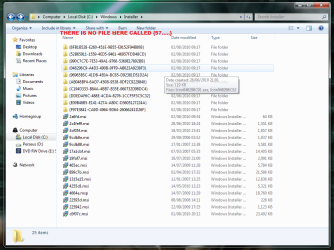
and i thought.. might as well check out the affected programs while i am in the registry and to my surprise in the registry [screenshot included] there was this file path... WHICH TO NO FILE!!!

So i changed it to the program file where the icon is.... it didnt work.... but do you think that i am onto something here?

and for the all the icons that are not working it is looking in a non-existing file... should i rather edit that folder? but how do i get permission to copy into them? I have the thing that allows me to take ownership... do i need to take ownership of the whole file path or can i just take ownership of the file?
 

Attachments

  • Untitled.png
    Untitled.png
    259.3 KB · Views: 34

My Computer

Computer Manufacturer/Model Number
Self Built
OS
Windows 7 Professional 64bit + Ubuntu in Virtual Box
CPU
Intel Quad Core 9550
Motherboard
ASUS P5Q SE2
Memory
2048MB Transend
Graphics Card(s)
Powercolor Radeon HD4870
Sound Card
Onboard
Monitor(s) Displays
Fujitsu Siemens Scaleoview L17-7 TFT
Screen Resolution
1280x1024
Hard Drives
500GB Seagate Barracuda
1TB Segate Barracuda
PSU
Huntkey 600W
Case
Achielles
Cooling
3x Fans
Keyboard
Microsoft Reculsa
Mouse
Microsoft Sidewinder 3X
Internet Speed
4MB
Other Info
TEC 5.1 Surround Sound
Free Mouse Pad :P
and for the all the icons that are not working it is looking in a non-existing file... should i rather edit that folder? but how do i get permission to copy into them? I have the thing that allows me to take ownership... do i need to take ownership of the whole file path or can i just take ownership of the file?
That's where some softwares keep their icons. Folder deletions can take place relatively easily from here. It's the same when a program says cannot un-install, its installer is missing. BTW, Eset is one of those that uses this location for icons.
 

My Computer

OS
Windows 7 Ultimatum
and for the all the icons that are not working it is looking in a non-existing file... should i rather edit that folder? but how do i get permission to copy into them? I have the thing that allows me to take ownership... do i need to take ownership of the whole file path or can i just take ownership of the file?
That's where some softwares keep their icons. Folder deletions can take place relatively easily from here. It's the same when a program says cannot un-install, its installer is missing. BTW, Eset is one of those that uses this location for icons.

So it would be better if i recreated those files?
 

My Computer

Computer Manufacturer/Model Number
Self Built
OS
Windows 7 Professional 64bit + Ubuntu in Virtual Box
CPU
Intel Quad Core 9550
Motherboard
ASUS P5Q SE2
Memory
2048MB Transend
Graphics Card(s)
Powercolor Radeon HD4870
Sound Card
Onboard
Monitor(s) Displays
Fujitsu Siemens Scaleoview L17-7 TFT
Screen Resolution
1280x1024
Hard Drives
500GB Seagate Barracuda
1TB Segate Barracuda
PSU
Huntkey 600W
Case
Achielles
Cooling
3x Fans
Keyboard
Microsoft Reculsa
Mouse
Microsoft Sidewinder 3X
Internet Speed
4MB
Other Info
TEC 5.1 Surround Sound
Free Mouse Pad :P
If you re-install over your existing programs the folders will (should!!) be replaced. Are icons missing or changed to default blank icons? If they're default blank, r-click and it'll tell you the path to the original location if you click "change icon".
 

My Computer

OS
Windows 7 Ultimatum
If you re-install over your existing programs the folders will (should!!) be replaced. Are icons missing or changed to default blank icons? If they're default blank, r-click and it'll tell you the path to the original location if you click "change icon".
Hi Sympatico !!
I hope his Change icon button for those program icons are already grayed out. (The same thing happened for me, you know). So if the location doesnot exist at all, probably instilling the programs over the existing installation, as you suggested , is the only way to have everything back.

Let us think and find out the cause of deletion of those folders , coz it is a common scenario to loose these things. If our icon is changed to the default, but the path exists, we may try reshacker etc to fix them, but if the location is deleting, how to prevent it ?
 

My Computer

Computer type
PC/Desktop
Computer Manufacturer/Model Number
Self Assembled
OS
Microsoft Windows 10 Pro Insider Preview 64-bit
CPU
Intel(R) Core(TM) i3-4130 CPU @ 3.40GHz
Motherboard
Gigabyte Technology Co., Ltd. B85M-D3H
Memory
Corsair Vengence 4GB x2 (8.00GB Dual-Channel DDR3 @ 798MHz)
Graphics Card(s)
2047MB GeForce GTS 450 (ZOTAC International)
Sound Card
Onboard (Realtek High Definition Audio)
Monitor(s) Displays
LG Flatron E2040T
Screen Resolution
1600x900
Hard Drives
Western Digital 1 TB
Seagate 500 GB
PSU
Corsair VS550
Case
Cooler Master K380
Cooling
Cooler Master Seidon 120V Plus
Keyboard
Logitech MK260r
Mouse
Logitech MK260r
Internet Speed
PMPL Broadband
Antivirus
Windows Defender + MBAM
Browser
Firefox
Other Info
Dell Studio 15" Laptop
If you re-install over your existing programs the folders will (should!!) be replaced. Are icons missing or changed to default blank icons? If they're default blank, r-click and it'll tell you the path to the original location if you click "change icon".
Hi Sympatico !!
I hope his Change icon button for those program icons are already grayed out. (The same thing happened for me, you know). So if the location doesnot exist at all, probably instilling the programs over the existing installation, as you suggested , is the only way to have everything back.

Let us think and find out the cause of deletion of those folders , coz it is a common scenario to loose these things. If our icon is changed to the default, but the path exists, we may try reshacker etc to fix them, but if the location is deleting, how to prevent it ?

Yeah coz i dont want to have to fix my icons every month...
 

My Computer

Computer Manufacturer/Model Number
Self Built
OS
Windows 7 Professional 64bit + Ubuntu in Virtual Box
CPU
Intel Quad Core 9550
Motherboard
ASUS P5Q SE2
Memory
2048MB Transend
Graphics Card(s)
Powercolor Radeon HD4870
Sound Card
Onboard
Monitor(s) Displays
Fujitsu Siemens Scaleoview L17-7 TFT
Screen Resolution
1280x1024
Hard Drives
500GB Seagate Barracuda
1TB Segate Barracuda
PSU
Huntkey 600W
Case
Achielles
Cooling
3x Fans
Keyboard
Microsoft Reculsa
Mouse
Microsoft Sidewinder 3X
Internet Speed
4MB
Other Info
TEC 5.1 Surround Sound
Free Mouse Pad :P
Yeah coz i dont want to have to fix my icons every month...
If we try ... you, Sympatico, me and others, I hope there must be a way out . But primarily, do as Sympatico suggested .... reinstall the programs once again. As and when everything is fine, have a quick image backup.
 

My Computer

Computer type
PC/Desktop
Computer Manufacturer/Model Number
Self Assembled
OS
Microsoft Windows 10 Pro Insider Preview 64-bit
CPU
Intel(R) Core(TM) i3-4130 CPU @ 3.40GHz
Motherboard
Gigabyte Technology Co., Ltd. B85M-D3H
Memory
Corsair Vengence 4GB x2 (8.00GB Dual-Channel DDR3 @ 798MHz)
Graphics Card(s)
2047MB GeForce GTS 450 (ZOTAC International)
Sound Card
Onboard (Realtek High Definition Audio)
Monitor(s) Displays
LG Flatron E2040T
Screen Resolution
1600x900
Hard Drives
Western Digital 1 TB
Seagate 500 GB
PSU
Corsair VS550
Case
Cooler Master K380
Cooling
Cooler Master Seidon 120V Plus
Keyboard
Logitech MK260r
Mouse
Logitech MK260r
Internet Speed
PMPL Broadband
Antivirus
Windows Defender + MBAM
Browser
Firefox
Other Info
Dell Studio 15" Laptop
...coz it is a common scenario to loose these things. If our icon is changed to the default, but the path exists, we may try reshacker etc to fix them, but if the location is deleting, how to prevent it ?
Hi Arc,
I've never really found out why/who/what was deleting stuff out of the installers folder, I just know it used to happen to me a lot more in the past when on XP. Mind you, I was using pretty "aggressive" clean-up tools at the time. I even had the folder completely emptied once!!
Yeah coz i dont want to have to fix my icons every month...
Coward!! ;)
 

My Computer

OS
Windows 7 Ultimatum
how do i do an image back up... how much space does that take? I really dont want to reinstall all of my programs... i can live with the eset and supreme commander... even the itunes... but the office is bugging me...
 

My Computer

Computer Manufacturer/Model Number
Self Built
OS
Windows 7 Professional 64bit + Ubuntu in Virtual Box
CPU
Intel Quad Core 9550
Motherboard
ASUS P5Q SE2
Memory
2048MB Transend
Graphics Card(s)
Powercolor Radeon HD4870
Sound Card
Onboard
Monitor(s) Displays
Fujitsu Siemens Scaleoview L17-7 TFT
Screen Resolution
1280x1024
Hard Drives
500GB Seagate Barracuda
1TB Segate Barracuda
PSU
Huntkey 600W
Case
Achielles
Cooling
3x Fans
Keyboard
Microsoft Reculsa
Mouse
Microsoft Sidewinder 3X
Internet Speed
4MB
Other Info
TEC 5.1 Surround Sound
Free Mouse Pad :P
Back
Top