Need to Remove Old Network Devices (NIC)

WindowsStar

New member
Guru
Gold Member
VIP
Local time
3:40 AM
Messages
2,737
Location
Earth - I wish I was on Risa
First off, machine works FINE, Network Works fine.

Problem in a nutshell:

I had 2 HP 318 Network Cards in my Windows 7 Ultimate machine and I replaced both with 2 new Broadcom Cards.

Booted up and everything works. However Windows 7 still sees the old cards, sort of. If you look anywhere in the GUI the cards are gone, you cannot see them or find them in the GUI, however if you run some software it picks up the old cards as well the new cards, so software thinks I have 4 network cards when I only have 2. I assume it is because these old cards are still in the registry somewhere but I cannot find where.

Anyone know where these are stored in the registry; so I can delete the registry entries and clean this up?

Thanks

WS
 

My Computer My Computer

Computer type
PC/Desktop
Computer Manufacturer/Model Number
Dell OP7010
OS
Windows 7 Enterprise (x64); Windows Server 2008 R2 (x64)
Memory
16GB
Monitor(s) Displays
4 Dell 24" LCD
Screen Resolution
1280x1024
Keyboard
Dell
Mouse
Dell Optical
Internet Speed
40meg
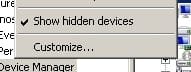
Usually just going into the device manager> view>show hidden devices, will allow to remove those old adaptors.
 

My Computer My Computer

Computer type
PC/Desktop
Computer Manufacturer/Model Number
Home built
OS
Windows 7 Ult, Windows 8.1 Pro,
CPU
Q9650-4.275GHz, E8600 4.5GHz, E6750-3.8GHz
Motherboard
Evga 780i FTW
Memory
G.Skill PC2 9600 1200Mhz 5 5 5 15 2T
Graphics Card(s)
GTX480
Sound Card
Asus Xonar D2
Monitor(s) Displays
HannsG
Screen Resolution
1680X1050
Hard Drives
GSkill Phoenix Pro 120GB SSD
PSU
ThermalTake Toughpower 1000Watt modular
Case
ThermalTake XaserV
Cooling
Xigmatek S1283
Keyboard
Logitech G15
Mouse
Logitech G9
Internet Speed
T1
Usually just going into the device manager> view>show hidden devices, will allow to remove those old adaptors.

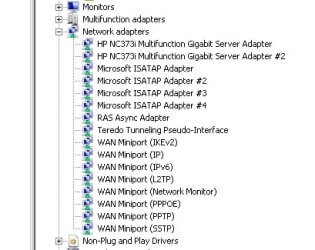
Nope, you do not see them in the Windows GUI anywhere.

They are not listed in the Device Manager. Thanks for the suggestion; they are in the registry somewhere I just need to know where. I think I can delete the keys that point to the old NICs and then we will be good. -WS

Edit: I was messing around and put the HP cards back in and you do not see the Broadcom cards.
 

Attachments

  • NIC1.jpg
    NIC1.jpg
    26.1 KB · Views: 44
  • NIC2.jpg
    NIC2.jpg
    3.8 KB · Views: 6,138

My Computer My Computer

Computer type
PC/Desktop
Computer Manufacturer/Model Number
Dell OP7010
OS
Windows 7 Enterprise (x64); Windows Server 2008 R2 (x64)
Memory
16GB
Monitor(s) Displays
4 Dell 24" LCD
Screen Resolution
1280x1024
Keyboard
Dell
Mouse
Dell Optical
Internet Speed
40meg
Have you tried using CCleaner to remove the unassociated nic entries from the registry. Be sure and back up the registry first needless to say.
 

My Computer My Computer

Computer type
PC/Desktop
Computer Manufacturer/Model Number
Home built
OS
Windows 7 Ult, Windows 8.1 Pro,
CPU
Q9650-4.275GHz, E8600 4.5GHz, E6750-3.8GHz
Motherboard
Evga 780i FTW
Memory
G.Skill PC2 9600 1200Mhz 5 5 5 15 2T
Graphics Card(s)
GTX480
Sound Card
Asus Xonar D2
Monitor(s) Displays
HannsG
Screen Resolution
1680X1050
Hard Drives
GSkill Phoenix Pro 120GB SSD
PSU
ThermalTake Toughpower 1000Watt modular
Case
ThermalTake XaserV
Cooling
Xigmatek S1283
Keyboard
Logitech G15
Mouse
Logitech G9
Internet Speed
T1
I have not tried CCleaner, I like the software but I keep reading mixed reviews on it, and many of the GURUs here say not to use it. I guess I could try it as a test ONLY???
 

My Computer My Computer

Computer type
PC/Desktop
Computer Manufacturer/Model Number
Dell OP7010
OS
Windows 7 Enterprise (x64); Windows Server 2008 R2 (x64)
Memory
16GB
Monitor(s) Displays
4 Dell 24" LCD
Screen Resolution
1280x1024
Keyboard
Dell
Mouse
Dell Optical
Internet Speed
40meg
I have not tried CCleaner, I like the software but I keep reading mixed reviews on it, and many of the GURUs here say not to use it. I guess I could try it as a test ONLY???

It works really well for me and you are prompted to create a back up first so not much to lose by trying it. You should try CCleaner first because it usually picks up any unassociated registry entries and allows you to remove them safely.

Alternatively you could try this Msoft link which will allow even more hidden devices to show up in device manager.
Error message when you try to set an IP address on a network adapter
 

My Computer My Computer

Computer type
PC/Desktop
Computer Manufacturer/Model Number
Home built
OS
Windows 7 Ult, Windows 8.1 Pro,
CPU
Q9650-4.275GHz, E8600 4.5GHz, E6750-3.8GHz
Motherboard
Evga 780i FTW
Memory
G.Skill PC2 9600 1200Mhz 5 5 5 15 2T
Graphics Card(s)
GTX480
Sound Card
Asus Xonar D2
Monitor(s) Displays
HannsG
Screen Resolution
1680X1050
Hard Drives
GSkill Phoenix Pro 120GB SSD
PSU
ThermalTake Toughpower 1000Watt modular
Case
ThermalTake XaserV
Cooling
Xigmatek S1283
Keyboard
Logitech G15
Mouse
Logitech G9
Internet Speed
T1
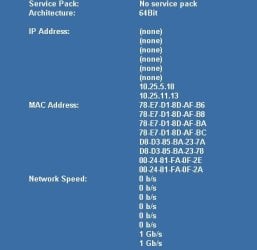
Here is a screen shot of BGInfo a Microsoft software for displaying information on the desktop. Even Microsoft's own software sees the other NICs. I have now tried 8 different NICs and you can see that BGInfo sees all 8 NICs but only 2 have IP addresses and only 2 are in the GUI.
 

Attachments

  • NIC3.jpg
    NIC3.jpg
    16.8 KB · Views: 32

My Computer My Computer

Computer type
PC/Desktop
Computer Manufacturer/Model Number
Dell OP7010
OS
Windows 7 Enterprise (x64); Windows Server 2008 R2 (x64)
Memory
16GB
Monitor(s) Displays
4 Dell 24" LCD
Screen Resolution
1280x1024
Keyboard
Dell
Mouse
Dell Optical
Internet Speed
40meg

Attachments

  • NIC4.jpg
    NIC4.jpg
    8.4 KB · Views: 14

My Computer My Computer

Computer type
PC/Desktop
Computer Manufacturer/Model Number
Dell OP7010
OS
Windows 7 Enterprise (x64); Windows Server 2008 R2 (x64)
Memory
16GB
Monitor(s) Displays
4 Dell 24" LCD
Screen Resolution
1280x1024
Keyboard
Dell
Mouse
Dell Optical
Internet Speed
40meg
Alternatively you could try this Msoft link which will allow even more hidden devices to show up in device manager.
Error message when you try to set an IP address on a network adapter

The above worked Perfectly!!!! Thank you very much!

I'm glad you tested that method out because I havn't had a chance to see if it actually worked or not. I'm sure it also cleaned up your ipconfig results.

It's good to know that it works to show more even more hidden devices so you can delate them, thats a keeper for sure....added to my list of favorites worth keeping. :)
 

My Computer My Computer

Computer type
PC/Desktop
Computer Manufacturer/Model Number
Home built
OS
Windows 7 Ult, Windows 8.1 Pro,
CPU
Q9650-4.275GHz, E8600 4.5GHz, E6750-3.8GHz
Motherboard
Evga 780i FTW
Memory
G.Skill PC2 9600 1200Mhz 5 5 5 15 2T
Graphics Card(s)
GTX480
Sound Card
Asus Xonar D2
Monitor(s) Displays
HannsG
Screen Resolution
1680X1050
Hard Drives
GSkill Phoenix Pro 120GB SSD
PSU
ThermalTake Toughpower 1000Watt modular
Case
ThermalTake XaserV
Cooling
Xigmatek S1283
Keyboard
Logitech G15
Mouse
Logitech G9
Internet Speed
T1
Back
Top