Dual boot with a glitch in the bios

Bobthequill

New member
Member
Local time
8:39 AM
Messages
42
Location
East Gosford Central Coast OZ
I have one of these new all in one Medion Akoya P4020 (Aldi) touchscreen desktops.
Works reasonably well if you don't need fast graphics, the inbuilt HDTV tuner is fantastic. There is a small prob with the background LEDS failing (software) but I think Medion are working on that.
The motherboard is twin sata. One is the 1 terabyte HDD the other is a notebook style CD-DVD drive.
To get independent back up, I added a 320GB external HDD in a USB dock.
No problem, until I decided I would try a dual boot setup as I used to have in my older desk top. The second HDD crashed no matter what I tried.
I assumed it was a USB limitation so pulled out the sata CD-DVD drive and put it into an external enclosure on a USB connection.
Then I ran the sata 2 port out through an eSata connection to the HDD dock which will run off USB or sata and has its own power supply.
Still it crashed on initial boot on the second drive, I then noticed in the AMI bios,


1st Boot :CD-DVD


2nd Boot :HDD on sata 1


3rd Boot : [Disabled] my back up HDD


with a note saying "a device enclosed in
parenthesis has been disabled in the corresponding type menu"


I find I cannot re-enable this and have no idea where the corresponding type menu might be!


Emails to Medion have not been answered and I can find no driver updates on their site, never mind an answer to this particular problem.The BCD edit setup looks good but, if I select the backup drive to boot, a boot starts but fails to blue screen within a second or two.
That seems to indicate that win bootloader has started and then hit a problem? But surely that is after bios has finished?


Any help appreciated


Bobthequill
 

My Computer My Computer

At a glance

XP/Vista 32 bit/Win 7 hp 64 bitCore 2 duo 1.8/AMD Turion 64/Pentium Dual cor...4 GB/dunno/4GB (part share vid)Nvidia GeForce 8500 GT/ dunno/ Nvidia GeForce...
Computer Manufacturer/Model Number
Optima/TOSHIBA nb/Medion Akoya
OS
XP/Vista 32 bit/Win 7 hp 64 bit
CPU
Core 2 duo 1.8/AMD Turion 64/Pentium Dual core 2.3Ghz
Motherboard
Gigabyte 945 GZM-S2/MEDIONPC MS -7621 2.1
Memory
4 GB/dunno/4GB (part share vid)
Graphics Card(s)
Nvidia GeForce 8500 GT/ dunno/ Nvidia GeForce 9100 M
Sound Card
Realtek/??/Realtek
Monitor(s) Displays
Optima (Toshiba) 18 inch LCD/13 inch tft/MSI 21.5 inch touch
Screen Resolution
1440 x 900/not good/1920 x 1080
Hard Drives
2 x 320 GB sata

1 x 70 GB ide

1 x 1TB sata
PSU
400w/150w/300w
Case
Full/notebook/All in one desktop
Cooling
Fan/fan/ heat pipe fan
Keyboard
MEDION wireless/built in/MEDION wireless
Mouse
MEDION wireless/Genius wireless/MEDION wireless
Internet Speed
1.1 Mb
Other Info
Logitech webcam(3)
To usb certainly not! The Windows installer will clearly indicate that if you try. Depending on the eSata whether that goes directly to a port on the board itself or a separate controller added on would make a difference on a desktop in some cases.

Typically any external drives are for storage and backup. I agree with theog on this being the case.

Which versions are you planning to run with since your specs show the 7 RC? XP and Vista or have you gone for 7?
 

My Computers My Computers

  • At a glance

    W7 Ultimate x64/W10 Pro x64/W11 Pro Triple Bo...AMD Phenom II X4 975 Deneb 3.6ghz - 965 2nd r...Kingston Hyper X DDR3 1600 1.5v 16gb - Hyper ...MSI HD Radeon 5750 1gb - MSI HD Radeon 6450 o...
    Computer type
    PC/Desktop
    Computer Manufacturer/Model Number
    Custom builds = 2
    OS
    W7 Ultimate x64/W10 Pro x64/W11 Pro Triple Boot - Main PC W7 Remote PC Micro ATX W7 Pro x64/W11 Pro
    CPU
    AMD Phenom II X4 975 Deneb 3.6ghz - 965 2nd remote pc
    Motherboard
    Gigabyte GA-790XTA-UD4-Gigabyte GA-880GM-D2H remote pc
    Memory
    Kingston Hyper X DDR3 1600 1.5v 16gb - Hyper X Fury 8gb 2nd
    Graphics Card(s)
    MSI HD Radeon 5750 1gb - MSI HD Radeon 6450 on mini tower
    Sound Card
    Creative Labs X-Fi Xtreme Audio P - Realtek onooard 2nd case
    Monitor(s) Displays
    ASUS VW199T-P 19" HP 2082a Main-HP 2082a 20" remote pc
    Screen Resolution
    Asus 1440x900 - HP 1600x900
    Hard Drives
    WD Black 1TB HD per OS W7, W10, and pending W11 presently on 500gb OS Drive - Pending Triple 1TB HDs for Spanned Storage/backup volume
    Single 2TB external USB enclosure, single 1TB System 7 Host/Boot drive, Pending 8TB external HD for system image b
    PSU
    Corsair 750TX - primary / Corsair CX600 - second
    Case
    Antec 900-2 - SSD compatible / NZXT Vulcan mini tower
    Cooling
    Zalman CNPS9900A
    Keyboard
    AZIO L70 Backlit Letters Gaming - ONN Cordless/USB
    Mouse
    MSI DS200 Programmable, Logitech Cordless
    Internet Speed
    30mbps upgrade - primary hard wired - mini tower usb WiFi
    Antivirus
    GFI VIPRE Internet Security 2014 on W7 2016 beta on W10,
    Browser
    Cyberfox, WaterFox 64bit FF variants, FireFox x64, Pale Moon
    Other Info
    Accomdata fan cooled usb 2.0 PIDE/Sata II, III external enclosure.
    Sambient usb/eSata PATA/Sata II, III external enclosure.
  • At a glance

    W7 Pro x64/W11 ProAMD Deneb 3.6ghz - 965Kingston Hyper X Fury 8gbMSI HD Radeon 6450 DVI Output
    Computer type
    PC/Desktop
    System Manufacturer/Model Number
    CUSTOM ASSEMBLY
    OS
    W7 Pro x64/W11 Pro
    CPU
    AMD Deneb 3.6ghz - 965
    Motherboard
    Gigabyte GA-880GM-D2H remote pc
    Memory
    Kingston Hyper X Fury 8gb
    Graphics Card(s)
    MSI HD Radeon 6450 DVI Output
    Sound Card
    Realtek onooard Creative or Other separate PENDING
    Monitor(s) Displays
    VIZIO 32" LCD TV Separate LCD Pending
    Screen Resolution
    1600x1080
    Hard Drives
    WD 500GB OS Host/Boot WD Green 1TB Storage/Backup
    PSU
    Corsair 600W - THERMALTAKE 600W spare case
    Case
    NZXT Vulcan mini tower
    Cooling
    Twin 120mm Top Fans - 240mm Side Cover
    Keyboard
    ONN Cordless/USB Logitech Cordless
    Mouse
    ONN USB/Cordless - Logitech Cordless
    Internet Speed
    DSL 5G
    Browser
    MS Edge, FireFox, WaterFox x64, FireFox Nightly
    Other Info
    OS Testing-Remote Access to Main TeamViewer

Erm, I already have Win 7 home premium on the eSata drive. It makes no difference even if I swap the drives around and put it in sata port 1 inside the machine. It is recognised and will not get past initial boot.

I have a brand new Win 7 premium on the internal 1 terabyte drive and an older win 7 premium on the drive I am trying to add. It operates perfectly in dual boot in a conventional desktop.

It works as a file store no problem. The 1 terabyte drive works when internal and when plugged into the eSata extension dock.

The problem I think is the disablement in bios of the second boot option. It is independent of where it is connected.

I just need to be sure that it is achieved by a flag in bios or is it achieved by a flag that interferes with windows loader, in keys.ini maybe, which is on the drive I am trying to boot.

I have another hard drive with Vista on board. I might try to get that to dual boot on this new system.

Bobthequill
 

My Computer My Computer

At a glance

XP/Vista 32 bit/Win 7 hp 64 bitCore 2 duo 1.8/AMD Turion 64/Pentium Dual cor...4 GB/dunno/4GB (part share vid)Nvidia GeForce 8500 GT/ dunno/ Nvidia GeForce...
Computer Manufacturer/Model Number
Optima/TOSHIBA nb/Medion Akoya
OS
XP/Vista 32 bit/Win 7 hp 64 bit
CPU
Core 2 duo 1.8/AMD Turion 64/Pentium Dual core 2.3Ghz
Motherboard
Gigabyte 945 GZM-S2/MEDIONPC MS -7621 2.1
Memory
4 GB/dunno/4GB (part share vid)
Graphics Card(s)
Nvidia GeForce 8500 GT/ dunno/ Nvidia GeForce 9100 M
Sound Card
Realtek/??/Realtek
Monitor(s) Displays
Optima (Toshiba) 18 inch LCD/13 inch tft/MSI 21.5 inch touch
Screen Resolution
1440 x 900/not good/1920 x 1080
Hard Drives
2 x 320 GB sata

1 x 70 GB ide

1 x 1TB sata
PSU
400w/150w/300w
Case
Full/notebook/All in one desktop
Cooling
Fan/fan/ heat pipe fan
Keyboard
MEDION wireless/built in/MEDION wireless
Mouse
MEDION wireless/Genius wireless/MEDION wireless
Internet Speed
1.1 Mb
Other Info
Logitech webcam(3)
When swapping drives back and forth you are also switching ports most likely where one drive will automatically be made the default boot device until the next one is added on. For configuring a dual or multiboot you leave a host drive set as the defautl hard drive seen at the top of the list in the list of drives installed when pressing enter on the hard drives item in the boot order or advanced section.

Even with only one item enabled set as hard drive that wouldn't prevent a second Windows installation from loading. The startup repair tool would be the first thing to try in order to see the 7 install with the problem running again there.
 

My Computers My Computers

  • At a glance

    W7 Ultimate x64/W10 Pro x64/W11 Pro Triple Bo...AMD Phenom II X4 975 Deneb 3.6ghz - 965 2nd r...Kingston Hyper X DDR3 1600 1.5v 16gb - Hyper ...MSI HD Radeon 5750 1gb - MSI HD Radeon 6450 o...
    Computer type
    PC/Desktop
    Computer Manufacturer/Model Number
    Custom builds = 2
    OS
    W7 Ultimate x64/W10 Pro x64/W11 Pro Triple Boot - Main PC W7 Remote PC Micro ATX W7 Pro x64/W11 Pro
    CPU
    AMD Phenom II X4 975 Deneb 3.6ghz - 965 2nd remote pc
    Motherboard
    Gigabyte GA-790XTA-UD4-Gigabyte GA-880GM-D2H remote pc
    Memory
    Kingston Hyper X DDR3 1600 1.5v 16gb - Hyper X Fury 8gb 2nd
    Graphics Card(s)
    MSI HD Radeon 5750 1gb - MSI HD Radeon 6450 on mini tower
    Sound Card
    Creative Labs X-Fi Xtreme Audio P - Realtek onooard 2nd case
    Monitor(s) Displays
    ASUS VW199T-P 19" HP 2082a Main-HP 2082a 20" remote pc
    Screen Resolution
    Asus 1440x900 - HP 1600x900
    Hard Drives
    WD Black 1TB HD per OS W7, W10, and pending W11 presently on 500gb OS Drive - Pending Triple 1TB HDs for Spanned Storage/backup volume
    Single 2TB external USB enclosure, single 1TB System 7 Host/Boot drive, Pending 8TB external HD for system image b
    PSU
    Corsair 750TX - primary / Corsair CX600 - second
    Case
    Antec 900-2 - SSD compatible / NZXT Vulcan mini tower
    Cooling
    Zalman CNPS9900A
    Keyboard
    AZIO L70 Backlit Letters Gaming - ONN Cordless/USB
    Mouse
    MSI DS200 Programmable, Logitech Cordless
    Internet Speed
    30mbps upgrade - primary hard wired - mini tower usb WiFi
    Antivirus
    GFI VIPRE Internet Security 2014 on W7 2016 beta on W10,
    Browser
    Cyberfox, WaterFox 64bit FF variants, FireFox x64, Pale Moon
    Other Info
    Accomdata fan cooled usb 2.0 PIDE/Sata II, III external enclosure.
    Sambient usb/eSata PATA/Sata II, III external enclosure.
  • At a glance

    W7 Pro x64/W11 ProAMD Deneb 3.6ghz - 965Kingston Hyper X Fury 8gbMSI HD Radeon 6450 DVI Output
    Computer type
    PC/Desktop
    System Manufacturer/Model Number
    CUSTOM ASSEMBLY
    OS
    W7 Pro x64/W11 Pro
    CPU
    AMD Deneb 3.6ghz - 965
    Motherboard
    Gigabyte GA-880GM-D2H remote pc
    Memory
    Kingston Hyper X Fury 8gb
    Graphics Card(s)
    MSI HD Radeon 6450 DVI Output
    Sound Card
    Realtek onooard Creative or Other separate PENDING
    Monitor(s) Displays
    VIZIO 32" LCD TV Separate LCD Pending
    Screen Resolution
    1600x1080
    Hard Drives
    WD 500GB OS Host/Boot WD Green 1TB Storage/Backup
    PSU
    Corsair 600W - THERMALTAKE 600W spare case
    Case
    NZXT Vulcan mini tower
    Cooling
    Twin 120mm Top Fans - 240mm Side Cover
    Keyboard
    ONN Cordless/USB Logitech Cordless
    Mouse
    ONN USB/Cordless - Logitech Cordless
    Internet Speed
    DSL 5G
    Browser
    MS Edge, FireFox, WaterFox x64, FireFox Nightly
    Other Info
    OS Testing-Remote Access to Main TeamViewer
When swapping drives back and forth you are also switching ports most likely where one drive will automatically be made the default boot device until the next one is added on. For configuring a dual or multiboot you leave a host drive set as the defautl hard drive seen at the top of the list in the list of drives installed when pressing enter on the hard drives item in the boot order or advanced section.

Even with only one item enabled set as hard drive that wouldn't prevent a second Windows installation from loading. The startup repair tool would be the first thing to try in order to see the 7 install with the problem running again there.

Thanks Nighthawk

Been there, done that. Repair tool tried a few times. I am unable to establish a second hard drive in the boot options in bios. it shows the second drive OK and identifies it. Just won't let me put it in the boot sequence. It always comes up [disabled]

The person who programmed this AMIbios for this particular machine, did too good a job. Unfortunately I cannot get enough info from Medion or AMI to reprogram the bios. Also, I no longer have the ability to program in Dos, even if I had the info. Too bloody old! it's been too long!

I just need to be sure how it was done, as I have never heard of
this type of bios manipulation before.

I just cannot see how Windows/system32/boot/winload.exe can start then fail due to this disablement unless it has been tweaked in advance by the bios.

Not sure I am looking at this logically. It may happen later but, it certainly puts up the start screen before failing.

Bobthequill
 

My Computer My Computer

At a glance

XP/Vista 32 bit/Win 7 hp 64 bitCore 2 duo 1.8/AMD Turion 64/Pentium Dual cor...4 GB/dunno/4GB (part share vid)Nvidia GeForce 8500 GT/ dunno/ Nvidia GeForce...
Computer Manufacturer/Model Number
Optima/TOSHIBA nb/Medion Akoya
OS
XP/Vista 32 bit/Win 7 hp 64 bit
CPU
Core 2 duo 1.8/AMD Turion 64/Pentium Dual core 2.3Ghz
Motherboard
Gigabyte 945 GZM-S2/MEDIONPC MS -7621 2.1
Memory
4 GB/dunno/4GB (part share vid)
Graphics Card(s)
Nvidia GeForce 8500 GT/ dunno/ Nvidia GeForce 9100 M
Sound Card
Realtek/??/Realtek
Monitor(s) Displays
Optima (Toshiba) 18 inch LCD/13 inch tft/MSI 21.5 inch touch
Screen Resolution
1440 x 900/not good/1920 x 1080
Hard Drives
2 x 320 GB sata

1 x 70 GB ide

1 x 1TB sata
PSU
400w/150w/300w
Case
Full/notebook/All in one desktop
Cooling
Fan/fan/ heat pipe fan
Keyboard
MEDION wireless/built in/MEDION wireless
Mouse
MEDION wireless/Genius wireless/MEDION wireless
Internet Speed
1.1 Mb
Other Info
Logitech webcam(3)
What drive mode is the bios set for? When getting into a new build/different make board I first tried things out with the AHCI mode set and had too many problems until switching it to the Native ide mode. From there 7 has been running like a top.

In some cases you can get away with download of a particular driver in order to enable the AHCI mode. But besides all that this could explain why the errors are being seen when everything seems normal.

Other then that locating a bios update would seem to be the fast way to solve any corrupted programming. I never rush for those however when everything is running in top shape to fix what isn't broken. In your situation that might correct the problem if it isn't simply a setting change needed.
 

My Computers My Computers

  • At a glance

    W7 Ultimate x64/W10 Pro x64/W11 Pro Triple Bo...AMD Phenom II X4 975 Deneb 3.6ghz - 965 2nd r...Kingston Hyper X DDR3 1600 1.5v 16gb - Hyper ...MSI HD Radeon 5750 1gb - MSI HD Radeon 6450 o...
    Computer type
    PC/Desktop
    Computer Manufacturer/Model Number
    Custom builds = 2
    OS
    W7 Ultimate x64/W10 Pro x64/W11 Pro Triple Boot - Main PC W7 Remote PC Micro ATX W7 Pro x64/W11 Pro
    CPU
    AMD Phenom II X4 975 Deneb 3.6ghz - 965 2nd remote pc
    Motherboard
    Gigabyte GA-790XTA-UD4-Gigabyte GA-880GM-D2H remote pc
    Memory
    Kingston Hyper X DDR3 1600 1.5v 16gb - Hyper X Fury 8gb 2nd
    Graphics Card(s)
    MSI HD Radeon 5750 1gb - MSI HD Radeon 6450 on mini tower
    Sound Card
    Creative Labs X-Fi Xtreme Audio P - Realtek onooard 2nd case
    Monitor(s) Displays
    ASUS VW199T-P 19" HP 2082a Main-HP 2082a 20" remote pc
    Screen Resolution
    Asus 1440x900 - HP 1600x900
    Hard Drives
    WD Black 1TB HD per OS W7, W10, and pending W11 presently on 500gb OS Drive - Pending Triple 1TB HDs for Spanned Storage/backup volume
    Single 2TB external USB enclosure, single 1TB System 7 Host/Boot drive, Pending 8TB external HD for system image b
    PSU
    Corsair 750TX - primary / Corsair CX600 - second
    Case
    Antec 900-2 - SSD compatible / NZXT Vulcan mini tower
    Cooling
    Zalman CNPS9900A
    Keyboard
    AZIO L70 Backlit Letters Gaming - ONN Cordless/USB
    Mouse
    MSI DS200 Programmable, Logitech Cordless
    Internet Speed
    30mbps upgrade - primary hard wired - mini tower usb WiFi
    Antivirus
    GFI VIPRE Internet Security 2014 on W7 2016 beta on W10,
    Browser
    Cyberfox, WaterFox 64bit FF variants, FireFox x64, Pale Moon
    Other Info
    Accomdata fan cooled usb 2.0 PIDE/Sata II, III external enclosure.
    Sambient usb/eSata PATA/Sata II, III external enclosure.
  • At a glance

    W7 Pro x64/W11 ProAMD Deneb 3.6ghz - 965Kingston Hyper X Fury 8gbMSI HD Radeon 6450 DVI Output
    Computer type
    PC/Desktop
    System Manufacturer/Model Number
    CUSTOM ASSEMBLY
    OS
    W7 Pro x64/W11 Pro
    CPU
    AMD Deneb 3.6ghz - 965
    Motherboard
    Gigabyte GA-880GM-D2H remote pc
    Memory
    Kingston Hyper X Fury 8gb
    Graphics Card(s)
    MSI HD Radeon 6450 DVI Output
    Sound Card
    Realtek onooard Creative or Other separate PENDING
    Monitor(s) Displays
    VIZIO 32" LCD TV Separate LCD Pending
    Screen Resolution
    1600x1080
    Hard Drives
    WD 500GB OS Host/Boot WD Green 1TB Storage/Backup
    PSU
    Corsair 600W - THERMALTAKE 600W spare case
    Case
    NZXT Vulcan mini tower
    Cooling
    Twin 120mm Top Fans - 240mm Side Cover
    Keyboard
    ONN Cordless/USB Logitech Cordless
    Mouse
    ONN USB/Cordless - Logitech Cordless
    Internet Speed
    DSL 5G
    Browser
    MS Edge, FireFox, WaterFox x64, FireFox Nightly
    Other Info
    OS Testing-Remote Access to Main TeamViewer
What drive mode is the bios set for? When getting into a new build/different make board I first tried things out with the AHCI mode set and had too many problems until switching it to the Native ide mode. From there 7 has been running like a top.

In some cases you can get away with download of a particular driver in order to enable the AHCI mode. But besides all that this could explain why the errors are being seen when everything seems normal.

Other then that locating a bios update would seem to be the fast way to solve any corrupted programming. I never rush for those however when everything is running in top shape to fix what isn't broken. In your situation that might correct the problem if it isn't simply a setting change needed.

The bios was preset to AHCI mode. I haven't tried switching to IDE but will do so.

I did try the same intention with an old 250GB drive with Vista loaded. The drive ID became erratic and sometimes it would boot without detecting it at all. Even when detected it still would not allow boot from the second drive even if it was placed as first boot.

I did try turning off auto detect and S.M.A.R.T. but no improvement.

I am now back to the 320GB Win 7 drive which is always identified.
I must admit, it is not as if I am dead in the water but, I suspect if I try to partition the 1terabyte drive and add a second OS, it will hit the same problem.

It is OK to hold a recovery image on a second drive, but not OK to boot from that drive, only to restore from it!

What weird thinking justified programming in such a limitation?

Will report back.

Bobthequill
 

My Computer My Computer

At a glance

XP/Vista 32 bit/Win 7 hp 64 bitCore 2 duo 1.8/AMD Turion 64/Pentium Dual cor...4 GB/dunno/4GB (part share vid)Nvidia GeForce 8500 GT/ dunno/ Nvidia GeForce...
Computer Manufacturer/Model Number
Optima/TOSHIBA nb/Medion Akoya
OS
XP/Vista 32 bit/Win 7 hp 64 bit
CPU
Core 2 duo 1.8/AMD Turion 64/Pentium Dual core 2.3Ghz
Motherboard
Gigabyte 945 GZM-S2/MEDIONPC MS -7621 2.1
Memory
4 GB/dunno/4GB (part share vid)
Graphics Card(s)
Nvidia GeForce 8500 GT/ dunno/ Nvidia GeForce 9100 M
Sound Card
Realtek/??/Realtek
Monitor(s) Displays
Optima (Toshiba) 18 inch LCD/13 inch tft/MSI 21.5 inch touch
Screen Resolution
1440 x 900/not good/1920 x 1080
Hard Drives
2 x 320 GB sata

1 x 70 GB ide

1 x 1TB sata
PSU
400w/150w/300w
Case
Full/notebook/All in one desktop
Cooling
Fan/fan/ heat pipe fan
Keyboard
MEDION wireless/built in/MEDION wireless
Mouse
MEDION wireless/Genius wireless/MEDION wireless
Internet Speed
1.1 Mb
Other Info
Logitech webcam(3)
Just tried IDE mode but I thought I should enable PCI Bus Master
The sata ports showed as ports 5 and 6

It gave me 6 options on each:-
LBA/Large mode [Auto]
Block (multi sector transfer) [Auto]
PIO mode [Auto] ??
DMA mode [Auto]
S.M.A.R.T. [Auto]
32 bit data transfer [enabled]

When i returned to the first page the drives were undetected.

On reboot, it got through to the system select page. I didn't try the second boot but the normal one.

It started to load and went blue screen just before the little twirly flags came together. Which is exactly where the disable external OS fails as well.

I reverted to AHCI and no PCI IDE Bus Master.

Back to square one!

Possibly a little something learn't though.The failure mode is familiar.

I suspect that the 1 Terabyte drive has a special ID which sets it apart from the common herd of hard drives. the Bios is set up to allow only that special ID to be booted.

Otherwise it would have to hold a list of all possible drives to be excluded..

Makes sense, a sort of negative engineering?

I just might try it in my core 2 duo Gigabyte motherboard and see what happens.

Bobthequill
 

My Computer My Computer

At a glance

XP/Vista 32 bit/Win 7 hp 64 bitCore 2 duo 1.8/AMD Turion 64/Pentium Dual cor...4 GB/dunno/4GB (part share vid)Nvidia GeForce 8500 GT/ dunno/ Nvidia GeForce...
Computer Manufacturer/Model Number
Optima/TOSHIBA nb/Medion Akoya
OS
XP/Vista 32 bit/Win 7 hp 64 bit
CPU
Core 2 duo 1.8/AMD Turion 64/Pentium Dual core 2.3Ghz
Motherboard
Gigabyte 945 GZM-S2/MEDIONPC MS -7621 2.1
Memory
4 GB/dunno/4GB (part share vid)
Graphics Card(s)
Nvidia GeForce 8500 GT/ dunno/ Nvidia GeForce 9100 M
Sound Card
Realtek/??/Realtek
Monitor(s) Displays
Optima (Toshiba) 18 inch LCD/13 inch tft/MSI 21.5 inch touch
Screen Resolution
1440 x 900/not good/1920 x 1080
Hard Drives
2 x 320 GB sata

1 x 70 GB ide

1 x 1TB sata
PSU
400w/150w/300w
Case
Full/notebook/All in one desktop
Cooling
Fan/fan/ heat pipe fan
Keyboard
MEDION wireless/built in/MEDION wireless
Mouse
MEDION wireless/Genius wireless/MEDION wireless
Internet Speed
1.1 Mb
Other Info
Logitech webcam(3)
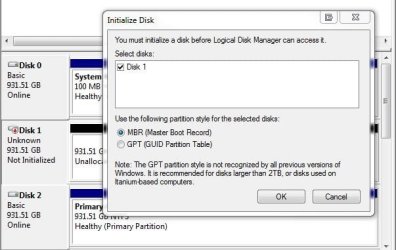
It also depends on the type of partition as far as MBR or GPT(GUID Partition Table). When going into the Disk Management when a drive is raw or simply not available to turn it online and then see a drive letter assigned when using the new volume wizard the option for mbr or the other is set for mbr by default.

If somehow the other is on that would stall everything since you configure things differently for the other partition style.
 

Attachments

  • DiskPart6b GUID Partition Table or MBR.jpg
    DiskPart6b GUID Partition Table or MBR.jpg
    40.2 KB · Views: 16

My Computers My Computers

  • At a glance

    W7 Ultimate x64/W10 Pro x64/W11 Pro Triple Bo...AMD Phenom II X4 975 Deneb 3.6ghz - 965 2nd r...Kingston Hyper X DDR3 1600 1.5v 16gb - Hyper ...MSI HD Radeon 5750 1gb - MSI HD Radeon 6450 o...
    Computer type
    PC/Desktop
    Computer Manufacturer/Model Number
    Custom builds = 2
    OS
    W7 Ultimate x64/W10 Pro x64/W11 Pro Triple Boot - Main PC W7 Remote PC Micro ATX W7 Pro x64/W11 Pro
    CPU
    AMD Phenom II X4 975 Deneb 3.6ghz - 965 2nd remote pc
    Motherboard
    Gigabyte GA-790XTA-UD4-Gigabyte GA-880GM-D2H remote pc
    Memory
    Kingston Hyper X DDR3 1600 1.5v 16gb - Hyper X Fury 8gb 2nd
    Graphics Card(s)
    MSI HD Radeon 5750 1gb - MSI HD Radeon 6450 on mini tower
    Sound Card
    Creative Labs X-Fi Xtreme Audio P - Realtek onooard 2nd case
    Monitor(s) Displays
    ASUS VW199T-P 19" HP 2082a Main-HP 2082a 20" remote pc
    Screen Resolution
    Asus 1440x900 - HP 1600x900
    Hard Drives
    WD Black 1TB HD per OS W7, W10, and pending W11 presently on 500gb OS Drive - Pending Triple 1TB HDs for Spanned Storage/backup volume
    Single 2TB external USB enclosure, single 1TB System 7 Host/Boot drive, Pending 8TB external HD for system image b
    PSU
    Corsair 750TX - primary / Corsair CX600 - second
    Case
    Antec 900-2 - SSD compatible / NZXT Vulcan mini tower
    Cooling
    Zalman CNPS9900A
    Keyboard
    AZIO L70 Backlit Letters Gaming - ONN Cordless/USB
    Mouse
    MSI DS200 Programmable, Logitech Cordless
    Internet Speed
    30mbps upgrade - primary hard wired - mini tower usb WiFi
    Antivirus
    GFI VIPRE Internet Security 2014 on W7 2016 beta on W10,
    Browser
    Cyberfox, WaterFox 64bit FF variants, FireFox x64, Pale Moon
    Other Info
    Accomdata fan cooled usb 2.0 PIDE/Sata II, III external enclosure.
    Sambient usb/eSata PATA/Sata II, III external enclosure.
  • At a glance

    W7 Pro x64/W11 ProAMD Deneb 3.6ghz - 965Kingston Hyper X Fury 8gbMSI HD Radeon 6450 DVI Output
    Computer type
    PC/Desktop
    System Manufacturer/Model Number
    CUSTOM ASSEMBLY
    OS
    W7 Pro x64/W11 Pro
    CPU
    AMD Deneb 3.6ghz - 965
    Motherboard
    Gigabyte GA-880GM-D2H remote pc
    Memory
    Kingston Hyper X Fury 8gb
    Graphics Card(s)
    MSI HD Radeon 6450 DVI Output
    Sound Card
    Realtek onooard Creative or Other separate PENDING
    Monitor(s) Displays
    VIZIO 32" LCD TV Separate LCD Pending
    Screen Resolution
    1600x1080
    Hard Drives
    WD 500GB OS Host/Boot WD Green 1TB Storage/Backup
    PSU
    Corsair 600W - THERMALTAKE 600W spare case
    Case
    NZXT Vulcan mini tower
    Cooling
    Twin 120mm Top Fans - 240mm Side Cover
    Keyboard
    ONN Cordless/USB Logitech Cordless
    Mouse
    ONN USB/Cordless - Logitech Cordless
    Internet Speed
    DSL 5G
    Browser
    MS Edge, FireFox, WaterFox x64, FireFox Nightly
    Other Info
    OS Testing-Remote Access to Main TeamViewer
6 days later the mystery is solved.

Medion came good with a bit of info, only after I threatened to become an ex Medion customer.

"Windows Vista is producing a BSOD because the drivers installed on it are system specific. It works on the 'Core 2 Duo' because Windows has tailored the software to talk to the specific hardware in that system only. The MD8870 has different system components to the 'Core 2 Duo' which is causing the software to throw a STOP message. The BSOD will happen every time you boot from any other system that differs in system specifications to the 'Core 2 Duo'. The solution is to install Windows Vista on your external hard drive for the MD8870."

So, system specific! that is a strange one but, explains everything. 2 Win OS's incompatible because of the hardware they have been set up on. Not a bios problem but a front end problem.

The advice ignored the fact that windows will not install across a USB connection.

So, if I clean install one of my other drives into the Medion machine, it will then not boot in a core2duo machine?

Really defeats the purpose of dual boot doesn't it.

I would dearly love to know how that was achieved. Must be some sort of special driver but, how it is called is a mystery.
Something on the motherboard perhaps.

I guess I am stuck with a solitary machine, to which I can add a back up drive and that is it.

Thanks for your inputs guys.

Bobthequill
 

My Computer My Computer

At a glance

XP/Vista 32 bit/Win 7 hp 64 bitCore 2 duo 1.8/AMD Turion 64/Pentium Dual cor...4 GB/dunno/4GB (part share vid)Nvidia GeForce 8500 GT/ dunno/ Nvidia GeForce...
Computer Manufacturer/Model Number
Optima/TOSHIBA nb/Medion Akoya
OS
XP/Vista 32 bit/Win 7 hp 64 bit
CPU
Core 2 duo 1.8/AMD Turion 64/Pentium Dual core 2.3Ghz
Motherboard
Gigabyte 945 GZM-S2/MEDIONPC MS -7621 2.1
Memory
4 GB/dunno/4GB (part share vid)
Graphics Card(s)
Nvidia GeForce 8500 GT/ dunno/ Nvidia GeForce 9100 M
Sound Card
Realtek/??/Realtek
Monitor(s) Displays
Optima (Toshiba) 18 inch LCD/13 inch tft/MSI 21.5 inch touch
Screen Resolution
1440 x 900/not good/1920 x 1080
Hard Drives
2 x 320 GB sata

1 x 70 GB ide

1 x 1TB sata
PSU
400w/150w/300w
Case
Full/notebook/All in one desktop
Cooling
Fan/fan/ heat pipe fan
Keyboard
MEDION wireless/built in/MEDION wireless
Mouse
MEDION wireless/Genius wireless/MEDION wireless
Internet Speed
1.1 Mb
Other Info
Logitech webcam(3)
Medion came good with a bit of info, only after I threatened to become an ex Medion customer.

"Windows Vista is producing a BSOD because the drivers installed on it are system specific. It works on the 'Core 2 Duo' because Windows has tailored the software to talk to the specific hardware in that system only. The MD8870 has different system components to the 'Core 2 Duo' [ ... ]
Bob, I have a dead Medion MD8870 that I bricked during a failed BIOS upgrade. I'm able to reprogram the BIOS offboard using a USB SPI programmer, but unfortunately, I don't have the original BIOS file to restore.

I wonder if you still have your MD8870 and if so, would you be willing to check some things on your BIOS & motherboard to see if it might be compatible with mine? (Medion are notorious for switching components, or indeed whole motherboards, without changing the product code!)

Thanks,

Eddy
 

My Computer My Computer

At a glance

Win7 Ultimate x64Intel Core 2 Q82008 GBATI Radeon 1650
Computer type
PC/Desktop
Computer Manufacturer/Model Number
Custom build
OS
Win7 Ultimate x64
CPU
Intel Core 2 Q8200
Motherboard
Asus P5K
Memory
8 GB
Graphics Card(s)
ATI Radeon 1650
Monitor(s) Displays
Two displays, 24" Asus and 21" generic
Screen Resolution
24" 1920 x 1200 + 21" 1920 x 1080
Hard Drives
SSD 120 GB, 1 TB data, 2 TB archive
Internet Speed
150 Mb/s via UPC cable
Antivirus
n/a
Browser
IE11 + Chrome
Back
Top