playback of Blue ray rip stutters

CyrexC14

New member
Local time
8:47 PM
Messages
6
Hi
I'm trying to play a .mkv file on my computer

The PC is based on a
Intel® Core™ i3-530 and I'm using shark codec with recommended settings.

It plays the file nicely until heavy action occurs, then it stutters.

Do I have a CPU shortage or am I missing something.


rgds
Cyrex
 

My Computer My Computer

At a glance

windows 7Core i3-5302Gb Kingston DDR3-1333Intel HD Graphic LG1156
Computer Manufacturer/Model Number
Home build
OS
windows 7
CPU
Core i3-530
Motherboard
Foxcon H55Mx-s
Memory
2Gb Kingston DDR3-1333
Graphics Card(s)
Intel HD Graphic LG1156
Sound Card
On board 8 channel
Monitor(s) Displays
Samsung 40" LE40C535
Screen Resolution
HD
Hard Drives
1000Gb WD Greenpower SATA 2
2000Gb NAS over wired 100Mbit
PSU
Seasonic S12
Internet Speed
10Mbit/2Mbit
Welcome To Seven Forums: Please take the time to fill in all your system specs under User CP top of page,scroll down to edit system specs.
It might also help to know the make and model number of the Blu Ray burner you used as well as the media it was burnt on and the speed of the burn.
It could be something as simple as a poor quality disc, burned at to high of speed.
Once you have provided the requested information it will make it a lot easier for members with Knowledge of the Shark Codec and burning.MKV files to help you. Thanks. Fabe
 

My Computer My Computer

At a glance

Windows 7 ultimate 64 bit / XP Home sp3intel Core 2 Duo E8400 3.0ghz8 gigs 1066 OCZ Fata1tyEVGA GTX 580 Call of Duty Black Ops Edition
Computer Manufacturer/Model Number
Self Built
OS
Windows 7 ultimate 64 bit / XP Home sp3
CPU
intel Core 2 Duo E8400 3.0ghz
Motherboard
Asus P5ND bios 1401
Memory
8 gigs 1066 OCZ Fata1ty
Graphics Card(s)
EVGA GTX 580 Call of Duty Black Ops Edition
Sound Card
Creative Soundblaster Audigy 2zs
Monitor(s) Displays
Asus 24in LCD's 2MS X2
Screen Resolution
1920x1080p @60Hz
Hard Drives
WD Caviar 500 Black/ WD Caviar 200 Blue
PSU
OCZ 700W GameXtreme
Case
NZXT Apollo
Cooling
Corsair H50 CPU/120mm x3 /60mm x2 /Corsair Dominator Ram
Keyboard
Logitech Bluetooth Wireless MX5000
Mouse
Logitech Bluetooth Wireless MX1000
Internet Speed
Download 19.83 Upload 0.97
Other Info
Logitech Z2300 Speakers/ Bose Noise Cancelling Headphones/Avermedia PCI-e Hybrid TV Bravo/Epson NX415 all in one/ 4 Port Powered USB Hub/ LG 10x Bluray Burner /TSST Corp DVDRW External
Hi
Thank you, I have tried to update my system specs.
I have tried to play the file again today using media player, and there did not seem to be a problem. I was using 60% on 2 out of 4 threads.
Maybe the error is related to Media center ? - I thougt media center just was a wrapper for media player ?

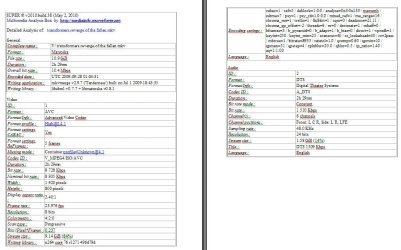
Also the file in question was streamed from my NAS over a wired network, the file has the characteristics seen in the attached file:


rgds
Cyrex
 

Attachments

  • transfomer_info.JPG
    transfomer_info.JPG
    87.7 KB · Views: 25

My Computer My Computer

At a glance

windows 7Core i3-5302Gb Kingston DDR3-1333Intel HD Graphic LG1156
Computer Manufacturer/Model Number
Home build
OS
windows 7
CPU
Core i3-530
Motherboard
Foxcon H55Mx-s
Memory
2Gb Kingston DDR3-1333
Graphics Card(s)
Intel HD Graphic LG1156
Sound Card
On board 8 channel
Monitor(s) Displays
Samsung 40" LE40C535
Screen Resolution
HD
Hard Drives
1000Gb WD Greenpower SATA 2
2000Gb NAS over wired 100Mbit
PSU
Seasonic S12
Internet Speed
10Mbit/2Mbit
Hi
Maybe the error is related to Media center ? - I thougt media center just was a wrapper for media player ?

Media Center is a separate player from WMP although it will use WMP for thumbing.

Media Center playback issues are often solved by choosing to disabe the Microsoft Video decoder on the SWAP TAB of the Shark007 settings application.

If the blu-ray rip contains VC1 video, also select to use the MPC-HC codec for WVC1.
 

My Computer My Computer

At a glance

Windows 7 Ultimate 64biti7 2600k16GB (4x4) corsair vengeanceIntel HD3000 iGPU / AMD HD6870 1024MB
Computer Manufacturer/Model Number
Selfbuilt
OS
Windows 7 Ultimate 64bit
CPU
i7 2600k
Motherboard
asus P8Z68-V LE
Memory
16GB (4x4) corsair vengeance
Graphics Card(s)
Intel HD3000 iGPU / AMD HD6870 1024MB
Sound Card
bitstreamed to an Onkyo 609
Monitor(s) Displays
Asus VE278 27" LED / Bravia EX7 60" LED
Screen Resolution
native 1080p x2
Hard Drives
4x 2TB int. + 2x 2TB external and a SSD for the boot drive.
PSU
650w Antec
Case
NZXT tempest evo
Cooling
air/stock
Keyboard
Dell
Mouse
logitech m505
Internet Speed
dual: cable/blackberry tether for travel use
Other Info
BD re-writer //
asus notebook G73Jw
Thanks for the suggestions, I think it did the trick, at least now I can play the file.

Can you elaborate on the down side of doing this - if any?
Why is this not part "Shark007 suggested settings"?
rgds
Cyrex
 

My Computer My Computer

At a glance

windows 7Core i3-5302Gb Kingston DDR3-1333Intel HD Graphic LG1156
Computer Manufacturer/Model Number
Home build
OS
windows 7
CPU
Core i3-530
Motherboard
Foxcon H55Mx-s
Memory
2Gb Kingston DDR3-1333
Graphics Card(s)
Intel HD Graphic LG1156
Sound Card
On board 8 channel
Monitor(s) Displays
Samsung 40" LE40C535
Screen Resolution
HD
Hard Drives
1000Gb WD Greenpower SATA 2
2000Gb NAS over wired 100Mbit
PSU
Seasonic S12
Internet Speed
10Mbit/2Mbit
Back
Top