Solved Intermittent network issue

jpargo

New member
Here is my situation.

1 windows 7 ultimate wireless laptop
1 windows 7 home premium laptop
1 windows xp desktop computer


I have setup sharing of folders and it works beautifully. However sometimes when I turn on my laptop, the windows 7 system can no longer see the desktop computer (xp). This is not always the case. Sometimes I shutoff and its working beautifully next day. Weird thing is I have had this issue on another windows 7 laptop too (my older dell). In between shutting down, Im not making any changes (ala firewall,settings, et) on either of the systems.

The way I fixed it is very weird too. If I change my wireless network name in my router, and connect to this new network name, it works beautifully. All Im changing is the network name and trick my computer into thinking its new network. I think this is why it works. I have also tried changing the network location from home to work and vice versa and it does not work. You have to literally trick it into thinking its a new network you are connecting.

When its not working I have checked all the wireless settings and it is the same as when it worked (network sharing on, etc). The two windows 7 systems can always see each other fine.

Any reason on why this is occurring.
 

My Computer

OS
Windows 7
Here is my situation.

1 windows 7 ultimate wireless laptop
1 windows 7 home premium laptop
1 windows xp desktop computer


I have setup sharing of folders and it works beautifully. However sometimes when I turn on my laptop, the windows 7 system can no longer see the desktop computer (xp). This is not always the case. Sometimes I shutoff and its working beautifully next day. Weird thing is I have had this issue on another windows 7 laptop too (my older dell). In between shutting down, Im not making any changes (ala firewall,settings, et) on either of the systems.

The way I fixed it is very weird too. If I change my wireless network name in my router, and connect to this new network name, it works beautifully. All Im changing is the network name and trick my computer into thinking its new network. I think this is why it works. I have also tried changing the network location from home to work and vice versa and it does not work. You have to literally trick it into thinking its a new network you are connecting.

When its not working I have checked all the wireless settings and it is the same as when it worked (network sharing on, etc). The two windows 7 systems can always see each other fine.

Any reason on why this is occurring.

I would bet you are using "homegroup" for networking. It uses IPv6 and is primarily just for win 7 networks. For mixed networks you should be using "workgroup". It uses IPv4 and works better with older machines.

To test it all you need to do is set up a new network connection using workgroup and if it works you can disable IPv6 and kill homegroup.


Let us know if you need help

Ken
 

My Computer

Computer Manufacturer/Model Number
HP Pavillion dv-7 1005 Tx
OS
Win 8 Release candidate 8400
CPU
[email protected]
Memory
4 gigs
Graphics Card(s)
Nvidia 9600M
Sound Card
HD built-in
Monitor(s) Displays
17" Wxga
Screen Resolution
1440x900
Cooling
none
Internet Speed
45Mb down 5Mb up
Wow ZigZag! I have being struggling with this for months and within minutes you fixed my problem. Thank You!

I was not in homegroup though. When I had this setup the xp system did not work. I took your advice and went into the adapter settings and disabled IPV6, and as soon as I did that and reconnected, it worked. I didnt have to go into router, rename my network, and connect again.

THX
 

My Computer

OS
Windows 7
Most likely IPv6 wasn't the problem and your A/V software is causing this problem to happen. The fact that your problem was intermittent makes this even more likely.
 

My Computer

Computer type
PC/Desktop
Computer Manufacturer/Model Number
Home built
OS
Windows 7 Ult, Windows 8.1 Pro,
CPU
Q9650-4.275GHz, E8600 4.5GHz, E6750-3.8GHz
Motherboard
Evga 780i FTW
Memory
G.Skill PC2 9600 1200Mhz 5 5 5 15 2T
Graphics Card(s)
GTX480
Sound Card
Asus Xonar D2
Monitor(s) Displays
HannsG
Screen Resolution
1680X1050
Hard Drives
GSkill Phoenix Pro 120GB SSD
PSU
ThermalTake Toughpower 1000Watt modular
Case
ThermalTake XaserV
Cooling
Xigmatek S1283
Keyboard
Logitech G15
Mouse
Logitech G9
Internet Speed
T1
Most likely IPv6 wasn't the problem and your A/V software is causing this problem to happen. The fact that your problem was intermittent makes this even more likely.

Actually you are right. After I turned on my laptop this morning, its not working any more.

I don't think its my A/V because I have avast anti virus (no firewall). Plus if it is A/V why does the problem solve itself when I connect to "new" network (ALA by renaming it)
 

My Computer

OS
Windows 7
Because that is how these A/V's work or don't work depending on how you look at it.

Often times if you just uninstall the A/V then make sure that networking is working correctly then reinstall the A/V, it will sometimes will pick up your network and make the rules to allow for sharing through the A/V.

These A/V's will automatically create rules that it thinks you need to secure your network. This is why it works one minute and not the next. I suggest that you uninstall your A/V and see if it improves the situation. You might also try going to the Avast forum to get info about how to configure it for sharing with Windows 7.
 

My Computer

Computer type
PC/Desktop
Computer Manufacturer/Model Number
Home built
OS
Windows 7 Ult, Windows 8.1 Pro,
CPU
Q9650-4.275GHz, E8600 4.5GHz, E6750-3.8GHz
Motherboard
Evga 780i FTW
Memory
G.Skill PC2 9600 1200Mhz 5 5 5 15 2T
Graphics Card(s)
GTX480
Sound Card
Asus Xonar D2
Monitor(s) Displays
HannsG
Screen Resolution
1680X1050
Hard Drives
GSkill Phoenix Pro 120GB SSD
PSU
ThermalTake Toughpower 1000Watt modular
Case
ThermalTake XaserV
Cooling
Xigmatek S1283
Keyboard
Logitech G15
Mouse
Logitech G9
Internet Speed
T1
Thanks Chev for your input. I don't think its my A/V but next time (hopefully not) I will uninstall Avast and restart and see if that has any effect.

Before I disabled IPV6 by going to adapter settings and unchecking the box. Supposedly this only disables it temporarily and when you restart it is enabled again (box is still unchecked). To permanently disable it you need to go into registry and disable it that way. I did that and restarted my computer and viola I have access to my XP system.

I will see if this is permanent or just temporary in next few days.
 

My Computer

OS
Windows 7
Unless your router is very very old IPv6 shouldn't be giving you any problems. At least now you will have more options to pursue if unchecking it doesn't work.

As another example of intermittent machines appearing then disappearing due to an A/V problem this post may inspire you. http://www.sevenforums.com/network-sharing/103693-sometimes-cannot-see-network-computers.html

These types of problems with pretty much any A/V have been occuring since day one and the vast majority of the time the A/V software is the culprit. :confused:
 

My Computer

Computer type
PC/Desktop
Computer Manufacturer/Model Number
Home built
OS
Windows 7 Ult, Windows 8.1 Pro,
CPU
Q9650-4.275GHz, E8600 4.5GHz, E6750-3.8GHz
Motherboard
Evga 780i FTW
Memory
G.Skill PC2 9600 1200Mhz 5 5 5 15 2T
Graphics Card(s)
GTX480
Sound Card
Asus Xonar D2
Monitor(s) Displays
HannsG
Screen Resolution
1680X1050
Hard Drives
GSkill Phoenix Pro 120GB SSD
PSU
ThermalTake Toughpower 1000Watt modular
Case
ThermalTake XaserV
Cooling
Xigmatek S1283
Keyboard
Logitech G15
Mouse
Logitech G9
Internet Speed
T1
Wow. My computer went into sleep/hibernate mode and upon returning the Windows 7 laptop can no longer see the XP. This problem just won't go away.

Here is what I tried so far:
-Not using homegroup. I set up workgroup that all pcs are connected to.
-I'm using Avast anti virus (not suite). I have completely uninstalled and this doesn't solve problem.
-Disabled IPV6. First time I did this, I got it work right away. But upon shutdown, problem re-occured.
-All the settings are proper because I can see and share files. Just intermittently (when it occurs it happens after shutdown/sleep/hibernate)

How I currently solve problem:
-Sure way of getting to work is to rename my network in router, I get the select network location wizard, and bam it goes from not working to working. If I shutdown/restart there is good chance the network doesn't work.

My guess is the problem is related to how it stores the network location wizard in registry. For some reason it does not keep the right settings after shutdown. I think this why joining "new network" causes it work. Does anybody know where it stores wireless networks in the registry? Atleast in the meantime I can just delete it instead of going through hassle of renaming my network.
 

My Computer

OS
Windows 7
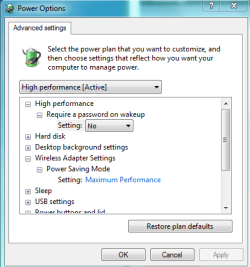
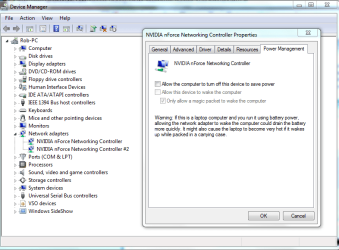
For the sleep mode problem you might try going into the Power Options settings and turn off sleep and hibernate for your network adaptor. You can also try going into Device Manager and turning off the network adaptor's ability to turn itself off in the properties windows of your network adaptor. Certain drivers can't deal with these functions very well and they tend to cause problems.
 

Attachments

  • power plan network adaptor settings.PNG
    power plan network adaptor settings.PNG
    44.3 KB · Views: 21
  • Device manager network adaptor.PNG
    Device manager network adaptor.PNG
    112 KB · Views: 48

My Computer

Computer type
PC/Desktop
Computer Manufacturer/Model Number
Home built
OS
Windows 7 Ult, Windows 8.1 Pro,
CPU
Q9650-4.275GHz, E8600 4.5GHz, E6750-3.8GHz
Motherboard
Evga 780i FTW
Memory
G.Skill PC2 9600 1200Mhz 5 5 5 15 2T
Graphics Card(s)
GTX480
Sound Card
Asus Xonar D2
Monitor(s) Displays
HannsG
Screen Resolution
1680X1050
Hard Drives
GSkill Phoenix Pro 120GB SSD
PSU
ThermalTake Toughpower 1000Watt modular
Case
ThermalTake XaserV
Cooling
Xigmatek S1283
Keyboard
Logitech G15
Mouse
Logitech G9
Internet Speed
T1
Thanks Chev. Still no go. I tried disabling powering off wireless device.

I think I have narrowed the problem to router. I think problem is the DHCP server and its assigning of the ip address. I think this is why it works when I connect under new network name, in that it resets the table and things its brand new computer.
 

My Computer

OS
Windows 7
Back
Top