I remember reading it in context of XP & assume that same can be done with win7 too.
I want the desktop to be clean with no icon or selected few icons like mac desktops. IF I save anything on the Desktop it should not show on desktop but it should go to another folder named Desktop which shows as shortcut on the desktop. I guess the article mentioned moving the system Desktop folder somewhere elsewhere.
I have a bad habit of cluttering the desktop & want to avoid it.
Do you know any tutorial how to make the desktop elsewhere?
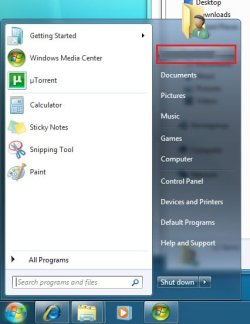
You could go to "personalization" and select whatever main icons you want and then just make a shortcut on the desktop and drag anything you want to keep into that folder. Keep it in your documents or something.
This would get you where you want to be. Good luck.
Let me know if this is NOT what you're thinking.
A lot of software gives the option whether or not to install a desktop shortcut. You could create a directory on your desktop with the icons placed in that i suppose
Thats what I do, I create a folder for programs and another folder for games. Ive put a lot of icons on the taskbar and deleted the ones on the desktop as well.
I think you guys are right. If you want to be organized...put what you use on the taskbar and make a folder that you can put other things into so the desktop does not get cluttered.
I only have recycle bin - computer - personal folder - and SIW.exe on my desktops.
4 icons. It seems to work fine.
My Computer
Computer Manufacturer/Model Number
Keeps changing - (Custom)
OS
Windows 7 Professional x64
CPU
Intel Core i7 860
Motherboard
Gigabyte GA-P55-UD4P
Memory
4GB DDR3 Mushkin 1600Mhz @ 7-8-7-20
Graphics Card(s)
MSI GTS250 1GB DDR3 Twin Frozr
Sound Card
Onboard realtek
Monitor(s) Displays
Samsung SyncMaster 24" P2450 + Samsung 20" 2033
Screen Resolution
1920 X 1080 and 1600 X 900 (#2 system 1440 X 900)
Hard Drives
Patriot Inferno 120GB SSD + 3 WD Blue 640GB drives
PSU
Corsair 750 HX Modular
Case
Lancool PC-K62
Cooling
Cooler Master TX3 CPU cooler and 4-140mm and 1-120mm case
Keyboard
Gigabyte USB keyboard
Mouse
Microsoft wireless laser mouse 5000
Internet Speed
7 Mb down 1.5 up
Other Info
System #2: AMD Phenom II X6 1055T (Freezer 7 Pro cooler) - Gigabyte 880GMA-UD2H - WD 500GB Black - 9500GT (1GB) 500W OCZ modular PSU - Antec 200 case. System #3 (LapTop) Core 2 Duo T6670 - 320GB 7200RPM HD - 4GB DDR3 RAM.
I've been looking for a decent solution to this and have found the following is rather handy.
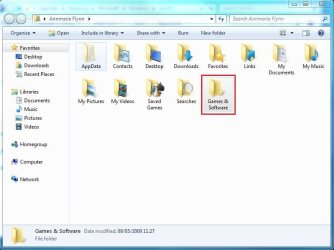
Step 1: Add a new folder in your user folder ("Games & Software" is as good as any). [See Pic 1 & 2]
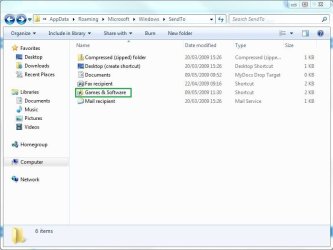
Step 2: Add a new Send To option by navigating to C:\Users\[user name]\AppData\Roaming\Microsoft\Windows\SendTo and create a shortcut to the new folder . [See Pic 3]
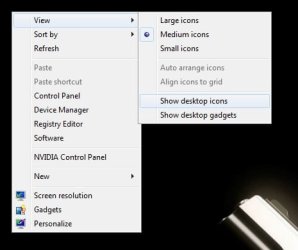
Step 4: Right-click the task bar & under Toolbars & New Toolbar, select the folder that you created and it will appear on the taskbar. [See Pic 4]
Now, you can right-click any icon on the desktop & Send To [new folder] and the icons will appear in the taskbar toolbar. You can now delete the icon from the desktop without any hitch.
Thanks to all for answering, I have already tried few suggestion I actually want the convenience of dragging the web page shortcut to desktop but not want the desktop to clutter, so I need the folder redirection.
I drag to or save a file to desktop but instead it goes to my custom created folder named "Ranjan desktop"
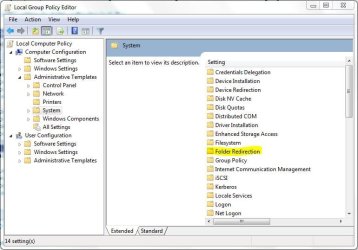
Is it possible to do folder redirection as mentioned in the above article within windows 7 x64 build 7100?
Thanks Orbital Shark,
I found that setting now when I open the folder redirection where do I tell the OS to direct my files, there should be some place to type the path to the redirected folder.
On my d drive I have created a folder "Ranjan desktop" now anything I should save on main desktop should not show on the desktop but it should save to "Ranjan Desktop".
however Ranjan desktop shortcut should be visible on the main desktop.
I need step by step too dumb here.
Dinesh I have that too, its just that I have too many programs to be used so I already have a folder called icons in which i keep less used program icons & frequently used are on the toolbar.
My typical day usage will get me 8-10 images saved on desktop & 4-5 web pages link, this is done on desktop bcoz they are not required for long term but I am lazy & forget them to be delete the ones I don't need. At the same time there are some which I need for long term, so in 15 days time I have a fully disorganized desktop which i am ashamed to show here.
If redirection can work then it would solve my issue.
Orbital Sharktake your time, no hurry.
Thanks for helping!
That's the way I am using it as of now but that does not prevent me from saving the shortcuts & files on main desktop. I want to completely stop that so the files are dragged onto desktop but they get redirected on to my custom folder instead.
6 pata Ide HD's & 2 Sata HD's
added 80gb external on Ult 7600 computer,
numerous extra 1tb, 2TB, 3Tb SATA HD's
A collection of ext HD Docks w/ HDs
PSU
430w, 550w, 600w, 700, 800, etc
Case
All Generic Full Towers
Cooling
Open Air & a few fans, some w/ colored LEDs
Keyboard
Compaq & Dell recycled from GoodWill
Mouse
Made in China Optical Wired Mouse
Internet Speed
Fast Cable InterNet
Antivirus
AVG Free on 24 different Desktops, NO Problems!
Browser
IE 8 is preferred, but use FireFox sometimes
Other Info
Linksys Routers, switches, & Hubs
Too Many USB Flash Drives to count, Biggest is 64GB !
Eight computers in my home network.
Sixteen computers at my business network.
Linked via TeamViewer !
Lots of old used spare computer parts everywhere!