Help. Windows 7 default user in recovery drive? Can't figure this out

Jwheels

New member
Local time
4:26 PM
Messages
11
Hello

I installed windows 7 on my dell desktop a few days ago. I meet the system requirements. I purchased the copy of windows 7 from my school Digital Union so I'm pretty sure it's an OEM (did not come in retail package etc)

I've been having this problem:

I have two user accounts. One is in my C drive and the other is in my recovery D drive. I'm pretty sure my default user is the D drive, but this drive is only about 15 GB and is filling up fast.

I've tried to change the path of programs that I download through the registry but that doesn't completely work. I've also attempted to copy files based on the tutorial Brink posted on this forum but that doesn't work when I try to install things either, stuff still defaults to the D drive sometimes. It's like my active user account is the D drive and I can't do anything to switch it.

I know the D drive is for backup.

I've watched the tutorial whs made on creating seperate partitions but still do not quite understand how that will help me.

I'm very confused and need help. Please excuse my naivete. I am in a total state of confusion. Have spent about 5 hours between yesterday and today researching and trying to figure it out.

Any help would be invaluable.
 

My Computer My Computer

At a glance

windows 7
OS
windows 7
Hello Jwheels, welcome to Seven Forums!


Just to get started; the D: Recovery is more than likely a partition that was added at the factory by Dell and was not intended to be used for anything, it's original purpose was to contain the image used to recover the PC from "issues" back to the original factory state and also used to create the set of recovery disks used for the same purpose.

It would be a very good idea to move any data on that partition to the main C:, the "Move To" part listed in the tutorial at the link below can be used for that purpose to great effect.
We'll stop here for now as I'm sure that's enough for the time being; have you any questions?


Context Menu - Add Copy To Folder and Move To Folder
 

My Computer My Computer

At a glance

W 7 64-bit UltimateIntel Q9550 Yorkfield8GB Dominator 8500C5DATI : XFX 5870
Computer Manufacturer/Model Number
* BFK Customs *
OS
W 7 64-bit Ultimate
CPU
Intel Q9550 Yorkfield
Motherboard
ASUS P5Q Pro
Memory
8GB Dominator 8500C5D
Graphics Card(s)
ATI : XFX 5870
Sound Card
Realtek HD Audio 7-1
Monitor(s) Displays
1x 47" LCD HDMI & 3x 26" LCD HDMI
Screen Resolution
1920x1080P & 1920x1200
Hard Drives
1x 80GB Intel X25-M G2 SSD : 1x 500GB & 1x 640GB WD Caviar Black(s)
PSU
Corsair 620HX
Case
Cooler Master RC-690
Cooling
Tuniq Tower 120, 2x 140mm and 3x 120mm case fans
Keyboard
Microsoft 500
Mouse
Razer Diamondback 3G
Internet Speed
14 Mb/s
Other Info
1x Koutech 3Gb/s SATA HDD Hot Swap Rack
Hey, thanks for replying Bare Foot Kid!

So let me understand this just a bit before I look through the tutorial and try it out:

Did I accidentally install Windows 7 on my D drive placed as a recovery partition by Dell? I originally had Windows Vista installed from the factory.
 

My Computer My Computer

At a glance

windows 7
OS
windows 7
No, I don't believe so as 15GB is not enough to install Windows 7 to; do this.

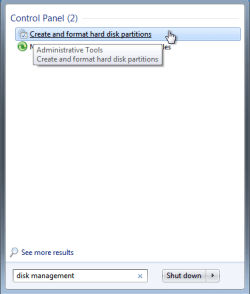
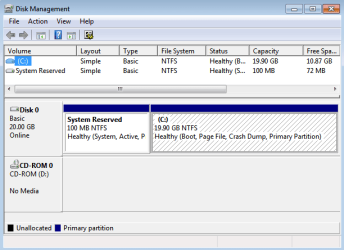
In the Windows start menu type "disk management" and post a snip/screen-shot of the complete drive map of your disk management so we can see what you have going on (like this).


How to Post a Screenshot in Seven Forums


click to enlarge
Start Menu.PNGDM.PNG
 

My Computer My Computer

At a glance

W 7 64-bit UltimateIntel Q9550 Yorkfield8GB Dominator 8500C5DATI : XFX 5870
Computer Manufacturer/Model Number
* BFK Customs *
OS
W 7 64-bit Ultimate
CPU
Intel Q9550 Yorkfield
Motherboard
ASUS P5Q Pro
Memory
8GB Dominator 8500C5D
Graphics Card(s)
ATI : XFX 5870
Sound Card
Realtek HD Audio 7-1
Monitor(s) Displays
1x 47" LCD HDMI & 3x 26" LCD HDMI
Screen Resolution
1920x1080P & 1920x1200
Hard Drives
1x 80GB Intel X25-M G2 SSD : 1x 500GB & 1x 640GB WD Caviar Black(s)
PSU
Corsair 620HX
Case
Cooler Master RC-690
Cooling
Tuniq Tower 120, 2x 140mm and 3x 120mm case fans
Keyboard
Microsoft 500
Mouse
Razer Diamondback 3G
Internet Speed
14 Mb/s
Other Info
1x Koutech 3Gb/s SATA HDD Hot Swap Rack
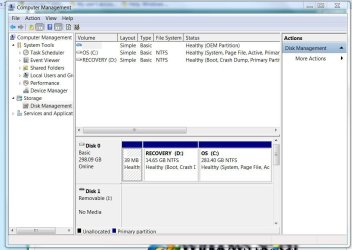
Here is the screenshot of my disk partitions

Thanks for your help so far, BFK
 

Attachments

  • Diskpartitions.JPG
    Diskpartitions.JPG
    85.2 KB · Views: 29

My Computer My Computer

At a glance

windows 7
OS
windows 7
OK, here you are:

1. when you still had Vista, your C partition was the Vista OS and your D partition was the Vista recovery partition. That is how the OEMs set it up.
2. now you seem to have installed your Win7 on D - but your Win7 MBR is probably on C - so you ended up with a mix-up
3. when you install Win7 from and OEM disk, you should end up with one partition provided you start with a clean disk

4. Here is what I suggest:

a) make an image of your Vista partition for the case you ever want your Vista back. Use this program. If you think you never want your Vista back, you can skip that.
b) Cleanup your whole disk (delete all 3 partitions) and reformat (quick format) the disk with this program. Define the whole disk as one partition (that way you avoid the 100MB boot partition at installation time). Burn the bootable CD (see left pane on the webpage). Then it is easy to do.
c) reinstall your Win7 in that partition.

Note: I did not recommend to image and reload your current Win7 because I suspect some mixup with the MBR.

PS: If you need more help with my other tutorial, send me a PM.
 

My Computer My Computer

At a glance

Vista, Windows7, Mint Mate, Zorin, Windows 8from 1.6GHz Duo to i7
Computer Manufacturer/Model Number
HP, Dell, Gateway, Toshiba - 4 laptops and 2 desktops
OS
Vista, Windows7, Mint Mate, Zorin, Windows 8
CPU
from 1.6GHz Duo to i7
Monitor(s) Displays
2x HP w2207
Hard Drives
5x HDD, 7x SSD, 12x Externals
Keyboard
with trackball - no mices
Mouse
Trackball mice
Internet Speed
DSL 6000
OK, here you are:

1. when you still had Vista, your C partition was the Vista OS and your D partition was the Vista recovery partition. That is how the OEMs set it up.
2. now you seem to have installed your Win7 on D - but your Win7 MBR is probably on C - so you ended up with a mix-up
3. when you install Win7 from and OEM disk, you should end up with one partition provided you start with a clean disk

4. Here is what I suggest:

a) make an image of your Vista partition for the case you ever want your Vista back. Use this program. If you think you never want your Vista back, you can skip that.
b) Cleanup your whole disk (delete all 3 partitions) and reformat (quick format) the disk with this program. Define the whole disk as one partition (that way you avoid the 100MB boot partition at installation time). Burn the bootable CD (see left pane on the webpage). Then it is easy to do.
c) reinstall your Win7 in that partition.

Note: I did not recommend to image and reload your current Win7 because I suspect some mixup with the MBR.


Hello Wolfgang, have you seen the snip of disk management above?
 

My Computer My Computer

At a glance

W 7 64-bit UltimateIntel Q9550 Yorkfield8GB Dominator 8500C5DATI : XFX 5870
Computer Manufacturer/Model Number
* BFK Customs *
OS
W 7 64-bit Ultimate
CPU
Intel Q9550 Yorkfield
Motherboard
ASUS P5Q Pro
Memory
8GB Dominator 8500C5D
Graphics Card(s)
ATI : XFX 5870
Sound Card
Realtek HD Audio 7-1
Monitor(s) Displays
1x 47" LCD HDMI & 3x 26" LCD HDMI
Screen Resolution
1920x1080P & 1920x1200
Hard Drives
1x 80GB Intel X25-M G2 SSD : 1x 500GB & 1x 640GB WD Caviar Black(s)
PSU
Corsair 620HX
Case
Cooler Master RC-690
Cooling
Tuniq Tower 120, 2x 140mm and 3x 120mm case fans
Keyboard
Microsoft 500
Mouse
Razer Diamondback 3G
Internet Speed
14 Mb/s
Other Info
1x Koutech 3Gb/s SATA HDD Hot Swap Rack
I would suggest you get all the date off of the D: partition you want to keep to the C: and then you can go from there.
 

My Computer My Computer

At a glance

W 7 64-bit UltimateIntel Q9550 Yorkfield8GB Dominator 8500C5DATI : XFX 5870
Computer Manufacturer/Model Number
* BFK Customs *
OS
W 7 64-bit Ultimate
CPU
Intel Q9550 Yorkfield
Motherboard
ASUS P5Q Pro
Memory
8GB Dominator 8500C5D
Graphics Card(s)
ATI : XFX 5870
Sound Card
Realtek HD Audio 7-1
Monitor(s) Displays
1x 47" LCD HDMI & 3x 26" LCD HDMI
Screen Resolution
1920x1080P & 1920x1200
Hard Drives
1x 80GB Intel X25-M G2 SSD : 1x 500GB & 1x 640GB WD Caviar Black(s)
PSU
Corsair 620HX
Case
Cooler Master RC-690
Cooling
Tuniq Tower 120, 2x 140mm and 3x 120mm case fans
Keyboard
Microsoft 500
Mouse
Razer Diamondback 3G
Internet Speed
14 Mb/s
Other Info
1x Koutech 3Gb/s SATA HDD Hot Swap Rack
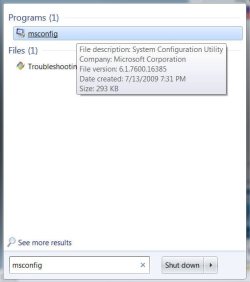
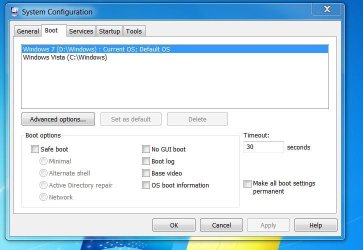
BFK, yes I saw the snip. I conclude that he somehow got Win7 on D and the MBR is on C because it is active. It would be easy to check in msconfig > Boot tab if he has 2 Operating systems. But maybe I am wrong.
 

My Computer My Computer

At a glance

Vista, Windows7, Mint Mate, Zorin, Windows 8from 1.6GHz Duo to i7
Computer Manufacturer/Model Number
HP, Dell, Gateway, Toshiba - 4 laptops and 2 desktops
OS
Vista, Windows7, Mint Mate, Zorin, Windows 8
CPU
from 1.6GHz Duo to i7
Monitor(s) Displays
2x HP w2207
Hard Drives
5x HDD, 7x SSD, 12x Externals
Keyboard
with trackball - no mices
Mouse
Trackball mice
Internet Speed
DSL 6000
Hello Jwheels, let us see the boot at msconfig.


MS.JPGboot.JPG
 

My Computer My Computer

At a glance

W 7 64-bit UltimateIntel Q9550 Yorkfield8GB Dominator 8500C5DATI : XFX 5870
Computer Manufacturer/Model Number
* BFK Customs *
OS
W 7 64-bit Ultimate
CPU
Intel Q9550 Yorkfield
Motherboard
ASUS P5Q Pro
Memory
8GB Dominator 8500C5D
Graphics Card(s)
ATI : XFX 5870
Sound Card
Realtek HD Audio 7-1
Monitor(s) Displays
1x 47" LCD HDMI & 3x 26" LCD HDMI
Screen Resolution
1920x1080P & 1920x1200
Hard Drives
1x 80GB Intel X25-M G2 SSD : 1x 500GB & 1x 640GB WD Caviar Black(s)
PSU
Corsair 620HX
Case
Cooler Master RC-690
Cooling
Tuniq Tower 120, 2x 140mm and 3x 120mm case fans
Keyboard
Microsoft 500
Mouse
Razer Diamondback 3G
Internet Speed
14 Mb/s
Other Info
1x Koutech 3Gb/s SATA HDD Hot Swap Rack
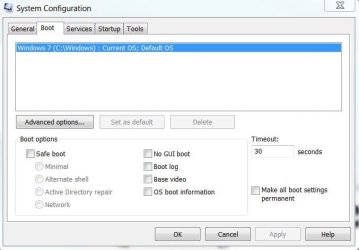
here is my boot config

I'm starting to understand, I think.

Thanks again guys for helping me through this. I'll wait for your final comments before I do anything.
 

Attachments

  • bootconfig.JPG
    bootconfig.JPG
    46.4 KB · Views: 14

My Computer My Computer

At a glance

windows 7
OS
windows 7
One option: if you have somewhere you can move/back-up all the data to externally so that there's nothing left on the Hard Disk Drive (HDD) that would be lost you can use the tutorial at the link below to do a "clean all" to the HDD and do a clean install and have a completely clean slate to start with; there are other options though more complicated; you will need to back-up all the data in either case.

BTW, you do have both Vista and Windows 7 installed to separate partitions.


SSD / HDD : Optimize for Windows Reinstallation

How to Do a Clean Installation with Windows
 

My Computer My Computer

At a glance

W 7 64-bit UltimateIntel Q9550 Yorkfield8GB Dominator 8500C5DATI : XFX 5870
Computer Manufacturer/Model Number
* BFK Customs *
OS
W 7 64-bit Ultimate
CPU
Intel Q9550 Yorkfield
Motherboard
ASUS P5Q Pro
Memory
8GB Dominator 8500C5D
Graphics Card(s)
ATI : XFX 5870
Sound Card
Realtek HD Audio 7-1
Monitor(s) Displays
1x 47" LCD HDMI & 3x 26" LCD HDMI
Screen Resolution
1920x1080P & 1920x1200
Hard Drives
1x 80GB Intel X25-M G2 SSD : 1x 500GB & 1x 640GB WD Caviar Black(s)
PSU
Corsair 620HX
Case
Cooler Master RC-690
Cooling
Tuniq Tower 120, 2x 140mm and 3x 120mm case fans
Keyboard
Microsoft 500
Mouse
Razer Diamondback 3G
Internet Speed
14 Mb/s
Other Info
1x Koutech 3Gb/s SATA HDD Hot Swap Rack
Just so you'll know, don't do anything to either of those entries in msconfig, it won't solve the issue and WILL make things worse. ;)
 

My Computer My Computer

At a glance

W 7 64-bit UltimateIntel Q9550 Yorkfield8GB Dominator 8500C5DATI : XFX 5870
Computer Manufacturer/Model Number
* BFK Customs *
OS
W 7 64-bit Ultimate
CPU
Intel Q9550 Yorkfield
Motherboard
ASUS P5Q Pro
Memory
8GB Dominator 8500C5D
Graphics Card(s)
ATI : XFX 5870
Sound Card
Realtek HD Audio 7-1
Monitor(s) Displays
1x 47" LCD HDMI & 3x 26" LCD HDMI
Screen Resolution
1920x1080P & 1920x1200
Hard Drives
1x 80GB Intel X25-M G2 SSD : 1x 500GB & 1x 640GB WD Caviar Black(s)
PSU
Corsair 620HX
Case
Cooler Master RC-690
Cooling
Tuniq Tower 120, 2x 140mm and 3x 120mm case fans
Keyboard
Microsoft 500
Mouse
Razer Diamondback 3G
Internet Speed
14 Mb/s
Other Info
1x Koutech 3Gb/s SATA HDD Hot Swap Rack
Yeah I wasn't going to mess around with that ;)

I'm not sure about how I would go about backing up my drivers as you suggested if I wanted to do a clean install in one large partition.

I'm still a little bit confused...
 

My Computer My Computer

At a glance

windows 7
OS
windows 7
Do you have an external, USB HDD? I'm not referring to the whole system just your user data.
 

My Computer My Computer

At a glance

W 7 64-bit UltimateIntel Q9550 Yorkfield8GB Dominator 8500C5DATI : XFX 5870
Computer Manufacturer/Model Number
* BFK Customs *
OS
W 7 64-bit Ultimate
CPU
Intel Q9550 Yorkfield
Motherboard
ASUS P5Q Pro
Memory
8GB Dominator 8500C5D
Graphics Card(s)
ATI : XFX 5870
Sound Card
Realtek HD Audio 7-1
Monitor(s) Displays
1x 47" LCD HDMI & 3x 26" LCD HDMI
Screen Resolution
1920x1080P & 1920x1200
Hard Drives
1x 80GB Intel X25-M G2 SSD : 1x 500GB & 1x 640GB WD Caviar Black(s)
PSU
Corsair 620HX
Case
Cooler Master RC-690
Cooling
Tuniq Tower 120, 2x 140mm and 3x 120mm case fans
Keyboard
Microsoft 500
Mouse
Razer Diamondback 3G
Internet Speed
14 Mb/s
Other Info
1x Koutech 3Gb/s SATA HDD Hot Swap Rack
I have a 320 GB toshiba external Harddisk yeah. It's empty. I just bought it a few days ago
 

My Computer My Computer

At a glance

windows 7
OS
windows 7
The question is, what do you want to do, either way it would be a very good idea to make back-ups of all your user data to that HDD before you make any changes; (to me) the easiest way would be to do the clean all / clean install though you could repair what you have now but it would be a considerable bit more work to accomplish successfully.

In the meantime, while you consider the options start the back-ups.
 

My Computer My Computer

At a glance

W 7 64-bit UltimateIntel Q9550 Yorkfield8GB Dominator 8500C5DATI : XFX 5870
Computer Manufacturer/Model Number
* BFK Customs *
OS
W 7 64-bit Ultimate
CPU
Intel Q9550 Yorkfield
Motherboard
ASUS P5Q Pro
Memory
8GB Dominator 8500C5D
Graphics Card(s)
ATI : XFX 5870
Sound Card
Realtek HD Audio 7-1
Monitor(s) Displays
1x 47" LCD HDMI & 3x 26" LCD HDMI
Screen Resolution
1920x1080P & 1920x1200
Hard Drives
1x 80GB Intel X25-M G2 SSD : 1x 500GB & 1x 640GB WD Caviar Black(s)
PSU
Corsair 620HX
Case
Cooler Master RC-690
Cooling
Tuniq Tower 120, 2x 140mm and 3x 120mm case fans
Keyboard
Microsoft 500
Mouse
Razer Diamondback 3G
Internet Speed
14 Mb/s
Other Info
1x Koutech 3Gb/s SATA HDD Hot Swap Rack
Okay it sounds to me that the clean all / clean install is the best option.

Should I backup the user data from my D: drive then? What all should I backup? Is there a tutorial on this?

Sorry I've just never done this before.... Feeling kind of novice right now. Sorry it's such a task to help me with this.
 

My Computer My Computer

At a glance

windows 7
OS
windows 7
You are no problem mate, I like to help people.


Just back-up anything you don'y want to lose, i.e. your pictures, music, doccuments; to start, have a look at the tutorial at the link below to get some ideas.


Backup User and System Files
 

My Computer My Computer

At a glance

W 7 64-bit UltimateIntel Q9550 Yorkfield8GB Dominator 8500C5DATI : XFX 5870
Computer Manufacturer/Model Number
* BFK Customs *
OS
W 7 64-bit Ultimate
CPU
Intel Q9550 Yorkfield
Motherboard
ASUS P5Q Pro
Memory
8GB Dominator 8500C5D
Graphics Card(s)
ATI : XFX 5870
Sound Card
Realtek HD Audio 7-1
Monitor(s) Displays
1x 47" LCD HDMI & 3x 26" LCD HDMI
Screen Resolution
1920x1080P & 1920x1200
Hard Drives
1x 80GB Intel X25-M G2 SSD : 1x 500GB & 1x 640GB WD Caviar Black(s)
PSU
Corsair 620HX
Case
Cooler Master RC-690
Cooling
Tuniq Tower 120, 2x 140mm and 3x 120mm case fans
Keyboard
Microsoft 500
Mouse
Razer Diamondback 3G
Internet Speed
14 Mb/s
Other Info
1x Koutech 3Gb/s SATA HDD Hot Swap Rack
Cool, my backup is currently in process. Brink wrote a great tutorial on that. I learned a lot from it.

So, after that I'll do the clean up and clean install. It'll probably be a challenge for me but the tutorials seem very good and I think I can manage. If I have any more questions I'll post them.

Is there anything else I need to know before I start this process?

Thanks so much for your help!
 

My Computer My Computer

At a glance

windows 7
OS
windows 7
Back
Top