

Michael Daniels
New member
- Local time
- 12:05 AM
- Messages
- 8
Hi everyone 
I have this strange issue with IE8. Everytime I open IE, a diaglog box appears and tells me that "Internet Explorer is not currently your default browser. Would you like to make it your default browser?". I have the option "Always perform this check when starting Internet Explorer" checked and press OK. Then everything seems to be normal. But when I close IE and start it again, this diaglog box appears again :shock:! Still having the option "Always perform this check when starting Internet Explorer" checked and press OK .
.
I have restarted my computer several times, but this still happen. I suspected that this diaglog box doesn't work when I press OK, and I had a little check. After clicking "OK" on that diaglog box ("Internet Explorer is not currently your default browser. Would you like to make it your default browser?" with the option "Always perform this check when starting Internet Explorer" checked), I open the Internet Options diaglog box and select tab Programs. And as I suspected, in the "Default web browser" section, the status was "Internet Explorer is not currently the default web browser" :shock::huh:!
I have Firefox 3.6.8 on my computer. I always set Firefox not to be the default browser. When IE8 told me that it's not the default browser, I have also checked Firefox but Firefox was still not the default browser. This is really bizarre, if IE is not the default browser and Firefox is not the default browser too, so what's the default browser on my computer :shock:?
Well, in summary, my issue is that I cannot make IE8 my default web browser. I hope that you can help me on this . Thank you very much! And have a nice day .
I have this strange issue with IE8. Everytime I open IE, a diaglog box appears and tells me that "Internet Explorer is not currently your default browser. Would you like to make it your default browser?". I have the option "Always perform this check when starting Internet Explorer" checked and press OK. Then everything seems to be normal. But when I close IE and start it again, this diaglog box appears again :shock:! Still having the option "Always perform this check when starting Internet Explorer" checked and press OK
.I have restarted my computer several times, but this still happen. I suspected that this diaglog box doesn't work when I press OK, and I had a little check. After clicking "OK" on that diaglog box ("Internet Explorer is not currently your default browser. Would you like to make it your default browser?" with the option "Always perform this check when starting Internet Explorer" checked), I open the Internet Options diaglog box and select tab Programs. And as I suspected, in the "Default web browser" section, the status was "Internet Explorer is not currently the default web browser"
:shock::huh:!I have Firefox 3.6.8 on my computer. I always set Firefox not to be the default browser. When IE8 told me that it's not the default browser, I have also checked Firefox but Firefox was still not the default browser. This is really bizarre, if IE is not the default browser and Firefox is not the default browser too, so what's the default browser on my computer :shock:?
Well, in summary, my issue is that I cannot make IE8 my default web browser
. I hope that you can help me on this . Thank you very much! And have a nice day .My Computer
At a glance
Windows 7 Professional (x86)Intel Core2 Duo T5750 @ 2.00 GHz2x 1GB DDR2-SDRAM @ 667 MHz (dual channel)Intel GMA X3100
- Computer Manufacturer/Model Number
- Asus Notebook F80L Series
- OS
- Windows 7 Professional (x86)
- CPU
- Intel Core2 Duo T5750 @ 2.00 GHz
- Motherboard
- Asus Notebook F80L
- Memory
- 2x 1GB DDR2-SDRAM @ 667 MHz (dual channel)
- Graphics Card(s)
- Intel GMA X3100
- Sound Card
- Realtek High Definition Audio
- Monitor(s) Displays
- Generic 14.1" Notebook LCD
- Screen Resolution
- 1280x800
- Hard Drives
- Hitachi 160 GB SATA 1.5 Gbps hard disk drive
- Keyboard
- Generic Notebook keyboard
- Mouse
- Synaptic Touchpad


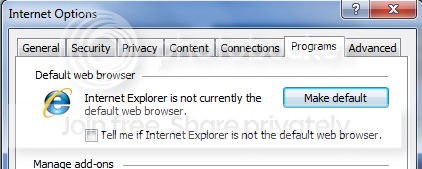
 . I have to uncheck "Tell me if Internet Explorer is not the default web browser" to stop that diaglog annoying me
