
Enable Direct2D and Hardware Acceleration in Mozilla Firefox

Capt.Jack Sparrow

Crash Dump Analyst
Guru
Local time
8:32 PM
Messages
4,772
A little background for those who wondering what is Direct2D and DirectWrite Hardware Acceleration

Direct2D :

Direct2Dis a hardware-accelerated, immediate-mode, 2-D graphics API that provides high performance and high-quality rendering for 2-D geometry, bitmaps, and text. The Direct2D API is designed to interoperate well with GDI, GDI+, and Direct3D.

DirectWrite Hardware Acceleration:

Today's applications must support high-quality text rendering, resolution-independent outline fonts, and full Unicode text and layout support. DirectWrite, a new DirectX API, provides these features and more:

  • A device-independent text layout system that improves text readability in documents and in UI.
  • High-quality, sub-pixel, ClearType text rendering that can use GDI, Direct2D, or application-specific rendering technology.
  • Hardware-accelerated text, when used with Direct2D.
  • Support for multi-format text.
  • Support for the advanced typography features of OpenType fonts.
  • Support for the layout and rendering of text in all supported languages.
  • GDI-compatible layout and rendering.
Note:

  1. This will only work with Firefox 4 Beta and later
  2. Some Add-ons may interfere with proper operation when they call a certain API prematurely. I had problems with ABP add-ons managed to find a link for developers build https://adblockplus.org/devbuilds/adblockplus/
  3. Your Video Drivers should be updated to the latest version.
Here is how:

1. If you're not using Firefox 4 Beta download it from here. Firefox 4 Beta

2. On the Address bar type in about:config then click on "I'll be careful. I promise!"
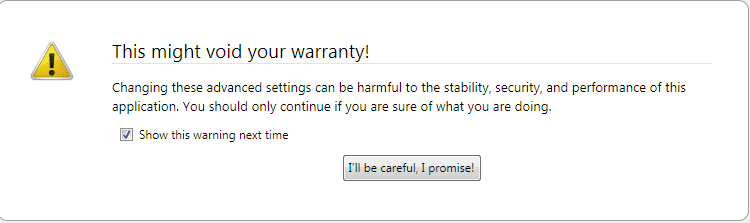
1.PNG

3. Under Filter type in "gfx.font_rendering.directwrite.enabled" without Quotes and double click on it to change the value from False to True

2.PNG

4. Then under Filter type in "mozilla.widget.render-mode" without Quotes and double click on it change the value from -1 to 6
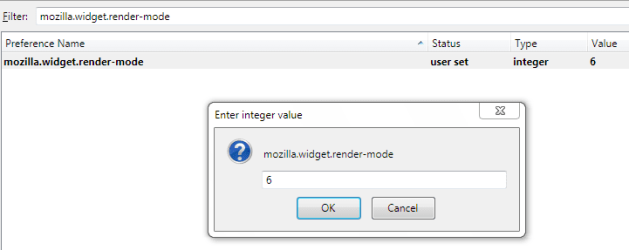
3.PNG

5. Now restart your browser to take effect

Hope this helps,
Captain
 

My Computer My Computer

Computer Manufacturer/Model Number
Samsung NP550P5C-S02IN
OS
Windows 7 Ultimate - 64-bit | Windows 8 Pro - 64-bit
CPU
Intel® Core™ i7 Processor 3,610QM (2.30Hz, 6MB L3 Cach
Memory
8 GB
Graphics Card(s)
NVIDIA® GeForce® GT 650M 2GB Graphics, Optimus™ techno
Sound Card
SoundAlive™ JBL 3 Speakers (With sub-Woofer)
Monitor(s) Displays
39.62cm (15.6) SuperBright 300nit HD+ LED Display
Screen Resolution
1,600 x 900, Anti-Reflective
Hard Drives
1TB S-ATA II Hard Drive (5,400RPM)
Well done Captain.
 

My Computer My Computer

Computer Manufacturer/Model Number
Samsung NP530U4B-S02IN
OS
Windows® 8 Pro (64-bit)
CPU
Intel® Core™ i5 Processor 2467M (1.60GHz, 3MB L3 Cache)
Motherboard
Samsung Electronics
Memory
6GB DDR3 System Memory at 1,333MHz (on BD 4GB + 2GB x 1)
Graphics Card(s)
AMD Radeon™ HD7550M 1GB DDR3 (Ext. Graphic)
Sound Card
Realtek High Definition Audio
Monitor(s) Displays
35.56cm (14.0) SuperBright 300nit HD LED Display
Screen Resolution
1366x768
Hard Drives
1TB S-ATA II Hard Drive (5400RPM) with ExpressCache 16GB SSD
Internet Speed
sucks
Antivirus
Microsoft Security Essentials
Browser
Google Chrome (Sync enabled)

My Computer My Computer

Computer Manufacturer/Model Number
Samsung NP550P5C-S02IN
OS
Windows 7 Ultimate - 64-bit | Windows 8 Pro - 64-bit
CPU
Intel® Core™ i7 Processor 3,610QM (2.30Hz, 6MB L3 Cach
Memory
8 GB
Graphics Card(s)
NVIDIA® GeForce® GT 650M 2GB Graphics, Optimus™ techno
Sound Card
SoundAlive™ JBL 3 Speakers (With sub-Woofer)
Monitor(s) Displays
39.62cm (15.6) SuperBright 300nit HD+ LED Display
Screen Resolution
1,600 x 900, Anti-Reflective
Hard Drives
1TB S-ATA II Hard Drive (5,400RPM)
Well done Capt :)

Just a little word of warning: this might just be me, but when I turn on HW acceleration in 4.0b it crashes my graphics driver, im using a Geforce 210 and the latest drivers. Just be warned ;)
 

My Computer My Computer

Computer type
PC/Desktop
Computer Manufacturer/Model Number
Medion Erazer (note to self: insert model number) - with custom additions
OS
Windows 10 Pro x64
CPU
Intel Core i5 7400 @ 3.00GHz
Motherboard
OEM supllied with PC
Memory
8GB 2133Mhz DDR4 (OEM supplied)
Graphics Card(s)
Gygabyte Windforce GTX 1050Ti (Factory Overclocked)
Sound Card
Realtek
Monitor(s) Displays
Acer Al1980 + HKC
Screen Resolution
1360*768(HKC) / 1280*1024(Acer)
Hard Drives
1TB Toshiba
1TB WD Caviar Green
120GB Samsung Evo 840
PSU
OEM supplied (no power rating on case)
Case
OEM Supplied
Cooling
Stock
Keyboard
Logitech Wireless
Mouse
Logitect Wireless
Internet Speed
40Mb/s Down 10Mb/s Up
Antivirus
Defender
Browser
Firefox
Well done Capt :)

Just a little word of warning: this might just be me, but when I turn on HW acceleration in 4.0b it crashes my graphics driver, im using a Geforce 210 and the latest drivers. Just be warned ;)

Thanks for the Heads up Martin. Maybe just check here https://bugzilla.mozilla.org/ if it's some kind of bug. I use nVidia Geforce 6100 and it works fine for me.
 

My Computer My Computer

Computer Manufacturer/Model Number
Samsung NP550P5C-S02IN
OS
Windows 7 Ultimate - 64-bit | Windows 8 Pro - 64-bit
CPU
Intel® Core™ i7 Processor 3,610QM (2.30Hz, 6MB L3 Cach
Memory
8 GB
Graphics Card(s)
NVIDIA® GeForce® GT 650M 2GB Graphics, Optimus™ techno
Sound Card
SoundAlive™ JBL 3 Speakers (With sub-Woofer)
Monitor(s) Displays
39.62cm (15.6) SuperBright 300nit HD+ LED Display
Screen Resolution
1,600 x 900, Anti-Reflective
Hard Drives
1TB S-ATA II Hard Drive (5,400RPM)
edit: I dunno' what's goin' on for sure. All I can say is using these settings with 3.6.8 makes for fuzzy fonts. I don't see much in the way of "snappy" either with the Minefield beta 5 or this browser. It all seems the same to me.
 

My Computer My Computer

Computer Manufacturer/Model Number
HP Media Center
OS
Windows 7 32 bit
CPU
AMD 5200+ dual core
Memory
2 GB
Graphics Card(s)
NVidia GeForce 6150SE 128 MB
Monitor(s) Displays
CRT
Screen Resolution
1280x1024
Hard Drives
500 GB Sata internal :

SIIG USB 3.0 docking stations w/WD Caviar Black 6 Gb/s drives
Keyboard
PS/2
Mouse
PS/2 Wheel Mouse
Other Info
SIIG USB 3.0 PCIexpress card.
Miles, from the Capt.'s post:

"Note:
This will only work with Firefox 4 Beta and later"

Good info Capt. :thumbsup:

A Guy
 

My Computer My Computer

Computer type
PC/Desktop
OS
Windows 10 Home x64
CPU
INTEL Core i5-750 Quad-Core 3.37GHz
Motherboard
ASUS P7P55D
Memory
HyperX Fury Black Series 8GB (2 x 4GB) 1866Mhz
Graphics Card(s)
EVGA GeForce GTX 750 Superclocked 1GB 128-Bit GDDR5
Monitor(s) Displays
LG 32MA68HY 32" IPS
Screen Resolution
1920 x 1080
Hard Drives
Samsung 840 Evo 120GB, SEAGATE 500GB Barracuda® 7200.12, SATA 3 Gb/s, 7200 RPM, 16MB cache
PSU
ANTEC TruePower New TP-550, 80 PLUS, 550W
Case
ANTEC Three Hundred Illusion
Cooling
COOLER MASTER Hyper 212 Plus, 4 x 120mm 1 x 140mm Noctua's
Internet Speed
85 + Mbps
Antivirus
Avast
Browser
Vivaldi
I installed the Minefield. Got about:support to show it was enabled. But I still didn't notice any difference. Then again, my systems don't have kick-ass GPUs either. :)

Just seems like if you set those settings on 3.6.8 you get grainy fonts. Just peculiar. Maybe it's the power of suggestion. FF has a tendency to do weird things with profiles. But iirc in a development version they claimed unless you set it up in isolation, the 2D rendering would not work no matter what settings you used. I dunno' anymore. I guess I've just lost patience playing with Minefield builds. :(
 

My Computer My Computer

Computer Manufacturer/Model Number
HP Media Center
OS
Windows 7 32 bit
CPU
AMD 5200+ dual core
Memory
2 GB
Graphics Card(s)
NVidia GeForce 6150SE 128 MB
Monitor(s) Displays
CRT
Screen Resolution
1280x1024
Hard Drives
500 GB Sata internal :

SIIG USB 3.0 docking stations w/WD Caviar Black 6 Gb/s drives
Keyboard
PS/2
Mouse
PS/2 Wheel Mouse
Other Info
SIIG USB 3.0 PCIexpress card.
hello Captain I did everything you said up until the mozilla.widget.render-mode which is not list in my about:config so why isn't it listed?
 

My Computer My Computer

Computer Manufacturer/Model Number
VIA Technologies Inc. KT600-8237
OS
windows xp pro
Motherboard
AMD Athlon XP 2900+
Graphics Card(s)
Radeon 7000 series
Sound Card
Realtek AC'97 Audio for VIA
Hard Drives
Maxtor 2B020H1
Hi Tigresskat welcome to the forums,

FF4 now has Hardware Acceleration enabled by default, you should not need to change anything to get it working :) Cheers.
 

My Computer My Computer

Computer type
PC/Desktop
Computer Manufacturer/Model Number
Medion Erazer (note to self: insert model number) - with custom additions
OS
Windows 10 Pro x64
CPU
Intel Core i5 7400 @ 3.00GHz
Motherboard
OEM supllied with PC
Memory
8GB 2133Mhz DDR4 (OEM supplied)
Graphics Card(s)
Gygabyte Windforce GTX 1050Ti (Factory Overclocked)
Sound Card
Realtek
Monitor(s) Displays
Acer Al1980 + HKC
Screen Resolution
1360*768(HKC) / 1280*1024(Acer)
Hard Drives
1TB Toshiba
1TB WD Caviar Green
120GB Samsung Evo 840
PSU
OEM supplied (no power rating on case)
Case
OEM Supplied
Cooling
Stock
Keyboard
Logitech Wireless
Mouse
Logitect Wireless
Internet Speed
40Mb/s Down 10Mb/s Up
Antivirus
Defender
Browser
Firefox
Back
Top