Question about gadget functionality

jjensson

New member
Hi folks,

I cannot figure this out, so i'm hoping that this forum can help me.

I want to disable all gadgets at once when i play a game (for making sure nothing in the background slows the game down) or when i don't need them. And after that i want quickly to enable all gadgets again, exactly like they where configured, including all the special settings i made (that cost me a full 10 min of my time...).

There have to be a way, right? How you guys do this? So far when i close a gadget, it forgets all the settings! :cry:

Thanks in advance,
jj
 

My Computer

Computer type
PC/Desktop
Computer Manufacturer/Model Number
selfmade
OS
Microsoft Windows 10 Home 64-bit 10240 Multiprocessor Free
CPU
Intel(R) Core(TM) i5-2400 CPU @ 3.10GHz
Motherboard
Gigabyte Technology Co., Ltd. H67MA-D2H-B3
Memory
8,00 GB
Graphics Card(s)
NVIDIA GeForce GTX 970
Sound Card
(1) HD Webcam C270 (2) High Definition Audio Device (3)
Screen Resolution
2560 x 1440 x 32 bits (4294967296 colors) @ 59 Hz
Hard Drives
(1) TEAC USB HS-MS Card USB Device (2) TEAC USB HS-CF Card USB Device (3) TEAC USB HS-xD/SM USB Device (4) WDC WD1002FAEX-00Z3A0 (5) Samsung SSD 840 Series (6) TEAC USB HS-SD Card USB Device (7) WDC WD1002FAEX-00Z3A0
I end the process SideBar.exe in taskmanager and when I want to run them again I open the Start Menu and type sidebar into the search bar and then select the first link.

Sidebar.PNG
 

My Computers

System One System Two

  • Computer type
    PC/Desktop
    Computer Manufacturer/Model Number
    The Beast Model A (homebrew)
    OS
    Windows 11 21H2 Current build
    CPU
    AMD Ryzen 9 3950X
    Motherboard
    MSI MEG X570 GODLIKE
    Memory
    4 * 32 GB - Corsair Vengeance 3600 MHz
    Graphics Card(s)
    EVGA GeForce RTX 3080 Ti XC3 ULTRA GAMING (12G-P5-3955-KR)
    Sound Card
    Realtek® ALC1220 Codec
    Monitor(s) Displays
    2x Eve Spectrum ES07D03 4K Gaming Monitor (Matte) | Eve Spec
    Screen Resolution
    3x 3840 x 2160
    Hard Drives
    3x Samsung 980 Pro NVMe PCIe 4 M.2 2 TB SSD (MZ-V8P2T0B/AM) } 3x Sabrent Rocket NVMe 4.0 1 TB SSD
    PSU
    PC Power & Cooling’s Silencer Series 1050 Watt, 80 Plus Plat
    Case
    Fractal Design Define 7 XL Dark ATX Full Tower Case
    Cooling
    SteelSeries Apex Pro Wired Gaming Keyboard
    Keyboard
    SteelSeries Apex Pro
    Mouse
    Logitech MX Master 3S | MX Master 3 for business
    Internet Speed
    AT&T LightSpeed Gigabit Duplex Ftth
    Antivirus
    Windows Defender + MB 3
    Browser
    Nightly (default) + Firefox (stable),Chrome, Edge
  • Computer type
    PC/Desktop
    System Manufacturer/Model Number
    Dell Latitude E5470
    OS
    ChromeOS Flex Dev Channel (current)
    CPU
    Intel(R) Core(TM) i5-6300U CPU @ 2.40GHz, 2501 Mhz, 2 Core(s), 4 Logical Processor(s)
    Motherboard
    Dell
    Memory
    16 GB
    Graphics Card(s)
    Intel(R) HD Graphics 520
    Sound Card
    Intel(R) HD Graphics 520 + RealTek Audio
    Monitor(s) Displays
    Dell laptop display 15"
    Screen Resolution
    1920 * 1080
    Hard Drives
    Toshiba 128GB M.2 22300 drive
    INTEL Cherryville 520 Series SSDSC2CW180A 180 GB SATA III SSD
    PSU
    Dell
    Case
    Dell
    Cooling
    Dell
    Keyboard
    Dell
    Mouse
    Logitech MX Master 3S (shared w. Sys 1) | Dell TouchPad
    Internet Speed
    AT&T LightSpeed Gigabit Duplex Ftth
Wow, that's working! Thanks, John. Not the most elegant solution, but will do! :)

Why doesn't MS give us such an option from the start? We have always to do it the hard way...

Cheers,
jj
 

My Computer

Computer type
PC/Desktop
Computer Manufacturer/Model Number
selfmade
OS
Microsoft Windows 10 Home 64-bit 10240 Multiprocessor Free
CPU
Intel(R) Core(TM) i5-2400 CPU @ 3.10GHz
Motherboard
Gigabyte Technology Co., Ltd. H67MA-D2H-B3
Memory
8,00 GB
Graphics Card(s)
NVIDIA GeForce GTX 970
Sound Card
(1) HD Webcam C270 (2) High Definition Audio Device (3)
Screen Resolution
2560 x 1440 x 32 bits (4294967296 colors) @ 59 Hz
Hard Drives
(1) TEAC USB HS-MS Card USB Device (2) TEAC USB HS-CF Card USB Device (3) TEAC USB HS-xD/SM USB Device (4) WDC WD1002FAEX-00Z3A0 (5) Samsung SSD 840 Series (6) TEAC USB HS-SD Card USB Device (7) WDC WD1002FAEX-00Z3A0
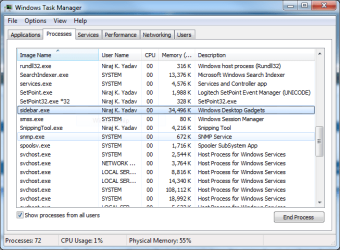
that is the only way I have been doing it - it is one of the reasons I absolutely love the Vista / win7 Search in the start menu - it makes life a *lot* easier in terms of running things....

As for why they don't - I think with the beta testing process, they purposefully do not tell us things so we can discover them on our own - and blog / write / talk to people about what we have found....

But that is my own conjecture....
 

My Computers

System One System Two

  • Computer type
    PC/Desktop
    Computer Manufacturer/Model Number
    The Beast Model A (homebrew)
    OS
    Windows 11 21H2 Current build
    CPU
    AMD Ryzen 9 3950X
    Motherboard
    MSI MEG X570 GODLIKE
    Memory
    4 * 32 GB - Corsair Vengeance 3600 MHz
    Graphics Card(s)
    EVGA GeForce RTX 3080 Ti XC3 ULTRA GAMING (12G-P5-3955-KR)
    Sound Card
    Realtek® ALC1220 Codec
    Monitor(s) Displays
    2x Eve Spectrum ES07D03 4K Gaming Monitor (Matte) | Eve Spec
    Screen Resolution
    3x 3840 x 2160
    Hard Drives
    3x Samsung 980 Pro NVMe PCIe 4 M.2 2 TB SSD (MZ-V8P2T0B/AM) } 3x Sabrent Rocket NVMe 4.0 1 TB SSD
    PSU
    PC Power & Cooling’s Silencer Series 1050 Watt, 80 Plus Plat
    Case
    Fractal Design Define 7 XL Dark ATX Full Tower Case
    Cooling
    SteelSeries Apex Pro Wired Gaming Keyboard
    Keyboard
    SteelSeries Apex Pro
    Mouse
    Logitech MX Master 3S | MX Master 3 for business
    Internet Speed
    AT&T LightSpeed Gigabit Duplex Ftth
    Antivirus
    Windows Defender + MB 3
    Browser
    Nightly (default) + Firefox (stable),Chrome, Edge
  • Computer type
    PC/Desktop
    System Manufacturer/Model Number
    Dell Latitude E5470
    OS
    ChromeOS Flex Dev Channel (current)
    CPU
    Intel(R) Core(TM) i5-6300U CPU @ 2.40GHz, 2501 Mhz, 2 Core(s), 4 Logical Processor(s)
    Motherboard
    Dell
    Memory
    16 GB
    Graphics Card(s)
    Intel(R) HD Graphics 520
    Sound Card
    Intel(R) HD Graphics 520 + RealTek Audio
    Monitor(s) Displays
    Dell laptop display 15"
    Screen Resolution
    1920 * 1080
    Hard Drives
    Toshiba 128GB M.2 22300 drive
    INTEL Cherryville 520 Series SSDSC2CW180A 180 GB SATA III SSD
    PSU
    Dell
    Case
    Dell
    Cooling
    Dell
    Keyboard
    Dell
    Mouse
    Logitech MX Master 3S (shared w. Sys 1) | Dell TouchPad
    Internet Speed
    AT&T LightSpeed Gigabit Duplex Ftth
Hi folks,

I cannot figure this out, so i'm hoping that this forum can help me.

I want to disable all gadgets at once when i play a game (for making sure nothing in the background slows the game down) or when i don't need them. And after that i want quickly to enable all gadgets again, exactly like they where configured, including all the special settings i made (that cost me a full 10 min of my time...).

There have to be a way, right? How you guys do this? So far when i close a gadget, it forgets all the settings! :cry:

Thanks in advance,
jj


As for why they don't - I think with the beta testing process, they purposefully do not tell us things so we can discover them on our own - and blog / write / talk to people about what we have found....

They do..


There's actually a way easier way to enable and disable the gadgets and still save their settings.

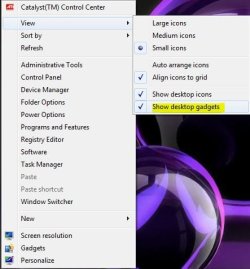
Just right click the desktop, in the context menu-View-Show Desktop Gadgets.

Uncheck it, it will stop the sidebar.exe process, not just hide them. When you're ready to enable them again, just re check it. :)


show gadgets.JPG
 

My Computer

Computer type
PC/Desktop
Computer Manufacturer/Model Number
Airbot 2.0
OS
Windows 7 Ultimate x64 SP1
CPU
Core i7 920 (D0) @ 4Ghz, *26c idle *65c full load on air
Motherboard
Asus P6X58D Premium - Sata 6Gb/s - USB 3.0
Memory
12GB DDR3 Corsair Dominator -CMD12GX3M6A1600C8 at 1600MHz
Graphics Card(s)
Zotac Geforce GTX 770
Sound Card
ASUS Xonar D2X
Monitor(s) Displays
1 LG 24" Flatron W2453V-PF 1 Samsung 24" P2450H both 2ms RT
Screen Resolution
1920x1080@60hz
Hard Drives
1 Samsung 250GB 840 Evo SSD
1 OCZ Vertex2 180GB SSD
1 TB Samsung Spinpoint F1 7200RPM 32MB cache
2 500GB WD Caviar Blacks 7200RPM 32MB cache (WD5001AALS)

Pioneer DVD Burner DVR-S18M
PSU
Corsair HX1000W
Case
Cooler Master HAF 932
Cooling
Case Fans *3 230mm, *1 140mm/CPU - *Tuniq Tower 120 Extreme
Keyboard
Logitech Wireless MK700
Mouse
Logitech Wireless MK700
Internet Speed
DL 15 Mbps UL 0.98 Mbps
Antivirus
None
Browser
Firefox Nightly
Other Info
Processor-7.7 *RAM- 7.9 *Graphics-7.9 *Gaming Graphics- 7.9 *SSD- 7.8 W.E.I final score= 7.7
*Phone- LG Nexus 5
Doh! I never thought about searching under "View" in the context menu! Absolutely great. Thanks a bunch!

jj
 

My Computer

Computer type
PC/Desktop
Computer Manufacturer/Model Number
selfmade
OS
Microsoft Windows 10 Home 64-bit 10240 Multiprocessor Free
CPU
Intel(R) Core(TM) i5-2400 CPU @ 3.10GHz
Motherboard
Gigabyte Technology Co., Ltd. H67MA-D2H-B3
Memory
8,00 GB
Graphics Card(s)
NVIDIA GeForce GTX 970
Sound Card
(1) HD Webcam C270 (2) High Definition Audio Device (3)
Screen Resolution
2560 x 1440 x 32 bits (4294967296 colors) @ 59 Hz
Hard Drives
(1) TEAC USB HS-MS Card USB Device (2) TEAC USB HS-CF Card USB Device (3) TEAC USB HS-xD/SM USB Device (4) WDC WD1002FAEX-00Z3A0 (5) Samsung SSD 840 Series (6) TEAC USB HS-SD Card USB Device (7) WDC WD1002FAEX-00Z3A0
No problem.
 

My Computer

Computer type
PC/Desktop
Computer Manufacturer/Model Number
Airbot 2.0
OS
Windows 7 Ultimate x64 SP1
CPU
Core i7 920 (D0) @ 4Ghz, *26c idle *65c full load on air
Motherboard
Asus P6X58D Premium - Sata 6Gb/s - USB 3.0
Memory
12GB DDR3 Corsair Dominator -CMD12GX3M6A1600C8 at 1600MHz
Graphics Card(s)
Zotac Geforce GTX 770
Sound Card
ASUS Xonar D2X
Monitor(s) Displays
1 LG 24" Flatron W2453V-PF 1 Samsung 24" P2450H both 2ms RT
Screen Resolution
1920x1080@60hz
Hard Drives
1 Samsung 250GB 840 Evo SSD
1 OCZ Vertex2 180GB SSD
1 TB Samsung Spinpoint F1 7200RPM 32MB cache
2 500GB WD Caviar Blacks 7200RPM 32MB cache (WD5001AALS)

Pioneer DVD Burner DVR-S18M
PSU
Corsair HX1000W
Case
Cooler Master HAF 932
Cooling
Case Fans *3 230mm, *1 140mm/CPU - *Tuniq Tower 120 Extreme
Keyboard
Logitech Wireless MK700
Mouse
Logitech Wireless MK700
Internet Speed
DL 15 Mbps UL 0.98 Mbps
Antivirus
None
Browser
Firefox Nightly
Other Info
Processor-7.7 *RAM- 7.9 *Graphics-7.9 *Gaming Graphics- 7.9 *SSD- 7.8 W.E.I final score= 7.7
*Phone- LG Nexus 5
You could also try this. I use it and think it is a neat little tool. It not only stops sidebar but also any other services that are not needed whilst gaming, therefore more power to gaming. It has just come out of the beta stage and is now v1.

Game Booster | Better Play Experience | Game Accelerator
 

My Computer

Computer Manufacturer/Model Number
Custom Build.
OS
Windows 7 Ultimate x64.
CPU
i5 760 @ 4.2Ghz. 1.18v
Motherboard
Gigabyte - H55M-USB3
Memory
4g Corsair xms3 ddr3, 1600Mhz.
Graphics Card(s)
Gigabyte GTX-560Ti soc edition
Sound Card
Asus Xonar Dx - Logitech Z5500.
Monitor(s) Displays
Acer 22" LCD Wide screen 1680-1050 -Samsung 42" Plasma....
Screen Resolution
1680/1050 -----1920/1080p.
Hard Drives
2x 2TB Seagate Go Flex,
1x 1TB Seagate,
1x 640WD Black,
x16 Gig sandisc flash drive,
1x8Gig sandisc flash drive.
PSU
XigmaTek 80plus NRP-PC702 - 700w dual 30a.
Case
Venus Gamers Midi Tower Case with LED Display
Cooling
Arctic Freezer 7 Pro Rev 2... x2 Arctic F8 case fans........
Keyboard
Logitech G15-v2 Gaming.
Mouse
Microsoft Sidewinder X8.
Internet Speed
Virgin Media - 50mb down- 8mb up.
Other Info
x2 Xbox 360 wireless controllers...

Dual layer optical disc drive...

Chrome 79million

A.V = MSE
Back
Top