
System Restore General Troubleshooting to Fix Issues

General Troubleshooting to Fix System Restore Issues

   Information
If the System is not able to create System restore point try to Create the restore point manually. If you are unable to create a system restore point manually then you could try these steps


1. Make sure that System Restore is enabled

2. Make sure that you have sufficient disk space on all the drives where System Restore is enabled

3. Try creating a System Restore point manually and making a note of the Error Message you get. If you don't get one, check if one has been created or not.

4. Next set would be to Check the Event Viewer

Type Event Viewer in Start Menu Search Box, hit Enter. Expand Windows Logs then click on Application. Look for Errors if your find any codes post it here or search in Google for that Error codes.

5. Type Services in Start Menu Search Box, hit Enter. Make sure that the Volume Shadow Copy Service is Running if its not running then double click on it.


  • If the Start up type is set to Disabled or Manually
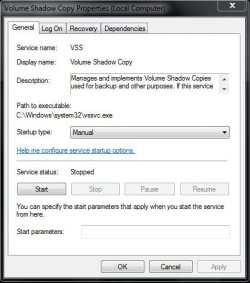
1.JPG


  • click the Drop down and Select to Automatic and click on start
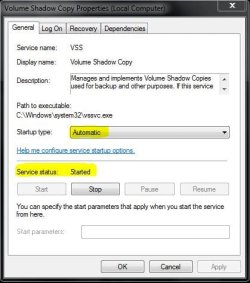
2.JPG

  • Apply it then Click OK
6. Also make sure RPC, Task Scheduler and all service related to DCOM is started

7. Next step we could try to Rebuild the WMI components


  • Close all open programs.
  • Download the WMI.bat from from here

  • Right Click on WMI.bat file and Run as administrator.
  • The Command Prompt window will open. When prompted, type Y to continue.
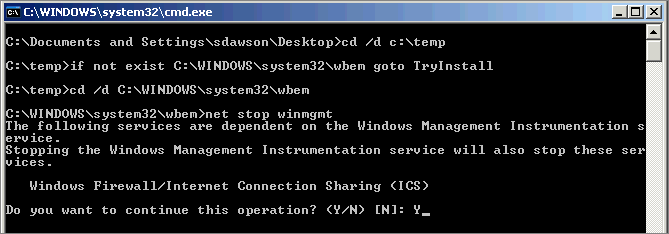
3.gif

  • Allow the Command Prompt to finish and automatically close.
8. Then next step would be to try to create the Restore point in Selective Startup

9. Try to Login under Safe Mode then try to Create a restore point

10. Try to Turn off the System Restore and turn it back on

11. Remove restore points:


  • In Computer (Computer), right-click on C, then Properties (properties), click Disk Cleanup (Disk Cleanup), then clean the system files (Clean up system files)
  • which shows the More Options tab (More Options)
  • By clicking on Clean (Clean up) under System Restore and Shadow (System Restore and Shadow Copies), restore points will be removed, except the most recent.
12. Run System File Checker

  • Start type cmd then Right Click and Run as administrator
  • Type in SFC/ SCANNOW
13. If that also didn’t fix then the next option would be to perform Repair Install


Hope this helps,
Captain​


Last edited by a moderator:
Geez Cap'n, I could've used this earlier today, let me see if I can find the thread. :confused:
 

My Computer

Computer Manufacturer/Model Number
* BFK Customs *
OS
W 7 64-bit Ultimate
CPU
Intel Q9550 Yorkfield
Motherboard
ASUS P5Q Pro
Memory
8GB Dominator 8500C5D
Graphics Card(s)
ATI : XFX 5870
Sound Card
Realtek HD Audio 7-1
Monitor(s) Displays
1x 47" LCD HDMI & 3x 26" LCD HDMI
Screen Resolution
1920x1080P & 1920x1200
Hard Drives
1x 80GB Intel X25-M G2 SSD : 1x 500GB & 1x 640GB WD Caviar Black(s)
PSU
Corsair 620HX
Case
Cooler Master RC-690
Cooling
Tuniq Tower 120, 2x 140mm and 3x 120mm case fans
Keyboard
Microsoft 500
Mouse
Razer Diamondback 3G
Internet Speed
14 Mb/s
Other Info
1x Koutech 3Gb/s SATA HDD Hot Swap Rack
Hy!!!

I think I tried all of those things and it still doesn't work... I have the same problem. The restore points desappear when I reboot... Any other ideas? Thank you
 

My Computer

Computer Manufacturer/Model Number
dell latitude e4300
OS
windows 7
Excellent tutorial. Thanks.
 

My Computer

Computer Manufacturer/Model Number
Toshiba Satellite S875D-S7239 laptop
OS
MS Windows 7 Ultimate SP1 64-bit
CPU
AMD A10-4600M
Motherboard
AMD Pumori (Socket FT1)
Memory
6.00 GB Dual-Channel DDR3 @ 798MHz (11-11-12-28)
Graphics Card(s)
AMD Radeon HD 7660G
Sound Card
High Definition Audio Device
Monitor(s) Displays
Generic PnP Monitor (1600x900@60Hz)
Screen Resolution
1600x900@60Hz
Hard Drives
SSD 119GB Corsair CSSD-V128GB2 ATA Device
Keyboard
Standard PS/2 Keyboard
Mouse
HP Wireless Optical Mobile Mouse Model FHA-3410
Internet Speed
What the local pub, local coffee shop offers.
Other Info
Optical Drive:MATSHITA BD-CMB UJ160B ATA Device


Also have an Asus ha1002xp netbook with Win 7 Ultimate installed.
Hy!!!

I think I tried all of those things and it still doesn't work... I have the same problem. The restore points desappear when I reboot... Any other ideas? Thank you

Did you try that last step ? Repair install ?
 

My Computer

Computer Manufacturer/Model Number
Samsung NP550P5C-S02IN
OS
Windows 7 Ultimate - 64-bit | Windows 8 Pro - 64-bit
CPU
Intel® Core™ i7 Processor 3,610QM (2.30Hz, 6MB L3 Cach
Memory
8 GB
Graphics Card(s)
NVIDIA® GeForce® GT 650M 2GB Graphics, Optimus™ techno
Sound Card
SoundAlive™ JBL 3 Speakers (With sub-Woofer)
Monitor(s) Displays
39.62cm (15.6) SuperBright 300nit HD+ LED Display
Screen Resolution
1,600 x 900, Anti-Reflective
Hard Drives
1TB S-ATA II Hard Drive (5,400RPM)

My Computer

Computer Manufacturer/Model Number
Samsung NP550P5C-S02IN
OS
Windows 7 Ultimate - 64-bit | Windows 8 Pro - 64-bit
CPU
Intel® Core™ i7 Processor 3,610QM (2.30Hz, 6MB L3 Cach
Memory
8 GB
Graphics Card(s)
NVIDIA® GeForce® GT 650M 2GB Graphics, Optimus™ techno
Sound Card
SoundAlive™ JBL 3 Speakers (With sub-Woofer)
Monitor(s) Displays
39.62cm (15.6) SuperBright 300nit HD+ LED Display
Screen Resolution
1,600 x 900, Anti-Reflective
Hard Drives
1TB S-ATA II Hard Drive (5,400RPM)
I haven't tried it yet the repair install... I'm afraid I will have to reinstall many things... I'm not sure what will it be and if I still have all the needed drivers...
 

My Computer

Computer Manufacturer/Model Number
dell latitude e4300
OS
windows 7
I haven't tried it yet the repair install... I'm afraid I will have to reinstall many things... I'm not sure what will it be and if I still have all the needed drivers...

No you don't have to reinstall every single thing. Go through the tutorial link i mentioned.
 

My Computer

Computer Manufacturer/Model Number
Samsung NP550P5C-S02IN
OS
Windows 7 Ultimate - 64-bit | Windows 8 Pro - 64-bit
CPU
Intel® Core™ i7 Processor 3,610QM (2.30Hz, 6MB L3 Cach
Memory
8 GB
Graphics Card(s)
NVIDIA® GeForce® GT 650M 2GB Graphics, Optimus™ techno
Sound Card
SoundAlive™ JBL 3 Speakers (With sub-Woofer)
Monitor(s) Displays
39.62cm (15.6) SuperBright 300nit HD+ LED Display
Screen Resolution
1,600 x 900, Anti-Reflective
Hard Drives
1TB S-ATA II Hard Drive (5,400RPM)
Got a question, sys rest won't work since an update got "stuck", anything in your arsenal to clean out, reset or reinstall Windows Update agent short of a Repair install?
 

My Computer

Computer type
PC/Desktop
Computer Manufacturer/Model Number
Dell Hell oh Well
OS
Win 7 32 Home Premium, Win 7 64 Pro, Win 8.1, Win 10
CPU
Intel Core 2 Duo 2.93GHz
Memory
Not much with my ADHD
Graphics Card(s)
ATI Radeon HD 4350
Monitor(s) Displays
24" HDTV/Monitor
Screen Resolution
Blurry after a Scotch or 2
Hard Drives
1 HDD 250 GB, 1 HDD 1 TB, 3 - 1 TB Externals
Case
Don't get on my case...man :D
Cooling
I have an Air Conditioner & Diet Pepsi
Keyboard
Saitek Cyborg
Mouse
10 yr old MS optical mouse that still works
Internet Speed
Never fast enough
Antivirus
Various
Browser
Various
G'day, mate....If I delete SR points as described in your para 11, they all delete (as advertised) except for the System Image Restore Points. How do I get rid of them?
 

My Computer

OS
Win 7 Home Prem 64
Thanks Capt.

That seems to taken care of things. Both Shadows were set to manual and off.
I went ahead and ran the .bat and SFC /scannow just to be sure.

Tutorial Rep button won't work. :(

Mike
 

My Computer

Computer Manufacturer/Model Number
Hopalong/ Godzilla
OS
Windows7 Pro 64bit SP-1; Windows XP Pro 32bit
CPU
Intel Core i7-870 Lynnfield 2.93GHz LGA 1156 95W Quad-Core
Motherboard
ASUS P7P55D-E PRO
Memory
8GB@1400MHz Crucial Ballistix DDR3-1600 4x2GB
Graphics Card(s)
ASUS ENGTX460 DirectCU/2DI/1GD5 1GB 256-bit GDDR5
Sound Card
VIA Onboard
Monitor(s) Displays
Asus VS248H-P 24"; Samsung SyncMaster 941BW 19"ws
Screen Resolution
1920x1080; 1440x900
Hard Drives
Samsung 830 120GB SSD
Intel 320 120GB SSD
Western Digital Caviar Black WD7501AALS 750GB 7200 RPM SATA 3.0Gb/s
Western Digital Caviar Black WD6401AALS 640GB 7200 RPM SATA 3.0Gb/s
PSU
COOLER MASTER Silent Pro RS850-AMBAJ3-US 850W Modular
Case
COOLER MASTER HAF 932 RC-932-KKN5-GP Black
Cooling
Scythe "Mugen-2 Rev.B" (2 ScytheKaze-Jyuni PWM fans)
Keyboard
Logitech K-320
Mouse
Kensington
Antivirus
Avast Inernet Suite
Browser
IE 9 ; Chrome
Thanks Capt.

That seems to taken care of things. Both Shadows were set to manual and off.
I went ahead and ran the .bat and SFC /scannow just to be sure.

Tutorial Rep button won't work. :(

Mike

Your Welcome Mike ... You took the time to replay to this thread is more than enough :)
 

My Computer

Computer Manufacturer/Model Number
Samsung NP550P5C-S02IN
OS
Windows 7 Ultimate - 64-bit | Windows 8 Pro - 64-bit
CPU
Intel® Core™ i7 Processor 3,610QM (2.30Hz, 6MB L3 Cach
Memory
8 GB
Graphics Card(s)
NVIDIA® GeForce® GT 650M 2GB Graphics, Optimus™ techno
Sound Card
SoundAlive™ JBL 3 Speakers (With sub-Woofer)
Monitor(s) Displays
39.62cm (15.6) SuperBright 300nit HD+ LED Display
Screen Resolution
1,600 x 900, Anti-Reflective
Hard Drives
1TB S-ATA II Hard Drive (5,400RPM)
Hi

Thanks for the suggestions. Unfortunately having worked thru them -no luck. System restore works but does not pick up main C drive just C system. I am reluctant to try the last as I had enough trouble getting the printer and video card to work in Windows 7 before!! I specify just want system restore to recognize the drive. In XP easy delete the txt file and it re-creates on re-boot. Is there a similar thing for 7?
 

My Computer

Computer Manufacturer/Model Number
Aceum
OS
Windows 7 Pro 32
CPU
AMD
Motherboard
Asus
Memory
4gb
Graphics Card(s)
ATI Radeon
Sound Card
Via HDMI
Monitor(s) Displays
Dual flat screen Samsung & CTX
Hard Drives
Samsung 2TB
PSU
450
Hi what I found is I get an error message system restore encountered an error. please try to run system restore again. (0x81000203)
But it wont work no matter how many times you do it ?
But I found if you restart and hit F8 and get where it says repair your computer and let it run it will bring up system restore and it will work from there.
I restored my PC from a windows critical update restore point and system Restore was working just fine again. for a day or so until I let my Computer get another critical update and windows defender updates and my system restore went back to not working ? I figure there is something in one of the critical updates or in windows defender updates that messes up system restore. so I am going to restore my PC agian and not get the critical up date that I think was the problem I will go to windows up date and hide those updates something is wrong with it or windows defender I might just uninstall that also and see if my PC works again. well there you have it.:)
 

My Computer

OS
Windows 7 Home Premium x64
I found errors in the BAT file. For when it calls "%1 /RegServer", it prints an error message instead:
C:\Windows\System32\wbem>WinMgmt.exe /RegServer
Invalid parameter
 

My Computer

Computer type
PC/Desktop
Computer Manufacturer/Model Number
Custom
OS
Microsoft Windows 7 Home Premium 64-bit Service Pack 1
CPU
AMD A10-6800K APU with Radeon(tm)™ HD Graphics 4100
Motherboard
ASRock FM2A85X Extreme4-M
Memory
(2) G.Skill F3-12800CL10-8GBXL
Graphics Card(s)
ASUS R7 250 Series (0x6610)
Sound Card
Realtek High Definition Audio
Monitor(s) Displays
Acer X213H LCD monitor, 21"
Screen Resolution
1920 x 1080 x 32 bits @ 60 Hz
Hard Drives
WD Black, 1.0TB, WDC WD1002FAEX-00Z3A0
PSU
Rosewill Quark-650
Case
Raidmax Comet SECC Steel ATX Mid Tower Computer Case
Cooling
1 x 80mm + 2 x 120mm + Stock cooler
Mouse
Gear Head Wireless Optical 5-button mouse
Internet Speed
FTTx 6000 / 1000
Antivirus
Avast! Free Antivirus 2015.10.0.2208
Browser
Google Chrome Version 40.0.2214.115
Other Info
*AMD Dual-Graphics
*Uses OpenDNS
*Uses Folding@Home
*HP 16x Super-Multi DVD Writer
*Superspeed 74-in-1 Card Reader
*Maximum overclock has not been determined.
Thank you, I will definitely try this out and if it fails will do the mend the install method :D
 

My Computer

Computer type
PC/Desktop
Computer Manufacturer/Model Number
Dell Precision WorkStation 690
OS
Windows 7 Ultimate x64 (Service Pack 1 )
CPU
2x QuadCore Intel Xeon X5355, 2666 MHz (8 x 333)
Motherboard
DELL Motherboard Product 0MY171 (Ver A01)
Memory
16GB (DDR2-667 Fully Buffered ECC DDR2 SDRAM)
Graphics Card(s)
NVIDIA GeForce 8400 GS (512 MB)
Sound Card
SigmaTel STAC9200 @ Intel 631xESB/6321ESB - High Definition
Monitor(s) Displays
JVC 24 Inch
Screen Resolution
1280 x 1024
Hard Drives
Partition Partition Type Drive Start Offset Partition Length
#1 NTFS E: (System) 1 MB 8000 MB
#2 (Active) NTFS C: (Windows7) 8001 MB 1899346 MB

Raid 0 is made up from
1TB Hitachi HDS72101
1TB Seagate Pipeline
PSU
dell 750w
Case
dell precision 690 tower
Cooling
4 x fan 2 x cpu heat sink, gpu silent cooling heat sink
Keyboard
DELL USB
Mouse
DELL PS2
Internet Speed
DOWN = 8 mb/s, UP 0.67 mb/s
Antivirus
Avast 2014
Browser
Internet Explorer 10.0.9200.16721
Back
Top