Update error codes 800B0100 and 80073712... Tried EVERYTHING, HELP!

ramrod

New member
Local time
1:30 PM
Messages
24
Ok so I have been trying to fix these error codes 80073712 and 800B0100 for days and days on end now... I have tried pretty much everything I can think of and everything that I have read on numerous different forums and nothing at all seems to work for me...

I have deleted all anti virus software and disabled all firewalls including windows...

I have used Microsoft Fix it in agressive mode and normal mode...

I have used Windowsupdate agent, Sysytem readiness update tool etc...

I have tried manually installing these updates as well and they still fail...

I am thinking my only option left is to upgrade windows all over again...

I am running Windows 7 64 bit Home Premium on an Asus P5Q Pro Turbo that I have built....

Someone pleeeeaaaaasssse heeeelllppp!!! :)
 

My Computer My Computer

At a glance

windows 7 Home 64-bitCore2Duo E8400 3.0Ghz4Gb GSkill 800Mhz 5-5-5-15XFX 9600GT
OS
windows 7 Home 64-bit
CPU
Core2Duo E8400 3.0Ghz
Motherboard
Asus P5Q Pro Turbo
Memory
4Gb GSkill 800Mhz 5-5-5-15
Graphics Card(s)
XFX 9600GT
Monitor(s) Displays
LG 23' LCD Full HD 1080p
Hard Drives
750Gb Barracuda
PSU
XFX 600W
Case
Rosewill Challenger
Cooling
Zalman 9500A

My Computer My Computer

At a glance

Windows 7 Ultimate 32bit SP1Intel(R) Core(TM)2 Quad CPU @ 2.40GHz, 2400 MHz4 GBATI Radeon HD 2600 Pro
Computer type
PC/Desktop
Computer Manufacturer/Model Number
Bruce ... somewhere in his 40's
OS
Windows 7 Ultimate 32bit SP1
CPU
Intel(R) Core(TM)2 Quad CPU @ 2.40GHz, 2400 MHz
Motherboard
INTEL/D975XBX2
Memory
4 GB
Graphics Card(s)
ATI Radeon HD 2600 Pro
Monitor(s) Displays
Samsung SyncMaster 914v
Screen Resolution
1280 x 1024
Hard Drives
2/500GB each ... ST3500630AS ATA Device.
One is not connected
PSU
Rocketfish 700 W
Case
G.Skill Gigabyte Chassis
Keyboard
Standard PS/2 Keyboard
Mouse
Microsoft PS/2 Mouse
Internet Speed
DSL
Antivirus
Avira Internet Security
Browser
IE 11
Other Info
ATI HDMI Audio
I have tried all of those fixes and most of them only apply to Vista but I have tried them anyways and still to no avail...

Someone please help...
 

My Computer My Computer

At a glance

windows 7 Home 64-bitCore2Duo E8400 3.0Ghz4Gb GSkill 800Mhz 5-5-5-15XFX 9600GT
OS
windows 7 Home 64-bit
CPU
Core2Duo E8400 3.0Ghz
Motherboard
Asus P5Q Pro Turbo
Memory
4Gb GSkill 800Mhz 5-5-5-15
Graphics Card(s)
XFX 9600GT
Monitor(s) Displays
LG 23' LCD Full HD 1080p
Hard Drives
750Gb Barracuda
PSU
XFX 600W
Case
Rosewill Challenger
Cooling
Zalman 9500A
Here are my log files...
 

Attachments

My Computer My Computer

At a glance

windows 7 Home 64-bitCore2Duo E8400 3.0Ghz4Gb GSkill 800Mhz 5-5-5-15XFX 9600GT
OS
windows 7 Home 64-bit
CPU
Core2Duo E8400 3.0Ghz
Motherboard
Asus P5Q Pro Turbo
Memory
4Gb GSkill 800Mhz 5-5-5-15
Graphics Card(s)
XFX 9600GT
Monitor(s) Displays
LG 23' LCD Full HD 1080p
Hard Drives
750Gb Barracuda
PSU
XFX 600W
Case
Rosewill Challenger
Cooling
Zalman 9500A

My Computer My Computer

At a glance

Windows 7 Ultimate - 64-bit | Windows 8 Pro -...Intel® Core™ i7 Processor 3,610QM (2.30Hz, 6M...8 GBNVIDIA® GeForce® GT 650M 2GB Graphics, Optimu...
Computer Manufacturer/Model Number
Samsung NP550P5C-S02IN
OS
Windows 7 Ultimate - 64-bit | Windows 8 Pro - 64-bit
CPU
Intel® Core™ i7 Processor 3,610QM (2.30Hz, 6MB L3 Cach
Memory
8 GB
Graphics Card(s)
NVIDIA® GeForce® GT 650M 2GB Graphics, Optimus™ techno
Sound Card
SoundAlive™ JBL 3 Speakers (With sub-Woofer)
Monitor(s) Displays
39.62cm (15.6) SuperBright 300nit HD+ LED Display
Screen Resolution
1,600 x 900, Anti-Reflective
Hard Drives
1TB S-ATA II Hard Drive (5,400RPM)
Hello and Welcome !

Try this article and see if that works http://www.sevenforums.com/tutorials/91738-windows-update-reset.html if that fails then I'd run a Repair Install

Resetting WU will never work if you damages in WinSxS or Packages folder and repair install is solution for cannibals,although I admitt you have seriously damages:

Unavailable repair files:
winsxs\manifests\amd64_mscorlib_b77a5c561934e089_6.1.7600.20717_none_3dbbc63282d93e16.manifest
winsxs\manifests\amd64_microsoft-windows-security-schannel_31bf3856ad364e35_6.1.7600.16612_none_7e53f0fd6ebdc541.manifest
winsxs\manifests\amd64_microsoft-windows-smbserver-common_31bf3856ad364e35_6.1.7600.20740_none_607b009642d9c626.manifest
winsxs\manifests\wow64_microsoft-windows-security-schannel_31bf3856ad364e35_6.1.7600.16612_none_88a89b4fa31e873c.manifest
winsxs\manifests\amd64_netfx-mscordacwks_b03f5f7f11d50a3a_6.1.7600.20717_none_a126b806c861ae6e.manifest
winsxs\manifests\amd64_microsoft-windows-smbserver-v1_31bf3856ad364e35_6.1.7600.16619_none_363c11500fe837b6.manifest
winsxs\manifests\msil_mscorlib.resources_b77a5c561934e089_6.1.7600.16597_en-us_66b0e132757333e5.manifest
winsxs\manifests\amd64_netfx-sos_dll_b03f5f7f11d50a3a_6.1.7600.20717_none_89f4ffc7bc568a83.manifest
winsxs\manifests\amd64_netfx-sos_dll_b03f5f7f11d50a3a_6.1.7600.16597_none_a0caa8fba2a7f4e4.manifest
winsxs\manifests\amd64_microsoft-windows-smbserver-common_31bf3856ad364e35_6.1.7600.16619_none_601ad629299bb698.manifest
winsxs\manifests\wow64_microsoft-windows-security-schannel_31bf3856ad364e35_6.1.7600.20735_none_891f9920bc49aaed.manifest
winsxs\manifests\amd64_netfx-mscorwks_dll_b03f5f7f11d50a3a_6.1.7600.16597_none_bf383e53d6b20cfc.manifest
winsxs\manifests\amd64_microsoft-windows-security-schannel_31bf3856ad364e35_6.1.7600.20735_none_7ecaeece87e8e8f2.manifest
winsxs\manifests\msil_mscorlib.resources_b77a5c561934e089_6.1.7600.20717_en-us_4fdb37fe8f21c984.manifest
winsxs\manifests\amd64_microsoft-windows-smbserver-v1_31bf3856ad364e35_6.1.7600.20740_none_369c3bbd29264744.manifest
winsxs\manifests\amd64_microsoft-windows-smbserver-v2_31bf3856ad364e35_6.1.7600.20740_none_36916bd1292e6335.manifest
winsxs\manifests\amd64_microsoft-windows-smbserver-v2_31bf3856ad364e35_6.1.7600.16619_none_363141640ff053a7.manifest
winsxs\manifests\amd64_netfx-mscorwks_dll_b03f5f7f11d50a3a_6.1.7600.20717_none_a862951ff060a29b.manifest
winsxs\manifests\amd64_netfx-mscordacwks_b03f5f7f11d50a3a_6.1.7600.16597_none_b7fc613aaeb318cf.manifest
servicing\packages\Package_1_for_KB982214~31bf3856ad364e35~amd64~~6.1.1.3.mum
servicing\packages\Package_1_for_KB983590~31bf3856ad364e35~amd64~~6.1.1.0.mum
servicing\packages\Package_2_for_KB980436~31bf3856ad364e35~amd64~~6.1.1.2.mum
servicing\packages\Package_2_for_KB983590~31bf3856ad364e35~amd64~~6.1.1.0.mum
servicing\packages\Package_3_for_KB980436~31bf3856ad364e35~amd64~~6.1.1.2.mum
servicing\packages\Package_4_for_KB983590~31bf3856ad364e35~amd64~~6.1.1.0.mum
servicing\packages\Package_for_KB980436_RTM~31bf3856ad364e35~amd64~~6.1.1.2.mum
servicing\packages\Package_for_KB980436~31bf3856ad364e35~amd64~~6.1.1.2.mum
servicing\packages\Package_for_KB982214_RTM~31bf3856ad364e35~amd64~~6.1.1.3.mum
servicing\packages\Package_for_KB982214~31bf3856ad364e35~amd64~~6.1.1.3.mum
servicing\packages\Package_for_KB983590_RTM~31bf3856ad364e35~amd64~~6.1.1.0.mum
servicing\packages\Package_for_KB983590~31bf3856ad364e35~amd64~~6.1.1.0.mum
servicing\packages\Package_1_for_KB982214~31bf3856ad364e35~amd64~~6.1.1.3.cat
servicing\packages\Package_1_for_KB983590~31bf3856ad364e35~amd64~~6.1.1.0.cat
servicing\packages\Package_2_for_KB980436~31bf3856ad364e35~amd64~~6.1.1.2.cat
servicing\packages\Package_2_for_KB983590~31bf3856ad364e35~amd64~~6.1.1.0.cat
servicing\packages\Package_3_for_KB980436~31bf3856ad364e35~amd64~~6.1.1.2.cat
servicing\packages\Package_4_for_KB983590~31bf3856ad364e35~amd64~~6.1.1.0.cat
servicing\packages\Package_for_KB980436_RTM~31bf3856ad364e35~amd64~~6.1.1.2.cat
servicing\packages\Package_for_KB980436~31bf3856ad364e35~amd64~~6.1.1.2.cat
servicing\packages\Package_for_KB982214_RTM~31bf3856ad364e35~amd64~~6.1.1.3.cat
servicing\packages\Package_for_KB982214~31bf3856ad364e35~amd64~~6.1.1.3.cat
servicing\packages\Package_for_KB983590_RTM~31bf3856ad364e35~amd64~~6.1.1.0.cat
servicing\packages\Package_for_KB983590~31bf3856ad364e35~amd64~~6.1.1.0.cat
I'll prepare files to replace,untill now don't do that anything.

EDIT
Your damages are very similar to this guy -interesting http://www.sevenforums.com/windows-...-unable-install-updates-because-800b0100.html
Here is instruction for you:
I attached to post files to replace,download & unpack them anythere

Two methods to replace these corrupted files:

METHOD I
1.Download attached to post Packs.zip file -in zip file is packed Packs folder -you have to unpack it and place directly on C: exactly as I show below:

wol_error.gif
Click this bar to view the full image.
wol_error.gif
Click this bar to view the full image.
17045d1257709937-updates-fail-load-error-packs.png

2.Boot your Windows install disk (if you don't have Windows 7 install disk instead use special recovery disk)
Choose language>>Repair Computer>>WinRE>>command prompt

and type:

robocopy C:\Packs C:\ /E /IS

press ENTER

del C:\Windows\Logs\CBS\*.*

press ENTER

METHOD II (recomended if you have any another OS on your hdd)

1.Download & unpack attached to post file anythere
2.Run your second OS,from unpacked files choose only Windows folder and it's subfolders and copy to partition where you have corrupted system,during copying the second OS ask you "do you want to merge folders?" or likely,apply procedure.
3.Empty C:\Windows\Logs\CBS folder

When procedure is done run your system again and run again Readiness Tool -if log is empty that means WU should work now,if not present here new CheckSur.log file -above fix may not fix all issues at once

 
Last edited:

My Computer My Computer

At a glance

Windows 7 Professional x64 PLAMD Athlon 4450eGoodRam DDR2 2x2048MB (FSB 800MHz)nVidia GeForce 9600GT (G94-300) 1024 MB
Computer Manufacturer/Model Number
Custom made
OS
Windows 7 Professional x64 PL
CPU
AMD Athlon 4450e
Motherboard
Giga-Byte GA-MA69G-S3H
Memory
GoodRam DDR2 2x2048MB (FSB 800MHz)
Graphics Card(s)
nVidia GeForce 9600GT (G94-300) 1024 MB
Monitor(s) Displays
SAMSUNG SyncMaster HS2P301688
Hard Drives
Seagate ST3750330AS 750GB
PSU
Corsair 550W
Cooling
AeroCool ExtremeEngine 3T
I extracted the attatched files directly to my C: but I am not fully understanding step 2 of Method I... Everytime I boot my windows 7 disc it just says install... Im a little confused right here and now im feeling "n00bish" :( I appreciate everything though...
 

My Computer My Computer

At a glance

windows 7 Home 64-bitCore2Duo E8400 3.0Ghz4Gb GSkill 800Mhz 5-5-5-15XFX 9600GT
OS
windows 7 Home 64-bit
CPU
Core2Duo E8400 3.0Ghz
Motherboard
Asus P5Q Pro Turbo
Memory
4Gb GSkill 800Mhz 5-5-5-15
Graphics Card(s)
XFX 9600GT
Monitor(s) Displays
LG 23' LCD Full HD 1080p
Hard Drives
750Gb Barracuda
PSU
XFX 600W
Case
Rosewill Challenger
Cooling
Zalman 9500A
I extracted the attatched files directly to my C: but I am not fully understanding step 2 of Method I... Everytime I boot my windows 7 disc it just says install... Im a little confused right here and now im feeling "n00bish" :( I appreciate everything though...
Probably you have install disk with stripped "repair computer" option -it's possible.

Two methods to workaround it -
1.Burn special recovery and use it Download Windows 7 System Recovery Discs — The NeoSmart Files
2.Harder method You cannot start Windows Recovery Environment after you start a computer by using the installation DVD that has been provided by the computer manufacturer
 

My Computer My Computer

At a glance

Windows 7 Professional x64 PLAMD Athlon 4450eGoodRam DDR2 2x2048MB (FSB 800MHz)nVidia GeForce 9600GT (G94-300) 1024 MB
Computer Manufacturer/Model Number
Custom made
OS
Windows 7 Professional x64 PL
CPU
AMD Athlon 4450e
Motherboard
Giga-Byte GA-MA69G-S3H
Memory
GoodRam DDR2 2x2048MB (FSB 800MHz)
Graphics Card(s)
nVidia GeForce 9600GT (G94-300) 1024 MB
Monitor(s) Displays
SAMSUNG SyncMaster HS2P301688
Hard Drives
Seagate ST3750330AS 750GB
PSU
Corsair 550W
Cooling
AeroCool ExtremeEngine 3T
Ok ok nevermind im sorry I did get into the repair mode command prompt but the commands would not work... Im going to try one more thing real quick....
 

My Computer My Computer

At a glance

windows 7 Home 64-bitCore2Duo E8400 3.0Ghz4Gb GSkill 800Mhz 5-5-5-15XFX 9600GT
OS
windows 7 Home 64-bit
CPU
Core2Duo E8400 3.0Ghz
Motherboard
Asus P5Q Pro Turbo
Memory
4Gb GSkill 800Mhz 5-5-5-15
Graphics Card(s)
XFX 9600GT
Monitor(s) Displays
LG 23' LCD Full HD 1080p
Hard Drives
750Gb Barracuda
PSU
XFX 600W
Case
Rosewill Challenger
Cooling
Zalman 9500A
Ok when I enter robocopy C:\Packs C:\ /E /IS at prompt it says error2 0x00000002 Can't find file specified...

That is exactly where the files are C:\Packs I dont understand....
 

My Computer My Computer

At a glance

windows 7 Home 64-bitCore2Duo E8400 3.0Ghz4Gb GSkill 800Mhz 5-5-5-15XFX 9600GT
OS
windows 7 Home 64-bit
CPU
Core2Duo E8400 3.0Ghz
Motherboard
Asus P5Q Pro Turbo
Memory
4Gb GSkill 800Mhz 5-5-5-15
Graphics Card(s)
XFX 9600GT
Monitor(s) Displays
LG 23' LCD Full HD 1080p
Hard Drives
750Gb Barracuda
PSU
XFX 600W
Case
Rosewill Challenger
Cooling
Zalman 9500A
Ok when I enter robocopy C:\Packs C:\ /E /IS at prompt it says error2 0x00000002 Can't find file specified...

That is exactly where the files are C:\Packs I dont understand....
Maybe you have installed OS on another partition only signed as C:?

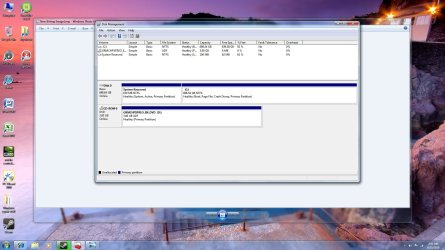
Back to your system and run diskmgmt.msc and show screen

Probably for you C: is not the first partition thus you have problem.Probably in my command you have to change letter...
 

My Computer My Computer

At a glance

Windows 7 Professional x64 PLAMD Athlon 4450eGoodRam DDR2 2x2048MB (FSB 800MHz)nVidia GeForce 9600GT (G94-300) 1024 MB
Computer Manufacturer/Model Number
Custom made
OS
Windows 7 Professional x64 PL
CPU
AMD Athlon 4450e
Motherboard
Giga-Byte GA-MA69G-S3H
Memory
GoodRam DDR2 2x2048MB (FSB 800MHz)
Graphics Card(s)
nVidia GeForce 9600GT (G94-300) 1024 MB
Monitor(s) Displays
SAMSUNG SyncMaster HS2P301688
Hard Drives
Seagate ST3750330AS 750GB
PSU
Corsair 550W
Cooling
AeroCool ExtremeEngine 3T
I think u r right it is just C:

...
 

Attachments

  • diskmagmt screen.jpg
    diskmagmt screen.jpg
    190.3 KB · Views: 39

My Computer My Computer

At a glance

windows 7 Home 64-bitCore2Duo E8400 3.0Ghz4Gb GSkill 800Mhz 5-5-5-15XFX 9600GT
OS
windows 7 Home 64-bit
CPU
Core2Duo E8400 3.0Ghz
Motherboard
Asus P5Q Pro Turbo
Memory
4Gb GSkill 800Mhz 5-5-5-15
Graphics Card(s)
XFX 9600GT
Monitor(s) Displays
LG 23' LCD Full HD 1080p
Hard Drives
750Gb Barracuda
PSU
XFX 600W
Case
Rosewill Challenger
Cooling
Zalman 9500A
So in your computer first partition is "System reserved" (System) and the second partion (C:) (boot)

boot -it is partition where is Windows folder

This command should be proper for you

robocopy D:\Packs D:\ /E /IS

EDIT

for clarification

from WinRE "system reserved" should be available as C: ,and "C:" should be available as "D:"
 
Last edited:

My Computer My Computer

At a glance

Windows 7 Professional x64 PLAMD Athlon 4450eGoodRam DDR2 2x2048MB (FSB 800MHz)nVidia GeForce 9600GT (G94-300) 1024 MB
Computer Manufacturer/Model Number
Custom made
OS
Windows 7 Professional x64 PL
CPU
AMD Athlon 4450e
Motherboard
Giga-Byte GA-MA69G-S3H
Memory
GoodRam DDR2 2x2048MB (FSB 800MHz)
Graphics Card(s)
nVidia GeForce 9600GT (G94-300) 1024 MB
Monitor(s) Displays
SAMSUNG SyncMaster HS2P301688
Hard Drives
Seagate ST3750330AS 750GB
PSU
Corsair 550W
Cooling
AeroCool ExtremeEngine 3T
Ok so the log says no errors so I ran WU and it downloaded and installed updates! 2 of them still say status pending though... Now I keep getting a BSOD saying bad pool caller.... erg :(

Thank you so much for your help!!! Now on to this other issue I guess, geez they never end...
 

My Computer My Computer

At a glance

windows 7 Home 64-bitCore2Duo E8400 3.0Ghz4Gb GSkill 800Mhz 5-5-5-15XFX 9600GT
OS
windows 7 Home 64-bit
CPU
Core2Duo E8400 3.0Ghz
Motherboard
Asus P5Q Pro Turbo
Memory
4Gb GSkill 800Mhz 5-5-5-15
Graphics Card(s)
XFX 9600GT
Monitor(s) Displays
LG 23' LCD Full HD 1080p
Hard Drives
750Gb Barracuda
PSU
XFX 600W
Case
Rosewill Challenger
Cooling
Zalman 9500A
Ok so the log says no errors so I ran WU and it downloaded and installed updates! 2 of them still say status pending though...
Download & install them manually from Microsoft Download Center Microsoft Download Center (not from Windows Update!)
empty C:\Windows\Logs\CBS and run Readiness Tool again,if CheckSur.log is not empty present it here

Now I keep getting a BSOD saying bad pool caller.... erg :(
Please pack folder C:\Windows\Minidump and file C:\Windows\Memory.dmp (of course if you have it),pack all and upload on RapidShare: 1-CLICK Web hosting - Easy Filehosting

EDIT

I see you fought previously with this error http://www.sevenforums.com/crashes-debugging/67198-bsod-bad_pool_caller.html
 

My Computer My Computer

At a glance

Windows 7 Professional x64 PLAMD Athlon 4450eGoodRam DDR2 2x2048MB (FSB 800MHz)nVidia GeForce 9600GT (G94-300) 1024 MB
Computer Manufacturer/Model Number
Custom made
OS
Windows 7 Professional x64 PL
CPU
AMD Athlon 4450e
Motherboard
Giga-Byte GA-MA69G-S3H
Memory
GoodRam DDR2 2x2048MB (FSB 800MHz)
Graphics Card(s)
nVidia GeForce 9600GT (G94-300) 1024 MB
Monitor(s) Displays
SAMSUNG SyncMaster HS2P301688
Hard Drives
Seagate ST3750330AS 750GB
PSU
Corsair 550W
Cooling
AeroCool ExtremeEngine 3T

My Computer My Computer

At a glance

windows 7 Home 64-bitCore2Duo E8400 3.0Ghz4Gb GSkill 800Mhz 5-5-5-15XFX 9600GT
OS
windows 7 Home 64-bit
CPU
Core2Duo E8400 3.0Ghz
Motherboard
Asus P5Q Pro Turbo
Memory
4Gb GSkill 800Mhz 5-5-5-15
Graphics Card(s)
XFX 9600GT
Monitor(s) Displays
LG 23' LCD Full HD 1080p
Hard Drives
750Gb Barracuda
PSU
XFX 600W
Case
Rosewill Challenger
Cooling
Zalman 9500A
started a new thread on crashes and fixes BSOD's....
 

My Computer My Computer

At a glance

windows 7 Home 64-bitCore2Duo E8400 3.0Ghz4Gb GSkill 800Mhz 5-5-5-15XFX 9600GT
OS
windows 7 Home 64-bit
CPU
Core2Duo E8400 3.0Ghz
Motherboard
Asus P5Q Pro Turbo
Memory
4Gb GSkill 800Mhz 5-5-5-15
Graphics Card(s)
XFX 9600GT
Monitor(s) Displays
LG 23' LCD Full HD 1080p
Hard Drives
750Gb Barracuda
PSU
XFX 600W
Case
Rosewill Challenger
Cooling
Zalman 9500A
Back
Top