Windows Media Palyer 12, Only plays 1 song at a time

zuffy

New member
Local time
5:26 AM
Messages
12
Im not sure if this is a bug, or just an annoying change from WMP11 to WMP12

What happens is when i have all music up and i just want everything i see to be played i select the song and in WMP11 it would play the whole list...
But with WMP12 it only plays that one song i clicked and puts it in an unknown playlist.

This is quite annoying, say if i wanted to play all ACDC albums on my compter i cant just type ACDC in the seach menu and click any song to play them all... i would have to click the top one and press shift + and click at the bottom one and then drag to a playlist

Is there a way of having the old style

PS i half tried to install WMP11 but it was not compatible and would not allow me to (half tried)
 

My Computer My Computer

At a glance

windows 7 Ultimate RCIntel Core Duo E6750, 2.66GHz 2.72GHz4GBNvidia 8800GTS
OS
windows 7 Ultimate RC
CPU
Intel Core Duo E6750, 2.66GHz 2.72GHz
Motherboard
IP35
Memory
4GB
Graphics Card(s)
Nvidia 8800GTS
Sound Card
Creative
Monitor(s) Displays
BenQ 21.5"
Hard Drives
2T - total
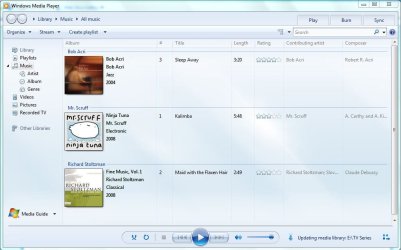
I've just had a look into this and i had it work fine, played all songs 1 after the other, even in this view (see pic)
 

Attachments

  • Capture.JPG
    Capture.JPG
    70 KB · Views: 164

My Computer My Computer

At a glance

Windows 7 Ultimate x64AMD Sempron Dual Core3GBNVIDIA GeForce 6150SE nForce 430
Computer Manufacturer/Model Number
Compaq Desktop
OS
Windows 7 Ultimate x64
CPU
AMD Sempron Dual Core
Memory
3GB
Graphics Card(s)
NVIDIA GeForce 6150SE nForce 430
Screen Resolution
1024x768
Hard Drives
150GB Sata
Ok just been fooling around, i have solved half the issue. However the original one is still a problem

Solved: if i type something in search and then click on a song it will add the whole list


Not Solved: if i just click on all music and dont type anything in search it plays one at a time


Steps i take to get error?

1: open up media player
2: click on search and make sure nothing is typed in and press enter
3: all your music should show... now click on any song and in the playlist there will be only the clicked song
 
Last edited:

My Computer My Computer

At a glance

windows 7 Ultimate RCIntel Core Duo E6750, 2.66GHz 2.72GHz4GBNvidia 8800GTS
OS
windows 7 Ultimate RC
CPU
Intel Core Duo E6750, 2.66GHz 2.72GHz
Motherboard
IP35
Memory
4GB
Graphics Card(s)
Nvidia 8800GTS
Sound Card
Creative
Monitor(s) Displays
BenQ 21.5"
Hard Drives
2T - total
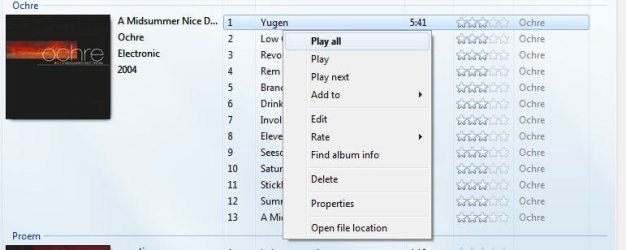
Can't you just right click on a song in an album and choose Play All?


playall.JPG
 

My Computer My Computer

At a glance

Windows 7 Ultimate x64 SP1Core i7 920 (D0) @ 4Ghz, *26c idle *65c full ...12GB DDR3 Corsair Dominator -CMD12GX3M6A1600C...Zotac Geforce GTX 770
Computer type
PC/Desktop
Computer Manufacturer/Model Number
Airbot 2.0
OS
Windows 7 Ultimate x64 SP1
CPU
Core i7 920 (D0) @ 4Ghz, *26c idle *65c full load on air
Motherboard
Asus P6X58D Premium - Sata 6Gb/s - USB 3.0
Memory
12GB DDR3 Corsair Dominator -CMD12GX3M6A1600C8 at 1600MHz
Graphics Card(s)
Zotac Geforce GTX 770
Sound Card
ASUS Xonar D2X
Monitor(s) Displays
1 LG 24" Flatron W2453V-PF 1 Samsung 24" P2450H both 2ms RT
Screen Resolution
1920x1080@60hz
Hard Drives
1 Samsung 250GB 840 Evo SSD
1 OCZ Vertex2 180GB SSD
1 TB Samsung Spinpoint F1 7200RPM 32MB cache
2 500GB WD Caviar Blacks 7200RPM 32MB cache (WD5001AALS)

Pioneer DVD Burner DVR-S18M
PSU
Corsair HX1000W
Case
Cooler Master HAF 932
Cooling
Case Fans *3 230mm, *1 140mm/CPU - *Tuniq Tower 120 Extreme
Keyboard
Logitech Wireless MK700
Mouse
Logitech Wireless MK700
Internet Speed
DL 15 Mbps UL 0.98 Mbps
Antivirus
None
Browser
Firefox Nightly
Other Info
Processor-7.7 *RAM- 7.9 *Graphics-7.9 *Gaming Graphics- 7.9 *SSD- 7.8 W.E.I final score= 7.7
*Phone- LG Nexus 5

My Computer My Computer

At a glance

windows 7 Ultimate RCIntel Core Duo E6750, 2.66GHz 2.72GHz4GBNvidia 8800GTS
OS
windows 7 Ultimate RC
CPU
Intel Core Duo E6750, 2.66GHz 2.72GHz
Motherboard
IP35
Memory
4GB
Graphics Card(s)
Nvidia 8800GTS
Sound Card
Creative
Monitor(s) Displays
BenQ 21.5"
Hard Drives
2T - total
No for some reason it still will only play that one song
But if i click on the album art picture and click play all it send the album (only), i would like everything to play not just the album
 

My Computer My Computer

At a glance

windows 7 Ultimate RCIntel Core Duo E6750, 2.66GHz 2.72GHz4GBNvidia 8800GTS
OS
windows 7 Ultimate RC
CPU
Intel Core Duo E6750, 2.66GHz 2.72GHz
Motherboard
IP35
Memory
4GB
Graphics Card(s)
Nvidia 8800GTS
Sound Card
Creative
Monitor(s) Displays
BenQ 21.5"
Hard Drives
2T - total
Great news the problem has been solved

I deleted everything out of the libaray and reloaded as files back on and for some unknown reason its working perfectly
 

My Computer My Computer

At a glance

windows 7 Ultimate RCIntel Core Duo E6750, 2.66GHz 2.72GHz4GBNvidia 8800GTS
OS
windows 7 Ultimate RC
CPU
Intel Core Duo E6750, 2.66GHz 2.72GHz
Motherboard
IP35
Memory
4GB
Graphics Card(s)
Nvidia 8800GTS
Sound Card
Creative
Monitor(s) Displays
BenQ 21.5"
Hard Drives
2T - total
Error Back

Ok i thought that everything was sweet and working properly until i realised that 90%of my music never loaded, even though all was shown in libraries documents, just not media player.

What i have worked out is that there is a bug when you have to many songs loaded in WMP12, it will do 1 or 3 things
1. Play the one clicked song
2. Play 10,000 songs
3. Play 5,000 songs

but will never play the full list (I have well over 20,000 songs)
It does seem to start screwing me around the 19,500 mark, but i can't confirm as it is random amounts this starts happening.

Where would i report so Microsoft is aware and might fix it?
Or is it a quick reg change issue?
 

My Computer My Computer

At a glance

windows 7 Ultimate RCIntel Core Duo E6750, 2.66GHz 2.72GHz4GBNvidia 8800GTS
OS
windows 7 Ultimate RC
CPU
Intel Core Duo E6750, 2.66GHz 2.72GHz
Motherboard
IP35
Memory
4GB
Graphics Card(s)
Nvidia 8800GTS
Sound Card
Creative
Monitor(s) Displays
BenQ 21.5"
Hard Drives
2T - total
Auto Playlist

I have the same problem. To overcome it I created an auto-playlist which contains all my songs.

To do this I set the criteria of the auto playlist to include all songs with file size greater than 1kb.
 

My Computer My Computer

At a glance

Windows 7
OS
Windows 7
Open the folder you want then go to organize and select all then click play.
Works for me.
 

My Computer My Computer

At a glance

Windows 10 Pro x64i7-4770K16Gig DDR3-2400Gigabyte GT740
Computer type
PC/Desktop
Computer Manufacturer/Model Number
Self Built Custom Computer.
OS
Windows 10 Pro x64
CPU
i7-4770K
Motherboard
Asus Z87 Sabertooth
Memory
16Gig DDR3-2400
Graphics Card(s)
Gigabyte GT740
Sound Card
Onboard
Monitor(s) Displays
Benq 27" - Dell 23' - Benq 22"
Screen Resolution
1680x1050
Hard Drives
Samsung 840 Pro 128g SSD
1xWestern Digital Caviar Green 1tb
2xWestern Digital Caviar Green 2 tb
PSU
Seasonic 760 watt Platinum
Case
Coolermaster Haf - X
Cooling
Noctua NH-C12P CPU Cooler
Keyboard
Logitech illuminated keyboard
Mouse
Logitech Perfomance MX
Internet Speed
Cable = speeds to 20Mbps downsteam and 512kbps upsteam
Antivirus
Avast Internet Security
Browser
Firefox
pretty sure there's an option somewhere..one sec
(kinda noobie but just in cases yaknows =))

--gahh. pretty sure once was playing about in options(looking for the no fade of controls thing since it intereferred with lyrics plugin view)found it and set it just for funn...then set it back after another round of (distracted)'mucking about'.............

--okies. this is horridd.
if remember right there was once a (checkbox) option in uh, options to modify the default click action--similar to what rightclick song: play/all/next etc. a toggle for just that one click between these options.

according to here http://www.sevenforums.com/sound-audio/115477-want-double-click-add-list-wmp-12-a.html the functuality has been removed in later versions of wmp(the example here is of shell rightclick context menu--but am guessing the same has become of the in-wmp clicks)
..perhaps yours is a leftover 'buggy' byproduct from that?


solutions now if wanted DDD=:
the old 'repeat all/one'(in the same line as 'shuffle all/one)..
rightclick: play/one/all/next
advanced playback>close/stop after current


also, to knowledge wmp10-11 Is compatible with win7? downgraded after da installed win7 since was used to it(+the shameless colours..)then upgraded straight back to check out the picture libs.

@zuffy
your first method didn't work. it still played everything showing ie our whole entire list..


WikipediaWictionaryChambers (UK)Google imagesGoogle defineThe Free DictionaryJoin exampleWordNetGoogleUrban DictionaryAnswers.comrhymezone.comMerriam-Webster<>0

wvcidfjoguarm
 

My Computer My Computer

At a glance

Windows 7 Ultimate x64
OS
Windows 7 Ultimate x64
Back
Top