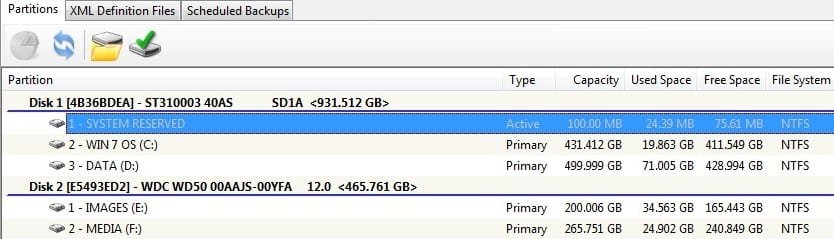
My planned partitions for 1TB Drive

BarrieNoodles

New member
Member
Local time
1:00 AM
Messages
64
Location
Ontario, Canada
Here is a list of the partitions I was planning to put on my 2nd drive, a 1TB Seagate. Am I micro managing the partitions and should stay with Directories? What do you think?

Drive: K - Windows 7 OS 100GB
L - Page Files 15GB
M - Temp Files
Temp Internet Files
Downloads 100GB
N - Programs 200GB
O - Documents & Data 200GB
P - Utility Programs 100GB - I'm a Utility junky, like to try out new Utils so I
was thinking of keeping them together
R - Pics - Videos - Music 285GB - the balance
 

My Computer My Computer

At a glance

Windows Vista Ultimate 32 bit & Win 7 Profess...Intel Core 2 E6320 Duo (4MB L2 cache, 1.86Ghz...4GB Kingston Dual Channel DDR2, PC2-5300, 667Mhz256MB nVidia GeForce 8600GTS
Computer Manufacturer/Model Number
Dell Dimension 9200
OS
Windows Vista Ultimate 32 bit & Win 7 Professional 32 bit
CPU
Intel Core 2 E6320 Duo (4MB L2 cache, 1.86Ghz, 1066FSB
Motherboard
Dell
Memory
4GB Kingston Dual Channel DDR2, PC2-5300, 667Mhz
Graphics Card(s)
256MB nVidia GeForce 8600GTS
Sound Card
Integrated Sound Blaster Audigy
Monitor(s) Displays
22 inch Widescreen Digital(Dell) @ 19" Acer LCD
Screen Resolution
Dell 1680 x 1050, Axcer 1280 x1024
Hard Drives
500GB Serial ATA 3Gb/s, 7200rpm w/ DataBurst Cache
1TB Seagate Barracuda 7200.12, 2 x 1TB USB drives for BU
PSU
APC Back UPS ES 750
Case
Standard
Cooling
Standard
Keyboard
MX5500 Logitech
Mouse
Logitech Bluetooth MX5500
Other Info
Dell Studio Laptop, Win 7 Pro 64 bit.
I would go with directories. What is the desire to create so many partitions?
 

My Computer My Computer

At a glance

Windows 7 Ultimate x64Intel Q9550 2.83Ghz OC'd to 3.40Ghz8GB G.Skill PI DDR2-800, 4-4-4-12 timingsEVGA 1280MB Nvidia GeForce GTX570
Computer Manufacturer/Model Number
Self-Built in July 2009
OS
Windows 7 Ultimate x64
CPU
Intel Q9550 2.83Ghz OC'd to 3.40Ghz
Motherboard
Gigabyte GA-EP45-UD3R rev. 1.1, F12 BIOS
Memory
8GB G.Skill PI DDR2-800, 4-4-4-12 timings
Graphics Card(s)
EVGA 1280MB Nvidia GeForce GTX570
Sound Card
Realtek ALC899A 8 channel onboard audio
Monitor(s) Displays
23" Acer x233H
Screen Resolution
1920x1080
Hard Drives
Intel X25-M 80GB Gen 2 SSD
Western Digital 1TB Caviar Black, 32MB cache. WD1001FALS
PSU
Corsair 620HX modular
Case
Antec P182
Cooling
stock
Keyboard
ABS M1 Mechanical
Mouse
Logitech G9 Laser Mouse
Internet Speed
15/2 cable modem
Other Info
Windows and Linux enthusiast. Logitech G35 Headset.
To keep the OS on it's own partition and cut down on defrag. time.

The other option I was looking at is
K - for Win 7 OS
L - Page Files
M - Temp Files
N - All other files
 

My Computer My Computer

At a glance

Windows Vista Ultimate 32 bit & Win 7 Profess...Intel Core 2 E6320 Duo (4MB L2 cache, 1.86Ghz...4GB Kingston Dual Channel DDR2, PC2-5300, 667Mhz256MB nVidia GeForce 8600GTS
Computer Manufacturer/Model Number
Dell Dimension 9200
OS
Windows Vista Ultimate 32 bit & Win 7 Professional 32 bit
CPU
Intel Core 2 E6320 Duo (4MB L2 cache, 1.86Ghz, 1066FSB
Motherboard
Dell
Memory
4GB Kingston Dual Channel DDR2, PC2-5300, 667Mhz
Graphics Card(s)
256MB nVidia GeForce 8600GTS
Sound Card
Integrated Sound Blaster Audigy
Monitor(s) Displays
22 inch Widescreen Digital(Dell) @ 19" Acer LCD
Screen Resolution
Dell 1680 x 1050, Axcer 1280 x1024
Hard Drives
500GB Serial ATA 3Gb/s, 7200rpm w/ DataBurst Cache
1TB Seagate Barracuda 7200.12, 2 x 1TB USB drives for BU
PSU
APC Back UPS ES 750
Case
Standard
Cooling
Standard
Keyboard
MX5500 Logitech
Mouse
Logitech Bluetooth MX5500
Other Info
Dell Studio Laptop, Win 7 Pro 64 bit.
Keeping the OS on it's own partition makes sense. Windows 7 pretty much defrags in the background. I rarely, if ever defrag a drive.
 

My Computer My Computer

At a glance

Windows 7 Ultimate x64Intel Q9550 2.83Ghz OC'd to 3.40Ghz8GB G.Skill PI DDR2-800, 4-4-4-12 timingsEVGA 1280MB Nvidia GeForce GTX570
Computer Manufacturer/Model Number
Self-Built in July 2009
OS
Windows 7 Ultimate x64
CPU
Intel Q9550 2.83Ghz OC'd to 3.40Ghz
Motherboard
Gigabyte GA-EP45-UD3R rev. 1.1, F12 BIOS
Memory
8GB G.Skill PI DDR2-800, 4-4-4-12 timings
Graphics Card(s)
EVGA 1280MB Nvidia GeForce GTX570
Sound Card
Realtek ALC899A 8 channel onboard audio
Monitor(s) Displays
23" Acer x233H
Screen Resolution
1920x1080
Hard Drives
Intel X25-M 80GB Gen 2 SSD
Western Digital 1TB Caviar Black, 32MB cache. WD1001FALS
PSU
Corsair 620HX modular
Case
Antec P182
Cooling
stock
Keyboard
ABS M1 Mechanical
Mouse
Logitech G9 Laser Mouse
Internet Speed
15/2 cable modem
Other Info
Windows and Linux enthusiast. Logitech G35 Headset.
To keep the OS on it's own partition and cut down on defrag. time.

The other option I was looking at is
K - for Win 7 OS
L - Page Files
M - Temp Files
N - All other files

A partition for the pagefile on the same drive is a waste of time as it won't help with performance, and if anything will hamper it.. If something has to be written to the pagefile and it happens at the same time as something else is being read from another partition, it will slow everything down. The only way that can provide any benefit when moving the pagefile is if it is to another hard drive, and then only if the other drive is the same speed or faster (and then you want it set as the first partition on the drive.
 

My Computer My Computer

At a glance

Win 7 Ultimate x64FX-8350 @ 4.6 GHz so farADATA XPG V1 Series Black 8GB DDR3 1600Sapphire R9 270x Dual-X
Computer type
PC/Desktop
Computer Manufacturer/Model Number
Me
OS
Win 7 Ultimate x64
CPU
FX-8350 @ 4.6 GHz so far
Motherboard
Asus M5A97 EVO
Memory
ADATA XPG V1 Series Black 8GB DDR3 1600
Graphics Card(s)
Sapphire R9 270x Dual-X
Sound Card
Xonar DGX w/ Corsair Vengence 1300
Monitor(s) Displays
Acer S232HL Abid
Screen Resolution
1920x1080
Hard Drives
120 GB OCZ Vertex 3
500 GB Seagate 7200.12
PSU
Antec Earthwatts 650W Green
Case
Antec Three Hundred
Cooling
Cooler Master 212 EVO
Keyboard
Logitech G510
Mouse
Logitech G500s
Internet Speed
35000/3000
I second Stormy and PParks.

Putting the page file in a separate partition on the same drive will actually slow your system down. If you want to put it a DRIVE which does not contain your system files, then you can get a slight benefit.

Make a 100GB partition for your system. Everything else can be lumped together into one partition. With the handling of directories/folders and libraries by Win 7, then all of your partitioning is an unneeded complication to you and your computer. Forget the XP ways.
 

My Computer My Computer

At a glance

MS Windows 7 Ultimate SP1 64-bitAMD A10-4600M6.00 GB Dual-Channel DDR3 @ 798MHz (11-11-12-28)AMD Radeon HD 7660G
Computer Manufacturer/Model Number
Toshiba Satellite S875D-S7239 laptop
OS
MS Windows 7 Ultimate SP1 64-bit
CPU
AMD A10-4600M
Motherboard
AMD Pumori (Socket FT1)
Memory
6.00 GB Dual-Channel DDR3 @ 798MHz (11-11-12-28)
Graphics Card(s)
AMD Radeon HD 7660G
Sound Card
High Definition Audio Device
Monitor(s) Displays
Generic PnP Monitor (1600x900@60Hz)
Screen Resolution
1600x900@60Hz
Hard Drives
SSD 119GB Corsair CSSD-V128GB2 ATA Device
Keyboard
Standard PS/2 Keyboard
Mouse
HP Wireless Optical Mobile Mouse Model FHA-3410
Internet Speed
What the local pub, local coffee shop offers.
Other Info
Optical Drive:MATSHITA BD-CMB UJ160B ATA Device


Also have an Asus ha1002xp netbook with Win 7 Ultimate installed.
Agreed. Unless you wanted to dual boot, it's decent to keep the os on one partition and programs/data on the other.
 

My Computer My Computer

At a glance

Systems 1 and 2: Windows 7 Enterprise x64, Wi...System 1: i7 [email protected], System 2: AMD FX-41...System 1: 8GB System 2: 8GBSystem 1: ATI FirePro V4800 System 2: Radeon ...
Computer Manufacturer/Model Number
Dell and Custom
OS
Systems 1 and 2: Windows 7 Enterprise x64, Win 8 Developer
CPU
System 1: i7 [email protected], System 2: AMD FX-4100 Zambezi 3.6G
Motherboard
System 1:Dell 06NWYK System 2: ASUS M5A97 AM3+
Memory
System 1: 8GB System 2: 8GB
Graphics Card(s)
System 1: ATI FirePro V4800 System 2: Radeon HD 6850
Sound Card
System 1: onboard System 2: onboard
Monitor(s) Displays
System1: Viewsonic HDMI 24"
Screen Resolution
System 1: 1920x1080 System 2: 1920x1080
Hard Drives
System 1: Mirrored .5B drives System 2: Seagate Barracuda ST1000DM003 1TB 7200 RPM 64MB Cache SATA 6.0Gb/s
Case
System 1: Dell System 2: Cooler Master
Internet Speed
10 MBPS
Actually, he is much better of always installing programs to the OS partition and with 100 GB he will have plenty of room for programs and system. I've never been able to use more than about 20 GB. Right now with everything except for my iso files which I keep in a separate partition then I'm only using 23.2 GB. That 23.2 includes \documents, \music, \video, \picture libraries plus another library of .docx files
 

My Computer My Computer

At a glance

MS Windows 7 Ultimate SP1 64-bitAMD A10-4600M6.00 GB Dual-Channel DDR3 @ 798MHz (11-11-12-28)AMD Radeon HD 7660G
Computer Manufacturer/Model Number
Toshiba Satellite S875D-S7239 laptop
OS
MS Windows 7 Ultimate SP1 64-bit
CPU
AMD A10-4600M
Motherboard
AMD Pumori (Socket FT1)
Memory
6.00 GB Dual-Channel DDR3 @ 798MHz (11-11-12-28)
Graphics Card(s)
AMD Radeon HD 7660G
Sound Card
High Definition Audio Device
Monitor(s) Displays
Generic PnP Monitor (1600x900@60Hz)
Screen Resolution
1600x900@60Hz
Hard Drives
SSD 119GB Corsair CSSD-V128GB2 ATA Device
Keyboard
Standard PS/2 Keyboard
Mouse
HP Wireless Optical Mobile Mouse Model FHA-3410
Internet Speed
What the local pub, local coffee shop offers.
Other Info
Optical Drive:MATSHITA BD-CMB UJ160B ATA Device


Also have an Asus ha1002xp netbook with Win 7 Ultimate installed.
I too Agree.

Win 7, PageFile and all applications/Software together.

2nd Partiiton for all other DATA (Pictures,Music, Videos etc)


--Ideally, a second HD would be nice for Backup/Imaging Purposes.

But, if this is your only one, you may consider 1 other partition at the very end of the drive, For System Images.

Granted, being on the same drive you will not be protected from a HD failure, but it will have OS images in case other trouble arises. And its better than none at all.

By keeping DATA on the 2nd partition, it would be easier to back up.

Something Like [C-OS] [D-DATA] [E-Backups]


But, if at all possible, just the 2 partitions and backups on a separate Drive or External Drive.
 

My Computer My Computer

At a glance

Windows 7 Home Premium 64bitIntel Core i7 2700k8GB Mushkin Redline Ridgebacks @1866EVGA GTX570 SC
Computer Manufacturer/Model Number
Custom (Self Build)
OS
Windows 7 Home Premium 64bit
CPU
Intel Core i7 2700k
Motherboard
eVGA P67 SLI
Memory
8GB Mushkin Redline Ridgebacks @1866
Graphics Card(s)
EVGA GTX570 SC
Sound Card
XiFi Titanium HD
Monitor(s) Displays
LG W2453V
Screen Resolution
1920x1080
Hard Drives
Intel 320 80GB -- Intel X25-V 40GB --WD Black 1TB x2 -- WD Blue 640GB
PSU
Seasonic x750
Case
Corsair 600T SE White
Cooling
eVGA Superclocked CPU Cooler
Keyboard
Saitek Cyborg
Antivirus
Kaspersky
Browser
IE
Other Info
LG BD/DVD
I agree with most for the most part, OS you should on its own partition and a DATA partition on the primary drive.

paging file should be left alone!

Create a DATA partition for things like My Documents, My Videos, My Pictures, etc....
Data Partition - Windows 7 Forums

Something Like [C-OS] [D-DATA] [E-Backups]
That's exactly what I had up until I get a secondary drive. Although my OS partition is huge and will probably NEWER come close to being full, I just made it easier for myself. LOL

Then I created two more partitions [E-Backups] [F-DVD ONLY] in case that something goes wrong with the first drive all my backups and as well as my DVD-Ready files are on the secondary drive.

Good Luck with your move to Windows 7, it will be FUN!

Once you set everything up, I would create a system image backup using Macrium Reflect Free Edition. Once all drivers, windows updates applications are installed create another system image back.
Imaging with free Macrium - Windows 7 Forums

This will save you from having to re-install Windows if something goes wrong.

Take Care,
Eldin
 

Attachments

  • partitions.jpg
    partitions.jpg
    41.8 KB · Views: 60

My Computers My Computers

  • At a glance

    WIN10AMD Ryzen 5 3600 6-Core Processor 3.59 GHz16.0 GB
    Computer type
    PC/Desktop
    Computer Manufacturer/Model Number
    PowerSpec G164
    OS
    WIN10
    CPU
    AMD Ryzen 5 3600 6-Core Processor 3.59 GHz
    Memory
    16.0 GB
    Internet Speed
    VERY FAST>>>!!!
  • Antivirus
    ESET Security Premium

My Computer My Computer

At a glance

MS Windows 7 Ultimate SP1 64-bitAMD A10-4600M6.00 GB Dual-Channel DDR3 @ 798MHz (11-11-12-28)AMD Radeon HD 7660G
Computer Manufacturer/Model Number
Toshiba Satellite S875D-S7239 laptop
OS
MS Windows 7 Ultimate SP1 64-bit
CPU
AMD A10-4600M
Motherboard
AMD Pumori (Socket FT1)
Memory
6.00 GB Dual-Channel DDR3 @ 798MHz (11-11-12-28)
Graphics Card(s)
AMD Radeon HD 7660G
Sound Card
High Definition Audio Device
Monitor(s) Displays
Generic PnP Monitor (1600x900@60Hz)
Screen Resolution
1600x900@60Hz
Hard Drives
SSD 119GB Corsair CSSD-V128GB2 ATA Device
Keyboard
Standard PS/2 Keyboard
Mouse
HP Wireless Optical Mobile Mouse Model FHA-3410
Internet Speed
What the local pub, local coffee shop offers.
Other Info
Optical Drive:MATSHITA BD-CMB UJ160B ATA Device


Also have an Asus ha1002xp netbook with Win 7 Ultimate installed.
After careful consideration and flipping a coin I will follow your advise and go with 2 partitions on the second HD. One for the OS and one for the other files. I don't need a BU partition because I will have a 1TB eSATA external HD to take care of back ups.
Thank you for your input. This is a great forum!
 

My Computer My Computer

At a glance

Windows Vista Ultimate 32 bit & Win 7 Profess...Intel Core 2 E6320 Duo (4MB L2 cache, 1.86Ghz...4GB Kingston Dual Channel DDR2, PC2-5300, 667Mhz256MB nVidia GeForce 8600GTS
Computer Manufacturer/Model Number
Dell Dimension 9200
OS
Windows Vista Ultimate 32 bit & Win 7 Professional 32 bit
CPU
Intel Core 2 E6320 Duo (4MB L2 cache, 1.86Ghz, 1066FSB
Motherboard
Dell
Memory
4GB Kingston Dual Channel DDR2, PC2-5300, 667Mhz
Graphics Card(s)
256MB nVidia GeForce 8600GTS
Sound Card
Integrated Sound Blaster Audigy
Monitor(s) Displays
22 inch Widescreen Digital(Dell) @ 19" Acer LCD
Screen Resolution
Dell 1680 x 1050, Axcer 1280 x1024
Hard Drives
500GB Serial ATA 3Gb/s, 7200rpm w/ DataBurst Cache
1TB Seagate Barracuda 7200.12, 2 x 1TB USB drives for BU
PSU
APC Back UPS ES 750
Case
Standard
Cooling
Standard
Keyboard
MX5500 Logitech
Mouse
Logitech Bluetooth MX5500
Other Info
Dell Studio Laptop, Win 7 Pro 64 bit.
wise decision.
Glad that we could be of assistance.
 

My Computer My Computer

At a glance

MS Windows 7 Ultimate SP1 64-bitAMD A10-4600M6.00 GB Dual-Channel DDR3 @ 798MHz (11-11-12-28)AMD Radeon HD 7660G
Computer Manufacturer/Model Number
Toshiba Satellite S875D-S7239 laptop
OS
MS Windows 7 Ultimate SP1 64-bit
CPU
AMD A10-4600M
Motherboard
AMD Pumori (Socket FT1)
Memory
6.00 GB Dual-Channel DDR3 @ 798MHz (11-11-12-28)
Graphics Card(s)
AMD Radeon HD 7660G
Sound Card
High Definition Audio Device
Monitor(s) Displays
Generic PnP Monitor (1600x900@60Hz)
Screen Resolution
1600x900@60Hz
Hard Drives
SSD 119GB Corsair CSSD-V128GB2 ATA Device
Keyboard
Standard PS/2 Keyboard
Mouse
HP Wireless Optical Mobile Mouse Model FHA-3410
Internet Speed
What the local pub, local coffee shop offers.
Other Info
Optical Drive:MATSHITA BD-CMB UJ160B ATA Device


Also have an Asus ha1002xp netbook with Win 7 Ultimate installed.
Good work! The most important lesson whatever decision is to backup/imaging. It will save you from the pain of re-installation when things go south.

Happy Imaging!
Eldin
 

My Computers My Computers

  • At a glance

    WIN10AMD Ryzen 5 3600 6-Core Processor 3.59 GHz16.0 GB
    Computer type
    PC/Desktop
    Computer Manufacturer/Model Number
    PowerSpec G164
    OS
    WIN10
    CPU
    AMD Ryzen 5 3600 6-Core Processor 3.59 GHz
    Memory
    16.0 GB
    Internet Speed
    VERY FAST>>>!!!
  • Antivirus
    ESET Security Premium
one partition for the OS then one partition for other stuff using directories would be best.
 

My Computer My Computer

At a glance

Windows 7 Ultimate 32-Bit (x86)Intel Quad Core Q8200 2.33 GHZ4GB
Computer Manufacturer/Model Number
Dell Inspiron 545
OS
Windows 7 Ultimate 32-Bit (x86)
CPU
Intel Quad Core Q8200 2.33 GHZ
Memory
4GB
Monitor(s) Displays
LG Flatron W1943SB
Internet Speed
8MB
After careful consideration and flipping a coin I will follow your advise and go with 2 partitions on the second HD. One for the OS and one for the other files.
The next coin flip .. Have you decided how big to make the OS partition ???
 

My Computer My Computer

At a glance

XP MCE .... XP Pro 64 .... W7 U x64E6750, 2.67GHz C2D4GB, PC2 6400GeForce 9400GT
Computer Manufacturer/Model Number
HP d4996t (upgraded)
OS
XP MCE .... XP Pro 64 .... W7 U x64
CPU
E6750, 2.67GHz C2D
Memory
4GB, PC2 6400
Graphics Card(s)
GeForce 9400GT
Monitor(s) Displays
Twin Samsung 2443BWT
Screen Resolution
1920x1200
Hard Drives
Many .. 3 Installed
PSU
460W
Internet Speed
Cable
My OS partition will be 100GB. I have lot of space with a 1TB HD a 500MG HD (it has Vista on it) and 1TB eSATA External Back Up plus 500MB USB External drive.
 

My Computer My Computer

At a glance

Windows Vista Ultimate 32 bit & Win 7 Profess...Intel Core 2 E6320 Duo (4MB L2 cache, 1.86Ghz...4GB Kingston Dual Channel DDR2, PC2-5300, 667Mhz256MB nVidia GeForce 8600GTS
Computer Manufacturer/Model Number
Dell Dimension 9200
OS
Windows Vista Ultimate 32 bit & Win 7 Professional 32 bit
CPU
Intel Core 2 E6320 Duo (4MB L2 cache, 1.86Ghz, 1066FSB
Motherboard
Dell
Memory
4GB Kingston Dual Channel DDR2, PC2-5300, 667Mhz
Graphics Card(s)
256MB nVidia GeForce 8600GTS
Sound Card
Integrated Sound Blaster Audigy
Monitor(s) Displays
22 inch Widescreen Digital(Dell) @ 19" Acer LCD
Screen Resolution
Dell 1680 x 1050, Axcer 1280 x1024
Hard Drives
500GB Serial ATA 3Gb/s, 7200rpm w/ DataBurst Cache
1TB Seagate Barracuda 7200.12, 2 x 1TB USB drives for BU
PSU
APC Back UPS ES 750
Case
Standard
Cooling
Standard
Keyboard
MX5500 Logitech
Mouse
Logitech Bluetooth MX5500
Other Info
Dell Studio Laptop, Win 7 Pro 64 bit.
BarrieNoodles- That sounds like a sweet setup probably because I have very nearly the same setup only with 60GB for the OS on the 1TB drive and a 2TB eSATA Raid 0 drive for backups as well as data and 100's of GB of WMP recorded video plus a 500GB 'Run'nGun' USB drive for data posted to and downloaded from the internet plus an additional pair of inert 1TB redundant data backup drives one Firewire 400 and the other USB both of which make me appreciate the speed of the eSATA Raid 0 drive all the more!

~Maxx~
.
da59fa57.png
 

My Computer My Computer

At a glance

Windows 7 x64 Home PremiumIntel Core i7 930 @ 2.8 Ghz Socket 1366 LGA8 GB 1366 Mhz DDR3 (PC3-10700) RAMATI Radeon 5770 1 GB DDR5 RAM
Computer Manufacturer/Model Number
HP HPE 270f
OS
Windows 7 x64 Home Premium
CPU
Intel Core i7 930 @ 2.8 Ghz Socket 1366 LGA
Motherboard
Pegatron Truckee v1.04E41
Memory
8 GB 1366 Mhz DDR3 (PC3-10700) RAM
Graphics Card(s)
ATI Radeon 5770 1 GB DDR5 RAM
Sound Card
Realtech High Definition
Monitor(s) Displays
32" Sony Bravia
Screen Resolution
1366 X 768
Hard Drives
Intel 25nm 120 GB Series 320 SSD HD Tune- 265 MBps Read/ 130 MBps Write

LaCie 1TB + 1TB RAID 0 eSATA Drive HD Tune- 160 MBps Read/ 90 MBps Write
Keyboard
Logitech Illuminated
Mouse
Logitech MX Revolution
Internet Speed
36.4 Mbps Maximum on a 37 Mbps Motorola SB501 Modem
Back
Top