Get Debian in fullscreen on VirtualBox

MPREv

New member
Hi,

I got a Windows 7 (x64), 4GB of RAM, VT-x and a Display of 1440x900.

I've got installed Virtual Box and ran a Debian Linux (Console only!) in it.
But the Proble ist to get it working in full screen or at least full-screen window.

I know i ned to use the [HOST]+[F]. But this also don't do a got job,
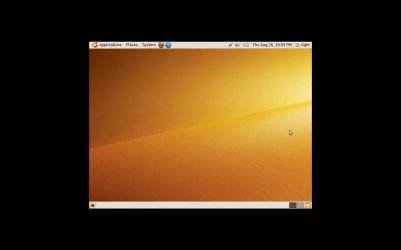
as the Content is in a small box in the center of the Display with black around.

I also tried a WinXP in the VBox. At first it doesn't work:
1024x768 -> smaller than Display
1280x800 -> bigger than Display in vertical i have to scrool
[Crt]+[D] --> Installin the Virtual Box Addins --> 1024x768 now fits the screen.
(Installation starts automaticaly)

So I also tried it with the Debian. But no action with [Crt]+[D].
Tried: 'aptitude install virtualbox-ose-guest-modules virtualbox-ose-guest-utils'
--> "Starting VirtualBox Additions ... cannot modprobe vboxadd kernel module fail! fail!"

So I'm still not happy.
Any one with suggestion for VBox.
Or what virtualisation should I use?
 

My Computer

OS
Windows 7
The size of the windows besides dragging the edges manually to fill the screen is mainly determined by the screen resolution options seen in the OS run on VBox. To the greater extent this will also be a factor with any other VM program.

If the distro lacks the higher resolutions you will be limited to the size the highest available will be seen at for the most part. Dragging the edges will then only results in seeing a white border surrounding the desktop. VMs for the most are geared to run in windows not maxed out to full screen. Even when running Windows as well as the XP Mode this is the norm with that as well.
 

My Computers

System One System Two

  • Computer type
    PC/Desktop
    Computer Manufacturer/Model Number
    Custom builds = 2
    OS
    W7 Ultimate x64/W10 Pro x64/W11 Pro Triple Boot - Main PC W7 Remote PC Micro ATX W7 Pro x64/W11 Pro
    CPU
    AMD Phenom II X4 975 Deneb 3.6ghz - 965 2nd remote pc
    Motherboard
    Gigabyte GA-790XTA-UD4-Gigabyte GA-880GM-D2H remote pc
    Memory
    Kingston Hyper X DDR3 1600 1.5v 16gb - Hyper X Fury 8gb 2nd
    Graphics Card(s)
    MSI HD Radeon 5750 1gb - MSI HD Radeon 6450 on mini tower
    Sound Card
    Creative Labs X-Fi Xtreme Audio P - Realtek onooard 2nd case
    Monitor(s) Displays
    ASUS VW199T-P 19" HP 2082a Main-HP 2082a 20" remote pc
    Screen Resolution
    Asus 1440x900 - HP 1600x900
    Hard Drives
    WD Black 1TB HD per OS W7, W10, and pending W11 presently on 500gb OS Drive - Pending Triple 1TB HDs for Spanned Storage/backup volume
    Single 2TB external USB enclosure, single 1TB System 7 Host/Boot drive, Pending 8TB external HD for system image b
    PSU
    Corsair 750TX - primary / Corsair CX600 - second
    Case
    Antec 900-2 - SSD compatible / NZXT Vulcan mini tower
    Cooling
    Zalman CNPS9900A
    Keyboard
    AZIO L70 Backlit Letters Gaming - ONN Cordless/USB
    Mouse
    MSI DS200 Programmable, Logitech Cordless
    Internet Speed
    30mbps upgrade - primary hard wired - mini tower usb WiFi
    Antivirus
    GFI VIPRE Internet Security 2014 on W7 2016 beta on W10,
    Browser
    Cyberfox, WaterFox 64bit FF variants, FireFox x64, Pale Moon
    Other Info
    Accomdata fan cooled usb 2.0 PIDE/Sata II, III external enclosure.
    Sambient usb/eSata PATA/Sata II, III external enclosure.
  • Computer type
    PC/Desktop
    System Manufacturer/Model Number
    CUSTOM ASSEMBLY
    OS
    W7 Pro x64/W11 Pro
    CPU
    AMD Deneb 3.6ghz - 965
    Motherboard
    Gigabyte GA-880GM-D2H remote pc
    Memory
    Kingston Hyper X Fury 8gb
    Graphics Card(s)
    MSI HD Radeon 6450 DVI Output
    Sound Card
    Realtek onooard Creative or Other separate PENDING
    Monitor(s) Displays
    VIZIO 32" LCD TV Separate LCD Pending
    Screen Resolution
    1600x1080
    Hard Drives
    WD 500GB OS Host/Boot WD Green 1TB Storage/Backup
    PSU
    Corsair 600W - THERMALTAKE 600W spare case
    Case
    NZXT Vulcan mini tower
    Cooling
    Twin 120mm Top Fans - 240mm Side Cover
    Keyboard
    ONN Cordless/USB Logitech Cordless
    Mouse
    ONN USB/Cordless - Logitech Cordless
    Internet Speed
    DSL 5G
    Browser
    MS Edge, FireFox, WaterFox x64, FireFox Nightly
    Other Info
    OS Testing-Remote Access to Main TeamViewer

My Computer

Computer Manufacturer/Model Number
Dell and Custom
OS
Systems 1 and 2: Windows 7 Enterprise x64, Win 8 Developer
CPU
System 1: i7 [email protected], System 2: AMD FX-4100 Zambezi 3.6G
Motherboard
System 1:Dell 06NWYK System 2: ASUS M5A97 AM3+
Memory
System 1: 8GB System 2: 8GB
Graphics Card(s)
System 1: ATI FirePro V4800 System 2: Radeon HD 6850
Sound Card
System 1: onboard System 2: onboard
Monitor(s) Displays
System1: Viewsonic HDMI 24"
Screen Resolution
System 1: 1920x1080 System 2: 1920x1080
Hard Drives
System 1: Mirrored .5B drives System 2: Seagate Barracuda ST1000DM003 1TB 7200 RPM 64MB Cache SATA 6.0Gb/s
Case
System 1: Dell System 2: Cooler Master
Internet Speed
10 MBPS
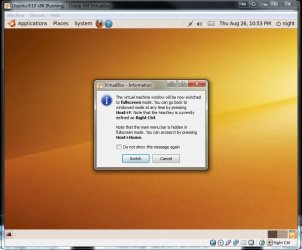
That would be similar to the ALT+ENTER key combo seen with Windows according to the answer seen there.

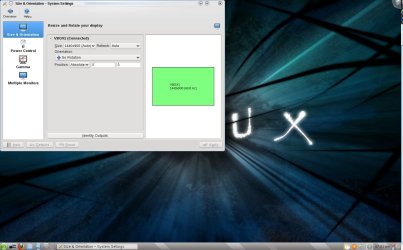
I just checked with ubuntu only seeing two 640x480 on the 9.10 and the latest Mint 9 seeing the 1440x900 option there.
 

Attachments

  • VM Full Screen.jpg
    VM Full Screen.jpg
    73.3 KB · Views: 133
  • VM in Full Screen Mode.jpg
    VM in Full Screen Mode.jpg
    49.7 KB · Views: 60
  • VM Mint9 Full Screen.jpg
    VM Mint9 Full Screen.jpg
    128.2 KB · Views: 182
Last edited:

My Computers

System One System Two

  • Computer type
    PC/Desktop
    Computer Manufacturer/Model Number
    Custom builds = 2
    OS
    W7 Ultimate x64/W10 Pro x64/W11 Pro Triple Boot - Main PC W7 Remote PC Micro ATX W7 Pro x64/W11 Pro
    CPU
    AMD Phenom II X4 975 Deneb 3.6ghz - 965 2nd remote pc
    Motherboard
    Gigabyte GA-790XTA-UD4-Gigabyte GA-880GM-D2H remote pc
    Memory
    Kingston Hyper X DDR3 1600 1.5v 16gb - Hyper X Fury 8gb 2nd
    Graphics Card(s)
    MSI HD Radeon 5750 1gb - MSI HD Radeon 6450 on mini tower
    Sound Card
    Creative Labs X-Fi Xtreme Audio P - Realtek onooard 2nd case
    Monitor(s) Displays
    ASUS VW199T-P 19" HP 2082a Main-HP 2082a 20" remote pc
    Screen Resolution
    Asus 1440x900 - HP 1600x900
    Hard Drives
    WD Black 1TB HD per OS W7, W10, and pending W11 presently on 500gb OS Drive - Pending Triple 1TB HDs for Spanned Storage/backup volume
    Single 2TB external USB enclosure, single 1TB System 7 Host/Boot drive, Pending 8TB external HD for system image b
    PSU
    Corsair 750TX - primary / Corsair CX600 - second
    Case
    Antec 900-2 - SSD compatible / NZXT Vulcan mini tower
    Cooling
    Zalman CNPS9900A
    Keyboard
    AZIO L70 Backlit Letters Gaming - ONN Cordless/USB
    Mouse
    MSI DS200 Programmable, Logitech Cordless
    Internet Speed
    30mbps upgrade - primary hard wired - mini tower usb WiFi
    Antivirus
    GFI VIPRE Internet Security 2014 on W7 2016 beta on W10,
    Browser
    Cyberfox, WaterFox 64bit FF variants, FireFox x64, Pale Moon
    Other Info
    Accomdata fan cooled usb 2.0 PIDE/Sata II, III external enclosure.
    Sambient usb/eSata PATA/Sata II, III external enclosure.
  • Computer type
    PC/Desktop
    System Manufacturer/Model Number
    CUSTOM ASSEMBLY
    OS
    W7 Pro x64/W11 Pro
    CPU
    AMD Deneb 3.6ghz - 965
    Motherboard
    Gigabyte GA-880GM-D2H remote pc
    Memory
    Kingston Hyper X Fury 8gb
    Graphics Card(s)
    MSI HD Radeon 6450 DVI Output
    Sound Card
    Realtek onooard Creative or Other separate PENDING
    Monitor(s) Displays
    VIZIO 32" LCD TV Separate LCD Pending
    Screen Resolution
    1600x1080
    Hard Drives
    WD 500GB OS Host/Boot WD Green 1TB Storage/Backup
    PSU
    Corsair 600W - THERMALTAKE 600W spare case
    Case
    NZXT Vulcan mini tower
    Cooling
    Twin 120mm Top Fans - 240mm Side Cover
    Keyboard
    ONN Cordless/USB Logitech Cordless
    Mouse
    ONN USB/Cordless - Logitech Cordless
    Internet Speed
    DSL 5G
    Browser
    MS Edge, FireFox, WaterFox x64, FireFox Nightly
    Other Info
    OS Testing-Remote Access to Main TeamViewer
u need guest additions im guessing?
 

My Computer

Computer Manufacturer/Model Number
HP dv6519tx
OS
Windows 7 Ultimate x64
CPU
1.80 GHz Intel Core 2 Duo processor T7100
Memory
3 gig ddr2
Graphics Card(s)
NVIDIA GeForce 8400M GS
Sound Card
Realtek High Definition Audio
Monitor(s) Displays
15.4” WXGA High Definition BrightView Widescreen
Screen Resolution
1280 x 800
Hard Drives
Hitachi 320 GB (5400 rpm)
PSU
90 W AC Power Adapter
Cooling
Kitchen plate under the lappy
Keyboard
101 key compatible
Mouse
Touch Pad with On/Off button and dedicated vertical Scroll
Internet Speed
Three Wireless internet prepaid using E160G USB dongle
The OS you install is a guest addition. You are running a guest OS on a Windows host machine using Virtual Box or anotner VM ware.
 

My Computers

System One System Two

  • Computer type
    PC/Desktop
    Computer Manufacturer/Model Number
    Custom builds = 2
    OS
    W7 Ultimate x64/W10 Pro x64/W11 Pro Triple Boot - Main PC W7 Remote PC Micro ATX W7 Pro x64/W11 Pro
    CPU
    AMD Phenom II X4 975 Deneb 3.6ghz - 965 2nd remote pc
    Motherboard
    Gigabyte GA-790XTA-UD4-Gigabyte GA-880GM-D2H remote pc
    Memory
    Kingston Hyper X DDR3 1600 1.5v 16gb - Hyper X Fury 8gb 2nd
    Graphics Card(s)
    MSI HD Radeon 5750 1gb - MSI HD Radeon 6450 on mini tower
    Sound Card
    Creative Labs X-Fi Xtreme Audio P - Realtek onooard 2nd case
    Monitor(s) Displays
    ASUS VW199T-P 19" HP 2082a Main-HP 2082a 20" remote pc
    Screen Resolution
    Asus 1440x900 - HP 1600x900
    Hard Drives
    WD Black 1TB HD per OS W7, W10, and pending W11 presently on 500gb OS Drive - Pending Triple 1TB HDs for Spanned Storage/backup volume
    Single 2TB external USB enclosure, single 1TB System 7 Host/Boot drive, Pending 8TB external HD for system image b
    PSU
    Corsair 750TX - primary / Corsair CX600 - second
    Case
    Antec 900-2 - SSD compatible / NZXT Vulcan mini tower
    Cooling
    Zalman CNPS9900A
    Keyboard
    AZIO L70 Backlit Letters Gaming - ONN Cordless/USB
    Mouse
    MSI DS200 Programmable, Logitech Cordless
    Internet Speed
    30mbps upgrade - primary hard wired - mini tower usb WiFi
    Antivirus
    GFI VIPRE Internet Security 2014 on W7 2016 beta on W10,
    Browser
    Cyberfox, WaterFox 64bit FF variants, FireFox x64, Pale Moon
    Other Info
    Accomdata fan cooled usb 2.0 PIDE/Sata II, III external enclosure.
    Sambient usb/eSata PATA/Sata II, III external enclosure.
  • Computer type
    PC/Desktop
    System Manufacturer/Model Number
    CUSTOM ASSEMBLY
    OS
    W7 Pro x64/W11 Pro
    CPU
    AMD Deneb 3.6ghz - 965
    Motherboard
    Gigabyte GA-880GM-D2H remote pc
    Memory
    Kingston Hyper X Fury 8gb
    Graphics Card(s)
    MSI HD Radeon 6450 DVI Output
    Sound Card
    Realtek onooard Creative or Other separate PENDING
    Monitor(s) Displays
    VIZIO 32" LCD TV Separate LCD Pending
    Screen Resolution
    1600x1080
    Hard Drives
    WD 500GB OS Host/Boot WD Green 1TB Storage/Backup
    PSU
    Corsair 600W - THERMALTAKE 600W spare case
    Case
    NZXT Vulcan mini tower
    Cooling
    Twin 120mm Top Fans - 240mm Side Cover
    Keyboard
    ONN Cordless/USB Logitech Cordless
    Mouse
    ONN USB/Cordless - Logitech Cordless
    Internet Speed
    DSL 5G
    Browser
    MS Edge, FireFox, WaterFox x64, FireFox Nightly
    Other Info
    OS Testing-Remote Access to Main TeamViewer
u need guest additions im guessing?

As already mentiond I allready tried it.

The Debians with aptitude:
'aptitude install virtualbox-ose-guest-modules virtualbox-ose-guest-utils'
--> "Starting VirtualBox Additions ... cannot modprobe vboxadd kernel module fail! fail!"

And also the ones from Vbox:
'sh VBOX-Linux....-x86.s'
...
....
Doing non-kernel setup of the Guest Additions ... done.
Installing the Window System drivers ... fail!
(Could not find the X.Org or XFree86 Window System.)


The size of the windows besides dragging the edges manually to fill the screen is mainly determined by the screen resolution options seen in the OS run on VBox. To the greater extent this will also be a factor with any other VM program.

If the distro lacks the higher resolutions you will be limited to the size the highest available will be seen at for the most part. Dragging the edges will then only results in seeing a white border surrounding the desktop. VMs for the most are geared to run in windows not maxed out to full screen. Even when running Windows as well as the XP Mode this is the norm with that as well.

Yeah, but running Debian directly on the Notebook also shows th _whole_ Diplay used for the Console (no mater of the 'resolution').
In the true full screen mode at least ther shouldn't be a need of a high resolution.
Or how can i change a Resolution in the console?
 

My Computer

OS
Windows 7
Do you have X11 installed on the Debian system? Are you trying to modprobe the guest additions module into the kernel without Super User permissions?

Heres a thought, you could try getting the source code for the guest additions from Oracle, compile the kernel module, and then inject it into the 2.6.32 kernel headers (for compatibility even if its not the most current).

Best luck to you!
 

My Computer

Computer Manufacturer/Model Number
Custom | Whitebox
OS
Windows 7 Ultimate, OS X 10.7, Ubuntu 11.04
CPU
Intel E6750 @ 3.80GHz
Motherboard
Gigabyte GA-EP45-UD3L (Revision 1.1)
Memory
2x2GB & 2x1GB (6GB) OCZ Reaper 1066MHz @ 1080MHz
Graphics Card(s)
EVGA nVidia GTX 260 896mb (216 Core) FTW Edition
Sound Card
Realtek ALC888
Monitor(s) Displays
21" VIZIO TV
Screen Resolution
1680x1050 @ 60Hz
Hard Drives
Western Digital WD6401AALS - 640GB
Hitachi HDP725016GLA380 - 160GB
PSU
Corsair 750W
Case
NZXT Nemesis Elite
Cooling
Thermaltake SpinQ
Keyboard
Logitech Wireless S520
Mouse
Logitech Wireless S520 - Microsoft Wireless Arc Mouse
Internet Speed
Download: 20mbps, Upload: 3mbps
When not in the full screen mode the resolution settings determine the size of the window you see. For ubuntu a Debian based distro the 9.10 install on VBox only saw two options for 640x480 and 800x600. :(

When not wanting the full screen taken up being in the full screen mode for access to things like the taskbar in the host 7 like the pinned snipping tool for example :D that could be an obstacle even with a dual monitor setup. Fortunately Virtual Box has another option for that as well.
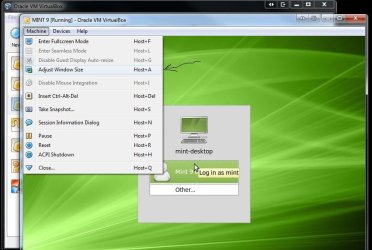
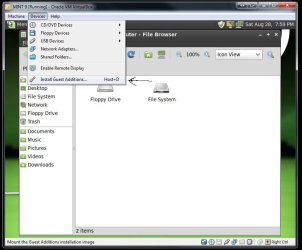
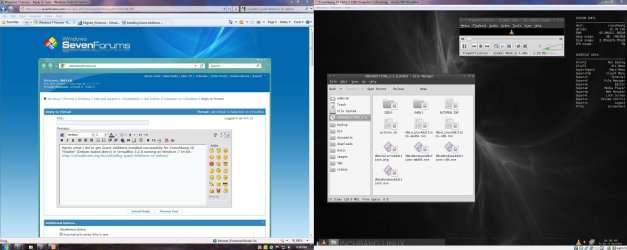
Adding one more image you can see the option for guest additions under "devices". That's mostly for applications you plan to install however.
 

Attachments

  • VBox Adjust Windows Size.jpg
    VBox Adjust Windows Size.jpg
    120.6 KB · Views: 127
  • VBox Install Guest Additions.jpg
    VBox Install Guest Additions.jpg
    108.1 KB · Views: 124
Last edited:

My Computers

System One System Two

  • Computer type
    PC/Desktop
    Computer Manufacturer/Model Number
    Custom builds = 2
    OS
    W7 Ultimate x64/W10 Pro x64/W11 Pro Triple Boot - Main PC W7 Remote PC Micro ATX W7 Pro x64/W11 Pro
    CPU
    AMD Phenom II X4 975 Deneb 3.6ghz - 965 2nd remote pc
    Motherboard
    Gigabyte GA-790XTA-UD4-Gigabyte GA-880GM-D2H remote pc
    Memory
    Kingston Hyper X DDR3 1600 1.5v 16gb - Hyper X Fury 8gb 2nd
    Graphics Card(s)
    MSI HD Radeon 5750 1gb - MSI HD Radeon 6450 on mini tower
    Sound Card
    Creative Labs X-Fi Xtreme Audio P - Realtek onooard 2nd case
    Monitor(s) Displays
    ASUS VW199T-P 19" HP 2082a Main-HP 2082a 20" remote pc
    Screen Resolution
    Asus 1440x900 - HP 1600x900
    Hard Drives
    WD Black 1TB HD per OS W7, W10, and pending W11 presently on 500gb OS Drive - Pending Triple 1TB HDs for Spanned Storage/backup volume
    Single 2TB external USB enclosure, single 1TB System 7 Host/Boot drive, Pending 8TB external HD for system image b
    PSU
    Corsair 750TX - primary / Corsair CX600 - second
    Case
    Antec 900-2 - SSD compatible / NZXT Vulcan mini tower
    Cooling
    Zalman CNPS9900A
    Keyboard
    AZIO L70 Backlit Letters Gaming - ONN Cordless/USB
    Mouse
    MSI DS200 Programmable, Logitech Cordless
    Internet Speed
    30mbps upgrade - primary hard wired - mini tower usb WiFi
    Antivirus
    GFI VIPRE Internet Security 2014 on W7 2016 beta on W10,
    Browser
    Cyberfox, WaterFox 64bit FF variants, FireFox x64, Pale Moon
    Other Info
    Accomdata fan cooled usb 2.0 PIDE/Sata II, III external enclosure.
    Sambient usb/eSata PATA/Sata II, III external enclosure.
  • Computer type
    PC/Desktop
    System Manufacturer/Model Number
    CUSTOM ASSEMBLY
    OS
    W7 Pro x64/W11 Pro
    CPU
    AMD Deneb 3.6ghz - 965
    Motherboard
    Gigabyte GA-880GM-D2H remote pc
    Memory
    Kingston Hyper X Fury 8gb
    Graphics Card(s)
    MSI HD Radeon 6450 DVI Output
    Sound Card
    Realtek onooard Creative or Other separate PENDING
    Monitor(s) Displays
    VIZIO 32" LCD TV Separate LCD Pending
    Screen Resolution
    1600x1080
    Hard Drives
    WD 500GB OS Host/Boot WD Green 1TB Storage/Backup
    PSU
    Corsair 600W - THERMALTAKE 600W spare case
    Case
    NZXT Vulcan mini tower
    Cooling
    Twin 120mm Top Fans - 240mm Side Cover
    Keyboard
    ONN Cordless/USB Logitech Cordless
    Mouse
    ONN USB/Cordless - Logitech Cordless
    Internet Speed
    DSL 5G
    Browser
    MS Edge, FireFox, WaterFox x64, FireFox Nightly
    Other Info
    OS Testing-Remote Access to Main TeamViewer
... cannot modprobe vboxadd kernel module fail! fail
I think your problem is that your linux installation doesn't support dynamic kernel modules:

From the VirtualBox installation manual (pg 70): (referring to Linux guests)

1. Before installing the Guest Additions, you will have to prepare your guest system for building external kernel modules. This works similarly as described in chap- ter 2.3.2, The VirtualBox kernel module, page 37, except that this step must now be performed in your Linux guest instead of on a Linux host system, as described there. Again, as with Linux hosts, we recommend using DKMS for Linux guests as well.

If it is not installed, use this command for Ubuntu/Debian systems:

sudo apt-get install dkms

<snip>
Make sure to nstall DKMS before installing the Linux Guest Additions.

2. Mount the VBoxGuestAdditions.iso file as your Linux guest’s virtual CD-ROM drive, exactly the same way as described for a Windows guest in chapter 4.2.1.1, Installation, page 66.

3. Change to the directory where your CD-ROM drive is mounted and execute as root: sh ./VBoxLinuxAdditions-x86.run In a 64-bit Linux guest, use VBoxLinuxAdditions-amd64.run instead.
 

My Computer

Computer Manufacturer/Model Number
Lenovo ThinkPad E520 / MacBook Pro 17" (mid 2010)
OS
Windows 7 Professional (64-bit) / OS X Snow Leopard
CPU
Core i5 / Core i7
Memory
4 GB / 8 GB
Sound Card
built-in
Monitor(s) Displays
internal & Samsung SyncMaster 191T / internal
Screen Resolution
1366x768 & 1280 x 1024 /1920x1200
Hard Drives
2 WD Raptors (74 G)
1 WD Caviar (250 G)
1 HP Personal Media Drive (USB, 300 G)
etc.
Cooling
none
Keyboard
built-in
Mouse
generic mouse / Wacom Intuos 3 tablet
Internet Speed
(very variable) high-speed cable
Do you have X11 installed on the Debian system? Are you trying to modprobe the guest additions module into the kernel without Super User permissions?
No (don't need X11 in commandline) and No (i use root).


Heres a thought, you could try getting the source code for the guest additions from Oracle, compile the kernel module, and then inject it into the 2.6.32 kernel headers (for compatibility even if its not the most current).
hmmm.... what?


Adding one more image you can see the option for guest additions under "devices". That's mostly for applications you plan to install however.
I also tried Ubuntu and installed the Addins ...
There now the Combination for real fullscreen (without black boarders) works:
-> set high resoulution on guest
-> [Host] + F
-> [Host] + G

But here i'm missing 32 Bit color.
(But thats not a major problem, as i'm looking for a Debian comandline solution. dual monitor setup --> same)

But Debian still not working.


I think your problem is that your linux installation doesn't support dynamic kernel modules:

Tried something like this ...


Following result:

VirtualBox Guest Additions installer
Verifying archive integrity... All good.
Uncompressing VirtualBox 3.2.8 Guest Additions for Linux........
Removing the installed version 3.2.8 of VirtualBox Guest Additions ...
Building the UirtualBox Guest Additions kernel modules
Your guest system does not seem to have sufficient OpenGL support to enable
3D effects (this requires Linux 2.6.27 or later in the guest system)
This Guest Additions feature will be disabled.

Building the Main Guest Additions Module ... done .
Building the shared folder support Module ... done.
Doing non-kernel setup of the Guest Additions ... done.
You should restart your guest to Make sure the new Modules are actually used

Installing the Window System drivers ... fail!
(Could not find the X. Org or XFree86 Window System.)

now with "Starting VirtualBox Additions ... done"
but no change .. big black boarder still there in fullscreen mode.
 

My Computer

OS
Windows 7
looks like your debian dosent have open GL. (i hope you see the humour in having an unwanted big black boarder compared to border btw...)
 

My Computer

Computer Manufacturer/Model Number
HP dv6519tx
OS
Windows 7 Ultimate x64
CPU
1.80 GHz Intel Core 2 Duo processor T7100
Memory
3 gig ddr2
Graphics Card(s)
NVIDIA GeForce 8400M GS
Sound Card
Realtek High Definition Audio
Monitor(s) Displays
15.4” WXGA High Definition BrightView Widescreen
Screen Resolution
1280 x 800
Hard Drives
Hitachi 320 GB (5400 rpm)
PSU
90 W AC Power Adapter
Cooling
Kitchen plate under the lappy
Keyboard
101 key compatible
Mouse
Touch Pad with On/Off button and dedicated vertical Scroll
Internet Speed
Three Wireless internet prepaid using E160G USB dongle
THEORY ONE
I indeed tried the same thing with vBox additions under the most current linux headers and received the same error. It seems that vBox additions and the module that it is trying to compile is currently not supported with the most current linux headers.

Its a theory at best, but it makes sense.


THEORY TWO
Make sure that the version number of Guest additions you are attempting to install match the version number of your VirtualBox Installation (the Client itself).

I read up a bit, and saw people were having the same error when trying to install vBox Guest additions 1.6.2 when their VirtualBox Client was at 1.5.x. So make sure everything is updated!
 

My Computer

Computer Manufacturer/Model Number
Custom | Whitebox
OS
Windows 7 Ultimate, OS X 10.7, Ubuntu 11.04
CPU
Intel E6750 @ 3.80GHz
Motherboard
Gigabyte GA-EP45-UD3L (Revision 1.1)
Memory
2x2GB & 2x1GB (6GB) OCZ Reaper 1066MHz @ 1080MHz
Graphics Card(s)
EVGA nVidia GTX 260 896mb (216 Core) FTW Edition
Sound Card
Realtek ALC888
Monitor(s) Displays
21" VIZIO TV
Screen Resolution
1680x1050 @ 60Hz
Hard Drives
Western Digital WD6401AALS - 640GB
Hitachi HDP725016GLA380 - 160GB
PSU
Corsair 750W
Case
NZXT Nemesis Elite
Cooling
Thermaltake SpinQ
Keyboard
Logitech Wireless S520
Mouse
Logitech Wireless S520 - Microsoft Wireless Arc Mouse
Internet Speed
Download: 20mbps, Upload: 3mbps

Attachments

  • Capture.JPG
    Capture.JPG
    372.3 KB · Views: 127

My Computer

Computer Manufacturer/Model Number
Dell E520
OS
Windows 7 Enterprise x64 SP1, Ubuntu 11.04 x64
CPU
Core2Quad Q6700 - 2.66 GHz
Motherboard
Whatever the heck Dell put in there...
Memory
8 Gig Mushkin DDR2 800 MHz
Graphics Card(s)
EVGA NVIDIA 9800GT - 512MB DDR3
Monitor(s) Displays
2 x 19" ViewSonic LCD
Screen Resolution
2560x1024
Hard Drives
1 Intel X25-M 120G SSD, 1 300G VelociRaptor, 1 WD Caviar Black 1TB
PSU
PCPower & Cooling Silencer 500 Watt
Internet Speed
15/2 Roadrunner Cable
Other Info
NOD32 AV - Malwarebytes
Back
Top