TomBradbury
New member
- Local time
- 9:08 AM
- Messages
- 2
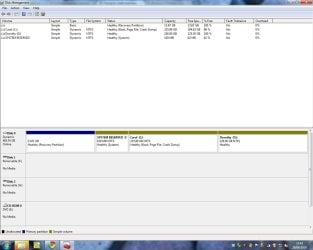
I've been attempting to install Windows XP on a PC from ACER which has Windows 7 pre-installed. Problem is that I'm trying to install it but haven't got any spare partitions on HDD, although Disk Management in Win 7 says I've only got 3 partitions, whereas when I go to install WinXP, the setup screen is saying I've used up all available partitions (4). WinXP setup says I've got a partition which is only 1MB in size, but this doesn't show up in Disk Management in Win 7. I can't delete the 1MB partition because its a dynamic partition and doing so, WinXP setup is telling me if I delete that one 1MB partition, I will lose all the data on the other 3 partitions which contain the System Re-install files (on Partition2 totalling 14GB), the current install of Win 7 and other programs/data (on Partition4 which has a capacity of 266GB) and the System Recovery partition of 100MB which I understand is needed to ensure Win 7 works property. When going to install WinXP, it is telling me that I've got 265GB of unallocated space, but in Disk Management, that shows up as Drive D. I was originally thinking I could put WinXP on Drive D.
Anybody got any ideas?
Anybody got any ideas?
My Computer
At a glance
Windows 7 Home Premium x64
- OS
- Windows 7 Home Premium x64