Adding Old Games to Games Panel

SailingNut

New member
Member
VIP
Local time
12:00 PM
Messages
127
Hi,

I was wondering if it is possible to manually add a game to the games panel.

I have Oblivion and would like to add a shortcut in the games panel but can't figure out how (if) it can be done. I also need to be able to control all of the details of the shortcut because of launching the game differently to allow for loading mods.

TIA!
 

My Computer

Computer Manufacturer/Model Number
Home Build
OS
Windows 7 Ultimate x64
CPU
Core i5 760
Motherboard
Biostar T5XE (P55)
Memory
2x2GB Mushkin PC3-10666
Graphics Card(s)
GeForce GTX 460
Internet Speed
FiOS 25Gbps down & up

My Computer

Computer type
PC/Desktop
Computer Manufacturer/Model Number
Self built custom
OS
64-bit Windows 11 Pro for Workstations
CPU
Intel i7-8700K OC'd to 5 GHz
Motherboard
ASUS ROG Maximus XI Formula Z390
Memory
64 GB (4x16GB) G.SKILL TridentZ RGB DDR4 3600 MHz
Graphics Card(s)
ASUS ROG-STRIX-GTX1080TI-O11G-GAMING
Sound Card
Integrated
Monitor(s) Displays
2 x Samsung Odyssey G7 27"
Screen Resolution
2560x1440
Hard Drives
1TB Samsung 990 PRO M.2,
4TB Samsung 990 PRO PRO M.2,
TerraMaster F8 SSD Plus NAS
PSU
Seasonic Prime Titanium 850W
Case
Thermaltake Core P3
Cooling
Corsair Hydro H115i
Keyboard
Logitech wireless K800
Mouse
Logitech MX Master 4
Internet Speed
2 Gb/s Download and 100 Mb/s Upload
Antivirus
Malwarebyte Anti-Malware Premium
Browser
Google Chrome
Other Info
Logitech Z625 speaker system,
Logitech BRIO 4K Pro webcam,
HP Color LaserJet Pro MFP M477fdn,
APC SMART-UPS RT 1000 XL - SURT1000XLI,
Galaxy S23 Plus phone
Yes, you can. If you right click on the executable, pin to start menu. Then drag the shortcut to the games folder.
 

My Computer

Computer Manufacturer/Model Number
Dell and Custom
OS
Systems 1 and 2: Windows 7 Enterprise x64, Win 8 Developer
CPU
System 1: i7 [email protected], System 2: AMD FX-4100 Zambezi 3.6G
Motherboard
System 1:Dell 06NWYK System 2: ASUS M5A97 AM3+
Memory
System 1: 8GB System 2: 8GB
Graphics Card(s)
System 1: ATI FirePro V4800 System 2: Radeon HD 6850
Sound Card
System 1: onboard System 2: onboard
Monitor(s) Displays
System1: Viewsonic HDMI 24"
Screen Resolution
System 1: 1920x1080 System 2: 1920x1080
Hard Drives
System 1: Mirrored .5B drives System 2: Seagate Barracuda ST1000DM003 1TB 7200 RPM 64MB Cache SATA 6.0Gb/s
Case
System 1: Dell System 2: Cooler Master
Internet Speed
10 MBPS
Follow the instructions carefully for the "Add games to" Tutorial Brink linked.

It works very well.

You can also make your own custom box art if you so choose, just name it the same as the one Windows auto downloads and replace it :)

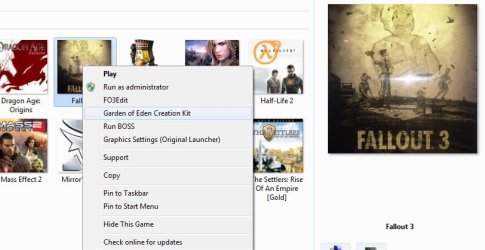
I'm assuming your ultimate goal is to have a context menu for Oblivion, similar to my Fallout one in this snip. My "Play" option for this game is actually the FOSE loader.


To do this, after you get the game listed in the Game explorer like you want it, follow the steps in this Tutorial.
http://www.sevenforums.com/tutorials/64159-games-explorer-folder-customize-context-menu.html?ltr=G
 

Attachments

  • Untitled.jpg
    Untitled.jpg
    44.1 KB · Views: 26

My Computer

Computer Manufacturer/Model Number
Custom (Self Build)
OS
Windows 7 Home Premium 64bit
CPU
Intel Core i7 2700k
Motherboard
eVGA P67 SLI
Memory
8GB Mushkin Redline Ridgebacks @1866
Graphics Card(s)
EVGA GTX570 SC
Sound Card
XiFi Titanium HD
Monitor(s) Displays
LG W2453V
Screen Resolution
1920x1080
Hard Drives
Intel 320 80GB -- Intel X25-V 40GB --WD Black 1TB x2 -- WD Blue 640GB
PSU
Seasonic x750
Case
Corsair 600T SE White
Cooling
eVGA Superclocked CPU Cooler
Keyboard
Saitek Cyborg
Antivirus
Kaspersky
Browser
IE
Other Info
LG BD/DVD
Thanks for all of the information!

I got the icon to show up in the games explorer, but I can't seem to change what executable it launches.

I changed it in RegEdit but no luck. (Might need to reboot though.)

One other thing is that I'd like to change the default action to "run as administrator"
 

My Computer

Computer Manufacturer/Model Number
Home Build
OS
Windows 7 Ultimate x64
CPU
Core i5 760
Motherboard
Biostar T5XE (P55)
Memory
2x2GB Mushkin PC3-10666
Graphics Card(s)
GeForce GTX 460
Internet Speed
FiOS 25Gbps down & up
The tutorial I linked will show how to add the context menus.

Whatever is in Folder "0", labeled as "Play" is what it will launch when you double click the icon from game Explorer.
You need to delete the Play shortcut, replace it with the app you want to launch, and name it Play.

The folders 1 and up will be options.

Once you do all the steps in the tutorial Brink Linked, you can then edit these things. remember, Folder 0 must be labeled as "Play" , regardless what shortcut you put there.


To have the app always prompt for Admin privlage, simply navigate to its main location.
Right Click the exe you want to runas Admin, choose Compatability, and check the "Run this program" as Admin box.
 

My Computer

Computer Manufacturer/Model Number
Custom (Self Build)
OS
Windows 7 Home Premium 64bit
CPU
Intel Core i7 2700k
Motherboard
eVGA P67 SLI
Memory
8GB Mushkin Redline Ridgebacks @1866
Graphics Card(s)
EVGA GTX570 SC
Sound Card
XiFi Titanium HD
Monitor(s) Displays
LG W2453V
Screen Resolution
1920x1080
Hard Drives
Intel 320 80GB -- Intel X25-V 40GB --WD Black 1TB x2 -- WD Blue 640GB
PSU
Seasonic x750
Case
Corsair 600T SE White
Cooling
eVGA Superclocked CPU Cooler
Keyboard
Saitek Cyborg
Antivirus
Kaspersky
Browser
IE
Other Info
LG BD/DVD

My Computer

Computer Manufacturer/Model Number
Toshiba Satellite A135S4487
OS
Windows 7 Ultimate (32-bit)
CPU
Intel Mobile Core 2 Duo T5500 @ 1.66 GHz
Motherboard
Intel i945GM Chipset
Memory
2.0GB Dual Channel DDR2 @ 266 MHz 4-4-4-12
Graphics Card(s)
Mobile Intel 945 Express Chipset Family
Sound Card
Realtek High Definition Audio
Monitor(s) Displays
Generic PnP Monitor, Samsung 46" LCD
Screen Resolution
1280 x 800, 1920 x 1080
Hard Drives
100GB Hitachi ATA Device (IDE)
120GB Western Digital USB
250GB External USB
Keyboard
Microsoft Wireless Comfort Keyboard 5000
Mouse
Microsoft Wireless Mouse 5000
Internet Speed
DSL
The tutorial I linked will show how to add the context menus.

Whatever is in Folder "0", labeled as "Play" is what it will launch when you double click the icon from game Explorer.
You need to delete the Play shortcut, replace it with the app you want to launch, and name it Play.

The folders 1 and up will be options.

Once you do all the steps in the tutorial Brink Linked, you can then edit these things. remember, Folder 0 must be labeled as "Play" , regardless what shortcut you put there.


To have the app always prompt for Admin privlage, simply navigate to its main location.
Right Click the exe you want to runas Admin, choose Compatability, and check the "Run this program" as Admin box.

That worked great, thanks!
 

My Computer

Computer Manufacturer/Model Number
Home Build
OS
Windows 7 Ultimate x64
CPU
Core i5 760
Motherboard
Biostar T5XE (P55)
Memory
2x2GB Mushkin PC3-10666
Graphics Card(s)
GeForce GTX 460
Internet Speed
FiOS 25Gbps down & up

My Computer

Computer Manufacturer/Model Number
Home Build
OS
Windows 7 Ultimate x64
CPU
Core i5 760
Motherboard
Biostar T5XE (P55)
Memory
2x2GB Mushkin PC3-10666
Graphics Card(s)
GeForce GTX 460
Internet Speed
FiOS 25Gbps down & up

My Computer

Computer Manufacturer/Model Number
Toshiba Satellite A135S4487
OS
Windows 7 Ultimate (32-bit)
CPU
Intel Mobile Core 2 Duo T5500 @ 1.66 GHz
Motherboard
Intel i945GM Chipset
Memory
2.0GB Dual Channel DDR2 @ 266 MHz 4-4-4-12
Graphics Card(s)
Mobile Intel 945 Express Chipset Family
Sound Card
Realtek High Definition Audio
Monitor(s) Displays
Generic PnP Monitor, Samsung 46" LCD
Screen Resolution
1280 x 800, 1920 x 1080
Hard Drives
100GB Hitachi ATA Device (IDE)
120GB Western Digital USB
250GB External USB
Keyboard
Microsoft Wireless Comfort Keyboard 5000
Mouse
Microsoft Wireless Mouse 5000
Internet Speed
DSL

My Computer

Computer Manufacturer/Model Number
Home Build
OS
Windows 7 Ultimate x64
CPU
Core i5 760
Motherboard
Biostar T5XE (P55)
Memory
2x2GB Mushkin PC3-10666
Graphics Card(s)
GeForce GTX 460
Internet Speed
FiOS 25Gbps down & up
Back
Top