Change Windows Clock's font size

This is what I use - atomic clock

can show uptime wekkday date alarm calendar etc

Thats EXACTLY what ive been looking for, but couldn't remember what it was called, thanx a million!!!:D
 

My Computer My Computer

Computer Manufacturer/Model Number
Compaq presario CQ5320f
OS
Windows 7 Ultimate 32bit
CPU
AMD Athlon II x2 240 Dual Core 2.8ghz
Memory
3 GB ddr3
Monitor(s) Displays
RCA 32" 720p 60Hz Class LCD HDTV
Screen Resolution
1360x768
Hard Drives
500 gb raptor on board
1 tb WD My Book
Keyboard
Microsoft comfort curve keyboard 2000
Mouse
Orbit Optical Tracball
Internet Speed
Roadrunner High Speed turbo
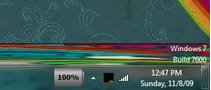
Do you want it to look like this ?
 

Attachments

  • 2009-11-08_124815.jpg
    2009-11-08_124815.jpg
    16.7 KB · Views: 2,137

My Computer My Computer

Computer Manufacturer/Model Number
Sony Vaio
OS
Windows 7 Ultimate x86
CPU
Intel Core 2 Duo [email protected] GHz
Memory
3 GB
Graphics Card(s)
ATI Mobility HD 3400 Series
Screen Resolution
1600x900
@SmiLey497: That looks like the original Windows clock! Is it the original one tweaked or is it another application (which one)???
 

My Computer My Computer

OS
Windows 7
How would you like it like this:

systray.jpg


I just stated using TClock today for the first time in a long time. I could upload it if you like. It is very customizeable.
I tried the same Tclock. I can start it,customize and everything, it's on startup, but after i reboot, i receive the message "TCDLL.dll could not be found on your system"
Can you help me, please ? This program seems to be only for XP / Vista.
 

My Computer My Computer

Computer type
PC/Desktop
OS
Windows 7 Ultimate x64
CPU
Intel7 4790K
Motherboard
Gigabyte GA-Z97X UD5H
Memory
8 GB DDR3
Graphics Card(s)
GTX 980Ti G1
Sound Card
SoundBlaster X-FI XtremeGamer
Monitor(s) Displays
Samsung UE40JU6550 UHD
Screen Resolution
3840 X 2160
Hard Drives
1 SSD Intel 330
2 x Western Digital 6400 AAKS
1 x Western Digital 3200 AAKS
PSU
Corsair 750W
Case
Cooler Master HAF 922
After you download the Tclock2.29.zip, you need to make sure that all the files from the zip are in the same folder. Like extracted to TClock folder. There is no install. Just run TClock.exe.

How would you like it like this:

systray.jpg


I just stated using TClock today for the first time in a long time. I could upload it if you like. It is very customizeable.
I tried the same Tclock. I can start it,customize and everything, it's on startup, but after i reboot, i receive the message "TCDLL.dll could not be found on your system"
Can you help me, please ? This program seems to be only for XP / Vista.
 

My Computer My Computer

Computer type
PC/Desktop
Computer Manufacturer/Model Number
Made by Dixon Butz
OS
Win7 Win 10, Win 8.1
CPU
AMD FX-8350, Corsair H100i
Motherboard
ASUS Crosshair V Formula-Z
Memory
16GB G.SKILL Ripjaws DDR3
Graphics Card(s)
EVGA GTX 980, EVGA GTX 860
Sound Card
Denon x4200 Dolby AMOS!
Monitor(s) Displays
65" Samsung 4K, +3 27inch
Screen Resolution
4K, 1080x3
Hard Drives
2TB Samsung hd204ui

1X Samsung 850 SSD
PSU
1000w EVGA, 2000VA UPS, 1000VA UPS and many others
Case
Lian Li
Cooling
Corsair H100i
Keyboard
Logitech K800
Mouse
Logitech Couch Mouse
Internet Speed
Gigabit!
Antivirus
Defender
Browser
Slimjet Chrome
After you download the Tclock2.29.zip, you need to make sure that all the files from the zip are in the same folder. Like extracted to TClock folder. There is no install. Just run TClock.exe.

How would you like it like this:

systray.jpg


I just stated using TClock today for the first time in a long time. I could upload it if you like. It is very customizeable.
I tried the same Tclock. I can start it,customize and everything, it's on startup, but after i reboot, i receive the message "TCDLL.dll could not be found on your system"
Can you help me, please ? This program seems to be only for XP / Vista.
I did exactly as you said.
But at startup is the problem.
The error message is : TCDLL.dll is missing from your system
Do you use now Tclock, on Windows 7 ?
 

My Computer My Computer

Computer type
PC/Desktop
OS
Windows 7 Ultimate x64
CPU
Intel7 4790K
Motherboard
Gigabyte GA-Z97X UD5H
Memory
8 GB DDR3
Graphics Card(s)
GTX 980Ti G1
Sound Card
SoundBlaster X-FI XtremeGamer
Monitor(s) Displays
Samsung UE40JU6550 UHD
Screen Resolution
3840 X 2160
Hard Drives
1 SSD Intel 330
2 x Western Digital 6400 AAKS
1 x Western Digital 3200 AAKS
PSU
Corsair 750W
Case
Cooler Master HAF 922

My Computer My Computer

Computer type
PC/Desktop
Computer Manufacturer/Model Number
Made by Dixon Butz
OS
Win7 Win 10, Win 8.1
CPU
AMD FX-8350, Corsair H100i
Motherboard
ASUS Crosshair V Formula-Z
Memory
16GB G.SKILL Ripjaws DDR3
Graphics Card(s)
EVGA GTX 980, EVGA GTX 860
Sound Card
Denon x4200 Dolby AMOS!
Monitor(s) Displays
65" Samsung 4K, +3 27inch
Screen Resolution
4K, 1080x3
Hard Drives
2TB Samsung hd204ui

1X Samsung 850 SSD
PSU
1000w EVGA, 2000VA UPS, 1000VA UPS and many others
Case
Lian Li
Cooling
Corsair H100i
Keyboard
Logitech K800
Mouse
Logitech Couch Mouse
Internet Speed
Gigabit!
Antivirus
Defender
Browser
Slimjet Chrome
When I try to run it, it halts, saying the tclock.dll is not on the computer. It is in the same directory!
 

My Computer My Computer

Computer type
PC/Desktop
Computer Manufacturer/Model Number
Acer
OS
Windows Professional x64
CPU
Atom
Memory
3G
Graphics Card(s)
nVidia
Browser
Firefox
Hi Brian Welcome to Seven Forums .. Read the Link below and follow the Instructions ..

Copy tClock.dll to the installation directory of the program that is requesting .
If that doesn't work, you will have to copy and paste tClock.dll to your system directory. By default, this is:
C:\Windows\System (Windows 95/98/Me)
C:\WINNT\System32 (Windows NT/2000)
C:\Windows\System32 (Windows XP, Vista, 7,8)
If you use a 64-bit version of Windows, you should also place tClock.dll in C:\Windows\SysWOW64\ Make sure overwrite any existing files (but make a backup copy of the original file).
Reboot your computer.

If the problem still occurs, try the following:
1. Open Windows Start menu and select "Run...".
2. Type CMD and press Enter (or if you use Windows ME, type COMMAND)).
3. Type regsvr32 tClock.dll and press Enter.

Do not Download any files
 
Last edited:

My Computer My Computer

Computer Manufacturer/Model Number
W530-3630QM1
OS
windows 7 home 64bit
CPU
INTEL-CORE I7
Memory
16GB
Hard Drives
750GB
Browser
Chrome
Made sure the x64 version is in System32 and the WOW directory, but continues to object the wrong version for W7 is all that's available. A very sloppy install sequence here.
 

My Computer My Computer

Computer type
PC/Desktop
Computer Manufacturer/Model Number
Acer
OS
Windows Professional x64
CPU
Atom
Memory
3G
Graphics Card(s)
nVidia
Browser
Firefox
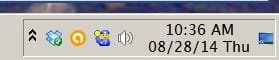
Win7 Clock font size

Active Title font also controls system tray clock font. Try Lucida Sans 11 pt with bar ht set at 19 pt (default for that font size).
 

Attachments

  • 002 Screen on 2014.08.28 @  10.37.06.jpg
    002 Screen on 2014.08.28 @ 10.37.06.jpg
    4.5 KB · Views: 26

My Computer My Computer

Computer type
PC/Desktop
Computer Manufacturer/Model Number
HP
OS
Win7 Home Prem x64
CPU
Intel Core22 Quad Q8300 @ 2.5GHz
Motherboard
ASUS IPIBL-LB (Benicia GL8E)
Memory
8.0 GB
Graphics Card(s)
NVIDIA GE Force GT 240
Hard Drives
ST3750528AS
Antivirus
avast
Browser
Chrome
Tray Clock Bold Font

Finally !
Fresh install W7
but how to make clock more visible?

So the "BOLD" is the important thing
tahomab.ttf (bold) will not work
instead tahoma bold
 

Attachments

  • TRAY CLOCK FONT.jpg
    TRAY CLOCK FONT.jpg
    47.6 KB · Views: 2

My Computer My Computer

Computer type
PC/Desktop
Computer Manufacturer/Model Number
696
OS
7 Ultimate x64 sp1
CPU
Intel i5-4690K
Motherboard
GA Z97X Gaming 5
Memory
16Gb HyperX fury
Graphics Card(s)
R9-270x 2Gb
Sound Card
On Board
Monitor(s) Displays
2443NW
Screen Resolution
1920x1200
Hard Drives
WD5000 -
WD5001 -
WD1002
PSU
Cft-650-14cs
Case
Very Big Case
Cooling
stock
Keyboard
G11
Mouse
Logitech
Internet Speed
Adsl
Browser
FF
Other Info
RWD
Back
Top