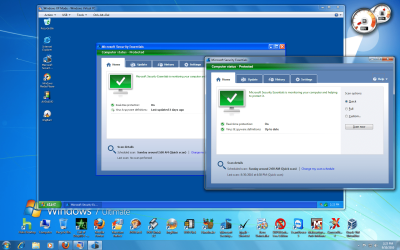
Running the same AV software in Windows 7 & in the Virtual PC

Agrippa

New member
Local time
7:46 PM
Messages
27
I have Windows 7 64-bit Professional and have downloaded the Virtual PC and installed the Windows XP mode.

In Windows 7 the AV is McAfee Security Center that came pre-installed by Dell with a 15 month licence. In the Windows XP Mode I have installed Microsoft Security Essentials.

The problem is that McAfee Security Center kills the Windows 7 search function. McAfee have now been aware of this problem for months but have still not sorted it. If they don't fix it soon I shall uninstall McAfee and install some other AV software.

My question is, if I install Microsoft Security Essentials on Windows 7 then, as I also have it installed on the Virtual PC, are there likely to be any clashes or problems?
 

My Computer My Computer

OS
Windows 7 64-bit
I have Windows 7 64-bit Professional and have downloaded the Virtual PC and installed the Windows XP mode.

In Windows 7 the AV is McAfee Security Center that came pre-installed by Dell with a 15 month licence. In the Windows XP Mode I have installed Microsoft Security Essentials.

The problem is that McAfee Security Center kills the Windows 7 search function. McAfee have now been aware of this problem for months but have still not sorted it. If they don't fix it soon I shall uninstall McAfee and install some other AV software.

My question is, if I install Microsoft Security Essentials on Windows 7 then, as I also have it installed on the Virtual PC, are there likely to be any clashes or problems?

I recommend you run MSE or, at the very least, don't run the full Security Center.
 

My Computer My Computer

Computer Manufacturer/Model Number
Dell and Custom
OS
Systems 1 and 2: Windows 7 Enterprise x64, Win 8 Developer
CPU
System 1: i7 [email protected], System 2: AMD FX-4100 Zambezi 3.6G
Motherboard
System 1:Dell 06NWYK System 2: ASUS M5A97 AM3+
Memory
System 1: 8GB System 2: 8GB
Graphics Card(s)
System 1: ATI FirePro V4800 System 2: Radeon HD 6850
Sound Card
System 1: onboard System 2: onboard
Monitor(s) Displays
System1: Viewsonic HDMI 24"
Screen Resolution
System 1: 1920x1080 System 2: 1920x1080
Hard Drives
System 1: Mirrored .5B drives System 2: Seagate Barracuda ST1000DM003 1TB 7200 RPM 64MB Cache SATA 6.0Gb/s
Case
System 1: Dell System 2: Cooler Master
Internet Speed
10 MBPS

Attachments

  • Untitled.png
    Untitled.png
    256 KB · Views: 12

My Computers My Computers

System One System Two

  • Computer type
    PC/Desktop
    Computer Manufacturer/Model Number
    PowerSpec G164
    OS
    WIN10
    CPU
    AMD Ryzen 5 3600 6-Core Processor 3.59 GHz
    Memory
    16.0 GB
    Internet Speed
    VERY FAST>>>!!!
  • Antivirus
    ESET Security Premium
That was a quick response!

OK, the answer would seem to be for me to eventually go ahead with MSE.

As for the McAfee problem, here is the link to a lengthy thread on the topic; I'd describe it as semi-authoritative. From comments in the thread I'd say you need a complete removal of McAfee, not just disabling parts of it.
 

My Computer My Computer

OS
Windows 7 64-bit
Why wait, McAfee is horrible. The regular uninstall method was a major pain for me, but that was back in Vista. If you use that removal tool, restart as it says, you should be fine!

Good luck,
 

My Computers My Computers

System One System Two

  • Computer type
    PC/Desktop
    Computer Manufacturer/Model Number
    PowerSpec G164
    OS
    WIN10
    CPU
    AMD Ryzen 5 3600 6-Core Processor 3.59 GHz
    Memory
    16.0 GB
    Internet Speed
    VERY FAST>>>!!!
  • Antivirus
    ESET Security Premium
Yeah, there's little to no reason to ever consider running Mcafee, given it's high resource usage, and low detection rates...the exact opposite of what you'd want in an AV scanner. Mcafee software is like a virus, to be honest.
 

My Computer My Computer

OS
Windows 7 Ultimate x64 SP1
CPU
Intel Core i7-2600
Motherboard
Gigabyte GA-P67A-UD3P-B3
Memory
12 GB Patriot Extreme DDR3-1333
Graphics Card(s)
Nvidia GTX 470
Monitor(s) Displays
Dell UltraSharp 2209WA
Hard Drives
OCZ Agility3 240 GB, WD5001AALS, WD7501AALS
PSU
OCZ ModStream 700W
Case
CoolerMaster HAF 912 Advanced
Cooling
CoolerMaster Hyper 212 Plus
We had a mcafee site license for the entire university. Never installed it on any of my computers.
 

My Computer My Computer

Computer Manufacturer/Model Number
Dell and Custom
OS
Systems 1 and 2: Windows 7 Enterprise x64, Win 8 Developer
CPU
System 1: i7 [email protected], System 2: AMD FX-4100 Zambezi 3.6G
Motherboard
System 1:Dell 06NWYK System 2: ASUS M5A97 AM3+
Memory
System 1: 8GB System 2: 8GB
Graphics Card(s)
System 1: ATI FirePro V4800 System 2: Radeon HD 6850
Sound Card
System 1: onboard System 2: onboard
Monitor(s) Displays
System1: Viewsonic HDMI 24"
Screen Resolution
System 1: 1920x1080 System 2: 1920x1080
Hard Drives
System 1: Mirrored .5B drives System 2: Seagate Barracuda ST1000DM003 1TB 7200 RPM 64MB Cache SATA 6.0Gb/s
Case
System 1: Dell System 2: Cooler Master
Internet Speed
10 MBPS
From comments in the thread I'd say you need a complete removal of McAfee, not just disabling parts of it.

I would have to agree with you. Many other forums have tales where McAfee (as well as other security products) leave behind registry entries that conflict with new security products. So use the McAfee removal tool or in the alternative, Revo's free uninstaller.
 

My Computer My Computer

Computer type
Laptop
Computer Manufacturer/Model Number
Sony Vaio VPCEB47GM Laptop
OS
Win 7 Pro 64-bit
CPU
Intel i5 2.4 Ghz
Memory
8GB DDR3
Graphics Card(s)
Intel HD 3000
Sound Card
IDT High Definition
Monitor(s) Displays
15.6 WGXA Anti-Glare LED
Screen Resolution
1280x800
Hard Drives
640Gb 7200rpm
Antivirus
MSE
Browser
Opera (primary) with IE9 backup
I always thought Norton was the worst for leaving junk in the registry, etc. Yuck...
 

My Computer My Computer

Computer Manufacturer/Model Number
Dell and Custom
OS
Systems 1 and 2: Windows 7 Enterprise x64, Win 8 Developer
CPU
System 1: i7 [email protected], System 2: AMD FX-4100 Zambezi 3.6G
Motherboard
System 1:Dell 06NWYK System 2: ASUS M5A97 AM3+
Memory
System 1: 8GB System 2: 8GB
Graphics Card(s)
System 1: ATI FirePro V4800 System 2: Radeon HD 6850
Sound Card
System 1: onboard System 2: onboard
Monitor(s) Displays
System1: Viewsonic HDMI 24"
Screen Resolution
System 1: 1920x1080 System 2: 1920x1080
Hard Drives
System 1: Mirrored .5B drives System 2: Seagate Barracuda ST1000DM003 1TB 7200 RPM 64MB Cache SATA 6.0Gb/s
Case
System 1: Dell System 2: Cooler Master
Internet Speed
10 MBPS
I am usually use the open minded approach to security suggesting others to experiment with different software and make their own choice. I am going to take a different stance here. Mcafee has to be one of the most resource hungry and problem causing suites out there. I live by the rule that if it takes a removal tool to completely remove all components of an app off my system then I am not installing it.
 

My Computer My Computer

Computer Manufacturer/Model Number
Toshiba L505
OS
Windows 7 64x
CPU
AMD Turion II Dual-Core Mobile M520 2.30 GHz
Memory
4GB
Graphics Card(s)
ATI Radeon HD 4200
That's why I've likened it to a virus. It puts hooks into the OS that can be very difficult to completely remove 100%...much like a virus.
 

My Computer My Computer

OS
Windows 7 Ultimate x64 SP1
CPU
Intel Core i7-2600
Motherboard
Gigabyte GA-P67A-UD3P-B3
Memory
12 GB Patriot Extreme DDR3-1333
Graphics Card(s)
Nvidia GTX 470
Monitor(s) Displays
Dell UltraSharp 2209WA
Hard Drives
OCZ Agility3 240 GB, WD5001AALS, WD7501AALS
PSU
OCZ ModStream 700W
Case
CoolerMaster HAF 912 Advanced
Cooling
CoolerMaster Hyper 212 Plus
That's why I've likened it to a virus. It puts hooks into the OS that can be very difficult to completely remove 100%...much like a virus.

I would agree. Trend Micro and previous versions of Norton had the same issues. I haven't played around with the latest versions of Norton so I don't know if it still an issue or not.
 

My Computer My Computer

Computer Manufacturer/Model Number
Toshiba L505
OS
Windows 7 64x
CPU
AMD Turion II Dual-Core Mobile M520 2.30 GHz
Memory
4GB
Graphics Card(s)
ATI Radeon HD 4200
Back
Top