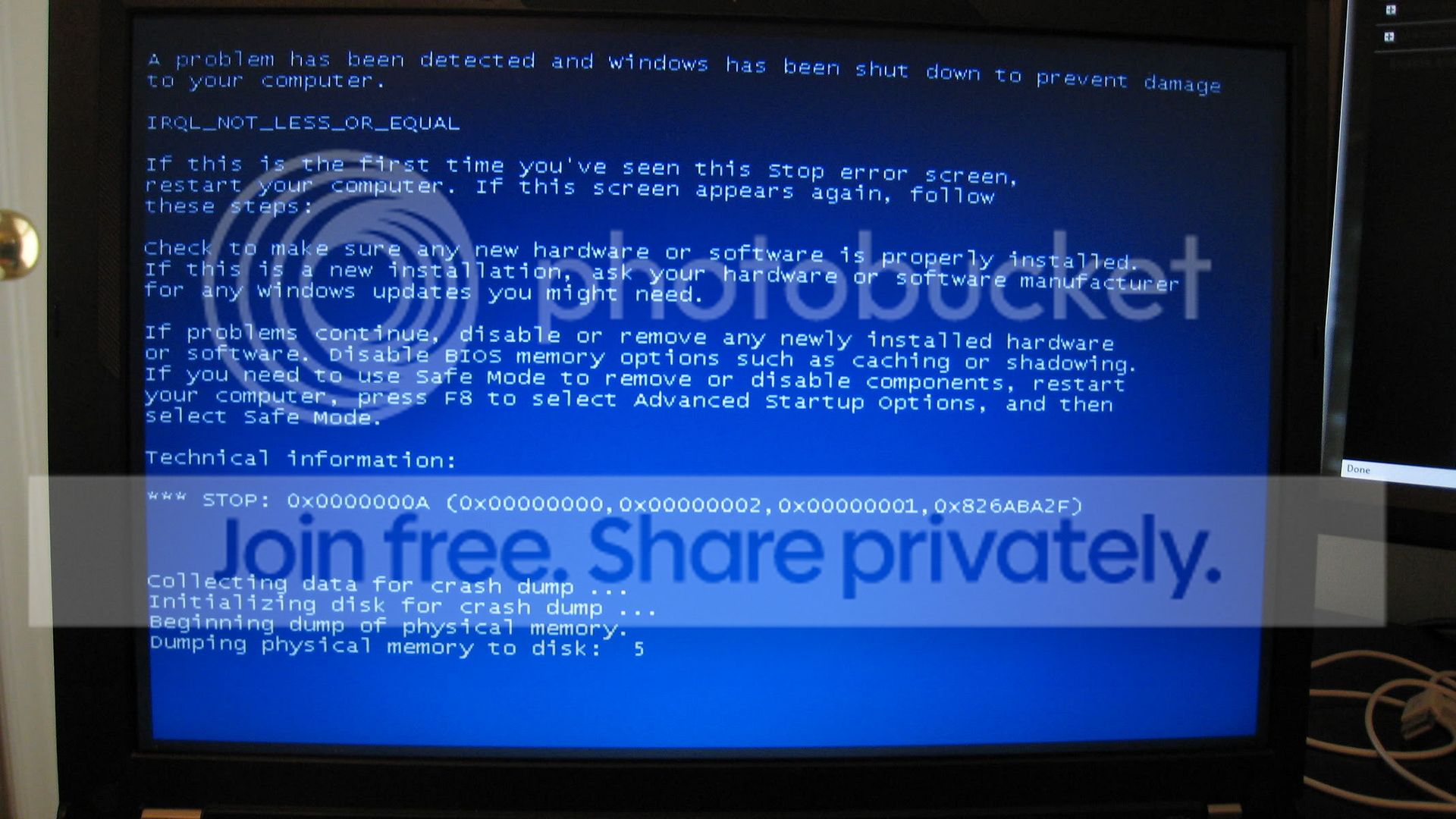
windows 7 RC blue screen IRQL error

Zevin64

New member
Local time
5:10 PM
Messages
12
Hi, when attempting to install windows 7 RC just before the installation can finish I get a BSOD with an IRQL error. The computer automatically restarts so I don't get enough time to see the details of the error then it automatically reverts back to Vista. Some assistance please?
 

My Computer

OS
Windows Vista & Ubuntu
Hi, when attempting to install windows 7 RC just before the installation can finish I get a BSOD with an IRQL error. The computer automatically restarts so I don't get enough time to see the details of the error then it automatically reverts back to Vista. Some assistance please?

Hi Zevin,

IRQ Errors are usually caused by your Computer devices, Reset your BIOS to defaults and remove/disconnect all non-essential hardware like modems, USB hubs and etc... Doing these things should solve 99% of all setup related errors ;)

It would help to know the error code, Can you find the Setup log and upload it here? (Windows setup log file locations)

Steven
 
what are your system specs
 

My Computer

Computer Manufacturer/Model Number
Intel E8500
OS
Win7 build 7100, Win Bus 64bit, Mac OS X
Motherboard
Asus P5Q3 Deluxe WiFi
Memory
4gb DDR3 Gskill
Graphics Card(s)
EVGA Nvidia Geforce 9800GT
Sound Card
Onboard Soundmax
Monitor(s) Displays
8 yr old Princeton 17" LCD
Screen Resolution
1024 768
Hard Drives
3 Sata 2 Seagate 500gb
Case
Coolermaster
Keyboard
Microsoft USB
Mouse
Logitech USB
Post your ntbtlog.txt file here in text. It is in the root of Win 7
 

My Computer

Computer Manufacturer/Model Number
Intel E8500
OS
Win7 build 7100, Win Bus 64bit, Mac OS X
Motherboard
Asus P5Q3 Deluxe WiFi
Memory
4gb DDR3 Gskill
Graphics Card(s)
EVGA Nvidia Geforce 9800GT
Sound Card
Onboard Soundmax
Monitor(s) Displays
8 yr old Princeton 17" LCD
Screen Resolution
1024 768
Hard Drives
3 Sata 2 Seagate 500gb
Case
Coolermaster
Keyboard
Microsoft USB
Mouse
Logitech USB
Zevin64, as previously asked by Snifferpro what are your system specs? What hardware are you using?
 

My Computer

Computer Manufacturer/Model Number
Self Build
OS
Win 7 RC
CPU
C2D E6700 2.6Ghz
Motherboard
Asus P5N32-Sli Premium
Memory
4GB
Graphics Card(s)
ATI Radeon X1950 Pro
Monitor(s) Displays
Dell S2309W
Screen Resolution
1920 x 1080
Hard Drives
Maxtor 6V250F0
WDC WD2500JD-00HBB0
WDC WD2500KS-00MJB0
PSU
Xclio 700W Modular
Case
Akasa Mirage
Keyboard
Logitech LX-300
Mouse
Logitech MX Revolution
I'm using an old Vaio notebook:

Machine name: ZANGETSU
Operating System: Windows Vista™ Ultimate (6.0, Build 6001) Service Pack 1 (6001.vistasp1_gdr.090302-1506)
Language: English (Regional Setting: English)
System Manufacturer: Sony Corporation
System Model: VGN-FS850
BIOS: Phoenix NoteBIOS 4.0 Release 6.0
Processor: Intel(R) Pentium(R) M processor 1.86GHz, ~1.9GHz
Memory: 1526MB RAM
Page File: 2664MB used, 645MB available
Windows Dir: C:\Windows
DirectX Version: DirectX 10

Card name: Mobile Intel(R) 915GM/GMS,910GML Express Chipset Family
Manufacturer: Intel Corporation
Chip type: Intel(R) 915GM/GMS,910GML Express Chipset
DAC type: Internal
Device Key: Enum\PCI\VEN_8086&DEV_2592&SUBSYS_81B8104D&REV_03
Display Memory: 121.5 MB
Dedicated Memory: n/a
Shared Memory: n/a
Current Mode: 1024 x 768 (32 bit) (60Hz)
Monitor: Generic PnP Monitor
Driver Name: igxprd32
Driver Version: 6.14.0010.4704 (English)
DDI Version: 9
Driver Attributes: Final Retail
Driver Date/Size: 10/6/2006 23:23:32, 53248 bytes
WHQL Logo'd: Yes
WHQL Date Stamp:
Device Identifier: {D7B78E66-66D2-11CF-9D61-B2A1A2C2CB35}
Vendor ID: 0x8086
Device ID: 0x2592
SubSys ID: 0x81B8104D
Revision ID: 0x0003
Revision ID: 0x0003
Video Accel:
Deinterlace Caps: n/a
DDraw Status: Enabled
D3D Status: Enabled
AGP Status: Not Available

-
Description: Speaker/HP (Realtek High Definition Audio)
Default Sound Playback: Yes
Default Voice Playback: Yes
Hardware ID: HDAUDIO\FUNC_01&VEN_10EC&DEV_0260&SUBSYS_104D0000&REV_1003
Manufacturer ID: 1
Product ID: 100
Type: WDM
Driver Name: RTKVHDA.sys
Driver Version: 6.00.0001.5845 (English)
Driver Attributes: Final Retail
WHQL Logo'd: n/a
Date and Size: 5/4/2009 17:25:56, 2365792 bytes
Other Files:
Driver Provider: Realtek Semiconductor Corp.
HW Accel Level: Basic
Cap Flags: 0x0
Min/Max Sample Rate: 0, 0
Static/Strm HW Mix Bufs: 0, 0
Static/Strm HW 3D Bufs: 0, 0
HW Memory: 0
Voice Management: No
EAX(tm) 2.0 Listen/Src: No, No
I3DL2(tm) Listen/Src: No, No
Sensaura(tm) ZoomFX(tm): No

Description: Digital Output(Optical) (Realtek High Definition Audio)
Default Sound Playback: No
Default Voice Playback: No
Hardware ID: HDAUDIO\FUNC_01&VEN_10EC&DEV_0260&SUBSYS_104D0000&REV_1003
Manufacturer ID: 1
Product ID: 100
Type: WDM
Driver Name: RTKVHDA.sys
Driver Version: 6.00.0001.5845 (English)
Driver Attributes: Final Retail
WHQL Logo'd: n/a
Date and Size: 5/4/2009 17:25:56, 2365792 bytes
Other Files:
Driver Provider: Realtek Semiconductor Corp.
HW Accel Level: Basic
Cap Flags: 0x0
Min/Max Sample Rate: 0, 0
Static/Strm HW Mix Bufs: 0, 0
Static/Strm HW 3D Bufs: 0, 0
HW Memory: 0
Voice Management: No
EAX(tm) 2.0 Listen/Src: No, No
I3DL2(tm) Listen/Src: No, No
Sensaura(tm) ZoomFX(tm): No
 

My Computer

OS
Windows Vista & Ubuntu
Zevin64, first I would check to see if there is a bios update available. The next thing would be to disable onboard devices such as soundcard..etc. If Win 7 still fails to install I would suggest you do a clean install deleting/recreating the disk partition. If it still fails then I would suggest getting in touch with Sony tech support.
 

My Computer

Computer Manufacturer/Model Number
Self Build
OS
Win 7 RC
CPU
C2D E6700 2.6Ghz
Motherboard
Asus P5N32-Sli Premium
Memory
4GB
Graphics Card(s)
ATI Radeon X1950 Pro
Monitor(s) Displays
Dell S2309W
Screen Resolution
1920 x 1080
Hard Drives
Maxtor 6V250F0
WDC WD2500JD-00HBB0
WDC WD2500KS-00MJB0
PSU
Xclio 700W Modular
Case
Akasa Mirage
Keyboard
Logitech LX-300
Mouse
Logitech MX Revolution
IMG_1146.jpg


I am having the same problem trying to do an upgrade install from Vista 32 to Windows 7 RC 32. I will try to post the error logs later, but I essentially get a BSOD with an IRQL error just before it seems to finish with the installation process.

Unfortunately clean install is not an option for me, I have the most up to date BIOS, and I have tried disabling a variety of devices.
 
Last edited:

My Computer

OS
Windows 7
I already have all my stuff up to date and I had tried disabling sound before. I reburned the disc and this time on the BSOD it wasn't an IRQL error but a problem with "afd.sys" Could anybody help me with how I could fix afd.sys?
 

My Computer

OS
Windows Vista & Ubuntu
Zevin64, are you sure it's not a bad burn? I don't suppose you have a large memory stick you could try the install from?
 

My Computer

Computer Manufacturer/Model Number
Self Build
OS
Win 7 RC
CPU
C2D E6700 2.6Ghz
Motherboard
Asus P5N32-Sli Premium
Memory
4GB
Graphics Card(s)
ATI Radeon X1950 Pro
Monitor(s) Displays
Dell S2309W
Screen Resolution
1920 x 1080
Hard Drives
Maxtor 6V250F0
WDC WD2500JD-00HBB0
WDC WD2500KS-00MJB0
PSU
Xclio 700W Modular
Case
Akasa Mirage
Keyboard
Logitech LX-300
Mouse
Logitech MX Revolution
No Hammerhead I don't have a large memory stick. As I mentioned I had just reburned it....should I pick an even lower speed? And does the afd.sys error really mean anything?
 

My Computer

OS
Windows Vista & Ubuntu
Did you burn at 4x speed? If not I'd try it at that speed. I find it's handy to have a rewritable dvd so you're not making coasters. The fact that you are getting an error different to what you've normally had would suggest to me that you may have a bad burn.
 

My Computer

Computer Manufacturer/Model Number
Self Build
OS
Win 7 RC
CPU
C2D E6700 2.6Ghz
Motherboard
Asus P5N32-Sli Premium
Memory
4GB
Graphics Card(s)
ATI Radeon X1950 Pro
Monitor(s) Displays
Dell S2309W
Screen Resolution
1920 x 1080
Hard Drives
Maxtor 6V250F0
WDC WD2500JD-00HBB0
WDC WD2500KS-00MJB0
PSU
Xclio 700W Modular
Case
Akasa Mirage
Keyboard
Logitech LX-300
Mouse
Logitech MX Revolution
Try burning at 4x using imgburn

Use a DVD-RW disk as hammerhead says will be ok.
 

My Computer

Computer type
PC/Desktop
Computer Manufacturer/Model Number
Self Build
OS
MS Windows 7 Professional 64-bit SP1
CPU
AMD FX(tm)-6100 Six-Core Processor Socket AM3+ (942)
Motherboard
ASUSTeK COMPUTER INC. SABERTOOTH 990FX (AM3r2)
Memory
8.00 GB Dual-Channel DDR3 @ 802MHz (11-11-11-36) 1.5Volts
Graphics Card(s)
NVIDIA GeForce GTX 560 Ti
Sound Card
Onboard Realtek HD
Monitor(s) Displays
shimian (1920x1080@60Hz)
Screen Resolution
1920*1080
Hard Drives
OCZ-AGIL ITY3 SATA Disk Device 120GB
PSU
Corsair TX 750
Case
Corsair
Cooling
WaterCooled
Keyboard
Microsoft Wired
Mouse
Logitech USB Optical TiltWheel Mouse
Internet Speed
Realtek PCIe GBE Family Controller 20MB*1MB
Antivirus
Avast
Browser
Firefox
Other Info
150GB Internal Hard Drive for Backing Up Important Files -
Hauppauge Nova-DT Dual DVB-T Tuner Device (+IR) -
USB PC Camera with Mic (SN9C105)
Back
Top