Some windows desktop ICONS are "faded"

MisterEdF

New member
Local time
12:18 PM
Messages
5
I've just noticed that recently some of my desktop ICONS are "faded" (sorry, no sun in this room). I've never remember seeing this before. I assume it has some significance but I have no idea what that would be.

See attachment for examples. Anyone know what it means (and how to disable that feature):
 

Attachments
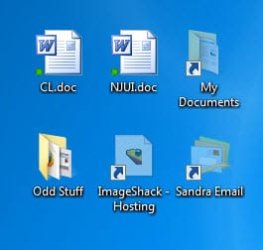
  • 9-14-2010 9-01-23 AM.jpg
    9-14-2010 9-01-23 AM.jpg
    10.5 KB · Views: 15,289

My Computer My Computer

At a glance

Win 7 Ultimate 64 BitI7-8608 Gig
Computer Manufacturer/Model Number
Homebrew
OS
Win 7 Ultimate 64 Bit
CPU
I7-860
Motherboard
Asus P7P55D Deluxe
Memory
8 Gig
Hard Drives
Dual 120Gig SSD Raid 0
Hi MisterEdF, welcome to the forums :)

You may have (inadvertently) hidden those folders/files and have explorer set to show hidden/system files/folders. You might want to right click each file just to make sure that they're not 'hidden'. That's normally the case for greyed out folders/icons/files.

Hope it helps :)


OS
 

My Computer My Computer

At a glance

Windows 7 Ultimate x64AMD Sempron Dual Core3GBNVIDIA GeForce 6150SE nForce 430
Computer Manufacturer/Model Number
Compaq Desktop
OS
Windows 7 Ultimate x64
CPU
AMD Sempron Dual Core
Memory
3GB
Graphics Card(s)
NVIDIA GeForce 6150SE nForce 430
Screen Resolution
1024x768
Hard Drives
150GB Sata
Thanks for the welcome ....

Nope, not hidden. That was one of the first things I checked. About half the file and folder icons are showing this.

Must be something simple ..... just have to figure out what. :)
 

My Computer My Computer

At a glance

Win 7 Ultimate 64 BitI7-8608 Gig
Computer Manufacturer/Model Number
Homebrew
OS
Win 7 Ultimate 64 Bit
CPU
I7-860
Motherboard
Asus P7P55D Deluxe
Memory
8 Gig
Hard Drives
Dual 120Gig SSD Raid 0
LOL ... just figured it out. Sorted my "installed programs" by install date and I recently installed PICASSA (Google). Uninstalled it and it went away.

Duhhhhh!
 

My Computer My Computer

At a glance

Win 7 Ultimate 64 BitI7-8608 Gig
Computer Manufacturer/Model Number
Homebrew
OS
Win 7 Ultimate 64 Bit
CPU
I7-860
Motherboard
Asus P7P55D Deluxe
Memory
8 Gig
Hard Drives
Dual 120Gig SSD Raid 0
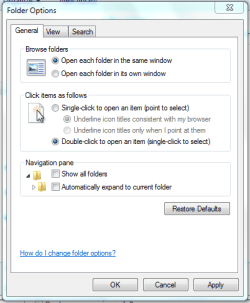
You could try resetting the folder/icon views.

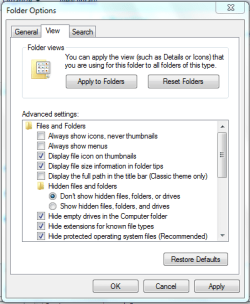
If you open explorer then click Organize->Folder and search options you can then reset both the tabs you see in the pics

General Tab
Capture1.PNG
(click 'Restore defaults')

View Tab
Capture2.PNG
(click 'Reset folders' and 'Restore defaults')


OS
 

My Computer My Computer

At a glance

Windows 7 Ultimate x64AMD Sempron Dual Core3GBNVIDIA GeForce 6150SE nForce 430
Computer Manufacturer/Model Number
Compaq Desktop
OS
Windows 7 Ultimate x64
CPU
AMD Sempron Dual Core
Memory
3GB
Graphics Card(s)
NVIDIA GeForce 6150SE nForce 430
Screen Resolution
1024x768
Hard Drives
150GB Sata
You must have just missed the message I posted right before yours. :)
 

My Computer My Computer

At a glance

Win 7 Ultimate 64 BitI7-8608 Gig
Computer Manufacturer/Model Number
Homebrew
OS
Win 7 Ultimate 64 Bit
CPU
I7-860
Motherboard
Asus P7P55D Deluxe
Memory
8 Gig
Hard Drives
Dual 120Gig SSD Raid 0

My Computer My Computer

At a glance

Windows 7 Ultimate x64AMD Sempron Dual Core3GBNVIDIA GeForce 6150SE nForce 430
Computer Manufacturer/Model Number
Compaq Desktop
OS
Windows 7 Ultimate x64
CPU
AMD Sempron Dual Core
Memory
3GB
Graphics Card(s)
NVIDIA GeForce 6150SE nForce 430
Screen Resolution
1024x768
Hard Drives
150GB Sata

My Computer My Computer

At a glance

Win7 Enterprise, Win7 x86 (Ult 7600), Win7 x6...AMD fx8350 4ghz, AMD-32 2400mhz, AMD-64 3200m...2gb, 4gb on the Ult 7600, 4gb on Technet RTM,...Draw my own Graphics, several nVidia cards
Computer type
PC/Desktop
Computer Manufacturer/Model Number
Built them myself, Science Experiments !
OS
Win7 Enterprise, Win7 x86 (Ult 7600), Win7 x64 Ult 7600, TechNet RTM on AMD x64 (2.8Ghz)
CPU
AMD fx8350 4ghz, AMD-32 2400mhz, AMD-64 3200mhz, AMDx64 2.8G
Motherboard
SIS 755, ECS-K8M890M-M (Ult 7600), GigaByte & others
Memory
2gb, 4gb on the Ult 7600, 4gb on Technet RTM, 32gb on FX8350
Graphics Card(s)
Draw my own Graphics, several nVidia cards
Sound Card
on motherboard
Monitor(s) Displays
19" flat scr, 28" I-Inc widescr,22" Emprex Widescr, 23" Acer
Screen Resolution
1280 x 1024, 1440 x 900, 1920 x 1080
Hard Drives
6 pata Ide HD's & 2 Sata HD's
added 80gb external on Ult 7600 computer,
numerous extra 1tb, 2TB, 3Tb SATA HD's
A collection of ext HD Docks w/ HDs
PSU
430w, 550w, 600w, 700, 800, etc
Case
All Generic Full Towers
Cooling
Open Air & a few fans, some w/ colored LEDs
Keyboard
Compaq & Dell recycled from GoodWill
Mouse
Made in China Optical Wired Mouse
Internet Speed
Fast Cable InterNet
Antivirus
AVG Free on 24 different Desktops, NO Problems!
Browser
IE 8 is preferred, but use FireFox sometimes
Other Info
Linksys Routers, switches, & Hubs
Too Many USB Flash Drives to count, Biggest is 64GB !
Eight computers in my home network.
Sixteen computers at my business network.
Linked via TeamViewer !
Lots of old used spare computer parts everywhere!
Important NB - CYbot B Virus- I should have added that when I got into SAFE MODE, I could run System Restore, by typing SYSTEM RESTORE into SEARCH; which cleared the virus.
 

My Computer My Computer

At a glance

Windows7 Professional
OS
Windows7 Professional
I experienced the faded desktop icon problem after cloning my boot drive with Easeus Todo Backup. The problem was solved by employing Orbital Shark's suggestion to switch Folder views back to the defaults. I was then able to go back to my preferred settings with everything displayed properly. Thank you, Orbital Shark.
 

My Computer My Computer

At a glance

windows
OS
windows
Hello all,

Hoping someone will see this message! I did exactly those solutions, the problems is that by doing so, I have lost all data including files and pictures. When I use Show Hidden Files it shows them but faded out.

About a week ago I suddenly saw greyed out, faded short cuts, and I also could no longer edit my photos by going into pictures, then using Photo Gallery. It is as if everything has disappeared. I installed Adobe Digital Editions and Silverlight to watch Netflix, nothing else. I use Google Chrome.

Please help, long term projects like the books I am writing have gone "faded", or missing once I reset to defaults. What's going on?

Thanks!
 

My Computer My Computer

At a glance

Windows 7 64
Computer type
Laptop
Computer Manufacturer/Model Number
Acer Aspire
OS
Windows 7 64
Antivirus
Norton
Browser
Google Chrome
mouse hidden when media player on

thanks that was the answer
 

My Computer My Computer

At a glance

win 07 ultimate 32bitKentsfield 2Quad CPU Q6600 @2.44.0nvidia GeForce 8400
Computer type
PC/Desktop
Computer Manufacturer/Model Number
hp m8307c
OS
win 07 ultimate 32bit
CPU
Kentsfield 2Quad CPU Q6600 @2.4
Motherboard
Benecia/ Asustek
Memory
4.0
Graphics Card(s)
nvidia GeForce 8400
Sound Card
Hauppauge WinTV HVR-1800
Monitor(s) Displays
TV
Screen Resolution
1920X1080
Hard Drives
master WDC 500gb
slave WDC 1.0tb
simplesave hp usb
Internet Speed
avg 50. down 20 up
Antivirus
McAfee thru Cox Cable
Browser
Opera, DuckDuckGo
Other Info
only using for media center recording capability instead of paying cox for the extra service which im beginning to question. lots a problems with an older computer like the 8307 running media center
Back
Top