Switching from Ultimate to Professional without reinstalling ?

tesseract4d

New member
Local time
5:33 AM
Messages
7
I am using a Windows 7 Ultimate and I want to switch to Professional.
Is it possible to do this without having to reinstall windows again - ie format my C drive and then install Professional to it.
The obvious concern is that I would have to reinstall all software and that would be too much of a bother.

What is the best way to do this ?

And just fyi, I've also dual booted my machine with Fedora as well.
 

My Computer My Computer

OS
Windows 7
To the best of my knowledge the only way to downgrade from Ultimate to Profesional is to reinstall.

A clean install would be the best way.
 

My Computer My Computer

Computer type
PC/Desktop
Computer Manufacturer/Model Number
Dell XPS 420
OS
Windows 10, Home Clean Install
CPU
Intel Core2 processsor Q8200(2.33Ghz 1333FSB) Quad Core Tech
Motherboard
Dell
Memory
6 gb
Graphics Card(s)
ATI Radeon 256MB HD3650
Sound Card
Intergrated 7.1 Channel Audio
Monitor(s) Displays
Dell SP2009W 20"
Hard Drives
640 GB Serial ATA Hard drive
Cooling
Fan
Keyboard
Dell USB Keyboard
Mouse
Dell Premium Optical USB
Internet Speed
DSL 2.85
There's no way to do that. You can only upgrade to higher editions. If you're at Ultimate, then if you want to go to a lower SKU, you will need to do a reinstall.
 

My Computer My Computer

OS
Windows 7 Ultimate x64 SP1
CPU
Intel Core i3 530 2.93 Ghz Clarkdale
Motherboard
ASRock P55 PRO/USB3 LGA 1156
Memory
4 GB OCZ DDR3 1600 (PC12800) Low Voltage Desktop Memory
Graphics Card(s)
Nvidia GeForce GTX 550 Ti with 1 GB of RAM
Sound Card
Realtek HD ALC892
Monitor(s) Displays
20'' eMachines E202HDbmd Glare Panel Widescreen
Screen Resolution
1600 x 900
Hard Drives
Western Digital 1 TB Caviar Black Edition (7200 RPM) SATA
Hitachi Deskstar 500 GB (7200 RPM) SATA
Samsung SpinPoint 400 GB (7200 RPM) SATA
PSU
Rosewill Xtreme Series RX750-D-B ATX12V v2.2 & EPS12V (750W)
Case
Cooler Master Centurion 534 RC-534-KKN2-GP Mid-Tower
Cooling
Standard Case Fans and Stock CPU Heatsink
Keyboard
Microsoft Wireless Optical Desktop Elite
Mouse
Microsoft Wireless Optical Desktop Elite
Internet Speed
7.1 Mbps Verizon DSL
You can change between retail versions with the popular workaround many beta testers used to change from the RC to a retail version.

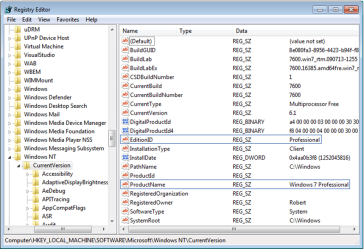
Change the two registry keys shown below to Professional exactly as they are typed, which tricks the installer into thinking it is doing a Repair Install which is always allowed:

regkeys.PNG (click on image to enlarge)

Next run the Professional Installer from desktop, select "Keep Connected To Internet" to get latest drivers and updates into Installer, then "Upgrade". You will have to reactivate afterwards with the Professional Key, but activation is reset anyway in a Repair Install.

I tested this about two weeks ago successfully from Ult>Pro after reports it wasn't working. Another Guru also found it to work then.

The performance reported by many who tried it after Win7 release are the best reports ever on in-place Upgrade, completely contradicting MS claims that beta code couldn't be upgraded. Two friends of mine who I did the RC Upgrade to retail for via Remote Desktop don't even want the promised clean install now when I come to visit.
 
Last edited:
I've gone from Home Premium to Ultimate and then back to Home Premium "without re-installing" using the work around Gregrocker posted above. :cool:
 

My Computer My Computer

Computer type
PC/Desktop
Computer Manufacturer/Model Number
Home Built
OS
Windows 10 Education 64 bit
CPU
AMD Phenom II X4 980 Black Edition Deneb 3.7GHz
Motherboard
Asus M4N68T-M V2 µATX Motherboard
Memory
8GB 4GBx2 Kingston PC10600 DDR3 1333 Memory
Graphics Card(s)
Zotac NVIDIA Geforce GT640 2 Gig DDR3 PCIe
Sound Card
VIA VT1708s High Definition Audio 8-channel Onboard
Monitor(s) Displays
22" LG E2242 1080p and 2 19" I-INC AG191D
Screen Resolution
1280x1024 - 1920x1080 - 1280x1024
Hard Drives
Crucial M100 256 GB SSD and 500 GB WD Blue SATA
PSU
Thermaltake TR 620
Case
Power Up Black ATX Mid-Tower Case
Cooling
Stock heatsink and fan
Keyboard
Logitech Wireless K350 Wave
Mouse
Logitech Wireless M570 Trackman Wheel
Internet Speed
80 Mbps Down 30 Mbps Up
Antivirus
Windows Defender
Browser
Internet Explorer 11
Other Info
HP DVD1040e Lightscribe - External USB2
You can change between retail versions using the popular workaround by which many beta testers changed from the RC to a retail version.

Change the two registry keys shown below to Professional exactly as they are typed, which tricks the installer into thinking it is doing a Repair Install which is always allowed:

View attachment 96355 (click on image to enlarge)

Next run the Professional Installer from desktop, select "Keep Connected To Internet" to get latest drivers and updates into Installer, then "Upgrade". You will have to reactivate afterwards with the Professional Key, but activation is reset anyway in a Repair Install.

I tested this about two weeks ago successfully from Ult>Pro after reports it wasn't working. Another Guru also found it to work then.

The performance reported by many who tried it after Win7 release are the best reports ever on in-place Upgrade, completely contradicting MS claims that beta code couldn't be upgraded. Two friends of mine who I did the RC Upgrade to retail for via Remote Desktop don't even want the promised clean install now when I come to visit.

Excellent, I would give rep for this, if I did not already. Great going Greg. You taught me too.
 

My Computer My Computer

Computer type
PC/Desktop
Computer Manufacturer/Model Number
Dell XPS 420
OS
Windows 10, Home Clean Install
CPU
Intel Core2 processsor Q8200(2.33Ghz 1333FSB) Quad Core Tech
Motherboard
Dell
Memory
6 gb
Graphics Card(s)
ATI Radeon 256MB HD3650
Sound Card
Intergrated 7.1 Channel Audio
Monitor(s) Displays
Dell SP2009W 20"
Hard Drives
640 GB Serial ATA Hard drive
Cooling
Fan
Keyboard
Dell USB Keyboard
Mouse
Dell Premium Optical USB
Internet Speed
DSL 2.85
Can I also switch from Home Premium to Professional that way, or can I do it like an "upgrade"?
 

My Computer My Computer

OS
Windows XP Service Pack 3
Out of curiosity, what is the reason for wanting to downgrade?
 

My Computer My Computer

Computer Manufacturer/Model Number
Self-Built in July 2009
OS
Windows 7 Ultimate x64
CPU
Intel Q9550 2.83Ghz OC'd to 3.40Ghz
Motherboard
Gigabyte GA-EP45-UD3R rev. 1.1, F12 BIOS
Memory
8GB G.Skill PI DDR2-800, 4-4-4-12 timings
Graphics Card(s)
EVGA 1280MB Nvidia GeForce GTX570
Sound Card
Realtek ALC899A 8 channel onboard audio
Monitor(s) Displays
23" Acer x233H
Screen Resolution
1920x1080
Hard Drives
Intel X25-M 80GB Gen 2 SSD
Western Digital 1TB Caviar Black, 32MB cache. WD1001FALS
PSU
Corsair 620HX modular
Case
Antec P182
Cooling
stock
Keyboard
ABS M1 Mechanical
Mouse
Logitech G9 Laser Mouse
Internet Speed
15/2 cable modem
Other Info
Windows and Linux enthusiast. Logitech G35 Headset.
Out of curiosity, what is the reason for wanting to downgrade?

In my case after doing an anytime upgrade to Ultimate (with an E-Bay key :o). I had to go back to my legal Home Premium and didn't want to re-install. Anytime upgrade just unlocked the extra features so I used the workaround to disable them again. All my installed programs remained intact and I didn't have to reload all my music, pictures and documents. It saved me from having to redo everything from scratch. :)
 

My Computer My Computer

Computer type
PC/Desktop
Computer Manufacturer/Model Number
Home Built
OS
Windows 10 Education 64 bit
CPU
AMD Phenom II X4 980 Black Edition Deneb 3.7GHz
Motherboard
Asus M4N68T-M V2 µATX Motherboard
Memory
8GB 4GBx2 Kingston PC10600 DDR3 1333 Memory
Graphics Card(s)
Zotac NVIDIA Geforce GT640 2 Gig DDR3 PCIe
Sound Card
VIA VT1708s High Definition Audio 8-channel Onboard
Monitor(s) Displays
22" LG E2242 1080p and 2 19" I-INC AG191D
Screen Resolution
1280x1024 - 1920x1080 - 1280x1024
Hard Drives
Crucial M100 256 GB SSD and 500 GB WD Blue SATA
PSU
Thermaltake TR 620
Case
Power Up Black ATX Mid-Tower Case
Cooling
Stock heatsink and fan
Keyboard
Logitech Wireless K350 Wave
Mouse
Logitech Wireless M570 Trackman Wheel
Internet Speed
80 Mbps Down 30 Mbps Up
Antivirus
Windows Defender
Browser
Internet Explorer 11
Other Info
HP DVD1040e Lightscribe - External USB2
Can I also switch from Home Premium to Professional that way, or can I do it like an "upgrade"?

There is really no need to do it if you are going up a version. Windows 7 is coded to let you go up in version with anytime upgrade. Just launch anytime upgrade and type in the product code for your Professional version. If its a valid code you will be upgraded to Pro and unlock the extra features of Pro. You may have to activate again but if its a legal code/version that shouldn't be a problem. Windows 7 just won't let you go back. It won't let you downgrade in versions unless you do the reg edit posted above and trick it into thinking you have a lower version.
 

My Computer My Computer

Computer type
PC/Desktop
Computer Manufacturer/Model Number
Home Built
OS
Windows 10 Education 64 bit
CPU
AMD Phenom II X4 980 Black Edition Deneb 3.7GHz
Motherboard
Asus M4N68T-M V2 µATX Motherboard
Memory
8GB 4GBx2 Kingston PC10600 DDR3 1333 Memory
Graphics Card(s)
Zotac NVIDIA Geforce GT640 2 Gig DDR3 PCIe
Sound Card
VIA VT1708s High Definition Audio 8-channel Onboard
Monitor(s) Displays
22" LG E2242 1080p and 2 19" I-INC AG191D
Screen Resolution
1280x1024 - 1920x1080 - 1280x1024
Hard Drives
Crucial M100 256 GB SSD and 500 GB WD Blue SATA
PSU
Thermaltake TR 620
Case
Power Up Black ATX Mid-Tower Case
Cooling
Stock heatsink and fan
Keyboard
Logitech Wireless K350 Wave
Mouse
Logitech Wireless M570 Trackman Wheel
Internet Speed
80 Mbps Down 30 Mbps Up
Antivirus
Windows Defender
Browser
Internet Explorer 11
Other Info
HP DVD1040e Lightscribe - External USB2
What if I want to switch from prof to home premium? I did a clean-install off of the microsoft "usb" download installation files online but for some reason it installed prof even though I have home prem.

I am guessing I could do the same thing as mentioned above but what are the exact two entries for Home Premium? Is it "Home Premium" or "Home Prem" or just "Premium"?

Thanks in advance and I hope this works for me as well...would hate to do a clean install and waste 3-4hrs re-doing my whole pc.
 

My Computer My Computer

OS
Windows 7 Home Premium 64bit
Hello nanotech, welcome to Seven Forums!


Why when you have a better version installed and working without issue would you want to revert to a lesser version, that makes no sense to me; have a look at the tutorial at the link below.


Compare Windows 7 Editions
 

My Computer My Computer

Computer Manufacturer/Model Number
* BFK Customs *
OS
W 7 64-bit Ultimate
CPU
Intel Q9550 Yorkfield
Motherboard
ASUS P5Q Pro
Memory
8GB Dominator 8500C5D
Graphics Card(s)
ATI : XFX 5870
Sound Card
Realtek HD Audio 7-1
Monitor(s) Displays
1x 47" LCD HDMI & 3x 26" LCD HDMI
Screen Resolution
1920x1080P & 1920x1200
Hard Drives
1x 80GB Intel X25-M G2 SSD : 1x 500GB & 1x 640GB WD Caviar Black(s)
PSU
Corsair 620HX
Case
Cooler Master RC-690
Cooling
Tuniq Tower 120, 2x 140mm and 3x 120mm case fans
Keyboard
Microsoft 500
Mouse
Razer Diamondback 3G
Internet Speed
14 Mb/s
Other Info
1x Koutech 3Gb/s SATA HDD Hot Swap Rack
Yeah I guess I wouldn't really switch except now when I finally tried to activate it...it wouldn't let me because my key is for home premium. Remember I just wanted to do a clean-install but somehow the usb installation version installed the prof version. I was fine with that until now it forced me to activate and when i tried it wouldn't do it since I have a home prem key. Now I haev "this copy is not genuine" on the bottom right hand corner of my computer....plus it nags me every now and then.

Thank you very much for the quick support guys!
 

My Computer My Computer

OS
Windows 7 Home Premium 64bit
Well it looks like I can't "repair" with my usb key, I have to have the actual DVD. I double-clicked on setup inside Win 7 (on my usb key), it did the normal steps and then when I got to "upgrade" or "clean install" (or whatever that 2nd option is), I chose upgrade, and when I did, it said can't upgrade from win 7 professional to win 7 professional...somehow my usb key that has the installation on it is ONLY for professional I guess. Maybe I just need to get a home premium installation pack on my USB?
 

My Computer My Computer

OS
Windows 7 Home Premium 64bit
Hello again nanotech.


You can use the info in this tutorial at the link below to create a universal installer disk that can be used to install Home Premium though it will have to be a clean install
Be sure to post back with any questions and to keep us informed.


Windows 7 Universal Installation Disc - Create
 

My Computer My Computer

Computer Manufacturer/Model Number
* BFK Customs *
OS
W 7 64-bit Ultimate
CPU
Intel Q9550 Yorkfield
Motherboard
ASUS P5Q Pro
Memory
8GB Dominator 8500C5D
Graphics Card(s)
ATI : XFX 5870
Sound Card
Realtek HD Audio 7-1
Monitor(s) Displays
1x 47" LCD HDMI & 3x 26" LCD HDMI
Screen Resolution
1920x1080P & 1920x1200
Hard Drives
1x 80GB Intel X25-M G2 SSD : 1x 500GB & 1x 640GB WD Caviar Black(s)
PSU
Corsair 620HX
Case
Cooler Master RC-690
Cooling
Tuniq Tower 120, 2x 140mm and 3x 120mm case fans
Keyboard
Microsoft 500
Mouse
Razer Diamondback 3G
Internet Speed
14 Mb/s
Other Info
1x Koutech 3Gb/s SATA HDD Hot Swap Rack
If you go into the sources folder on your USB install drive and delete the ie.cfg file you will unlock all the versions for installation. You will get a list of the different versions and you can then pick Home Premium. You still need a matching product code so this isn't a cheat to get a higher version. Where did you get your install media from, and how did you end up with the wrong version?
 

My Computer My Computer

Computer type
PC/Desktop
Computer Manufacturer/Model Number
Home Built
OS
Windows 10 Education 64 bit
CPU
AMD Phenom II X4 980 Black Edition Deneb 3.7GHz
Motherboard
Asus M4N68T-M V2 µATX Motherboard
Memory
8GB 4GBx2 Kingston PC10600 DDR3 1333 Memory
Graphics Card(s)
Zotac NVIDIA Geforce GT640 2 Gig DDR3 PCIe
Sound Card
VIA VT1708s High Definition Audio 8-channel Onboard
Monitor(s) Displays
22" LG E2242 1080p and 2 19" I-INC AG191D
Screen Resolution
1280x1024 - 1920x1080 - 1280x1024
Hard Drives
Crucial M100 256 GB SSD and 500 GB WD Blue SATA
PSU
Thermaltake TR 620
Case
Power Up Black ATX Mid-Tower Case
Cooling
Stock heatsink and fan
Keyboard
Logitech Wireless K350 Wave
Mouse
Logitech Wireless M570 Trackman Wheel
Internet Speed
80 Mbps Down 30 Mbps Up
Antivirus
Windows Defender
Browser
Internet Explorer 11
Other Info
HP DVD1040e Lightscribe - External USB2
I can't find the ie.cfg file. I realize I can probably do a clean install once I download Home Premium but I'm trying to avoid that, thanks for the suggestion though.

I got my laptop about a month ago and wanted to do a clean install but my laptop didn't come with any CD's nor even a built-in optical drive. So I went to the HP Envy forum on the notebookreview.com website and they had very nice step-by-step directions on how to do a clean install and otherwise optimize the computer. I did it and it worked, except somehow it installed prof instead of home premium (i don't even remember it giving me a choice). And now that I want to activate it of course I can't since my key is for home premium.
 

My Computer My Computer

OS
Windows 7 Home Premium 64bit
Hello again nanotech.


You can use the info in this tutorial at the link below to create a universal installer disk that can be used to install Home Premium though it will have to be a clean install
Be sure to post back with any questions and to keep us informed.


Windows 7 Universal Installation Disc - Create


This tutorial explains the whole process, did you have a look at it?
 

My Computer My Computer

Computer Manufacturer/Model Number
* BFK Customs *
OS
W 7 64-bit Ultimate
CPU
Intel Q9550 Yorkfield
Motherboard
ASUS P5Q Pro
Memory
8GB Dominator 8500C5D
Graphics Card(s)
ATI : XFX 5870
Sound Card
Realtek HD Audio 7-1
Monitor(s) Displays
1x 47" LCD HDMI & 3x 26" LCD HDMI
Screen Resolution
1920x1080P & 1920x1200
Hard Drives
1x 80GB Intel X25-M G2 SSD : 1x 500GB & 1x 640GB WD Caviar Black(s)
PSU
Corsair 620HX
Case
Cooler Master RC-690
Cooling
Tuniq Tower 120, 2x 140mm and 3x 120mm case fans
Keyboard
Microsoft 500
Mouse
Razer Diamondback 3G
Internet Speed
14 Mb/s
Other Info
1x Koutech 3Gb/s SATA HDD Hot Swap Rack
Ops, sorry, typo it should have been ei.cfg
Where ever you got your copy of windows 7 from you got the wrong version. All versions are on the DVD but microsoft locks it into a particular version with the ei.cfg file. Normally you don't get prompted to chose a version, it just installs the one the ei.cfg file tells it too. Delete that file and you get a choice. You can't download windows 7 from Microsoft unless you have a technet or MSDN subscription so my advice to you is to be carefull. Depending on where you got it from you could end up with some bonus extras you wern't counting on. :shock:
 

My Computer My Computer

Computer type
PC/Desktop
Computer Manufacturer/Model Number
Home Built
OS
Windows 10 Education 64 bit
CPU
AMD Phenom II X4 980 Black Edition Deneb 3.7GHz
Motherboard
Asus M4N68T-M V2 µATX Motherboard
Memory
8GB 4GBx2 Kingston PC10600 DDR3 1333 Memory
Graphics Card(s)
Zotac NVIDIA Geforce GT640 2 Gig DDR3 PCIe
Sound Card
VIA VT1708s High Definition Audio 8-channel Onboard
Monitor(s) Displays
22" LG E2242 1080p and 2 19" I-INC AG191D
Screen Resolution
1280x1024 - 1920x1080 - 1280x1024
Hard Drives
Crucial M100 256 GB SSD and 500 GB WD Blue SATA
PSU
Thermaltake TR 620
Case
Power Up Black ATX Mid-Tower Case
Cooling
Stock heatsink and fan
Keyboard
Logitech Wireless K350 Wave
Mouse
Logitech Wireless M570 Trackman Wheel
Internet Speed
80 Mbps Down 30 Mbps Up
Antivirus
Windows Defender
Browser
Internet Explorer 11
Other Info
HP DVD1040e Lightscribe - External USB2
Back
Top