
Internet Connection keeps on disconnecting

bjproc

New member
Member
VIP
Local time
11:56 AM
Messages
198
My internet connection has started to dissconect every now and again, i've bought a netgear dgn2000 & a d-link dsl 2740r router but it's still dropping out.

a reboot of the PC will start it up again

is there anything i can check here before i phone up my ISP?
 

My Computer My Computer

Computer Manufacturer/Model Number
Mesh Q4
OS
Win 7 Pro 32bit
CPU
Intel Quad Core 6600
Motherboard
Asus P5N-E SLI
Memory
4 GB
Graphics Card(s)
nVidia 8800GT
Sound Card
Onboard
Hard Drives
1TB Samsung Spinpoint,
1TB WD Eco Green
You are connecting via a wireless router. Maybe we can do a process of elimination. Can you connect to your pc via Ethernet? If so, then we can see if the wireless router is the problem.

Also, if you "power down, power up" both netgear and d-link, does this bring back the connection?

What is the distance of your pc to the wireless router? How strong are the bars indicating strength of connectivity?

Latest firmware for Netgear:
Answer

Latest for d-link:
DSL-2740R: Wireless-N ADSL2+ 4-port Modem Router - Technical support D-Link

One more interesting note about problem disconnecting with dsl
Dsl 2740r disconnection problems
 

My Computer My Computer

Computer Manufacturer/Model Number
Dell and Custom
OS
Systems 1 and 2: Windows 7 Enterprise x64, Win 8 Developer
CPU
System 1: i7 [email protected], System 2: AMD FX-4100 Zambezi 3.6G
Motherboard
System 1:Dell 06NWYK System 2: ASUS M5A97 AM3+
Memory
System 1: 8GB System 2: 8GB
Graphics Card(s)
System 1: ATI FirePro V4800 System 2: Radeon HD 6850
Sound Card
System 1: onboard System 2: onboard
Monitor(s) Displays
System1: Viewsonic HDMI 24"
Screen Resolution
System 1: 1920x1080 System 2: 1920x1080
Hard Drives
System 1: Mirrored .5B drives System 2: Seagate Barracuda ST1000DM003 1TB 7200 RPM 64MB Cache SATA 6.0Gb/s
Case
System 1: Dell System 2: Cooler Master
Internet Speed
10 MBPS
You are connecting via a wireless router. Maybe we can do a process of elimination. Can you connect to your pc via Ethernet? If so, then we can see if the wireless router is the problem.
cheers & sorry, i should've added the info.

connected through ethernet

Also, if you "power down, power up" both netgear and d-link, does this bring back the connection?
Not using the netgear, but yes, power down/up brings back the connection, but i also have reboot my pc at times

What is the distance of your pc to the wireless router? How strong are the bars indicating strength of connectivity?
Connected with ethernet cable on 3 pc's, also it did the same with my netbook (wireless) last night

Latest firmware for Netgear:
Answer

Latest for d-link:
DSL-2740R: Wireless-N ADSL2+ 4-port Modem Router - Technical support D-Link

One more interesting note about problem disconnecting with dsl
Dsl 2740r disconnection problems

the firmware is updated to the latest, V1.16

also updated my motherboard drivers this morning to see if that would help (it hasn't)


cheers for the quick reply :)
 

My Computer My Computer

Computer Manufacturer/Model Number
Mesh Q4
OS
Win 7 Pro 32bit
CPU
Intel Quad Core 6600
Motherboard
Asus P5N-E SLI
Memory
4 GB
Graphics Card(s)
nVidia 8800GT
Sound Card
Onboard
Hard Drives
1TB Samsung Spinpoint,
1TB WD Eco Green
internet

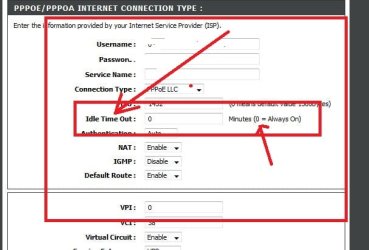
Youre connect maybe set to idle timeout after 30 mins, change it to 0

Use youre router number and it should be on the first page
just save it at the bottom of the screen and reconnect

hope it helps
 

Attachments

  • Capture.JPG
    Capture.JPG
    36.8 KB · Views: 91

My Computer My Computer

Computer type
PC/Desktop
OS
Windows 7 X64 Bit
CPU
Intel(R) Core(TM)i7-4771 CPU @ 3.50GH
Motherboard
Asus Sabertooth Z87
Memory
Corsair 4x8 Vengeance (32GB)
Graphics Card(s)
NVIDIA GeForce GTX780
Monitor(s) Displays
LG
Screen Resolution
1920x1080
PSU
Corsair CX750
Case
Corsair 200 series
Cooling
H80i Liquid Cooler
Keyboard
Microsoft
Mouse
Microsoft
Internet Speed
good times-500-850 kbs bad times-50-100 kbs
Try changing the wireless settings such as SSID and Channel, by going to the router setup page. Also change the securtiy algorithm if its enabled.
 

My Computer My Computer

Computer Manufacturer/Model Number
Custom Built
OS
Windows 7 Ultimate 64bit
CPU
Intel(R) Core(TM)2 Duo CPU E7500
Motherboard
DG41RQ
Memory
2.00 GB
Graphics Card(s)
Intel(R) G41 Express Chipset
Sound Card
Realtek
Monitor(s) Displays
Acer 20" Wide LCD
Screen Resolution
1600x900
Hard Drives
Seagate 500 GB Internal
Keyboard
Microsoft Cordless
Mouse
Microsoft Cordless
cheers gaz, mine is set up as dynamic IP, so i can't see that bit.

i'm getting a system log just now, so i'll post back with it.

this is out of a part of the log


'); } function mainTableEnd() { document.write('
Copyright © 2007 D-Link System, Inc.

'); setTimeout("document.getElementById('tblmain').style.display = 'block'", delaytimer); } function btnReboot(){ var code = 'location="reboot.html"'; eval(code); } function doLanguageChange(){ var code = 'location="language.html"'; eval(code); } 0 ideMenu[g_FID].shelp + '">'); document.write('

'); document.write(''); } document.write(''); } function Footer() { document.write(


here's a screenshot

2rnifx3.jpg
 
Last edited:

My Computer My Computer

Computer Manufacturer/Model Number
Mesh Q4
OS
Win 7 Pro 32bit
CPU
Intel Quad Core 6600
Motherboard
Asus P5N-E SLI
Memory
4 GB
Graphics Card(s)
nVidia 8800GT
Sound Card
Onboard
Hard Drives
1TB Samsung Spinpoint,
1TB WD Eco Green
UPDATE

just been on the phone to D-Link, the support guy asked my my router model & ISP, he's mentioned that O2 (my ISP) has tweaked away from the ADSL standard and this is giving problem to not just them, but also netgear, linksys etc

their tech 2 are in communication with O2 about this, so it is a known problem :(
 

My Computer My Computer

Computer Manufacturer/Model Number
Mesh Q4
OS
Win 7 Pro 32bit
CPU
Intel Quad Core 6600
Motherboard
Asus P5N-E SLI
Memory
4 GB
Graphics Card(s)
nVidia 8800GT
Sound Card
Onboard
Hard Drives
1TB Samsung Spinpoint,
1TB WD Eco Green
Glad to know that the problem not at your side. Hopefully OS fix the issue soon. :)
 

My Computer My Computer

Computer Manufacturer/Model Number
Custom Built
OS
Windows 7 Ultimate 64bit
CPU
Intel(R) Core(TM)2 Duo CPU E7500
Motherboard
DG41RQ
Memory
2.00 GB
Graphics Card(s)
Intel(R) G41 Express Chipset
Sound Card
Realtek
Monitor(s) Displays
Acer 20" Wide LCD
Screen Resolution
1600x900
Hard Drives
Seagate 500 GB Internal
Keyboard
Microsoft Cordless
Mouse
Microsoft Cordless
cheers gaz, mine is set up as dynamic IP, so i can't see that bit.

i'm getting a system log just now, so i'll post back with it.

this is out of a part of the log


'); } function mainTableEnd() { document.write('
Copyright © 2007 D-Link System, Inc.

'); setTimeout("document.getElementById('tblmain').style.display = 'block'", delaytimer); } function btnReboot(){ var code = 'location="reboot.html"'; eval(code); } function doLanguageChange(){ var code = 'location="language.html"'; eval(code); } 0 ideMenu[g_FID].shelp + '">'); document.write('

'); document.write(''); } document.write(''); } function Footer() { document.write(


here's a screenshot

2rnifx3.jpg
can you set up the pppoe first ,then select your preferred option to choose dynamic over pppoe,maybe the first settings will still be there but yours prioritised??,just a thought
 

My Computer My Computer

Computer type
PC/Desktop
OS
Windows 7 X64 Bit
CPU
Intel(R) Core(TM)i7-4771 CPU @ 3.50GH
Motherboard
Asus Sabertooth Z87
Memory
Corsair 4x8 Vengeance (32GB)
Graphics Card(s)
NVIDIA GeForce GTX780
Monitor(s) Displays
LG
Screen Resolution
1920x1080
PSU
Corsair CX750
Case
Corsair 200 series
Cooling
H80i Liquid Cooler
Keyboard
Microsoft
Mouse
Microsoft
Internet Speed
good times-500-850 kbs bad times-50-100 kbs
@ gaz,

if PPPoE/PPPoA is selected, it then asks for usernames and passwords, which O2 don't use AFAIB.

i've fitted a DGN2000, which did give me problems when first fitted, but thats about 20 hours now and it's all going good.
 

My Computer My Computer

Computer Manufacturer/Model Number
Mesh Q4
OS
Win 7 Pro 32bit
CPU
Intel Quad Core 6600
Motherboard
Asus P5N-E SLI
Memory
4 GB
Graphics Card(s)
nVidia 8800GT
Sound Card
Onboard
Hard Drives
1TB Samsung Spinpoint,
1TB WD Eco Green
internet

@ gaz,

if PPPoE/PPPoA is selected, it then asks for usernames and passwords, which O2 don't use AFAIB.

i've fitted a DGN2000, which did give me problems when first fitted, but thats about 20 hours now and it's all going good.
glad to here its working, i thought you could make your own usernames and passwords??? i was with o2 and could do so??
anyway all good if working
 

My Computer My Computer

Computer type
PC/Desktop
OS
Windows 7 X64 Bit
CPU
Intel(R) Core(TM)i7-4771 CPU @ 3.50GH
Motherboard
Asus Sabertooth Z87
Memory
Corsair 4x8 Vengeance (32GB)
Graphics Card(s)
NVIDIA GeForce GTX780
Monitor(s) Displays
LG
Screen Resolution
1920x1080
PSU
Corsair CX750
Case
Corsair 200 series
Cooling
H80i Liquid Cooler
Keyboard
Microsoft
Mouse
Microsoft
Internet Speed
good times-500-850 kbs bad times-50-100 kbs
Back
Top