
replacing my xfx nforce sli 750i mobo: Advices

amoretam

New member
Power User
Local time
11:17 AM
Messages
362
Hey how r you doing,!?!
I want to take this oppotunity to tell everyone to please stay away from XFX nforce 750i sli mobo.

But actually this thread is for you people to help me choose a replacement mobo so I can keep and use my CPU, GPU, PSU, RAM, HDD's, fans, case, etc. Also I need this mobo to be upgradable in case i need it and at least one FW port.

I will start with some simple questions:

-This mobo is Nvidia chipset, could I get one with Intel chipset?

-My GPU and RAM and Mobo are SLI ready, could I get a non-SLI mobo without loosing performance?

-Do I need SLI?

-My RAM is DDR2 and my CPU supports socket LGA 775, is any mobo with these specs going to work for me? Like this:
Tyan Toledo q35T Motherboard - Socket 775, SATA, PCI-Express, Intel Q35 Chipset, (2) Gbit LAN, USB 2.0, DDR2 667/800 MHz at TigerDirect.com

Thanks a lot.... I know these are simple questions, but I just want to narrow my google search to expert advices like yours.

PS: I decided to replace my current mobo because for a year I was having too many booting problems, after lots of troubleshooting I decided it's my mobo's fault.

---------------------------------------------------------------
Sandra is here:

Processor
Model : Intel(R) Core(TM)2 Quad CPU Q9400 @ 2.66GHz
Speed : 2.67GHz
Cores per Processor : 4 Unit(s)
Threads per Core : 1 Unit(s)
Type : Quad-Core
Integrated Data Cache : 4x 32kB, Synchronous, Write-Thru, 8-way, 64 byte line size
L2 On-board Cache : 2x 3MB, ECC, Synchronous, ATC, 12-way, 64 byte line size, 2 threads sharing

Computer
Mainboard : XFX MB-750I-72P9
BIOS : AMI V1.4B1 02/04/2009
Bus(es) : ISA X-Bus PCI PCIe IMB USB FireWire/1394 i2c/SMBus
Multi-Processor (MP) Support : No
Multi-Processor Advanced PIC (APIC) : Yes
Total Memory : 8GB DIMM SDRAM

Chipset
Model : nVidia C55 Host Bridge
Front Side Bus Speed : 4x 333MHz (1.33GHz)
Total Memory : 8GB DIMM SDRAM

Memory Module(s)
Memory Module : OCZ OCZ2N800SR2G 2GB DIMM DDR2 PC2-6400U DDR2-800 (5-6-6-18 3-24-6-3)

Video System
Video Adapter : NVIDIA GeForce 9400 GT (16 SM4.0 1.35GHz, 1GB DDR2 2x400MHz, PCIe 2.00 x16)

Graphics Processor
Adapter : NVIDIA GeForce 9400 GT (16SP 2C 1.35GHz, 1005.6MB 2x400MHz)
Adapter : NVIDIA GeForce 9400 GT (16SP 1.35GHz, 1005.6MB 2x400MHz)

Storage Devices
Hitachi HDP725050GLA360 (500.1GB, SATA300, 3.5", 7200rpm, NCQ, 15MB Cache) : 466GB (C:) (D:)
WDC WD5000AAKS-00A7B2 (500.1GB, SATA300, 3.5", 7200rpm, NCQ, 16MB Cache) : 466GB (F:)
JetFlashTranscend 4GB 4GB (USB) : 4GB (G:)
Maxtor OneTouch 1TB (FireWire/1394, NCQ) : 932GB (D:) (E:) (F:) (G:)
HP DVD Writer 1160d (SATA150, DVD+-RW, CD-RW, 2MB Cache) : 287MB (E:)

Logical Storage Devices
Hard Disk (C:) : 157GB (NTFS) @ Hitachi HDP725050GLA360 (500.1GB, SATA300, 3.5", 7200rpm, NCQ, 15MB Cache)
GRABADO (F:) : 466GB (NTFS) @ WDC WD5000AAKS-00A7B2 (500.1GB, SATA300, 3.5", 7200rpm, NCQ, 16MB Cache)
Removable Drive (G:) : 4GB (FAT32) @ JetFlashTranscend 4GB 4GB (USB)
back me up (D:) : 309GB (NTFS) @ Hitachi HDP725050GLA360 (500.1GB, SATA300, 3.5", 7200rpm, NCQ, 15MB Cache)
Audio CD (E:) : 0bytes (CDFS) @ HP DVD Writer 1160d (SATA150, DVD+-RW, CD-RW, 2MB Cache)

Peripherals
LPC Hub Controller 1 : MSI MCP51 LPC Bridge
LPC Legacy Controller 1 : Fintek F71882FG/F71883FG
Audio Device : MSI MCP51 High Definition Audio
Audio Codec : Realtek Semiconductor 888 High Definition Audio
Serial Port(s) : 1
Disk Controller : MSI MCP51 Parallel ATA Controller
Disk Controller : MSI MCP51 Serial ATA Controller
Disk Controller : MSI JMB36X PCIE-to-SATAII/IDE RAID Controller
USB Controller 1 : MSI MCP51 USB Controller
USB Controller 2 : MSI MCP51 USB Controller
FireWire/1394 Controller 1 : MSI VT6306 VIA Fire II IEEE-1394 OHCI Link Layer Controller
SMBus/i2c Controller 1 : nVidia MCP5+ SMBus 1
SMBus/i2c Controller 2 : nVidia MCP5+ SMBus 2

Peripherals
Media Player : JetFlash Transcend 4GB (3.73GB)

Network Services
Network Adapter : NVIDIA nForce Networking Controller (Ethernet, 100Mbps)

Power Management
Mains (AC) Line Status : On-Line

Operating System
Windows System : Microsoft Windows 7 Business 6.01.7600
Platform Compliance : x64


My Computer My Computer

Computer type
PC/Desktop
Computer Manufacturer/Model Number
Custom Build
OS
Windows 7 x64bit Home Premium
CPU
Intel Core i5-2500K Quad-Core Processor 3.3 GHz 6 MB Cache
Motherboard
Intel Desktop Board Media Series LGA 1155 DDR 1333 Micro-ATX
Memory
8GB G.Skill DDR3 PC3-12800 1600MHz - F3-12800CL9D-8GBRL
Graphics Card(s)
Sandy Bridge
Sound Card
M-Audio Fast Track PRO - Avid digidesign 003 rack factory
Monitor(s) Displays
Acer X233H LCD monitor
Screen Resolution
1920x1080
Hard Drives
OS Drive: Silicon Power 256GB SSD 3D NAND A55 SLC Cache Performance Boost SATA III
PSU
Cooler Master eXtreme Power Plus 500w Power Supply
Other Info
This Computer was built from scratch
The Nvidia 750i is a pretty decent board but the bios voltage settings need to be set correctly in order for this board to be stable.

With your 8GB of memory you need to try using 1.5 volts for the SPP "north bridge" voltage and also make sure that all other memory settings are per manufacture specs. It's usually best to change over to the "Expert" mode memory settings in order to get those settings correct.

Yes it's safe, yes it works and yes I have helped many many people with this exact problem in the past.

OCZ is one of the worst possible choices for memory on that board because it's very picky about settings. Using DDR2-800 (5-6-6-18 2T with memory voltage to OCZ specs should get you up and running.

If you post your bios settings here I can help you more.

Clearing the cmos should fix any other problem you might be having with that board.

I have helped thousands of people set those boards up correctly over at the EVGA forum. ;)
 

My Computer My Computer

Computer type
PC/Desktop
Computer Manufacturer/Model Number
Home built
OS
Windows 7 Ult, Windows 8.1 Pro,
CPU
Q9650-4.275GHz, E8600 4.5GHz, E6750-3.8GHz
Motherboard
Evga 780i FTW
Memory
G.Skill PC2 9600 1200Mhz 5 5 5 15 2T
Graphics Card(s)
GTX480
Sound Card
Asus Xonar D2
Monitor(s) Displays
HannsG
Screen Resolution
1680X1050
Hard Drives
GSkill Phoenix Pro 120GB SSD
PSU
ThermalTake Toughpower 1000Watt modular
Case
ThermalTake XaserV
Cooling
Xigmatek S1283
Keyboard
Logitech G15
Mouse
Logitech G9
Internet Speed
T1
I used an XFX 750i mobo for nearly 2 years without a problem, but like chev said, voltages can be a problem. When I upgraded from an E8200 to a Q9550, the PC would keep hardlocking because the voltage needed to be set properly for the Q9550 in BIOS.
 

My Computer My Computer

Computer type
PC/Desktop
Computer Manufacturer/Model Number
Custom Built
OS
Windows 8.1 Pro x64
CPU
Intel Core i7 4790k
Motherboard
MSI Z97S Krait Edition
Memory
8GB Corsair Dominator 1600MHz
Graphics Card(s)
MSI TwinFrozr GeForce GTX770
Sound Card
ASUS Xonar DX/XD 7.1
Monitor(s) Displays
Dell 24" S2409W + Dell 20" E207WFP
Screen Resolution
1920x1080 + 1680x1050
Hard Drives
1x 120GB OCZ Agility 3, 1x 750GB Western Digital Caviar Black, 1x 1TB Western Digital Caviar Blue
PSU
Corsair HX850 modular
Case
Fractal Design Define R4
Cooling
Corsair H60 w/ twin Corsair SP120 fans
Keyboard
Logitech G510S Keyboard
Mouse
Logitech G500S Laser Mouse
Internet Speed
40Mbps
Antivirus
Microsoft Security Essentials
Browser
Google Chrome
Other Info
LG Blu-Ray player
The Nvidia 750i is a pretty decent board but the bios voltage settings need to be set correctly in order for this board to be stable.

With your 8GB of memory you need to try using 1.5 volts for the SPP "north bridge" voltage and also make sure that all other memory settings are per manufacture specs. It's usually best to change over to the "Expert" mode memory settings in order to get those settings correct.

Yes it's safe, yes it works and yes I have helped many many people with this exact problem in the past.

OCZ is one of the worst possible choices for memory on that board because it's very picky about settings. Using DDR2-800 (5-6-6-18 2T with memory voltage to OCZ specs should get you up and running.

If you post your bios settings here I can help you more.

Clearing the cmos should fix any other problem you might be having with that board.

I have helped thousands of people set those boards up correctly over at the EVGA forum. ;)

hey thanks a lot,
I'd always used "default settings in BIOS",
I do not know how to set memory timings and there's is no clear explanation in the manual about it.
I have never done any Overclocking to this mobo cause I have absolutely no idea.
I am really tired that I dont even want to tweak anymore.
I just want to be able to follow simple directions cause I am not a computer literate person.
THANKS
 

My Computer My Computer

Computer type
PC/Desktop
Computer Manufacturer/Model Number
Custom Build
OS
Windows 7 x64bit Home Premium
CPU
Intel Core i5-2500K Quad-Core Processor 3.3 GHz 6 MB Cache
Motherboard
Intel Desktop Board Media Series LGA 1155 DDR 1333 Micro-ATX
Memory
8GB G.Skill DDR3 PC3-12800 1600MHz - F3-12800CL9D-8GBRL
Graphics Card(s)
Sandy Bridge
Sound Card
M-Audio Fast Track PRO - Avid digidesign 003 rack factory
Monitor(s) Displays
Acer X233H LCD monitor
Screen Resolution
1920x1080
Hard Drives
OS Drive: Silicon Power 256GB SSD 3D NAND A55 SLC Cache Performance Boost SATA III
PSU
Cooler Master eXtreme Power Plus 500w Power Supply
Other Info
This Computer was built from scratch
It sounds like you havn't done any tweaking at all yet so I'm wondering how you can be tired? ;)

Who said anything about overclocking? These are basic settings that need adjustments, nothing difficult about it.

Default settings will not cut it on your particular board and most any enthusiast board that you build yourself will require some adjustments in bios to get it working correctly . You will need to access the bios settings by hitting the delate button on start up.

Your bios is a bit different than mine so giving exact directions on this isn't possible although it should be fairly easy to get to your memory settings and punch in the correct numbers which I have already mentioned. As I mentioned before the SPP voltage will also need an adjustment to work with 8GB of memory.

If you really want to get more precise directions for adjusting the bios then taking pictures and posting screen shots of your bios might be helpful.
 

My Computer My Computer

Computer type
PC/Desktop
Computer Manufacturer/Model Number
Home built
OS
Windows 7 Ult, Windows 8.1 Pro,
CPU
Q9650-4.275GHz, E8600 4.5GHz, E6750-3.8GHz
Motherboard
Evga 780i FTW
Memory
G.Skill PC2 9600 1200Mhz 5 5 5 15 2T
Graphics Card(s)
GTX480
Sound Card
Asus Xonar D2
Monitor(s) Displays
HannsG
Screen Resolution
1680X1050
Hard Drives
GSkill Phoenix Pro 120GB SSD
PSU
ThermalTake Toughpower 1000Watt modular
Case
ThermalTake XaserV
Cooling
Xigmatek S1283
Keyboard
Logitech G15
Mouse
Logitech G9
Internet Speed
T1
Also update your BIOS if you haven't. The latest BIOS for the XFX 750i was more stable with quad cores with me.

You'll need to register your board at www.xfxforce.com if you haven't already, then in the support section, download the BIOS Update version 1.41. It should be an ISO file you burn to a disk, then boot from the disk and it will update.

Before you do any fiddling in the BIOS though for voltages, you need to set the overclock jumper pin on the motherboard. It should explain how to in the manual.

If I remember correctly, once you've changed the jumper on the motherboard, the voltage settings can be found by entering BIOS>Advanced BIOS features>Cell Menu>XFX J0C1 Overclock Function then there will be CPU Voltage, Memory Voltage etc.
 

My Computer My Computer

Computer type
PC/Desktop
Computer Manufacturer/Model Number
Custom Built
OS
Windows 8.1 Pro x64
CPU
Intel Core i7 4790k
Motherboard
MSI Z97S Krait Edition
Memory
8GB Corsair Dominator 1600MHz
Graphics Card(s)
MSI TwinFrozr GeForce GTX770
Sound Card
ASUS Xonar DX/XD 7.1
Monitor(s) Displays
Dell 24" S2409W + Dell 20" E207WFP
Screen Resolution
1920x1080 + 1680x1050
Hard Drives
1x 120GB OCZ Agility 3, 1x 750GB Western Digital Caviar Black, 1x 1TB Western Digital Caviar Blue
PSU
Corsair HX850 modular
Case
Fractal Design Define R4
Cooling
Corsair H60 w/ twin Corsair SP120 fans
Keyboard
Logitech G510S Keyboard
Mouse
Logitech G500S Laser Mouse
Internet Speed
40Mbps
Antivirus
Microsoft Security Essentials
Browser
Google Chrome
Other Info
LG Blu-Ray player
If you go to the XFX site and register the board you can download the manual.
From what I've read it has a CMOS reset on the outside of the board as well as a jumper to set to overclock which opens up many more bios features.

I would suggest to download the PDF manual and read it, should help you with some questions, it also doesn't hurt to join their forum to get answers direct form XFX either, you can actually put in a support ticket and explain your problem or ask about the right timings and voltages for your setup and the will provide them for you. At least they have done for me in the past.Usually within 24hrs
.
As far as a replacement board I have an ASUS P5N-D 750i board. It's very stable and easy to setup especially if you only want to use the default settings. it's also inexpensive Newegg.com - ASUS P5N-D LGA 775 NVIDIA nForce 750i SLI ATX Intel Motherboard

Also I would like to suggest which ever board you decide to go with you should aways look on the manufacturers site for their compatible Ram list. This will be very helpful when purchasing the correct Ram for your board. Fabe
Seems like I'm a little late with most of my post.
 

My Computer My Computer

Computer Manufacturer/Model Number
Self Built
OS
Windows 7 ultimate 64 bit / XP Home sp3
CPU
intel Core 2 Duo E8400 3.0ghz
Motherboard
Asus P5ND bios 1401
Memory
8 gigs 1066 OCZ Fata1ty
Graphics Card(s)
EVGA GTX 580 Call of Duty Black Ops Edition
Sound Card
Creative Soundblaster Audigy 2zs
Monitor(s) Displays
Asus 24in LCD's 2MS X2
Screen Resolution
1920x1080p @60Hz
Hard Drives
WD Caviar 500 Black/ WD Caviar 200 Blue
PSU
OCZ 700W GameXtreme
Case
NZXT Apollo
Cooling
Corsair H50 CPU/120mm x3 /60mm x2 /Corsair Dominator Ram
Keyboard
Logitech Bluetooth Wireless MX5000
Mouse
Logitech Bluetooth Wireless MX1000
Internet Speed
Download 19.83 Upload 0.97
Other Info
Logitech Z2300 Speakers/ Bose Noise Cancelling Headphones/Avermedia PCI-e Hybrid TV Bravo/Epson NX415 all in one/ 4 Port Powered USB Hub/ LG 10x Bluray Burner /TSST Corp DVDRW External
Not late at all Fabe, thanks for the input. I didn't know about the bios overclocking jumper on the XFX boards. I just hate seeing a perfectly good board bashed and tossed aside for no good reason. I'd be willing to bet there isn't anything wrong with his board, it just needs an adjustment or two is all.
 

My Computer My Computer

Computer type
PC/Desktop
Computer Manufacturer/Model Number
Home built
OS
Windows 7 Ult, Windows 8.1 Pro,
CPU
Q9650-4.275GHz, E8600 4.5GHz, E6750-3.8GHz
Motherboard
Evga 780i FTW
Memory
G.Skill PC2 9600 1200Mhz 5 5 5 15 2T
Graphics Card(s)
GTX480
Sound Card
Asus Xonar D2
Monitor(s) Displays
HannsG
Screen Resolution
1680X1050
Hard Drives
GSkill Phoenix Pro 120GB SSD
PSU
ThermalTake Toughpower 1000Watt modular
Case
ThermalTake XaserV
Cooling
Xigmatek S1283
Keyboard
Logitech G15
Mouse
Logitech G9
Internet Speed
T1
Not late at all Fabe, thanks for the input. I didn't know about the bios overclocking jumper on the XFX boards. I just hate seeing a perfectly good board bashed and tossed aside for no good reason. I'd be willing to bet there isn't anything wrong with his board, it just needs an adjustment or two is all.

Well I can certainly say I never had any problems with it for the year and a half I used it, before moving on to my 790i. It is a good board, but just like you mentioned, the voltages do need tweaking to get it running properly. Especially with quad cores.
 

My Computer My Computer

Computer type
PC/Desktop
Computer Manufacturer/Model Number
Custom Built
OS
Windows 8.1 Pro x64
CPU
Intel Core i7 4790k
Motherboard
MSI Z97S Krait Edition
Memory
8GB Corsair Dominator 1600MHz
Graphics Card(s)
MSI TwinFrozr GeForce GTX770
Sound Card
ASUS Xonar DX/XD 7.1
Monitor(s) Displays
Dell 24" S2409W + Dell 20" E207WFP
Screen Resolution
1920x1080 + 1680x1050
Hard Drives
1x 120GB OCZ Agility 3, 1x 750GB Western Digital Caviar Black, 1x 1TB Western Digital Caviar Blue
PSU
Corsair HX850 modular
Case
Fractal Design Define R4
Cooling
Corsair H60 w/ twin Corsair SP120 fans
Keyboard
Logitech G510S Keyboard
Mouse
Logitech G500S Laser Mouse
Internet Speed
40Mbps
Antivirus
Microsoft Security Essentials
Browser
Google Chrome
Other Info
LG Blu-Ray player
OP, suggested you post in the Hardware forum so you could get just this kind of specific advice. Please do not give up yet. Work through each of the steps given, asking back how to perform those that you are unsure about.

It seems your mobo may not be the problem suspected, perhaps only a few settings.

Perhaps it would help if you recount the repair and install failures you feel are caused by hardware so the experts here can factor those in.

I believe you tried this in previous thread, but if not: Clear CMOS - 3 Ways to Clear the CMOS - Reset BIOS.URL
 
Not late at all Fabe, thanks for the input. I didn't know about the bios overclocking jumper on the XFX boards. I just hate seeing a perfectly good board bashed and tossed aside for no good reason. I'd be willing to bet there isn't anything wrong with his board, it just needs an adjustment or two is all.

I will not even describe everything I've been through with this mobo after reading only bad reviews, taking it to technicians and following many directions from different forums.
The problem has not been constant, it dessapeared and came back different but the same, very tricky.
I've done everything that you suggested.
The only thing I have not touched is the BIOS voltage or timing settings, why? because if I am not overclocking then I don't need to touch that overclocking jumper, that's my logic!!

These are the links of my past threads about the booting problem in cronological order:
http://www.sevenforums.com/hardware-devices/90135-my-computer-wont-boot-up.html

http://www.sevenforums.com/general-discussion/106610-strange-booting-problem.html

There, you will notice that the problem started like a month and a half after buying the mobo when I installed Win7 x64, which made me think that it was an OS problem.


chev65: I really wish I was wrong about my conclusions.

Do you want me to send you every page of my BIOS or what pages do you need?

Should I set the overclocking jumper on the motherborad
before taking pics??

THANKS A LOT


Last edited:

My Computer My Computer

Computer type
PC/Desktop
Computer Manufacturer/Model Number
Custom Build
OS
Windows 7 x64bit Home Premium
CPU
Intel Core i5-2500K Quad-Core Processor 3.3 GHz 6 MB Cache
Motherboard
Intel Desktop Board Media Series LGA 1155 DDR 1333 Micro-ATX
Memory
8GB G.Skill DDR3 PC3-12800 1600MHz - F3-12800CL9D-8GBRL
Graphics Card(s)
Sandy Bridge
Sound Card
M-Audio Fast Track PRO - Avid digidesign 003 rack factory
Monitor(s) Displays
Acer X233H LCD monitor
Screen Resolution
1920x1080
Hard Drives
OS Drive: Silicon Power 256GB SSD 3D NAND A55 SLC Cache Performance Boost SATA III
PSU
Cooler Master eXtreme Power Plus 500w Power Supply
Other Info
This Computer was built from scratch
The board's auto voltage setting has problems with quad cores. You need to manually set a voltage to get it running properly. I had the same problems when I upgraded to a quad core on the exact same motherboard. You need to move the jumper to open the overclocking/voltage section in the BIOS. I said in my last post which section of the BIOS you need to go to.
 

My Computer My Computer

Computer type
PC/Desktop
Computer Manufacturer/Model Number
Custom Built
OS
Windows 8.1 Pro x64
CPU
Intel Core i7 4790k
Motherboard
MSI Z97S Krait Edition
Memory
8GB Corsair Dominator 1600MHz
Graphics Card(s)
MSI TwinFrozr GeForce GTX770
Sound Card
ASUS Xonar DX/XD 7.1
Monitor(s) Displays
Dell 24" S2409W + Dell 20" E207WFP
Screen Resolution
1920x1080 + 1680x1050
Hard Drives
1x 120GB OCZ Agility 3, 1x 750GB Western Digital Caviar Black, 1x 1TB Western Digital Caviar Blue
PSU
Corsair HX850 modular
Case
Fractal Design Define R4
Cooling
Corsair H60 w/ twin Corsair SP120 fans
Keyboard
Logitech G510S Keyboard
Mouse
Logitech G500S Laser Mouse
Internet Speed
40Mbps
Antivirus
Microsoft Security Essentials
Browser
Google Chrome
Other Info
LG Blu-Ray player
Ok thanks for the reply,


Chev65 said: "With your 8GB of memory you need to try using 1.5 volts for the SPP "north bridge" voltage and also make sure that all other memory settings are per manufacture specs."
"Using DDR2-800 (5-6-6-18 2T with memory voltage to OCZ specs should get you up and running."

Everlong said: "If I remember correctly, once you've changed the jumper on the motherboard, the voltage settings can be found by entering BIOS>Advanced BIOS features>Cell Menu>XFX J0C1 Overclock Function then there will be CPU Voltage, Memory Voltage etc.

I appreciate your detailed description but I still do not have the sufficient knowledge to go and change voltages or timings.

I will set the jumper right away and take a pic of the Cell Menu so you people can guide me!!!

Thanks a lot!!!!
 

My Computer My Computer

Computer type
PC/Desktop
Computer Manufacturer/Model Number
Custom Build
OS
Windows 7 x64bit Home Premium
CPU
Intel Core i5-2500K Quad-Core Processor 3.3 GHz 6 MB Cache
Motherboard
Intel Desktop Board Media Series LGA 1155 DDR 1333 Micro-ATX
Memory
8GB G.Skill DDR3 PC3-12800 1600MHz - F3-12800CL9D-8GBRL
Graphics Card(s)
Sandy Bridge
Sound Card
M-Audio Fast Track PRO - Avid digidesign 003 rack factory
Monitor(s) Displays
Acer X233H LCD monitor
Screen Resolution
1920x1080
Hard Drives
OS Drive: Silicon Power 256GB SSD 3D NAND A55 SLC Cache Performance Boost SATA III
PSU
Cooler Master eXtreme Power Plus 500w Power Supply
Other Info
This Computer was built from scratch
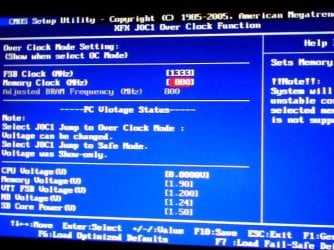
Ok, I have attached two Bios pages which I believe are the ones for timings and voltages....
Wow, this is exciting, I've never seen those options before, now after setting up that jumper the BIOS is no longer boring!!

THANKS !!!!!!!!!!
 

Attachments

  • Overclock function.jpg
    Overclock function.jpg
    57.7 KB · Views: 504
  • Advance DRAM Configuration.jpg
    Advance DRAM Configuration.jpg
    38.7 KB · Views: 1,392

My Computer My Computer

Computer type
PC/Desktop
Computer Manufacturer/Model Number
Custom Build
OS
Windows 7 x64bit Home Premium
CPU
Intel Core i5-2500K Quad-Core Processor 3.3 GHz 6 MB Cache
Motherboard
Intel Desktop Board Media Series LGA 1155 DDR 1333 Micro-ATX
Memory
8GB G.Skill DDR3 PC3-12800 1600MHz - F3-12800CL9D-8GBRL
Graphics Card(s)
Sandy Bridge
Sound Card
M-Audio Fast Track PRO - Avid digidesign 003 rack factory
Monitor(s) Displays
Acer X233H LCD monitor
Screen Resolution
1920x1080
Hard Drives
OS Drive: Silicon Power 256GB SSD 3D NAND A55 SLC Cache Performance Boost SATA III
PSU
Cooler Master eXtreme Power Plus 500w Power Supply
Other Info
This Computer was built from scratch
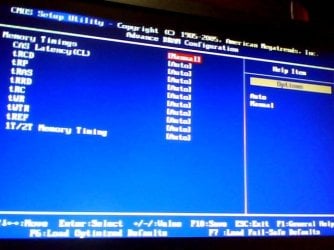
Okay, for the memory timings that chev mentioned. You want to change the following:

  • CAS Latency(CL) = 5,
  • tRCD = 6
  • tRP t = 6
  • tRAS to 18
  • 1T/2T Memory Timing to 2T

Set the tREF to 7.8uS too. This helped fix the random times the PC decided it wouldn't want to boot for me, too.

Now for the CPU voltage, set it to 1.265 volts to start off with (or as close as you can to this). If you still get problems with this voltage, then increase it by one notch in the voltage list.

Set the NB voltage to 1.5.

See how you get on with these settings.

If you run in to any problems doing this, then just push the reset button on the back of your motherboard to reset the BIOS to default settings.
 

My Computer My Computer

Computer type
PC/Desktop
Computer Manufacturer/Model Number
Custom Built
OS
Windows 8.1 Pro x64
CPU
Intel Core i7 4790k
Motherboard
MSI Z97S Krait Edition
Memory
8GB Corsair Dominator 1600MHz
Graphics Card(s)
MSI TwinFrozr GeForce GTX770
Sound Card
ASUS Xonar DX/XD 7.1
Monitor(s) Displays
Dell 24" S2409W + Dell 20" E207WFP
Screen Resolution
1920x1080 + 1680x1050
Hard Drives
1x 120GB OCZ Agility 3, 1x 750GB Western Digital Caviar Black, 1x 1TB Western Digital Caviar Blue
PSU
Corsair HX850 modular
Case
Fractal Design Define R4
Cooling
Corsair H60 w/ twin Corsair SP120 fans
Keyboard
Logitech G510S Keyboard
Mouse
Logitech G500S Laser Mouse
Internet Speed
40Mbps
Antivirus
Microsoft Security Essentials
Browser
Google Chrome
Other Info
LG Blu-Ray player
Okay, for the memory timings that chev mentioned. You want to change the following:

  • CAS Latency(CL) = 5,
  • tRCD = 6
  • tRP t = 6
  • tRAS to 18
  • 1T/2T Memory Timing to 2T

Set the tREF to 7.8uS too. This helped fix the random times the PC decided it wouldn't want to boot for me, too.

Now for the CPU voltage, set it to 1.265 volts to start off with (or as close as you can to this). If you still get problems with this voltage, then increase it by one notch in the voltage list.

Set the NB voltage to 1.5.

See how you get on with these settings.

If you run in to any problems doing this, then just push the reset button on the back of your motherboard to reset the BIOS to default settings.

ok, I did this:

CPU voltage (V) set to [0.1250V] - - Is that what you mean? next is > [0.1375V] - -

Memory Voltage: Shouldn't I set this to [2.10]? as Chev said "make sure that all other memory settings are per manufacture specs."
It is currently set to [1.90] (Default Voltage)

NB Voltage (V): There is no [1.5]. There is a [1.51] but the RED WARNING shows up telling me that this is not a recommended setting. RED WARNING starts at [1.36]. Everything below: ([1.32] - [1.28] - [1.24](default) - [1.20] - has no warning.
What should I set?

About the DRAM configuration, I did what you suggested and left tRRD, tRC, tWR, tWTR in auto.

Ok, i'll be wating here with my BIOS on...
thanks
 

My Computer My Computer

Computer type
PC/Desktop
Computer Manufacturer/Model Number
Custom Build
OS
Windows 7 x64bit Home Premium
CPU
Intel Core i5-2500K Quad-Core Processor 3.3 GHz 6 MB Cache
Motherboard
Intel Desktop Board Media Series LGA 1155 DDR 1333 Micro-ATX
Memory
8GB G.Skill DDR3 PC3-12800 1600MHz - F3-12800CL9D-8GBRL
Graphics Card(s)
Sandy Bridge
Sound Card
M-Audio Fast Track PRO - Avid digidesign 003 rack factory
Monitor(s) Displays
Acer X233H LCD monitor
Screen Resolution
1920x1080
Hard Drives
OS Drive: Silicon Power 256GB SSD 3D NAND A55 SLC Cache Performance Boost SATA III
PSU
Cooler Master eXtreme Power Plus 500w Power Supply
Other Info
This Computer was built from scratch
I missed the memory voltage sorry. If 2.10v is the manufacturer's specs, then yea set it to 2.10.

Set the NB voltage to 1.32v instead.

And don't keep it at 0.1250 for now and see how it goes.

I'm not sure if 0.1250 is the voltage it will be at, or the voltage on top of the default voltage. Though if I remember correctly, it is how much voltage to add on. If you still get some problems, then just keep try increasing the CPU voltage a bit more until it's running fine.
 

My Computer My Computer

Computer type
PC/Desktop
Computer Manufacturer/Model Number
Custom Built
OS
Windows 8.1 Pro x64
CPU
Intel Core i7 4790k
Motherboard
MSI Z97S Krait Edition
Memory
8GB Corsair Dominator 1600MHz
Graphics Card(s)
MSI TwinFrozr GeForce GTX770
Sound Card
ASUS Xonar DX/XD 7.1
Monitor(s) Displays
Dell 24" S2409W + Dell 20" E207WFP
Screen Resolution
1920x1080 + 1680x1050
Hard Drives
1x 120GB OCZ Agility 3, 1x 750GB Western Digital Caviar Black, 1x 1TB Western Digital Caviar Blue
PSU
Corsair HX850 modular
Case
Fractal Design Define R4
Cooling
Corsair H60 w/ twin Corsair SP120 fans
Keyboard
Logitech G510S Keyboard
Mouse
Logitech G500S Laser Mouse
Internet Speed
40Mbps
Antivirus
Microsoft Security Essentials
Browser
Google Chrome
Other Info
LG Blu-Ray player
I missed the memory voltage sorry. If 2.10v is the manufacturer's specs, then yea set it to 2.10.

Set the NB voltage to 1.32v instead.

And don't keep it at 0.1250 for now and see how it goes.

I'm not sure if 0.1250 is the voltage it will be at, or the voltage on top of the default voltage. Though if I remember correctly, it is how much voltage to add on. If you still get some problems, then just keep try increasing the CPU voltage a bit more until it's running fine.
"And don't keep it at 0.1250 for now and see how it goes".

What do you mean, what should I set it to? you mean I should leave the default value? [0.000]??
 

My Computer My Computer

Computer type
PC/Desktop
Computer Manufacturer/Model Number
Custom Build
OS
Windows 7 x64bit Home Premium
CPU
Intel Core i5-2500K Quad-Core Processor 3.3 GHz 6 MB Cache
Motherboard
Intel Desktop Board Media Series LGA 1155 DDR 1333 Micro-ATX
Memory
8GB G.Skill DDR3 PC3-12800 1600MHz - F3-12800CL9D-8GBRL
Graphics Card(s)
Sandy Bridge
Sound Card
M-Audio Fast Track PRO - Avid digidesign 003 rack factory
Monitor(s) Displays
Acer X233H LCD monitor
Screen Resolution
1920x1080
Hard Drives
OS Drive: Silicon Power 256GB SSD 3D NAND A55 SLC Cache Performance Boost SATA III
PSU
Cooler Master eXtreme Power Plus 500w Power Supply
Other Info
This Computer was built from scratch
I missed the memory voltage sorry. If 2.10v is the manufacturer's specs, then yea set it to 2.10.

Set the NB voltage to 1.32v instead.

And don't keep it at 0.1250 for now and see how it goes.

I'm not sure if 0.1250 is the voltage it will be at, or the voltage on top of the default voltage. Though if I remember correctly, it is how much voltage to add on. If you still get some problems, then just keep try increasing the CPU voltage a bit more until it's running fine.
"And don't keep it at 0.1250 for now and see how it goes".

What do you mean, what should I set it to? you mean I should leave the default value? [0.000]??

Oops, I meant keep it at 0.1250, sorry. How much is that up from 0.0000? After doing some reading around to refresh my memory, increase the voltage around 6 to 7 notches and go from there. That's about how much I increased mine by on that board.
 

My Computer My Computer

Computer type
PC/Desktop
Computer Manufacturer/Model Number
Custom Built
OS
Windows 8.1 Pro x64
CPU
Intel Core i7 4790k
Motherboard
MSI Z97S Krait Edition
Memory
8GB Corsair Dominator 1600MHz
Graphics Card(s)
MSI TwinFrozr GeForce GTX770
Sound Card
ASUS Xonar DX/XD 7.1
Monitor(s) Displays
Dell 24" S2409W + Dell 20" E207WFP
Screen Resolution
1920x1080 + 1680x1050
Hard Drives
1x 120GB OCZ Agility 3, 1x 750GB Western Digital Caviar Black, 1x 1TB Western Digital Caviar Blue
PSU
Corsair HX850 modular
Case
Fractal Design Define R4
Cooling
Corsair H60 w/ twin Corsair SP120 fans
Keyboard
Logitech G510S Keyboard
Mouse
Logitech G500S Laser Mouse
Internet Speed
40Mbps
Antivirus
Microsoft Security Essentials
Browser
Google Chrome
Other Info
LG Blu-Ray player
I missed the memory voltage sorry. If 2.10v is the manufacturer's specs, then yea set it to 2.10.

Set the NB voltage to 1.32v instead.

And don't keep it at 0.1250 for now and see how it goes.

I'm not sure if 0.1250 is the voltage it will be at, or the voltage on top of the default voltage. Though if I remember correctly, it is how much voltage to add on. If you still get some problems, then just keep try increasing the CPU voltage a bit more until it's running fine.
"And don't keep it at 0.1250 for now and see how it goes".

What do you mean, what should I set it to? you mean I should leave the default value? [0.000]??

Oops, I meant keep it at 0.1250, sorry. How much is that up from 0.0000? After doing some reading around to refresh my memory, increase the voltage around 6 to 7 notches and go from there. That's about how much I increased mine by on that board.

Ok, yesterday I left it at [0.0000] cause you said don't keep it at [0.1250.]

To get to [0.1250] I have to increase ten notches.

I just increased 7 notches to leave it at [0.0875V].

But, even on [0.0000], the computer turn on normally this morning!!
I can't believe it!!!
After a year of troubleshooting all I needed to do was this????????
WOW.. Incredible

I hope I'm not celebrating too early.

A few questions now:

The fact that I cannot rate my computer has something to do with this? I mean the WEI score, the button does not do anything.

I think my RAM memory is getting too hot, if I touch it after 3 seconds it becomes almost untouchable. how hot is too hot??

Can I set the jumper to safe mode now>??

THAt's it , thanks a lot... :I am so happppy!!!
 

My Computer My Computer

Computer type
PC/Desktop
Computer Manufacturer/Model Number
Custom Build
OS
Windows 7 x64bit Home Premium
CPU
Intel Core i5-2500K Quad-Core Processor 3.3 GHz 6 MB Cache
Motherboard
Intel Desktop Board Media Series LGA 1155 DDR 1333 Micro-ATX
Memory
8GB G.Skill DDR3 PC3-12800 1600MHz - F3-12800CL9D-8GBRL
Graphics Card(s)
Sandy Bridge
Sound Card
M-Audio Fast Track PRO - Avid digidesign 003 rack factory
Monitor(s) Displays
Acer X233H LCD monitor
Screen Resolution
1920x1080
Hard Drives
OS Drive: Silicon Power 256GB SSD 3D NAND A55 SLC Cache Performance Boost SATA III
PSU
Cooler Master eXtreme Power Plus 500w Power Supply
Other Info
This Computer was built from scratch
Back
Top