Can not acces partition

blazone

New member
Local time
6:42 PM
Messages
4
Hello :cool:, I have 2 hdds, one is cuted into two partitions "c" and "e" and second hdd is "d" (dvd-rom is "f")
So... on "c" i have instaled Win XP, on "d" i have Win7 and "e" is storage which i can not acces from win7.
Please, is there some way how to open it without formating?
Cause there is a lot of stuff :sarc:
 

My Computer

OS
Win XP Pro SP3

My Computer

Computer Manufacturer/Model Number
ENIAC
OS
Windows 7 RC 7100 32bit/64bit
CPU
Intel Core2Duo E4500 2.20 GHz
Motherboard
ASUS P5LD2-X/1333
Memory
2x1GB Kinsgston DDR2 800MHz
Graphics Card(s)
Nvidia 8500GT
Sound Card
Onboard High Definition Audio Device
Monitor(s) Displays
Sony Bravia 42"
Case
LINKW 2222
Cooling
Standard Intel
Keyboard
Some cheap one
Mouse
Microsoft Intellimouse something
Internet Speed
24MBps ADSL
wow, that was fast :D
i will try it when i come home :)
thx a lot
 

My Computer

OS
Win XP Pro SP3
Well, i have done it like you wrote it but when i try to open it...:

"E:\ is not accesible.
The file or directory is corrupted or unreadable."

But i know that it is all right...

:(
 

My Computer

OS
Win XP Pro SP3
Hello wan3350,

Welcome to the Seven Forums.

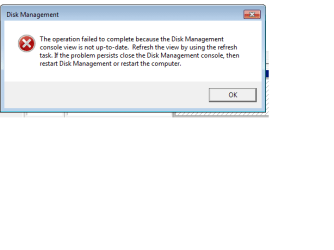
Are you saying that after closing the disk management console and rebooting the computer, you still can't complete the operation?

Gary
 

My Computer

Computer Manufacturer/Model Number
Dell XPS420
OS
Vista Ult 64 bit Seven Ult RTM x64
CPU
Intel Core2 Quad Q6600 2.40 gigahertz
Memory
Crucial Ballistix 4x2GB PC2 6400
Graphics Card(s)
NVIDIA GeForce 8600 GTS 256 MB
Sound Card
Creative SB X-Fi audio
Monitor(s) Displays
HP w2207 + HPvs15
Screen Resolution
1680x1050 + 1024x768
Hard Drives
2-WD5000AAKS-500 GB
WD5000AAV-500 GB external
Keyboard
Microsoft Comfort Curve
Mouse
MX Revolution
Other Info
Wacom Intuos 2 Graphics Tablet
Experience Index=5.5
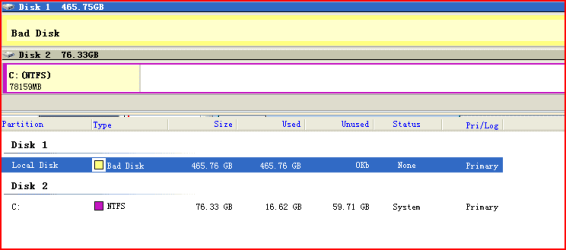
Yes sir, still unable to allocate the drive after restart. :cry::cry:. thousand my very important files inside there. While i tried to fix using EASUES Partition Magic.. the disc found as BAD.
Easues.PNG
 

My Computer

OS
windows 7
yy, i have exactly that problem...
disk is all right but win 7 is showing it as bad...
i have xp on first hdd so it is not very bad, but if i want something from "e" i must relog from win7 to xp, copy that thing into win7 system disk and relog back to win7 :D
a little f...ed :rolleyes:

oh btw... in disk manager that "bad" disk allready has its name (letter) so i can not change it...
i think...
the only solution is format but that's the last option :)

this is what is in disk management:
here
 

My Computer

OS
Win XP Pro SP3
Thanks for the info, need someone who have problem before to give further advise
 

My Computer

OS
windows 7
Hi, all.

Seems I am the 3rd who has the exactly same problem here.
 

My Computer

OS
Windows 7 x64 and x86
CPU
Q8200
Motherboard
Gigabyte EP45-UD3P
Memory
Patriot 6400LL 2GBx4 ddr2-800
Graphics Card(s)
ASUS 9600GSO
Monitor(s) Displays
Sony 19
Screen Resolution
1280x1024
Hard Drives
WD 80G SATA I
Seagate 80G SATA I
PSU
Antec SmartPower 350w
Case
Antec
Cooling
Intel box cpu cooling
Keyboard
Lenovo 101
Mouse
Microsoft Wireless IntelliMouse Explorer 2.0
Internet Speed
slow dsl
Hi, all.

Seems I am the 3rd who has the exactly same problem here.

Finally, put the drive back under winxp, then both partitions shows up and read/write able, while the live Gparted CD and EASEUS Partition Magic@seven can't recognize it.
 

My Computer

OS
Windows 7 x64 and x86
CPU
Q8200
Motherboard
Gigabyte EP45-UD3P
Memory
Patriot 6400LL 2GBx4 ddr2-800
Graphics Card(s)
ASUS 9600GSO
Monitor(s) Displays
Sony 19
Screen Resolution
1280x1024
Hard Drives
WD 80G SATA I
Seagate 80G SATA I
PSU
Antec SmartPower 350w
Case
Antec
Cooling
Intel box cpu cooling
Keyboard
Lenovo 101
Mouse
Microsoft Wireless IntelliMouse Explorer 2.0
Internet Speed
slow dsl
Back
Top