
my laptop has Vista loader on it?

dwilbank

New member
Local time
9:44 PM
Messages
8
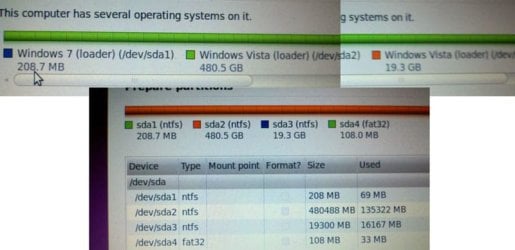
Good sirs. I was attempting to put a 2nd operating system on my Win7 laptop, when all of a sudden, I was horrified to see the information in my attached photo. Now what should I make of all this? The laptop was bought from Best Buy with Win 7 installed. Am I seeing a Vista upgrade and not a fresh Win 7 install? Does that make it less stable? I am certainly having problems with the shift keys on my keyboard, which is why I was trying to install Ubuntu until I got a good answer about how to fix my Windows problems... My drives are labeled C: local disk 447 GB D: recovery 17.9 GB E: HP_TOOLS - 99 MB if I try to use the recovery drive (which looks to be Vista) won't I just ruin my Win 7 install? And should the GeekSquad fix anything about this for free? Thanks for any info.
 

Attachments
  • my laptop drives.jpg
    my laptop drives.jpg
    54.3 KB · Views: 70

My Computer My Computer

At a glance

Windows 7 Premium 64 bit
OS
Windows 7 Premium 64 bit
How many partitions/ OS do you have on the computer? WOW

There is an advance option in the menu. It will allow you to select which partition or drive to use.

Are you familar with linux drive reference? Your best bet is to check the ubuntu forum.
 

My Computer My Computer

At a glance

Windows 7 Pro
OS
Windows 7 Pro
Some of the early OEM windows 7 installs used the vista bootloader. If best buy upgraded your computer to windows 7 and didn't provide you with a windows 7 disk, that's pretty shady. Especially if they put a windows 7 sticker on it.

What I would do in your situation is run the factory system recovery, and if vista ends up being installed, go back to the store where you bought the computer, acting extremely irate, and demand either a windows 7 disk or a refund.. then take it home ..wipe the HDD and do a clean install. Don't finish the ubuntu installation or you won't get anywhere with them
 
sounds like a plan thanks!
 

My Computer My Computer

At a glance

Windows 7 Premium 64 bit
OS
Windows 7 Premium 64 bit
Just as a sidenote...
Hey MadTownIdiot... I want the image you used in your sig. TOO funny and yet, horribly true. LOLOLOL

Some of the early OEM windows 7 installs used the vista bootloader. If best buy upgraded your computer to windows 7 and didn't provide you with a windows 7 disk, that's pretty shady. Especially if they put a windows 7 sticker on it.

What I would do in your situation is run the factory system recovery, and if vista ends up being installed, go back to the store where you bought the computer, acting extremely irate, and demand either a windows 7 disk or a refund.. then take it home ..wipe the HDD and do a clean install. Don't finish the ubuntu installation or you won't get anywhere with them
 

My Computer My Computer

At a glance

Microsoft Windows 10 Home Build 15036Intel(R) Core(TM) i7-860 @ 2.80GHz4.00 GBNVIDIA GeForce GTX 750
Computer type
PC/Desktop
Computer Manufacturer/Model Number
iBuyPower NZXT
OS
Microsoft Windows 10 Home Build 15036
CPU
Intel(R) Core(TM) i7-860 @ 2.80GHz
Motherboard
Gigabyte Technology Co., Ltd. P55-UD3L
Memory
4.00 GB
Graphics Card(s)
NVIDIA GeForce GTX 750
Sound Card
(1) Line 6 UX2 (2) Realtek High Definition Audio
Monitor(s) Displays
23" acer
Screen Resolution
1920 x 1080 x 32 bits (4294967296 colors) @ 60 Hz
Hard Drives
(1) WDC WD5000AAKS-00D2B0 ATA Device (2) Seagate FreeAgent Go 250G USB Device
Cooling
Corsair H75 liquid cooler (Very easy to install, actually)
Internet Speed
60M cable modem-->Linksys E1200-->1Gbps net card
Browser
Chrome
Other Info
This is probably the longest I've ever had a Windows machine run without having to restore it to scratch. I'm used to restoring to "factory" about every 2 yrs. I've run with Win7 since new in 2009 and only recently (Nov, '14) restored to clean up the machine from all my 'xperimenting. LOL!! I may never need another machine.

Upgraded to 10 when it was still free, then installed 2017 update.
Just as a sidenote...
Hey MadTownIdiot... I want the image you used in your sig. TOO funny and yet, horribly true. LOLOLOL
hope you get you're problem solved.. keep us posted.. having taken a closer look.. I can see that best buy did indeed upgrade a factory installed vista system to windows 7 but didn't change the recovery partition.. take it back to the store
also do a google image search for "too many toolbars" and get one that's similar
 
From your screenshot, it looks like your plan is to use the Ubuntu installer to shrink your Win7 partition to make room for Ubuntu. Do NOT do that! There have been lots of reports in the Ubuntu forums of folks ending up with unbootable Win7 setups after allowing the Linux partitioner (GParted) to mess with their Win7 partition.

Instead, use the Win7 Disk Management utility to shrink the Win7 OS, leaving unallocated space. Then, boot into the Ubuntu installer from the CD, and use the "largest free space" option to allow it to partition the free space and install.
 

My Computer My Computer

At a glance

Win7 Pro 32-bit, Win8 Pro 32-bitAMD Phenom II X6 1090T4GB ddr3 1300AMD HD 4290 onboard
Computer type
PC/Desktop
Computer Manufacturer/Model Number
Custom
OS
Win7 Pro 32-bit, Win8 Pro 32-bit
CPU
AMD Phenom II X6 1090T
Motherboard
Gigabyte
Memory
4GB ddr3 1300
Graphics Card(s)
AMD HD 4290 onboard
Sound Card
Builtin Realtek HD Audio
Monitor(s) Displays
Samsung 24" widescreen, LG 23" widescreen
Screen Resolution
1920x1200/1920x1080
Hard Drives
Kingston 256GB SSD
Keyboard
Logitech Illuminated Keyboard
Mouse
Logitech M705 wireless mouse
Antivirus
Norton Av 2013
Browser
IE v10
I would shrink my windows 7 partition, but from the picture, it looks like 450 of the 500 GB are used by some phantom version of Vista.

I just don't know what to do other than go fuss at the Geek Squad until all the partitions say Windows 7.
 

My Computer My Computer

At a glance

Windows 7 Premium 64 bit
OS
Windows 7 Premium 64 bit
From your screenshot, it looks like your plan is to use the Ubuntu installer to shrink your Win7 partition to make room for Ubuntu. Do NOT do that! There have been lots of reports in the Ubuntu forums of folks ending up with unbootable Win7 setups after allowing the Linux partitioner (GParted) to mess with their Win7 partition.

Instead, use the Win7 Disk Management utility to shrink the Win7 OS, leaving unallocated space. Then, boot into the Ubuntu installer from the CD, and use the "largest free space" option to allow it to partition the free space and install.
I've used to gparted numerous times in the past 6 months to shrink a windows 7 partition in order to install ubuntu and never had any of that happen
 
Back
Top