Cant find HDD for Windows 7 installation...

vijayjames

New member
Local time
8:25 AM
Messages
4
I tried installing Fedora 13 64 bit OS with dual booting enabled on my Windows 7 Ultimate OS. The partitions were 257 GB dedicated entirely for Windows (C: Drive) and the remaining 50 GB was allocated for Fedora installation.

I made grub as the default bootloader handler and completed the installation. But after this I started experiencing problems. I was unable to loginto Windows, as my system started showing the blue screen whenever I tried logging into Windows..After that, I made a whole mess by doing some unwanted steps which I never had any idea of..

Now I cant view my HDD to install Windows, No drives are being displayed soon after I select the "Custom option" to install Windows.. And When I click on "Load Driver" its just showing me an X: Drive which has around 100MB capacity and has four folders. I tried System Restore and some of the other options that were present in the Windows repair option but was unsuccessful..

I am confused as to what could have happened to my HDD and I would greatly appreciate your help in recovering my HDD. ( Is there any third party utility to wipe clean my HDD??? Reformat it completely and convert the partitions into NTFS, so that I could install a copy of windows) .

My laptop model Dell N5010...RAM 4 GB..HDD 320 GB...

Thanking you....
 

My Computer My Computer

At a glance

Windows 7 Ultimate x64
OS
Windows 7 Ultimate x64
Active@Killdisk will completely wipe drive, it will also make data unrecoverable but it has worked for me every time. It basically gives you an empty drive.
I use the US DOD 3 Pass method and it takes between 5 to 8 hours to complete depending on the size of the drive but you can choose more or less passes.
Just install it on another machine, restart with the dead drive connected, select the dead drive and kill it.

It's a great program, good luck.
 

My Computer My Computer

At a glance

Windows 7 Ultimate x64i7920 @ 4.0GHz12GB G-Skill 1600 MHzGTX480 2 way SLI OC 900MHz Water Cooled
OS
Windows 7 Ultimate x64
CPU
i7920 @ 4.0GHz
Motherboard
Gigagyte X58a UD7
Memory
12GB G-Skill 1600 MHz
Graphics Card(s)
GTX480 2 way SLI OC 900MHz Water Cooled
Sound Card
On board
Monitor(s) Displays
Asus 26 inch
Hard Drives
2 X WD 640 GB SATA3 AAEX, 1 X WD 500 GB AALS
PSU
Crosair 850 GX
Case
CM HAF 932
Cooling
Corsair H50 CPU, GB pump Swiftech 2 core 3 fan radiator GPU
Keyboard
G15
Mouse
MX Revolution
Internet Speed
Cable
Other Info
Logitech Z 550D Speakers
Hello vijayjames, welcome to Seven Forums!


You don't need a third party program any Windows 7 disk will do it natively, right in the target machine; have a look at this tutorial at the link below for the info and be sure to post back if you have any questions and to keep us informed.


SSD / HDD : Optimize for Windows Reinstallation
 

My Computer My Computer

At a glance

W 7 64-bit UltimateIntel Q9550 Yorkfield8GB Dominator 8500C5DATI : XFX 5870
Computer Manufacturer/Model Number
* BFK Customs *
OS
W 7 64-bit Ultimate
CPU
Intel Q9550 Yorkfield
Motherboard
ASUS P5Q Pro
Memory
8GB Dominator 8500C5D
Graphics Card(s)
ATI : XFX 5870
Sound Card
Realtek HD Audio 7-1
Monitor(s) Displays
1x 47" LCD HDMI & 3x 26" LCD HDMI
Screen Resolution
1920x1080P & 1920x1200
Hard Drives
1x 80GB Intel X25-M G2 SSD : 1x 500GB & 1x 640GB WD Caviar Black(s)
PSU
Corsair 620HX
Case
Cooler Master RC-690
Cooling
Tuniq Tower 120, 2x 140mm and 3x 120mm case fans
Keyboard
Microsoft 500
Mouse
Razer Diamondback 3G
Internet Speed
14 Mb/s
Other Info
1x Koutech 3Gb/s SATA HDD Hot Swap Rack
Thank you so much for this pleasant Welcome. I tried as per the instructions adviced in the SSD/HDD page..Wow!! My HDD is back and its active now...:geek:. Thank you so much...
Now I have installed Windows and Fedora on it and its running fine...

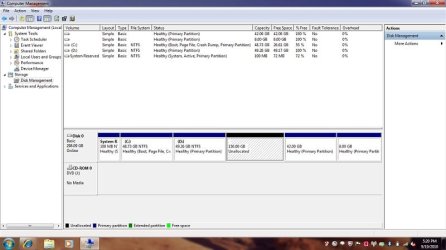
I have a small concern as I cant create anymore partitions on my HDD..I am attaching a copy of my Disk Manager for your refernce (42 GB and 8 GB partitions shown are the linux partitions...) Kindly advise as to what could be done...

There is an error message stating that I cant create anymore partitions on the drive as the disk already contains maximum number of partitions...
 

Attachments

  • Untitled.jpg
    Untitled.jpg
    39.4 KB · Views: 49

My Computer My Computer

At a glance

Windows 7 Ultimate x64
OS
Windows 7 Ultimate x64
Hello again, I'm pleased we could help and thanks for the update.


If you choose you could do away with the "System Reserved" partition to the far left, be sure you understand the need to do the 3 separate startup repairs with the system restarts between each repair outlined in this tutorial at the link below, if you choose to remove that partition; if you have any questions feel free to ask them.

Startup Repair - Run 3 Separate Times


Also have a good look through this entire tutorial for some ideas to sort your partition issue.

Partition Wizard : Use the Bootable CD
 

My Computer My Computer

At a glance

W 7 64-bit UltimateIntel Q9550 Yorkfield8GB Dominator 8500C5DATI : XFX 5870
Computer Manufacturer/Model Number
* BFK Customs *
OS
W 7 64-bit Ultimate
CPU
Intel Q9550 Yorkfield
Motherboard
ASUS P5Q Pro
Memory
8GB Dominator 8500C5D
Graphics Card(s)
ATI : XFX 5870
Sound Card
Realtek HD Audio 7-1
Monitor(s) Displays
1x 47" LCD HDMI & 3x 26" LCD HDMI
Screen Resolution
1920x1080P & 1920x1200
Hard Drives
1x 80GB Intel X25-M G2 SSD : 1x 500GB & 1x 640GB WD Caviar Black(s)
PSU
Corsair 620HX
Case
Cooler Master RC-690
Cooling
Tuniq Tower 120, 2x 140mm and 3x 120mm case fans
Keyboard
Microsoft 500
Mouse
Razer Diamondback 3G
Internet Speed
14 Mb/s
Other Info
1x Koutech 3Gb/s SATA HDD Hot Swap Rack
I had this with vista and 7, format it and make sure it has no extra partitions, I did this using another computer.
 

My Computer My Computer

At a glance

Windows 7 Professional (x64/SP1) /Linux Mint 16Intel i5-3570k 3.40 GHz @ 4.6 GHz8GB (2133MHz) DDR3Asus GTX560 Ti (Nvidia)
Computer type
PC/Desktop
Computer Manufacturer/Model Number
GIGABYTE Rig (Custom)
OS
Windows 7 Professional (x64/SP1) /Linux Mint 16
CPU
Intel i5-3570k 3.40 GHz @ 4.6 GHz
Motherboard
GIGABYTE Z77X-D3H
Memory
8GB (2133MHz) DDR3
Graphics Card(s)
Asus GTX560 Ti (Nvidia)
Monitor(s) Displays
HP 23", Acer 19" and a Dell 17"
Screen Resolution
1080p, 1440x900 and 1280x1024
Hard Drives
Sandisk Extreme 120GB (SSD), WD 2TB green and 4 other HDDs
PSU
Antec 620w High Current Gamer
Case
Corsair Obsidian 600D
Cooling
CPU - Antec KÜHLER H₂O 920
Keyboard
Steelseries 6Gv2
Mouse
Roccat LUA
Internet Speed
4 - 6mb/s
Antivirus
ESET NOD32
Browser
Chrome/Firefox
Other Info
Intel Gigabit CT (PCIE NIC) and Thinkpad T61p,
Is it possible to create extended partitions on my Harddisk??..I would like to stay away from deleting the System Partition of 100 MB coz I have the linux files on it...
 

My Computer My Computer

At a glance

Windows 7 Ultimate x64
OS
Windows 7 Ultimate x64
Not with the current setup you have.
 

My Computer My Computer

At a glance

W 7 64-bit UltimateIntel Q9550 Yorkfield8GB Dominator 8500C5DATI : XFX 5870
Computer Manufacturer/Model Number
* BFK Customs *
OS
W 7 64-bit Ultimate
CPU
Intel Q9550 Yorkfield
Motherboard
ASUS P5Q Pro
Memory
8GB Dominator 8500C5D
Graphics Card(s)
ATI : XFX 5870
Sound Card
Realtek HD Audio 7-1
Monitor(s) Displays
1x 47" LCD HDMI & 3x 26" LCD HDMI
Screen Resolution
1920x1080P & 1920x1200
Hard Drives
1x 80GB Intel X25-M G2 SSD : 1x 500GB & 1x 640GB WD Caviar Black(s)
PSU
Corsair 620HX
Case
Cooler Master RC-690
Cooling
Tuniq Tower 120, 2x 140mm and 3x 120mm case fans
Keyboard
Microsoft 500
Mouse
Razer Diamondback 3G
Internet Speed
14 Mb/s
Other Info
1x Koutech 3Gb/s SATA HDD Hot Swap Rack
Delete the last two partitions on the HD, then use free Partition Wizard bootable CD to create Logical data partitions there.
 
Vijay,
And if you right-click on that "unallocated" area, then
can't you choose the create a partition. Now what MS will do is create a "Logical Drive" there since you already have the max nr of partitions.
 

My Computer My Computer

At a glance

MS Windows 7 Ultimate SP1 64-bitAMD A10-4600M6.00 GB Dual-Channel DDR3 @ 798MHz (11-11-12-28)AMD Radeon HD 7660G
Computer Manufacturer/Model Number
Toshiba Satellite S875D-S7239 laptop
OS
MS Windows 7 Ultimate SP1 64-bit
CPU
AMD A10-4600M
Motherboard
AMD Pumori (Socket FT1)
Memory
6.00 GB Dual-Channel DDR3 @ 798MHz (11-11-12-28)
Graphics Card(s)
AMD Radeon HD 7660G
Sound Card
High Definition Audio Device
Monitor(s) Displays
Generic PnP Monitor (1600x900@60Hz)
Screen Resolution
1600x900@60Hz
Hard Drives
SSD 119GB Corsair CSSD-V128GB2 ATA Device
Keyboard
Standard PS/2 Keyboard
Mouse
HP Wireless Optical Mobile Mouse Model FHA-3410
Internet Speed
What the local pub, local coffee shop offers.
Other Info
Optical Drive:MATSHITA BD-CMB UJ160B ATA Device


Also have an Asus ha1002xp netbook with Win 7 Ultimate installed.
Finally my problem has been resolved.. I depended on a third party tool this time..I used the "Mini Tool Partition Manager" to succesively partition my HDD..

Once again...thank you so much to everyone who took the pain to help me out..

It gives me great priviledge to continue as a member of this forum...
 

My Computer My Computer

At a glance

Windows 7 Ultimate x64
OS
Windows 7 Ultimate x64
Finally my problem has been resolved.. I depended on a third party tool this time..I used the "Mini Tool Partition Manager" to succesively partition my HDD..

Once again...thank you so much to everyone who took the pain to help me out..

It gives me great priviledge to continue as a member of this forum...

Hello again.

It is our privilege to have you as a member. ;)


Glad to see you found a solution that worked for you and thanks for the update.
 

My Computer My Computer

At a glance

W 7 64-bit UltimateIntel Q9550 Yorkfield8GB Dominator 8500C5DATI : XFX 5870
Computer Manufacturer/Model Number
* BFK Customs *
OS
W 7 64-bit Ultimate
CPU
Intel Q9550 Yorkfield
Motherboard
ASUS P5Q Pro
Memory
8GB Dominator 8500C5D
Graphics Card(s)
ATI : XFX 5870
Sound Card
Realtek HD Audio 7-1
Monitor(s) Displays
1x 47" LCD HDMI & 3x 26" LCD HDMI
Screen Resolution
1920x1080P & 1920x1200
Hard Drives
1x 80GB Intel X25-M G2 SSD : 1x 500GB & 1x 640GB WD Caviar Black(s)
PSU
Corsair 620HX
Case
Cooler Master RC-690
Cooling
Tuniq Tower 120, 2x 140mm and 3x 120mm case fans
Keyboard
Microsoft 500
Mouse
Razer Diamondback 3G
Internet Speed
14 Mb/s
Other Info
1x Koutech 3Gb/s SATA HDD Hot Swap Rack
Back
Top