Are firewalls really needed?

I will have to say that you guys need to at least agree that having the OS using a software firewall is recommended, regardless if it is MS or some other party for some specific reasons, all of which are with regards to security, be it from within the OS or adding another layer within your own network.

I'll agree to that. Although I once had the Norton Firewall and I found that it also programs freely access the internet. Its really good to see that the Win 7 firewall is so much improved!

~Maxx~
 

My Computer My Computer

At a glance

Windows 7 x64 Home PremiumIntel Core i7 930 @ 2.8 Ghz Socket 1366 LGA8 GB 1366 Mhz DDR3 (PC3-10700) RAMATI Radeon 5770 1 GB DDR5 RAM
Computer Manufacturer/Model Number
HP HPE 270f
OS
Windows 7 x64 Home Premium
CPU
Intel Core i7 930 @ 2.8 Ghz Socket 1366 LGA
Motherboard
Pegatron Truckee v1.04E41
Memory
8 GB 1366 Mhz DDR3 (PC3-10700) RAM
Graphics Card(s)
ATI Radeon 5770 1 GB DDR5 RAM
Sound Card
Realtech High Definition
Monitor(s) Displays
32" Sony Bravia
Screen Resolution
1366 X 768
Hard Drives
Intel 25nm 120 GB Series 320 SSD HD Tune- 265 MBps Read/ 130 MBps Write

LaCie 1TB + 1TB RAID 0 eSATA Drive HD Tune- 160 MBps Read/ 90 MBps Write
Keyboard
Logitech Illuminated
Mouse
Logitech MX Revolution
Internet Speed
36.4 Mbps Maximum on a 37 Mbps Motorola SB501 Modem
Your flagrant disregard for the supreme importance of the privacy of personal data and opinion that it is not in any way security related is frightening. As far as privacy is concerned its everyone's right and not just those who are computer adept.
I just believe that there should be better ways of addressing this problem.
Anti-monopolist, Anti-Thrust organisations?
yes, on second thought I am probably being too optimistic of them..

I will address the Comodo Firewall Pro because I'm quite familiar with it and contrary to what you believe about software Firewalls anyone can program it to stop all unwanted outbound traffic simply by placing it in Custom Policy Mode and it will alert the user to any and all outbound traffic and all the user has to do is allow or block!
As I told you before, I am not discouraging you from doing so. And I am not saying it's wrong.

I just can't see how average home user (who doesn't care and bother about IT security) will know if he should allow svchost.exe from communicating into outbound connection in port 80.
Or he will not care and will just press allow. Or block and will block access for Windows Update for example which will cause even more troubles.

You see for so many years people can't be made into using LUA, which is not rocket science. They cried out when there was created easy to-use, straightforward UAC.

So, I doubt they will bother learning what each service does and from which port it should communicate.
Let them try. Maybe I am wrong. (Hopefully I am wrong) And people will start using it.

But I can't see it happing in near future. I can't see giving non tech-savvy users outbound firewall.

I'll agree to that. Although I once had the Norton Firewall and I found that it also programs freely access the internet. Its really good to see that the Win 7 firewall is so much improved!

~Maxx~

So, do I.
Most of the average users are good to go with Win 7 firewall itself. They don't need all those new HIPS and 2-way firewalls.

In my opinion they are created just for us, tech-savvy people.

They have too much power, and as we know with power comes responsibilities.
So it is too much responsibilities for average computer illiterate users.

But even though we have some disagreements, I hope we came into some conclusion here?
 

My Computer My Computer

At a glance

Windows 7 Ultimate x86 SP1
OS
Windows 7 Ultimate x86 SP1
So it is too much responsibilities for average computer illiterate users.

Most of the average users are good to go with Win 7 firewall itself. They don't need all those new HIPS and 2-way firewalls.

Could you possibly start making some constructive comments addressing the skill level of the average user that reads these posts here on the Forum instead of invoking what 'computer illiterate users' might be able to understand about computer security because they just don't show up that often around here if ever?

I started using UAC on Vista and then on Win 7 and I just could not get used to the redundant nagging. Replacing UAC with the Matousec top rated HIPS program finally gave me freedom on the desktop because it remembers my instructions and never ever repeats a permission request. To me HIPS is nothing fancy just complete and quiet control of everything that runs on the desktop.

PS- The Windows 7 Firewall is a 2-way Firewall and its there because they need it.

~Maxx~
.
da59fa57.png
 

My Computer My Computer

At a glance

Windows 7 x64 Home PremiumIntel Core i7 930 @ 2.8 Ghz Socket 1366 LGA8 GB 1366 Mhz DDR3 (PC3-10700) RAMATI Radeon 5770 1 GB DDR5 RAM
Computer Manufacturer/Model Number
HP HPE 270f
OS
Windows 7 x64 Home Premium
CPU
Intel Core i7 930 @ 2.8 Ghz Socket 1366 LGA
Motherboard
Pegatron Truckee v1.04E41
Memory
8 GB 1366 Mhz DDR3 (PC3-10700) RAM
Graphics Card(s)
ATI Radeon 5770 1 GB DDR5 RAM
Sound Card
Realtech High Definition
Monitor(s) Displays
32" Sony Bravia
Screen Resolution
1366 X 768
Hard Drives
Intel 25nm 120 GB Series 320 SSD HD Tune- 265 MBps Read/ 130 MBps Write

LaCie 1TB + 1TB RAID 0 eSATA Drive HD Tune- 160 MBps Read/ 90 MBps Write
Keyboard
Logitech Illuminated
Mouse
Logitech MX Revolution
Internet Speed
36.4 Mbps Maximum on a 37 Mbps Motorola SB501 Modem
Could you possibly start making some constructive comments addressing the skill level of the average user that reads these posts here on the Forum instead of invoking what 'computer illiterate users' might be able to understand about computer security because they just don't show up that often around here if ever?

Let's see, I am talking about what 75-85% of Windows users?
oh, who cares let's don't count them.

Forum readers...
They don't really care about our posts. They are clever enough to analyse situation to themselves.

Why we should only count forum readers?
Look back, why was this thread started. This thread was addressing everyone, not forum readers.
So as I told you I am addressing most of the Windows users who don't have a clue or will not bother about Windows security..

I started using UAC on Vista and then on Win 7 and I just could not get used to the redundant nagging. Replacing UAC with the Matousec top rated HIPS program finally gave me freedom on the desktop because it remembers my instructions and never ever repeats a permission request. To me HIPS is nothing fancy just complete and quiet control of everything that runs on the desktop.

PS- The Windows 7 Firewall is a 2-way Firewall.

Because UAC and HIPS are the same things............. no :sarc:
It's not UAC only job to warn you..

Anyway dose your experience apply to users mentioned above? no...

Yeah, Windows 7 firewall is 2-way.
But what is the point if by default settings anything, I mean anything is allow to outbound communicate.
This default rules will not be changed by users I mentioned (which are majority).
They will be changed by only handful people. Something like 0.5% of Windows users?
well done, Thats an achievement.

So, in default settings it's outbound protection doesn't count...

EDIT: Anyway, ok. I will stop my arguments from now on.
It's not going anywhere.
Sorry for starting it.. Peace.
 

My Computer My Computer

At a glance

Windows 7 Ultimate x86 SP1
OS
Windows 7 Ultimate x86 SP1
Anyway, ok. I will stop my arguments from now on.
It's not going anywhere.
Sorry for starting it.. Peace.

Its sad that we couldn't have had a constructive conversation about genuine security concerns and effective methods to deal with the many ways in which each of us as Win 7 users are having our personal information absconded with each day by the many different manifestations of spyware on our computers all of which can be thwarted by using a software firewall.

~Maxx~
.
da59fa57.png
 

My Computer My Computer

At a glance

Windows 7 x64 Home PremiumIntel Core i7 930 @ 2.8 Ghz Socket 1366 LGA8 GB 1366 Mhz DDR3 (PC3-10700) RAMATI Radeon 5770 1 GB DDR5 RAM
Computer Manufacturer/Model Number
HP HPE 270f
OS
Windows 7 x64 Home Premium
CPU
Intel Core i7 930 @ 2.8 Ghz Socket 1366 LGA
Motherboard
Pegatron Truckee v1.04E41
Memory
8 GB 1366 Mhz DDR3 (PC3-10700) RAM
Graphics Card(s)
ATI Radeon 5770 1 GB DDR5 RAM
Sound Card
Realtech High Definition
Monitor(s) Displays
32" Sony Bravia
Screen Resolution
1366 X 768
Hard Drives
Intel 25nm 120 GB Series 320 SSD HD Tune- 265 MBps Read/ 130 MBps Write

LaCie 1TB + 1TB RAID 0 eSATA Drive HD Tune- 160 MBps Read/ 90 MBps Write
Keyboard
Logitech Illuminated
Mouse
Logitech MX Revolution
Internet Speed
36.4 Mbps Maximum on a 37 Mbps Motorola SB501 Modem
Do any of the Members who are reading this thread have any constructive comments and solutions regarding the use of a software Firewall to enhance the prevention of programs sending personal information they have gathered in our Win 7 computers out to the internet as so many of todays freeware programs have been instructed to do?

~Maxx~
.
da59fa57.png
 

My Computer My Computer

At a glance

Windows 7 x64 Home PremiumIntel Core i7 930 @ 2.8 Ghz Socket 1366 LGA8 GB 1366 Mhz DDR3 (PC3-10700) RAMATI Radeon 5770 1 GB DDR5 RAM
Computer Manufacturer/Model Number
HP HPE 270f
OS
Windows 7 x64 Home Premium
CPU
Intel Core i7 930 @ 2.8 Ghz Socket 1366 LGA
Motherboard
Pegatron Truckee v1.04E41
Memory
8 GB 1366 Mhz DDR3 (PC3-10700) RAM
Graphics Card(s)
ATI Radeon 5770 1 GB DDR5 RAM
Sound Card
Realtech High Definition
Monitor(s) Displays
32" Sony Bravia
Screen Resolution
1366 X 768
Hard Drives
Intel 25nm 120 GB Series 320 SSD HD Tune- 265 MBps Read/ 130 MBps Write

LaCie 1TB + 1TB RAID 0 eSATA Drive HD Tune- 160 MBps Read/ 90 MBps Write
Keyboard
Logitech Illuminated
Mouse
Logitech MX Revolution
Internet Speed
36.4 Mbps Maximum on a 37 Mbps Motorola SB501 Modem
Maxxwire:D

Just one.

I have my firewall up and keeping it up.
I don't know exactly the "how or why" but I know the results of not having one.

A bit like the CPU and Ram modules. Kind of understand the basics but not all the technical.
I do know the motherboard isn't going to do much without them.

Sort of a necessity by my thinking.:)
Mike
 

My Computer My Computer

At a glance

Windows7 Pro 64bit SP-1; Windows XP Pro 32bitIntel Core i7-870 Lynnfield 2.93GHz LGA 1156 ...8GB@1400MHz Crucial Ballistix DDR3-1600 4x2GBASUS ENGTX460 DirectCU/2DI/1GD5 1GB 256-bit G...
Computer Manufacturer/Model Number
Hopalong/ Godzilla
OS
Windows7 Pro 64bit SP-1; Windows XP Pro 32bit
CPU
Intel Core i7-870 Lynnfield 2.93GHz LGA 1156 95W Quad-Core
Motherboard
ASUS P7P55D-E PRO
Memory
8GB@1400MHz Crucial Ballistix DDR3-1600 4x2GB
Graphics Card(s)
ASUS ENGTX460 DirectCU/2DI/1GD5 1GB 256-bit GDDR5
Sound Card
VIA Onboard
Monitor(s) Displays
Asus VS248H-P 24"; Samsung SyncMaster 941BW 19"ws
Screen Resolution
1920x1080; 1440x900
Hard Drives
Samsung 830 120GB SSD
Intel 320 120GB SSD
Western Digital Caviar Black WD7501AALS 750GB 7200 RPM SATA 3.0Gb/s
Western Digital Caviar Black WD6401AALS 640GB 7200 RPM SATA 3.0Gb/s
PSU
COOLER MASTER Silent Pro RS850-AMBAJ3-US 850W Modular
Case
COOLER MASTER HAF 932 RC-932-KKN5-GP Black
Cooling
Scythe "Mugen-2 Rev.B" (2 ScytheKaze-Jyuni PWM fans)
Keyboard
Logitech K-320
Mouse
Kensington
Antivirus
Avast Inernet Suite
Browser
IE 9 ; Chrome
Do any of the Members who are reading this thread have any constructive comments and solutions regarding the use of a software Firewall to enhance the prevention of programs sending personal information they have gathered in our Win 7 computers out to the internet as so many of todays freeware programs have been instructed to do?

~Maxx~
.
da59fa57.png

@ Maxx i have used Comodo Firewall & Windows Firewall...i found Comodo much better then Windows though Comodo keep telling you at every stage while installing a software (changing system files,registry) which i found great but as @ jav said most of non-tech user won't know whats happening & while simply accept everything which might lead a virus enter the network...Windows Firewall is as well great but it allowed a virus without my knowledge & after a reboot i couldn't log in :shock: & then i have to do the repair to get things going for me :)...i don't know how that happened :confused:...but i agree with both u & jav but would like to tell you that i'm not using any Firewall & there are many people like me who are not using any firewall...i'm not saying that 1 shouldn't but like u 2 i'll say every1 should use a firewall if its 2 way then great!!!
 

My Computer My Computer

At a glance

windows 7 Ultimate x86AMD Athlon x2 QL60 1900Mhz 1 MB L2 cache2GB DDR2nVidia GeForce 9100M G
Computer Manufacturer/Model Number
Acer Aspire 4530
OS
windows 7 Ultimate x86
CPU
AMD Athlon x2 QL60 1900Mhz 1 MB L2 cache
Motherboard
Acer Grasmoor
Memory
2GB DDR2
Graphics Card(s)
nVidia GeForce 9100M G
Sound Card
Onboard
Monitor(s) Displays
14.1"
Screen Resolution
1280*800
Hard Drives
160 GB
PSU
Onboard
Case
Onboard
Cooling
Onboard
Keyboard
Standard laptop keyboard
Mouse
Touchpad & external iball usb mouse
Internet Speed
its slower then SNAIL
Hey Maxx i want to know what's your take on Comodo Firewall vs Windows Firewall???:geek:
i'm thinking of getting my firewall up though i use internet cautiously but the world is full of uncertainties & surprises...:)!!!! i'm sure you agree on that?
 

My Computer My Computer

At a glance

windows 7 Ultimate x86AMD Athlon x2 QL60 1900Mhz 1 MB L2 cache2GB DDR2nVidia GeForce 9100M G
Computer Manufacturer/Model Number
Acer Aspire 4530
OS
windows 7 Ultimate x86
CPU
AMD Athlon x2 QL60 1900Mhz 1 MB L2 cache
Motherboard
Acer Grasmoor
Memory
2GB DDR2
Graphics Card(s)
nVidia GeForce 9100M G
Sound Card
Onboard
Monitor(s) Displays
14.1"
Screen Resolution
1280*800
Hard Drives
160 GB
PSU
Onboard
Case
Onboard
Cooling
Onboard
Keyboard
Standard laptop keyboard
Mouse
Touchpad & external iball usb mouse
Internet Speed
its slower then SNAIL
I have my firewall up and keeping it up.
I don't know exactly the "how or why" but I know the results of not having one.

Kind of understand the basics but not all the technical.
Mike

And that's all the basic fundamental understanding that's needed. Fortunately if someone wants to gain a more in depth knowledge of how to control there are plenty of Firewall experts who are more than willing to share what they know.

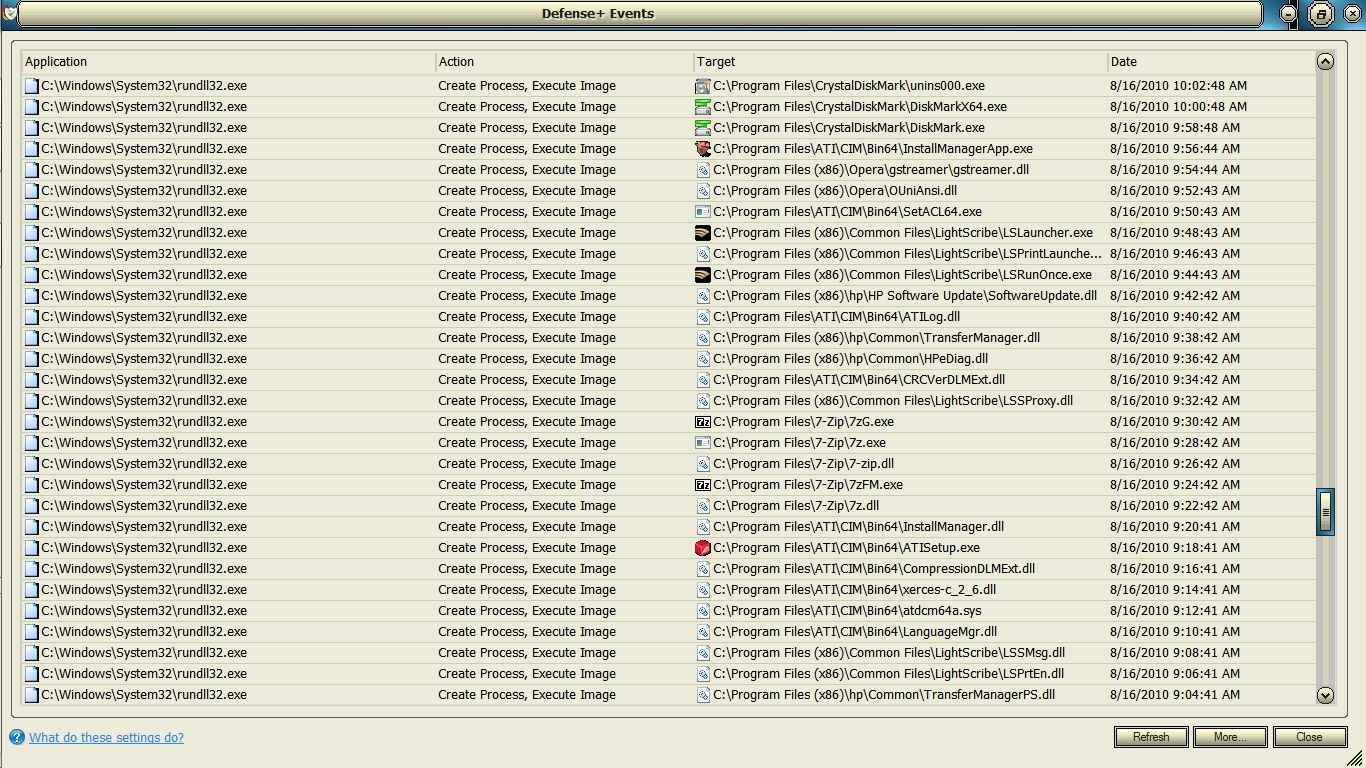
Although I'm no expert I do know that its a good idea to be aware of what is going on in your Firewall. A good example of this was something that I found a while back in the top rated Comodo Defense+ HIPS log (which is a much higher level of desktop security than UAC which it replaced as you can see below) of rundll32.exe opening each and every one of my programs along with many of the .dll's that they use in preparation for a regularly scheduled report to MS. At first I was totally shocked because I had never seen this before in Vista and then I learned that this particular style of intense and in depth information gathering was new to Win 7.

6f6efd29.jpg


This is just a small portion of the regularly scheduled comprehensive information gathering session that went on for several hours just as it does in all Win 7 computers! I had no idea how to trace this down, but within the hour I was able to end it forever with help from the vast security conscience community of computer users available on the internet. If you want I can in turn show you how to stop this regularly scheduled gathering of information from your Win 7 computer before it even reaches the Firewall.

~Maxx~
.
da59fa57.png
 

My Computer My Computer

At a glance

Windows 7 x64 Home PremiumIntel Core i7 930 @ 2.8 Ghz Socket 1366 LGA8 GB 1366 Mhz DDR3 (PC3-10700) RAMATI Radeon 5770 1 GB DDR5 RAM
Computer Manufacturer/Model Number
HP HPE 270f
OS
Windows 7 x64 Home Premium
CPU
Intel Core i7 930 @ 2.8 Ghz Socket 1366 LGA
Motherboard
Pegatron Truckee v1.04E41
Memory
8 GB 1366 Mhz DDR3 (PC3-10700) RAM
Graphics Card(s)
ATI Radeon 5770 1 GB DDR5 RAM
Sound Card
Realtech High Definition
Monitor(s) Displays
32" Sony Bravia
Screen Resolution
1366 X 768
Hard Drives
Intel 25nm 120 GB Series 320 SSD HD Tune- 265 MBps Read/ 130 MBps Write

LaCie 1TB + 1TB RAID 0 eSATA Drive HD Tune- 160 MBps Read/ 90 MBps Write
Keyboard
Logitech Illuminated
Mouse
Logitech MX Revolution
Internet Speed
36.4 Mbps Maximum on a 37 Mbps Motorola SB501 Modem
Maxxwire.

I'll get back to you tomorrow sometime on the above.

Time for bed on this end.
Mike
 

My Computer My Computer

At a glance

Windows7 Pro 64bit SP-1; Windows XP Pro 32bitIntel Core i7-870 Lynnfield 2.93GHz LGA 1156 ...8GB@1400MHz Crucial Ballistix DDR3-1600 4x2GBASUS ENGTX460 DirectCU/2DI/1GD5 1GB 256-bit G...
Computer Manufacturer/Model Number
Hopalong/ Godzilla
OS
Windows7 Pro 64bit SP-1; Windows XP Pro 32bit
CPU
Intel Core i7-870 Lynnfield 2.93GHz LGA 1156 95W Quad-Core
Motherboard
ASUS P7P55D-E PRO
Memory
8GB@1400MHz Crucial Ballistix DDR3-1600 4x2GB
Graphics Card(s)
ASUS ENGTX460 DirectCU/2DI/1GD5 1GB 256-bit GDDR5
Sound Card
VIA Onboard
Monitor(s) Displays
Asus VS248H-P 24"; Samsung SyncMaster 941BW 19"ws
Screen Resolution
1920x1080; 1440x900
Hard Drives
Samsung 830 120GB SSD
Intel 320 120GB SSD
Western Digital Caviar Black WD7501AALS 750GB 7200 RPM SATA 3.0Gb/s
Western Digital Caviar Black WD6401AALS 640GB 7200 RPM SATA 3.0Gb/s
PSU
COOLER MASTER Silent Pro RS850-AMBAJ3-US 850W Modular
Case
COOLER MASTER HAF 932 RC-932-KKN5-GP Black
Cooling
Scythe "Mugen-2 Rev.B" (2 ScytheKaze-Jyuni PWM fans)
Keyboard
Logitech K-320
Mouse
Kensington
Antivirus
Avast Inernet Suite
Browser
IE 9 ; Chrome
Hey Maxx i want to know what's your take on Comodo Firewall vs Windows Firewall???:geek:
i'm thinking of getting my firewall up though i use internet cautiously but the world is full of uncertainties & surprises...:)!!!! i'm sure you agree on that?

The thing that I like about the Comodo Firewall is that you can set it in Custom Policy Mode and it will let you know about every program that tries to access the internet which in turn allows you to decide which programs you personally want to allow internet access instead of every program being allowed internet access by default with Windows Firewall.

Comodo is definitely not for everyone or those who do not care what information is disseminated from their computer, but if you are the kind of person who would like to make these kind of decisions and doesn't mind taking the time to ask the occasional question of those who are more experienced then a granularly programmable software program like Comodo may be for you. Comodo 2011 has just been released and it has some amazing new features like automatic sandboxing, cloud behavioral blocker, cloud AV scanner and of course the world's top rated Software Firewall\ HIPS combination so you might want to check it out on their website where the software is always free.

~Maxx~
.
da59fa57.png
 

My Computer My Computer

At a glance

Windows 7 x64 Home PremiumIntel Core i7 930 @ 2.8 Ghz Socket 1366 LGA8 GB 1366 Mhz DDR3 (PC3-10700) RAMATI Radeon 5770 1 GB DDR5 RAM
Computer Manufacturer/Model Number
HP HPE 270f
OS
Windows 7 x64 Home Premium
CPU
Intel Core i7 930 @ 2.8 Ghz Socket 1366 LGA
Motherboard
Pegatron Truckee v1.04E41
Memory
8 GB 1366 Mhz DDR3 (PC3-10700) RAM
Graphics Card(s)
ATI Radeon 5770 1 GB DDR5 RAM
Sound Card
Realtech High Definition
Monitor(s) Displays
32" Sony Bravia
Screen Resolution
1366 X 768
Hard Drives
Intel 25nm 120 GB Series 320 SSD HD Tune- 265 MBps Read/ 130 MBps Write

LaCie 1TB + 1TB RAID 0 eSATA Drive HD Tune- 160 MBps Read/ 90 MBps Write
Keyboard
Logitech Illuminated
Mouse
Logitech MX Revolution
Internet Speed
36.4 Mbps Maximum on a 37 Mbps Motorola SB501 Modem
I have my firewall up and keeping it up.
I don't know exactly the "how or why" but I know the results of not having one.

Kind of understand the basics but not all the technical.
Mike

And that's all the basic fundamental understanding that's needed. Fortunately if someone wants to gain a more in depth knowledge of how to control there are plenty of Firewall experts who are more than willing to share what they know.

Although I'm no expert I do know that its a good idea to be aware of what is going on in your Firewall. A good example of this was something that I found a while back in the top rated Comodo Defense+ HIPS log (which is a much higher level of desktop security than UAC which it replaced as you can see below) of rundll32.exe opening each and every one of my programs along with many of the .dll's that they use in preparation for a regularly scheduled report to MS. At first I was totally shocked because I had never seen this before in Vista and then I learned that this particular style of intense and in depth information gathering was new to Win 7.

6f6efd29.jpg


This is just a small portion of the regularly scheduled comprehensive information gathering session that went on for several hours just as it does in all Win 7 computers! I had no idea how to trace this down, but within the hour I was able to end it forever with help from the vast security conscience community of computer users available on the internet. If you want I can in turn show you how to stop this regularly scheduled gathering of information from your Win 7 computer before it even reaches the Firewall.

~Maxx~
.
da59fa57.png

@ Maxx what version of Comodo firewall are you using???i've 3.14.13 for XP & Vista 32...can you suggest 1 (Comodo) for Windows 7 Build 7600 x86???:) Thank you & also how to show the regular schedule information can be gathered from my Win7 before it reaches the Firewall (though i know how a firewall works & filter packet data) but this would be a new learning for me...:D!!!!:geek:
 

My Computer My Computer

At a glance

windows 7 Ultimate x86AMD Athlon x2 QL60 1900Mhz 1 MB L2 cache2GB DDR2nVidia GeForce 9100M G
Computer Manufacturer/Model Number
Acer Aspire 4530
OS
windows 7 Ultimate x86
CPU
AMD Athlon x2 QL60 1900Mhz 1 MB L2 cache
Motherboard
Acer Grasmoor
Memory
2GB DDR2
Graphics Card(s)
nVidia GeForce 9100M G
Sound Card
Onboard
Monitor(s) Displays
14.1"
Screen Resolution
1280*800
Hard Drives
160 GB
PSU
Onboard
Case
Onboard
Cooling
Onboard
Keyboard
Standard laptop keyboard
Mouse
Touchpad & external iball usb mouse
Internet Speed
its slower then SNAIL
@ Maxx what version of Comodo firewall are you using???i've 3.14.13 for XP & Vista 32...can you suggest 1 (Comodo) for Windows 7 Build 7600 x86???:) Thank you & also how to show the regular schedule information can be gathered from my Win7 before it reaches the Firewall (though i know how a firewall works & filter packet data) but this would be a new learning for me...:D!!!!:geek:

deepakumar- On my Win 7 x64 desktop I started with the very reliable Comodo v3.14 and then upgraded to v4.1 but there were a few problems with the Comodo Sandbox sandboxing programs that it was instructed not to for example the browser so I went back to v3.14 up until last week when Comodo v5.0 was released and I haven't had any of the problems I had with v4.1. I would definately recommend Comodo 2011 (v5.0) for all of your computers especially your Win 7 x86 computer because this new version has so many new layers of state of the art computer security that will keep it safe and secure both from things coming from and going to the internet.

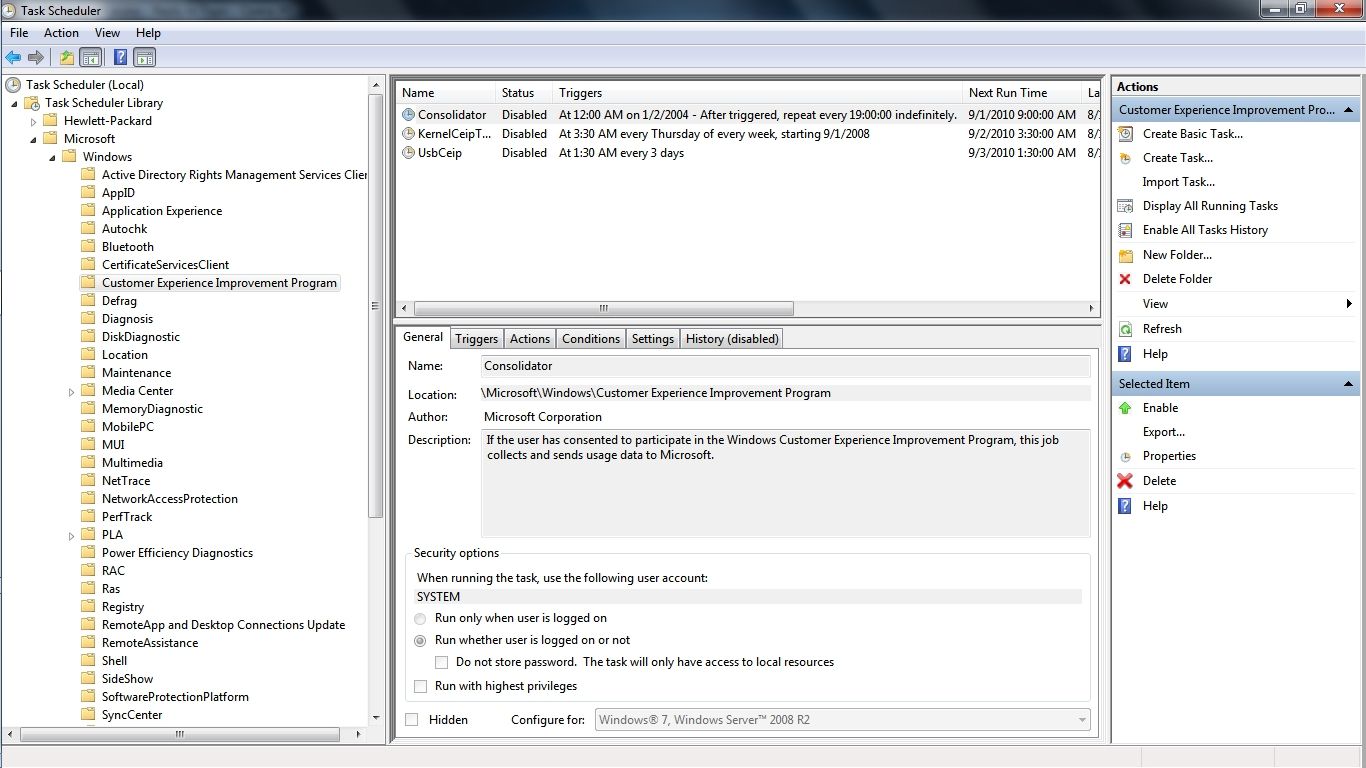
The systematic scheduling of System32\rundll32.exe do in depth information gathering in Windows 7 has been pre-programmed into the Task Scheduler for many years to come by MS for their Customer Experience Improvement Program for which the information gathering continues on even though the user has opted out of CEIP.

4a5667d1.jpg


The simple method would be to click Start and type and then click on Task Scheduler. Next go into the file tree and click on Microsoft and all of the scheduled tasks will appear. Select the group of tasks by clicking on the title and by right clicking on any individual task you can select which action you want to take.

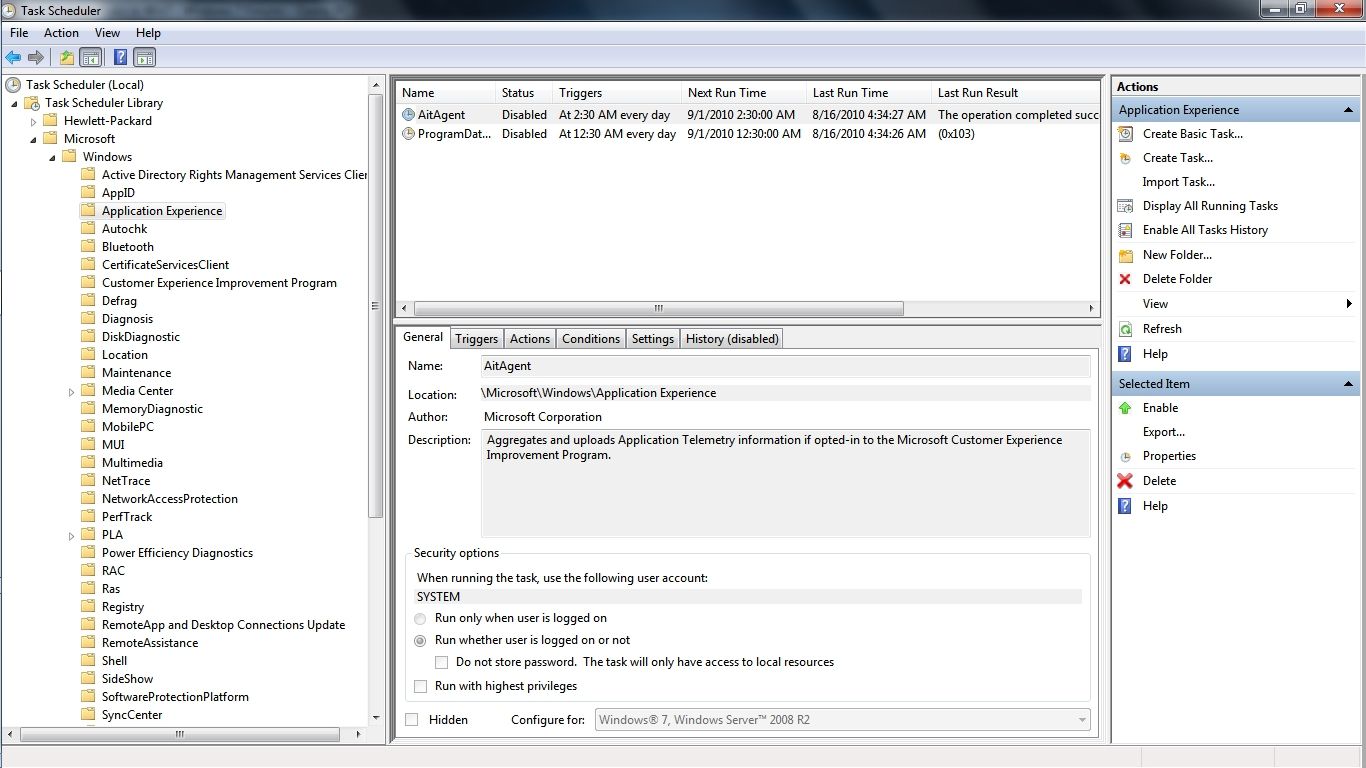
You may notice in the graphic that I have deleted 3 of the scheduled CEIP information gathering tasks under Customer Experience Improvement Program because even though officially opted out of CEIP in Win 7 the scheduled task information gathering will continue. As I understand this is new to Win 7 and there are even more scheduled CEIP information gathering tasks under Application Experience...

64513911.jpg


After Disabling these scheduled tasks along with 2 more under the heading DiskDiagnostic my Win 7 computer now boots with 4 less programs starting and running all day and that is my version of a genuine Customer Experience Improvement! I plan on deleting these CEIP information gathering tasks as soon as I am 100% sure that there have been no negative consequences to preventing this information gathering.

Speaking of which here is the Comodo Defense+ log that shows the scheduled Application Experience information gathering in progress as rundll32.exe silently opens each of the programs on my computer and spends a good 2 minutes examining each one until it starts the next which is what initially started my investigation into this matter. This is just a 1 hour excerpt out of an MS scheduled application information gathering process that went on for hours even though I had officially opted out of CEIP when I first set up the computer...

6f6efd29.jpg


~Maxx~
.
da59fa57.png
 

My Computer My Computer

At a glance

Windows 7 x64 Home PremiumIntel Core i7 930 @ 2.8 Ghz Socket 1366 LGA8 GB 1366 Mhz DDR3 (PC3-10700) RAMATI Radeon 5770 1 GB DDR5 RAM
Computer Manufacturer/Model Number
HP HPE 270f
OS
Windows 7 x64 Home Premium
CPU
Intel Core i7 930 @ 2.8 Ghz Socket 1366 LGA
Motherboard
Pegatron Truckee v1.04E41
Memory
8 GB 1366 Mhz DDR3 (PC3-10700) RAM
Graphics Card(s)
ATI Radeon 5770 1 GB DDR5 RAM
Sound Card
Realtech High Definition
Monitor(s) Displays
32" Sony Bravia
Screen Resolution
1366 X 768
Hard Drives
Intel 25nm 120 GB Series 320 SSD HD Tune- 265 MBps Read/ 130 MBps Write

LaCie 1TB + 1TB RAID 0 eSATA Drive HD Tune- 160 MBps Read/ 90 MBps Write
Keyboard
Logitech Illuminated
Mouse
Logitech MX Revolution
Internet Speed
36.4 Mbps Maximum on a 37 Mbps Motorola SB501 Modem
The thing that I like about the Comodo Firewall is that you can set it in Custom Policy Mode and it will let you know about every program that tries to access the internet which in turn allows you to decide which programs you personally want to allow internet access
That's also what I like about the Norton firewall. You can change one setting to have it prompt for everything or you can leave it at default and let it decide for you.

At default, the Norton firewall is very effective.
For a period a few weeks ago, it was blocking intrusion attempts to my sister's computer. I also recently came across a user with Norton 2009 installed (2011 is out). They had some sort of infection Norton didn't detect but the firewall kept blocking the malware from calling home.

I'm currently using Windows Firewall at default.
 

My Computer My Computer

At a glance

Arch Linux 64-bit
OS
Arch Linux 64-bit

My Computer My Computer

At a glance

Windows 7 x64 Home PremiumIntel Core i7 930 @ 2.8 Ghz Socket 1366 LGA8 GB 1366 Mhz DDR3 (PC3-10700) RAMATI Radeon 5770 1 GB DDR5 RAM
Computer Manufacturer/Model Number
HP HPE 270f
OS
Windows 7 x64 Home Premium
CPU
Intel Core i7 930 @ 2.8 Ghz Socket 1366 LGA
Motherboard
Pegatron Truckee v1.04E41
Memory
8 GB 1366 Mhz DDR3 (PC3-10700) RAM
Graphics Card(s)
ATI Radeon 5770 1 GB DDR5 RAM
Sound Card
Realtech High Definition
Monitor(s) Displays
32" Sony Bravia
Screen Resolution
1366 X 768
Hard Drives
Intel 25nm 120 GB Series 320 SSD HD Tune- 265 MBps Read/ 130 MBps Write

LaCie 1TB + 1TB RAID 0 eSATA Drive HD Tune- 160 MBps Read/ 90 MBps Write
Keyboard
Logitech Illuminated
Mouse
Logitech MX Revolution
Internet Speed
36.4 Mbps Maximum on a 37 Mbps Motorola SB501 Modem
Here 2 question: 1 for Maxx: what is HIPS since you've been mentioning in most of your post (i know its similar to UAC but not sure)??
2nd for all my friends: should i have two firewall e.g. Windows & Comodo/Norton etc or just 1 at a time??? I know at times it does conflict but at times it run smooth as well like few years ago i had Norton & Comodo both they worked fine (OS was XP)...so i want to know if 1 should have just 1 or can have 2 as well????:geek:
 

My Computer My Computer

At a glance

windows 7 Ultimate x86AMD Athlon x2 QL60 1900Mhz 1 MB L2 cache2GB DDR2nVidia GeForce 9100M G
Computer Manufacturer/Model Number
Acer Aspire 4530
OS
windows 7 Ultimate x86
CPU
AMD Athlon x2 QL60 1900Mhz 1 MB L2 cache
Motherboard
Acer Grasmoor
Memory
2GB DDR2
Graphics Card(s)
nVidia GeForce 9100M G
Sound Card
Onboard
Monitor(s) Displays
14.1"
Screen Resolution
1280*800
Hard Drives
160 GB
PSU
Onboard
Case
Onboard
Cooling
Onboard
Keyboard
Standard laptop keyboard
Mouse
Touchpad & external iball usb mouse
Internet Speed
its slower then SNAIL
deepakumar- Host Intrusion Prevention System (HIPS) proactively monitors systems and system processes to detect and prevent system changes such as rootkit installations, inter-process memory injections, key-loggers and much more. HIPS technology is driven by a white list architecture which identifies trusted applications and prevents untrusted applications being installed or running on the computer. Default deny HIPS is so powerful that it can detect zero day Malware that a black list antivirus does not yet have the definitions for.

As far as a Firewall goes the basic rule of thumb is one per computer. I don't know how you could need more than one detailed customized set of Firewall rules governing internet traffic on your computer anyway.

~Maxx~
.
da59fa57.png
 

My Computer My Computer

At a glance

Windows 7 x64 Home PremiumIntel Core i7 930 @ 2.8 Ghz Socket 1366 LGA8 GB 1366 Mhz DDR3 (PC3-10700) RAMATI Radeon 5770 1 GB DDR5 RAM
Computer Manufacturer/Model Number
HP HPE 270f
OS
Windows 7 x64 Home Premium
CPU
Intel Core i7 930 @ 2.8 Ghz Socket 1366 LGA
Motherboard
Pegatron Truckee v1.04E41
Memory
8 GB 1366 Mhz DDR3 (PC3-10700) RAM
Graphics Card(s)
ATI Radeon 5770 1 GB DDR5 RAM
Sound Card
Realtech High Definition
Monitor(s) Displays
32" Sony Bravia
Screen Resolution
1366 X 768
Hard Drives
Intel 25nm 120 GB Series 320 SSD HD Tune- 265 MBps Read/ 130 MBps Write

LaCie 1TB + 1TB RAID 0 eSATA Drive HD Tune- 160 MBps Read/ 90 MBps Write
Keyboard
Logitech Illuminated
Mouse
Logitech MX Revolution
Internet Speed
36.4 Mbps Maximum on a 37 Mbps Motorola SB501 Modem
Thank you for the info. again Maxx :D....well i know but this asked to me by some1 & since as i said in the past i used 2 but now things are different & i know that 1 can't run 2 firewall on same comp. but i wanted to check this 1st with you guys before i can confirm the same to other person...but again :cool:
 

My Computer My Computer

At a glance

windows 7 Ultimate x86AMD Athlon x2 QL60 1900Mhz 1 MB L2 cache2GB DDR2nVidia GeForce 9100M G
Computer Manufacturer/Model Number
Acer Aspire 4530
OS
windows 7 Ultimate x86
CPU
AMD Athlon x2 QL60 1900Mhz 1 MB L2 cache
Motherboard
Acer Grasmoor
Memory
2GB DDR2
Graphics Card(s)
nVidia GeForce 9100M G
Sound Card
Onboard
Monitor(s) Displays
14.1"
Screen Resolution
1280*800
Hard Drives
160 GB
PSU
Onboard
Case
Onboard
Cooling
Onboard
Keyboard
Standard laptop keyboard
Mouse
Touchpad & external iball usb mouse
Internet Speed
its slower then SNAIL
deepakumar- I can assure you that the very best advise is to run just 1 Firewall and whichever one you choose make sure to take some time to learn how it works and how you can use its features to protect your computer from both unwanted intrusion and from unwanted communication from programs which may have gathered important information from within your computer that are trying to send it out over the internet.

~Maxx~
.
da59fa57.png
 

My Computer My Computer

At a glance

Windows 7 x64 Home PremiumIntel Core i7 930 @ 2.8 Ghz Socket 1366 LGA8 GB 1366 Mhz DDR3 (PC3-10700) RAMATI Radeon 5770 1 GB DDR5 RAM
Computer Manufacturer/Model Number
HP HPE 270f
OS
Windows 7 x64 Home Premium
CPU
Intel Core i7 930 @ 2.8 Ghz Socket 1366 LGA
Motherboard
Pegatron Truckee v1.04E41
Memory
8 GB 1366 Mhz DDR3 (PC3-10700) RAM
Graphics Card(s)
ATI Radeon 5770 1 GB DDR5 RAM
Sound Card
Realtech High Definition
Monitor(s) Displays
32" Sony Bravia
Screen Resolution
1366 X 768
Hard Drives
Intel 25nm 120 GB Series 320 SSD HD Tune- 265 MBps Read/ 130 MBps Write

LaCie 1TB + 1TB RAID 0 eSATA Drive HD Tune- 160 MBps Read/ 90 MBps Write
Keyboard
Logitech Illuminated
Mouse
Logitech MX Revolution
Internet Speed
36.4 Mbps Maximum on a 37 Mbps Motorola SB501 Modem
Back
Top