Windows freezes at the "Welcome" screen.

Leopard

New member
Local time
8:19 AM
Messages
18
Location
Oklahoma, USA
Hello forum,

This is my first post here on your fine forum. :p

I'm having a problem finishing the installation process of Genuine Windows 7 Ultimate x86-64 on a 2010 MacBook Pro 13' baseline model via Bootcamp 3.0.2.

I have tried several installs, using two different discs. (Burned at 4x using Disc Utility.)

The initial install works just fine, and I can reach the desktop and am able to use the operating system just fine. The actual problem occurs the first time I try to reboot Windows. It shuts down normally, and everything appears normal on boot-up, until I hit the welcome screen. The loading animation goes around a few times, then just freezes completely. I don't hear the processor going or the disk spinning, and my computer gets very hot. The only way I can shut down the computer is by pressing and holding the power button. It happens regardless of if I use the Bootcamp driver installation CD or not, and if I restart or shut down.

I have tried all safe mode options, starting Windows normally, and recovering the OS with both the original installation disc and a NeoSmart specialized recovery/repair disc. THe installation disc reports that it isn't compatible with the installed version of Windows, even though it is the same disc I installed Windows with in the first place. The NeoSmart specialized recovery/repair CD refuses to boot up for some reason.

Please help me resolve my issue. :cry:

Thanks in Advance,

Andrew
 

My Computer My Computer

At a glance

Windows 7 Ultimate x86-64, via Bootcamp.2.4 GHz Intel Core 2 Duo.4 GiB DDR3 1066 MHz.NVIDIA GeForce 320M.
Computer Manufacturer/Model Number
2010 Apple MacBook Pro 13'. (Laptop.)
OS
Windows 7 Ultimate x86-64, via Bootcamp.
CPU
2.4 GHz Intel Core 2 Duo.
Memory
4 GiB DDR3 1066 MHz.
Graphics Card(s)
NVIDIA GeForce 320M.
Screen Resolution
1280 x 800.
Hard Drives
250 GB 5400rpm HDD.
Internet Speed
Download: 20.91 Mb/s. Upload: 2.97 Mb/s.
Bump.

(Went to the second page after 13 hours.)

Sorry if it's too early to bump my topic.

:o
 

My Computer My Computer

At a glance

Windows 7 Ultimate x86-64, via Bootcamp.2.4 GHz Intel Core 2 Duo.4 GiB DDR3 1066 MHz.NVIDIA GeForce 320M.
Computer Manufacturer/Model Number
2010 Apple MacBook Pro 13'. (Laptop.)
OS
Windows 7 Ultimate x86-64, via Bootcamp.
CPU
2.4 GHz Intel Core 2 Duo.
Memory
4 GiB DDR3 1066 MHz.
Graphics Card(s)
NVIDIA GeForce 320M.
Screen Resolution
1280 x 800.
Hard Drives
250 GB 5400rpm HDD.
Internet Speed
Download: 20.91 Mb/s. Upload: 2.97 Mb/s.
Check all of the drivers, starting with chipset and display, to make sure you have the latest.

Does it start correctly in Safe Mode?

You might want to try a MacBook forum too.
 
Hello gregrocker,
Thank you for your reply.

Check all of the drivers, starting with chipset and display, to make sure you have the latest.

I can't, because I am unable to boot into the system.

However, the problem shouldn't be with the drivers, as Apple supplies all of the drivers needed for Windows on a CD when you first get a Mac.

Since the problem always occurs on the second boot, there really isn't a chance for the drivers to be corrupted.

Does it start correctly in Safe Mode?

As I said in my first post, I have tried all three 'Safe Mode' options and they all freeze at the same point.

You might want to try a MacBook forum too.

I have.

I posted on this very large Mac forum;
MBP Windows OS Bootcamp Issues & Questions - Mac Forums
I didn't get any relevant replies to my primary issue, so i tried again with the booting issue as a standalone topic;
Windows Bootcamp Install Hangs On Boot - Mac Forums

To note, the IEEE 1394 and the CLASSPNP.SYS issues mentioned in the Mac Rumors thread happen when I install Windows without a password.

When I install it with a password, the problem that I posted here with happens.

The solution 'balamw' posted in the last Mac Rumors topic was impossible, since this time I got the 'Welcome' screen error before the IEEE 1394 driver attempted an install.

I have tried 3 different installation discs, all still in perfect condition, burned at 4x (recommended speed) with Mac OS X's Disc Utility.

Also, just to add some more info, x86-64 Linux installs just fine with the proper MCP89 MBP 7,1 kernel patch applied. I used a daily build of Ubuntu Lucid Lynx LTS and openSUSE 11.3.

Please help guys... I've made and removed so many botched bootcamp installs and they all run into the same problem eventually.

I'm trying to make my posts as understandable as possible. I'm really sorry if it's in a confusing layout or something. :huh:
 

My Computer My Computer

At a glance

Windows 7 Ultimate x86-64, via Bootcamp.2.4 GHz Intel Core 2 Duo.4 GiB DDR3 1066 MHz.NVIDIA GeForce 320M.
Computer Manufacturer/Model Number
2010 Apple MacBook Pro 13'. (Laptop.)
OS
Windows 7 Ultimate x86-64, via Bootcamp.
CPU
2.4 GHz Intel Core 2 Duo.
Memory
4 GiB DDR3 1066 MHz.
Graphics Card(s)
NVIDIA GeForce 320M.
Screen Resolution
1280 x 800.
Hard Drives
250 GB 5400rpm HDD.
Internet Speed
Download: 20.91 Mb/s. Upload: 2.97 Mb/s.
Hello Leopard, welcome to Seven Forums!


There's nothing wrong with you or your posts, it's just few of us here do mac. ;)
 

My Computer My Computer

At a glance

W 7 64-bit UltimateIntel Q9550 Yorkfield8GB Dominator 8500C5DATI : XFX 5870
Computer Manufacturer/Model Number
* BFK Customs *
OS
W 7 64-bit Ultimate
CPU
Intel Q9550 Yorkfield
Motherboard
ASUS P5Q Pro
Memory
8GB Dominator 8500C5D
Graphics Card(s)
ATI : XFX 5870
Sound Card
Realtek HD Audio 7-1
Monitor(s) Displays
1x 47" LCD HDMI & 3x 26" LCD HDMI
Screen Resolution
1920x1080P & 1920x1200
Hard Drives
1x 80GB Intel X25-M G2 SSD : 1x 500GB & 1x 640GB WD Caviar Black(s)
PSU
Corsair 620HX
Case
Cooler Master RC-690
Cooling
Tuniq Tower 120, 2x 140mm and 3x 120mm case fans
Keyboard
Microsoft 500
Mouse
Razer Diamondback 3G
Internet Speed
14 Mb/s
Other Info
1x Koutech 3Gb/s SATA HDD Hot Swap Rack
The title of your post is key to getting help.

The problem is that while there are some Mac knowledgeable people here to help, your post does not attract them with the title. So those familar with the issue in your title are coming into this thread expecting to help with Win7 and largely not familar with Mac which is key to finding your fix.

The best advice I can give you is to title your post as precisely as if you are wording a billboard on the highway to flag down the exact person who can help you. Place it in the General forum where there is the most traffic so Mac people will most likely see it.

I fumbled in the initial reply because I sensed how urgent you needed help and wanted to throw out anything that might help and bump to keep the post seen in this sub-forum which has limited traffic.
 
Solution found!

Hello once again gregrocker,

The problem is that while there are some Mac knowledgeable people here to help, your post does not attract them with the title. So those familar with the issue in your title are coming into this thread expecting to help with Win7 and largely not familar with Mac which is key to finding your fix.

The best advice I can give you is to title your post as precisely as if you are wording a billboard on the highway to flag down the exact person who can help you. Place it in the General forum where there is the most traffic so Mac people will most likely see it.

I fumbled in the initial reply because I sensed how urgent you needed help and wanted to throw out anything that might help and bump to keep the post seen in this sub-forum which has limited traffic.

I have actually found a solution. I'm not quite sure how it all worked out (it was pure luck!), but I am happily posting from a fresh install of Windows 7 Ultimate x64 on my new 2010 MacBook Pro 13' via Bootcamp.

For other people who may have run into this problem, here is the steps I took to fix it:
1. Start/restart Windows.
2. Press & hold the 'F8' key until an advanced boot menu comes up.
3. Select 'Repair Your Computer'.
4. Select 'Command Prompt'.
5. Log in as an Administrator.
6. Type in "chkdsk c: /f" (without the quotes), and press [ENTER].
7. Exit out of the command prompt.
8. Click on 'Restart'.
9. Press & hold the 'F8' key until an advanced boot menu comes up.
10. Select 'Enable Boot Logging'.
11. Enjoy Windows 7! :cool:

It appeared that the nasty driver causing the problem was the 'LSI 1394 OHCI Compliant Host Controller'. (This appears to be the FireWire port causing all this trouble!)

Before, when the system was installed with a password, it would hang forever at the 'Welcome' screen on the second boot.

Before, when the system was installed without a password, it would freeze trying to install the aforementioned driver on the second boot, then on subsequent boots, it would hang forever at the 'Welcome' screen.

After doing the above process, my system booted normally and installed the ''LSI 1394 OHCI Compliant Host Controller' without any freezes or complaints.

I can't count how many times I reinstalled Windows, burned new installation discs, started new threads, tried different methods, etc. just to find this. Trial & error (eventually) won!

I hope this helps someone if they are having issues with their new Mac. Please post back if it worked for you!


And gregrocker,

I fumbled in the initial reply because I sensed how urgent you needed help and wanted to throw out anything that might help and bump to keep the post seen in this sub-forum which has limited traffic.

This is the part I appreciate the most. Thank you. +Rep! :D


Sincerely,

Andrew
 
Last edited:

My Computer My Computer

At a glance

Windows 7 Ultimate x86-64, via Bootcamp.2.4 GHz Intel Core 2 Duo.4 GiB DDR3 1066 MHz.NVIDIA GeForce 320M.
Computer Manufacturer/Model Number
2010 Apple MacBook Pro 13'. (Laptop.)
OS
Windows 7 Ultimate x86-64, via Bootcamp.
CPU
2.4 GHz Intel Core 2 Duo.
Memory
4 GiB DDR3 1066 MHz.
Graphics Card(s)
NVIDIA GeForce 320M.
Screen Resolution
1280 x 800.
Hard Drives
250 GB 5400rpm HDD.
Internet Speed
Download: 20.91 Mb/s. Upload: 2.97 Mb/s.
Andrew -

So glad to hear you found the fix! What tipped you to a combination of chkdsk and Boot Logging?

We use chkdsk for suspected HD issues, and Boot Logging on slow or hanging start-up. So it makes sense it might pinpoint the failing driver if it has only made it to the Starting Windows screen before stalling.

Did you reinstall the driver or how exactly did it resolve since Boot Logging only reports the fail?

I'll remember this when drivers are called into question due to boot stalling. In fact, we should try bootlogging more on failed install startups since we can get to the log through the DVD mini-explorer where Drivers are loaded.

Thanks for reporting back and the rep which I hardly deserve! :eek:

Enjoy Win7 on your Mac. From all I've heard, they're great machines.

Greg
 
Hello again gregrocker,

Andrew -

So glad to hear you found the fix! What tipped you to a combination of chkdsk and Boot Logging?

We use chkdsk for suspected HD issues, and Boot Logging on slow or hanging start-up. So it makes sense it might pinpoint the failing driver if it has only made it to the Starting Windows screen before stalling.

Did you reinstall the driver or how exactly did it resolve since Boot Logging only reports the fail?

I'll remember this when drivers are called into question due to boot stalling. In fact, we should try bootlogging more on failed install startups since we can get to the log through the DVD mini-explorer where Drivers are loaded.

Thanks for reporting back and the rep which I hardly deserve! :eek:

Enjoy Win7 on your Mac. From all I've heard, they're great machines.

Greg

I got the idea for the 'CHKDSK' from my experiences with Linux; 'e2fsck' would check the file system after every unclean shutdown. Thinking of this, I figured it couldn't hurt to check NTFS for incosistencies after a (forced) unclean shutdown.

I got the idea for the boot logging from a thread I started on one my my favorite forums.
Hey guys... Anyone here good with Windows 7 troubleshooting?

And looky what I found greg;

Here is the Microsoft hotfix for the problem (I just found this.):
Computer that has an nVidia MCP7A-GeForce 9300 rev B1 motherboard together with an LSI Logic FW533 or an FW643 1394 Host controller crashes after you install Windows 7 or Windows Server 2008 R2

Here is some information regarding the power states Microsoft listed in the hotfix:
Advanced Configuration and Power Interface - Wikipedia, the free encyclopedia

Here is the ntbtlog.txt from the first successful boot:
Code:
Microsoft (R) Windows (R) Version 6.1 (Build 7600)
 9 26 2010 02:33:49.375
Loaded driver \SystemRoot\system32\ntoskrnl.exe
Loaded driver \SystemRoot\system32\hal.dll
Loaded driver \SystemRoot\system32\kdcom.dll
Loaded driver \SystemRoot\system32\mcupdate_GenuineIntel.dll
Loaded driver \SystemRoot\system32\PSHED.dll
Loaded driver \SystemRoot\system32\CLFS.SYS
Loaded driver \SystemRoot\system32\CI.dll
Loaded driver \SystemRoot\system32\drivers\Wdf01000.sys
Loaded driver \SystemRoot\system32\drivers\WDFLDR.SYS
Loaded driver \SystemRoot\system32\DRIVERS\ACPI.sys
Loaded driver \SystemRoot\system32\DRIVERS\WMILIB.SYS
Loaded driver \SystemRoot\system32\DRIVERS\msisadrv.sys
Loaded driver \SystemRoot\system32\DRIVERS\pci.sys
Loaded driver \SystemRoot\system32\DRIVERS\vdrvroot.sys
Loaded driver \SystemRoot\System32\drivers\partmgr.sys
Loaded driver \SystemRoot\system32\DRIVERS\compbatt.sys
Loaded driver \SystemRoot\system32\DRIVERS\BATTC.SYS
Loaded driver \SystemRoot\system32\DRIVERS\volmgr.sys
Loaded driver \SystemRoot\System32\drivers\volmgrx.sys
Loaded driver \SystemRoot\system32\DRIVERS\pciide.sys
Loaded driver \SystemRoot\system32\DRIVERS\PCIIDEX.SYS
Loaded driver \SystemRoot\System32\Drivers\AppleMNT.sys
Loaded driver \SystemRoot\System32\drivers\mountmgr.sys
Loaded driver \SystemRoot\system32\DRIVERS\atapi.sys
Loaded driver \SystemRoot\system32\DRIVERS\ataport.SYS
Loaded driver \SystemRoot\system32\DRIVERS\amdxata.sys
Loaded driver \SystemRoot\system32\drivers\fltmgr.sys
Loaded driver \SystemRoot\system32\drivers\fileinfo.sys
Loaded driver \SystemRoot\System32\Drivers\Ntfs.sys
Loaded driver \SystemRoot\System32\Drivers\msrpc.sys
Loaded driver \SystemRoot\System32\Drivers\ksecdd.sys
Loaded driver \SystemRoot\System32\Drivers\cng.sys
Loaded driver \SystemRoot\System32\drivers\pcw.sys
Loaded driver \SystemRoot\System32\Drivers\AppleHFS.sys
Loaded driver \SystemRoot\System32\Drivers\Fs_Rec.sys
Loaded driver \SystemRoot\system32\drivers\ndis.sys
Loaded driver \SystemRoot\system32\drivers\NETIO.SYS
Loaded driver \SystemRoot\System32\Drivers\ksecpkg.sys
Loaded driver \SystemRoot\System32\drivers\tcpip.sys
Loaded driver \SystemRoot\System32\drivers\fwpkclnt.sys
Loaded driver \SystemRoot\system32\DRIVERS\vmstorfl.sys
Loaded driver \SystemRoot\system32\DRIVERS\volsnap.sys
Loaded driver \SystemRoot\System32\Drivers\spldr.sys
Loaded driver \SystemRoot\System32\drivers\rdyboost.sys
Loaded driver \SystemRoot\System32\Drivers\mup.sys
Loaded driver \SystemRoot\System32\drivers\hwpolicy.sys
Loaded driver \SystemRoot\System32\DRIVERS\fvevol.sys
Loaded driver \SystemRoot\system32\DRIVERS\disk.sys
Loaded driver \SystemRoot\system32\DRIVERS\CLASSPNP.SYS
Loaded driver \SystemRoot\system32\DRIVERS\cdrom.sys
Loaded driver \SystemRoot\System32\Drivers\Null.SYS
Loaded driver \SystemRoot\System32\Drivers\Beep.SYS
Loaded driver \SystemRoot\System32\drivers\vga.sys
Loaded driver \SystemRoot\System32\DRIVERS\RDPCDD.sys
Loaded driver \SystemRoot\system32\drivers\rdpencdd.sys
Loaded driver \SystemRoot\system32\drivers\rdprefmp.sys
Loaded driver \SystemRoot\System32\Drivers\Msfs.SYS
Loaded driver \SystemRoot\System32\Drivers\Npfs.SYS
Loaded driver \SystemRoot\system32\DRIVERS\tdx.sys
Loaded driver \SystemRoot\system32\drivers\afd.sys
Loaded driver \SystemRoot\System32\DRIVERS\netbt.sys
Loaded driver \SystemRoot\system32\DRIVERS\wfplwf.sys
Loaded driver \SystemRoot\system32\DRIVERS\pacer.sys
Loaded driver \SystemRoot\system32\DRIVERS\vwififlt.sys
Loaded driver \SystemRoot\system32\DRIVERS\netbios.sys
Loaded driver \SystemRoot\system32\DRIVERS\wanarp.sys
Loaded driver \SystemRoot\system32\DRIVERS\termdd.sys
Loaded driver \SystemRoot\system32\DRIVERS\rdbss.sys
Loaded driver \SystemRoot\system32\drivers\nsiproxy.sys
Loaded driver \SystemRoot\system32\DRIVERS\mssmbios.sys
Loaded driver \SystemRoot\System32\drivers\discache.sys
Loaded driver \SystemRoot\system32\drivers\csc.sys
Loaded driver \SystemRoot\System32\Drivers\dfsc.sys
Loaded driver \SystemRoot\system32\DRIVERS\blbdrive.sys
Loaded driver \SystemRoot\system32\DRIVERS\tunnel.sys
Loaded driver \SystemRoot\system32\DRIVERS\intelppm.sys
Loaded driver \SystemRoot\system32\DRIVERS\CmBatt.sys
Loaded driver \SystemRoot\system32\DRIVERS\acpials.sys
Loaded driver \SystemRoot\system32\DRIVERS\nvsmu.sys
Loaded driver \SystemRoot\system32\DRIVERS\usbohci.sys
Loaded driver \SystemRoot\system32\DRIVERS\usbehci.sys
Loaded driver \SystemRoot\system32\DRIVERS\HDAudBus.sys
Loaded driver \SystemRoot\system32\DRIVERS\1394ohci.sys
Loaded driver \SystemRoot\system32\DRIVERS\bcmwl664.sys
Loaded driver \SystemRoot\system32\DRIVERS\vwifibus.sys
Loaded driver \SystemRoot\system32\DRIVERS\b57nd60a.sys
Loaded driver \SystemRoot\System32\drivers\dxgkrnl.sys
Loaded driver \SystemRoot\system32\DRIVERS\nvlddmkm.sys
Loaded driver \SystemRoot\system32\DRIVERS\CompositeBus.sys
Loaded driver \SystemRoot\system32\DRIVERS\AgileVpn.sys
Loaded driver \SystemRoot\system32\DRIVERS\rasl2tp.sys
Loaded driver \SystemRoot\system32\DRIVERS\ndistapi.sys
Loaded driver \SystemRoot\system32\DRIVERS\ndiswan.sys
Loaded driver \SystemRoot\system32\DRIVERS\raspppoe.sys
Loaded driver \SystemRoot\system32\DRIVERS\raspptp.sys
Loaded driver \SystemRoot\system32\DRIVERS\rassstp.sys
Loaded driver \SystemRoot\system32\DRIVERS\rdpbus.sys
Loaded driver \SystemRoot\system32\DRIVERS\kbdclass.sys
Loaded driver \SystemRoot\system32\DRIVERS\mouclass.sys
Loaded driver \SystemRoot\system32\DRIVERS\swenum.sys
Loaded driver \SystemRoot\system32\DRIVERS\umbus.sys
Loaded driver \SystemRoot\system32\DRIVERS\usbhub.sys
Did not load driver \SystemRoot\System32\drivers\vga.sys
Loaded driver \SystemRoot\System32\Drivers\NDProxy.SYS
Did not load driver \SystemRoot\System32\Drivers\NDProxy.SYS
Loaded driver \SystemRoot\system32\DRIVERS\CS420x64.sys
Loaded driver \SystemRoot\system32\drivers\HdAudio.sys
Loaded driver \SystemRoot\system32\drivers\ksthunk.sys
Loaded driver \SystemRoot\system32\drivers\nvhda64v.sys
Loaded driver \SystemRoot\system32\DRIVERS\usbccgp.sys
Loaded driver \SystemRoot\System32\Drivers\usbvideo.sys
Loaded driver \SystemRoot\system32\DRIVERS\monitor.sys
Loaded driver \SystemRoot\system32\DRIVERS\USBSTOR.SYS
Loaded driver \SystemRoot\system32\DRIVERS\KeyMagic.sys
Loaded driver \SystemRoot\system32\DRIVERS\hidusb.sys
Loaded driver \SystemRoot\system32\DRIVERS\applemtp.sys
Loaded driver \SystemRoot\system32\DRIVERS\applemtm.sys
Loaded driver \SystemRoot\system32\DRIVERS\kbdhid.sys
Loaded driver \SystemRoot\system32\DRIVERS\mouhid.sys
Loaded driver \SystemRoot\system32\DRIVERS\IRFilter.sys
Loaded driver \SystemRoot\system32\DRIVERS\AppleBtBc.sys
Loaded driver \SystemRoot\System32\Drivers\BTHUSB.sys
Loaded driver \SystemRoot\system32\DRIVERS\rfcomm.sys
Loaded driver \SystemRoot\system32\DRIVERS\BthEnum.sys
Loaded driver \SystemRoot\system32\DRIVERS\bthpan.sys
Loaded driver \SystemRoot\system32\drivers\luafv.sys
Loaded driver \SystemRoot\system32\drivers\WudfPf.sys
Loaded driver \SystemRoot\system32\DRIVERS\acpials.sys
Loaded driver \SystemRoot\system32\DRIVERS\WUDFRd.sys
Loaded driver \SystemRoot\system32\DRIVERS\lltdio.sys
Loaded driver \SystemRoot\system32\DRIVERS\nwifi.sys
Loaded driver \SystemRoot\system32\DRIVERS\ndisuio.sys
Loaded driver \SystemRoot\system32\DRIVERS\rspndr.sys
Loaded driver \SystemRoot\system32\drivers\HTTP.sys
Loaded driver \SystemRoot\system32\DRIVERS\bowser.sys
Loaded driver \SystemRoot\System32\drivers\mpsdrv.sys
Loaded driver \SystemRoot\system32\DRIVERS\mrxsmb.sys
Loaded driver \SystemRoot\system32\DRIVERS\mrxsmb10.sys
Loaded driver \SystemRoot\system32\DRIVERS\mrxsmb20.sys
Loaded driver \??\C:\Windows\system32\drivers\KeyAgent.sys
Loaded driver \??\C:\Windows\system32\drivers\MacHALDriver.sys
Loaded driver \SystemRoot\system32\drivers\peauth.sys
Loaded driver \SystemRoot\System32\Drivers\secdrv.SYS
Loaded driver \SystemRoot\System32\DRIVERS\srvnet.sys
Loaded driver \SystemRoot\System32\drivers\tcpipreg.sys
Loaded driver \SystemRoot\System32\DRIVERS\srv2.sys
Loaded driver \SystemRoot\System32\DRIVERS\srv.sys
Did not load driver \SystemRoot\System32\DRIVERS\srv.sys
[B]Loaded driver \SystemRoot\system32\DRIVERS\1394ohci.sys[/B]

Notice the last line...

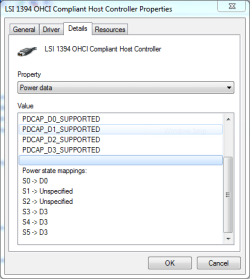
I've also attached a screenshot of the power data device property.
(Notice the unspecified...?)

gregrocker, to be honest, I think I fixed the problem because of the very fact I booted into that recovery mode in the first place. My theory is, by doing so, Window's advanced power management features were not utilized, so the problem causing low power 'D3' never initialized, allowing the OHCI driver to load properly. Then when I rebooted, the driver had already loaded properly so when the machine entered a D3 mode again the OHCI correctly did a soft reset.


That's only a theory though. Perhaps you (or another member) can verify and/or correct my theory.

Interesting to say the least. I feel like Sherlock Holmes now. :D

All this info does lead me to one more question though; should I install Microsoft's hotfix or leave it alone now that it's working?

(And yes you deserve the Rep by the way. :cool:)

Sincerely,

Andrew
 

Attachments

  • ohci1394.PNG
    ohci1394.PNG
    10.5 KB · Views: 14
Last edited:

My Computer My Computer

At a glance

Windows 7 Ultimate x86-64, via Bootcamp.2.4 GHz Intel Core 2 Duo.4 GiB DDR3 1066 MHz.NVIDIA GeForce 320M.
Computer Manufacturer/Model Number
2010 Apple MacBook Pro 13'. (Laptop.)
OS
Windows 7 Ultimate x86-64, via Bootcamp.
CPU
2.4 GHz Intel Core 2 Duo.
Memory
4 GiB DDR3 1066 MHz.
Graphics Card(s)
NVIDIA GeForce 320M.
Screen Resolution
1280 x 800.
Hard Drives
250 GB 5400rpm HDD.
Internet Speed
Download: 20.91 Mb/s. Upload: 2.97 Mb/s.
hello,
I have the same problem with Windows 7 professional x32 on my new 2010 MacBook Pro,
13', and followed your instructions but still freezing when reboots and gets to the the desktop screen, any thoughts?

thank you very much,
 

My Computer My Computer

At a glance

32 bit professional
Computer Manufacturer/Model Number
mac
OS
32 bit professional
I suggest you PM Leopard as he has researched this in depth and may be the expert on it outside of Mac forums..
 
my problems with freezing windows 7 booting are the same, can you help

Hi greg and leopard,
\my problems with freezing windows 7 booting are the same, did you already solve this problem?
thank you very much for the reply: [email protected].

Hello again gregrocker,

Andrew -

So glad to hear you found the fix! What tipped you to a combination of chkdsk and Boot Logging?

We use chkdsk for suspected HD issues, and Boot Logging on slow or hanging start-up. So it makes sense it might pinpoint the failing driver if it has only made it to the Starting Windows screen before stalling.

Did you reinstall the driver or how exactly did it resolve since Boot Logging only reports the fail?

I'll remember this when drivers are called into question due to boot stalling. In fact, we should try bootlogging more on failed install startups since we can get to the log through the DVD mini-explorer where Drivers are loaded.

Thanks for reporting back and the rep which I hardly deserve! :eek:

Enjoy Win7 on your Mac. From all I've heard, they're great machines.

Greg

I got the idea for the 'CHKDSK' from my experiences with Linux; 'e2fsck' would check the file system after every unclean shutdown. Thinking of this, I figured it couldn't hurt to check NTFS for incosistencies after a (forced) unclean shutdown.

I got the idea for the boot logging from a thread I started on one my my favorite forums.
Hey guys... Anyone here good with Windows 7 troubleshooting?

And looky what I found greg;

Here is the Microsoft hotfix for the problem (I just found this.):
Computer that has an nVidia MCP7A-GeForce 9300 rev B1 motherboard together with an LSI Logic FW533 or an FW643 1394 Host controller crashes after you install Windows 7 or Windows Server 2008 R2

Here is some information regarding the power states Microsoft listed in the hotfix:
Advanced Configuration and Power Interface - Wikipedia, the free encyclopedia

Here is the ntbtlog.txt from the first successful boot:
Code:
Microsoft (R) Windows (R) Version 6.1 (Build 7600)
 9 26 2010 02:33:49.375
Loaded driver \SystemRoot\system32\ntoskrnl.exe
Loaded driver \SystemRoot\system32\hal.dll
Loaded driver \SystemRoot\system32\kdcom.dll
Loaded driver \SystemRoot\system32\mcupdate_GenuineIntel.dll
Loaded driver \SystemRoot\system32\PSHED.dll
Loaded driver \SystemRoot\system32\CLFS.SYS
Loaded driver \SystemRoot\system32\CI.dll
Loaded driver \SystemRoot\system32\drivers\Wdf01000.sys
Loaded driver \SystemRoot\system32\drivers\WDFLDR.SYS
Loaded driver \SystemRoot\system32\DRIVERS\ACPI.sys
Loaded driver \SystemRoot\system32\DRIVERS\WMILIB.SYS
Loaded driver \SystemRoot\system32\DRIVERS\msisadrv.sys
Loaded driver \SystemRoot\system32\DRIVERS\pci.sys
Loaded driver \SystemRoot\system32\DRIVERS\vdrvroot.sys
Loaded driver \SystemRoot\System32\drivers\partmgr.sys
Loaded driver \SystemRoot\system32\DRIVERS\compbatt.sys
Loaded driver \SystemRoot\system32\DRIVERS\BATTC.SYS
Loaded driver \SystemRoot\system32\DRIVERS\volmgr.sys
Loaded driver \SystemRoot\System32\drivers\volmgrx.sys
Loaded driver \SystemRoot\system32\DRIVERS\pciide.sys
Loaded driver \SystemRoot\system32\DRIVERS\PCIIDEX.SYS
Loaded driver \SystemRoot\System32\Drivers\AppleMNT.sys
Loaded driver \SystemRoot\System32\drivers\mountmgr.sys
Loaded driver \SystemRoot\system32\DRIVERS\atapi.sys
Loaded driver \SystemRoot\system32\DRIVERS\ataport.SYS
Loaded driver \SystemRoot\system32\DRIVERS\amdxata.sys
Loaded driver \SystemRoot\system32\drivers\fltmgr.sys
Loaded driver \SystemRoot\system32\drivers\fileinfo.sys
Loaded driver \SystemRoot\System32\Drivers\Ntfs.sys
Loaded driver \SystemRoot\System32\Drivers\msrpc.sys
Loaded driver \SystemRoot\System32\Drivers\ksecdd.sys
Loaded driver \SystemRoot\System32\Drivers\cng.sys
Loaded driver \SystemRoot\System32\drivers\pcw.sys
Loaded driver \SystemRoot\System32\Drivers\AppleHFS.sys
Loaded driver \SystemRoot\System32\Drivers\Fs_Rec.sys
Loaded driver \SystemRoot\system32\drivers\ndis.sys
Loaded driver \SystemRoot\system32\drivers\NETIO.SYS
Loaded driver \SystemRoot\System32\Drivers\ksecpkg.sys
Loaded driver \SystemRoot\System32\drivers\tcpip.sys
Loaded driver \SystemRoot\System32\drivers\fwpkclnt.sys
Loaded driver \SystemRoot\system32\DRIVERS\vmstorfl.sys
Loaded driver \SystemRoot\system32\DRIVERS\volsnap.sys
Loaded driver \SystemRoot\System32\Drivers\spldr.sys
Loaded driver \SystemRoot\System32\drivers\rdyboost.sys
Loaded driver \SystemRoot\System32\Drivers\mup.sys
Loaded driver \SystemRoot\System32\drivers\hwpolicy.sys
Loaded driver \SystemRoot\System32\DRIVERS\fvevol.sys
Loaded driver \SystemRoot\system32\DRIVERS\disk.sys
Loaded driver \SystemRoot\system32\DRIVERS\CLASSPNP.SYS
Loaded driver \SystemRoot\system32\DRIVERS\cdrom.sys
Loaded driver \SystemRoot\System32\Drivers\Null.SYS
Loaded driver \SystemRoot\System32\Drivers\Beep.SYS
Loaded driver \SystemRoot\System32\drivers\vga.sys
Loaded driver \SystemRoot\System32\DRIVERS\RDPCDD.sys
Loaded driver \SystemRoot\system32\drivers\rdpencdd.sys
Loaded driver \SystemRoot\system32\drivers\rdprefmp.sys
Loaded driver \SystemRoot\System32\Drivers\Msfs.SYS
Loaded driver \SystemRoot\System32\Drivers\Npfs.SYS
Loaded driver \SystemRoot\system32\DRIVERS\tdx.sys
Loaded driver \SystemRoot\system32\drivers\afd.sys
Loaded driver \SystemRoot\System32\DRIVERS\netbt.sys
Loaded driver \SystemRoot\system32\DRIVERS\wfplwf.sys
Loaded driver \SystemRoot\system32\DRIVERS\pacer.sys
Loaded driver \SystemRoot\system32\DRIVERS\vwififlt.sys
Loaded driver \SystemRoot\system32\DRIVERS\netbios.sys
Loaded driver \SystemRoot\system32\DRIVERS\wanarp.sys
Loaded driver \SystemRoot\system32\DRIVERS\termdd.sys
Loaded driver \SystemRoot\system32\DRIVERS\rdbss.sys
Loaded driver \SystemRoot\system32\drivers\nsiproxy.sys
Loaded driver \SystemRoot\system32\DRIVERS\mssmbios.sys
Loaded driver \SystemRoot\System32\drivers\discache.sys
Loaded driver \SystemRoot\system32\drivers\csc.sys
Loaded driver \SystemRoot\System32\Drivers\dfsc.sys
Loaded driver \SystemRoot\system32\DRIVERS\blbdrive.sys
Loaded driver \SystemRoot\system32\DRIVERS\tunnel.sys
Loaded driver \SystemRoot\system32\DRIVERS\intelppm.sys
Loaded driver \SystemRoot\system32\DRIVERS\CmBatt.sys
Loaded driver \SystemRoot\system32\DRIVERS\acpials.sys
Loaded driver \SystemRoot\system32\DRIVERS\nvsmu.sys
Loaded driver \SystemRoot\system32\DRIVERS\usbohci.sys
Loaded driver \SystemRoot\system32\DRIVERS\usbehci.sys
Loaded driver \SystemRoot\system32\DRIVERS\HDAudBus.sys
Loaded driver \SystemRoot\system32\DRIVERS\1394ohci.sys
Loaded driver \SystemRoot\system32\DRIVERS\bcmwl664.sys
Loaded driver \SystemRoot\system32\DRIVERS\vwifibus.sys
Loaded driver \SystemRoot\system32\DRIVERS\b57nd60a.sys
Loaded driver \SystemRoot\System32\drivers\dxgkrnl.sys
Loaded driver \SystemRoot\system32\DRIVERS\nvlddmkm.sys
Loaded driver \SystemRoot\system32\DRIVERS\CompositeBus.sys
Loaded driver \SystemRoot\system32\DRIVERS\AgileVpn.sys
Loaded driver \SystemRoot\system32\DRIVERS\rasl2tp.sys
Loaded driver \SystemRoot\system32\DRIVERS\ndistapi.sys
Loaded driver \SystemRoot\system32\DRIVERS\ndiswan.sys
Loaded driver \SystemRoot\system32\DRIVERS\raspppoe.sys
Loaded driver \SystemRoot\system32\DRIVERS\raspptp.sys
Loaded driver \SystemRoot\system32\DRIVERS\rassstp.sys
Loaded driver \SystemRoot\system32\DRIVERS\rdpbus.sys
Loaded driver \SystemRoot\system32\DRIVERS\kbdclass.sys
Loaded driver \SystemRoot\system32\DRIVERS\mouclass.sys
Loaded driver \SystemRoot\system32\DRIVERS\swenum.sys
Loaded driver \SystemRoot\system32\DRIVERS\umbus.sys
Loaded driver \SystemRoot\system32\DRIVERS\usbhub.sys
Did not load driver \SystemRoot\System32\drivers\vga.sys
Loaded driver \SystemRoot\System32\Drivers\NDProxy.SYS
Did not load driver \SystemRoot\System32\Drivers\NDProxy.SYS
Loaded driver \SystemRoot\system32\DRIVERS\CS420x64.sys
Loaded driver \SystemRoot\system32\drivers\HdAudio.sys
Loaded driver \SystemRoot\system32\drivers\ksthunk.sys
Loaded driver \SystemRoot\system32\drivers\nvhda64v.sys
Loaded driver \SystemRoot\system32\DRIVERS\usbccgp.sys
Loaded driver \SystemRoot\System32\Drivers\usbvideo.sys
Loaded driver \SystemRoot\system32\DRIVERS\monitor.sys
Loaded driver \SystemRoot\system32\DRIVERS\USBSTOR.SYS
Loaded driver \SystemRoot\system32\DRIVERS\KeyMagic.sys
Loaded driver \SystemRoot\system32\DRIVERS\hidusb.sys
Loaded driver \SystemRoot\system32\DRIVERS\applemtp.sys
Loaded driver \SystemRoot\system32\DRIVERS\applemtm.sys
Loaded driver \SystemRoot\system32\DRIVERS\kbdhid.sys
Loaded driver \SystemRoot\system32\DRIVERS\mouhid.sys
Loaded driver \SystemRoot\system32\DRIVERS\IRFilter.sys
Loaded driver \SystemRoot\system32\DRIVERS\AppleBtBc.sys
Loaded driver \SystemRoot\System32\Drivers\BTHUSB.sys
Loaded driver \SystemRoot\system32\DRIVERS\rfcomm.sys
Loaded driver \SystemRoot\system32\DRIVERS\BthEnum.sys
Loaded driver \SystemRoot\system32\DRIVERS\bthpan.sys
Loaded driver \SystemRoot\system32\drivers\luafv.sys
Loaded driver \SystemRoot\system32\drivers\WudfPf.sys
Loaded driver \SystemRoot\system32\DRIVERS\acpials.sys
Loaded driver \SystemRoot\system32\DRIVERS\WUDFRd.sys
Loaded driver \SystemRoot\system32\DRIVERS\lltdio.sys
Loaded driver \SystemRoot\system32\DRIVERS\nwifi.sys
Loaded driver \SystemRoot\system32\DRIVERS\ndisuio.sys
Loaded driver \SystemRoot\system32\DRIVERS\rspndr.sys
Loaded driver \SystemRoot\system32\drivers\HTTP.sys
Loaded driver \SystemRoot\system32\DRIVERS\bowser.sys
Loaded driver \SystemRoot\System32\drivers\mpsdrv.sys
Loaded driver \SystemRoot\system32\DRIVERS\mrxsmb.sys
Loaded driver \SystemRoot\system32\DRIVERS\mrxsmb10.sys
Loaded driver \SystemRoot\system32\DRIVERS\mrxsmb20.sys
Loaded driver \??\C:\Windows\system32\drivers\KeyAgent.sys
Loaded driver \??\C:\Windows\system32\drivers\MacHALDriver.sys
Loaded driver \SystemRoot\system32\drivers\peauth.sys
Loaded driver \SystemRoot\System32\Drivers\secdrv.SYS
Loaded driver \SystemRoot\System32\DRIVERS\srvnet.sys
Loaded driver \SystemRoot\System32\drivers\tcpipreg.sys
Loaded driver \SystemRoot\System32\DRIVERS\srv2.sys
Loaded driver \SystemRoot\System32\DRIVERS\srv.sys
Did not load driver \SystemRoot\System32\DRIVERS\srv.sys
[B]Loaded driver \SystemRoot\system32\DRIVERS\1394ohci.sys[/B]

Notice the last line...

I've also attached a screenshot of the power data device property.
(Notice the unspecified...?)

gregrocker, to be honest, I think I fixed the problem because of the very fact I booted into that recovery mode in the first place. My theory is, by doing so, Window's advanced power management features were not utilized, so the problem causing low power 'D3' never initialized, allowing the OHCI driver to load properly. Then when I rebooted, the driver had already loaded properly so when the machine entered a D3 mode again the OHCI correctly did a soft reset.


That's only a theory though. Perhaps you (or another member) can verify and/or correct my theory.

Interesting to say the least. I feel like Sherlock Holmes now. :D

All this info does lead me to one more question though; should I install Microsoft's hotfix or leave it alone now that it's working?

(And yes you deserve the Rep by the way. :cool:)

Sincerely,

Andrew
 

My Computer My Computer

At a glance

OSX and windows 7 home premium x64
OS
OSX and windows 7 home premium x64
If your issues are not the same as Leopard's above and therefore won't respond to the fixes he used, then please start another thread in the General section. Use a descriptive title that will catch the attention of those who know about your issue, include all details of the problem, what you have tried and the results of each.
 
Back
Top