win7 64bit only recognizing 6gig of my 8gig of ram

HeroGhost

New member
Member
Local time
10:27 AM
Messages
54
I just built a win7 home premium 64-bit system with 8gig(4x2gig sticks) of ram in a triple channel mode. When I use cpu-z to check on my ram, it see's all at gigs at their proper timings and recognizes the triple channel set up. However, windows system configuration is only listing 6gigs. Is there something I'm missing about setting up windows to recognize this? Does windows not recognize triple channel set ups?
 

My Computer My Computer

At a glance

Windows 7 Home Premium 64-bitIntel Q6600 2.4ghz4 gig CorsairEVGA 8800 GTS(512)
OS
Windows 7 Home Premium 64-bit
CPU
Intel Q6600 2.4ghz
Motherboard
MSI P6N Diamond SLI
Memory
4 gig Corsair
Graphics Card(s)
EVGA 8800 GTS(512)
Sound Card
Soundblaster X-Fi Titanium
Monitor(s) Displays
HP LP2275w
Screen Resolution
1680x1050
Hard Drives
2 80 gig raptor drives
1 320 gig WD
PSU
750w
Case
lian li
Never mind. I had to set the DRAM bus voltage manually to 1.65v and now all memory is recognized. Just an FYI if anyone else runs into the same issue.

Scratch that. Now windows only sometimes recognizes all the ram. I'm not sure what's going on, but this is getting frustrated. For some reason it's leaving out 1 stick every other time I turn it on.
 
Last edited:

My Computer My Computer

At a glance

Windows 7 Home Premium 64-bitIntel Q6600 2.4ghz4 gig CorsairEVGA 8800 GTS(512)
OS
Windows 7 Home Premium 64-bit
CPU
Intel Q6600 2.4ghz
Motherboard
MSI P6N Diamond SLI
Memory
4 gig Corsair
Graphics Card(s)
EVGA 8800 GTS(512)
Sound Card
Soundblaster X-Fi Titanium
Monitor(s) Displays
HP LP2275w
Screen Resolution
1680x1050
Hard Drives
2 80 gig raptor drives
1 320 gig WD
PSU
750w
Case
lian li
from a cold start, it will only recognize 6 gig of ram.... From just a restart, all 8 will appear. This leads me to think it's some sort of power issue, but I'm not really sure how to solve it. Any help or insight into what this might be?
 

My Computer My Computer

At a glance

Windows 7 Home Premium 64-bitIntel Q6600 2.4ghz4 gig CorsairEVGA 8800 GTS(512)
OS
Windows 7 Home Premium 64-bit
CPU
Intel Q6600 2.4ghz
Motherboard
MSI P6N Diamond SLI
Memory
4 gig Corsair
Graphics Card(s)
EVGA 8800 GTS(512)
Sound Card
Soundblaster X-Fi Titanium
Monitor(s) Displays
HP LP2275w
Screen Resolution
1680x1050
Hard Drives
2 80 gig raptor drives
1 320 gig WD
PSU
750w
Case
lian li
Not sure where to point you but this,

I just built a win7 home premium 64-bit system with 8gig(4x2gig sticks) of ram in a triple channel mode. When I use cpu-z to check on my ram, it see's all at gigs at their proper timings and recognizes the triple channel set up.

isn't possible, even more so when only the i7/socket 1366 support triple channel.

MSI USA – Computer, Laptop, Notebook, Desktop, Mainboard, Graphics and more

Bult_ar_org.gif
Main Memory


• Supports dual channel DDR2 533/667/800, using four 240-pin/1.8V DDR2 DIMMs.
• Supports a maximum memory size up to 16GB

Are all sticks the same make and specs?
 

My Computer My Computer

At a glance

Win 7 Ultimate x64FX-8350 @ 4.6 GHz so farADATA XPG V1 Series Black 8GB DDR3 1600Sapphire R9 270x Dual-X
Computer type
PC/Desktop
Computer Manufacturer/Model Number
Me
OS
Win 7 Ultimate x64
CPU
FX-8350 @ 4.6 GHz so far
Motherboard
Asus M5A97 EVO
Memory
ADATA XPG V1 Series Black 8GB DDR3 1600
Graphics Card(s)
Sapphire R9 270x Dual-X
Sound Card
Xonar DGX w/ Corsair Vengence 1300
Monitor(s) Displays
Acer S232HL Abid
Screen Resolution
1920x1080
Hard Drives
120 GB OCZ Vertex 3
500 GB Seagate 7200.12
PSU
Antec Earthwatts 650W Green
Case
Antec Three Hundred
Cooling
Cooler Master 212 EVO
Keyboard
Logitech G510
Mouse
Logitech G500s
Internet Speed
35000/3000
From what you're referencing, I'm assuming you're looking at my specs in my sig, which is accurate for my system, but not the system I just built.

This is the motherboard for the system I'm having problems with:
Newegg.com - ASUS Sabertooth X58 LGA 1366 Intel X58 SATA 6Gb/s USB 3.0 ATX Intel Motherboard

and this is the ram:
Newegg.com - CORSAIR XMS3 8GB (4 x 2GB) 240-Pin DDR3 SDRAM DDR3 1600 (PC3 12800) Desktop Memory Model CMX8GX3M4A1600C9

In the bios I manually set the voltage for the ram bus to 1.65 and I set the memory type to ddr3-1600.

Like I said, from a cold boot windows will only recognize the 6 gigs, it's leaving out a stick and I don't know why. From a restart, all of the memory is recognized. I'm not able to tell why.

The full specs of the machine I'm building(I suppose this would've been helpful in the first place):
Intel Core i7-950 Bloomfield 3.06GHz LGA 1366 130W Quad-Core Processor BX80601950
CORSAIR XMS3 8GB (4 x 2GB) 240-Pin DDR3 SDRAM DDR3 1600 (PC3 12800) Desktop Memory Model CMX8GX3M4A1600C9
ASUS Sabertooth X58 LGA 1366 Intel X58 SATA 6Gb/s USB 3.0 ATX Intel Motherboard
SAPPHIRE Vapor-X 100281VX-2SR Radeon HD 5870 1GB 256-bit GDDR5 PCI Express 2.0 x16 HDCP Ready CrossFireX Support Video Card ...
Western Digital Caviar Blue WD5000AAKS 500GB 7200 RPM SATA 3.0Gb/s 3.5" Internal Hard Drive -Bare Drive
CORSAIR CMPSU-750TX 750W ATX12V / EPS12V SLI Ready CrossFire Ready 80 PLUS Certified Active PFC Compatible with Core i7 Power ...
Antec Three Hundred Illusion Black Steel ATX Mid Tower Computer Case
ASUS DRW-24B1ST/BLK/B/AS Black SATA 24X DVD Burner - Bulk - OEM
Microsoft Windows 7 Home Premium 64-bit 1-Pack for System Builders - OEM
 

My Computer My Computer

At a glance

Windows 7 Home Premium 64-bitIntel Q6600 2.4ghz4 gig CorsairEVGA 8800 GTS(512)
OS
Windows 7 Home Premium 64-bit
CPU
Intel Q6600 2.4ghz
Motherboard
MSI P6N Diamond SLI
Memory
4 gig Corsair
Graphics Card(s)
EVGA 8800 GTS(512)
Sound Card
Soundblaster X-Fi Titanium
Monitor(s) Displays
HP LP2275w
Screen Resolution
1680x1050
Hard Drives
2 80 gig raptor drives
1 320 gig WD
PSU
750w
Case
lian li
Someone needs to update their specs. ;)

Hopefully someone with a similar setup can offer more, but at the moment the only thing I can see is that that memory is not on the QVL for that CPU. It is on the QVL for the Gulftown based one's, but not the Bloomfield one's. The QVL isn't the be all and end all of what will and won't work, but it is a place to start.
 

My Computer My Computer

At a glance

Win 7 Ultimate x64FX-8350 @ 4.6 GHz so farADATA XPG V1 Series Black 8GB DDR3 1600Sapphire R9 270x Dual-X
Computer type
PC/Desktop
Computer Manufacturer/Model Number
Me
OS
Win 7 Ultimate x64
CPU
FX-8350 @ 4.6 GHz so far
Motherboard
Asus M5A97 EVO
Memory
ADATA XPG V1 Series Black 8GB DDR3 1600
Graphics Card(s)
Sapphire R9 270x Dual-X
Sound Card
Xonar DGX w/ Corsair Vengence 1300
Monitor(s) Displays
Acer S232HL Abid
Screen Resolution
1920x1080
Hard Drives
120 GB OCZ Vertex 3
500 GB Seagate 7200.12
PSU
Antec Earthwatts 650W Green
Case
Antec Three Hundred
Cooling
Cooler Master 212 EVO
Keyboard
Logitech G510
Mouse
Logitech G500s
Internet Speed
35000/3000
well I just pulled the stick and reseated it, and then I updated some mobo drivers. At the moment it looks like it's working, but I'm going to leave it off for a while then try again. I think it's the drivers more than the seating, because I checked to make sure it was secure several times. Plus I ran a memory test with MemTest86+ without error and everything was detected. Hopefully the drivers were the issue.

Someone needs to update their specs. ;)

Not keeping it, so I won't be doing that. This is a system for the parents. :geek:
 

My Computer My Computer

At a glance

Windows 7 Home Premium 64-bitIntel Q6600 2.4ghz4 gig CorsairEVGA 8800 GTS(512)
OS
Windows 7 Home Premium 64-bit
CPU
Intel Q6600 2.4ghz
Motherboard
MSI P6N Diamond SLI
Memory
4 gig Corsair
Graphics Card(s)
EVGA 8800 GTS(512)
Sound Card
Soundblaster X-Fi Titanium
Monitor(s) Displays
HP LP2275w
Screen Resolution
1680x1050
Hard Drives
2 80 gig raptor drives
1 320 gig WD
PSU
750w
Case
lian li
Ooops!
 
Last edited:

My Computer My Computer

At a glance

Windows7 Pro 64bit SP-1; Windows XP Pro 32bitIntel Core i7-870 Lynnfield 2.93GHz LGA 1156 ...8GB@1400MHz Crucial Ballistix DDR3-1600 4x2GBASUS ENGTX460 DirectCU/2DI/1GD5 1GB 256-bit G...
Computer Manufacturer/Model Number
Hopalong/ Godzilla
OS
Windows7 Pro 64bit SP-1; Windows XP Pro 32bit
CPU
Intel Core i7-870 Lynnfield 2.93GHz LGA 1156 95W Quad-Core
Motherboard
ASUS P7P55D-E PRO
Memory
8GB@1400MHz Crucial Ballistix DDR3-1600 4x2GB
Graphics Card(s)
ASUS ENGTX460 DirectCU/2DI/1GD5 1GB 256-bit GDDR5
Sound Card
VIA Onboard
Monitor(s) Displays
Asus VS248H-P 24"; Samsung SyncMaster 941BW 19"ws
Screen Resolution
1920x1080; 1440x900
Hard Drives
Samsung 830 120GB SSD
Intel 320 120GB SSD
Western Digital Caviar Black WD7501AALS 750GB 7200 RPM SATA 3.0Gb/s
Western Digital Caviar Black WD6401AALS 640GB 7200 RPM SATA 3.0Gb/s
PSU
COOLER MASTER Silent Pro RS850-AMBAJ3-US 850W Modular
Case
COOLER MASTER HAF 932 RC-932-KKN5-GP Black
Cooling
Scythe "Mugen-2 Rev.B" (2 ScytheKaze-Jyuni PWM fans)
Keyboard
Logitech K-320
Mouse
Kensington
Antivirus
Avast Inernet Suite
Browser
IE 9 ; Chrome
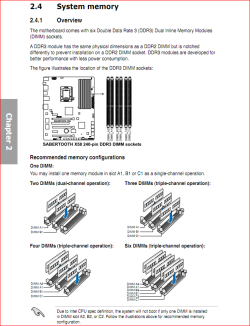
Hopalong you would thinks so but,

triplechannel.PNG

from the manual for that motherboard.
 

My Computer My Computer

At a glance

Win 7 Ultimate x64FX-8350 @ 4.6 GHz so farADATA XPG V1 Series Black 8GB DDR3 1600Sapphire R9 270x Dual-X
Computer type
PC/Desktop
Computer Manufacturer/Model Number
Me
OS
Win 7 Ultimate x64
CPU
FX-8350 @ 4.6 GHz so far
Motherboard
Asus M5A97 EVO
Memory
ADATA XPG V1 Series Black 8GB DDR3 1600
Graphics Card(s)
Sapphire R9 270x Dual-X
Sound Card
Xonar DGX w/ Corsair Vengence 1300
Monitor(s) Displays
Acer S232HL Abid
Screen Resolution
1920x1080
Hard Drives
120 GB OCZ Vertex 3
500 GB Seagate 7200.12
PSU
Antec Earthwatts 650W Green
Case
Antec Three Hundred
Cooling
Cooler Master 212 EVO
Keyboard
Logitech G510
Mouse
Logitech G500s
Internet Speed
35000/3000
Now that is weird. LOL:confused:

Before I bought this board I was also looking at a 58 chip set board but not the Sabertooth and it specifically said not do do what you have done.

Different board.
Mia culpa!
My apologies.

Mike
 

My Computer My Computer

At a glance

Windows7 Pro 64bit SP-1; Windows XP Pro 32bitIntel Core i7-870 Lynnfield 2.93GHz LGA 1156 ...8GB@1400MHz Crucial Ballistix DDR3-1600 4x2GBASUS ENGTX460 DirectCU/2DI/1GD5 1GB 256-bit G...
Computer Manufacturer/Model Number
Hopalong/ Godzilla
OS
Windows7 Pro 64bit SP-1; Windows XP Pro 32bit
CPU
Intel Core i7-870 Lynnfield 2.93GHz LGA 1156 95W Quad-Core
Motherboard
ASUS P7P55D-E PRO
Memory
8GB@1400MHz Crucial Ballistix DDR3-1600 4x2GB
Graphics Card(s)
ASUS ENGTX460 DirectCU/2DI/1GD5 1GB 256-bit GDDR5
Sound Card
VIA Onboard
Monitor(s) Displays
Asus VS248H-P 24"; Samsung SyncMaster 941BW 19"ws
Screen Resolution
1920x1080; 1440x900
Hard Drives
Samsung 830 120GB SSD
Intel 320 120GB SSD
Western Digital Caviar Black WD7501AALS 750GB 7200 RPM SATA 3.0Gb/s
Western Digital Caviar Black WD6401AALS 640GB 7200 RPM SATA 3.0Gb/s
PSU
COOLER MASTER Silent Pro RS850-AMBAJ3-US 850W Modular
Case
COOLER MASTER HAF 932 RC-932-KKN5-GP Black
Cooling
Scythe "Mugen-2 Rev.B" (2 ScytheKaze-Jyuni PWM fans)
Keyboard
Logitech K-320
Mouse
Kensington
Antivirus
Avast Inernet Suite
Browser
IE 9 ; Chrome
Question

CPU-Z see all of the memory -- right?
Win sees it sometimes -- right?

What is your Bios seeing, is it all the time or sometimes.

If the bios fails to some times see all the memory. One cause could be some contaminant in the cpu socket that is borderline on shuting off one of the mem sockets. To rule that out you could remove the CPU and inspect the socket with a magnifying glass. You would have to look at it from all angles. This would be small and very hard to see.

I went this route once, and it was a minute piece of packing (foam) in the socket. Really hard to see.
 

My Computer My Computer

At a glance

win 7 X64 Ultimate SP1I3770KG Skill F3-14900CL9-4GBXL x 4NVIDIA GeForce GTX670 + Intel 4000
Computer Manufacturer/Model Number
BGC (Bob's Garage Crew)
OS
win 7 X64 Ultimate SP1
CPU
I3770K
Motherboard
Asus P8Z77-V Deluxe
Memory
G Skill F3-14900CL9-4GBXL x 4
Graphics Card(s)
NVIDIA GeForce GTX670 + Intel 4000
Sound Card
Realtek HD 5.1 (MOB)
Monitor(s) Displays
Asus VW224T (1)
Screen Resolution
1920 x 1080
Hard Drives
SATA Corsair Force GT 2.5" 180GB (System) Sata 3
OCZ Vertex3 120GB
OCZ Vertex 2 120GB 2.5" SATA II
ST31000524AS 1000.2GB
WD15EARS (External)
PSU
CoolerMaster 1000 Watt
Case
CoolerMaster HAF X
Cooling
CPU -- CoolerMaster 520N
Keyboard
MS Wireless 3000 V2
Mouse
MS Wireless 3000 V2
Internet Speed
Cable
Antivirus
Norton Internet Security
Browser
IE9
Other Info
AMI Bios 1805
OC'd 3%

My Computer My Computer

At a glance

Windows 7 Home Premium 64-bitIntel Q6600 2.4ghz4 gig CorsairEVGA 8800 GTS(512)
OS
Windows 7 Home Premium 64-bit
CPU
Intel Q6600 2.4ghz
Motherboard
MSI P6N Diamond SLI
Memory
4 gig Corsair
Graphics Card(s)
EVGA 8800 GTS(512)
Sound Card
Soundblaster X-Fi Titanium
Monitor(s) Displays
HP LP2275w
Screen Resolution
1680x1050
Hard Drives
2 80 gig raptor drives
1 320 gig WD
PSU
750w
Case
lian li
CPU-Z see all of the memory -- right?
Win sees it sometimes -- right?

What is your Bios seeing, is it all the time or sometimes.

If the bios fails to some times see all the memory. One cause could be some contaminant in the cpu socket that is borderline on shuting off one of the mem sockets. To rule that out you could remove the CPU and inspect the socket with a magnifying glass. You would have to look at it from all angles. This would be small and very hard to see.

I went this route once, and it was a minute piece of packing (foam) in the socket. Really hard to see.

I might leave this as a last resort.
CPU-Z always sees it, and the bios always sees it. I've even run memtest86+ to double check the ram and I get no errors. Windows will always see it from a warm or restart, but will not see it on a cold start.
 

My Computer My Computer

At a glance

Windows 7 Home Premium 64-bitIntel Q6600 2.4ghz4 gig CorsairEVGA 8800 GTS(512)
OS
Windows 7 Home Premium 64-bit
CPU
Intel Q6600 2.4ghz
Motherboard
MSI P6N Diamond SLI
Memory
4 gig Corsair
Graphics Card(s)
EVGA 8800 GTS(512)
Sound Card
Soundblaster X-Fi Titanium
Monitor(s) Displays
HP LP2275w
Screen Resolution
1680x1050
Hard Drives
2 80 gig raptor drives
1 320 gig WD
PSU
750w
Case
lian li
i'm having a hard time gauging when the problem is happening now. I've just tried some cold boots and restarts and the ram is always showing up correctly. However before that I had left the computer off for several hours and when I started it up the ram wasn't visible to windows. I'm going to leave it off for a couple hours again, and then check the bios when I turn it on. Could it possibly be some a bent pin or something that's only hitting the ram stick onces it's warm?

it's throwin me for a loop.
 

My Computer My Computer

At a glance

Windows 7 Home Premium 64-bitIntel Q6600 2.4ghz4 gig CorsairEVGA 8800 GTS(512)
OS
Windows 7 Home Premium 64-bit
CPU
Intel Q6600 2.4ghz
Motherboard
MSI P6N Diamond SLI
Memory
4 gig Corsair
Graphics Card(s)
EVGA 8800 GTS(512)
Sound Card
Soundblaster X-Fi Titanium
Monitor(s) Displays
HP LP2275w
Screen Resolution
1680x1050
Hard Drives
2 80 gig raptor drives
1 320 gig WD
PSU
750w
Case
lian li
OK, I'm confused.... If you have a 1366 system that uses triple channel memory... why are you only using 8gig? Sort of like using 3gig on a 4gig board.

You might want to check with the manufacture but, I would think that board would like either 6 or 12gig of RAM, 8 is one of those 'tweena issues that's probably confusing the system.

1- Also how did you purchase your memory? Was it in pairs?
2- And pairs of what? - 2gig packs, 3gig packs, or what?

Edit: You have the wrong memory package! Even though that memory supports i7 it is packaged and designed for the i7-800 series processors (P55 chipset) Dual channel.

Since you have a X85 chipset MB, you'd have to have an i7-900 series processor which would be a triple channel memory.

You should have got something like this... Newegg.com - CORSAIR DOMINATOR 6GB (3 x 2GB) 240-Pin DDR3 SDRAM DDR3 1600 (PC3 12800) Triple Channel Kit Desktop Memory Model TR3X6G1600C8D

Thus my questions above about the memory pairs
 

My Computer My Computer

At a glance

Windows 10 ProIntel Core i7-4770K (3.5Ghz)32 gig Corsair Dominator Platinum (4x8Gig)Sapphire Tri-X R9 Fury
Computer type
PC/Desktop
Computer Manufacturer/Model Number
Custom built by me.
OS
Windows 10 Pro
CPU
Intel Core i7-4770K (3.5Ghz)
Motherboard
Gigabyte G1 Sniper 5 (F10 Bios)
Memory
32 gig Corsair Dominator Platinum (4x8Gig)
Graphics Card(s)
Sapphire Tri-X R9 Fury
Sound Card
Soundblaster ZXR
Monitor(s) Displays
NEC PA242W 24" LCD Monitor
Screen Resolution
1920 x 1200
Hard Drives
Primary - Samsung 850 Pro (512gig), Samsung 840 Pro (256gig), 2TB WD Caviar Black.
PSU
EVGA Supernova 1000 G2
Case
Cooler Master HAF X
Cooling
Corsair H100i with Corsair Air Series SP120 Quiet Fans
Keyboard
Logitech Wireless Wave
Mouse
Logitech Performance MX
Internet Speed
High Speed Cable
Antivirus
Norton Security
Browser
IE11
Other Info
Memory Timings - 1866MHz @ 9-9-9-27-1T @ 1.5 volts
OK, I'm confused.... If you have a 1366 system that uses triple channel memory... why are you only using 8gig? Sort of like using 3gig on a 4gig board.

You might want to check with the manufacture but, I would think that board would like either 6 or 12gig of RAM, 8 is one of those 'tweena issues that's probably confusing the system.

1- Also how did you purchase your memory? Was it in pairs?
2- And pairs of what? - 2gig packs, 3gig packs, or what?


You can see the purchases from the links in the previous posts. one pack of 4 sticks memory. I suppose it's possible that it's confusing the system, but it supposedly would be able to handle it. Did I buy the wrong ram? Shoot, i probably did.. My thinking was that the only difference between the dual and triple channel was how many sticks there were in the pack. I didn't think it would have an adverse effect on the system.
 

My Computer My Computer

At a glance

Windows 7 Home Premium 64-bitIntel Q6600 2.4ghz4 gig CorsairEVGA 8800 GTS(512)
OS
Windows 7 Home Premium 64-bit
CPU
Intel Q6600 2.4ghz
Motherboard
MSI P6N Diamond SLI
Memory
4 gig Corsair
Graphics Card(s)
EVGA 8800 GTS(512)
Sound Card
Soundblaster X-Fi Titanium
Monitor(s) Displays
HP LP2275w
Screen Resolution
1680x1050
Hard Drives
2 80 gig raptor drives
1 320 gig WD
PSU
750w
Case
lian li
My thinking was that the only difference between the dual and triple channel was how many sticks there were in the pack. I didn't think it would have an adverse effect on the system.

Well.... :shock:


You've got the wrong package. You'll want to go with either a 6gig or 12gig config. And you want them in a set.

And you want something like this... Newegg.com - CORSAIR DOMINATOR 6GB (3 x 2GB) 240-Pin DDR3 SDRAM DDR3 1600 (PC3 12800) Triple Channel Kit Desktop Memory Model TR3X6G1600C8D
 

My Computer My Computer

At a glance

Windows 10 ProIntel Core i7-4770K (3.5Ghz)32 gig Corsair Dominator Platinum (4x8Gig)Sapphire Tri-X R9 Fury
Computer type
PC/Desktop
Computer Manufacturer/Model Number
Custom built by me.
OS
Windows 10 Pro
CPU
Intel Core i7-4770K (3.5Ghz)
Motherboard
Gigabyte G1 Sniper 5 (F10 Bios)
Memory
32 gig Corsair Dominator Platinum (4x8Gig)
Graphics Card(s)
Sapphire Tri-X R9 Fury
Sound Card
Soundblaster ZXR
Monitor(s) Displays
NEC PA242W 24" LCD Monitor
Screen Resolution
1920 x 1200
Hard Drives
Primary - Samsung 850 Pro (512gig), Samsung 840 Pro (256gig), 2TB WD Caviar Black.
PSU
EVGA Supernova 1000 G2
Case
Cooler Master HAF X
Cooling
Corsair H100i with Corsair Air Series SP120 Quiet Fans
Keyboard
Logitech Wireless Wave
Mouse
Logitech Performance MX
Internet Speed
High Speed Cable
Antivirus
Norton Security
Browser
IE11
Other Info
Memory Timings - 1866MHz @ 9-9-9-27-1T @ 1.5 volts
My thinking was that the only difference between the dual and triple channel was how many sticks there were in the pack. I didn't think it would have an adverse effect on the system.

Well.... :shock:


You've got the wrong package. You'll want to go with either a 6gig or 12gig config. And you want them in a set.


Well crap. Guess I might return and pick up the other kit. I'm inquiring with corsair to see what the hardware difference really is, or if it's just a "pack". I've read that the sticks themselves aren't different, it's the memory controller that's different. Where did you see about the chipsets? I don't see anywhere that specifies the P55 i7800 vs the other in the ram details.
 

My Computer My Computer

At a glance

Windows 7 Home Premium 64-bitIntel Q6600 2.4ghz4 gig CorsairEVGA 8800 GTS(512)
OS
Windows 7 Home Premium 64-bit
CPU
Intel Q6600 2.4ghz
Motherboard
MSI P6N Diamond SLI
Memory
4 gig Corsair
Graphics Card(s)
EVGA 8800 GTS(512)
Sound Card
Soundblaster X-Fi Titanium
Monitor(s) Displays
HP LP2275w
Screen Resolution
1680x1050
Hard Drives
2 80 gig raptor drives
1 320 gig WD
PSU
750w
Case
lian li
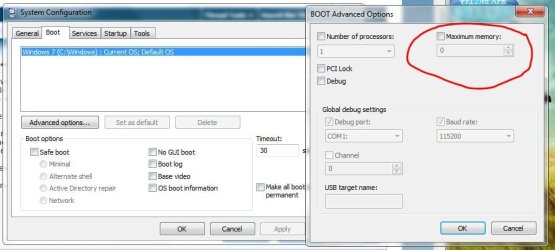
Do you have Maximum Memory set to zero (0) ? Like in my snip ?
 

Attachments

  • Maximum_memory.JPG
    Maximum_memory.JPG
    51.3 KB · Views: 59

My Computer My Computer

At a glance

Win7 Enterprise, Win7 x86 (Ult 7600), Win7 x6...AMD fx8350 4ghz, AMD-32 2400mhz, AMD-64 3200m...2gb, 4gb on the Ult 7600, 4gb on Technet RTM,...Draw my own Graphics, several nVidia cards
Computer type
PC/Desktop
Computer Manufacturer/Model Number
Built them myself, Science Experiments !
OS
Win7 Enterprise, Win7 x86 (Ult 7600), Win7 x64 Ult 7600, TechNet RTM on AMD x64 (2.8Ghz)
CPU
AMD fx8350 4ghz, AMD-32 2400mhz, AMD-64 3200mhz, AMDx64 2.8G
Motherboard
SIS 755, ECS-K8M890M-M (Ult 7600), GigaByte & others
Memory
2gb, 4gb on the Ult 7600, 4gb on Technet RTM, 32gb on FX8350
Graphics Card(s)
Draw my own Graphics, several nVidia cards
Sound Card
on motherboard
Monitor(s) Displays
19" flat scr, 28" I-Inc widescr,22" Emprex Widescr, 23" Acer
Screen Resolution
1280 x 1024, 1440 x 900, 1920 x 1080
Hard Drives
6 pata Ide HD's & 2 Sata HD's
added 80gb external on Ult 7600 computer,
numerous extra 1tb, 2TB, 3Tb SATA HD's
A collection of ext HD Docks w/ HDs
PSU
430w, 550w, 600w, 700, 800, etc
Case
All Generic Full Towers
Cooling
Open Air & a few fans, some w/ colored LEDs
Keyboard
Compaq & Dell recycled from GoodWill
Mouse
Made in China Optical Wired Mouse
Internet Speed
Fast Cable InterNet
Antivirus
AVG Free on 24 different Desktops, NO Problems!
Browser
IE 8 is preferred, but use FireFox sometimes
Other Info
Linksys Routers, switches, & Hubs
Too Many USB Flash Drives to count, Biggest is 64GB !
Eight computers in my home network.
Sixteen computers at my business network.
Linked via TeamViewer !
Lots of old used spare computer parts everywhere!

My Computer My Computer

At a glance

Windows 7 Home Premium 64-bitIntel Q6600 2.4ghz4 gig CorsairEVGA 8800 GTS(512)
OS
Windows 7 Home Premium 64-bit
CPU
Intel Q6600 2.4ghz
Motherboard
MSI P6N Diamond SLI
Memory
4 gig Corsair
Graphics Card(s)
EVGA 8800 GTS(512)
Sound Card
Soundblaster X-Fi Titanium
Monitor(s) Displays
HP LP2275w
Screen Resolution
1680x1050
Hard Drives
2 80 gig raptor drives
1 320 gig WD
PSU
750w
Case
lian li
Back
Top