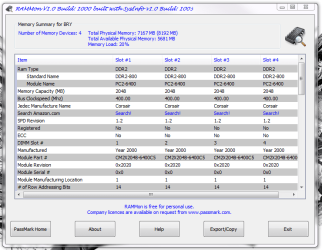
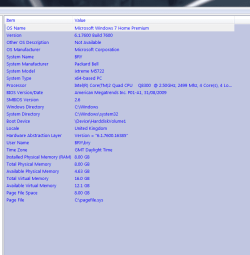
Where did you see about the chipsets? I don't see anywhere that specifies the P55 i7800 vs the other in the ram details.
That's because you don't have a P55 chipset. You have an X58 chipset, the X58 number in your MB model

As for the memory you currently have - you can use it, but it's paired for a dual channel system, the the 4 module kit (4x2)
If you got/get a triple channel kit, it would be packaged in either a 3 or 6 module kit, either 3x2 or 6x2.
So.... if you want, you could just remove one of the modules and just run 6gig. Since the kit is matched anyway it shouldn't be a compatibility problem.
The issue is running an odd (odd as in RAM size) configuration - 8gig as opposed to either 6 or 12gig.
That "may" be what causing the odd issues, the way you have to configure (install) the RAM.
My two cents.
Do you have Maximum Memory set to zero (0) ? Like in my snip ?
it looks like your screenshot
And it should. Don't do anything to it.
My Computer
At a glance
Windows 10 ProIntel Core i7-4770K (3.5Ghz)32 gig Corsair Dominator Platinum (4x8Gig)Sapphire Tri-X R9 Fury
- Computer type
- PC/Desktop
- Computer Manufacturer/Model Number
- Custom built by me.
- OS
- Windows 10 Pro
- CPU
- Intel Core i7-4770K (3.5Ghz)
- Motherboard
- Gigabyte G1 Sniper 5 (F10 Bios)
- Memory
- 32 gig Corsair Dominator Platinum (4x8Gig)
- Graphics Card(s)
- Sapphire Tri-X R9 Fury
- Sound Card
- Soundblaster ZXR
- Monitor(s) Displays
- NEC PA242W 24" LCD Monitor
- Screen Resolution
- 1920 x 1200
- Hard Drives
- Primary - Samsung 850 Pro (512gig), Samsung 840 Pro (256gig), 2TB WD Caviar Black.
- PSU
- EVGA Supernova 1000 G2
- Case
- Cooler Master HAF X
- Cooling
- Corsair H100i with Corsair Air Series SP120 Quiet Fans
- Keyboard
- Logitech Wireless Wave
- Mouse
- Logitech Performance MX
- Internet Speed
- High Speed Cable
- Antivirus
- Norton Security
- Browser
- IE11
- Other Info
- Memory Timings - 1866MHz @ 9-9-9-27-1T @ 1.5 volts