Realtek HD Audio Driver AND nVidia HD drivers?

JC6

New member
Local time
7:03 PM
Messages
2
I am installing a new Win 7 build on my new-build PC. I have a question...

My Asus P6X58D-E motherboard has onboard Realtek HD audio, for which one would expect to install the Realtek HD drivers. I just installed my nVidia graphics card driver (before installing the sound drivers) and the latest beta gives you the option to install or not install the "nVidia HD Audio driver".

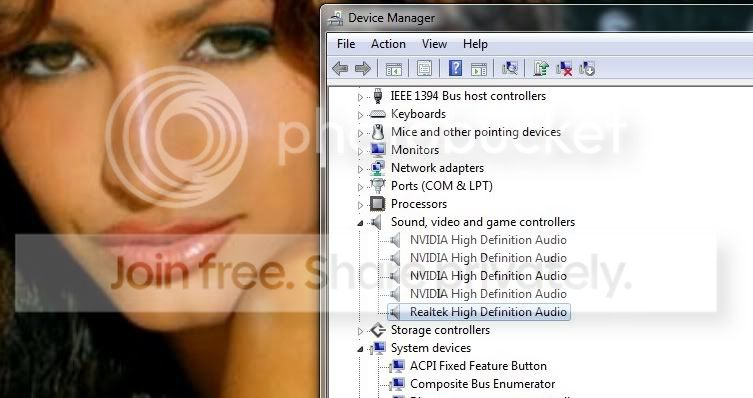
Now, I will want to use audio over HDMI sometimes to output from my PC to my TV via HDMI - so I opted to install the nVidia HD Audio driver. My question is: do I also install the Realtek HD audio drivers? There are currently 4 "NVIDIA High Definition Audio" items showing up in device manager, plus one separate "High Definition Audio Device".

Any advice? Do the Realtek drivers offer much benefit over the built in Win 7 drivers? Any issues with conflicts if the nVidia and Realtek drivers are installed together?

Thanks.
 

My Computer My Computer

OS
Windows 7 Home Premium x64
CPU
Core i7-950
Motherboard
Asus P6X58D-E
Graphics Card(s)
Nvidia GeForce GTX 460
My ASUS P7P55D-E PRO has both installed.
It appears on mine the Nvidia is for graphics card output for HDMI, built in monitor speakers, etc. from the graphics card.
The onboard audio is for the motherboard audio outputs which also would include front panel in/outputs if you have them on the case and wired to mobo.

So you need both if using now or in the future.
Mike
 

My Computer My Computer

Computer Manufacturer/Model Number
Hopalong/ Godzilla
OS
Windows7 Pro 64bit SP-1; Windows XP Pro 32bit
CPU
Intel Core i7-870 Lynnfield 2.93GHz LGA 1156 95W Quad-Core
Motherboard
ASUS P7P55D-E PRO
Memory
8GB@1400MHz Crucial Ballistix DDR3-1600 4x2GB
Graphics Card(s)
ASUS ENGTX460 DirectCU/2DI/1GD5 1GB 256-bit GDDR5
Sound Card
VIA Onboard
Monitor(s) Displays
Asus VS248H-P 24"; Samsung SyncMaster 941BW 19"ws
Screen Resolution
1920x1080; 1440x900
Hard Drives
Samsung 830 120GB SSD
Intel 320 120GB SSD
Western Digital Caviar Black WD7501AALS 750GB 7200 RPM SATA 3.0Gb/s
Western Digital Caviar Black WD6401AALS 640GB 7200 RPM SATA 3.0Gb/s
PSU
COOLER MASTER Silent Pro RS850-AMBAJ3-US 850W Modular
Case
COOLER MASTER HAF 932 RC-932-KKN5-GP Black
Cooling
Scythe "Mugen-2 Rev.B" (2 ScytheKaze-Jyuni PWM fans)
Keyboard
Logitech K-320
Mouse
Kensington
Antivirus
Avast Inernet Suite
Browser
IE 9 ; Chrome
  • Like
Reactions: JC6
The Windows HD device is actually a Windows certified Realtek driver.

I'm of the opinion, if everything is working well in the manner you require, there's no need to upgrade. If you're having problems, then upgrading the drivers becomes an option. (Depending on your problem).

(If you do decide to install the latest Realtek driver you may have to re-install the Graphics drivers again, depends on what the latest Realtek driver decides what to do with the HDMI devices, it should leave them alone but you never know.

All the settings you need can be found by right clicking on the Microsoft speaker icon in the task bar, select either Playback or Recording Devices, you may have to set Nvidia HDMI as the default output deivce when you're going to use HDMI. One you single left click on a device other options be come available.

Also, some devices may be hidden.

Right click the MS Speaker icon, select playback devices, right click anywhere in the center of the Window, enable both Show Disabled/Disconnected Devices.

Ap
 
Last edited:

My Computer My Computer

Computer Manufacturer/Model Number
Assembled in my workshop
OS
Windows 7 Home Premium
CPU
Intel Core 2 Duo @ 3.00gHz
Motherboard
Gigabyte GA-P35-S3G
Memory
4 GB
Graphics Card(s)
ATI Radeon HD 2600 XT
Sound Card
RME 24/96 Card, Realtek Internal Audio PreSonus FireStudio
Monitor(s) Displays
Acer 1917 (x2)
Screen Resolution
1280 x 1024 on both monitors
Hard Drives
Three 250GB Seagate SATA Barracuda 7200rpm
PSU
Rosewill 500-watt
Case
Rosewill mid-tower
Cooling
Noctua NH-U9B (CPU), PwrSupply fan + single large case Fan
Keyboard
Macally w/2/USB ports.
Mouse
Trackman Wheel
Other Info
Event 20/20 bas studio monitors, Yamaha sub.
Rackmount Korg/Roland/Yamaha synthesizers,
Cubase MIDI/audio recording. Sony Soundforge audio/mastering software. CD Architect Mastering. RME & Presonus audio interfaces.
The Windows HD device is actually a Windows certified Realtek driver.

I'm of the opinion, if everything is working well in the manner you require, there's no need to upgrade. If you're having problems, then upgrading the drivers becomes an option. (Depending on your problem).

(If you do decide to install the latest Realtek driver you may have to re-install the Graphics drivers again, depends on what the latest Realtek driver decides what to do with the HDMI devices, it should leave them alone but you never know.

All the settings you need can be found by right clicking on the Microsoft speaker icon in the task bar, select either Playback or Recording Devices, you may have to set Nvidia HDMI as the default output deivce when you're going to use HDMI. One you single left click on a device other options be come available.

Also, some devices may be hidden.

Right click the MS Speaker icon, select playback devices, right click anywhere in the center of the Window, enable both Show Disabled/Disconnected Devices.

Ap

Aphelion~

You seem to be in the know here, NV audio, what not.

Anywho, I have FOUR NV Audio Drivers in Device Mgr. It happened during install-

ation of NV display drivers took a few times, LOL!!:D :sarc:

Here's pic, CAN I REMOVE ALL BUT ONE NV AUDIO DRIVER???

For that matter, I have no built in Speakers anywhere, ok. Like to

delete all, but no biggy there.:what:

chris1.jpg


Surely I don't need FIVE!! :zip:

Thanks in Advance!!

Blue
 

My Computer My Computer

Computer Manufacturer/Model Number
I build all my Own PC's Period, this PC is a BlueMonster XL
OS
Win7 Ultimate
CPU
Intel Q9650 @3.5GHz
Motherboard
Gigabyte GA- EP45T-USB3P
Memory
4 GIG's Gskill 1333 DDR3 RAM 9.9.9.24
Graphics Card(s)
EVGA GTX 460se 1GIG
Sound Card
Azilia Realtech HD audio Sourond Sound or 5.1
Monitor(s) Displays
Sony BlackTrinitron P1130b 21" max rez @2500X
Screen Resolution
1920X1080
Hard Drives
2 HDDS Both 250 EACH GIG Western Digital Caviar2 Sata2

500 GIG Total raid_0
PSU
Corsair TX750
Case
Antec Blue Tour 5X 80mm FANS HUGE!!
Cooling
Artec Freezer PRO
Keyboard
Black Glossy, Reclusa Blue LED keyboard. Razer and MS
Mouse
NEW version 2.03 HABU Razer MS Gaming Mouse Blue LED- FAST
Internet Speed
21meg Up, 6Meg Down
Other Info
Work of Love and Passion.

Oh Cambridge OLD school Speaker System, off the Hook Sound.

Zennhizer Headphones, Very Nice Wireless
I also have the 4 NVIDIA High Definition Audio entries and in my case a VIA High Definition Audio entry under Sound video, and game controllers. Having 4 NVIDIA entries are normal, its not the same driver installed 4 times. If you delete them windows will just install them again. In my case the NVIDIA entries are for my GT220 video card and the VIA entry is for my motherboards onboard sound chip. I'd just leave it alone, especially if everything is working OK.
 

My Computer My Computer

Computer type
PC/Desktop
Computer Manufacturer/Model Number
Home Built
OS
Windows 10 Education 64 bit
CPU
AMD Phenom II X4 980 Black Edition Deneb 3.7GHz
Motherboard
Asus M4N68T-M V2 µATX Motherboard
Memory
8GB 4GBx2 Kingston PC10600 DDR3 1333 Memory
Graphics Card(s)
Zotac NVIDIA Geforce GT640 2 Gig DDR3 PCIe
Sound Card
VIA VT1708s High Definition Audio 8-channel Onboard
Monitor(s) Displays
22" LG E2242 1080p and 2 19" I-INC AG191D
Screen Resolution
1280x1024 - 1920x1080 - 1280x1024
Hard Drives
Crucial M100 256 GB SSD and 500 GB WD Blue SATA
PSU
Thermaltake TR 620
Case
Power Up Black ATX Mid-Tower Case
Cooling
Stock heatsink and fan
Keyboard
Logitech Wireless K350 Wave
Mouse
Logitech Wireless M570 Trackman Wheel
Internet Speed
80 Mbps Down 30 Mbps Up
Antivirus
Windows Defender
Browser
Internet Explorer 11
Other Info
HP DVD1040e Lightscribe - External USB2
I also have the 4 NVIDIA High Definition Audio entries and in my case a VIA High Definition Audio entry under Sound video, and game controllers. Having 4 NVIDIA entries are normal, its not the same driver installed 4 times. If you delete them windows will just install them again. In my case the NVIDIA entries are for my GT220 video card and the VIA entry is for my motherboards onboard sound chip. I'd just leave it alone, especially if everything is working OK.

Good advice. each driver file is probably about 50-100 kb's

Hardly anything to get worked up over!! LOL!! :cry: :sleepy: :huh: I'll just let them be.

Thanks again fella's.........

Blue
 

My Computer My Computer

Computer Manufacturer/Model Number
I build all my Own PC's Period, this PC is a BlueMonster XL
OS
Win7 Ultimate
CPU
Intel Q9650 @3.5GHz
Motherboard
Gigabyte GA- EP45T-USB3P
Memory
4 GIG's Gskill 1333 DDR3 RAM 9.9.9.24
Graphics Card(s)
EVGA GTX 460se 1GIG
Sound Card
Azilia Realtech HD audio Sourond Sound or 5.1
Monitor(s) Displays
Sony BlackTrinitron P1130b 21" max rez @2500X
Screen Resolution
1920X1080
Hard Drives
2 HDDS Both 250 EACH GIG Western Digital Caviar2 Sata2

500 GIG Total raid_0
PSU
Corsair TX750
Case
Antec Blue Tour 5X 80mm FANS HUGE!!
Cooling
Artec Freezer PRO
Keyboard
Black Glossy, Reclusa Blue LED keyboard. Razer and MS
Mouse
NEW version 2.03 HABU Razer MS Gaming Mouse Blue LED- FAST
Internet Speed
21meg Up, 6Meg Down
Other Info
Work of Love and Passion.

Oh Cambridge OLD school Speaker System, off the Hook Sound.

Zennhizer Headphones, Very Nice Wireless
No problem, thats what we are here for. :thumbsup:
 

My Computer My Computer

Computer type
PC/Desktop
Computer Manufacturer/Model Number
Home Built
OS
Windows 10 Education 64 bit
CPU
AMD Phenom II X4 980 Black Edition Deneb 3.7GHz
Motherboard
Asus M4N68T-M V2 µATX Motherboard
Memory
8GB 4GBx2 Kingston PC10600 DDR3 1333 Memory
Graphics Card(s)
Zotac NVIDIA Geforce GT640 2 Gig DDR3 PCIe
Sound Card
VIA VT1708s High Definition Audio 8-channel Onboard
Monitor(s) Displays
22" LG E2242 1080p and 2 19" I-INC AG191D
Screen Resolution
1280x1024 - 1920x1080 - 1280x1024
Hard Drives
Crucial M100 256 GB SSD and 500 GB WD Blue SATA
PSU
Thermaltake TR 620
Case
Power Up Black ATX Mid-Tower Case
Cooling
Stock heatsink and fan
Keyboard
Logitech Wireless K350 Wave
Mouse
Logitech Wireless M570 Trackman Wheel
Internet Speed
80 Mbps Down 30 Mbps Up
Antivirus
Windows Defender
Browser
Internet Explorer 11
Other Info
HP DVD1040e Lightscribe - External USB2
Problem i have is that everytime i restart the pc or plug in the hdmi cord it keeps on reinstalling thes 4 drivers over and over again. Any way to fix that?
 

My Computer My Computer

OS
Windows 7 64bit
CPU
amd 1055t
Motherboard
M4a89gtd pro/usb3
Memory
OCZ AMD Black Edition 4GB
PSU
CORSAIR CMPSU-650TX
Case
haf 932
Are you deleting them again each time? If yes, don't, just leave them alone. If no, I think I would un-install and then re-install my video drivers.
 

My Computer My Computer

Computer type
PC/Desktop
Computer Manufacturer/Model Number
Home Built
OS
Windows 10 Education 64 bit
CPU
AMD Phenom II X4 980 Black Edition Deneb 3.7GHz
Motherboard
Asus M4N68T-M V2 µATX Motherboard
Memory
8GB 4GBx2 Kingston PC10600 DDR3 1333 Memory
Graphics Card(s)
Zotac NVIDIA Geforce GT640 2 Gig DDR3 PCIe
Sound Card
VIA VT1708s High Definition Audio 8-channel Onboard
Monitor(s) Displays
22" LG E2242 1080p and 2 19" I-INC AG191D
Screen Resolution
1280x1024 - 1920x1080 - 1280x1024
Hard Drives
Crucial M100 256 GB SSD and 500 GB WD Blue SATA
PSU
Thermaltake TR 620
Case
Power Up Black ATX Mid-Tower Case
Cooling
Stock heatsink and fan
Keyboard
Logitech Wireless K350 Wave
Mouse
Logitech Wireless M570 Trackman Wheel
Internet Speed
80 Mbps Down 30 Mbps Up
Antivirus
Windows Defender
Browser
Internet Explorer 11
Other Info
HP DVD1040e Lightscribe - External USB2
4 NVIDIA HD Audio Drivers but no audio and sometimes no display

I've just noticed that I have the same 4 x HD Audio Drivers.

What's odd is that the 1st time I used an HDMI cable to connect to tv the display worked bu no audio. The next day both worked, and now it seems neither does. Please help this is driving me nuts. It is an NVidia card, think a 320??

I am now using an RGB lead instead.

Also have questions about the sound from the onboard outputs. I have just bought a 5.1 pc surround system which connects using 3 3.5mm jacks, but it doesn't look ike I have a read and sub output, just the blue pink and green ones. I read somewhere that these sometimes do both the rear/sub outputs and mic/line in. Is this right? If not what is the best way to connect this system?

Thank you, Matt
 

My Computer My Computer

OS
vista
Have a look in control panel for an icon for you particular sound card, be it VIA or Realtek, etc. Once you find it and run the application there should be options to reconfigure the jacks. Your Mic jack will likely end un being the center, sub channel. Some are auto sensing so just plugging in the cables may auto switch it. There should be a speaker test option in there somewhere too, to verify you've got it all plugged in correctly.
 

My Computer My Computer

Computer type
PC/Desktop
Computer Manufacturer/Model Number
Home Built
OS
Windows 10 Education 64 bit
CPU
AMD Phenom II X4 980 Black Edition Deneb 3.7GHz
Motherboard
Asus M4N68T-M V2 µATX Motherboard
Memory
8GB 4GBx2 Kingston PC10600 DDR3 1333 Memory
Graphics Card(s)
Zotac NVIDIA Geforce GT640 2 Gig DDR3 PCIe
Sound Card
VIA VT1708s High Definition Audio 8-channel Onboard
Monitor(s) Displays
22" LG E2242 1080p and 2 19" I-INC AG191D
Screen Resolution
1280x1024 - 1920x1080 - 1280x1024
Hard Drives
Crucial M100 256 GB SSD and 500 GB WD Blue SATA
PSU
Thermaltake TR 620
Case
Power Up Black ATX Mid-Tower Case
Cooling
Stock heatsink and fan
Keyboard
Logitech Wireless K350 Wave
Mouse
Logitech Wireless M570 Trackman Wheel
Internet Speed
80 Mbps Down 30 Mbps Up
Antivirus
Windows Defender
Browser
Internet Explorer 11
Other Info
HP DVD1040e Lightscribe - External USB2
same 4 drivers

i also have the Nvidia drivers plus the realtek. I use the realtek for my lcd speakers and one of the Nvidia for my hdmi. i have the others disabled. My problem is i have an unknown device attached that i believe is coming from one of those drivers. can anyone help me in the right direction? I tried playing movies using the hdmi while others disabled and its like a 50/50 chance when it doesnt just freeze. I might have other problems as well but i just want to get started, thanks in advance
 

My Computer My Computer

OS
windows 7 x64 Ultimate SP1
CPU
AMD BE 950 3.2ghz
Motherboard
Gigabyte GA-MA790GPT-UD3H
Memory
pc12800 black edition
Graphics Card(s)
AMD HD3300
Sound Card
on board
Monitor(s) Displays
acer 17" LCD and 46" LED tv
Hard Drives
(2) WD black Terabytes
PSU
750w
Cooling
Sphire eclipse
Keyboard
microsoft wireless
Mouse
Microsoft wireless
Internet Speed
2.5 mb/sec
Your best option, for a good response to your problem, would be to start your own thread. You''ll get more looks/hits that way. :)
 

My Computer My Computer

Computer type
PC/Desktop
Computer Manufacturer/Model Number
Home Built
OS
Windows 10 Education 64 bit
CPU
AMD Phenom II X4 980 Black Edition Deneb 3.7GHz
Motherboard
Asus M4N68T-M V2 µATX Motherboard
Memory
8GB 4GBx2 Kingston PC10600 DDR3 1333 Memory
Graphics Card(s)
Zotac NVIDIA Geforce GT640 2 Gig DDR3 PCIe
Sound Card
VIA VT1708s High Definition Audio 8-channel Onboard
Monitor(s) Displays
22" LG E2242 1080p and 2 19" I-INC AG191D
Screen Resolution
1280x1024 - 1920x1080 - 1280x1024
Hard Drives
Crucial M100 256 GB SSD and 500 GB WD Blue SATA
PSU
Thermaltake TR 620
Case
Power Up Black ATX Mid-Tower Case
Cooling
Stock heatsink and fan
Keyboard
Logitech Wireless K350 Wave
Mouse
Logitech Wireless M570 Trackman Wheel
Internet Speed
80 Mbps Down 30 Mbps Up
Antivirus
Windows Defender
Browser
Internet Explorer 11
Other Info
HP DVD1040e Lightscribe - External USB2
Thanks for the advice. I had a look for the option to reconfigure the jacks and couldn't find anything. This is an on board sound card, would that make any difference? Is there anything else I could do, like change the driver or something?
Thanks
 

My Computer My Computer

OS
vista
The hardware has to support that function regardless of the driver. It may not work without the correct driver but the hardware has to support it in the first place. if it doesn't, it doesn't matter what driver you use. Both of my current PC's support that function with their onboard sound. One is Realtek and the other is a VIA chip-set. Get your driver from the motherboard manufacturers support web page for your model motherboard. You might also want to look at your motherboards manual to see what it says regarding the audio jack configuration.
 

My Computer My Computer

Computer type
PC/Desktop
Computer Manufacturer/Model Number
Home Built
OS
Windows 10 Education 64 bit
CPU
AMD Phenom II X4 980 Black Edition Deneb 3.7GHz
Motherboard
Asus M4N68T-M V2 µATX Motherboard
Memory
8GB 4GBx2 Kingston PC10600 DDR3 1333 Memory
Graphics Card(s)
Zotac NVIDIA Geforce GT640 2 Gig DDR3 PCIe
Sound Card
VIA VT1708s High Definition Audio 8-channel Onboard
Monitor(s) Displays
22" LG E2242 1080p and 2 19" I-INC AG191D
Screen Resolution
1280x1024 - 1920x1080 - 1280x1024
Hard Drives
Crucial M100 256 GB SSD and 500 GB WD Blue SATA
PSU
Thermaltake TR 620
Case
Power Up Black ATX Mid-Tower Case
Cooling
Stock heatsink and fan
Keyboard
Logitech Wireless K350 Wave
Mouse
Logitech Wireless M570 Trackman Wheel
Internet Speed
80 Mbps Down 30 Mbps Up
Antivirus
Windows Defender
Browser
Internet Explorer 11
Other Info
HP DVD1040e Lightscribe - External USB2
Thanks all. Eventually used an online program to identify my motherboard, then used the intel website to update software. May have been lucky but now have surround sound though the 3 connections that normally do mic & input. Cheers for the help, got there eventually.
 

My Computer My Computer

OS
vista
Well I had a question just posted a bit ago. Since I am new it was moderated til right now. I go to edit it because I answered it :) It says that was too short. So now I have to type nonsense here.
 
Last edited:

My Computer My Computer

Computer type
PC/Desktop
Computer Manufacturer/Model Number
HP
OS
xp 32 bit
i also have the Nvidia drivers plus the realtek. I use the realtek for my lcd speakers and one of the Nvidia for my hdmi. i have the others disabled. My problem is i have an unknown device attached that i believe is coming from one of those drivers. can anyone help me in the right direction? I tried playing movies using the hdmi while others disabled and its like a 50/50 chance when it doesnt just freeze. I might have other problems as well but i just want to get started, thanks in advance

Well I have been reading all over about the 2 drivers clashing and only the 2. Seems realtek and nvidia dislike each other. After 4 days of vigorous work of installing / uninstalling ccleaners reg edit... You name it I did it. I saw someone say.. when they updated/ installed Nvidia it kicked realtek off. It was forced off in bios. Not sure why it did. I checked mine this morning and sure was the same. It kicked my on board off. Then nvidia HD audio was only showing. Check there might just be an easy fix. It may be reading your on board HD or another.
 

My Computer My Computer

Computer type
PC/Desktop
Computer Manufacturer/Model Number
HP
OS
xp 32 bit
I dont get it. Do nvidia cards also process sound if you use HDMI? i have a sound card with its driver installed and also nvidia hd drivers installed, should i remove the nvidia audio drivers?
 

My Computer My Computer

Computer type
PC/Desktop
OS
windows
My suggestion is don't remove the drivers. Windows will use the drivers needed and leave the rest alone until needed.
 

My Computer My Computer

Computer type
PC/Desktop
Computer Manufacturer/Model Number
Home made Desktop
OS
Windows 10 Pro. 64/ version 1709 Windows 7 Pro/64
CPU
Intel i7-6800K @ 4.3
Motherboard
ASUS X-99 Deluxe II
Memory
Corsair Platinum 16 gig @2400
Graphics Card(s)
EVGA GTX 1070 OC
Monitor(s) Displays
Asus 27" LED LCD/VE278Q
Screen Resolution
1920-1080 or 1280-720 HDMI
Hard Drives
INTEL SSD 730-240 Gb Sata 3.0/
PSU
EVGA Platium 1200W
Case
Phanteks Luxe Tempered Glass 8 fans/ one radiator
Cooling
XSPC/ Water Cooled CPU
Keyboard
Das 4 Professional
Mouse
Logitech M705/MX Anywhere 2-S
Internet Speed
100 mbits
Antivirus
Microsoft Security Essentials/ Malwarebytes Premium 3.0/ SAS
Browser
I.E. 11 default/Firefox/ ISP Time Warner Cable/Spectrum
Other Info
LG BluRay Burner/
Sound system-KLipsch-THX/
Icy Dock ssd Hot Swap bays.
Back
Top