Switching from Ultimate to Professional without reinstalling ?

You can still do the Repair Install workaround to change from Pro to Home Premium.

But since you downloaded the wrong version of Win7, as the others have stated you need to unlock all versions within the same installer. Do this by extracting the files from the ISO to your desktop using 7zip, PowerISO, etc. Then remove the ei.cfg file from Sources folder, recompile the files into a bootable ISO using ImgBurn to burn DVD at 4x speed to use for repairs or future reinstalls.

You can then run the files right from the desktop by rightclicking on Setup to Run as Admin.
 
I downloaded the win 7 64bit home premium (the one I have) from the site above and did all the steps above. Except since I couldn't find the file you were mentioning I just used a "tool" that extracts and deletes that file and then after using that tool on the .iso file I then extracted it using 7zip and clicked on setup.

It only gives me an install option, no repair option. I cilck on isntall now and it just goes through the installation steps, nowhere mentioning repair and then it finally asks me which partition of the disk to install it, at which point I realize it is not going to give me a repair option so I just cancel the setup.

Please help, thank yoU!
 
Last edited by a moderator:

My Computer My Computer

At a glance

Windows 7 Home Premium 64bit
OS
Windows 7 Home Premium 64bit
Are you running Setup as Admin? Are you sure you're installation is 64 bit?

If you have Premium which is what you want to install over Pro, then you didn't need to remove ei.cfg. But if ei.cfg is missing then the ISO might be messed with in such a way that it won't run the desired Repair Install, or your installation is corrupt in some way.

You can try again, but probably best to clean install after wiping the HD in case you have infection.
 
I am running as admin and it is 64-bit. I never saw the file you were talking about so maybe the iso that I downloaded has been altered. Where is that file usually located?

I actually downloaded the iso for home premium 64-bit specfically and even though I couldn't see the ei.cfg file I had it removed using a special "tool"....when I go through the installation it doesn't ask me which version and just asks me to accept the terms for home premium. Which is ok because that's what i want to install anyway.
 

My Computer My Computer

At a glance

Windows 7 Home Premium 64bit
OS
Windows 7 Home Premium 64bit
The ei.cfg file, if it is there, will be in the "sources" folder. It should be viewable in notepad. If you don't get a window to select which version you want to install, its still there. If you have the version you want you don't need to remove it anyway. Its just convenient if you have more than one version of windows 7 installed on your PCs. You just need the the one disk or thumbdrive instead of two or three and you always have the right one with you. It can also bail you out if your install media is damaged and you have to borrow one that doesn't match your version. Anyway I think I would have another go at it. Just be sure you trust the source for your download or you could end up with some new headaches.
 

My Computer My Computer

At a glance

Windows 10 Education 64 bitAMD Phenom II X4 980 Black Edition Deneb 3.7GHz8GB 4GBx2 Kingston PC10600 DDR3 1333 MemoryZotac NVIDIA Geforce GT640 2 Gig DDR3 PCIe
Computer type
PC/Desktop
Computer Manufacturer/Model Number
Home Built
OS
Windows 10 Education 64 bit
CPU
AMD Phenom II X4 980 Black Edition Deneb 3.7GHz
Motherboard
Asus M4N68T-M V2 µATX Motherboard
Memory
8GB 4GBx2 Kingston PC10600 DDR3 1333 Memory
Graphics Card(s)
Zotac NVIDIA Geforce GT640 2 Gig DDR3 PCIe
Sound Card
VIA VT1708s High Definition Audio 8-channel Onboard
Monitor(s) Displays
22" LG E2242 1080p and 2 19" I-INC AG191D
Screen Resolution
1280x1024 - 1920x1080 - 1280x1024
Hard Drives
Crucial M100 256 GB SSD and 500 GB WD Blue SATA
PSU
Thermaltake TR 620
Case
Power Up Black ATX Mid-Tower Case
Cooling
Stock heatsink and fan
Keyboard
Logitech Wireless K350 Wave
Mouse
Logitech Wireless M570 Trackman Wheel
Internet Speed
80 Mbps Down 30 Mbps Up
Antivirus
Windows Defender
Browser
Internet Explorer 11
Other Info
HP DVD1040e Lightscribe - External USB2
The ei.cfg file, if it is there, will be in the "sources" folder. It should be viewable in notepad. If you don't get a window to select which version you want to install, its still there. If you have the version you want you don't need to remove it anyway. Its just convenient if you have more than one version of windows 7 installed on your PCs. You just need the the one disk or thumbdrive instead of two or three and you always have the right one with you. It can also bail you out if your install media is damaged and you have to borrow one that doesn't match your version. Anyway I think I would have another go at it. Just be sure you trust the source for your download or you could end up with some new headaches.


Here's a link to the tutorial that out-lines how to do it.


Windows 7 Universal Installation Disc - Create
 

My Computer My Computer

At a glance

W 7 64-bit UltimateIntel Q9550 Yorkfield8GB Dominator 8500C5DATI : XFX 5870
Computer Manufacturer/Model Number
* BFK Customs *
OS
W 7 64-bit Ultimate
CPU
Intel Q9550 Yorkfield
Motherboard
ASUS P5Q Pro
Memory
8GB Dominator 8500C5D
Graphics Card(s)
ATI : XFX 5870
Sound Card
Realtek HD Audio 7-1
Monitor(s) Displays
1x 47" LCD HDMI & 3x 26" LCD HDMI
Screen Resolution
1920x1080P & 1920x1200
Hard Drives
1x 80GB Intel X25-M G2 SSD : 1x 500GB & 1x 640GB WD Caviar Black(s)
PSU
Corsair 620HX
Case
Cooler Master RC-690
Cooling
Tuniq Tower 120, 2x 140mm and 3x 120mm case fans
Keyboard
Microsoft 500
Mouse
Razer Diamondback 3G
Internet Speed
14 Mb/s
Other Info
1x Koutech 3Gb/s SATA HDD Hot Swap Rack
i've tried gregrocker's trick on windows 7 ultimate but it didn't work.

i don't know if i used a RC or a retail version of the dvd, but i've changed the registry key from Ultimate to Home Premium and the other one from Windows 7 Ultimate to Windows 7 Home Premium and i've ran the dvd from the administrator account (i've not booted on the dvd) but when i try to upgrade it tells me that i can't upgrade from Ultimate to Home Premium.
 

My Computer My Computer

At a glance

Windows 7 ultimate x64Core i7 q7204 gbGeforce GTS 250 M
Computer Manufacturer/Model Number
Toshiba Qosmio X500 10Q (Laptop)
OS
Windows 7 ultimate x64
CPU
Core i7 q720
Memory
4 gb
Graphics Card(s)
Geforce GTS 250 M
Monitor(s) Displays
18"
Case
Laptop
That wll not work. They must read exactly HOMEPREMIUM for the EditionID, and Windows 7 HOMEPREMIUM for the ProductName.

I would cut and paste.

You can change between retail versions with the popular workaround many beta testers used to change from the RC to a retail version.

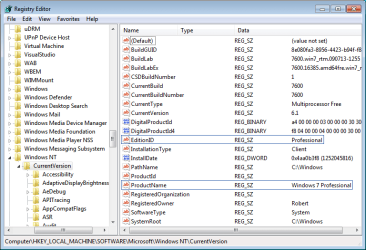
Change the two registry keys shown below to Professional exactly as they are typed, which tricks the installer into thinking it is doing a Repair Install which is always allowed:

win7_alter_registry.png(click on image to enlarge)

Next run the Professional Installer from desktop, select "Keep Connected To Internet" to get latest drivers and updates into Installer, then "Upgrade". You will have to reactivate afterwards with the Professional Key, but activation is reset anyway in a Repair Install.

I tested this about two weeks ago successfully from Ult>Pro after reports it wasn't working. Another Guru also found it to work then.

The performance reported by many who tried it after Win7 release are the best reports ever on in-place Upgrade, completely contradicting MS claims that beta code couldn't be upgraded. Two friends of mine who I did the RC Upgrade to retail for via Remote Desktop don't even want the promised clean install now when I come to visit.
 
Hello Gregrocker,

i've tried using HOMEPREMIUM instead of Home Premium, but now it tells me that:

Les problèmes suivants empêchent Windows de procéder à la mise à niveau. Annulez la mise à niveau, complétez chaque tâche et redémarrez la mise à niveau pour continuer.


  • [*]Votre version actuelle de Windows est plus récente que la version vers laquelle vous essayez d’effectuer une mise à niveau. Windows ne peut pas effectuer la mise à niveau.


  • [*]Windows doit être redémarré afin que les modifications nécessaires des fichiers système puissent être effectuées avant de poursuivre.

warning.gif
La mise à niveau de Windows affectera les périphériques et/ou programmes suivants :

  • Il se peut que ces périphériques ne fonctionnent pas correctement après la mise à niveau. Avant la mise à niveau, nous vous recommandons de mettre à jour les pilotes de ces périphériques. Annulez la mise à niveau, ouvrez le Panneau de configuration et recherchez « pilotes de périphérique mis à jour » ou accédez au site Web du fabricant du périphérique pour rechercher des pilotes mis à jour.

    • [*]Bluetooth: Android Composite ADB Interface

      [*]Ports (COM et LPT): USB Modem Driver (COM3)
  • Il se peut que ces programmes ne fonctionnent pas correctement après la mise à niveau. Nous vous recommandons de désinstaller ces programmes avant la mise à niveau. Annulez la mise à niveau, ouvrez le Panneau de configuration et recherchez « désinstaller un programme ». (Remarque : les programmes portant la marque * peuvent être résinstallés en toute sécurité après la mise à niveau.)

    • [*]iTunes (Please deauthorize computer prior to upgrade)

      [*]MagicISO Virtual CD/DVD Manager *
 

My Computer My Computer

At a glance

Windows 7 ultimate x64Core i7 q7204 gbGeforce GTS 250 M
Computer Manufacturer/Model Number
Toshiba Qosmio X500 10Q (Laptop)
OS
Windows 7 ultimate x64
CPU
Core i7 q720
Memory
4 gb
Graphics Card(s)
Geforce GTS 250 M
Monitor(s) Displays
18"
Case
Laptop
maybe the iso image i tried is without SP1 but i don't know
 

My Computer My Computer

At a glance

Windows 7 ultimate x64Core i7 q7204 gbGeforce GTS 250 M
Computer Manufacturer/Model Number
Toshiba Qosmio X500 10Q (Laptop)
OS
Windows 7 ultimate x64
CPU
Core i7 q720
Memory
4 gb
Graphics Card(s)
Geforce GTS 250 M
Monitor(s) Displays
18"
Case
Laptop
i can't uninstall sp1 from the current install of windows 7 ultimate because it was installed from the dvd. i've tried to uninstall from programs and features but i have no option to uninstall it.
 

My Computer My Computer

At a glance

Windows 7 ultimate x64Core i7 q7204 gbGeforce GTS 250 M
Computer Manufacturer/Model Number
Toshiba Qosmio X500 10Q (Laptop)
OS
Windows 7 ultimate x64
CPU
Core i7 q720
Memory
4 gb
Graphics Card(s)
Geforce GTS 250 M
Monitor(s) Displays
18"
Case
Laptop
ok i've just started the download of windows 7 iso with sp1 (in french) from your link.
 

My Computer My Computer

At a glance

Windows 7 ultimate x64Core i7 q7204 gbGeforce GTS 250 M
Computer Manufacturer/Model Number
Toshiba Qosmio X500 10Q (Laptop)
OS
Windows 7 ultimate x64
CPU
Core i7 q720
Memory
4 gb
Graphics Card(s)
Geforce GTS 250 M
Monitor(s) Displays
18"
Case
Laptop
You do not need to uninstall SP1, only use the latest official Win7 installer with SP1 which I've linked you.

Can you translate the other issues Upgrade Advisor found?
 
yes, i can translate it:

it says:

The following problems avoid Windows to proceed to the upgrade, complete each task and restart the upgrade to continue.


  • [*]Your present version of Windows is more recent than the version you are trying to upgrade.
    [*] Windows can't do the upgrade.


  • [*]Windows must be restarted for the modifications necessary to system files can be done before to follow up.

warning.gif
Windows upgrade will affect following devices and/or programs and features :

  • those devices might not work correctly after the upgrade. before the upgrade, we recommand you to update those devices drivers. Cancel the upgrade, open control panel and look for « updated devices drivers » or access the manufacturer's website of of the device to search for updated drivers.

    • [*]Bluetooth: Android Composite ADB Interface

      [*]Ports (COM et LPT): USB Modem Driver (COM3)
  • Those programs might not work correctly after the upgrade. We recommand you to uninstall those programs before the upgrade. Cancel the upgrade, open control panel and look for « uninstall a program ». (comment : programs having the mark * can be reinstalled safely after the upgrade.)

    • [*]iTunes (Please deauthorize computer prior to upgrade)

      [*]MagicISO Virtual CD/DVD Manager *
 

My Computer My Computer

At a glance

Windows 7 ultimate x64Core i7 q7204 gbGeforce GTS 250 M
Computer Manufacturer/Model Number
Toshiba Qosmio X500 10Q (Laptop)
OS
Windows 7 ultimate x64
CPU
Core i7 q720
Memory
4 gb
Graphics Card(s)
Geforce GTS 250 M
Monitor(s) Displays
18"
Case
Laptop
i still have the same message with the iso with sp1 from digital river.
 

My Computer My Computer

At a glance

Windows 7 ultimate x64Core i7 q7204 gbGeforce GTS 250 M
Computer Manufacturer/Model Number
Toshiba Qosmio X500 10Q (Laptop)
OS
Windows 7 ultimate x64
CPU
Core i7 q720
Memory
4 gb
Graphics Card(s)
Geforce GTS 250 M
Monitor(s) Displays
18"
Case
Laptop
i just had to reboot and it worked, i still had the warning message but i had a next button on the right hand corner.

i've uninstalled itunes and magic iso but not the drivers
 

My Computer My Computer

At a glance

Windows 7 ultimate x64Core i7 q7204 gbGeforce GTS 250 M
Computer Manufacturer/Model Number
Toshiba Qosmio X500 10Q (Laptop)
OS
Windows 7 ultimate x64
CPU
Core i7 q720
Memory
4 gb
Graphics Card(s)
Geforce GTS 250 M
Monitor(s) Displays
18"
Case
Laptop
i still have an issue of corrupted files from the iso i burned but i have no md5 for the iso of windows 7 home premium 64bits french
 

My Computer My Computer

At a glance

Windows 7 ultimate x64Core i7 q7204 gbGeforce GTS 250 M
Computer Manufacturer/Model Number
Toshiba Qosmio X500 10Q (Laptop)
OS
Windows 7 ultimate x64
CPU
Core i7 q720
Memory
4 gb
Graphics Card(s)
Geforce GTS 250 M
Monitor(s) Displays
18"
Case
Laptop
Back
Top