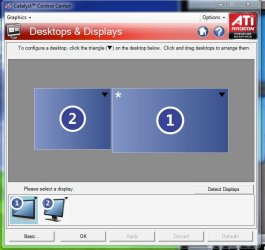
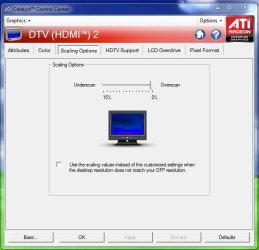
I am re-launching the question after sone search here, answers that seemed to work in December 2009, but we're now in January 2011, I have this new monitor installed to replace my 17 inches (with no effect as I have to run it at 1440x900 to fill the screen - no black stripe). PROBLEM : my new monitor recommended resolution (1920x1080) don't fill the screen - I get a 2 inches black stripe at right, and about 1/4 inch stripe on all other sides. Only way to fill the screen is to go for 1440x900, which is no value added (compared to my previous 17 inches monitor) I was reading that under VGA one need to use the Catalyst 8.9 (my display adapter is ATI Radeon HD 5450) - drivers are latest, version of Catalyst is latest (10.12). I am under Windows 7 x64 Pro.
Other monitor (1) is Viewsonic and resolution is 1650 x 1080 - no problem at all. Connected through DVI.
I made sure to update monitor driver for the ACER P216H as it showed ''Generic PnP monitor'' previously, now it shows ''ACER P216H''.
I am being told that this has nothing to do with the monitor (purchased yesterday - I was preparing to repack and return, but as I can see, most monitors are now 1920x1080 by default - and I *have* to connect this through VGA as my other one uses the DVI connector.
Is this still true that Windows 7 cannot display at 1920x1080 under VGA cable as I was reading in an old message (dated a year ago) here? Can't believe this would be the case a year after !!
If there is no other solution, I am repacking this monitor and returning it as there's no added value for it to replace my old 17 inches which displayed at 1280 x 1080 or alike!! I gain no more real estate if I use lower resolution on this new one, and worse: I get a distorted image.
DONE:
- updated monitor driver
- checked that I have the latest display driver version
- checked that I have the latest Catalyst software
- played with refresh rate - of course not all resolutions work at every rate. If I raise the rate from 60 to 75, I am forced to 1280x1080 resolution and resulting image distortion again.
Also, the box of this monitor states false if what was said about VGA and 1920x1080 is still true: it states ''compatible with Windows 7'' and *only has a VGA connector''. (Be careful when reading about the P216H on the web - they don't mention that you can buy (which I did...) a ''P216H - Version P216 HB'' (small print, side of the box...) which unlike description on web *does not* have DVI...
So is it still the case that VGA don't allow to display 1920 x 1080 under Windows 7? Could I risk using Catalyst 8.9 (downgrade) with the HD5450 ?
Any suggestion ?
Thanks,
Rob
Other monitor (1) is Viewsonic and resolution is 1650 x 1080 - no problem at all. Connected through DVI.
I made sure to update monitor driver for the ACER P216H as it showed ''Generic PnP monitor'' previously, now it shows ''ACER P216H''.
I am being told that this has nothing to do with the monitor (purchased yesterday - I was preparing to repack and return, but as I can see, most monitors are now 1920x1080 by default - and I *have* to connect this through VGA as my other one uses the DVI connector.
Is this still true that Windows 7 cannot display at 1920x1080 under VGA cable as I was reading in an old message (dated a year ago) here? Can't believe this would be the case a year after !!
If there is no other solution, I am repacking this monitor and returning it as there's no added value for it to replace my old 17 inches which displayed at 1280 x 1080 or alike!! I gain no more real estate if I use lower resolution on this new one, and worse: I get a distorted image.
DONE:
- updated monitor driver
- checked that I have the latest display driver version
- checked that I have the latest Catalyst software
- played with refresh rate - of course not all resolutions work at every rate. If I raise the rate from 60 to 75, I am forced to 1280x1080 resolution and resulting image distortion again.
Also, the box of this monitor states false if what was said about VGA and 1920x1080 is still true: it states ''compatible with Windows 7'' and *only has a VGA connector''. (Be careful when reading about the P216H on the web - they don't mention that you can buy (which I did...) a ''P216H - Version P216 HB'' (small print, side of the box...) which unlike description on web *does not* have DVI...
So is it still the case that VGA don't allow to display 1920 x 1080 under Windows 7? Could I risk using Catalyst 8.9 (downgrade) with the HD5450 ?
Any suggestion ?
Thanks,
Rob
My Computer
At a glance
Win 7 Pro x64i7 Quad 8708GB DDR3Sapphirre ATI Radeon HD 5450 1GB
- Computer Manufacturer/Model Number
- built
- OS
- Win 7 Pro x64
- CPU
- i7 Quad 870
- Motherboard
- ASUS P7P55D-E
- Memory
- 8GB DDR3
- Graphics Card(s)
- Sapphirre ATI Radeon HD 5450 1GB
- Sound Card
- Frontier Design Dakota (ADAT) + onboard card
- Monitor(s) Displays
- Viewsonic vmb2255 + ACER P216H
- Hard Drives
- WD