Cannot switch on to 1920x1080 resolution...

thecreature

New member
Local time
9:32 AM
Messages
3
Hi guys,

I am using Sony Bravia Ex300 27" and windows professional x64 wiht XFX Radeon 4870 1gb DDR card the problem is that my desktop resolution shows only 1376 x 726 (recommended) i wanted to go in full HD 1920x1080 as my monitor will support it (i guess).. can u guys help me... please..
 

My Computer

OS
Windows 7 Professional x64
CPU
AMD FX 4100
Motherboard
gigabyte 880gm-usb3
Memory
Corsair 4GB
Graphics Card(s)
XFX Radeon 4870 1GB DDR5
Sound Card
Onboard
Monitor(s) Displays
Sony Bravia EX300 LCD TV
Hard Drives
Seagate 500 GB
Cooling
Coolermaster 500W
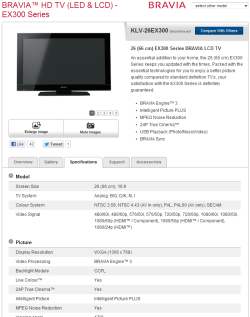
Is this your Sony?

If it is, have a look at the Resolution in the picture.

Edit: It might not be as its 26", but I can't seem to find a 27" model online. Do you have an exact model number for it?


Paul.
 

Attachments

  • sony.PNG
    sony.PNG
    33.1 KB · Views: 45

My Computer

OS
Windows 7 Professional 64 bit
Hi guys,

I am using Sony Bravia Ex300 27" and windows professional x64 wiht XFX Radeon 4870 1gb DDR card the problem is that my desktop resolution shows only 1376 x 726 (recommended) i wanted to go in full HD 1920x1080 as my monitor will support it (i guess).. can u guys help me... please..
What are you using for your connectors?Like a VGA,HDMI,DVI,DP. When using VGA it won't allow to display at those high resolutions,happened with my tv,had to use HDMI to display 1080p.
 

My Computer

Computer type
PC/Desktop
Computer Manufacturer/Model Number
custom build
OS
Windows 10 64bit
CPU
AMD Phenom II X4 925 (Deneb)(2.8GHz) OC 3.4GHz
Motherboard
M5A78L-MLX Plus
Memory
Corsair Vengeance DDR3 4GBX2 (8192MB)
Graphics Card(s)
XFX HD 6870 1GB (OC)- 940MHz core, mem 1150MHz
Monitor(s) Displays
Vizio 26' 1920x1080 / Acer 1336x768
Screen Resolution
1920x1080 60Hz /1336x768
Hard Drives
Kingston Digital 60GB SSDNow V300/500gb HDD Western Digital 7200rpm (/WD 160GB HDD 7200rpm
PSU
CORSAIR CX600 600w
Case
AZZA Orion 202 EVO
Cooling
cooler master hyper TX3 cpu cooler
Keyboard
Razer DeathStalker
Mouse
Logitech Optical Gaming Mouse G400
Antivirus
Defualt on win 10
Browser
Firefox
Other Info
cpu is overclocked in bios
You can try to scale it to 1920/1080
 

My Computer

Computer type
PC/Desktop
Computer Manufacturer/Model Number
CoreI7-6700K MrFingerIII Special Builds
OS
Windows 10 Home Premium 64bit sp1
CPU
Intel I7-6700K @ 4.6 Ghz 1.344 volts everyday OC
Motherboard
Asrock Fatality K6 Z170 Socket 1151
Memory
32GB G-Skill TridentZ 3200mhz 16-18-18-38 DDR4
Graphics Card(s)
Sli Gigabyte Windforce GTX 980 G1
Sound Card
AC97 Creative Rage Tactic 3D Headphones Bluetooth
Monitor(s) Displays
27" Asus ROG Swift PG278Q G-Sync 48" Vizio Smart HD TV
Screen Resolution
2560x1440p 27"- 48" Currently Gaming at 2560x1440p Res 2K
Hard Drives
250GB Samsung Evo840SSD Seagate baracuda 500 GB WD Mybook 500Gb 1TB Seagate Barracuda
PSU
HX1050w Corsair Silver 80plus certified crosfire/sli
Case
Enthod Pro Full Tower
Cooling
Corsair H110i GT 280 mm High Performance WaterBlock
Keyboard
Logitech wireless keyboard
Mouse
Logitech wireless mouse
Internet Speed
Cox Cable 100+ mb
Antivirus
WebRoot Spysweeper with Antivirus
Browser
IE-10, Chrome, Opera
Other Info
My Other Rig is a AMD FX8320E @4.6Ghz 16GB Ballistic Sport Ram
Mobo Asrock Fatality 990FX 120GB OCZ SSD 1TB Seagate Barracuda Corsair H75 Cooling PSU Corsair CX750
GPU GTX Gigabyte 970G1
If the specs that Paul posted are the same as for yours then it won't matter what or how you connect it, as the native resolution is only 1366x768. If that is what it is then even if you got it to accept a 1920x1080 signal, it looks like the TV will just downsample it to 1366X768 anyways..
 

My Computer

Computer type
PC/Desktop
Computer Manufacturer/Model Number
Me
OS
Win 7 Ultimate x64
CPU
FX-8350 @ 4.6 GHz so far
Motherboard
Asus M5A97 EVO
Memory
ADATA XPG V1 Series Black 8GB DDR3 1600
Graphics Card(s)
Sapphire R9 270x Dual-X
Sound Card
Xonar DGX w/ Corsair Vengence 1300
Monitor(s) Displays
Acer S232HL Abid
Screen Resolution
1920x1080
Hard Drives
120 GB OCZ Vertex 3
500 GB Seagate 7200.12
PSU
Antec Earthwatts 650W Green
Case
Antec Three Hundred
Cooling
Cooler Master 212 EVO
Keyboard
Logitech G510
Mouse
Logitech G500s
Internet Speed
35000/3000
If the specs that Paul posted are the same as for yours then it won't matter what or how you connect it, as the native resolution is only 1366x768. If that is what it is then even if you got it to accept a 1920x1080 signal, it looks like the TV will just downsample it to 1366X768 anyways..
The thing is mine was a 1080p tv but with vga it would only display to 1600X900
Find this full-HD Sanyo 42" LCD HDTV at Walmart.com. Save money. Live better.

I got it to display in 1080 with the HDMI cord though,so something was with the vga cord because my tv did support 1080p.
Though with his tv idk might be a 720p only tv
 

My Computer

Computer type
PC/Desktop
Computer Manufacturer/Model Number
custom build
OS
Windows 10 64bit
CPU
AMD Phenom II X4 925 (Deneb)(2.8GHz) OC 3.4GHz
Motherboard
M5A78L-MLX Plus
Memory
Corsair Vengeance DDR3 4GBX2 (8192MB)
Graphics Card(s)
XFX HD 6870 1GB (OC)- 940MHz core, mem 1150MHz
Monitor(s) Displays
Vizio 26' 1920x1080 / Acer 1336x768
Screen Resolution
1920x1080 60Hz /1336x768
Hard Drives
Kingston Digital 60GB SSDNow V300/500gb HDD Western Digital 7200rpm (/WD 160GB HDD 7200rpm
PSU
CORSAIR CX600 600w
Case
AZZA Orion 202 EVO
Cooling
cooler master hyper TX3 cpu cooler
Keyboard
Razer DeathStalker
Mouse
Logitech Optical Gaming Mouse G400
Antivirus
Defualt on win 10
Browser
Firefox
Other Info
cpu is overclocked in bios
Is this your Sony?

If it is, have a look at the Resolution in the picture.

Edit: It might not be as its 26", but I can't seem to find a 27" model online. Do you have an exact model number for it?


Paul.

yes its a 26" model one.. do i need to have a HDMI to DVI cable or what? there is a VGA port on the TV i connect it through my HDMI to VGA.. what suppose to be the problem?? do i need to reinstall my windows or is it with the TV or connector??
 

My Computer

OS
Windows 7 Professional x64
CPU
AMD FX 4100
Motherboard
gigabyte 880gm-usb3
Memory
Corsair 4GB
Graphics Card(s)
XFX Radeon 4870 1GB DDR5
Sound Card
Onboard
Monitor(s) Displays
Sony Bravia EX300 LCD TV
Hard Drives
Seagate 500 GB
Cooling
Coolermaster 500W
The difference M1GU31 though between your TV and thecreature's is, yours is 1920x1080 where his is only 1366x768.

The one thing I can see from looking the model up that thecreature has is that Sony are idiots and used the same specs for all TV's in that series, and only changed certain parts depending on model. The manual for that TV even goes so far to be for a range of models (14, from a 55" all the way down to a 22"), that range from 1920x1080 to 1366x768. Think you will find that is what is leading to thecreature's confusion as to why he can't get it to display at 1920x1080.

thecreature, your TV is 1366x768 only and that is why you can't set it to 1920x1080 so there is nothing wrong.
 

My Computer

Computer type
PC/Desktop
Computer Manufacturer/Model Number
Me
OS
Win 7 Ultimate x64
CPU
FX-8350 @ 4.6 GHz so far
Motherboard
Asus M5A97 EVO
Memory
ADATA XPG V1 Series Black 8GB DDR3 1600
Graphics Card(s)
Sapphire R9 270x Dual-X
Sound Card
Xonar DGX w/ Corsair Vengence 1300
Monitor(s) Displays
Acer S232HL Abid
Screen Resolution
1920x1080
Hard Drives
120 GB OCZ Vertex 3
500 GB Seagate 7200.12
PSU
Antec Earthwatts 650W Green
Case
Antec Three Hundred
Cooling
Cooler Master 212 EVO
Keyboard
Logitech G510
Mouse
Logitech G500s
Internet Speed
35000/3000
The difference M1GU31 though between your TV and thecreature's is, yours is 1920x1080 where his is only 1366x768.

The one thing I can see from looking the model up that thecreature has is that Sony are idiots and used the same specs for all TV's in that series, and only changed certain parts depending on model. The manual for that TV even goes so far to be for a range of models (14, from a 55" all the way down to a 22"), that range from 1920x1080 to 1366x768. Think you will find that is what is leading to thecreature's confusion as to why he can't get it to display at 1920x1080.

thecreature, your TV is 1366x768 only and that is why you can't set it to 1920x1080 so there is nothing wrong.

Thanks Stormy13, agree with that... then why did they put up HDMI, HDTV.. blah..blah.. on that TV!! very disappointing.... nways will my acer led 18.5 supports 1920x1080?? :p
 

My Computer

OS
Windows 7 Professional x64
CPU
AMD FX 4100
Motherboard
gigabyte 880gm-usb3
Memory
Corsair 4GB
Graphics Card(s)
XFX Radeon 4870 1GB DDR5
Sound Card
Onboard
Monitor(s) Displays
Sony Bravia EX300 LCD TV
Hard Drives
Seagate 500 GB
Cooling
Coolermaster 500W
Back
Top