Dual Monitor Set-Up with Sapphire ATI Radeon HD 4350

juice370

New member
Local time
12:49 AM
Messages
4
Hi,

We are having problems on a Dell Vostro 230 desktop with dual monitors with Sapphire ATI Radeon HD 4350 graphics card.

Dual Boot (2 HDS) 32bit and 64bit Windows 7.

2 Monitors connected to the card:

- Monitor 1 LCD 20" Monitor via DVI lead (set as Main in windows & ATI Catalyst Control Center). This is only Monitor 1 when the HDMI is not connected.

- Monitor 2 is via HDMI and this is a 22" TV. Monitor 2 is not always turned on but this monitor controls monitor 1 depending on the setting in Windows Screen Resolution option (right click on desktop).

Problems:

1) When I connect the HDMI lead the main monitor that should be 1 (DVI), now becomes monitor 2 and the HDMI TV takes over as Monitor 1. Although in ATI Catalyst Control Center the DVI remains as monitor 1 like it should.

Does this suggest that Windows is controlling the Graphics Card / ATI Catalyst Control Center and not vice versa.

Q: Is there a way for the ATI Catalyst Control Center to take full control and control Windows Screen Resolution settings so the HDMI monitor will remain as monitor 2 at all times when connected?

2) Because the HDMI TV takes over as Monitor 1, it controls what I can and can't do with the DVI main monitor. For example I have to keep the desktop as extended or my monitor turns off and the desktop and icons moves over to the HDMI TV.

Please detail any fixes or things we can try. Totally lost and perplexed.

Any help appreciated.

Thanks
Ian
 

My Computer My Computer

At a glance

Windows 7 64bit
OS
Windows 7 64bit
try configuring it with windows
start>Control Panel>Display>Adjust resolution
 

My Computer My Computer

At a glance

Windows 7 Home Premium 64bitAMD Athlon II Dual-Core M300 2.0 GHz2X 2GB DDR2 667MHzIntegrated ATI Mobility Radeon HD 4200-1919MB...
Computer Manufacturer/Model Number
Gateway NV5378u Laptop
OS
Windows 7 Home Premium 64bit
CPU
AMD Athlon II Dual-Core M300 2.0 GHz
Motherboard
AMD M880G
Memory
2X 2GB DDR2 667MHz
Graphics Card(s)
Integrated ATI Mobility Radeon HD 4200-1919MB of HyperMemory
Sound Card
ATI HD Audio / Conexant HD Audio
Monitor(s) Displays
15.6" 16:9 aspect ratio, Ultrabright™ LED-backlight
Screen Resolution
1366 x 768
Hard Drives
500GB Hitachi HTS545050B9A300 SATA
PSU
Laptop
Case
Laptop
Cooling
Laptop
Keyboard
Laptop
Mouse
Laptop/External
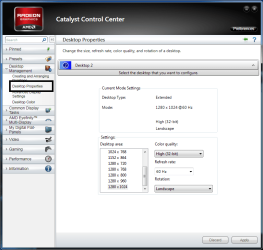
The best answer is.....keep the monitors plugged in and turn them OFF with their power buttons.

To configure:
Use Extend or Replace.
Use Swap for monitor placement. Don't worry if the resolution is out of whack........use Desktop Properties to adjust the resolution for each monitor.

Right click on icons for more options.

Once you get the monitors set up the way you want, you don't have to do anything further.
The setting are usually retained when you turn off the computer.

amd.PNG

amd2.PNG

amd3.PNG
 

My Computer My Computer

At a glance

Windows 7 Home Premium 64 bitIntel Core i7-4790G.SKILL 8GB (2 x 4GB) DDR3 F3-10666CL9D-8GBNTAMD Radeon R7 250
Computer type
PC/Desktop
Computer Manufacturer/Model Number
Custom Build
OS
Windows 7 Home Premium 64 bit
CPU
Intel Core i7-4790
Motherboard
GA-Z87X-D3H
Memory
G.SKILL 8GB (2 x 4GB) DDR3 F3-10666CL9D-8GBNT
Graphics Card(s)
AMD Radeon R7 250
Sound Card
Realtek ALC892
Monitor(s) Displays
Samsung UN32EH5000, Dell 1703FPT
Screen Resolution
1920 x 1080, 1280 x 1024
Hard Drives
WD5003AZEX
WD10EZEX
Samsung HD103SJ
Samsung 128 GB 840 PRO
PSU
SeaSonic M12II SS-500GM
Case
Fractal Design Define R4
Cooling
Zalman CNPS9900ALED
Keyboard
Logitech K800
Mouse
Logitech M705
Internet Speed
16 Mbps
Antivirus
Avast
Browser
Firefox
Other Info
Bose Companion 2 Multimedia Speakers
Thanks for the responses.

As per my initial (somewhat long) description, in the ATI CCC its OK (see first image), although I don't have the 3 options you have in step 1 for some reason. Any ideas?

ATI_CCC.png


But in Windows, right click desktop > Screen Resolution its the opposite (see below image) and this seems to be the issue. Until numbers 1 and 2 are reversed I think its going to give me these issues.

Another symptom, not mentioned in my initial post is, if I turn Monitor 2 (HDMI) off and my desktop is not on 'Extended' but on normal 'Desktop Only' if I reboot, then my PC screen (monitor 1) has no signal and is dead until I turn my TV (Monitor 2) on. So that's why I currently have to run Monitor 1 in Extended always.

Anyways here' is the Windows > Screen Resolution image if it helps. If I can get 1 and 2 numbers flipped here, it would work as it should. Note that Monitor 2 is highlighted, set top main monitor yet its number 2, but should be 1.

screen_resy.png


So any other ideas, could it be Windows or the Sapphire graphics card? All drivers and ATI CCC are up to date.

Thanks
Ian

P.S. No idea why the images aren't showing. When inserting an image it asked for the url so i gave it.
 
Last edited by a moderator:

My Computer My Computer

At a glance

Windows 7 64bit
OS
Windows 7 64bit
Hello,
The options Duplicate, Extend and Replace are only visible when two monitors are hooked up, but only one is detected. You can disregard the option since you have two monitors detected.

From what I've gathered, you want the DVI monitor to be 1 and the HDMI monitor to be 2.
Right click on either of the top monitors and Swap them. If prompted to retain the setting, select yes.
Adjust the resolution with Desktop Properties.

You can test to see if the symptom you mentioned goes away.

Hopefully you've updated your drivers from the AMD site and not the Sapphire site. I'm not sure if Sapphire updates their drivers after the card ends it production.

Good Luck!!
 

My Computer My Computer

At a glance

Windows 7 Home Premium 64 bitIntel Core i7-4790G.SKILL 8GB (2 x 4GB) DDR3 F3-10666CL9D-8GBNTAMD Radeon R7 250
Computer type
PC/Desktop
Computer Manufacturer/Model Number
Custom Build
OS
Windows 7 Home Premium 64 bit
CPU
Intel Core i7-4790
Motherboard
GA-Z87X-D3H
Memory
G.SKILL 8GB (2 x 4GB) DDR3 F3-10666CL9D-8GBNT
Graphics Card(s)
AMD Radeon R7 250
Sound Card
Realtek ALC892
Monitor(s) Displays
Samsung UN32EH5000, Dell 1703FPT
Screen Resolution
1920 x 1080, 1280 x 1024
Hard Drives
WD5003AZEX
WD10EZEX
Samsung HD103SJ
Samsung 128 GB 840 PRO
PSU
SeaSonic M12II SS-500GM
Case
Fractal Design Define R4
Cooling
Zalman CNPS9900ALED
Keyboard
Logitech K800
Mouse
Logitech M705
Internet Speed
16 Mbps
Antivirus
Avast
Browser
Firefox
Other Info
Bose Companion 2 Multimedia Speakers
I'm not sure this guy was understood, and I'm having the same problem, so hopefully I can make it a little clearer.

I also have two monitors: a 23" Dell monitor hooked up on my desktop through DVI, and then my second monitor is my 55" LG television, hooked up through HDMI. (Both of the heads on my Radeon 4850 are DVI, so the HDMI one goes through an adapter.)

On CCC, the Dell shows up as Monitor 1 and the LG TV shows up as Monitor 2. This is good. This is how I want it.

On the Win7 Screen Resolution control panel, invariably, the LG TV shows up as Monitor 1 and the Dell monitor shows up as Monitor 2. This is backwards from how I want it, and it's not just a cosmetic fix because the built-in Win7 multi-monitor hotkey (Win+P) now thinks my Dell is the "projector" and the LG is "Computer only". This creates problems when it comes to my HTPC automation.

This problem seems to be consistent even if I swap the two plugs into the video card, which is odd because in the past this usually fixed it.

So the question is, how to force WINDOWS to enumerate the Dell as 1 and the LG TV as 2? Is it an issue with HDMI connections always enumerating before DVI or can it be forced?
 

My Computer My Computer

At a glance

Windows 7 Ultimate 64-bit
OS
Windows 7 Ultimate 64-bit
Back
Top