Solved Dual monitor set up help.

scottyb

New member
Local time
9:07 AM
Messages
12
HI Guys - thanks in advance for any help.

New Dell XPS desktop. I'm having trouble setting up dual monitors. Had them set up before. But so much is new. I need help. Nvidia 650GT. Fresh install of windows 7. Updated. Both monitors work. They just won't work together.
They will duplicate but they wont 'extend'. The mouse simply won't travel screen to screen. Both screen power up. Resolution recognizes both monitors by model # = Acer G215VH and ViewSonic VA2703
The Nvidia control panel recognizes both monitors also.
The device manager shows The Viewsonic with the latest driver.
The second driver is identified as PNP monitor and says best driver installed but it doesn't list the acer by name... ? When I search drivers for Acer I find only vista 32bit drivers - sorry to be so long here.
Both screens are same resolution and refresh rate although different sizes ?
Acer is on VGA cable and VA2703 is on a VID cable, these are the two jacks this card has.
 

My Computer My Computer

At a glance

windows 7 home premium 64bit 16GB Ram3.40 GH16 GBInvidia 650 GT
Computer type
PC/Desktop
Computer Manufacturer/Model Number
Dell
OS
windows 7 home premium 64bit 16GB Ram
CPU
3.40 GH
Memory
16 GB
Graphics Card(s)
Invidia 650 GT
Hard Drives
solid state
Antivirus
avast
Browser
Google chrome
What version of Windows 7 are you using? Windows 7 Starter?
 

My Computer My Computer

At a glance

Windows 7 Ultimate 64-bitIntel Core i732GB RAM
Computer type
PC/Desktop
Computer Manufacturer/Model Number
Custom Build
OS
Windows 7 Ultimate 64-bit
CPU
Intel Core i7
Motherboard
ASUS
Memory
32GB RAM
Monitor(s) Displays
2
Hard Drives
1TB HDD
160GB SSD
2TB HDD
Cooling
3 Fans, water cooling
Keyboard
Microsoft
Mouse
Microsoft
Internet Speed
Around 70mbps
Antivirus
AVG Internet Security 2014
Browser
IE11, Google Chrome (default browser is Chrome)
I'm using windows 7 home premium 64 bit, thank you.
 

My Computer My Computer

At a glance

windows 7 home premium 64bit 16GB Ram3.40 GH16 GBInvidia 650 GT
Computer type
PC/Desktop
Computer Manufacturer/Model Number
Dell
OS
windows 7 home premium 64bit 16GB Ram
CPU
3.40 GH
Memory
16 GB
Graphics Card(s)
Invidia 650 GT
Hard Drives
solid state
Antivirus
avast
Browser
Google chrome
Right click on your desktop, click screen resolution and post a pic of the window.

What is a VID cable ?

Also post a link to your exact video card.
 

My Computer My Computer

At a glance

Windows 10 Pro x64Intel Core i7 6700KGSkill TridentZ RGB 16GB 3600 16-16-16-36EVGA GTX 980 Ti SC x2
Computer type
PC/Desktop
Computer Manufacturer/Model Number
Skylake Special #666
OS
Windows 10 Pro x64
CPU
Intel Core i7 6700K
Motherboard
Asus Sabertooth Z170 Mark 1
Memory
GSkill TridentZ RGB 16GB 3600 16-16-16-36
Graphics Card(s)
EVGA GTX 980 Ti SC x2
Sound Card
Realtek High Definition
Monitor(s) Displays
AOC G2460PG
Screen Resolution
1920 x 1080 144Hz
Hard Drives
Samsung 860 Pro 256GB, Seagate Barracuda 4TB x2
PSU
EVGA 1000 P2, EVGA White Custom Braided Cables
Case
Corsair Vengeance C70 Gunmetal Black
Cooling
Corsair H100i v2, Corsair ML120 x2, Thermal Grizzly Kryonaut
Keyboard
Logitech G910 Orion Spectrum
Mouse
Logitech G700s
Internet Speed
Verizon Fios Quantum Gateway 75/75
Antivirus
Windows Defender, Malwarebytes Free 3.8.3
Browser
Chrome
Other Info
Corsair SP120 x4, LG Blu-ray Drive, Durabrand HT-395 100 Watt Dolby Digital Amp, Corsair H2100 Wireless 7.1 Headset
What is a VID cable ?

Either shorthand for video cable or DVI cable.

It may be easier using the Windows Screen resolution setup


Try right clicking the desktop > Screen resolution

From there you should see your primary screen (the laptop screen) and a blanked out pic of the external monitor.

Click on the disabled display and select "extend these displays" > Apply

By rights you should now have an extended display instead of cloned mode.


The drivers shouldn't matter. It will most likely show up as PNP monitor.
 

My Computer My Computer

At a glance

8 Pro x64i7 3770K 4.6GHz16GB G.Skill Trident X 2666mhzx2 EVGA 780 Ti Superclocked SLI
Computer type
PC/Desktop
Computer Manufacturer/Model Number
Systems by SmartEyeball
OS
8 Pro x64
CPU
i7 3770K 4.6GHz
Motherboard
ASUS P8Z77 WS
Memory
16GB G.Skill Trident X 2666mhz
Graphics Card(s)
x2 EVGA 780 Ti Superclocked SLI
Sound Card
SB X-FI Surround 5.1 PRO USB / ATH-AD900 Headphones
Monitor(s) Displays
x3 Dell U2410 / 58" Samsung
Screen Resolution
5760*1200/ 1920*1200
Hard Drives
2x Intel 520 240GB (RAID 0) * 2x WD Caviar Blacks 2TB (RAID 0) * 2TB WD Caviar Black * Sony Optirac DVD
PSU
Silverstone Strider Evolution 1200W
Case
Thermaltake Level 10 GT Snow Edition
Cooling
Noctua NH-D14
Keyboard
Topre Realforce // Ducky Shine MX Black // Filco Ninja TKL
Mouse
Thermaltake Theron (Highly Recommended) + Razer Imperator
Antivirus
MSE
Browser
IE, FF, WaterFox
Other Info
GT Extreme V2 Sim Racing Cockpit + 40" LCD and K/B Mouse stand ▼
Fanatec CSR Elite Wheel + Clubsport V1 Pedals + CSR shifter/7G-H ▼Saitek X52 Pro ▼ TrackIR 5 Pro
Buttkicker v2 Seat Rumbler with Dedicated 5.1 and Sub Woofer attached to frame ▼
=
Bloody Big Grin
Thank you for your suggestions guys, Yes I meant DVI-D cable.

Both monitors work when selected as primary the screen and both work in 'duplicate display' mode but only #1 works in 'extend display' mode and mouse courser can not go from screen to screen at any time.
 

My Computer My Computer

At a glance

windows 7 home premium 64bit 16GB Ram3.40 GH16 GBInvidia 650 GT
Computer type
PC/Desktop
Computer Manufacturer/Model Number
Dell
OS
windows 7 home premium 64bit 16GB Ram
CPU
3.40 GH
Memory
16 GB
Graphics Card(s)
Invidia 650 GT
Hard Drives
solid state
Antivirus
avast
Browser
Google chrome
Hi Scotty, welcome to the Seven Forums.

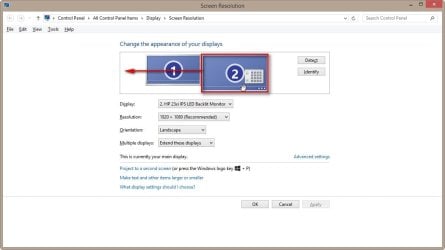
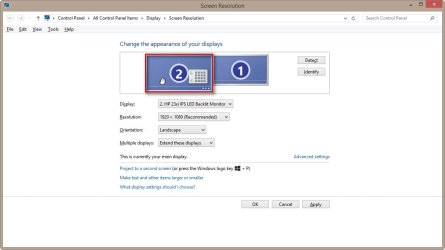
Does the Windows Screen Resolution tool show the displays as they are located on your desk? I mean, if your main display is at left and your secondary display at right, does the tool show the same, number 1 on left display and number 2 on right?

If not, you can drag and drop the display icons in Screen Resolution tool as you wish. An example:

Originally I had Display 1 at left, Display 2 at right. Now I have physically moved my secondary display (2.) on my desk from right to left, I also need to change how they are displayed in Screen Resolution tool, because only the location of displays as shown in Screen Resolution tool determines how the mouse pointer moves from one display to another.

Original situation, I select the display 2 and drag it in to a new position to the left of display 1:

2013-11-17_225106.jpg

Now the display icons are located as the real displays on my desk, display 2 at left and display 1 at right:

2013-11-17_225214.jpg

Notice that you can set the display icons exactly as you want to but you need to remember that the way you organize the display icons determines the area and direction where mouse can move from one display to another. See the screenshot below; the top and bottom red arrows show where mouse cannot move over the edge to the next display, the highlighted yellow area and the bidirectional arrow in it show where mouse can move over the display border to the next display:

2013-11-17_225435.jpg

More here: http://www.sevenforums.com/graphic-cards/56097-dual-monitor-issue-gtx-260-a.html#post511936

Kari
 
Last edited:

My Computer My Computer

At a glance

Windows 10 Pro x64 EN-GB1.6 GHz Intel Core i7-720QM Processor6 GBATI Mobility Radeon HD 5850 Graphics
Computer type
Laptop
Computer Manufacturer/Model Number
HP ENVY 17-1150eg
OS
Windows 10 Pro x64 EN-GB
CPU
1.6 GHz Intel Core i7-720QM Processor
Memory
6 GB
Graphics Card(s)
ATI Mobility Radeon HD 5850 Graphics
Sound Card
Beats sound system with integrated subwoofer
Monitor(s) Displays
17" laptop display, 22" LED and 32" Full HD TV through HDMI
Screen Resolution
1600*900 (1), 1920*1080 (2&3)
Hard Drives
Internal: 2 x 500 GB SATA Hard Disk Drive 7200 rpm
External: 2TB for backups, 3TB USB3 network drive for media
Cooling
As Envy runs a bit warm, I have it on a Cooler Master pad
Keyboard
Logitech diNovo Media Desktop Laser (bluetooth)
Mouse
Logitech Performance Mouse MX
Internet Speed
50/10 Mbps VDSL
Antivirus
Windows Defender 4.3.9431.0
Browser
Maxthon 3.5.2., IE11
You are a genius!
One thousand thank yous.
The fix was as simple as swapping the display icons :D
 

My Computer My Computer

At a glance

windows 7 home premium 64bit 16GB Ram3.40 GH16 GBInvidia 650 GT
Computer type
PC/Desktop
Computer Manufacturer/Model Number
Dell
OS
windows 7 home premium 64bit 16GB Ram
CPU
3.40 GH
Memory
16 GB
Graphics Card(s)
Invidia 650 GT
Hard Drives
solid state
Antivirus
avast
Browser
Google chrome
You are welcome :).
 

My Computer My Computer

At a glance

Windows 10 Pro x64 EN-GB1.6 GHz Intel Core i7-720QM Processor6 GBATI Mobility Radeon HD 5850 Graphics
Computer type
Laptop
Computer Manufacturer/Model Number
HP ENVY 17-1150eg
OS
Windows 10 Pro x64 EN-GB
CPU
1.6 GHz Intel Core i7-720QM Processor
Memory
6 GB
Graphics Card(s)
ATI Mobility Radeon HD 5850 Graphics
Sound Card
Beats sound system with integrated subwoofer
Monitor(s) Displays
17" laptop display, 22" LED and 32" Full HD TV through HDMI
Screen Resolution
1600*900 (1), 1920*1080 (2&3)
Hard Drives
Internal: 2 x 500 GB SATA Hard Disk Drive 7200 rpm
External: 2TB for backups, 3TB USB3 network drive for media
Cooling
As Envy runs a bit warm, I have it on a Cooler Master pad
Keyboard
Logitech diNovo Media Desktop Laser (bluetooth)
Mouse
Logitech Performance Mouse MX
Internet Speed
50/10 Mbps VDSL
Antivirus
Windows Defender 4.3.9431.0
Browser
Maxthon 3.5.2., IE11
Thought you would have tried that already, but glad you got it sorted. :)
 

My Computer My Computer

At a glance

Windows 10 Pro x64Intel Core i7 6700KGSkill TridentZ RGB 16GB 3600 16-16-16-36EVGA GTX 980 Ti SC x2
Computer type
PC/Desktop
Computer Manufacturer/Model Number
Skylake Special #666
OS
Windows 10 Pro x64
CPU
Intel Core i7 6700K
Motherboard
Asus Sabertooth Z170 Mark 1
Memory
GSkill TridentZ RGB 16GB 3600 16-16-16-36
Graphics Card(s)
EVGA GTX 980 Ti SC x2
Sound Card
Realtek High Definition
Monitor(s) Displays
AOC G2460PG
Screen Resolution
1920 x 1080 144Hz
Hard Drives
Samsung 860 Pro 256GB, Seagate Barracuda 4TB x2
PSU
EVGA 1000 P2, EVGA White Custom Braided Cables
Case
Corsair Vengeance C70 Gunmetal Black
Cooling
Corsair H100i v2, Corsair ML120 x2, Thermal Grizzly Kryonaut
Keyboard
Logitech G910 Orion Spectrum
Mouse
Logitech G700s
Internet Speed
Verizon Fios Quantum Gateway 75/75
Antivirus
Windows Defender, Malwarebytes Free 3.8.3
Browser
Chrome
Other Info
Corsair SP120 x4, LG Blu-ray Drive, Durabrand HT-395 100 Watt Dolby Digital Amp, Corsair H2100 Wireless 7.1 Headset
No - I was ignorant - lol
Thank you again for having a very helpful forum.
I used it years ago but lost that username.
Recently bought new PC with win8 and ditched it for win7
 

My Computer My Computer

At a glance

windows 7 home premium 64bit 16GB Ram3.40 GH16 GBInvidia 650 GT
Computer type
PC/Desktop
Computer Manufacturer/Model Number
Dell
OS
windows 7 home premium 64bit 16GB Ram
CPU
3.40 GH
Memory
16 GB
Graphics Card(s)
Invidia 650 GT
Hard Drives
solid state
Antivirus
avast
Browser
Google chrome
Back
Top