How to force nvidia to use 1680x1050

v0id

Counter-Strike
Power User
VIP
Local time
2:18 PM
Messages
291
Location
Steam
Hi to all!

I am using windows 7 RC x64 (build 7100) and i cant use 1680x1050 res on my monitor. Now i am using 1440x900. It shows me that i can use 1680x1050 res but when i apply, it automatic change to 1600x1200. So how i can force my grafic card to use 1680x1050?

I have nvidia GeForce 8500 GT
GeForce 8500

I am using Samsung SyncMaster 2023NW 20" Widescreen TFT Monitor
Play.com (UK) : Samsung SyncMaster 2023NW 20" Widescreen TFT Monitor : Computing - Free Delivery

Any help would be appreciated! Thank You!
 
Last edited:

My Computer My Computer

At a glance

Windows 3.11Pentium 38612 MB2 MB
Computer Manufacturer/Model Number
IBM
OS
Windows 3.11
CPU
Pentium 386
Memory
12 MB
Graphics Card(s)
2 MB
Monitor(s) Displays
12"
Screen Resolution
640X480
Hard Drives
100 MB
Internet Speed
1 kb/s
Other Info
I Love my PC!
Try using the Nvidia control panel and select the native resolution setting and use monitors built in scaling, I think you may have to use a DVI cable to get that option though, which is the best option anyway if you have it.

2009-02-15_003015.jpg
 

My Computer My Computer

At a glance

Windows 7 Ultimate Vista Ultimate x64Core 2 Duo E8500 3.16Ghz @ 3.8Ghz2x2Gigs Patriot PC2-6400 LLInno3D GeForce GTX260 216 SP
Computer Manufacturer/Model Number
Home Brew
OS
Windows 7 Ultimate Vista Ultimate x64
CPU
Core 2 Duo E8500 3.16Ghz @ 3.8Ghz
Motherboard
eVGA 750i FTW
Memory
2x2Gigs Patriot PC2-6400 LL
Graphics Card(s)
Inno3D GeForce GTX260 216 SP
Monitor(s) Displays
ASUS VW222U 22" 2ms Response time
Screen Resolution
1680x1050
Hard Drives
SATA 150GB
SATA II 250GB
USB IDE 750GB Ext.
PSU
HYTEC 600W & Thermaltake 650W Toughpower Power Exp
Case
Thermaltake Armor LCS (Liquid Cooling System)
Cooling
Liquid Cooling System
Keyboard
Logitech G15 Gaming Keyboard
Mouse
Logitech G9 Gaming Mouse
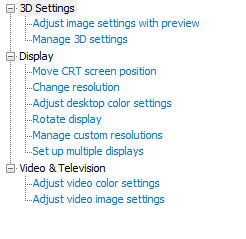
Thank you for answering but i dont have in nvidia cp "Change flat panel scaling" option. I am using advanced setings!
 

Attachments

  • aaaaaa.png
    aaaaaa.png
    3.7 KB · Views: 9,237

My Computer My Computer

At a glance

Windows 3.11Pentium 38612 MB2 MB
Computer Manufacturer/Model Number
IBM
OS
Windows 3.11
CPU
Pentium 386
Memory
12 MB
Graphics Card(s)
2 MB
Monitor(s) Displays
12"
Screen Resolution
640X480
Hard Drives
100 MB
Internet Speed
1 kb/s
Other Info
I Love my PC!
That is because you are using a VGA connection to your monitor, you will need to use DVI and that will solve your problem.
 

My Computer My Computer

At a glance

Windows 7 Ultimate Vista Ultimate x64Core 2 Duo E8500 3.16Ghz @ 3.8Ghz2x2Gigs Patriot PC2-6400 LLInno3D GeForce GTX260 216 SP
Computer Manufacturer/Model Number
Home Brew
OS
Windows 7 Ultimate Vista Ultimate x64
CPU
Core 2 Duo E8500 3.16Ghz @ 3.8Ghz
Motherboard
eVGA 750i FTW
Memory
2x2Gigs Patriot PC2-6400 LL
Graphics Card(s)
Inno3D GeForce GTX260 216 SP
Monitor(s) Displays
ASUS VW222U 22" 2ms Response time
Screen Resolution
1680x1050
Hard Drives
SATA 150GB
SATA II 250GB
USB IDE 750GB Ext.
PSU
HYTEC 600W & Thermaltake 650W Toughpower Power Exp
Case
Thermaltake Armor LCS (Liquid Cooling System)
Cooling
Liquid Cooling System
Keyboard
Logitech G15 Gaming Keyboard
Mouse
Logitech G9 Gaming Mouse
But in XP its working, only in windows 7 i cant use 1680x1050 res. Is there any other solution? I dont have DVI and my monitor not suport DVI only VGA!
 

My Computer My Computer

At a glance

Windows 3.11Pentium 38612 MB2 MB
Computer Manufacturer/Model Number
IBM
OS
Windows 3.11
CPU
Pentium 386
Memory
12 MB
Graphics Card(s)
2 MB
Monitor(s) Displays
12"
Screen Resolution
640X480
Hard Drives
100 MB
Internet Speed
1 kb/s
Other Info
I Love my PC!
No sorry, everyone that has had this problem also has it working fine on XP and Vista but this is the only know solution for Windows 7 ATM, once you have a DVI cable you will not want to go back anyway, the picture is far superior and is what you should be using anyway unless your Graphics Card doesn't support it.
 

My Computer My Computer

At a glance

Windows 7 Ultimate Vista Ultimate x64Core 2 Duo E8500 3.16Ghz @ 3.8Ghz2x2Gigs Patriot PC2-6400 LLInno3D GeForce GTX260 216 SP
Computer Manufacturer/Model Number
Home Brew
OS
Windows 7 Ultimate Vista Ultimate x64
CPU
Core 2 Duo E8500 3.16Ghz @ 3.8Ghz
Motherboard
eVGA 750i FTW
Memory
2x2Gigs Patriot PC2-6400 LL
Graphics Card(s)
Inno3D GeForce GTX260 216 SP
Monitor(s) Displays
ASUS VW222U 22" 2ms Response time
Screen Resolution
1680x1050
Hard Drives
SATA 150GB
SATA II 250GB
USB IDE 750GB Ext.
PSU
HYTEC 600W & Thermaltake 650W Toughpower Power Exp
Case
Thermaltake Armor LCS (Liquid Cooling System)
Cooling
Liquid Cooling System
Keyboard
Logitech G15 Gaming Keyboard
Mouse
Logitech G9 Gaming Mouse
OK! If not there any other solution i will go back to XP or Vista (probably XP).
Thank You for helping me!
 

My Computer My Computer

At a glance

Windows 3.11Pentium 38612 MB2 MB
Computer Manufacturer/Model Number
IBM
OS
Windows 3.11
CPU
Pentium 386
Memory
12 MB
Graphics Card(s)
2 MB
Monitor(s) Displays
12"
Screen Resolution
640X480
Hard Drives
100 MB
Internet Speed
1 kb/s
Other Info
I Love my PC!
So DVI is not an option for you then?
 

My Computer My Computer

At a glance

Windows 7 Ultimate Vista Ultimate x64Core 2 Duo E8500 3.16Ghz @ 3.8Ghz2x2Gigs Patriot PC2-6400 LLInno3D GeForce GTX260 216 SP
Computer Manufacturer/Model Number
Home Brew
OS
Windows 7 Ultimate Vista Ultimate x64
CPU
Core 2 Duo E8500 3.16Ghz @ 3.8Ghz
Motherboard
eVGA 750i FTW
Memory
2x2Gigs Patriot PC2-6400 LL
Graphics Card(s)
Inno3D GeForce GTX260 216 SP
Monitor(s) Displays
ASUS VW222U 22" 2ms Response time
Screen Resolution
1680x1050
Hard Drives
SATA 150GB
SATA II 250GB
USB IDE 750GB Ext.
PSU
HYTEC 600W & Thermaltake 650W Toughpower Power Exp
Case
Thermaltake Armor LCS (Liquid Cooling System)
Cooling
Liquid Cooling System
Keyboard
Logitech G15 Gaming Keyboard
Mouse
Logitech G9 Gaming Mouse
I dont have DVI! But i think there is other solution coz its working on XP and Vista! I will try to find one. If someone other have other solution please replay to this thread. If i not find til tomorrow i will back to XP or Vista.
 

My Computer My Computer

At a glance

Windows 3.11Pentium 38612 MB2 MB
Computer Manufacturer/Model Number
IBM
OS
Windows 3.11
CPU
Pentium 386
Memory
12 MB
Graphics Card(s)
2 MB
Monitor(s) Displays
12"
Screen Resolution
640X480
Hard Drives
100 MB
Internet Speed
1 kb/s
Other Info
I Love my PC!
No other solution for me? :cry:
OK!
I am now runing XP :huh:
 

My Computer My Computer

At a glance

Windows 3.11Pentium 38612 MB2 MB
Computer Manufacturer/Model Number
IBM
OS
Windows 3.11
CPU
Pentium 386
Memory
12 MB
Graphics Card(s)
2 MB
Monitor(s) Displays
12"
Screen Resolution
640X480
Hard Drives
100 MB
Internet Speed
1 kb/s
Other Info
I Love my PC!
Doesnt your card have a dvi slot?
 

My Computer My Computer

At a glance

Windows 7 Professional 64-bitIntel E8400 3GHzKingston PC3-10700H 4GbXFX Radeon HD 5850 BlackEd.
Computer Manufacturer/Model Number
self built
OS
Windows 7 Professional 64-bit
CPU
Intel E8400 3GHz
Motherboard
Intel DX48BT2
Memory
Kingston PC3-10700H 4Gb
Graphics Card(s)
XFX Radeon HD 5850 BlackEd.
Sound Card
Asus Xonar DG
Monitor(s) Displays
2x Samsung SM-T220HD 22"
Screen Resolution
1680x1050 on two monitors
Hard Drives
OCZ Vertex 2 120gb 3.5" (OS)
Seagate Momentus XT 500gb
Samsung F3 1Tb (games)
2x Samsung F1 1Tb
PSU
Thermaltake ToughPower 850w
Case
Thermaltake Armor
Cooling
Scythe Mugen II
Keyboard
Microsoft Comfort Curve USB
Mouse
Razer Diamondback 3G
Internet Speed
8128/443
Have you tried using that "Manage Custom Resolutions" option that shows in your screen shot?
 

My Computer My Computer

At a glance

Win 7 Ult SP1/Win 10 Pro (all x64)Intel® Core™ i7-975 Extreme O/C to 4.02 GHz, ...24GB Corsair Vengeance DDR3 SDRAM at 1600MHz ...1792 MB NVIDIA® GeForce® GTX 295 Dual Core
Computer type
PC/Desktop
Computer Manufacturer/Model Number
Alienware® ALX X58
OS
Win 7 Ult SP1/Win 10 Pro (all x64)
CPU
Intel® Core™ i7-975 Extreme O/C to 4.02 GHz, 8MB Cache
Motherboard
Asus® P6T Deluxe V2 X58 LGA1366
Memory
24GB Corsair Vengeance DDR3 SDRAM at 1600MHz - 6 x 4096MB
Graphics Card(s)
1792 MB NVIDIA® GeForce® GTX 295 Dual Core
Sound Card
Onboard Soundmax® High-Definition 7.1 Performance Audio
Monitor(s) Displays
Samsung XL2370 LED backlit 23" W/S 2ms response time
Screen Resolution
1920 X 1080
Hard Drives
2 x 500gb SATA II
1 x 1TB SATA II
1 external eSATA LaCie 3TB
(Non-RAID)
PSU
Alienware® 1200 Watt Multi-GPU
Case
Alienware® P2 ALX Chassis with AlienIce™ 3.0 Video Cooling
Cooling
Alienware® High-Perf. Liquid Cooling + Acoustic Dampening
Keyboard
Microsoft® Wireless Entertainment 8000 + Logitech® G15 Wired
Mouse
Microsoft® Wireless Laser 8000 + Logitech® G9 Wired
Internet Speed
1Gb/s
Antivirus
McAfee LiveSafe
Browser
Firefox - latest
Other Info
Using non-RAID on purpose as I find RAID to be too temperamental.
Now set to AHCI
Doesnt your card have a dvi slot?
Yes. But my monitor dont have. Only VGA!
Have you tried using that "Manage Custom Resolutions" option that shows in your screen shot?
Yes i have tryed that and its same. When i aplyed it back to res 1600x1200 but i want 1680x1050.
 

My Computer My Computer

At a glance

Windows 3.11Pentium 38612 MB2 MB
Computer Manufacturer/Model Number
IBM
OS
Windows 3.11
CPU
Pentium 386
Memory
12 MB
Graphics Card(s)
2 MB
Monitor(s) Displays
12"
Screen Resolution
640X480
Hard Drives
100 MB
Internet Speed
1 kb/s
Other Info
I Love my PC!
ignore....will check...
 

My Computer My Computer

At a glance

Win 7 Ult SP1/Win 10 Pro (all x64)Intel® Core™ i7-975 Extreme O/C to 4.02 GHz, ...24GB Corsair Vengeance DDR3 SDRAM at 1600MHz ...1792 MB NVIDIA® GeForce® GTX 295 Dual Core
Computer type
PC/Desktop
Computer Manufacturer/Model Number
Alienware® ALX X58
OS
Win 7 Ult SP1/Win 10 Pro (all x64)
CPU
Intel® Core™ i7-975 Extreme O/C to 4.02 GHz, 8MB Cache
Motherboard
Asus® P6T Deluxe V2 X58 LGA1366
Memory
24GB Corsair Vengeance DDR3 SDRAM at 1600MHz - 6 x 4096MB
Graphics Card(s)
1792 MB NVIDIA® GeForce® GTX 295 Dual Core
Sound Card
Onboard Soundmax® High-Definition 7.1 Performance Audio
Monitor(s) Displays
Samsung XL2370 LED backlit 23" W/S 2ms response time
Screen Resolution
1920 X 1080
Hard Drives
2 x 500gb SATA II
1 x 1TB SATA II
1 external eSATA LaCie 3TB
(Non-RAID)
PSU
Alienware® 1200 Watt Multi-GPU
Case
Alienware® P2 ALX Chassis with AlienIce™ 3.0 Video Cooling
Cooling
Alienware® High-Perf. Liquid Cooling + Acoustic Dampening
Keyboard
Microsoft® Wireless Entertainment 8000 + Logitech® G15 Wired
Mouse
Microsoft® Wireless Laser 8000 + Logitech® G9 Wired
Internet Speed
1Gb/s
Antivirus
McAfee LiveSafe
Browser
Firefox - latest
Other Info
Using non-RAID on purpose as I find RAID to be too temperamental.
Now set to AHCI
Yes. But my monitor dont have. Only VGA!

Yes i have tryed that and its same. When i aplyed it back to res 1600x1200 but i want 1680x1050.

its gotta be related to the 8500.....

ive had no resolution issues with the 3 GFX cards i tried on 7, 9600GSO, 8800GT, GTX260..

have you reseated the card now windows 7 & the Nvidia drivers are installed..??

sometimes if you install a bucket load of S/W onto ''pre-installed'' H/W it may not detect it all properly..


:)SK
 

My Computer My Computer

At a glance

SEVEN x64Q9450 @ 3.6GHZ 1.34v8GB 1066 buffalo firestix @ 1152mhz CL5Sapphire HD 5970 + GTX260 (physX)
Computer Manufacturer/Model Number
myself
OS
SEVEN x64
CPU
Q9450 @ 3.6GHZ 1.34v
Motherboard
ASUS P5K PREMIUM P35
Memory
8GB 1066 buffalo firestix @ 1152mhz CL5
Graphics Card(s)
Sapphire HD 5970 + GTX260 (physX)
Sound Card
Creative X-FI Xtreme Gamer
Monitor(s) Displays
SAMSUNG 20'' & SAMSUNG 23'' (dual screens)
Screen Resolution
2048x1152 & 1680x1050
Hard Drives
1x seagate 160gb IDE & 1x seagate 160gb SATA
PSU
XCILIO 850w (78A)
Case
CM590 1x 120x38mm & 2x92x38mm / 4x 120x25mm
Cooling
AC7 PRO @ 92x38mm blower, Lamptron military bus bay controll
Keyboard
LOGITECH E110
Mouse
logitech NX5
Internet Speed
2MB
Other Info
its a continual ''work in progress''....
Thank you skunksmash for help, but everything its ok, only res is problem. I can change res to 1680x1050 in XP and Vista with no problem, but in Windows 7 is BIG problem for me!

Is there any program can help me to force my card to use 1680x1050 res, or i need to hack somthing to work?
 

My Computer My Computer

At a glance

Windows 3.11Pentium 38612 MB2 MB
Computer Manufacturer/Model Number
IBM
OS
Windows 3.11
CPU
Pentium 386
Memory
12 MB
Graphics Card(s)
2 MB
Monitor(s) Displays
12"
Screen Resolution
640X480
Hard Drives
100 MB
Internet Speed
1 kb/s
Other Info
I Love my PC!
what about using a dvi to vga adapter? doesn't the 8500 have a dvi slot onboard?
 

My Computer My Computer

At a glance

Windows 7 64-bit
OS
Windows 7 64-bit
what about using a dvi to vga adapter? doesn't the 8500 have a dvi slot onboard?
Hi hdwalla!

My card have DVI and VGA slots but my monitor have only VGA. I will buy this adapter to see is this is going to work.

Thank you for helping me! :geek:
 

My Computer My Computer

At a glance

Windows 3.11Pentium 38612 MB2 MB
Computer Manufacturer/Model Number
IBM
OS
Windows 3.11
CPU
Pentium 386
Memory
12 MB
Graphics Card(s)
2 MB
Monitor(s) Displays
12"
Screen Resolution
640X480
Hard Drives
100 MB
Internet Speed
1 kb/s
Other Info
I Love my PC!
I've got exact same problem with my Samsung Syncmaster 205bw and nvidia 7300 gs card on Windows Seven. DVI or VGA max resolution is 1600 x 1200 and Ican't get native resolution (1680 x1050) for my screen.
 

My Computer My Computer

At a glance

xp
OS
xp
I've got exact same problem with my Samsung Syncmaster 205bw and nvidia 7300 gs card on Windows Seven. DVI or VGA max resolution is 1600 x 1200 and Ican't get native resolution (1680 x1050) for my screen.
We must report this Bug to nvidia to fix this! ;)
 

My Computer My Computer

At a glance

Windows 3.11Pentium 38612 MB2 MB
Computer Manufacturer/Model Number
IBM
OS
Windows 3.11
CPU
Pentium 386
Memory
12 MB
Graphics Card(s)
2 MB
Monitor(s) Displays
12"
Screen Resolution
640X480
Hard Drives
100 MB
Internet Speed
1 kb/s
Other Info
I Love my PC!
Back
Top