NVIDIA + Win7 + Dual Monitors = Frustration

CEV

New member
Local time
4:07 PM
Messages
14
I had no issues whatsoever when I was running WinXP Pro. I have Dell Vostro 220 running Win7 Ultimate with EVGA GeForce 9500GT running dual Samsung 2494's. I have installed the latest nvidia drivers. I am able to get cloned displays, but not extended display. And everytime I reboot, no settings stick, even the resolution. It looks as if I'm running in Safe Mode after a reboot. Please advise.
Thanks,
Chad
 

My Computer My Computer

At a glance

Win7 UltimateCore2Quad 2.664GBEVGA GeForce 9500GT
Computer Manufacturer/Model Number
Dell Vostro 220
OS
Win7 Ultimate
CPU
Core2Quad 2.66
Memory
4GB
Graphics Card(s)
EVGA GeForce 9500GT
Monitor(s) Displays
(2) Samsung 2494
After every reboot, I need to set the resolution all over again. And I am not able to select to extend the display over the 2 screens, it will only let me clone. Anyone else ever seen this?
Thanks,
Chad
 

My Computer My Computer

At a glance

Win7 UltimateCore2Quad 2.664GBEVGA GeForce 9500GT
Computer Manufacturer/Model Number
Dell Vostro 220
OS
Win7 Ultimate
CPU
Core2Quad 2.66
Memory
4GB
Graphics Card(s)
EVGA GeForce 9500GT
Monitor(s) Displays
(2) Samsung 2494
Still looking for suggestions.
Thanks
 

My Computer My Computer

At a glance

Win7 UltimateCore2Quad 2.664GBEVGA GeForce 9500GT
Computer Manufacturer/Model Number
Dell Vostro 220
OS
Win7 Ultimate
CPU
Core2Quad 2.66
Memory
4GB
Graphics Card(s)
EVGA GeForce 9500GT
Monitor(s) Displays
(2) Samsung 2494
Is anything flagged as having problems in device manager? Did you run your Windows Experience Index, I didn't get Aero until I ran it at least once. You might try installing the latest chip-set drivers available for your motherboard. Are you setting up the extended desktop in the windows interface or the Nvidia control panel? I've always done it from windows and not had any problems. I'm running a 220GT on windows home premium x64 with two I-Inc 19 LCD's.
 

My Computer My Computer

At a glance

Windows 10 Education 64 bitAMD Phenom II X4 980 Black Edition Deneb 3.7GHz8GB 4GBx2 Kingston PC10600 DDR3 1333 MemoryZotac NVIDIA Geforce GT640 2 Gig DDR3 PCIe
Computer type
PC/Desktop
Computer Manufacturer/Model Number
Home Built
OS
Windows 10 Education 64 bit
CPU
AMD Phenom II X4 980 Black Edition Deneb 3.7GHz
Motherboard
Asus M4N68T-M V2 µATX Motherboard
Memory
8GB 4GBx2 Kingston PC10600 DDR3 1333 Memory
Graphics Card(s)
Zotac NVIDIA Geforce GT640 2 Gig DDR3 PCIe
Sound Card
VIA VT1708s High Definition Audio 8-channel Onboard
Monitor(s) Displays
22" LG E2242 1080p and 2 19" I-INC AG191D
Screen Resolution
1280x1024 - 1920x1080 - 1280x1024
Hard Drives
Crucial M100 256 GB SSD and 500 GB WD Blue SATA
PSU
Thermaltake TR 620
Case
Power Up Black ATX Mid-Tower Case
Cooling
Stock heatsink and fan
Keyboard
Logitech Wireless K350 Wave
Mouse
Logitech Wireless M570 Trackman Wheel
Internet Speed
80 Mbps Down 30 Mbps Up
Antivirus
Windows Defender
Browser
Internet Explorer 11
Other Info
HP DVD1040e Lightscribe - External USB2
Nothing flagged in device manager. I have run Windows Experience Index. Doesn't work no matter if I use the windows interface or the NVIDIA control panel. Is it possible the Samsung 2494's could be the problem?
 

My Computer My Computer

At a glance

Win7 UltimateCore2Quad 2.664GBEVGA GeForce 9500GT
Computer Manufacturer/Model Number
Dell Vostro 220
OS
Win7 Ultimate
CPU
Core2Quad 2.66
Memory
4GB
Graphics Card(s)
EVGA GeForce 9500GT
Monitor(s) Displays
(2) Samsung 2494
What does WEI score for Graphics, and Gaming Graphics and if you view the detailed performance and system information does it list the correct video card? If your PC has onboard video, is it disabled in your BIOS? Both monitors are connected to the 9500GT?
 

My Computer My Computer

At a glance

Windows 10 Education 64 bitAMD Phenom II X4 980 Black Edition Deneb 3.7GHz8GB 4GBx2 Kingston PC10600 DDR3 1333 MemoryZotac NVIDIA Geforce GT640 2 Gig DDR3 PCIe
Computer type
PC/Desktop
Computer Manufacturer/Model Number
Home Built
OS
Windows 10 Education 64 bit
CPU
AMD Phenom II X4 980 Black Edition Deneb 3.7GHz
Motherboard
Asus M4N68T-M V2 µATX Motherboard
Memory
8GB 4GBx2 Kingston PC10600 DDR3 1333 Memory
Graphics Card(s)
Zotac NVIDIA Geforce GT640 2 Gig DDR3 PCIe
Sound Card
VIA VT1708s High Definition Audio 8-channel Onboard
Monitor(s) Displays
22" LG E2242 1080p and 2 19" I-INC AG191D
Screen Resolution
1280x1024 - 1920x1080 - 1280x1024
Hard Drives
Crucial M100 256 GB SSD and 500 GB WD Blue SATA
PSU
Thermaltake TR 620
Case
Power Up Black ATX Mid-Tower Case
Cooling
Stock heatsink and fan
Keyboard
Logitech Wireless K350 Wave
Mouse
Logitech Wireless M570 Trackman Wheel
Internet Speed
80 Mbps Down 30 Mbps Up
Antivirus
Windows Defender
Browser
Internet Explorer 11
Other Info
HP DVD1040e Lightscribe - External USB2
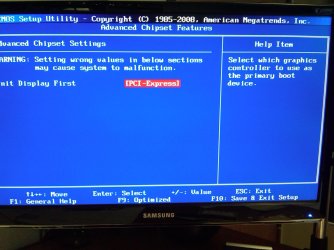
Graphics is 5.5, Gaming Graphics is 4.9. Details list correct video card. BIOS is showing the main display to be PCI-Express. Both monitors are connected to the video card. And when booting and while in BIOS, both monitors are displaying and cloned. Once it gets into windows, the cloned display is no longer there and the one display that is showing defaults to a reso of like 800x600. I then have to go in and set the reso to 1920x1080. It does this every time I reboot.
 

Attachments

  • IMG00132-20100602-0931.jpg
    IMG00132-20100602-0931.jpg
    261.5 KB · Views: 37

My Computer My Computer

At a glance

Win7 UltimateCore2Quad 2.664GBEVGA GeForce 9500GT
Computer Manufacturer/Model Number
Dell Vostro 220
OS
Win7 Ultimate
CPU
Core2Quad 2.66
Memory
4GB
Graphics Card(s)
EVGA GeForce 9500GT
Monitor(s) Displays
(2) Samsung 2494
OK , I'm 5.4 and 6.3 with a 220GT, so your's sound about right for a 9500GT. It's happened to me once were WEI hiccuped during the test and my graphics came back with a score of 1.0 while gaming graphics was a normal 6.3. AERO wouldn't work until I ran it again and got my 5.4 score back. If you go to Devices and Printers do both of your monitors show up, and do they show as 2494's? If they don't you may have to hunt up drivers for them. They call them drivers but it's actually just an inf file that defines all the supported resolutions. Other things to try would be to run directx diagnostics and see if it flags anything. You might even want to download the latest version of directx and install that. Are you running the latest motherboard and video card drivers for your system?
 

My Computer My Computer

At a glance

Windows 10 Education 64 bitAMD Phenom II X4 980 Black Edition Deneb 3.7GHz8GB 4GBx2 Kingston PC10600 DDR3 1333 MemoryZotac NVIDIA Geforce GT640 2 Gig DDR3 PCIe
Computer type
PC/Desktop
Computer Manufacturer/Model Number
Home Built
OS
Windows 10 Education 64 bit
CPU
AMD Phenom II X4 980 Black Edition Deneb 3.7GHz
Motherboard
Asus M4N68T-M V2 µATX Motherboard
Memory
8GB 4GBx2 Kingston PC10600 DDR3 1333 Memory
Graphics Card(s)
Zotac NVIDIA Geforce GT640 2 Gig DDR3 PCIe
Sound Card
VIA VT1708s High Definition Audio 8-channel Onboard
Monitor(s) Displays
22" LG E2242 1080p and 2 19" I-INC AG191D
Screen Resolution
1280x1024 - 1920x1080 - 1280x1024
Hard Drives
Crucial M100 256 GB SSD and 500 GB WD Blue SATA
PSU
Thermaltake TR 620
Case
Power Up Black ATX Mid-Tower Case
Cooling
Stock heatsink and fan
Keyboard
Logitech Wireless K350 Wave
Mouse
Logitech Wireless M570 Trackman Wheel
Internet Speed
80 Mbps Down 30 Mbps Up
Antivirus
Windows Defender
Browser
Internet Explorer 11
Other Info
HP DVD1040e Lightscribe - External USB2

My Computer My Computer

At a glance

Windows 7 Ultimate 64bitIntel i7 3770K16GB DDR3 1333 Corsair XMS3XFX HD6950 2GB EyeFinity
Computer Manufacturer/Model Number
HAL-9000
OS
Windows 7 Ultimate 64bit
CPU
Intel i7 3770K
Motherboard
Asus Sabertooth Z77
Memory
16GB DDR3 1333 Corsair XMS3
Graphics Card(s)
XFX HD6950 2GB EyeFinity
Sound Card
Logitech G35 & Sennheiser PC135 & VIA HD
Monitor(s) Displays
23" HP 2310e, 23" Samsung B2230, 21.5" Viewsonic
Screen Resolution
5760x1080
Hard Drives
16TB of Storage
128GB & 256GB Crucial M4 SSD's, 2X 1TB WD Black, 3x 2TB WD, 3x 2TB Samsung F4, 1.5TB Seagate, WD 500GB,
PSU
Antec True Power New 650watt
Case
Cooler Master HAF-932
Cooling
Corsair H60 Hydro Cooler, 3x 230mm Fans, 2x120mm Fan
Keyboard
Logitech G15 and G13
Mouse
Logitech G700 Gaming Mouse
Internet Speed
50/10 Mbit
Other Info
Speakers : Alesis M1 Active Mk2 Studio Monitors , APC RS 1200 UPS, HP 4500DN Color Laser, HP P1006 mono Laser, Kodak 8500 Dye-Sub, Epson 1280 inkjet, Epson Worforce 610 MFC
maybe run this, Solve Driver Problems, Fix Crashes - Driver Cleaner
and then re-install the latest drivers again.

I've been running duals since August (GTX285) and now triples (added a 9600GT) for the past 2-3 weeks.

I've used DriveSweeper, which is a free driver cleaner, and still getting the same results. I did not like the ideal of paying to get something that should work in the first place. And if that did not work, then I'd still be out the $ and have the same issue. Is it supposed to work any better than Drivercleaner?
 

My Computer My Computer

At a glance

Win7 UltimateCore2Quad 2.664GBEVGA GeForce 9500GT
Computer Manufacturer/Model Number
Dell Vostro 220
OS
Win7 Ultimate
CPU
Core2Quad 2.66
Memory
4GB
Graphics Card(s)
EVGA GeForce 9500GT
Monitor(s) Displays
(2) Samsung 2494
maybe run this, Solve Driver Problems, Fix Crashes - Driver Cleaner
and then re-install the latest drivers again.

I've been running duals since August (GTX285) and now triples (added a 9600GT) for the past 2-3 weeks.

I've used DriveSweeper, which is a free driver cleaner, and still getting the same results. I did not like the ideal of paying to get something that should work in the first place. And if that did not work, then I'd still be out the $ and have the same issue. Is it supposed to work any better than Drivercleaner?

Oh, I thought I linked you to a free program, my bad.
I've never used any of the driver cleaner type programs personally. so I can't really comment on how good/bad they work.
 

My Computer My Computer

At a glance

Windows 7 Ultimate 64bitIntel i7 3770K16GB DDR3 1333 Corsair XMS3XFX HD6950 2GB EyeFinity
Computer Manufacturer/Model Number
HAL-9000
OS
Windows 7 Ultimate 64bit
CPU
Intel i7 3770K
Motherboard
Asus Sabertooth Z77
Memory
16GB DDR3 1333 Corsair XMS3
Graphics Card(s)
XFX HD6950 2GB EyeFinity
Sound Card
Logitech G35 & Sennheiser PC135 & VIA HD
Monitor(s) Displays
23" HP 2310e, 23" Samsung B2230, 21.5" Viewsonic
Screen Resolution
5760x1080
Hard Drives
16TB of Storage
128GB & 256GB Crucial M4 SSD's, 2X 1TB WD Black, 3x 2TB WD, 3x 2TB Samsung F4, 1.5TB Seagate, WD 500GB,
PSU
Antec True Power New 650watt
Case
Cooler Master HAF-932
Cooling
Corsair H60 Hydro Cooler, 3x 230mm Fans, 2x120mm Fan
Keyboard
Logitech G15 and G13
Mouse
Logitech G700 Gaming Mouse
Internet Speed
50/10 Mbit
Other Info
Speakers : Alesis M1 Active Mk2 Studio Monitors , APC RS 1200 UPS, HP 4500DN Color Laser, HP P1006 mono Laser, Kodak 8500 Dye-Sub, Epson 1280 inkjet, Epson Worforce 610 MFC
CEV, you can try this:

Uninstall Nvidia driver, all of them, restart, boot into windows, run CCleaner/DriverSweeper, get rid of the residual files, DO NOT INSTALL JUST YET, another restart. Now you may install Nvidia driver.

zzz2496

Ps. I've been running triple since 2006, never had any problems (see my specs).
 

My Computer My Computer

At a glance

Windows7 Ultimate 64bitIntel Core 2 Quad Q6600DDR2 Adata 4GBNvidia GeForce GTX 285 1024 and Nvidia GeForc...
Computer Manufacturer/Model Number
Self Built
OS
Windows7 Ultimate 64bit
CPU
Intel Core 2 Quad Q6600
Motherboard
Abit IN9-32X-MMAX
Memory
DDR2 Adata 4GB
Graphics Card(s)
Nvidia GeForce GTX 285 1024 and Nvidia GeForce 8800GT 512
Sound Card
Asus Xonar HDAV 1.3
Monitor(s) Displays
Dell 2407WFP and BenQ 2400v and Philips 150v3
Screen Resolution
3840x1200 and 1024x768
Hard Drives
2 WDC 1TB
1 WDC 1.5TB
1 WDC 640GB
1 WDC 320GB
1 Seagate 200GB
PSU
Corsair TX 850W
Case
Cooler Master HAF932
Cooling
Arctic Cooling Freezer Extreme and plenty of fans...
Keyboard
MicrosoftNaturalKeyboard 4000/Apple Alu keyboard/Dinovo mini
Mouse
Logitech G5/MarbleMouseTrackball/PerformanceMX/SpacePilotPRO
Internet Speed
1.5Mbps down/384Kbps up
Other Info
APC SURT 1000XL
Logitech Z-560
Wiimote
Mikrotik Router
Linksys (now Cisco) SD2008 8 port Gigabit switch
Linksys WRT54G (acting as AP)
Apple wireless Aluminium keyboard
Apple Magic Mouse
Xbox360 wired controller
I have not had an issue with dual monitors (aside from a bad cable which took forever to figure out).

As zzz2496 said, try removing and reinstalling the drivers (the way he said).

If that fails to fix it (or try before) hit Windows+p to see if you can change the display settings to dual display.
You may also see if you can change it in the NVidia control panel.

~Lordbob
 

My Computer My Computer

At a glance

Windows 7 Ultimate x64, Mint 9Intel i5-2500k2x 4Gb Corsair VENGEANCE DDR3-1600NVidia GeForce N260GTX Twin Frozr
Computer Manufacturer/Model Number
Hera
OS
Windows 7 Ultimate x64, Mint 9
CPU
Intel i5-2500k
Motherboard
ASUS P8P67 Pro
Memory
2x 4Gb Corsair VENGEANCE DDR3-1600
Graphics Card(s)
NVidia GeForce N260GTX Twin Frozr
Sound Card
Realtek HD OnBoard Audio
Monitor(s) Displays
ASUS 24" Monitor
Screen Resolution
1920x1080
Hard Drives
G.SKILL Phoenix Series 60GB SATA II MLC Internal Solid State Drive (SSD)
SAMSUNG Spinpoint F3R 1TB 7200 RPM 32MB Cache SATA II
PSU
Cooler Master Real Power Pro 750W
Case
Cooler Master Haf 932
Cooling
Fans
Keyboard
Razer Tarantula
Mouse
Razer Lachesis
Internet Speed
not fast enough
Well, I've tried the suggestions in the previous 2 posts and it is still not working. I do know it is not a cable issue because the "cloned" display setting works. I know it is not an issue with the Dell Vostro 220 because the "extended" display setting worked when I had XP Pro on there. Did a clean install of Win7 Ultimate and that is when I was no longer able to use the "extended" setting.

I am using Drivesweeper and CCleaner when uninstalling and reinstalling the driver. Is it possible that after uninstalling and restarting that Win7 is installing it's own driver for the card? How can that be turned off? I'd like to try that and then uninstall and reinstall again.
 

My Computer My Computer

At a glance

Win7 UltimateCore2Quad 2.664GBEVGA GeForce 9500GT
Computer Manufacturer/Model Number
Dell Vostro 220
OS
Win7 Ultimate
CPU
Core2Quad 2.66
Memory
4GB
Graphics Card(s)
EVGA GeForce 9500GT
Monitor(s) Displays
(2) Samsung 2494
This is what I just tried:

ClickStart and type gpedit.msc in the Start Search and pressEnter.
OnceLocal Group Policy Editor is open navigate to:
Computer Configuration > Administrative Templates > System > Driver Installation
On the right pane, double click on“Turn Off Windows Update Device Driver Search Prompt” and selectEnabled and click OK.

OnceLocal Group Policy Editor is open navigate to:
Computer Configuration > Administrative Templates > System > DEVICE Installation > Device installation Restrictions
On the right pane, double click on“Prevent Installation of Devices not described by other policy” and selectEnabled and click OK.

After changing these 2 settings, I uninstalled the driver and software, ran CCleaner and Drivesweeper, and rebooted. Win7 did not auto install the driver. The card was flagged in Device Manager. While trying install the driver, I get an error indicating "installation of device is forbidden by system policy. Contact your administrator." I am administrator on this computer. When I change the settings back in gpedit and reboot, then the driver auto installs, and I am still not able to extend the display.

I really like Win7, except for this issue, but before too long I am going to give up and revert back to XP. At least then I can use both screens and be more productive.

Any other suggestions would be greatly appreciated.

Thanks,
Chad

 

My Computer My Computer

At a glance

Win7 UltimateCore2Quad 2.664GBEVGA GeForce 9500GT
Computer Manufacturer/Model Number
Dell Vostro 220
OS
Win7 Ultimate
CPU
Core2Quad 2.66
Memory
4GB
Graphics Card(s)
EVGA GeForce 9500GT
Monitor(s) Displays
(2) Samsung 2494
Any other suggestions would be greatly appreciated.

Thanks,
Chad
Hello Chad;

The computer I am using temporarily has a pair of GeForce 6800 Nvidia cards insrtalled with room for 4 monitors the way it is set up now (no SLI), although I only have three monitors. I had no issues with the Nvidia drivers but did with system (bios) resources.

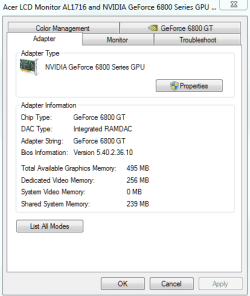
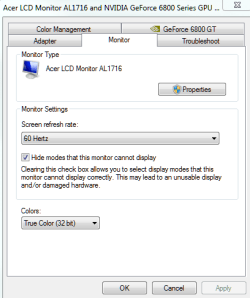
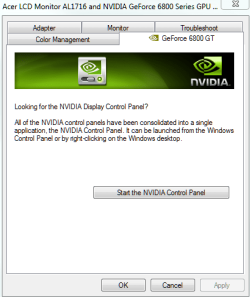
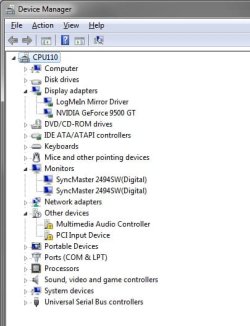
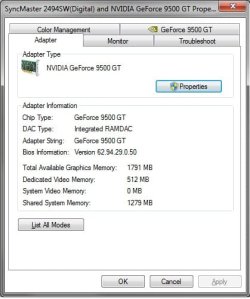
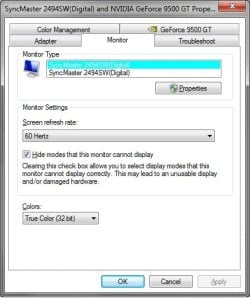
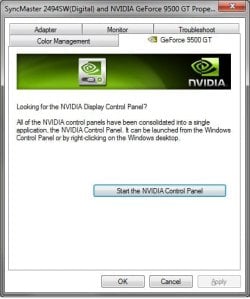
Would you be willing to post some screen shots similar to these?

cev_001.png cev_002.png

cev_003.png cev_004.png

Type device manager in the Start Button Search Box for the first one, and right click on the desktop and select Advanced for the other three.

If needed, here is a way to take screen shots and add them to your posts:

http://www.sevenforums.com/tutorials/51160-screenshot-upload-using-mwsnap.html

http://www.sevenforums.com/tutorials/9717-screenshot-paint.html

http://www.sevenforums.com/tutorials/9733-how-post-screenshot-seven-forums.html

Cheers!
Robert
 

My Computer My Computer

At a glance

...
OS
...
Instead of using the group policy editor try this
Press the Windows key and the Pause/Break
Then go to Advanced system properties
Under the Hardware tab click on Device Installation Settings
Then in the next window that opens select

"No,let me choose what to do" and
"Never install driver software from windows update".

I do this and can still install drivers manually. Keep in mind I don't think this will stop windows from installing generic drivers it already has on the install media. There are some that have to be installed just for windows to boot up and get to your desktop.

Before you go back to XP I think you should try one more clean install of windows 7. You may even want to try doing a repair, I think you just got a bad install. Is your Windows 7 an original DVD or a copy?
 

My Computer My Computer

At a glance

Windows 10 Education 64 bitAMD Phenom II X4 980 Black Edition Deneb 3.7GHz8GB 4GBx2 Kingston PC10600 DDR3 1333 MemoryZotac NVIDIA Geforce GT640 2 Gig DDR3 PCIe
Computer type
PC/Desktop
Computer Manufacturer/Model Number
Home Built
OS
Windows 10 Education 64 bit
CPU
AMD Phenom II X4 980 Black Edition Deneb 3.7GHz
Motherboard
Asus M4N68T-M V2 µATX Motherboard
Memory
8GB 4GBx2 Kingston PC10600 DDR3 1333 Memory
Graphics Card(s)
Zotac NVIDIA Geforce GT640 2 Gig DDR3 PCIe
Sound Card
VIA VT1708s High Definition Audio 8-channel Onboard
Monitor(s) Displays
22" LG E2242 1080p and 2 19" I-INC AG191D
Screen Resolution
1280x1024 - 1920x1080 - 1280x1024
Hard Drives
Crucial M100 256 GB SSD and 500 GB WD Blue SATA
PSU
Thermaltake TR 620
Case
Power Up Black ATX Mid-Tower Case
Cooling
Stock heatsink and fan
Keyboard
Logitech Wireless K350 Wave
Mouse
Logitech Wireless M570 Trackman Wheel
Internet Speed
80 Mbps Down 30 Mbps Up
Antivirus
Windows Defender
Browser
Internet Explorer 11
Other Info
HP DVD1040e Lightscribe - External USB2
Appreciate the help. Here are the screenshots.

Untitled1.jpg

Untitled2.jpg

Untitled3.jpg

Untitled4.jpg
 

My Computer My Computer

At a glance

Win7 UltimateCore2Quad 2.664GBEVGA GeForce 9500GT
Computer Manufacturer/Model Number
Dell Vostro 220
OS
Win7 Ultimate
CPU
Core2Quad 2.66
Memory
4GB
Graphics Card(s)
EVGA GeForce 9500GT
Monitor(s) Displays
(2) Samsung 2494
Those are great Chad, perfect. It would appear you have drivers, etc. setup correctly? Please look here; right click on the desktop and select "Screen resolution". Are you able to select "Extend desktop to this display"?

cev_05.png

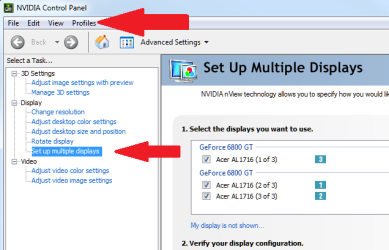
Next open the Nvidia Control Panel, either through the Control Panel, advanced settings, or from a quick link in your tab bar. Are you able to "Set up multiple displays"?

cev_06.png

Also please notice the Profiles menu. After you have settings the way you want them, save a profile. Then when you restart, if your settings are absent, just select the "Detect" button on the image above this one, and Nvidia should apply your profile. Keep you from re-configuring your video settings every time.

One last question: which driver version is currently installed?
ie: 195.62_desktop ... 32bit / 64bit ... etc?

Cheers!
Robert
 

My Computer My Computer

At a glance

...
OS
...
As a test you might want to un-install that LogMeIn Mirror driver or the application that loads it. You might be able to just temporarily disable it with msconfig.
 

My Computer My Computer

At a glance

Windows 10 Education 64 bitAMD Phenom II X4 980 Black Edition Deneb 3.7GHz8GB 4GBx2 Kingston PC10600 DDR3 1333 MemoryZotac NVIDIA Geforce GT640 2 Gig DDR3 PCIe
Computer type
PC/Desktop
Computer Manufacturer/Model Number
Home Built
OS
Windows 10 Education 64 bit
CPU
AMD Phenom II X4 980 Black Edition Deneb 3.7GHz
Motherboard
Asus M4N68T-M V2 µATX Motherboard
Memory
8GB 4GBx2 Kingston PC10600 DDR3 1333 Memory
Graphics Card(s)
Zotac NVIDIA Geforce GT640 2 Gig DDR3 PCIe
Sound Card
VIA VT1708s High Definition Audio 8-channel Onboard
Monitor(s) Displays
22" LG E2242 1080p and 2 19" I-INC AG191D
Screen Resolution
1280x1024 - 1920x1080 - 1280x1024
Hard Drives
Crucial M100 256 GB SSD and 500 GB WD Blue SATA
PSU
Thermaltake TR 620
Case
Power Up Black ATX Mid-Tower Case
Cooling
Stock heatsink and fan
Keyboard
Logitech Wireless K350 Wave
Mouse
Logitech Wireless M570 Trackman Wheel
Internet Speed
80 Mbps Down 30 Mbps Up
Antivirus
Windows Defender
Browser
Internet Explorer 11
Other Info
HP DVD1040e Lightscribe - External USB2
Back
Top