Win7 - Dual DVI Monitors + Secondary (Single) TV HDMI Out - Possible?

Soniclight

New member
Local time
12:52 PM
Messages
5
Location
Woodland Hills, CA
While I've already built my Win10 system (both Win7 and Win10 are 64-bit), I'm not using it until my current Win7 (Home) system goes belly up.

I'm partial to Win7 and even have another Win7 (Pro) on an SSD drive ready to go on that new system too...

But the issue is/will be the same on each system: I have a dedicated nVidia dual DVI video card on each system (no HDMI out, that port is on the mobo/s).

I know a bit about how to do this, but it's from a different situation:

I helped set up a friend's basic PC to his TV (no video card, he uses onboard mobo single DVI out) - and he uses ONLY his TV monitor for both desktop/PC stuff and watching TV. (His old 4:3 19" monitor is connected but turned off.)

Simple stuff for there, for it's only one monitor in both viewing situations chosen through his TV remote.

But in my case, I use a stretched/one desktop over dual HD 27" computer monitors.

Note: I have not yet bought the TV, but it will most likely by at least an HD, probably 50" or so. And I don't need 4 K, BTW, but the TV will probably offer that option, and interface will be HDMI.

As stated, I do have mobo HDMI out on both the current and to-be-used-in-future systems. But I see conflict here due to that I'm dealing with a total desktop resolution of 3960 x 1080 (2x 1980 x 1080 horizontally) vs. one TV monitor.

Is there any way I can set it up so that I can easily switch back and forth between pc system dual monitors and the TV one?

If so, would that require another dedicated video card or not?


Thanks.
 

My Computer My Computer

At a glance

1.Windows Home 7 64 bit - 2. Windows Pro 64 b...1.AMD X6 1092 3.2 Ghz. - 2. Ryzen 5 160016 Gb. DDR3 - 2. 12 Gb. DDR41. nVidia GT 430 - 2. nVidia EVGA GT 710
Computer type
PC/Desktop
Computer Manufacturer/Model Number
DIY
OS
1.Windows Home 7 64 bit - 2. Windows Pro 64 bit - 3. Windows 10 Home 64 bit
CPU
1.AMD X6 1092 3.2 Ghz. - 2. Ryzen 5 1600
Motherboard
1. Gigabyte GA-880GA-UD3H - 2. MSI B450 Gaming Plus
Memory
16 Gb. DDR3 - 2. 12 Gb. DDR4
Graphics Card(s)
1. nVidia GT 430 - 2. nVidia EVGA GT 710
Sound Card
1. M-Audio Audiophile 2496 - 2. To be decided...
Monitor(s) Displays
1. Dual Samsung 24" LCD - 2. Same
Screen Resolution
1920 HD
Hard Drives
Multiple SSD & HDD
PSU
Cooer lMaster GX 650
Case
DIY
Cooling
DIY
Keyboard
Logitech wireless
Mouse
Logitech wireless
Internet Speed
+/- 7
Browser
Primary: Chrome. Others if needed
First off having 2 graphics devices enabled can cause driver conflicts unless they are the same make/model and tied together; in that case they act as one device. Windows just doesn't have the capability to use both at the same time. For an example thread see Computer doesnt meet minimum requirement for installing the software. Secondly I'm not understanding your resolution question. Each device has it's own native resolution including TVs. Finally, TVs really aren't optimized for computers. You won't get the same quality as a high definition monitor. Also the standard output for HD video on a computer is a display port which is a lot like an HDMI port but not completely the same thing. Before getting a TV for your computer you might want to verify that it is HDMI and not a display port. DisplayPort vs. HDMI: Which Is Better For Gaming? | Tom's Hardware
 

My Computers My Computers

  • At a glance

    Windows 7 pro/Windows 10 ProIntel i7 860 Quad core 2.8 ghz8 gbATI Radeon HD 5770 1 gb ram
    Computer type
    PC/Desktop
    Computer Manufacturer/Model Number
    HP Pavillion Elite HPE-250f
    OS
    Windows 7 pro/Windows 10 Pro
    CPU
    Intel i7 860 Quad core 2.8 ghz
    Memory
    8 gb
    Graphics Card(s)
    ATI Radeon HD 5770 1 gb ram
    Monitor(s) Displays
    Alienware 25 AW2521HF & Viewsonic
    Screen Resolution
    1920 x1080 & 1680x1050
    Hard Drives
    WD blue 1 tb & 500 gb.
    Browser
    FF of course.
    Other Info
    https://www.bestbuy.com/site/hp-pavilion-elite-desktop-intel-core-i7-processor-8gb-memory-1tb-hard-drive/9921493.p?skuId=9921493
  • At a glance

    Windows 2012 R2 Data center/Linux Minti3 9100 3.6GHz, 8M cache, 4C/4T8GB 2666MT/s DDR4 ECC UDIMM
    Computer type
    PC/Desktop
    System Manufacturer/Model Number
    Dell Poweredge T140
    OS
    Windows 2012 R2 Data center/Linux Mint
    CPU
    i3 9100 3.6GHz, 8M cache, 4C/4T
    Memory
    8GB 2666MT/s DDR4 ECC UDIMM
    Monitor(s) Displays
    Viewsonic
    Screen Resolution
    1680x1050
    Hard Drives
    1 TB & 750 GB
    Other Info
    https://www.dell.com/en-us/work/shop/productdetailstxn/poweredge-t140?~ck=bt
Since your only HDMI port is connected to the motherboard, that means that HDMI signal will come from the built-in GPU in the CPU its self and not dedicated graphics. So if you need or want dedicated graphics for this TV with HDMI capability that GPU will have to have an HDMI port.

I'm not too sure if the newer flat panels now a days offer both HDMI and a display port or not. My 720p flat screen TV has just one HDMI port I do believe. And I do believe that flat panel TVs just use HDMI and not a display port, but I could be wrong. They may in fact offer both to the consumer for the ability to use one over the other.

Now I believe I have read that with using a TV for a computer, it's not an ideal monitor if you intend on gaming with it. It may be due to the fact the TV isn't fast enough to be used with a game. Best to read this informative article. Use your TV as a computer monitor: Everything you need to know | PCWorld
 

My Computer My Computer

At a glance

Windows 7 Ultimate x64
Computer type
PC/Desktop
OS
Windows 7 Ultimate x64
Thanks for prompt replies.

I also forgot to say that the reason I want to hook up a TV to my PC is that I live on a very limited disability income (and I'm old - soon to be 66), and can't afford cable or drowning my wallet in multiple streaming packages. Meaning, I haven't owned a TV in years and so watch everything online through my PC.

I'm not concerned about the TV to dual monitors resolution for I would not be doing my actual computer stuff via the TV - I just want to be able to use my slew of Chrome bookmarks to watch stuff online.

For example when I need to use Cubase for audio production, I'd switch to my duals.

I don't know if this further info helps clarify my situation to solve.
 

My Computer My Computer

At a glance

1.Windows Home 7 64 bit - 2. Windows Pro 64 b...1.AMD X6 1092 3.2 Ghz. - 2. Ryzen 5 160016 Gb. DDR3 - 2. 12 Gb. DDR41. nVidia GT 430 - 2. nVidia EVGA GT 710
Computer type
PC/Desktop
Computer Manufacturer/Model Number
DIY
OS
1.Windows Home 7 64 bit - 2. Windows Pro 64 bit - 3. Windows 10 Home 64 bit
CPU
1.AMD X6 1092 3.2 Ghz. - 2. Ryzen 5 1600
Motherboard
1. Gigabyte GA-880GA-UD3H - 2. MSI B450 Gaming Plus
Memory
16 Gb. DDR3 - 2. 12 Gb. DDR4
Graphics Card(s)
1. nVidia GT 430 - 2. nVidia EVGA GT 710
Sound Card
1. M-Audio Audiophile 2496 - 2. To be decided...
Monitor(s) Displays
1. Dual Samsung 24" LCD - 2. Same
Screen Resolution
1920 HD
Hard Drives
Multiple SSD & HDD
PSU
Cooer lMaster GX 650
Case
DIY
Cooling
DIY
Keyboard
Logitech wireless
Mouse
Logitech wireless
Internet Speed
+/- 7
Browser
Primary: Chrome. Others if needed
If you have video files you'd like to play on a TV there's emby. You can use your computer as a server and access it over your network on many smart TVs or devices. I can attest to using using it on Roku. There's a little bit of a learning curve when setting it up but they have good documentation and a support forum. It doesn't run by default on boot-up on a computer but you likely won't want that on your average PC. Supposedly you can also connect it to one of their accounts and access it off network but I haven't tried that.
 

My Computers My Computers

  • At a glance

    Windows 7 pro/Windows 10 ProIntel i7 860 Quad core 2.8 ghz8 gbATI Radeon HD 5770 1 gb ram
    Computer type
    PC/Desktop
    Computer Manufacturer/Model Number
    HP Pavillion Elite HPE-250f
    OS
    Windows 7 pro/Windows 10 Pro
    CPU
    Intel i7 860 Quad core 2.8 ghz
    Memory
    8 gb
    Graphics Card(s)
    ATI Radeon HD 5770 1 gb ram
    Monitor(s) Displays
    Alienware 25 AW2521HF & Viewsonic
    Screen Resolution
    1920 x1080 & 1680x1050
    Hard Drives
    WD blue 1 tb & 500 gb.
    Browser
    FF of course.
    Other Info
    https://www.bestbuy.com/site/hp-pavilion-elite-desktop-intel-core-i7-processor-8gb-memory-1tb-hard-drive/9921493.p?skuId=9921493
  • At a glance

    Windows 2012 R2 Data center/Linux Minti3 9100 3.6GHz, 8M cache, 4C/4T8GB 2666MT/s DDR4 ECC UDIMM
    Computer type
    PC/Desktop
    System Manufacturer/Model Number
    Dell Poweredge T140
    OS
    Windows 2012 R2 Data center/Linux Mint
    CPU
    i3 9100 3.6GHz, 8M cache, 4C/4T
    Memory
    8GB 2666MT/s DDR4 ECC UDIMM
    Monitor(s) Displays
    Viewsonic
    Screen Resolution
    1680x1050
    Hard Drives
    1 TB & 750 GB
    Other Info
    https://www.dell.com/en-us/work/shop/productdetailstxn/poweredge-t140?~ck=bt
Well, I was a bit off on my GPUs - they both have a single extra mini-HDMI (not DisplayPort) next to the dual DVI ports. I don't do gaming so 3D support is not necessary for me.

So a bit more specs, which may or may not be relevant to my OP question. Also, I don't have exact specs-to-specs matching between the two (i.e. HDCP Ready) for not provided, but should be sufficient info overall:

EVGA GT 430 (current old Win 7 Home 64-bit system until it dies...)

1GB 128-Bit DDR3
Core Clock 700 MHz
2 x DVI 1 x mini HDMI
96 CUDA Cores
Effective Memory Clock 1400 MHz

PCI Express 2.0 x16
HDCP Ready - Yes
Max Resolution: Analog 2048 x 1536, Digital 2560 x 1600
DirectX 11
OpenGL 6.0
No SLI support


EVGA GT 710 (on to-be-used system Win 7 Pro 64-bit and/or Win 10 Home 64-bit)

2GB 64-Bit DDR3
Core Clock 954 MHz
1 x DVI-I
1 x DVI-D 1 x mini HDMI 1.4a
192 CUDA Cores
Effective Memory Clock: 1800 Mhz

PCI Express 2.0
Multi-Monitor Support: 3
Max Resolution: Analog: 2048 x 1536, Digital: 4096 x 2160
DirectX 12
OpenGL 4.6
 
Last edited:

My Computer My Computer

At a glance

1.Windows Home 7 64 bit - 2. Windows Pro 64 b...1.AMD X6 1092 3.2 Ghz. - 2. Ryzen 5 160016 Gb. DDR3 - 2. 12 Gb. DDR41. nVidia GT 430 - 2. nVidia EVGA GT 710
Computer type
PC/Desktop
Computer Manufacturer/Model Number
DIY
OS
1.Windows Home 7 64 bit - 2. Windows Pro 64 bit - 3. Windows 10 Home 64 bit
CPU
1.AMD X6 1092 3.2 Ghz. - 2. Ryzen 5 1600
Motherboard
1. Gigabyte GA-880GA-UD3H - 2. MSI B450 Gaming Plus
Memory
16 Gb. DDR3 - 2. 12 Gb. DDR4
Graphics Card(s)
1. nVidia GT 430 - 2. nVidia EVGA GT 710
Sound Card
1. M-Audio Audiophile 2496 - 2. To be decided...
Monitor(s) Displays
1. Dual Samsung 24" LCD - 2. Same
Screen Resolution
1920 HD
Hard Drives
Multiple SSD & HDD
PSU
Cooer lMaster GX 650
Case
DIY
Cooling
DIY
Keyboard
Logitech wireless
Mouse
Logitech wireless
Internet Speed
+/- 7
Browser
Primary: Chrome. Others if needed
I'm sorry but I'm really not understanding your questions. Fact of the matter is Windows doesn't work well with multiple independent GPUs. Unless you can contribute to their code base to overcome that you will have to live with that limitation. The best and most stable way to go between the devices to my knowledge is to keep the integrated disabled. When needed you shut down Windows and remove the graphics card and use the integrated for the TV. Otherwise you risk driver conflict as shown in the link I posted. Your alternative is to get a new card capable of supporting everything you need.
 

My Computers My Computers

  • At a glance

    Windows 7 pro/Windows 10 ProIntel i7 860 Quad core 2.8 ghz8 gbATI Radeon HD 5770 1 gb ram
    Computer type
    PC/Desktop
    Computer Manufacturer/Model Number
    HP Pavillion Elite HPE-250f
    OS
    Windows 7 pro/Windows 10 Pro
    CPU
    Intel i7 860 Quad core 2.8 ghz
    Memory
    8 gb
    Graphics Card(s)
    ATI Radeon HD 5770 1 gb ram
    Monitor(s) Displays
    Alienware 25 AW2521HF & Viewsonic
    Screen Resolution
    1920 x1080 & 1680x1050
    Hard Drives
    WD blue 1 tb & 500 gb.
    Browser
    FF of course.
    Other Info
    https://www.bestbuy.com/site/hp-pavilion-elite-desktop-intel-core-i7-processor-8gb-memory-1tb-hard-drive/9921493.p?skuId=9921493
  • At a glance

    Windows 2012 R2 Data center/Linux Minti3 9100 3.6GHz, 8M cache, 4C/4T8GB 2666MT/s DDR4 ECC UDIMM
    Computer type
    PC/Desktop
    System Manufacturer/Model Number
    Dell Poweredge T140
    OS
    Windows 2012 R2 Data center/Linux Mint
    CPU
    i3 9100 3.6GHz, 8M cache, 4C/4T
    Memory
    8GB 2666MT/s DDR4 ECC UDIMM
    Monitor(s) Displays
    Viewsonic
    Screen Resolution
    1680x1050
    Hard Drives
    1 TB & 750 GB
    Other Info
    https://www.dell.com/en-us/work/shop/productdetailstxn/poweredge-t140?~ck=bt
Is there any way I can set it up so that I can easily switch back and forth between pc system dual monitors and the TV one?

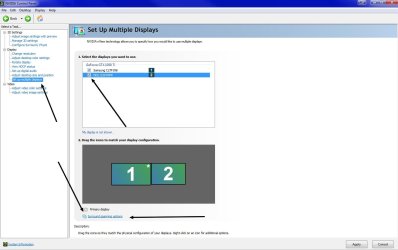
If you are using DVI now for the computer monitors, you should be able to use the TV HDMI port as well at the same time. What will happen is that the computer will display on all three I'm sure. In the Nvidea control panel under Display | Setup multiple displays, you can enable/disable more than one display and even use the span options below. Look at the screenshot.

Since your GPU has a mini HDMI port, you'll need a mini-HDMI to HDMI cable like this one.
 

Attachments

  • r5tyhgret.jpg
    r5tyhgret.jpg
    73.5 KB · Views: 1

My Computer My Computer

At a glance

Windows 7 Ultimate x64
Computer type
PC/Desktop
OS
Windows 7 Ultimate x64
Back
Top