win7 64bit only recognizing 6gig of my 8gig of ram

Where did you see about the chipsets? I don't see anywhere that specifies the P55 i7800 vs the other in the ram details.

That's because you don't have a P55 chipset. You have an X58 chipset, the X58 number in your MB model ;)

As for the memory you currently have - you can use it, but it's paired for a dual channel system, the the 4 module kit (4x2)

If you got/get a triple channel kit, it would be packaged in either a 3 or 6 module kit, either 3x2 or 6x2.

So.... if you want, you could just remove one of the modules and just run 6gig. Since the kit is matched anyway it shouldn't be a compatibility problem.

The issue is running an odd (odd as in RAM size) configuration - 8gig as opposed to either 6 or 12gig.

That "may" be what causing the odd issues, the way you have to configure (install) the RAM.

My two cents.

Do you have Maximum Memory set to zero (0) ? Like in my snip ?

it looks like your screenshot

And it should. Don't do anything to it.
 

My Computer My Computer

At a glance

Windows 10 ProIntel Core i7-4770K (3.5Ghz)32 gig Corsair Dominator Platinum (4x8Gig)Sapphire Tri-X R9 Fury
Computer type
PC/Desktop
Computer Manufacturer/Model Number
Custom built by me.
OS
Windows 10 Pro
CPU
Intel Core i7-4770K (3.5Ghz)
Motherboard
Gigabyte G1 Sniper 5 (F10 Bios)
Memory
32 gig Corsair Dominator Platinum (4x8Gig)
Graphics Card(s)
Sapphire Tri-X R9 Fury
Sound Card
Soundblaster ZXR
Monitor(s) Displays
NEC PA242W 24" LCD Monitor
Screen Resolution
1920 x 1200
Hard Drives
Primary - Samsung 850 Pro (512gig), Samsung 840 Pro (256gig), 2TB WD Caviar Black.
PSU
EVGA Supernova 1000 G2
Case
Cooler Master HAF X
Cooling
Corsair H100i with Corsair Air Series SP120 Quiet Fans
Keyboard
Logitech Wireless Wave
Mouse
Logitech Performance MX
Internet Speed
High Speed Cable
Antivirus
Norton Security
Browser
IE11
Other Info
Memory Timings - 1866MHz @ 9-9-9-27-1T @ 1.5 volts
so there is no actual physical difference between the sticks right? It's just the "package" that's different? I'd rather not have to return and pay a restocking fee if these should be working without problems and it's just the configuration of the number of sticks that makes it dual or triple.
 

My Computer My Computer

At a glance

Windows 7 Home Premium 64-bitIntel Q6600 2.4ghz4 gig CorsairEVGA 8800 GTS(512)
OS
Windows 7 Home Premium 64-bit
CPU
Intel Q6600 2.4ghz
Motherboard
MSI P6N Diamond SLI
Memory
4 gig Corsair
Graphics Card(s)
EVGA 8800 GTS(512)
Sound Card
Soundblaster X-Fi Titanium
Monitor(s) Displays
HP LP2275w
Screen Resolution
1680x1050
Hard Drives
2 80 gig raptor drives
1 320 gig WD
PSU
750w
Case
lian li
As far as compatibility no.

However, for the same price you get a better quality RAM - look at the links I provide.

If you were to return them, just get what I linked to, same price. Explain that you wanted to triple channel kit and instead got the dual channel kit. Tell them you have a 1366 socket (i7-900 Processor), not an 1156 socket (i7-800 processor).

This basically tells them you want the triple channel kits ;)

Since you're doing a swap, they shouldn't charge a restock fee, especially if you convince them that it was their fault. Thus my statement about the sockets :)

If you can't or don't want to do that, just go with 6gig, you're not going to see/feel the difference between 6 & 8gig, however you "could" see performance issues an 8gig configuration poses. My opinion, I have no proof, but... why were you here ;)

My two cents.

BTW - Welcome to Corsair :: XMS3 Product Information - same RAM, different package configurations.

Also - Welcome to Corsair :: Corsair FAQ - Memory related FAQ

Q » Which memory should I use with my Intel Core i7 CPU?

A » The Intel Core i7 CPU has two different versions. The is the i7-800 series and the i7-900 series. The i7-800 series is designed for Intel Socket 1156 and supports dual channel memory configurations. The i7-900 series is designed for Intel Socket LGA1366 and supports dual and triple channel DDR3 memory configurations. You can find memory designed and tested to run with the Core i7 here, or you can look up your motherboard on our Memory Configurator to get specific memory recommendations for your motherboard.
 

My Computer My Computer

At a glance

Windows 10 ProIntel Core i7-4770K (3.5Ghz)32 gig Corsair Dominator Platinum (4x8Gig)Sapphire Tri-X R9 Fury
Computer type
PC/Desktop
Computer Manufacturer/Model Number
Custom built by me.
OS
Windows 10 Pro
CPU
Intel Core i7-4770K (3.5Ghz)
Motherboard
Gigabyte G1 Sniper 5 (F10 Bios)
Memory
32 gig Corsair Dominator Platinum (4x8Gig)
Graphics Card(s)
Sapphire Tri-X R9 Fury
Sound Card
Soundblaster ZXR
Monitor(s) Displays
NEC PA242W 24" LCD Monitor
Screen Resolution
1920 x 1200
Hard Drives
Primary - Samsung 850 Pro (512gig), Samsung 840 Pro (256gig), 2TB WD Caviar Black.
PSU
EVGA Supernova 1000 G2
Case
Cooler Master HAF X
Cooling
Corsair H100i with Corsair Air Series SP120 Quiet Fans
Keyboard
Logitech Wireless Wave
Mouse
Logitech Performance MX
Internet Speed
High Speed Cable
Antivirus
Norton Security
Browser
IE11
Other Info
Memory Timings - 1866MHz @ 9-9-9-27-1T @ 1.5 volts
Difference

so there is no actual physical difference between the sticks right? It's just the "package" that's different? I'd rather not have to return and pay a restocking fee if these should be working without problems and it's just the configuration of the number of sticks that makes it dual or triple.

If I understand what you are saying. ................. There is a difference in DDR3 Triple Channel and DDR3 Dual Channel. It is in the XMP specs (probably embeded in the sticks). Those specs are read at boot and the bios configures your mem thusly. I have some corsair DDR3 that is dual channel and if I set my bios to XMP with it in the machine It shows one setting as disabled. When I put triple channel in it sets the parameters as it should. (not a very clear statement)
 

My Computer My Computer

At a glance

win 7 X64 Ultimate SP1I3770KG Skill F3-14900CL9-4GBXL x 4NVIDIA GeForce GTX670 + Intel 4000
Computer Manufacturer/Model Number
BGC (Bob's Garage Crew)
OS
win 7 X64 Ultimate SP1
CPU
I3770K
Motherboard
Asus P8Z77-V Deluxe
Memory
G Skill F3-14900CL9-4GBXL x 4
Graphics Card(s)
NVIDIA GeForce GTX670 + Intel 4000
Sound Card
Realtek HD 5.1 (MOB)
Monitor(s) Displays
Asus VW224T (1)
Screen Resolution
1920 x 1080
Hard Drives
SATA Corsair Force GT 2.5" 180GB (System) Sata 3
OCZ Vertex3 120GB
OCZ Vertex 2 120GB 2.5" SATA II
ST31000524AS 1000.2GB
WD15EARS (External)
PSU
CoolerMaster 1000 Watt
Case
CoolerMaster HAF X
Cooling
CPU -- CoolerMaster 520N
Keyboard
MS Wireless 3000 V2
Mouse
MS Wireless 3000 V2
Internet Speed
Cable
Antivirus
Norton Internet Security
Browser
IE9
Other Info
AMI Bios 1805
OC'd 3%
Hero Ghost

There is a difference.

Four matched sticks from the factory give you two sets of dual channel compatibility.
As you have it set up it works or is supposed to.

Three matched sticks from the factory are triple channel specific compatibility.
So the way you have it you are losing a channel of bandwidth.

You are losing 33% of your memory transfer rate.

The difference is in the basic RAM bios-not the PC bios- or could be hardware specific or both.
It is factory set either way. You only get a few options of XMP mode, voltage etc. thru mobo bios as you already know.

I hope that helps a little.:D
Mike
 

My Computer My Computer

At a glance

Windows7 Pro 64bit SP-1; Windows XP Pro 32bitIntel Core i7-870 Lynnfield 2.93GHz LGA 1156 ...8GB@1400MHz Crucial Ballistix DDR3-1600 4x2GBASUS ENGTX460 DirectCU/2DI/1GD5 1GB 256-bit G...
Computer Manufacturer/Model Number
Hopalong/ Godzilla
OS
Windows7 Pro 64bit SP-1; Windows XP Pro 32bit
CPU
Intel Core i7-870 Lynnfield 2.93GHz LGA 1156 95W Quad-Core
Motherboard
ASUS P7P55D-E PRO
Memory
8GB@1400MHz Crucial Ballistix DDR3-1600 4x2GB
Graphics Card(s)
ASUS ENGTX460 DirectCU/2DI/1GD5 1GB 256-bit GDDR5
Sound Card
VIA Onboard
Monitor(s) Displays
Asus VS248H-P 24"; Samsung SyncMaster 941BW 19"ws
Screen Resolution
1920x1080; 1440x900
Hard Drives
Samsung 830 120GB SSD
Intel 320 120GB SSD
Western Digital Caviar Black WD7501AALS 750GB 7200 RPM SATA 3.0Gb/s
Western Digital Caviar Black WD6401AALS 640GB 7200 RPM SATA 3.0Gb/s
PSU
COOLER MASTER Silent Pro RS850-AMBAJ3-US 850W Modular
Case
COOLER MASTER HAF 932 RC-932-KKN5-GP Black
Cooling
Scythe "Mugen-2 Rev.B" (2 ScytheKaze-Jyuni PWM fans)
Keyboard
Logitech K-320
Mouse
Kensington
Antivirus
Avast Inernet Suite
Browser
IE 9 ; Chrome
Do you have Maximum Memory set to zero (0) ? Like in my snip ?

doc what does that do? should it be set to 0 or to your mem max?
 

My Computer My Computer

At a glance

Operating System : Windows 7 Home Premium Edi...Processor : Intel Core 2 Quad Q8300 @ 2500 MHzPhysical Memory :8GB Corsair4x 2GB 800MHz C5 ...Video Card : XFX 6700 AMD
Computer Manufacturer/Model Number
packard bell IXTREME M5722
OS
Operating System : Windows 7 Home Premium Edition 6.01.7600 SP1 (x64)
CPU
Processor : Intel Core 2 Quad Q8300 @ 2500 MHz
Motherboard
Mainboard : Packard Bell (Acer EG43M )
Memory
Physical Memory :8GB Corsair4x 2GB 800MHz C5 DDR2
Graphics Card(s)
Video Card : XFX 6700 AMD
Monitor(s) Displays
Maestro 234DL - BenQ V2220 - BenQ VW2420H
Screen Resolution
Current Display :1920x1080p pixels at 60 Hz in HD LED
Hard Drives
Hard Disks : WDC (1000 GB)
Drive C: (Hard Disk) : 428 GB available on 491 GB
Drive D: (Hard Disk) : 426 GB available on 492 GB
SAMSUNG spinpoint HD103SJ 1000.2 GB
(X 2) KINGSTON SSD NOW V 30GB
PSU
XFX ProSeries 550W PSU
Case
PACKARD BELL IXTREME
Cooling
System Blower Current: 150mA Air Flow16CFM ;Akasa 90mm rear
Keyboard
Gigabyte Aivia K8100
Mouse
TRUST-Wireless Laser Mouse - Carbon edition MI-7770C
Internet Speed
TP-LINK > TL-WN951N / AV500 Gigabit Powerline Adapters
Browser
chrome dev
Other Info
EXTRA COOLING>(FAN CONTROLLER) PC Bay Cooler 3 x 40mm fans; Akasa AK-HD-BL Blue hard drive cooler 2 x 40 mm fan 4500 rpm 29.7 dBA
Bios> American Megatrends Inc.
Version : P01-A1
Date : 08/31/2009

Attachments

  • ramon.PNG
    ramon.PNG
    32.8 KB · Views: 28

My Computer My Computer

At a glance

Operating System : Windows 7 Home Premium Edi...Processor : Intel Core 2 Quad Q8300 @ 2500 MHzPhysical Memory :8GB Corsair4x 2GB 800MHz C5 ...Video Card : XFX 6700 AMD
Computer Manufacturer/Model Number
packard bell IXTREME M5722
OS
Operating System : Windows 7 Home Premium Edition 6.01.7600 SP1 (x64)
CPU
Processor : Intel Core 2 Quad Q8300 @ 2500 MHz
Motherboard
Mainboard : Packard Bell (Acer EG43M )
Memory
Physical Memory :8GB Corsair4x 2GB 800MHz C5 DDR2
Graphics Card(s)
Video Card : XFX 6700 AMD
Monitor(s) Displays
Maestro 234DL - BenQ V2220 - BenQ VW2420H
Screen Resolution
Current Display :1920x1080p pixels at 60 Hz in HD LED
Hard Drives
Hard Disks : WDC (1000 GB)
Drive C: (Hard Disk) : 428 GB available on 491 GB
Drive D: (Hard Disk) : 426 GB available on 492 GB
SAMSUNG spinpoint HD103SJ 1000.2 GB
(X 2) KINGSTON SSD NOW V 30GB
PSU
XFX ProSeries 550W PSU
Case
PACKARD BELL IXTREME
Cooling
System Blower Current: 150mA Air Flow16CFM ;Akasa 90mm rear
Keyboard
Gigabyte Aivia K8100
Mouse
TRUST-Wireless Laser Mouse - Carbon edition MI-7770C
Internet Speed
TP-LINK > TL-WN951N / AV500 Gigabit Powerline Adapters
Browser
chrome dev
Other Info
EXTRA COOLING>(FAN CONTROLLER) PC Bay Cooler 3 x 40mm fans; Akasa AK-HD-BL Blue hard drive cooler 2 x 40 mm fan 4500 rpm 29.7 dBA
Bios> American Megatrends Inc.
Version : P01-A1
Date : 08/31/2009
I find it interesting the conflicting opinions on the physical difference. A few of you say they are different, but I've gone to the corsair site and others that say there is no difference, that only the number of sticks is different. I understand that I'm not getting the benefits of the triple channel by running four sticks, but I'm not sure it's cost effective to pay the shipping and restocking fee to downgrade to 6gigs.
 

My Computer My Computer

At a glance

Windows 7 Home Premium 64-bitIntel Q6600 2.4ghz4 gig CorsairEVGA 8800 GTS(512)
OS
Windows 7 Home Premium 64-bit
CPU
Intel Q6600 2.4ghz
Motherboard
MSI P6N Diamond SLI
Memory
4 gig Corsair
Graphics Card(s)
EVGA 8800 GTS(512)
Sound Card
Soundblaster X-Fi Titanium
Monitor(s) Displays
HP LP2275w
Screen Resolution
1680x1050
Hard Drives
2 80 gig raptor drives
1 320 gig WD
PSU
750w
Case
lian li
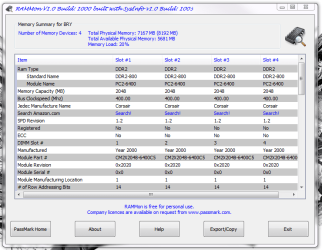
heroghost i just put new sticks in my machine i have the same spec as you nearly and i use this to help tell me about the ram >>>> passmark RamMON
PassMark RAMMon - Identify RAM type, speed & memory timings

My ram info from CPU-Z:
Type: DDR3
Size: 8192 MBytes
Channels #: Triple
NB Frequency: 3207.4 MHz
DRAM Frequency: 801.8 MHz
FSB:DRAM : 2:12
CAS# Latency(CL): 9.0 clocks
RAS# to CAS# Delay(tRCD): 9 clocks
RAS# Precharge(tRP): 9 clocks
Cycle Time(tRAS): 24 clocks
Row Refresh Cycle Time(tRFC): 88clocks
Command Rate (CR): 2T
 

My Computer My Computer

At a glance

Windows 7 Home Premium 64-bitIntel Q6600 2.4ghz4 gig CorsairEVGA 8800 GTS(512)
OS
Windows 7 Home Premium 64-bit
CPU
Intel Q6600 2.4ghz
Motherboard
MSI P6N Diamond SLI
Memory
4 gig Corsair
Graphics Card(s)
EVGA 8800 GTS(512)
Sound Card
Soundblaster X-Fi Titanium
Monitor(s) Displays
HP LP2275w
Screen Resolution
1680x1050
Hard Drives
2 80 gig raptor drives
1 320 gig WD
PSU
750w
Case
lian li
mmm your in a pickle when i put mine in yesterday and rebooted windows started fine and i checked with the passMark raMMon and eveything ok with no probs as yet, i no some of my mates have had trouble and after several times of putting the sticks in and out of the seating they got there's working its critical the pins match up.
 

My Computer My Computer

At a glance

Operating System : Windows 7 Home Premium Edi...Processor : Intel Core 2 Quad Q8300 @ 2500 MHzPhysical Memory :8GB Corsair4x 2GB 800MHz C5 ...Video Card : XFX 6700 AMD
Computer Manufacturer/Model Number
packard bell IXTREME M5722
OS
Operating System : Windows 7 Home Premium Edition 6.01.7600 SP1 (x64)
CPU
Processor : Intel Core 2 Quad Q8300 @ 2500 MHz
Motherboard
Mainboard : Packard Bell (Acer EG43M )
Memory
Physical Memory :8GB Corsair4x 2GB 800MHz C5 DDR2
Graphics Card(s)
Video Card : XFX 6700 AMD
Monitor(s) Displays
Maestro 234DL - BenQ V2220 - BenQ VW2420H
Screen Resolution
Current Display :1920x1080p pixels at 60 Hz in HD LED
Hard Drives
Hard Disks : WDC (1000 GB)
Drive C: (Hard Disk) : 428 GB available on 491 GB
Drive D: (Hard Disk) : 426 GB available on 492 GB
SAMSUNG spinpoint HD103SJ 1000.2 GB
(X 2) KINGSTON SSD NOW V 30GB
PSU
XFX ProSeries 550W PSU
Case
PACKARD BELL IXTREME
Cooling
System Blower Current: 150mA Air Flow16CFM ;Akasa 90mm rear
Keyboard
Gigabyte Aivia K8100
Mouse
TRUST-Wireless Laser Mouse - Carbon edition MI-7770C
Internet Speed
TP-LINK > TL-WN951N / AV500 Gigabit Powerline Adapters
Browser
chrome dev
Other Info
EXTRA COOLING>(FAN CONTROLLER) PC Bay Cooler 3 x 40mm fans; Akasa AK-HD-BL Blue hard drive cooler 2 x 40 mm fan 4500 rpm 29.7 dBA
Bios> American Megatrends Inc.
Version : P01-A1
Date : 08/31/2009
mmm your in a pickle when i put mine in yesterday and rebooted windows started fine and i checked with the passMark raMMon and eveything ok with no probs as yet, i no some of my mates have had trouble and after several times of putting the sticks in and out of the seating they got there's working its critical the pins match up.

this morning after being off for 6 hours I started it up and it works fine now. I'm not really sure what the difference is. However, since everyone keeps telling me I should be running 3 or six sticks, I think I'm going to end up returning these and downgrading to 6gigs, just to be optimal. I could just take one stick out, but that's a waste of money to have it sitting around and I currently have no other use for it. Talked to newegg and I'll have to pay $15 in restocking, but they're giving me a free shipping label and the new pack would be free shipping, so I guess I can chalk it up to a $15 lesson in triple channel ram configuration.
 

My Computer My Computer

At a glance

Windows 7 Home Premium 64-bitIntel Q6600 2.4ghz4 gig CorsairEVGA 8800 GTS(512)
OS
Windows 7 Home Premium 64-bit
CPU
Intel Q6600 2.4ghz
Motherboard
MSI P6N Diamond SLI
Memory
4 gig Corsair
Graphics Card(s)
EVGA 8800 GTS(512)
Sound Card
Soundblaster X-Fi Titanium
Monitor(s) Displays
HP LP2275w
Screen Resolution
1680x1050
Hard Drives
2 80 gig raptor drives
1 320 gig WD
PSU
750w
Case
lian li
mmm your in a pickle when i put mine in yesterday and rebooted windows started fine and i checked with the passMark raMMon and eveything ok with no probs as yet, i no some of my mates have had trouble and after several times of putting the sticks in and out of the seating they got there's working its critical the pins match up.

this morning after being off for 6 hours I started it up and it works fine now. I'm not really sure what the difference is. However, since everyone keeps telling me I should be running 3 or six sticks, I think I'm going to end up returning these and downgrading to 6gigs, just to be optimal. I could just take one stick out, but that's a waste of money to have it sitting around and I currently have no other use for it. Talked to newegg and I'll have to pay $15 in restocking, but they're giving me a free shipping label and the new pack would be free shipping, so I guess I can chalk it up to a $15 lesson in triple channel ram configuration.


did you have a look at the screen shot of my sticks? the raMMon is pretty good and tells you most what you want to no i have 4x 2GIG ddr2 all working fine and in tune
 

My Computer My Computer

At a glance

Operating System : Windows 7 Home Premium Edi...Processor : Intel Core 2 Quad Q8300 @ 2500 MHzPhysical Memory :8GB Corsair4x 2GB 800MHz C5 ...Video Card : XFX 6700 AMD
Computer Manufacturer/Model Number
packard bell IXTREME M5722
OS
Operating System : Windows 7 Home Premium Edition 6.01.7600 SP1 (x64)
CPU
Processor : Intel Core 2 Quad Q8300 @ 2500 MHz
Motherboard
Mainboard : Packard Bell (Acer EG43M )
Memory
Physical Memory :8GB Corsair4x 2GB 800MHz C5 DDR2
Graphics Card(s)
Video Card : XFX 6700 AMD
Monitor(s) Displays
Maestro 234DL - BenQ V2220 - BenQ VW2420H
Screen Resolution
Current Display :1920x1080p pixels at 60 Hz in HD LED
Hard Drives
Hard Disks : WDC (1000 GB)
Drive C: (Hard Disk) : 428 GB available on 491 GB
Drive D: (Hard Disk) : 426 GB available on 492 GB
SAMSUNG spinpoint HD103SJ 1000.2 GB
(X 2) KINGSTON SSD NOW V 30GB
PSU
XFX ProSeries 550W PSU
Case
PACKARD BELL IXTREME
Cooling
System Blower Current: 150mA Air Flow16CFM ;Akasa 90mm rear
Keyboard
Gigabyte Aivia K8100
Mouse
TRUST-Wireless Laser Mouse - Carbon edition MI-7770C
Internet Speed
TP-LINK > TL-WN951N / AV500 Gigabit Powerline Adapters
Browser
chrome dev
Other Info
EXTRA COOLING>(FAN CONTROLLER) PC Bay Cooler 3 x 40mm fans; Akasa AK-HD-BL Blue hard drive cooler 2 x 40 mm fan 4500 rpm 29.7 dBA
Bios> American Megatrends Inc.
Version : P01-A1
Date : 08/31/2009
Dual Channel vs Triple channel memory...

To clearify.....

The memory modules that HeroGhost has are the SAME modules used for the triple channel kits as well. It's the pairing that sets them apart.

In this instance, the difference between the two is in the packaging. Dual channel = 2 matched pairs, Triple channel = 3 matched pairs. Please take note here... Welcome to Corsair :: XMS3 Product Information. Same memory module, different pair configurations!

Where triple channel mode kicks in is in the memory controller on the CPU! - InsideHW - Intel Core i7: Dual-Channel vs. Triple-Channel Memory Mode

And is NOT a function of the XMP profiles, which basically sets voltage (1.6v vs 1.5v), timings (8-8-8-20 vs 9-9-9-24) speed 1600 vs 1066). Have a look at Intel's white paper on XMP - http://www.intel.com/assets/pdf/whitepaper/319124.pdf, section 3.1, figure 2.

You can also check here - Serial presence detect - Wikipedia, the free encyclopedia, scroll down to Enhanched Performance Profile, check out the XMP Profile bytes table to see what XMP does.

The triple channel/dual channel verbiage is basically used to distinguish memory kits, example… when you say triple channel memory it's understood that you want a 3/6 set memory kit. When you say dual channel, you're asking for a 2/4 set memory kit.

From a system standpoint, when you say triple channel memory, you’re saying you have a 1366 socket i7-900 series processor, on an X58 chipset MB. Dual channel would be a socket 1156 i5/i7 500/800 series processor on a P55 chipset MB.

Hope this clears things up :)
 

My Computer My Computer

At a glance

Windows 10 ProIntel Core i7-4770K (3.5Ghz)32 gig Corsair Dominator Platinum (4x8Gig)Sapphire Tri-X R9 Fury
Computer type
PC/Desktop
Computer Manufacturer/Model Number
Custom built by me.
OS
Windows 10 Pro
CPU
Intel Core i7-4770K (3.5Ghz)
Motherboard
Gigabyte G1 Sniper 5 (F10 Bios)
Memory
32 gig Corsair Dominator Platinum (4x8Gig)
Graphics Card(s)
Sapphire Tri-X R9 Fury
Sound Card
Soundblaster ZXR
Monitor(s) Displays
NEC PA242W 24" LCD Monitor
Screen Resolution
1920 x 1200
Hard Drives
Primary - Samsung 850 Pro (512gig), Samsung 840 Pro (256gig), 2TB WD Caviar Black.
PSU
EVGA Supernova 1000 G2
Case
Cooler Master HAF X
Cooling
Corsair H100i with Corsair Air Series SP120 Quiet Fans
Keyboard
Logitech Wireless Wave
Mouse
Logitech Performance MX
Internet Speed
High Speed Cable
Antivirus
Norton Security
Browser
IE11
Other Info
Memory Timings - 1866MHz @ 9-9-9-27-1T @ 1.5 volts
did you have a look at the screen shot of my sticks? the raMMon is pretty good and tells you most what you want to no i have 4x 2GIG ddr2 all working fine and in tune

You don't have a triple channel system like he does. He's better off going with 3 or 6 modules.

Could he run 8gig (4 modules), sure, but... again, why is he here? And as he said, his system is running fine now with just 3 modules installed ;)

My two cents

@ HeroGhost, I think you've made the right decision, and got off cheap.

Good luck.
 

My Computer My Computer

At a glance

Windows 10 ProIntel Core i7-4770K (3.5Ghz)32 gig Corsair Dominator Platinum (4x8Gig)Sapphire Tri-X R9 Fury
Computer type
PC/Desktop
Computer Manufacturer/Model Number
Custom built by me.
OS
Windows 10 Pro
CPU
Intel Core i7-4770K (3.5Ghz)
Motherboard
Gigabyte G1 Sniper 5 (F10 Bios)
Memory
32 gig Corsair Dominator Platinum (4x8Gig)
Graphics Card(s)
Sapphire Tri-X R9 Fury
Sound Card
Soundblaster ZXR
Monitor(s) Displays
NEC PA242W 24" LCD Monitor
Screen Resolution
1920 x 1200
Hard Drives
Primary - Samsung 850 Pro (512gig), Samsung 840 Pro (256gig), 2TB WD Caviar Black.
PSU
EVGA Supernova 1000 G2
Case
Cooler Master HAF X
Cooling
Corsair H100i with Corsair Air Series SP120 Quiet Fans
Keyboard
Logitech Wireless Wave
Mouse
Logitech Performance MX
Internet Speed
High Speed Cable
Antivirus
Norton Security
Browser
IE11
Other Info
Memory Timings - 1866MHz @ 9-9-9-27-1T @ 1.5 volts
And as he said, his system is running fine now with just 3 modules installed

Actually it's running fine with all 4 installed, but I do appreciate all of the help. My thought now is that you don't spend a bunch of money building a new system not to have it be optimized. Might as well follow everyones(including the manufacturers) advice. I could just add 2 more sticks, but I really don't think my parents need 12 gig of ram for it to be worth the added cost. I might still flip flop on that idea
 

My Computer My Computer

At a glance

Windows 7 Home Premium 64-bitIntel Q6600 2.4ghz4 gig CorsairEVGA 8800 GTS(512)
OS
Windows 7 Home Premium 64-bit
CPU
Intel Q6600 2.4ghz
Motherboard
MSI P6N Diamond SLI
Memory
4 gig Corsair
Graphics Card(s)
EVGA 8800 GTS(512)
Sound Card
Soundblaster X-Fi Titanium
Monitor(s) Displays
HP LP2275w
Screen Resolution
1680x1050
Hard Drives
2 80 gig raptor drives
1 320 gig WD
PSU
750w
Case
lian li
Well, as long as you understand what's going on. Do take a momnet to read what I posted about triple channel vs dual channel memory.

BTW it's always better to get your memory in matched pairs, that's why they sell them as kits. Point being, if you decide to add two more sticks to your system, you'll want to make sure they match what you already heve.

Good luck.
 

My Computer My Computer

At a glance

Windows 10 ProIntel Core i7-4770K (3.5Ghz)32 gig Corsair Dominator Platinum (4x8Gig)Sapphire Tri-X R9 Fury
Computer type
PC/Desktop
Computer Manufacturer/Model Number
Custom built by me.
OS
Windows 10 Pro
CPU
Intel Core i7-4770K (3.5Ghz)
Motherboard
Gigabyte G1 Sniper 5 (F10 Bios)
Memory
32 gig Corsair Dominator Platinum (4x8Gig)
Graphics Card(s)
Sapphire Tri-X R9 Fury
Sound Card
Soundblaster ZXR
Monitor(s) Displays
NEC PA242W 24" LCD Monitor
Screen Resolution
1920 x 1200
Hard Drives
Primary - Samsung 850 Pro (512gig), Samsung 840 Pro (256gig), 2TB WD Caviar Black.
PSU
EVGA Supernova 1000 G2
Case
Cooler Master HAF X
Cooling
Corsair H100i with Corsair Air Series SP120 Quiet Fans
Keyboard
Logitech Wireless Wave
Mouse
Logitech Performance MX
Internet Speed
High Speed Cable
Antivirus
Norton Security
Browser
IE11
Other Info
Memory Timings - 1866MHz @ 9-9-9-27-1T @ 1.5 volts
I learned a lot reading all this and thanks to all.
To the OP, if you have a desire to know what Windows is doing with your ram type in off of the Start button resmon.
 

My Computer My Computer

At a glance

Windows 10 Pro. 64/ version 1709 Windows 7 Pr...Intel i7-6800K @ 4.3Corsair Platinum 16 gig @2400EVGA GTX 1070 OC
Computer type
PC/Desktop
Computer Manufacturer/Model Number
Home made Desktop
OS
Windows 10 Pro. 64/ version 1709 Windows 7 Pro/64
CPU
Intel i7-6800K @ 4.3
Motherboard
ASUS X-99 Deluxe II
Memory
Corsair Platinum 16 gig @2400
Graphics Card(s)
EVGA GTX 1070 OC
Monitor(s) Displays
Asus 27" LED LCD/VE278Q
Screen Resolution
1920-1080 or 1280-720 HDMI
Hard Drives
INTEL SSD 730-240 Gb Sata 3.0/
PSU
EVGA Platium 1200W
Case
Phanteks Luxe Tempered Glass 8 fans/ one radiator
Cooling
XSPC/ Water Cooled CPU
Keyboard
Das 4 Professional
Mouse
Logitech M705/MX Anywhere 2-S
Internet Speed
100 mbits
Antivirus
Microsoft Security Essentials/ Malwarebytes Premium 3.0/ SAS
Browser
I.E. 11 default/Firefox/ ISP Time Warner Cable/Spectrum
Other Info
LG BluRay Burner/
Sound system-KLipsch-THX/
Icy Dock ssd Hot Swap bays.
I learned a lot reading all this and thanks to all.
To the OP, if you have a desire to know what Windows is doing with your ram type in off of the Start button resmon.


good to know, thanks
 

My Computer My Computer

At a glance

Windows 7 Home Premium 64-bitIntel Q6600 2.4ghz4 gig CorsairEVGA 8800 GTS(512)
OS
Windows 7 Home Premium 64-bit
CPU
Intel Q6600 2.4ghz
Motherboard
MSI P6N Diamond SLI
Memory
4 gig Corsair
Graphics Card(s)
EVGA 8800 GTS(512)
Sound Card
Soundblaster X-Fi Titanium
Monitor(s) Displays
HP LP2275w
Screen Resolution
1680x1050
Hard Drives
2 80 gig raptor drives
1 320 gig WD
PSU
750w
Case
lian li
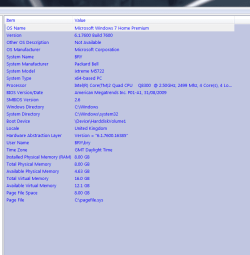
i noticed that in my computer > properties that windows 7 says:

installed memory 4GB (2GB usable)


why is that?


i have a 1156 socket i7800 series, and currently have 2 2gb sticks installed, waiting on my other 2 to RMA
 

My Computer My Computer

At a glance

Windows 7 64-bit HomeIntel Core i7-870 Lynnfield 2.93 Ghz8GB 4x2 A-Data 1333 MhzHIS Radeon HD 5850 1GB
Computer type
PC/Desktop
Computer Manufacturer/Model Number
My First Build
OS
Windows 7 64-bit Home
CPU
Intel Core i7-870 Lynnfield 2.93 Ghz
Motherboard
Asus P7P55D-E Pro
Memory
8GB 4x2 A-Data 1333 Mhz
Graphics Card(s)
HIS Radeon HD 5850 1GB
Sound Card
Onboard
Monitor(s) Displays
Dell S2440L 24"
Screen Resolution
1080p
Hard Drives
120 GB Intel X25-M SATA Solid State Drive ///
1 TB Western Digital Caviar Black SATA 6gb/s 7200rpm Drive
PSU
Corsair 650TX 650 Watt
Case
Antec Three Hundred
Cooling
Stock Intel /// 4 Antec Case Fans /// NZXT Sentry-2
Keyboard
Logitech LX 710
Mouse
Logitech LX 710
Other Info
LG Blu-Ray Drive
its nothing to worry over :) quite normal
 

Attachments

  • system info.PNG
    system info.PNG
    15.5 KB · Views: 23

My Computer My Computer

At a glance

Operating System : Windows 7 Home Premium Edi...Processor : Intel Core 2 Quad Q8300 @ 2500 MHzPhysical Memory :8GB Corsair4x 2GB 800MHz C5 ...Video Card : XFX 6700 AMD
Computer Manufacturer/Model Number
packard bell IXTREME M5722
OS
Operating System : Windows 7 Home Premium Edition 6.01.7600 SP1 (x64)
CPU
Processor : Intel Core 2 Quad Q8300 @ 2500 MHz
Motherboard
Mainboard : Packard Bell (Acer EG43M )
Memory
Physical Memory :8GB Corsair4x 2GB 800MHz C5 DDR2
Graphics Card(s)
Video Card : XFX 6700 AMD
Monitor(s) Displays
Maestro 234DL - BenQ V2220 - BenQ VW2420H
Screen Resolution
Current Display :1920x1080p pixels at 60 Hz in HD LED
Hard Drives
Hard Disks : WDC (1000 GB)
Drive C: (Hard Disk) : 428 GB available on 491 GB
Drive D: (Hard Disk) : 426 GB available on 492 GB
SAMSUNG spinpoint HD103SJ 1000.2 GB
(X 2) KINGSTON SSD NOW V 30GB
PSU
XFX ProSeries 550W PSU
Case
PACKARD BELL IXTREME
Cooling
System Blower Current: 150mA Air Flow16CFM ;Akasa 90mm rear
Keyboard
Gigabyte Aivia K8100
Mouse
TRUST-Wireless Laser Mouse - Carbon edition MI-7770C
Internet Speed
TP-LINK > TL-WN951N / AV500 Gigabit Powerline Adapters
Browser
chrome dev
Other Info
EXTRA COOLING>(FAN CONTROLLER) PC Bay Cooler 3 x 40mm fans; Akasa AK-HD-BL Blue hard drive cooler 2 x 40 mm fan 4500 rpm 29.7 dBA
Bios> American Megatrends Inc.
Version : P01-A1
Date : 08/31/2009
Back
Top