
Custom HDD Volume Label Not Displayed in "My Computer"

oidicle

TwO FaCeD dUdE
Pro User
Local time
8:50 PM
Messages
191
Location
Maputo, Mozambique
Hi Everyone, I need help with this issue that I'm having... Please look at the attachment and you'll notice that my Hard disks' volume labels are all set to "Local Disk" in my Computer, even if I rename them, the label doesn't change in "my computer", as you can see in the Disk management window the label appear correctly....

Has anyone else had this issue? Please give me some insight on it.


Thanks in Advance
 

Attachments
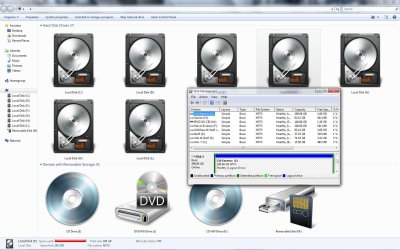
  • Comp.jpg
    Comp.jpg
    180.1 KB · Views: 833

My Computer My Computer

At a glance

Windows 7 Ultimate x64, 7600.20647 RTMIntel Core2Quad Q9505 @ 4.0Ghz6GB Transcend DDR3-1333 Dual ChannelASUS GTX285 1GB GDDR3
Computer Manufacturer/Model Number
It's a Custom Build.....
OS
Windows 7 Ultimate x64, 7600.20647 RTM
CPU
Intel Core2Quad Q9505 @ 4.0Ghz
Motherboard
Intel Skyburg DP45SG
Memory
6GB Transcend DDR3-1333 Dual Channel
Graphics Card(s)
ASUS GTX285 1GB GDDR3
Sound Card
OnBoard Intel IDT HD Audio
Monitor(s) Displays
HP w2207h 22" WideScreen LCD, VGA & HDMI
Screen Resolution
1680x1050, 60Hz
Hard Drives
1TB WD Caviar Black, Green Power...
1TB Dell, 32Mb/s, Internal SATA
320GB Seagate Internal SATA (3 Partitions)
PSU
Omega 600W ATX2.0 Dual Rail, 2x Fans
Case
Cooler Master HAF 922
Cooling
Corsair Hydro H50 in Push-Pull mode, 4 Case Fans with LED
Keyboard
White aigo keyboard with blue LED on the keys....
Mouse
Genius Mini Tracer
Internet Speed
I'm ashamed to say...
Other Info
Aigo wireless keyboard(black) and a 2.1 Speaker System(white)
Hello Oidicle, and welcome to Seven Forums.

Did you rename them from within the Computer window? If not, then you may need to refresh the Computer window to see the changes.

Do you have UAC turned on?

After I rename one in computer, I have to click on Continue (Access Denied prompt) and Yes (UAC prompt) before it changes.
 

My Computer My Computer

At a glance

64-bit Windows 11 Pro for WorkstationsIntel i7-8700K OC'd to 5 GHz64 GB (4x16GB) G.SKILL TridentZ RGB DDR4 3600...ASUS ROG-STRIX-GTX1080TI-O11G-GAMING
Computer type
PC/Desktop
Computer Manufacturer/Model Number
Self built custom
OS
64-bit Windows 11 Pro for Workstations
CPU
Intel i7-8700K OC'd to 5 GHz
Motherboard
ASUS ROG Maximus XI Formula Z390
Memory
64 GB (4x16GB) G.SKILL TridentZ RGB DDR4 3600 MHz
Graphics Card(s)
ASUS ROG-STRIX-GTX1080TI-O11G-GAMING
Sound Card
Integrated
Monitor(s) Displays
2 x Samsung Odyssey G7 27"
Screen Resolution
2560x1440
Hard Drives
1TB Samsung 990 PRO M.2,
4TB Samsung 990 PRO PRO M.2,
TerraMaster F8 SSD Plus NAS
PSU
Seasonic Prime Titanium 850W
Case
Thermaltake Core P3
Cooling
Corsair Hydro H115i
Keyboard
Logitech wireless K800
Mouse
Logitech MX Master 4
Internet Speed
2 Gb/s Download and 100 Mb/s Upload
Antivirus
Malwarebyte Anti-Malware Premium
Browser
Google Chrome
Other Info
Logitech Z625 speaker system,
Logitech BRIO 4K Pro webcam,
HP Color LaserJet Pro MFP M477fdn,
APC SMART-UPS RT 1000 XL - SURT1000XLI,
Galaxy S23 Plus phone
Might have something to do with how you got the icons changed?

(howd you do that btw?)
 

My Computer My Computer

At a glance

7264x64/7260x86
OS
7264x64/7260x86

My Computer My Computer

At a glance

64-bit Windows 11 Pro for WorkstationsIntel i7-8700K OC'd to 5 GHz64 GB (4x16GB) G.SKILL TridentZ RGB DDR4 3600...ASUS ROG-STRIX-GTX1080TI-O11G-GAMING
Computer type
PC/Desktop
Computer Manufacturer/Model Number
Self built custom
OS
64-bit Windows 11 Pro for Workstations
CPU
Intel i7-8700K OC'd to 5 GHz
Motherboard
ASUS ROG Maximus XI Formula Z390
Memory
64 GB (4x16GB) G.SKILL TridentZ RGB DDR4 3600 MHz
Graphics Card(s)
ASUS ROG-STRIX-GTX1080TI-O11G-GAMING
Sound Card
Integrated
Monitor(s) Displays
2 x Samsung Odyssey G7 27"
Screen Resolution
2560x1440
Hard Drives
1TB Samsung 990 PRO M.2,
4TB Samsung 990 PRO PRO M.2,
TerraMaster F8 SSD Plus NAS
PSU
Seasonic Prime Titanium 850W
Case
Thermaltake Core P3
Cooling
Corsair Hydro H115i
Keyboard
Logitech wireless K800
Mouse
Logitech MX Master 4
Internet Speed
2 Gb/s Download and 100 Mb/s Upload
Antivirus
Malwarebyte Anti-Malware Premium
Browser
Google Chrome
Other Info
Logitech Z625 speaker system,
Logitech BRIO 4K Pro webcam,
HP Color LaserJet Pro MFP M477fdn,
APC SMART-UPS RT 1000 XL - SURT1000XLI,
Galaxy S23 Plus phone
Yes, UAC is on and using the default settings, it's not related to UAC (I've checked) and it's not the way I changed the icon package on the computer, I've been using those icons ever since I installed Windows over a month ago, the issue started recently, I've installed windows 7 manager and made some tweaks, cleaning, etc, I'm not sure if that is the culprit, if it is I can't seem to find any setting that could have caused that, I've restored my computer to 2 weeks back but it didn't help. Could turning of some "unneeded" services at start-up cause it? what service could it be?

I'm at a loss here guys...


Copernicus
, I changed my Windows 7 icons using an icon package with Tune-UP Utilities, it's a package that I was using in windows vista....

Here's what I did: I searched the internet for some interesting 256 x 256 .png icons to use as custom icons(file type icons, notepad, etc), and injecting them into windows Vista SP1's 'Imageres.dll' file on the installation DVD(copied files to HDD) using both reshack and Restuner(it was a painful task because there were a lot of icons to inject), then I Installed windows vista and tune up utilities and used the save Icon Package option, so tune up utilities saved all the icons I had injected into Imageres.dll onto one single .tip file for sharing.... I did this because I couldn't manually change the icons from within tune up utilities because it doesn't allow you to select png icons, only .ico files....

If you'd like I can attach it and share it with you and whoever likes it....
 
Last edited:

My Computer My Computer

At a glance

Windows 7 Ultimate x64, 7600.20647 RTMIntel Core2Quad Q9505 @ 4.0Ghz6GB Transcend DDR3-1333 Dual ChannelASUS GTX285 1GB GDDR3
Computer Manufacturer/Model Number
It's a Custom Build.....
OS
Windows 7 Ultimate x64, 7600.20647 RTM
CPU
Intel Core2Quad Q9505 @ 4.0Ghz
Motherboard
Intel Skyburg DP45SG
Memory
6GB Transcend DDR3-1333 Dual Channel
Graphics Card(s)
ASUS GTX285 1GB GDDR3
Sound Card
OnBoard Intel IDT HD Audio
Monitor(s) Displays
HP w2207h 22" WideScreen LCD, VGA & HDMI
Screen Resolution
1680x1050, 60Hz
Hard Drives
1TB WD Caviar Black, Green Power...
1TB Dell, 32Mb/s, Internal SATA
320GB Seagate Internal SATA (3 Partitions)
PSU
Omega 600W ATX2.0 Dual Rail, 2x Fans
Case
Cooler Master HAF 922
Cooling
Corsair Hydro H50 in Push-Pull mode, 4 Case Fans with LED
Keyboard
White aigo keyboard with blue LED on the keys....
Mouse
Genius Mini Tracer
Internet Speed
I'm ashamed to say...
Other Info
Aigo wireless keyboard(black) and a 2.1 Speaker System(white)
Oidicle,

See if using METHOD TWO in the tutorial below to change the drive names will allow them to display in Computer.

Drive Name Change - Vista Forums

Hope this helps.
 

My Computer My Computer

At a glance

64-bit Windows 11 Pro for WorkstationsIntel i7-8700K OC'd to 5 GHz64 GB (4x16GB) G.SKILL TridentZ RGB DDR4 3600...ASUS ROG-STRIX-GTX1080TI-O11G-GAMING
Computer type
PC/Desktop
Computer Manufacturer/Model Number
Self built custom
OS
64-bit Windows 11 Pro for Workstations
CPU
Intel i7-8700K OC'd to 5 GHz
Motherboard
ASUS ROG Maximus XI Formula Z390
Memory
64 GB (4x16GB) G.SKILL TridentZ RGB DDR4 3600 MHz
Graphics Card(s)
ASUS ROG-STRIX-GTX1080TI-O11G-GAMING
Sound Card
Integrated
Monitor(s) Displays
2 x Samsung Odyssey G7 27"
Screen Resolution
2560x1440
Hard Drives
1TB Samsung 990 PRO M.2,
4TB Samsung 990 PRO PRO M.2,
TerraMaster F8 SSD Plus NAS
PSU
Seasonic Prime Titanium 850W
Case
Thermaltake Core P3
Cooling
Corsair Hydro H115i
Keyboard
Logitech wireless K800
Mouse
Logitech MX Master 4
Internet Speed
2 Gb/s Download and 100 Mb/s Upload
Antivirus
Malwarebyte Anti-Malware Premium
Browser
Google Chrome
Other Info
Logitech Z625 speaker system,
Logitech BRIO 4K Pro webcam,
HP Color LaserJet Pro MFP M477fdn,
APC SMART-UPS RT 1000 XL - SURT1000XLI,
Galaxy S23 Plus phone
Oidicle,

See if using METHOD TWO in the tutorial below to change the drive names will allow them to display in Computer.

Drive Name Change - Vista Forums

Hope this helps.

Brink:party:You're :geek: THE MAN:cool:, it worked, the problem really was with the autorun.inf files in the root of the HDD's and removable devices...

When I was reading about the autorun.inf files in the link you provided, it suddenly hit me that I used Windows 7 Manager to do that, the software has a feature(on the 'repair center', under the "information" tab) that gives you the option to Immunize the HDD's & USB's against the "autorun.inf" virus by inserting a a new folder with the same name and .inf extension and giving it system attributes to protect the folder from being ovewritten by the real autorun.inf virus text file which has malicious code in it that call up executable files(also copied to the drive) that mess up the windows system.... withouth the real autorun.inf file, those executables are harmless, they can be deleted by your Anti-Virus Program(if it's a good one) or you can manually delete them.

There's also a manual way of Immunizing the disk drives, but the software automates the process protecting the newly created folder even from manual deletion by the user, only the software can Un-Immunize the drives....

I've just realized now that the difference between the manual way(Cmd.exe, attrib +r +s +h....) and the automated way is that with the manual way the drives' volume labels still show up, whilst the automated way causes the custom labels to not show... I don't know why that is....

Brink, could you please shed a light in the matter?


The explanation is for those of you who see the "Autorun.inf" virus referenced here and don't know anything about it or the file. Anyways, there needn't be any worries about this virus nowadays because it's practically useless on windows 7 or vista... but you never know.....
 

Attachments

  • compfixed.jpg
    compfixed.jpg
    126 KB · Views: 373

My Computer My Computer

At a glance

Windows 7 Ultimate x64, 7600.20647 RTMIntel Core2Quad Q9505 @ 4.0Ghz6GB Transcend DDR3-1333 Dual ChannelASUS GTX285 1GB GDDR3
Computer Manufacturer/Model Number
It's a Custom Build.....
OS
Windows 7 Ultimate x64, 7600.20647 RTM
CPU
Intel Core2Quad Q9505 @ 4.0Ghz
Motherboard
Intel Skyburg DP45SG
Memory
6GB Transcend DDR3-1333 Dual Channel
Graphics Card(s)
ASUS GTX285 1GB GDDR3
Sound Card
OnBoard Intel IDT HD Audio
Monitor(s) Displays
HP w2207h 22" WideScreen LCD, VGA & HDMI
Screen Resolution
1680x1050, 60Hz
Hard Drives
1TB WD Caviar Black, Green Power...
1TB Dell, 32Mb/s, Internal SATA
320GB Seagate Internal SATA (3 Partitions)
PSU
Omega 600W ATX2.0 Dual Rail, 2x Fans
Case
Cooler Master HAF 922
Cooling
Corsair Hydro H50 in Push-Pull mode, 4 Case Fans with LED
Keyboard
White aigo keyboard with blue LED on the keys....
Mouse
Genius Mini Tracer
Internet Speed
I'm ashamed to say...
Other Info
Aigo wireless keyboard(black) and a 2.1 Speaker System(white)
Oidicle,

I'm happy to hear that you got the drive name to display now. I'm not certain as to why it would not work with the automatic method with that software unless something was not compatible with it.
 

My Computer My Computer

At a glance

64-bit Windows 11 Pro for WorkstationsIntel i7-8700K OC'd to 5 GHz64 GB (4x16GB) G.SKILL TridentZ RGB DDR4 3600...ASUS ROG-STRIX-GTX1080TI-O11G-GAMING
Computer type
PC/Desktop
Computer Manufacturer/Model Number
Self built custom
OS
64-bit Windows 11 Pro for Workstations
CPU
Intel i7-8700K OC'd to 5 GHz
Motherboard
ASUS ROG Maximus XI Formula Z390
Memory
64 GB (4x16GB) G.SKILL TridentZ RGB DDR4 3600 MHz
Graphics Card(s)
ASUS ROG-STRIX-GTX1080TI-O11G-GAMING
Sound Card
Integrated
Monitor(s) Displays
2 x Samsung Odyssey G7 27"
Screen Resolution
2560x1440
Hard Drives
1TB Samsung 990 PRO M.2,
4TB Samsung 990 PRO PRO M.2,
TerraMaster F8 SSD Plus NAS
PSU
Seasonic Prime Titanium 850W
Case
Thermaltake Core P3
Cooling
Corsair Hydro H115i
Keyboard
Logitech wireless K800
Mouse
Logitech MX Master 4
Internet Speed
2 Gb/s Download and 100 Mb/s Upload
Antivirus
Malwarebyte Anti-Malware Premium
Browser
Google Chrome
Other Info
Logitech Z625 speaker system,
Logitech BRIO 4K Pro webcam,
HP Color LaserJet Pro MFP M477fdn,
APC SMART-UPS RT 1000 XL - SURT1000XLI,
Galaxy S23 Plus phone
I have been so irritated over this issue as well, cursing M$ for everything from this to global warming. How serindipitious it was when low and behold I find the answer right here in the neighborhood. Thanks sooooooooooo much !
:thumbsup:
RBI
 

My Computer My Computer

At a glance

Windows 7 Professional RTM Clean Install X2E6600 / T55504 GB DDR2 Corsair X2NVIDIA 8600M GT / 8400M GS
Computer Manufacturer/Model Number
Custom x64 & HP dv6871 x64
OS
Windows 7 Professional RTM Clean Install X2
CPU
E6600 / T5550
Motherboard
ASUS P5B Deluxe WiFi / HP MB w/ Junkios Bios 1.0
Memory
4 GB DDR2 Corsair X2
Graphics Card(s)
NVIDIA 8600M GT / 8400M GS
Sound Card
ON BOARD X2
Monitor(s) Displays
2x Westinghouse L1975nw
Screen Resolution
1440 x 900 / 1280 x 800
Hard Drives
WD1001FALS 1T
WD2500AAKS 250G
WD2500KS 250G
& WD3200BEVT-60CT0 ATA IN THE LAPPY
PSU
HYPER 680 & Hampsters on the wheel in the HP
Case
COOLERMASTER 534
Cooling
ROSEWILL Z³
Keyboard
MICROSOFT COMFORT KEYBOARD
Mouse
2x MICROSOFT WIRELESS OPTICAL MOUSE 4000
Internet Speed
20 Mbps / 3.1 mbps
Other Info
ROUTER: DIR-655 Wireless a/ g/ Draft N
MM: SlingBox Pro
Gaming: Wii
ISP: Comcast
Thank you!!!

I had the same problem, I used the method two and it works. :party: But reading the method two I found, in the top of the page, my real problem, about the autorun.inf files. :D
I used Flash_Desinfector.exe and i have in all my drives the Autorun.inf folder created. That was the reason for my labels won't display in My Computer.

Next, I restored the method two to it's default and made a .reg file that disabled the execution for all autorun.inf's things, from my system. (you can create a .reg file that will disable only fixed disk autorun's - you don't need to disable all autorun's if you don't want that)

Now I can edit my labels normaly and everything it's back to normal.
(if you are asking why i don't just deteled the autorun.inf folder from all my hard drives.... you know the answer... the Flash_Desinfector.exe makes a autorun.inf 'place holder' against viruses)

The mothod two it's good, but if you want to change one of your disk with another one, the label will stay the same, because with the method two, the labels will be assigned per letter and not per hard drive (or partition).

As example I have two external hard drives that I never use in the same time. Normaly, both of them have their own label. When i connect one of them in the F:\ letter, both of them get the same label. I don't want that, of course.

sorry for my english, i hope it can be read :confused:


If your problem it's because of a autorun.inf file, just delete it, or use my method if you want to keep the autorun files.

I have attached the .reg files for disabing Autorun.inf in Windows 7 and some more notes how to create the files.
 

Attachments

My Computer My Computer

At a glance

Windows 7 Ultimate (Build 7600)
Computer Manufacturer/Model Number
HP Pavilion DV9850EB
OS
Windows 7 Ultimate (Build 7600)
I hope removing AUTORUN.INF files (and also folders) created by security software will help me also to display volume labels...
Thank you :cool:
P.S can anyone give me detailed instructions about manual way Immunizing the disk drives?
 

My Computer My Computer

At a glance

Windows 7 Ultimate Build 7600 / Windows XP Pr...Core 2 Duo E8400 3.00Ghz2X1Gb Kington DDR2 800 + 2X512MB Samsung DDR2...Asus-EN9600GT 512Mb GDDR3/256Bit
Computer Manufacturer/Model Number
Custom Build
OS
Windows 7 Ultimate Build 7600 / Windows XP Pro SP3
CPU
Core 2 Duo E8400 3.00Ghz
Motherboard
Asus P5K-Pro
Memory
2X1Gb Kington DDR2 800 + 2X512MB Samsung DDR2 800 (OC'D)
Graphics Card(s)
Asus-EN9600GT 512Mb GDDR3/256Bit
Sound Card
onBoard Realteck HD Audio
Monitor(s) Displays
Samsung 961BW
Screen Resolution
1440*900
Hard Drives
SAMSUNG HD403LJ (372 GB)
PSU
Codegen 550V
Keyboard
Genius Ultra Flat keyboard
Internet Speed
1mb/sec-8mb/sec (Global/Local-as my ISP says ;) )
I hope removing AUTORUN.INF files (and also folders) created by security software will help me also to display volume labels...
Thank you :cool:
P.S can anyone give me detailed instructions about manual way Immunizing the disk drives?

Hi Gio, welcome to the Forums...

The manual way of 'immunizing' is:

1. Open a command prompt window(type "cmd" on your start menu and press Enter)
2. From the command prompt, Navigate to your hard Disks' Root(eg. C:, D:, E:,etc)
3. Type "md -autorun.inf" and press Enter
4. Type "attrib +r +s +h autorun.inf" to give system attributes to the newly created folder.

Do this for all the drives you want to immunize.

But I'm afraid this option wont make the volume label display as I thought it did... it will work if you use it on XP, Vista or an OS other than Windows 7.

As I mentioned before in one of my previous posts, you don't really need this on Windows 7, the autorun.inf virus is ineffective on this OS.
 

My Computer My Computer

At a glance

Windows 7 Ultimate x64, 7600.20647 RTMIntel Core2Quad Q9505 @ 4.0Ghz6GB Transcend DDR3-1333 Dual ChannelASUS GTX285 1GB GDDR3
Computer Manufacturer/Model Number
It's a Custom Build.....
OS
Windows 7 Ultimate x64, 7600.20647 RTM
CPU
Intel Core2Quad Q9505 @ 4.0Ghz
Motherboard
Intel Skyburg DP45SG
Memory
6GB Transcend DDR3-1333 Dual Channel
Graphics Card(s)
ASUS GTX285 1GB GDDR3
Sound Card
OnBoard Intel IDT HD Audio
Monitor(s) Displays
HP w2207h 22" WideScreen LCD, VGA & HDMI
Screen Resolution
1680x1050, 60Hz
Hard Drives
1TB WD Caviar Black, Green Power...
1TB Dell, 32Mb/s, Internal SATA
320GB Seagate Internal SATA (3 Partitions)
PSU
Omega 600W ATX2.0 Dual Rail, 2x Fans
Case
Cooler Master HAF 922
Cooling
Corsair Hydro H50 in Push-Pull mode, 4 Case Fans with LED
Keyboard
White aigo keyboard with blue LED on the keys....
Mouse
Genius Mini Tracer
Internet Speed
I'm ashamed to say...
Other Info
Aigo wireless keyboard(black) and a 2.1 Speaker System(white)
Hi Gio, welcome to the Forums...

The manual way of 'immunizing' is:

1. Open a command prompt window(type "cmd" on your start menu and press Enter)
2. From the command prompt, Navigate to your hard Disks' Root(eg. C:, D:, E:,etc)
3. Type "md -autorun.inf" and press Enter
4. Type "attrib +r +s +h autorun.inf" to give system attributes to the newly created folder.

Do this for all the drives you want to immunize.

But I'm afraid this option wont make the volume label display as I thought it did... it will work if you use it on XP, Vista or an OS other than Windows 7.

As I mentioned before in one of my previous posts, you don't really need this on Windows 7, the autorun.inf virus is ineffective on this OS.

Thank you for reply,:)
I removed Autorun.inf folders from partitions and labels now are displayed correctly, but my Flash drive's labels still are not displayed, because I immunized them with Panda USB Vaccine, and I can not cancel this- I am using Flash drives on many computers.:(
 

My Computer My Computer

At a glance

Windows 7 Ultimate Build 7600 / Windows XP Pr...Core 2 Duo E8400 3.00Ghz2X1Gb Kington DDR2 800 + 2X512MB Samsung DDR2...Asus-EN9600GT 512Mb GDDR3/256Bit
Computer Manufacturer/Model Number
Custom Build
OS
Windows 7 Ultimate Build 7600 / Windows XP Pro SP3
CPU
Core 2 Duo E8400 3.00Ghz
Motherboard
Asus P5K-Pro
Memory
2X1Gb Kington DDR2 800 + 2X512MB Samsung DDR2 800 (OC'D)
Graphics Card(s)
Asus-EN9600GT 512Mb GDDR3/256Bit
Sound Card
onBoard Realteck HD Audio
Monitor(s) Displays
Samsung 961BW
Screen Resolution
1440*900
Hard Drives
SAMSUNG HD403LJ (372 GB)
PSU
Codegen 550V
Keyboard
Genius Ultra Flat keyboard
Internet Speed
1mb/sec-8mb/sec (Global/Local-as my ISP says ;) )
I removed Autorun.inf folders from partitions and labels now are displayed correctly, but my Flash drive's labels still are not displayed, because I immunized them with Panda USB Vaccine, and I can not cancel this- I am using Flash drives on many computers.:(
I'm not familiarized with with Panda USB Vaccine, but if the program did immunize your USB drives and you'd like to undo it, you'll need to remove the system attributes to the bogus ''autorun.inf'' that the program may have placed on the root of your device...

First you have to find out if that file really is hidden in the device:

1. Open a command prompt window and navigate to your devices root
2. Type dir/ah and press Enter... to see all the hidden system files, now see if the "autorun.inf" file is shown.
3. If the file is present then type "attrib -r -s -h autorun.inf" to remove the system attributes

Now you should be able to delete the file normally, but to ensure everything works out fine you have to uninstall that Panda program and restart your PC before doing any of the above steps.
 

My Computer My Computer

At a glance

Windows 7 Ultimate x64, 7600.20647 RTMIntel Core2Quad Q9505 @ 4.0Ghz6GB Transcend DDR3-1333 Dual ChannelASUS GTX285 1GB GDDR3
Computer Manufacturer/Model Number
It's a Custom Build.....
OS
Windows 7 Ultimate x64, 7600.20647 RTM
CPU
Intel Core2Quad Q9505 @ 4.0Ghz
Motherboard
Intel Skyburg DP45SG
Memory
6GB Transcend DDR3-1333 Dual Channel
Graphics Card(s)
ASUS GTX285 1GB GDDR3
Sound Card
OnBoard Intel IDT HD Audio
Monitor(s) Displays
HP w2207h 22" WideScreen LCD, VGA & HDMI
Screen Resolution
1680x1050, 60Hz
Hard Drives
1TB WD Caviar Black, Green Power...
1TB Dell, 32Mb/s, Internal SATA
320GB Seagate Internal SATA (3 Partitions)
PSU
Omega 600W ATX2.0 Dual Rail, 2x Fans
Case
Cooler Master HAF 922
Cooling
Corsair Hydro H50 in Push-Pull mode, 4 Case Fans with LED
Keyboard
White aigo keyboard with blue LED on the keys....
Mouse
Genius Mini Tracer
Internet Speed
I'm ashamed to say...
Other Info
Aigo wireless keyboard(black) and a 2.1 Speaker System(white)
oidicle,
youdon't understand me, :)
I can cancel immunity from Panda software, at least I can Format Flash drive, but I am not doing this because I am afraid Flash infection (I am using my flash cards on many other computers and some of them might be infected, my PC is secure, but not all PC's where I plug Flash drives, ) so, I have to keep them vaccinated :)
Due to this, my Windows7 can not show me Flash drive labels:(
 

My Computer My Computer

At a glance

Windows 7 Ultimate Build 7600 / Windows XP Pr...Core 2 Duo E8400 3.00Ghz2X1Gb Kington DDR2 800 + 2X512MB Samsung DDR2...Asus-EN9600GT 512Mb GDDR3/256Bit
Computer Manufacturer/Model Number
Custom Build
OS
Windows 7 Ultimate Build 7600 / Windows XP Pro SP3
CPU
Core 2 Duo E8400 3.00Ghz
Motherboard
Asus P5K-Pro
Memory
2X1Gb Kington DDR2 800 + 2X512MB Samsung DDR2 800 (OC'D)
Graphics Card(s)
Asus-EN9600GT 512Mb GDDR3/256Bit
Sound Card
onBoard Realteck HD Audio
Monitor(s) Displays
Samsung 961BW
Screen Resolution
1440*900
Hard Drives
SAMSUNG HD403LJ (372 GB)
PSU
Codegen 550V
Keyboard
Genius Ultra Flat keyboard
Internet Speed
1mb/sec-8mb/sec (Global/Local-as my ISP says ;) )
oidicle,
youdon't understand me, :)
I can cancel immunity from Panda software, at least I can Format Flash drive, but I am not doing this because I am afraid Flash infection (I am using my flash cards on many other computers and some of them might be infected, my PC is secure, but not all PC's where I plug Flash drives, ) so, I have to keep them vaccinated :)
Due to this, my Windows7 can not show me Flash drive labels:(
Well like I've already told you that there's no other way of doing it without the label disappearing. Unfortunately if you want to use your flash on some computers you suspect might have a virus, then you'll just have to leave the file as it is....
 

My Computer My Computer

At a glance

Windows 7 Ultimate x64, 7600.20647 RTMIntel Core2Quad Q9505 @ 4.0Ghz6GB Transcend DDR3-1333 Dual ChannelASUS GTX285 1GB GDDR3
Computer Manufacturer/Model Number
It's a Custom Build.....
OS
Windows 7 Ultimate x64, 7600.20647 RTM
CPU
Intel Core2Quad Q9505 @ 4.0Ghz
Motherboard
Intel Skyburg DP45SG
Memory
6GB Transcend DDR3-1333 Dual Channel
Graphics Card(s)
ASUS GTX285 1GB GDDR3
Sound Card
OnBoard Intel IDT HD Audio
Monitor(s) Displays
HP w2207h 22" WideScreen LCD, VGA & HDMI
Screen Resolution
1680x1050, 60Hz
Hard Drives
1TB WD Caviar Black, Green Power...
1TB Dell, 32Mb/s, Internal SATA
320GB Seagate Internal SATA (3 Partitions)
PSU
Omega 600W ATX2.0 Dual Rail, 2x Fans
Case
Cooler Master HAF 922
Cooling
Corsair Hydro H50 in Push-Pull mode, 4 Case Fans with LED
Keyboard
White aigo keyboard with blue LED on the keys....
Mouse
Genius Mini Tracer
Internet Speed
I'm ashamed to say...
Other Info
Aigo wireless keyboard(black) and a 2.1 Speaker System(white)
WINDOWS 7 No volume label

GO to My computer
Click on ORGANIZE near MENU BAR
click on folder and search option
you will see folder option
click on view
then click on restore default
click on apply and ok
now you will see the DRIVE labels and LETTERS
 

My Computer My Computer

At a glance

windows 7
OS
windows 7
Back
Top