Solved ram memory issue

so it should be like that?? it has to be only 3.87GB usable?

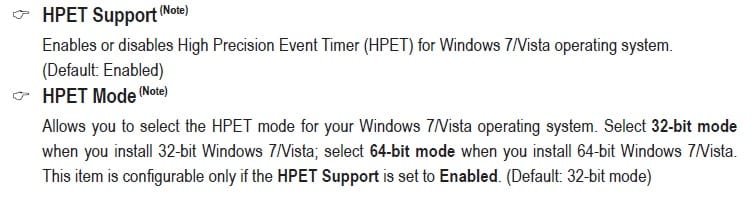
what is this "HPET mode" in the bios settings?? because it's on "32 bit mode"
 

My Computer

Computer Manufacturer/Model Number
Custom Build
OS
Windows 8 Pro x64
CPU
Intel Core I3 CPU 540 @ 3.07GHz
Motherboard
GIGABYTE GA-H55M-D2H
Memory
Team Elite DDR3 1333 MHz 4GB Dual Channel
Graphics Card(s)
Nvidia GEFORCE GTS 250
Sound Card
Realtek High Definition Audio
Monitor(s) Displays
Acer x223w
Screen Resolution
1680X1050
Hard Drives
Hitachi 500GB 7200 RPM
PSU
HuntKey
Case
HuntKey H301
Keyboard
Microsoft wireless keyboard 3000 v2.0
Mouse
Microsoft wireless mouse 5000
Internet Speed
15.60 Mbps
That's what we're trying to determine for sure or not. Hopefully not. :)

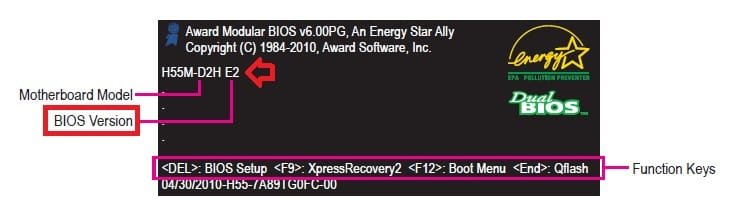
Do you have the latest F3 BIOS version flashed for your motherboard? It's suppose to have "Improve memory compatibility" that may help with this.

BIOS.jpg


EDIT:
You should have HPET Mode set to 64-bit mode since you have 64-bit Windows 7 installed.

HPET.jpg
 

My Computer

Computer type
PC/Desktop
Computer Manufacturer/Model Number
Self built custom
OS
64-bit Windows 11 Pro for Workstations
CPU
Intel i7-8700K OC'd to 5 GHz
Motherboard
ASUS ROG Maximus XI Formula Z390
Memory
64 GB (4x16GB) G.SKILL TridentZ RGB DDR4 3600 MHz
Graphics Card(s)
ASUS ROG-STRIX-GTX1080TI-O11G-GAMING
Sound Card
Integrated
Monitor(s) Displays
2 x Samsung Odyssey G7 27"
Screen Resolution
2560x1440
Hard Drives
1TB Samsung 990 PRO M.2,
4TB Samsung 990 PRO PRO M.2,
TerraMaster F8 SSD Plus NAS
PSU
Seasonic Prime Titanium 850W
Case
Thermaltake Core P3
Cooling
Corsair Hydro H115i
Keyboard
Logitech wireless K800
Mouse
Logitech MX Master 4
Internet Speed
2 Gb/s Download and 100 Mb/s Upload
Antivirus
Malwarebyte Anti-Malware Premium
Browser
Google Chrome
Other Info
Logitech Z625 speaker system,
Logitech BRIO 4K Pro webcam,
HP Color LaserJet Pro MFP M477fdn,
APC SMART-UPS RT 1000 XL - SURT1000XLI,
Galaxy S23 Plus phone
i read brink's answer and the onboard VGA setting is enabled

Is it set to Enabled or Enable If No Ext PEG? Enabled forces it on all the time whether you use it or not, the default Enable If No Ext PEG will disable it when a video card is used.

As for the memory remapping, unless I missed it in the manual it isn't there which means that it is enabled by default.
 

My Computer

Computer type
PC/Desktop
Computer Manufacturer/Model Number
Me
OS
Win 7 Ultimate x64
CPU
FX-8350 @ 4.6 GHz so far
Motherboard
Asus M5A97 EVO
Memory
ADATA XPG V1 Series Black 8GB DDR3 1600
Graphics Card(s)
Sapphire R9 270x Dual-X
Sound Card
Xonar DGX w/ Corsair Vengence 1300
Monitor(s) Displays
Acer S232HL Abid
Screen Resolution
1920x1080
Hard Drives
120 GB OCZ Vertex 3
500 GB Seagate 7200.12
PSU
Antec Earthwatts 650W Green
Case
Antec Three Hundred
Cooling
Cooler Master 212 EVO
Keyboard
Logitech G510
Mouse
Logitech G500s
Internet Speed
35000/3000
That's what we're trying to determine for sure or not. Hopefully not. :)

Do you have the latest F3 BIOS version flashed for your motherboard? It's suppose to have "Improve memory compatibility" that may help with this.

View attachment 153262


EDIT:
You should have HPET Mode set to 64-bit mode since you have 64-bit Windows 7 installed.

View attachment 153264

i have restarted my computer and it says h55m-d2h F2
 

My Computer

Computer Manufacturer/Model Number
Custom Build
OS
Windows 8 Pro x64
CPU
Intel Core I3 CPU 540 @ 3.07GHz
Motherboard
GIGABYTE GA-H55M-D2H
Memory
Team Elite DDR3 1333 MHz 4GB Dual Channel
Graphics Card(s)
Nvidia GEFORCE GTS 250
Sound Card
Realtek High Definition Audio
Monitor(s) Displays
Acer x223w
Screen Resolution
1680X1050
Hard Drives
Hitachi 500GB 7200 RPM
PSU
HuntKey
Case
HuntKey H301
Keyboard
Microsoft wireless keyboard 3000 v2.0
Mouse
Microsoft wireless mouse 5000
Internet Speed
15.60 Mbps
i read brink's answer and the onboard VGA setting is enabled

Is it set to Enabled or Enable If No Ext PEG? Enabled forces it on all the time whether you use it or not, the default Enable If No Ext PEG will disable it when a video card is used.

As for the memory remapping, unless I missed it in the manual it isn't there which means that it is enabled by default.
Enable If No Ext PEG
 

My Computer

Computer Manufacturer/Model Number
Custom Build
OS
Windows 8 Pro x64
CPU
Intel Core I3 CPU 540 @ 3.07GHz
Motherboard
GIGABYTE GA-H55M-D2H
Memory
Team Elite DDR3 1333 MHz 4GB Dual Channel
Graphics Card(s)
Nvidia GEFORCE GTS 250
Sound Card
Realtek High Definition Audio
Monitor(s) Displays
Acer x223w
Screen Resolution
1680X1050
Hard Drives
Hitachi 500GB 7200 RPM
PSU
HuntKey
Case
HuntKey H301
Keyboard
Microsoft wireless keyboard 3000 v2.0
Mouse
Microsoft wireless mouse 5000
Internet Speed
15.60 Mbps
i have restarted my computer and it says h55m-d2h F2

That indicates that you have the older F2 version flashed. If you would like to flash your BIOS to the latest F3 version, you can get it at the link below. Once you download the self extracting EXE file, run the EXE file to extract the contents to your desktop. The h55md2h.f3 file is your BIOS file. If you read starting at page 64 in your motherboard's manual (click on link) for Q-Flash. It will give you details on how to flash your motherboard with Q-Flash. If you do not have a USB key to put the extracted files on to use with Q-Flash, then you could just manually navigate to and select the h55md2h.f3 file on your desktop while in Q-Flash.

GIGABYTE - Motherboard - Socket 1156 - GA-H55M-D2H (rev. 1.3)


   Warning
Be sure that you do exactly as the manual says. One mistake could make a dead brick out of your motherboard. If you are not comfortable doing this, then it would be best not to do so to avoid the risk.
 

My Computer

Computer type
PC/Desktop
Computer Manufacturer/Model Number
Self built custom
OS
64-bit Windows 11 Pro for Workstations
CPU
Intel i7-8700K OC'd to 5 GHz
Motherboard
ASUS ROG Maximus XI Formula Z390
Memory
64 GB (4x16GB) G.SKILL TridentZ RGB DDR4 3600 MHz
Graphics Card(s)
ASUS ROG-STRIX-GTX1080TI-O11G-GAMING
Sound Card
Integrated
Monitor(s) Displays
2 x Samsung Odyssey G7 27"
Screen Resolution
2560x1440
Hard Drives
1TB Samsung 990 PRO M.2,
4TB Samsung 990 PRO PRO M.2,
TerraMaster F8 SSD Plus NAS
PSU
Seasonic Prime Titanium 850W
Case
Thermaltake Core P3
Cooling
Corsair Hydro H115i
Keyboard
Logitech wireless K800
Mouse
Logitech MX Master 4
Internet Speed
2 Gb/s Download and 100 Mb/s Upload
Antivirus
Malwarebyte Anti-Malware Premium
Browser
Google Chrome
Other Info
Logitech Z625 speaker system,
Logitech BRIO 4K Pro webcam,
HP Color LaserJet Pro MFP M477fdn,
APC SMART-UPS RT 1000 XL - SURT1000XLI,
Galaxy S23 Plus phone
i prefers not to do that alone, unless ill give it to a Professional that will help me with that.. anyway thanks a lot
 

My Computer

Computer Manufacturer/Model Number
Custom Build
OS
Windows 8 Pro x64
CPU
Intel Core I3 CPU 540 @ 3.07GHz
Motherboard
GIGABYTE GA-H55M-D2H
Memory
Team Elite DDR3 1333 MHz 4GB Dual Channel
Graphics Card(s)
Nvidia GEFORCE GTS 250
Sound Card
Realtek High Definition Audio
Monitor(s) Displays
Acer x223w
Screen Resolution
1680X1050
Hard Drives
Hitachi 500GB 7200 RPM
PSU
HuntKey
Case
HuntKey H301
Keyboard
Microsoft wireless keyboard 3000 v2.0
Mouse
Microsoft wireless mouse 5000
Internet Speed
15.60 Mbps
You're welcome. That would be the safest thing to do. :)

Just as a test using the tutorial below, see what happens when you check the Maximum memory box and select (with arrows) the maximum amount of memory it will let you to. 4096 if it will let you select all 4GB. If it doesn't help, then just go back and uncheck the Maximum memory box again.

Memory - Set Maximum Amount Used by Windows 7
 

My Computer

Computer type
PC/Desktop
Computer Manufacturer/Model Number
Self built custom
OS
64-bit Windows 11 Pro for Workstations
CPU
Intel i7-8700K OC'd to 5 GHz
Motherboard
ASUS ROG Maximus XI Formula Z390
Memory
64 GB (4x16GB) G.SKILL TridentZ RGB DDR4 3600 MHz
Graphics Card(s)
ASUS ROG-STRIX-GTX1080TI-O11G-GAMING
Sound Card
Integrated
Monitor(s) Displays
2 x Samsung Odyssey G7 27"
Screen Resolution
2560x1440
Hard Drives
1TB Samsung 990 PRO M.2,
4TB Samsung 990 PRO PRO M.2,
TerraMaster F8 SSD Plus NAS
PSU
Seasonic Prime Titanium 850W
Case
Thermaltake Core P3
Cooling
Corsair Hydro H115i
Keyboard
Logitech wireless K800
Mouse
Logitech MX Master 4
Internet Speed
2 Gb/s Download and 100 Mb/s Upload
Antivirus
Malwarebyte Anti-Malware Premium
Browser
Google Chrome
Other Info
Logitech Z625 speaker system,
Logitech BRIO 4K Pro webcam,
HP Color LaserJet Pro MFP M477fdn,
APC SMART-UPS RT 1000 XL - SURT1000XLI,
Galaxy S23 Plus phone
iv'e done that before and when i checked it it shows me 3.49GB, less from now
 

My Computer

Computer Manufacturer/Model Number
Custom Build
OS
Windows 8 Pro x64
CPU
Intel Core I3 CPU 540 @ 3.07GHz
Motherboard
GIGABYTE GA-H55M-D2H
Memory
Team Elite DDR3 1333 MHz 4GB Dual Channel
Graphics Card(s)
Nvidia GEFORCE GTS 250
Sound Card
Realtek High Definition Audio
Monitor(s) Displays
Acer x223w
Screen Resolution
1680X1050
Hard Drives
Hitachi 500GB 7200 RPM
PSU
HuntKey
Case
HuntKey H301
Keyboard
Microsoft wireless keyboard 3000 v2.0
Mouse
Microsoft wireless mouse 5000
Internet Speed
15.60 Mbps
LOL, we wouldn't want to go back to that then.

I must admit that I'm out of ideas other than flashing your BIOS to F3 when you are able to get a friend that knows more about it to help, if you wanted to. :(
 

My Computer

Computer type
PC/Desktop
Computer Manufacturer/Model Number
Self built custom
OS
64-bit Windows 11 Pro for Workstations
CPU
Intel i7-8700K OC'd to 5 GHz
Motherboard
ASUS ROG Maximus XI Formula Z390
Memory
64 GB (4x16GB) G.SKILL TridentZ RGB DDR4 3600 MHz
Graphics Card(s)
ASUS ROG-STRIX-GTX1080TI-O11G-GAMING
Sound Card
Integrated
Monitor(s) Displays
2 x Samsung Odyssey G7 27"
Screen Resolution
2560x1440
Hard Drives
1TB Samsung 990 PRO M.2,
4TB Samsung 990 PRO PRO M.2,
TerraMaster F8 SSD Plus NAS
PSU
Seasonic Prime Titanium 850W
Case
Thermaltake Core P3
Cooling
Corsair Hydro H115i
Keyboard
Logitech wireless K800
Mouse
Logitech MX Master 4
Internet Speed
2 Gb/s Download and 100 Mb/s Upload
Antivirus
Malwarebyte Anti-Malware Premium
Browser
Google Chrome
Other Info
Logitech Z625 speaker system,
Logitech BRIO 4K Pro webcam,
HP Color LaserJet Pro MFP M477fdn,
APC SMART-UPS RT 1000 XL - SURT1000XLI,
Galaxy S23 Plus phone
Hi again, its been a while and i notice to something. when i put the computer to sleep, the memory percent is very low before i turn on the computer for e.g: if i just turned on the computer without doing anything , the memory will be on 27-32 percent and if i turned him on from sleep it will be on 14-15 percent, again without doing anything. what could it be??
 

My Computer

Computer Manufacturer/Model Number
Custom Build
OS
Windows 8 Pro x64
CPU
Intel Core I3 CPU 540 @ 3.07GHz
Motherboard
GIGABYTE GA-H55M-D2H
Memory
Team Elite DDR3 1333 MHz 4GB Dual Channel
Graphics Card(s)
Nvidia GEFORCE GTS 250
Sound Card
Realtek High Definition Audio
Monitor(s) Displays
Acer x223w
Screen Resolution
1680X1050
Hard Drives
Hitachi 500GB 7200 RPM
PSU
HuntKey
Case
HuntKey H301
Keyboard
Microsoft wireless keyboard 3000 v2.0
Mouse
Microsoft wireless mouse 5000
Internet Speed
15.60 Mbps
Hello Adieitan,

This would be normal for this percentage to vary depending on what just happens to be running and what Windows had stored in memory at that time, and is nothing to worry about at those percentages. You can look in the "Memory" tab in Resource Monitor to see exactly what is using memory at the time.
 

My Computer

Computer type
PC/Desktop
Computer Manufacturer/Model Number
Self built custom
OS
64-bit Windows 11 Pro for Workstations
CPU
Intel i7-8700K OC'd to 5 GHz
Motherboard
ASUS ROG Maximus XI Formula Z390
Memory
64 GB (4x16GB) G.SKILL TridentZ RGB DDR4 3600 MHz
Graphics Card(s)
ASUS ROG-STRIX-GTX1080TI-O11G-GAMING
Sound Card
Integrated
Monitor(s) Displays
2 x Samsung Odyssey G7 27"
Screen Resolution
2560x1440
Hard Drives
1TB Samsung 990 PRO M.2,
4TB Samsung 990 PRO PRO M.2,
TerraMaster F8 SSD Plus NAS
PSU
Seasonic Prime Titanium 850W
Case
Thermaltake Core P3
Cooling
Corsair Hydro H115i
Keyboard
Logitech wireless K800
Mouse
Logitech MX Master 4
Internet Speed
2 Gb/s Download and 100 Mb/s Upload
Antivirus
Malwarebyte Anti-Malware Premium
Browser
Google Chrome
Other Info
Logitech Z625 speaker system,
Logitech BRIO 4K Pro webcam,
HP Color LaserJet Pro MFP M477fdn,
APC SMART-UPS RT 1000 XL - SURT1000XLI,
Galaxy S23 Plus phone
ok thank you :)
 

My Computer

Computer Manufacturer/Model Number
Custom Build
OS
Windows 8 Pro x64
CPU
Intel Core I3 CPU 540 @ 3.07GHz
Motherboard
GIGABYTE GA-H55M-D2H
Memory
Team Elite DDR3 1333 MHz 4GB Dual Channel
Graphics Card(s)
Nvidia GEFORCE GTS 250
Sound Card
Realtek High Definition Audio
Monitor(s) Displays
Acer x223w
Screen Resolution
1680X1050
Hard Drives
Hitachi 500GB 7200 RPM
PSU
HuntKey
Case
HuntKey H301
Keyboard
Microsoft wireless keyboard 3000 v2.0
Mouse
Microsoft wireless mouse 5000
Internet Speed
15.60 Mbps
You're welcome. :)
 

My Computer

Computer type
PC/Desktop
Computer Manufacturer/Model Number
Self built custom
OS
64-bit Windows 11 Pro for Workstations
CPU
Intel i7-8700K OC'd to 5 GHz
Motherboard
ASUS ROG Maximus XI Formula Z390
Memory
64 GB (4x16GB) G.SKILL TridentZ RGB DDR4 3600 MHz
Graphics Card(s)
ASUS ROG-STRIX-GTX1080TI-O11G-GAMING
Sound Card
Integrated
Monitor(s) Displays
2 x Samsung Odyssey G7 27"
Screen Resolution
2560x1440
Hard Drives
1TB Samsung 990 PRO M.2,
4TB Samsung 990 PRO PRO M.2,
TerraMaster F8 SSD Plus NAS
PSU
Seasonic Prime Titanium 850W
Case
Thermaltake Core P3
Cooling
Corsair Hydro H115i
Keyboard
Logitech wireless K800
Mouse
Logitech MX Master 4
Internet Speed
2 Gb/s Download and 100 Mb/s Upload
Antivirus
Malwarebyte Anti-Malware Premium
Browser
Google Chrome
Other Info
Logitech Z625 speaker system,
Logitech BRIO 4K Pro webcam,
HP Color LaserJet Pro MFP M477fdn,
APC SMART-UPS RT 1000 XL - SURT1000XLI,
Galaxy S23 Plus phone
Back
Top