Solved ram memory issue

adieitan96

New member
Member
VIP
Local time
4:11 PM
Messages
109
Location
Israel
hi, i have win 7 64 bit with 4GB of memory ram but when i enter to the system properties it shows me like this:

Untitled.png

please help me thank you :D
 

My Computer

Computer Manufacturer/Model Number
Custom Build
OS
Windows 8 Pro x64
CPU
Intel Core I3 CPU 540 @ 3.07GHz
Motherboard
GIGABYTE GA-H55M-D2H
Memory
Team Elite DDR3 1333 MHz 4GB Dual Channel
Graphics Card(s)
Nvidia GEFORCE GTS 250
Sound Card
Realtek High Definition Audio
Monitor(s) Displays
Acer x223w
Screen Resolution
1680X1050
Hard Drives
Hitachi 500GB 7200 RPM
PSU
HuntKey
Case
HuntKey H301
Keyboard
Microsoft wireless keyboard 3000 v2.0
Mouse
Microsoft wireless mouse 5000
Internet Speed
15.60 Mbps
Hello Adieitan, and welcome to Seven Forums.

Do you have a integrated graphics chip on your motherboard? If so, part of your RAM will be allocated for it to use.
 

My Computer

Computer type
PC/Desktop
Computer Manufacturer/Model Number
Self built custom
OS
64-bit Windows 11 Pro for Workstations
CPU
Intel i7-8700K OC'd to 5 GHz
Motherboard
ASUS ROG Maximus XI Formula Z390
Memory
64 GB (4x16GB) G.SKILL TridentZ RGB DDR4 3600 MHz
Graphics Card(s)
ASUS ROG-STRIX-GTX1080TI-O11G-GAMING
Sound Card
Integrated
Monitor(s) Displays
2 x Samsung Odyssey G7 27"
Screen Resolution
2560x1440
Hard Drives
1TB Samsung 990 PRO M.2,
4TB Samsung 990 PRO PRO M.2,
TerraMaster F8 SSD Plus NAS
PSU
Seasonic Prime Titanium 850W
Case
Thermaltake Core P3
Cooling
Corsair Hydro H115i
Keyboard
Logitech wireless K800
Mouse
Logitech MX Master 4
Internet Speed
2 Gb/s Download and 100 Mb/s Upload
Antivirus
Malwarebyte Anti-Malware Premium
Browser
Google Chrome
Other Info
Logitech Z625 speaker system,
Logitech BRIO 4K Pro webcam,
HP Color LaserJet Pro MFP M477fdn,
APC SMART-UPS RT 1000 XL - SURT1000XLI,
Galaxy S23 Plus phone
hi and thank you, i have the NVIDIA GEFORCE GTS 250 1GB
 

My Computer

Computer Manufacturer/Model Number
Custom Build
OS
Windows 8 Pro x64
CPU
Intel Core I3 CPU 540 @ 3.07GHz
Motherboard
GIGABYTE GA-H55M-D2H
Memory
Team Elite DDR3 1333 MHz 4GB Dual Channel
Graphics Card(s)
Nvidia GEFORCE GTS 250
Sound Card
Realtek High Definition Audio
Monitor(s) Displays
Acer x223w
Screen Resolution
1680X1050
Hard Drives
Hitachi 500GB 7200 RPM
PSU
HuntKey
Case
HuntKey H301
Keyboard
Microsoft wireless keyboard 3000 v2.0
Mouse
Microsoft wireless mouse 5000
Internet Speed
15.60 Mbps
I see that your score need to be refreshed. Re-run it again. :)
Also it will be good to fill out System Specs.
 

My Computer

Computer type
PC/Desktop
Computer Manufacturer/Model Number
Custom Build
OS
Windows 10 Pro x64
CPU
Intel Core i5 4440 @Stock
Motherboard
Gigabyte Z97 D3H
Memory
4 x 4GB HyperX Fury DDR3
Graphics Card(s)
Gigabyte GTX 1050Ti O4G
Sound Card
Integrated
Monitor(s) Displays
Dell P2417H
Screen Resolution
1920 x 1080
Hard Drives
Samsung EVO 850 120GB / Toshiba DT01ACA050 1TB 7200prm 32MB
PSU
Riotoro Onyx 750W
Case
NZXT H500 Black-Red
Cooling
Stock CPU + NZXT 120mm + 2x120mm red fans
Keyboard
Modecom Volcano Lanparty
Mouse
Asus ROG Gladius / DeepCool E-Pad Plus
Internet Speed
DOCSIS 50/3 Mbit
Browser
Google Chrome
Other Info
Asus K55VJ(i5 3210M, GT635M / 2GB, 8GB DDR3, 500GB HDD)
hi and thank you, i have the NVIDIA GEFORCE GTS 250 1GB

Could you fill in your System Specs (see How to - System Specs). This will help us to be able to help you faster by not having to ask you so many questions about your setup before we can get to your issue. :)

Yes, but does your motherboad also include a integrated graphics chip? If so, the BIOS could still be set to have part of your RAM allocated for it even though you are using a graphics card instead.

In addition, double check using the tutorial below to make sure that the Maximum memory box is unchecked to allow Windows 7 to use all RAM by default.

http://www.sevenforums.com/tutorials/66482-memory-set-maximum-amount-used-windows-7-a.html
 

My Computer

Computer type
PC/Desktop
Computer Manufacturer/Model Number
Self built custom
OS
64-bit Windows 11 Pro for Workstations
CPU
Intel i7-8700K OC'd to 5 GHz
Motherboard
ASUS ROG Maximus XI Formula Z390
Memory
64 GB (4x16GB) G.SKILL TridentZ RGB DDR4 3600 MHz
Graphics Card(s)
ASUS ROG-STRIX-GTX1080TI-O11G-GAMING
Sound Card
Integrated
Monitor(s) Displays
2 x Samsung Odyssey G7 27"
Screen Resolution
2560x1440
Hard Drives
1TB Samsung 990 PRO M.2,
4TB Samsung 990 PRO PRO M.2,
TerraMaster F8 SSD Plus NAS
PSU
Seasonic Prime Titanium 850W
Case
Thermaltake Core P3
Cooling
Corsair Hydro H115i
Keyboard
Logitech wireless K800
Mouse
Logitech MX Master 4
Internet Speed
2 Gb/s Download and 100 Mb/s Upload
Antivirus
Malwarebyte Anti-Malware Premium
Browser
Google Chrome
Other Info
Logitech Z625 speaker system,
Logitech BRIO 4K Pro webcam,
HP Color LaserJet Pro MFP M477fdn,
APC SMART-UPS RT 1000 XL - SURT1000XLI,
Galaxy S23 Plus phone
it shows me that i need to refresh it because before that i entered to the msconfig and chacked the box in the boot option and memory
 

My Computer

Computer Manufacturer/Model Number
Custom Build
OS
Windows 8 Pro x64
CPU
Intel Core I3 CPU 540 @ 3.07GHz
Motherboard
GIGABYTE GA-H55M-D2H
Memory
Team Elite DDR3 1333 MHz 4GB Dual Channel
Graphics Card(s)
Nvidia GEFORCE GTS 250
Sound Card
Realtek High Definition Audio
Monitor(s) Displays
Acer x223w
Screen Resolution
1680X1050
Hard Drives
Hitachi 500GB 7200 RPM
PSU
HuntKey
Case
HuntKey H301
Keyboard
Microsoft wireless keyboard 3000 v2.0
Mouse
Microsoft wireless mouse 5000
Internet Speed
15.60 Mbps
so you have any soulotion?
 

My Computer

Computer Manufacturer/Model Number
Custom Build
OS
Windows 8 Pro x64
CPU
Intel Core I3 CPU 540 @ 3.07GHz
Motherboard
GIGABYTE GA-H55M-D2H
Memory
Team Elite DDR3 1333 MHz 4GB Dual Channel
Graphics Card(s)
Nvidia GEFORCE GTS 250
Sound Card
Realtek High Definition Audio
Monitor(s) Displays
Acer x223w
Screen Resolution
1680X1050
Hard Drives
Hitachi 500GB 7200 RPM
PSU
HuntKey
Case
HuntKey H301
Keyboard
Microsoft wireless keyboard 3000 v2.0
Mouse
Microsoft wireless mouse 5000
Internet Speed
15.60 Mbps
Did you read Brink's answer ?
Also it wil be good to use button Edit for editing posts. edit.PNG
 

My Computer

Computer type
PC/Desktop
Computer Manufacturer/Model Number
Custom Build
OS
Windows 10 Pro x64
CPU
Intel Core i5 4440 @Stock
Motherboard
Gigabyte Z97 D3H
Memory
4 x 4GB HyperX Fury DDR3
Graphics Card(s)
Gigabyte GTX 1050Ti O4G
Sound Card
Integrated
Monitor(s) Displays
Dell P2417H
Screen Resolution
1920 x 1080
Hard Drives
Samsung EVO 850 120GB / Toshiba DT01ACA050 1TB 7200prm 32MB
PSU
Riotoro Onyx 750W
Case
NZXT H500 Black-Red
Cooling
Stock CPU + NZXT 120mm + 2x120mm red fans
Keyboard
Modecom Volcano Lanparty
Mouse
Asus ROG Gladius / DeepCool E-Pad Plus
Internet Speed
DOCSIS 50/3 Mbit
Browser
Google Chrome
Other Info
Asus K55VJ(i5 3210M, GT635M / 2GB, 8GB DDR3, 500GB HDD)
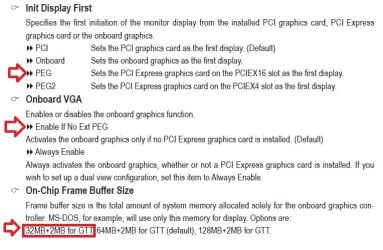
It can't be disabled manually but check in the bios that the onboard VGA setting (video is integrated into the CPU) is set to "enable if no external PEG" is set to enabled.
 

My Computer

Computer type
PC/Desktop
Computer Manufacturer/Model Number
Me
OS
Win 7 Ultimate x64
CPU
FX-8350 @ 4.6 GHz so far
Motherboard
Asus M5A97 EVO
Memory
ADATA XPG V1 Series Black 8GB DDR3 1600
Graphics Card(s)
Sapphire R9 270x Dual-X
Sound Card
Xonar DGX w/ Corsair Vengence 1300
Monitor(s) Displays
Acer S232HL Abid
Screen Resolution
1920x1080
Hard Drives
120 GB OCZ Vertex 3
500 GB Seagate 7200.12
PSU
Antec Earthwatts 650W Green
Case
Antec Three Hundred
Cooling
Cooler Master 212 EVO
Keyboard
Logitech G510
Mouse
Logitech G500s
Internet Speed
35000/3000
Adi,

We need to know if you checked what I posted above so see if the Maximum memory box is unchecked or not, a. We would like to help you, but we cannot help you if you do not reply back to our replies with what we requested to see if that may have been the issue or not.

Your motherboard specs says that it does have a onboard graphics chip. Since you say you are using a graphics card instead, you might also double check your BIOS settings to see if you may have any RAM (memory) still set to be allocated to it. If so, you can just set it to none or zero depending on what option it gives you.
 

My Computer

Computer type
PC/Desktop
Computer Manufacturer/Model Number
Self built custom
OS
64-bit Windows 11 Pro for Workstations
CPU
Intel i7-8700K OC'd to 5 GHz
Motherboard
ASUS ROG Maximus XI Formula Z390
Memory
64 GB (4x16GB) G.SKILL TridentZ RGB DDR4 3600 MHz
Graphics Card(s)
ASUS ROG-STRIX-GTX1080TI-O11G-GAMING
Sound Card
Integrated
Monitor(s) Displays
2 x Samsung Odyssey G7 27"
Screen Resolution
2560x1440
Hard Drives
1TB Samsung 990 PRO M.2,
4TB Samsung 990 PRO PRO M.2,
TerraMaster F8 SSD Plus NAS
PSU
Seasonic Prime Titanium 850W
Case
Thermaltake Core P3
Cooling
Corsair Hydro H115i
Keyboard
Logitech wireless K800
Mouse
Logitech MX Master 4
Internet Speed
2 Gb/s Download and 100 Mb/s Upload
Antivirus
Malwarebyte Anti-Malware Premium
Browser
Google Chrome
Other Info
Logitech Z625 speaker system,
Logitech BRIO 4K Pro webcam,
HP Color LaserJet Pro MFP M477fdn,
APC SMART-UPS RT 1000 XL - SURT1000XLI,
Galaxy S23 Plus phone
yes ive chacked it before i wrote something :confused: and thanks anyway
 

My Computer

Computer Manufacturer/Model Number
Custom Build
OS
Windows 8 Pro x64
CPU
Intel Core I3 CPU 540 @ 3.07GHz
Motherboard
GIGABYTE GA-H55M-D2H
Memory
Team Elite DDR3 1333 MHz 4GB Dual Channel
Graphics Card(s)
Nvidia GEFORCE GTS 250
Sound Card
Realtek High Definition Audio
Monitor(s) Displays
Acer x223w
Screen Resolution
1680X1050
Hard Drives
Hitachi 500GB 7200 RPM
PSU
HuntKey
Case
HuntKey H301
Keyboard
Microsoft wireless keyboard 3000 v2.0
Mouse
Microsoft wireless mouse 5000
Internet Speed
15.60 Mbps

My Computer

Computer Manufacturer/Model Number
Custom Build
OS
Windows 8 Pro x64
CPU
Intel Core I3 CPU 540 @ 3.07GHz
Motherboard
GIGABYTE GA-H55M-D2H
Memory
Team Elite DDR3 1333 MHz 4GB Dual Channel
Graphics Card(s)
Nvidia GEFORCE GTS 250
Sound Card
Realtek High Definition Audio
Monitor(s) Displays
Acer x223w
Screen Resolution
1680X1050
Hard Drives
Hitachi 500GB 7200 RPM
PSU
HuntKey
Case
HuntKey H301
Keyboard
Microsoft wireless keyboard 3000 v2.0
Mouse
Microsoft wireless mouse 5000
Internet Speed
15.60 Mbps
Adi,

We need to know if you checked what I posted above so see if the Maximum memory box is unchecked or not, a. We would like to help you, but we cannot help you if you do not reply back to our replies with what we requested to see if that may have been the issue or not.

Your motherboard specs says that it does have a onboard graphics chip. Since you say you are using a graphics card instead, you might also double check your BIOS settings to see if you may have any RAM (memory) still set to be allocated to it. If so, you can just set it to none or zero depending on what option it gives you.
i have followed your toturial and it staying the same
 

My Computer

Computer Manufacturer/Model Number
Custom Build
OS
Windows 8 Pro x64
CPU
Intel Core I3 CPU 540 @ 3.07GHz
Motherboard
GIGABYTE GA-H55M-D2H
Memory
Team Elite DDR3 1333 MHz 4GB Dual Channel
Graphics Card(s)
Nvidia GEFORCE GTS 250
Sound Card
Realtek High Definition Audio
Monitor(s) Displays
Acer x223w
Screen Resolution
1680X1050
Hard Drives
Hitachi 500GB 7200 RPM
PSU
HuntKey
Case
HuntKey H301
Keyboard
Microsoft wireless keyboard 3000 v2.0
Mouse
Microsoft wireless mouse 5000
Internet Speed
15.60 Mbps
Adi,

We need to know if you checked what I posted above so see if the Maximum memory box is unchecked or not, a. We would like to help you, but we cannot help you if you do not reply back to our replies with what we requested to see if that may have been the issue or not.

Your motherboard specs says that it does have a onboard graphics chip. Since you say you are using a graphics card instead, you might also double check your BIOS settings to see if you may have any RAM (memory) still set to be allocated to it. If so, you can just set it to none or zero depending on what option it gives you.

yes ive chacked it before i wrote something :confused: and thanks anyway

i have followed your toturial and it staying the same

I'm not sure if there may be a language gap issue or not, and you may just not be understanding what we're saying. If so, please let us know if you do not understand something we posted. We'll help.

Did you check the items above? If so, what were your findings?

I need to know more exact details on this before I'm able to recommend anything else if that's not the issue.
 

My Computer

Computer type
PC/Desktop
Computer Manufacturer/Model Number
Self built custom
OS
64-bit Windows 11 Pro for Workstations
CPU
Intel i7-8700K OC'd to 5 GHz
Motherboard
ASUS ROG Maximus XI Formula Z390
Memory
64 GB (4x16GB) G.SKILL TridentZ RGB DDR4 3600 MHz
Graphics Card(s)
ASUS ROG-STRIX-GTX1080TI-O11G-GAMING
Sound Card
Integrated
Monitor(s) Displays
2 x Samsung Odyssey G7 27"
Screen Resolution
2560x1440
Hard Drives
1TB Samsung 990 PRO M.2,
4TB Samsung 990 PRO PRO M.2,
TerraMaster F8 SSD Plus NAS
PSU
Seasonic Prime Titanium 850W
Case
Thermaltake Core P3
Cooling
Corsair Hydro H115i
Keyboard
Logitech wireless K800
Mouse
Logitech MX Master 4
Internet Speed
2 Gb/s Download and 100 Mb/s Upload
Antivirus
Malwarebyte Anti-Malware Premium
Browser
Google Chrome
Other Info
Logitech Z625 speaker system,
Logitech BRIO 4K Pro webcam,
HP Color LaserJet Pro MFP M477fdn,
APC SMART-UPS RT 1000 XL - SURT1000XLI,
Galaxy S23 Plus phone
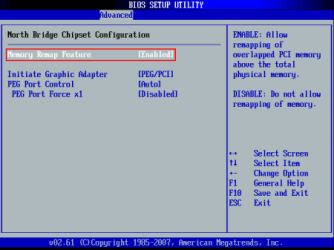
Enable 'memory remap' in your BIOS if it has this feature
 

Attachments

  • saas.png
    saas.png
    10.4 KB · Views: 19

My Computer

Computer type
PC/Desktop
Computer Manufacturer/Model Number
Custom Build
OS
Windows 10 Pro x64, Arch Linux
CPU
Intel Core 2 Quad Q8200 OC'd 3.08GHz
Motherboard
Asus Rampage formula LGA775
Memory
8GB DDR2 900Mhz
Graphics Card(s)
MSI GT730 2GB GDDR5 (Kepler)
Sound Card
Supreme FX2
Monitor(s) Displays
Samsung LS22F350 LED
Screen Resolution
1080P
Hard Drives
Kingston SSDNow UV400 120GB, 500GB Hitachi, 2TB Samsung, 500GB Seagate FreeAgent, 640GB Samsung, 160GB Toshiba (Arch)
PSU
AeroCool 500W Bronze
Cooling
Cooler Master V6 + 3X fans
Keyboard
Prolink keyboard
Mouse
Logitech M705
Internet Speed
1MiB/s
Browser
Chrome Beta
Adi,

We need to know if you checked what I posted above so see if the Maximum memory box is unchecked or not, a. We would like to help you, but we cannot help you if you do not reply back to our replies with what we requested to see if that may have been the issue or not.

Your motherboard specs says that it does have a onboard graphics chip. Since you say you are using a graphics card instead, you might also double check your BIOS settings to see if you may have any RAM (memory) still set to be allocated to it. If so, you can just set it to none or zero depending on what option it gives you.

yes ive chacked it before i wrote something :confused: and thanks anyway

i have followed your toturial and it staying the same

I'm not sure if there may be a language gap issue or not, and you may just not be understanding what we're saying. If so, please let us know if you do not understand something we posted. We'll help.

Did you check the items above? If so, what were your findings?

I need to know more exact details on this before I'm able to recommend anything else if that's not the issue.
lol, i have understand what u were saying to me and sorry about my english, wait a sec i will do restart and let u know about something because i did it again
 

My Computer

Computer Manufacturer/Model Number
Custom Build
OS
Windows 8 Pro x64
CPU
Intel Core I3 CPU 540 @ 3.07GHz
Motherboard
GIGABYTE GA-H55M-D2H
Memory
Team Elite DDR3 1333 MHz 4GB Dual Channel
Graphics Card(s)
Nvidia GEFORCE GTS 250
Sound Card
Realtek High Definition Audio
Monitor(s) Displays
Acer x223w
Screen Resolution
1680X1050
Hard Drives
Hitachi 500GB 7200 RPM
PSU
HuntKey
Case
HuntKey H301
Keyboard
Microsoft wireless keyboard 3000 v2.0
Mouse
Microsoft wireless mouse 5000
Internet Speed
15.60 Mbps
LOL, ok mate. :)

While your rebooting into BIOS, double check to make sure that you also have memory remap enabled in BIOS as Yowan posted above.
 

My Computer

Computer type
PC/Desktop
Computer Manufacturer/Model Number
Self built custom
OS
64-bit Windows 11 Pro for Workstations
CPU
Intel i7-8700K OC'd to 5 GHz
Motherboard
ASUS ROG Maximus XI Formula Z390
Memory
64 GB (4x16GB) G.SKILL TridentZ RGB DDR4 3600 MHz
Graphics Card(s)
ASUS ROG-STRIX-GTX1080TI-O11G-GAMING
Sound Card
Integrated
Monitor(s) Displays
2 x Samsung Odyssey G7 27"
Screen Resolution
2560x1440
Hard Drives
1TB Samsung 990 PRO M.2,
4TB Samsung 990 PRO PRO M.2,
TerraMaster F8 SSD Plus NAS
PSU
Seasonic Prime Titanium 850W
Case
Thermaltake Core P3
Cooling
Corsair Hydro H115i
Keyboard
Logitech wireless K800
Mouse
Logitech MX Master 4
Internet Speed
2 Gb/s Download and 100 Mb/s Upload
Antivirus
Malwarebyte Anti-Malware Premium
Browser
Google Chrome
Other Info
Logitech Z625 speaker system,
Logitech BRIO 4K Pro webcam,
HP Color LaserJet Pro MFP M477fdn,
APC SMART-UPS RT 1000 XL - SURT1000XLI,
Galaxy S23 Plus phone
LOL, ok mate. :)

While your rebooting into BIOS, double check to make sure that you also have memory remap enabled in BIOS as Yowan posted above.

i do not have memory remap on bios
 

My Computer

Computer Manufacturer/Model Number
Custom Build
OS
Windows 8 Pro x64
CPU
Intel Core I3 CPU 540 @ 3.07GHz
Motherboard
GIGABYTE GA-H55M-D2H
Memory
Team Elite DDR3 1333 MHz 4GB Dual Channel
Graphics Card(s)
Nvidia GEFORCE GTS 250
Sound Card
Realtek High Definition Audio
Monitor(s) Displays
Acer x223w
Screen Resolution
1680X1050
Hard Drives
Hitachi 500GB 7200 RPM
PSU
HuntKey
Case
HuntKey H301
Keyboard
Microsoft wireless keyboard 3000 v2.0
Mouse
Microsoft wireless mouse 5000
Internet Speed
15.60 Mbps
it shwos me now 3.87GB usable Instead 3.49GB, but 3.87GB was like the beginning.
 

My Computer

Computer Manufacturer/Model Number
Custom Build
OS
Windows 8 Pro x64
CPU
Intel Core I3 CPU 540 @ 3.07GHz
Motherboard
GIGABYTE GA-H55M-D2H
Memory
Team Elite DDR3 1333 MHz 4GB Dual Channel
Graphics Card(s)
Nvidia GEFORCE GTS 250
Sound Card
Realtek High Definition Audio
Monitor(s) Displays
Acer x223w
Screen Resolution
1680X1050
Hard Drives
Hitachi 500GB 7200 RPM
PSU
HuntKey
Case
HuntKey H301
Keyboard
Microsoft wireless keyboard 3000 v2.0
Mouse
Microsoft wireless mouse 5000
Internet Speed
15.60 Mbps
Adi,

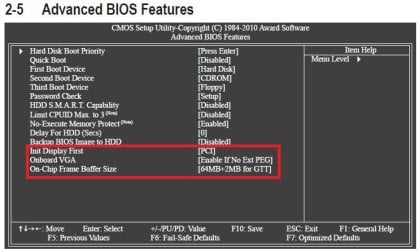
Looking at your motherboard's manual for your BIOS settings, it appears that you are only able to set the integrated graphics chip to use only as little as 32MB+2MB for GTT. This may be why you can only use 3.87GB instead of the full 4GB. In your Init Display First option in BIOS, double check to make sure it is set to PEG if you have your graphics card in the 1st PCI-E slot closest to the CPU.

BIOS-1.jpg
BIOS-2.jpg
 

My Computer

Computer type
PC/Desktop
Computer Manufacturer/Model Number
Self built custom
OS
64-bit Windows 11 Pro for Workstations
CPU
Intel i7-8700K OC'd to 5 GHz
Motherboard
ASUS ROG Maximus XI Formula Z390
Memory
64 GB (4x16GB) G.SKILL TridentZ RGB DDR4 3600 MHz
Graphics Card(s)
ASUS ROG-STRIX-GTX1080TI-O11G-GAMING
Sound Card
Integrated
Monitor(s) Displays
2 x Samsung Odyssey G7 27"
Screen Resolution
2560x1440
Hard Drives
1TB Samsung 990 PRO M.2,
4TB Samsung 990 PRO PRO M.2,
TerraMaster F8 SSD Plus NAS
PSU
Seasonic Prime Titanium 850W
Case
Thermaltake Core P3
Cooling
Corsair Hydro H115i
Keyboard
Logitech wireless K800
Mouse
Logitech MX Master 4
Internet Speed
2 Gb/s Download and 100 Mb/s Upload
Antivirus
Malwarebyte Anti-Malware Premium
Browser
Google Chrome
Other Info
Logitech Z625 speaker system,
Logitech BRIO 4K Pro webcam,
HP Color LaserJet Pro MFP M477fdn,
APC SMART-UPS RT 1000 XL - SURT1000XLI,
Galaxy S23 Plus phone
Back
Top