Solved CRT Monitor locked at 60hz.

SAGAAN

New member
Local time
9:07 AM
Messages
9
Hi, I just bought a new PC but I didn't buy a monitor. So I hooked my new rig to my old ADI Microscan 15 inch CRT monitor (don't laugh :p and I don't remember the model number). Now the refresh rate is locked at 60hz even if I uncheck the "Hide Unsupported Modes" option. With the old rig I could normally set the refresh rate to 85hz (maximum supported mode), but now I feel some very slight flickring with 60hz.

Specs for new rig: Intel Dual Core 2.6, 4GB RAM, XFX HD6670 DD3 1GB, Windows 7.
Old rig :(: AMD Athlon 1.4, 512MB RAM, Geforce FX5500 256MB, Windows XP SP3.

The refresh rate is locked regardless of screen resolution. My current is 1024x768.

I tried the Catalyst Control Center but it gives me only 59hz, 60hz.

The HD6670 has a VGA port so I connected the monitor directly without having to buy a converter (If it was a possible point of debate).

Any help would be appreciated.

Thanks.
 

My Computer My Computer

At a glance

Windows 7 Pro
OS
Windows 7 Pro
Try truning off advanced video features of Win7 such as Aero...
 

My Computer My Computer

At a glance

Windows 7 Ultimate 64 bit Steve Ballmer Signa...Intel Core 2 Quad - Q9550 - 2.83GHz stock - O...4GB DDR2 800MHz (PC6400) OCZ ReaperNvidia GE Force 8800 GTS
Computer Manufacturer/Model Number
Homebrew PC - "Alpha_Dawg"
OS
Windows 7 Ultimate 64 bit Steve Ballmer Signature Edition
CPU
Intel Core 2 Quad - Q9550 - 2.83GHz stock - OC'd to 3.6GHz
Motherboard
Gigabyte EP45-UD3P
Memory
4GB DDR2 800MHz (PC6400) OCZ Reaper
Graphics Card(s)
Nvidia GE Force 8800 GTS
Sound Card
Asus Xonar DX
Monitor(s) Displays
Samsung SyncMaster 2333HD
Screen Resolution
1920 x 1080
Hard Drives
WD Caviar Black 750GB - 7200RPM - 32MB cache
WD Caviar Green 1.5TB - 5400RPM - 64MB cache
WD Caviar Green 2.0TB - 5400RPM - 64MB cache
PSU
PC Power & Cooling Silencer 750
Case
Gigabyte 3D Aurora
Cooling
Case is Air - 5ea. 120mm fans (mix of Arctic and Xigmatec)
Keyboard
MS Natural Wireless KB
Mouse
MS Wireless Mouse
Internet Speed
50 mbps down/5 mbps up
Other Info
AVerMedia - AVerTVHD G2 Dual Tuner Card
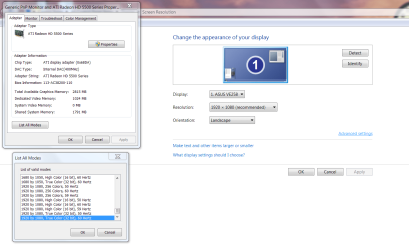
Right click your screen and bring up Screen Resolution. Click on Advance Settings. Select Adapter tab and at bottom select List All Modes then select what you want and see if it changes.

Display.PNG

Jim :geek:
 

My Computer My Computer

At a glance

Windows 8.1 Pro w/Media Center 64bit, Windows...Phenom II X6 1100TCrucial Balistic 8gb DDR3-1866 CL9MSI R6850 Cyclone IGD5 PE
Computer type
PC/Desktop
Computer Manufacturer/Model Number
Home Built
OS
Windows 8.1 Pro w/Media Center 64bit, Windows 7 HP 64bit
CPU
Phenom II X6 1100T
Motherboard
ASUS M5A99X EVO
Memory
Crucial Balistic 8gb DDR3-1866 CL9
Graphics Card(s)
MSI R6850 Cyclone IGD5 PE
Sound Card
On Board
Monitor(s) Displays
ASUS VE258Q 25" LED with DVI-HDMI-DisplayPort
Screen Resolution
1920 x 1080
Hard Drives
Two WD Cavier Black 2TB Sata III, WD My Book Essential 2TB USB 3.0
PSU
Seasonic X650 80 Plus GOLD Modular
Case
Corsair 400R
Cooling
Antec Kuhler H2O 620, Two 120mm and four 140mm
Keyboard
Logitech K120
Mouse
Logitech Marble Mouse USB, Logitech Precision Game Pad
Internet Speed
15MB
Antivirus
Norton IS 2013, Malwarebytes Pro Beta 2
Browser
IE-11, FF-27
Other Info
APC UPS ES 750, Netgear WNR3500L Gigabit & Wireless N Router with SamKnows Test Program, Motorola SB6120 Gigabit Cable Modem. Brother HL-2170W Laser Printer, Epson V300 Scanner
Try truning off advanced video features of Win7 such as Aero...

I googled Aero but I find it's not available in the business edition of Windows 7.
 

My Computer My Computer

At a glance

Windows 7 Pro
OS
Windows 7 Pro
Try truning off advanced video features of Win7 such as Aero...

I googled Aero but I find it's not available in the business edition of Windows 7.

There is no such thing as Win7 Business edition, only 4 versions...

Win7 Starter
Win7 Home
Win7 Pro
Win7 Ultimate

Try this...

Disabling Aero for Windows 7
  • First, you’ll want to right-click on the desktop and choose Personalize from the menu.
  • Then you can simply scroll the themes down until you see the Basic themes. Choose any of these basic themes and aero will be off!
 

My Computer My Computer

At a glance

Windows 7 Ultimate 64 bit Steve Ballmer Signa...Intel Core 2 Quad - Q9550 - 2.83GHz stock - O...4GB DDR2 800MHz (PC6400) OCZ ReaperNvidia GE Force 8800 GTS
Computer Manufacturer/Model Number
Homebrew PC - "Alpha_Dawg"
OS
Windows 7 Ultimate 64 bit Steve Ballmer Signature Edition
CPU
Intel Core 2 Quad - Q9550 - 2.83GHz stock - OC'd to 3.6GHz
Motherboard
Gigabyte EP45-UD3P
Memory
4GB DDR2 800MHz (PC6400) OCZ Reaper
Graphics Card(s)
Nvidia GE Force 8800 GTS
Sound Card
Asus Xonar DX
Monitor(s) Displays
Samsung SyncMaster 2333HD
Screen Resolution
1920 x 1080
Hard Drives
WD Caviar Black 750GB - 7200RPM - 32MB cache
WD Caviar Green 1.5TB - 5400RPM - 64MB cache
WD Caviar Green 2.0TB - 5400RPM - 64MB cache
PSU
PC Power & Cooling Silencer 750
Case
Gigabyte 3D Aurora
Cooling
Case is Air - 5ea. 120mm fans (mix of Arctic and Xigmatec)
Keyboard
MS Natural Wireless KB
Mouse
MS Wireless Mouse
Internet Speed
50 mbps down/5 mbps up
Other Info
AVerMedia - AVerTVHD G2 Dual Tuner Card
Right click your screen and bring up Screen Resolution. Click on Advance Settings. Select Adapter tab and at bottom select List All Modes then select what you want and see if it changes.

View attachment 174098

Jim :geek:

I tried that but ALL MODES are stuck with either 59hz or 60hz

One thing I forgot to mention is that my monitor is defined as "Generic Non-PnP Monitor". I remember it was "Plug & Play Monitor" with my old system. I also remember It didn't have any drivers CDs when I got it. Is there a way to identify the model number so I may find the proper driver from the Internet?
 

My Computer My Computer

At a glance

Windows 7 Pro
OS
Windows 7 Pro
One thing I forgot to mention is that my monitor is defined as "Generic Non-PnP Monitor". I remember it was "Plug & Play Monitor" with my old system. I also remember It didn't have any drivers CDs when I got it. Is there a way to identify the model number so I may find the proper driver from the Internet?

There's your problem! Find the correct drivers for that monitor and all should be returned to normal!:)
 

My Computer My Computer

At a glance

Windows 7 Ultimate 64 bit Steve Ballmer Signa...Intel Core 2 Quad - Q9550 - 2.83GHz stock - O...4GB DDR2 800MHz (PC6400) OCZ ReaperNvidia GE Force 8800 GTS
Computer Manufacturer/Model Number
Homebrew PC - "Alpha_Dawg"
OS
Windows 7 Ultimate 64 bit Steve Ballmer Signature Edition
CPU
Intel Core 2 Quad - Q9550 - 2.83GHz stock - OC'd to 3.6GHz
Motherboard
Gigabyte EP45-UD3P
Memory
4GB DDR2 800MHz (PC6400) OCZ Reaper
Graphics Card(s)
Nvidia GE Force 8800 GTS
Sound Card
Asus Xonar DX
Monitor(s) Displays
Samsung SyncMaster 2333HD
Screen Resolution
1920 x 1080
Hard Drives
WD Caviar Black 750GB - 7200RPM - 32MB cache
WD Caviar Green 1.5TB - 5400RPM - 64MB cache
WD Caviar Green 2.0TB - 5400RPM - 64MB cache
PSU
PC Power & Cooling Silencer 750
Case
Gigabyte 3D Aurora
Cooling
Case is Air - 5ea. 120mm fans (mix of Arctic and Xigmatec)
Keyboard
MS Natural Wireless KB
Mouse
MS Wireless Mouse
Internet Speed
50 mbps down/5 mbps up
Other Info
AVerMedia - AVerTVHD G2 Dual Tuner Card
Try truning off advanced video features of Win7 such as Aero...

I googled Aero but I find it's not available in the business edition of Windows 7.

There is no such thing as Win7 Business edition, only 4 versions...

Win7 Starter
Win7 Home
Win7 Pro
Win7 Ultimate

Try this...


Disabling Aero for Windows 7
  • First, you’ll want to right-click on the desktop and choose Personalize from the menu.
  • Then you can simply scroll the themes down until you see the Basic themes. Choose any of these basic themes and aero will be off!

Wow, the disc had "Windows 7 Buniness Edition" written on it. I right-click My Comuter to find it's Pro edition :confused:. I bought that version at a reduced price as part of some MS project to help college students afford Windows. But apparently the guys there don't know what they're doing. Anyway, I disabled Aero but no luck. Still stuck at 60hz.
 

My Computer My Computer

At a glance

Windows 7 Pro
OS
Windows 7 Pro
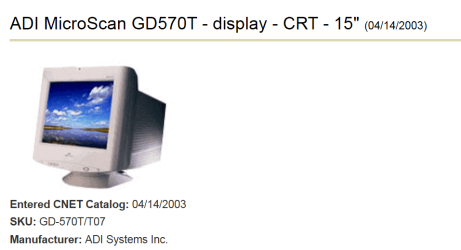
Does it have a sticker anywhere on it with any information?

Does it look like this one.

ADI.PNG

Jim :geek:
 

My Computer My Computer

At a glance

Windows 8.1 Pro w/Media Center 64bit, Windows...Phenom II X6 1100TCrucial Balistic 8gb DDR3-1866 CL9MSI R6850 Cyclone IGD5 PE
Computer type
PC/Desktop
Computer Manufacturer/Model Number
Home Built
OS
Windows 8.1 Pro w/Media Center 64bit, Windows 7 HP 64bit
CPU
Phenom II X6 1100T
Motherboard
ASUS M5A99X EVO
Memory
Crucial Balistic 8gb DDR3-1866 CL9
Graphics Card(s)
MSI R6850 Cyclone IGD5 PE
Sound Card
On Board
Monitor(s) Displays
ASUS VE258Q 25" LED with DVI-HDMI-DisplayPort
Screen Resolution
1920 x 1080
Hard Drives
Two WD Cavier Black 2TB Sata III, WD My Book Essential 2TB USB 3.0
PSU
Seasonic X650 80 Plus GOLD Modular
Case
Corsair 400R
Cooling
Antec Kuhler H2O 620, Two 120mm and four 140mm
Keyboard
Logitech K120
Mouse
Logitech Marble Mouse USB, Logitech Precision Game Pad
Internet Speed
15MB
Antivirus
Norton IS 2013, Malwarebytes Pro Beta 2
Browser
IE-11, FF-27
Other Info
APC UPS ES 750, Netgear WNR3500L Gigabit & Wireless N Router with SamKnows Test Program, Motorola SB6120 Gigabit Cable Modem. Brother HL-2170W Laser Printer, Epson V300 Scanner
Does it have a sticker anywhere on it with any information?

Does it look like this one.

View attachment 174109

Jim :geek:

After great physical effort, I located the model number of the old lady. It's an ADI Microscan V57. Now I downloaded the so-called "V57 Driver" from ADI official website. But all I get is a PDF manual and an INF file type. I don't know if the INF file can be injected somehow into the system. Now I stumbled upon a little tool called Refresh Lock that apparently can change the monitor's refresh rate . I wonder if anyone used it and if it's safe?!
 

My Computer My Computer

At a glance

Windows 7 Pro
OS
Windows 7 Pro
Right click the inf file it should have an Install choice. You can also open it to see what it is doing.

Jim :geek:
 

My Computer My Computer

At a glance

Windows 8.1 Pro w/Media Center 64bit, Windows...Phenom II X6 1100TCrucial Balistic 8gb DDR3-1866 CL9MSI R6850 Cyclone IGD5 PE
Computer type
PC/Desktop
Computer Manufacturer/Model Number
Home Built
OS
Windows 8.1 Pro w/Media Center 64bit, Windows 7 HP 64bit
CPU
Phenom II X6 1100T
Motherboard
ASUS M5A99X EVO
Memory
Crucial Balistic 8gb DDR3-1866 CL9
Graphics Card(s)
MSI R6850 Cyclone IGD5 PE
Sound Card
On Board
Monitor(s) Displays
ASUS VE258Q 25" LED with DVI-HDMI-DisplayPort
Screen Resolution
1920 x 1080
Hard Drives
Two WD Cavier Black 2TB Sata III, WD My Book Essential 2TB USB 3.0
PSU
Seasonic X650 80 Plus GOLD Modular
Case
Corsair 400R
Cooling
Antec Kuhler H2O 620, Two 120mm and four 140mm
Keyboard
Logitech K120
Mouse
Logitech Marble Mouse USB, Logitech Precision Game Pad
Internet Speed
15MB
Antivirus
Norton IS 2013, Malwarebytes Pro Beta 2
Browser
IE-11, FF-27
Other Info
APC UPS ES 750, Netgear WNR3500L Gigabit & Wireless N Router with SamKnows Test Program, Motorola SB6120 Gigabit Cable Modem. Brother HL-2170W Laser Printer, Epson V300 Scanner
Right click the inf file it should have an Install choice. You can also open it to see what it is doing.

Jim :geek:

It didn't work! :(

The right-click-install gave an error message. However I was able to choose the INF file manually using the Monitor's "Update Driver" button in Device Manager (a solution I got from sevenforums :p), thus displaying all available drivers in the INF file. Strangely the V57 model wasn't there. but the V77 was there and the only difference between them is the size (V57 15in, V77 17in). So I chose the V77 anyway making the monitor identified as "Display device on:VGA" instead of "Generic Non-PnP Monitor". Same 60hz

I also found the option to install the monitor as "Generic PnP Monitor". This added many "interlaced" modes with refresh rates between 25hz and 30hz.
 

My Computer My Computer

At a glance

Windows 7 Pro
OS
Windows 7 Pro
Hmm. 2 days and no reply. Now I officially lost hope. However after some searching It's probably the video card driver. Something with Windows not letting the driver overriding the EDID settings, and manufacturers not doing anything about it. Could someone at least verify this?
 

My Computer My Computer

At a glance

Windows 7 Pro
OS
Windows 7 Pro
Hmm. 2 days and no reply. Now I officially lost hope. However after some searching It's probably the video card driver. Something with Windows not letting the driver overriding the EDID settings, and manufacturers not doing anything about it. Could someone at least verify this?

If the video card is identified correctly and the monitor isnt... I'd say (educated guess) :sarc: that it is an unsupported Win7 monitor.

After all. most of us dumped CRT's years ago... and sorry, but ADI isnt a name that comes to mind when I think monitors!

If you have access to another video card, certainly try it... but I highly doubt anything will change! Honestly, I'd look for a more modern monitor first! If $ is tight... look to eBay or Craigs list!
 

My Computer My Computer

At a glance

Windows 7 Ultimate 64 bit Steve Ballmer Signa...Intel Core 2 Quad - Q9550 - 2.83GHz stock - O...4GB DDR2 800MHz (PC6400) OCZ ReaperNvidia GE Force 8800 GTS
Computer Manufacturer/Model Number
Homebrew PC - "Alpha_Dawg"
OS
Windows 7 Ultimate 64 bit Steve Ballmer Signature Edition
CPU
Intel Core 2 Quad - Q9550 - 2.83GHz stock - OC'd to 3.6GHz
Motherboard
Gigabyte EP45-UD3P
Memory
4GB DDR2 800MHz (PC6400) OCZ Reaper
Graphics Card(s)
Nvidia GE Force 8800 GTS
Sound Card
Asus Xonar DX
Monitor(s) Displays
Samsung SyncMaster 2333HD
Screen Resolution
1920 x 1080
Hard Drives
WD Caviar Black 750GB - 7200RPM - 32MB cache
WD Caviar Green 1.5TB - 5400RPM - 64MB cache
WD Caviar Green 2.0TB - 5400RPM - 64MB cache
PSU
PC Power & Cooling Silencer 750
Case
Gigabyte 3D Aurora
Cooling
Case is Air - 5ea. 120mm fans (mix of Arctic and Xigmatec)
Keyboard
MS Natural Wireless KB
Mouse
MS Wireless Mouse
Internet Speed
50 mbps down/5 mbps up
Other Info
AVerMedia - AVerTVHD G2 Dual Tuner Card
Hmm. 2 days and no reply. Now I officially lost hope. However after some searching It's probably the video card driver. Something with Windows not letting the driver overriding the EDID settings, and manufacturers not doing anything about it. Could someone at least verify this?

If the video card is identified correctly and the monitor isnt... I'd say (educated guess) :sarc: that it is an unsupported Win7 monitor.

After all. most of us dumped CRT's years ago... and sorry, but ADI isnt a name that comes to mind when I think monitors!

If you have access to another video card, certainly try it... but I highly doubt anything will change! Honestly, I'd look for a more modern monitor first! If $ is tight... look to eBay or Craigs list!

Thanks for the help everyone. I know the monitor is ancient but I noticed that a lot of people are intentionally using CRT for gaming because of the higher refresh rates (I'm a gaming :geek:). But since mine is stuck at 60hz I'm better off getting a modern one anyway. I just need the green light from the $ :p.
 

My Computer My Computer

At a glance

Windows 7 Pro
OS
Windows 7 Pro
Solved!!! Finally :D

I was toying with Catalyst Control Center and I found a little setting under the My VGA Displays tab -> Properties (VGA Displays) called "Use Extended Identification Data (EDID) or driver defaults", I unchecked it and I was able to set the maximum resolution and refresh rate manually, thus overriding the Windows settings. It was hiding in plain site!. I must've been blind. I was always looking in the Desktop Management tab -> Desktop Properties in CCC. Wow. Just wow.

Thanks again everyone.

Solved. :)
 

My Computer My Computer

At a glance

Windows 7 Pro
OS
Windows 7 Pro
Back
Top